
What Is TestPlan? what is testplan - A Guide to Flawless Software Releases

Ever wonder what separates a chaotic, bug-ridden software release from a smooth, successful one? Often, the answer is a solid test plan. Think of it as the master blueprint for your entire quality assurance effort, making sure every team member knows exactly what to test, how to test it, and when.
Defining The Test Plan: Your Blueprint For Quality

Imagine an architect designing a skyscraper. They wouldn’t just hand the crew some tools and say, “start building.” They provide a detailed blueprint specifying every material, measurement, and structural need. Without it, the project would be a mess of costly errors and instability.
A test plan serves the exact same purpose in software development.
It’s the single source of truth that turns testing from a reactive, chaotic scramble into a proactive, organized process. This document is far more than a simple checklist; it’s a vital communication tool that gets developers, project managers, and business stakeholders all on the same page about what “quality” actually means for the project.
The Strategic Value Of A Test Plan
A well-crafted test plan is your first line of defense against bugs. It’s the foundation for ensuring your application is stable and, most importantly, delivers what users actually expect. By formalizing the testing process, you bring predictability and accountability to the table. It forces the team to think critically about potential risks and roadblocks before they can derail a release.
This proactive approach is more critical than ever. The software testing market is set to grow from $2.3 billion in 2022 to $3.9 billion by 2030, a clear sign that the industry is doubling down on delivering reliable software. Companies get it: robust testing is directly linked to happy customers. We dive deeper into the tools modern teams are using to achieve this in our complete guide to software testing tools.
A test plan doesn’t just document what you’re going to do; it forces you to think strategically about why you’re doing it. It turns random acts of testing into a coordinated campaign for quality.
To quickly grasp its importance, here’s a look at what a test plan really does for your project.
The Core Purpose Of A Test Plan At A Glance
| Core Objective | Why It Matters For Your Project |
|---|---|
| Defines Scope & Objectives | Prevents “scope creep” and ensures everyone agrees on what success looks like. |
| Identifies Resources | Clarifies who is doing what and which tools are needed, avoiding last-minute scrambles. |
| Establishes A Schedule | Integrates testing into the development timeline, preventing it from becoming an afterthought. |
| Outlines The Approach | Details the how—the specific methods and strategies—for consistent, repeatable testing. |
| Manages Risks | Forces the team to anticipate potential problems and create contingency plans. |
| Aligns Stakeholders | Creates a shared understanding of quality goals across development, QA, and business teams. |
Ultimately, this document ensures the entire team is working toward the same goals with a clear, unified strategy.
Aligning Teams And Setting Expectations
Without a clear plan, “done” can mean different things to different people. A developer might focus on unit tests, while a QA engineer prioritizes end-to-end user journeys. A test plan harmonizes these efforts by clearly defining:
- Scope: What features will be tested and, just as importantly, what will not be tested for this release.
- Objectives: The specific, measurable goals, like “achieve a 95% test case pass rate.”
- Resources: Who is responsible for each testing activity and what tools they’ll need to do the job right.
- Schedule: Firm deadlines and milestones that fit into the overall project timeline, not against it.
For anyone serious about a career in software quality, understanding how to build and execute these documents is non-negotiable. A qualification like a Certified Software Tester Professional provides the foundational knowledge needed to create these vital plans. At the end of the day, a test plan ensures everyone is working from the same script, which minimizes misunderstandings and makes the whole process more efficient.
The Essential Components Of A Modern Test Plan
A solid test plan is so much more than a simple checklist. It’s the detailed playbook for your entire quality assurance effort, broken down into specific, actionable sections. Each piece has a job to do, and together, they eliminate confusion and keep everyone pulling in the same direction.
Think of these components as the chapters in your project’s quality story. Breaking the plan down this way turns a massive, intimidating task into a series of logical, manageable steps. Each section builds on the last, creating a clear path from high-level goals all the way down to the nitty-gritty execution details.
Defining Scope and Objectives
First things first: you need to draw a line in the sand. The scope defines exactly what you’re going to test and—just as critically—what you’re going to leave out. This single step is your best defense against “scope creep,” that sneaky villain that expands testing efforts until your release timeline is in shambles.
For instance, your scope for a new e-commerce checkout feature might cover payment gateway integration and order confirmation emails, but you’d explicitly exclude the product recommendation engine on that same page.
With the boundaries set, you define your objectives. These are the specific, measurable targets you’re aiming for. An objective isn’t a vague “test the feature.” It’s something concrete, like “achieve a 95% pass rate for all critical path test cases” or “find and fix all showstopper security bugs before the UAT phase begins.”
Developing a Clear Test Strategy
Now that you know your destination, the test strategy is the map that shows how you’ll get there. This is the tactical heart of your plan, where you lay out the different testing methods you’ll use to hit your objectives.
A good test strategy will almost always call for a mix of testing types. For example, understanding how to conduct usability testing is non-negotiable if you want to be sure you’re building something people actually enjoy using.
Your strategy should spell out the combination of tests you’ll run:
- Unit Testing: Making sure the smallest individual pieces of code work correctly on their own.
- Integration Testing: Checking that those individual pieces play nicely together.
- Performance Testing: Pushing the system to see how it holds up under heavy traffic.
- Regression Testing: Ensuring that your latest changes haven’t accidentally broken something that used to work.
This part of the plan guarantees a consistent approach, so every single person on the team knows the game plan.
A great test strategy doesn’t just list testing types. It explains why each type is necessary for the project and how they collectively mitigate risk and ensure a high-quality release.
Allocating Resources and Scheduling
A plan is just a wish without the right people, tools, and time. The resources section is where you list everyone involved in testing—from the QA engineers running the scripts to the developers who will be on deck to fix the bugs they find. It also covers the hardware, software, and tools you’ll need, like automation frameworks or monitoring platforms.
The schedule then weaves all of this into the main project timeline. It assigns clear start and end dates for every testing phase, from writing test cases to executing them and squashing bugs. This makes testing a parallel activity from the start, not a panicked scramble at the end.
Establishing Entry and Exit Criteria
How do you know when it’s time to start testing? And more importantly, how do you know when you’re done? That’s where entry and exit criteria come in.
Entry criteria are the non-negotiable prerequisites that must be in place before the testing phase can kick off. This could be something like, “The code has been successfully deployed to the staging environment” or “All developer unit tests are passing.”
On the flip side, exit criteria define what “done” looks like. These are the specific conditions that, once met, give you the green light to move on to the next stage.
Common exit criteria include:
- Test Case Completion: A high percentage (say, 98%) of all planned test cases have been run.
- Defect Density: The number of open, high-priority bugs is below a pre-agreed limit.
- Code Coverage: Your automated tests cover a specific percentage of the codebase.
These clear, data-driven rules take all the guesswork out of the process. No more arguments about whether the product is “ready”—the data decides.
Of course. Here is the rewritten section, crafted to sound human-written by an experienced expert, following all your requirements.
How To Write A Test Plan Step By Step
Knowing what goes into a test plan is one thing. Actually putting it all together into a document that people can read and act on is a whole different ball game. A great test plan isn’t just a checklist—it’s a product of careful analysis, strategic thinking, and a whole lot of collaboration.
Let’s walk through the process of turning those abstract components into a concrete, actionable plan. Think of it like planning a road trip. You wouldn’t just get in the car and start driving aimlessly. You’d figure out your destination, map the best route, and decide on your stops along the way. A test plan follows that same logic.
Step 1 Analyze The Product Thoroughly
Before you can even think about testing something, you have to understand it inside and out. I mean really understand it. Don’t just skim the documentation. Get in there and talk to the people who built it—the developers, the product managers, the UX designers.
Your goal here is to build a complete mental map of the application. Ask the tough questions until there are no gray areas left:
- What are the absolute must-work user workflows?
- Are we dealing with any tricky integrations or third-party services?
- Where are the dark corners of the codebase? What parts have been historically buggy?
This discovery phase is the bedrock of your entire plan. If you get this wrong, you’re practically guaranteed to have major gaps in your testing coverage later.
Step 2 Define Your Test Strategy
Okay, now that you have a solid grasp of the product, you can start outlining how you’re going to test it. Your test strategy is your high-level game plan. This is where you make the big calls on the types of testing you’ll need and how you’ll split the work between manual and automated efforts.
For instance, a shiny new feature with a lot of user interaction is going to demand a ton of manual exploratory and usability testing to catch those subtle UI quirks. On the other hand, a backend API update will lean heavily on automated integration and performance tests to make sure it’s fast and stable.
A well-defined test strategy doesn’t just list a bunch of testing types; it explains why you chose them. It justifies why a particular mix of manual and automated testing is the smartest, most efficient way to hit your quality goals for this project.
This is also where you need to be a realist and document the risks. What could derail the whole testing phase? A crazy tight deadline, no access to specific hardware, or a test environment that’s constantly falling over are all risks that need a mitigation plan—before they become full-blown emergencies.
Step 3 Set Clear Test Objectives
Your objectives are the specific, measurable goals you’re aiming for. They’re the answer to the all-important question: “What does a successful test cycle actually look like?” Vague goals like “find some bugs” are useless. You need to set sharp, precise targets that give your team direction and keep stakeholders aligned.
Good test objectives are:
- Specific: “Verify the new checkout flow correctly processes payments from Visa, Mastercard, and American Express.”
- Measurable: “Achieve 95% code coverage for the new API endpoints.”
- Attainable: “Cut the number of critical production bugs by 50% compared to the last release.”
- Relevant: “Confirm the app’s average response time stays under 500ms with 500 concurrent users.”
- Time-bound: “Finish all regression testing two full days before the scheduled release date.”
When your objectives are this clear, there’s no room for ambiguity. You’ll know definitively whether you hit the mark.
Step 4 Define The Test Scope And Deliverables
Now it’s time to draw some lines in the sand. The scope is where you explicitly list every feature and function that will be tested. Just as important, you also need to list what’s out of scope. This single step prevents a world of pain and “scope creep” later, making sure your team stays focused on what truly matters.
With the boundaries set, you can define your test deliverables. These are the actual documents and reports your team will produce. Think of them as the paper trail that proves what you did and how you did it, keeping the entire project team in the loop.
Common deliverables usually include:
- The Test Plan Document: The master guide we’re building right now.
- Test Cases: The detailed, step-by-step scripts your testers will follow.
- Defect Reports: Clear, well-documented, and reproducible bug reports.
- Test Summary Report: A final high-level report that sums up the entire testing cycle, its outcomes, and any remaining risks.
Getting everyone to agree on these deliverables upfront means no one is surprised, and everyone knows what information to expect and when.
Real-World Test Plan Examples And Templates

Theory and step-by-step guides are great, but nothing beats seeing the finished product. A complete test plan example is what makes the abstract concepts click, showing how all the pieces we’ve discussed fit together into a single, cohesive document your team can actually use.
Let’s walk through a practical scenario. We’ll look at a condensed test plan for a fictional e-commerce site called “QuickCart,” which is about to launch a new one-click checkout feature. This example will give you a real feel for the structure and level of detail needed for your own projects.
QuickCart One-Click Checkout Test Plan Example
This sample shows how you can document the essentials without burying your stakeholders in details. Notice how it clearly defines the scope, objectives, and success criteria, creating a clear roadmap for the entire QA team.
| Section | Details for QuickCart’s New Feature |
|---|---|
| Test Plan Title | v1.5 Release: One-Click Checkout Functionality |
| 1. Introduction | This plan outlines the testing activities to validate the new one-click checkout feature, ensuring it is secure, functional, and performs well before the Q3 release. |
| 2. Scope | In Scope: User authentication for saved payment methods, order processing via one-click, and confirmation email generation. Out of Scope: The standard multi-step checkout flow and product recommendation engine. |
| 3. Test Objectives | 1. Validate successful order placement for major credit cards (Visa, Mastercard, Amex). 2. Confirm that inventory levels are correctly updated after a successful purchase. 3. Achieve an average API response time of under 400ms during simulated peak load. |
| 4. Test Approach | A mix of manual and automated testing. Manual exploratory testing will focus on user experience, while automated regression and performance tests will cover core functionality and load capacity. |
| 5. Exit Criteria | Testing is complete when 98% of critical path test cases have passed and there are zero open high-priority defects related to payment processing. |
This example provides clarity at a glance. A project manager can quickly see the objectives and exit criteria, while a QA engineer knows exactly what’s in and out of scope. This level of shared understanding is what prevents costly assumptions and last-minute chaos.
A Customizable Test Plan Template
Now that you’ve seen an example in action, here’s a clean, versatile template you can adapt for your own needs. This structure is built to be comprehensive yet flexible, so you can scale the detail up or down depending on how complex your project is.
This template breaks down all the crucial information into manageable sections. Just copy it into your favorite documentation tool and start filling it out for your next release. It’s a solid starting point that helps ensure you don’t miss any critical planning steps.
Basic Test Plan Template
- Test Plan Title: [Name of the project, feature, or release, e.g., v3.2 Mobile App Redesign]
- Prepared By: [Your Name, Role]
- Date: [MM/DD/YYYY]
- 1. Introduction: [Briefly describe the purpose of this test plan and the feature being tested.]
- 2. Scope of Testing:
- In Scope: [List the specific features, modules, and user stories to be tested.]
- Out of Scope: [Clearly list items that will NOT be tested in this cycle to manage expectations.]
- 3. Test Objectives: [List 2-4 specific, measurable goals for this testing effort. Use numbers.]
- 4. Test Approach & Strategy:
- Methodologies: [e.g., Manual, Automated, Performance, Security Testing]
- Tools: [List any software or platforms to be used, e.g., Selenium, GoReplay, Jira]
- 5. Test Schedule:
- Test Planning: [Start Date - End Date]
- Test Execution: [Start Date - End Date]
- Bug Triage & Fixes: [Start Date - End Date]
- 6. Resources & Responsibilities: [Assign roles, e.g., QA Lead, Test Engineer, Developer on standby.]
- 7. Entry & Exit Criteria:
- Entry Criteria: [e.g., Staging environment is stable, all unit tests passing.]
- Exit Criteria: [e.g., 95% test case pass rate, no open critical bugs.]
- 8. Test Deliverables: [List expected outputs, e.g., Test Summary Report, Defect Reports.]
Of course, a test plan is only as good as the test cases it contains. To learn more about crafting effective, step-by-step instructions for your testers, check out our guide with example test cases that can help you flesh out your testing documentation.
Taking Your Test Plan to the Next Level With Replay-Based Testing
Even the most detailed test plans can have a major blind spot. They almost always rely on synthetic, manually-created test data. While that’s better than nothing, it’s a bit like a flight simulator that only knows how to fly in perfect weather. It completely misses the unpredictable, messy, and wonderfully chaotic behavior of real users in a production environment.
That gap between a clean test environment and the reality of production is exactly where the nastiest bugs love to hide. Synthetic tests often fail to uncover subtle performance bottlenecks, weird edge-case errors, or security holes that only surface under the strain of real-world traffic. This is where you need a much more realistic approach.
Bridging the Gap With Real Production Traffic
If you want to truly validate your application’s stability and performance, your test plan needs a dose of reality. That’s the whole idea behind replay-based testing. Instead of just guessing how users might use your system, you capture how they actually use it in production and replay those interactions in a safe test environment.
Tools like GoReplay are built for exactly this. Think of it as a high-fidelity recorder for your live traffic, capturing every single HTTP request and user session. You can then “play back” this recorded traffic against a new build in staging or development, putting it through the exact same paces it will face after release.
This screenshot shows the GoReplay interface, which allows you to capture and analyze real user traffic for testing purposes.
By integrating this method, you’ll start catching issues that would otherwise stay invisible until they’re impacting real customers.
How to Add a Traffic Replay Strategy to Your Plan
You don’t need to throw out your existing test plan to add this powerful technique. Instead, you just augment it with a new section that spells out your traffic replay strategy. This makes the process deliberate, repeatable, and tied directly to your quality goals.
Your Traffic Replay Strategy section should clearly define:
- Traffic Source: Where are you capturing traffic from? Be specific. Is it the main API, a particular microservice, or the entire user-facing application?
- Data Sanitization: This is absolutely critical. You must detail how you’ll mask or remove sensitive user data (like passwords, PII, or API keys) before it gets used in any non-production environment.
- Replay Environment: Document the hardware and software setup for the test environment. To get meaningful results, it needs to mirror production as closely as possible.
- Success Criteria: What does a successful test look like? Define it clearly. You could measure it by API response times, error rates, or by comparing system behavior between the original and replayed sessions. For instance, a great success criterion would be: “zero new 5xx errors during a full 24-hour traffic replay.”
A test plan using replayed traffic is no longer a forecast; it’s a dress rehearsal. It’s the closest you can get to predicting future performance by using data from the past, helping you find and fix real-world problems before they happen.
This modern approach isn’t just a niche idea; it’s becoming the standard. In fact, as of 2025, over 70% of Fortune 500 companies were using record and replay tools for at least part of their testing. This signals a massive industry shift toward validating application quality with realistic data.
Ultimately, integrating a replay-based approach transforms your test plan from a document based on assumptions into one grounded in reality. By using actual user traffic, you create a powerful feedback loop that dramatically improves the accuracy of your load, performance, and regression testing. For a deeper dive into the mechanics and benefits, check out our comprehensive guide on replay testing with GoReplay. This method ensures your application isn’t just tested—it’s battle-tested.
Common Test Plan Questions Answered
Even with a solid grasp of what a test plan is, a few practical questions always pop up once you start putting theory into practice. Let’s clear up some common points of confusion to help you move forward with confidence and keep your team on the same page.
These questions usually highlight the gap between textbook definitions and the real world, where a test plan has to be a practical tool, not just a formal document.
Test Plan Versus Test Strategy
What’s the difference between a test plan and a test strategy? This is easily the most frequent question, and the distinction is a big one.
A test strategy is the high-level, guiding philosophy for testing across your entire organization or product line. Think of it as a mostly static document answering the question, “What’s our general approach to quality?” It sets the standards, principles, and the kinds of testing that matter to the business.
A test plan, on the other hand, is a tactical, project-specific document. It takes the ideas from the strategy and applies them to a specific release. It gets down to the “what, when, and who” by detailing the scope, schedule, resources, and goals for one particular testing cycle.
Think of it this way: a test strategy is your company’s constitution for quality, while a test plan is the specific law written for a single project. The plan has to follow the constitution but deals with the immediate, practical details.
How Detailed Should a Test Plan Be?
Finding the right level of detail is a balancing act. It really depends on your project’s complexity, your team’s experience, and any regulatory strings attached. A small, seasoned agile team might get by just fine with a lightweight, one-page plan that hits the key objectives.
But for a large-scale, complex system—especially in regulated industries like finance or healthcare—a highly detailed plan is non-negotiable. It’s your proof that every requirement is covered and gives you a clear audit trail. A good rule of thumb? Provide enough detail so a new team member can understand the testing goals and their role without needing hours of hand-holding.
Can a Test Plan Change During a Project?
Absolutely. In fact, it should. A test plan is a living document, not something carved in stone.
In modern software development, especially in agile setups, change is the only constant. Requirements evolve, priorities shift, and unexpected risks crawl out of the woodwork. Your test plan has to be flexible enough to roll with these punches.
The trick is to manage changes in a structured way. Any significant deviation from the original plan—like a change in scope or a major timeline shift—needs to be discussed with stakeholders, approved, and documented in an updated version. This keeps everyone aligned and ensures the changes are deliberate, not accidental.
Approaches like replay-based testing, which uses captured traffic to create realistic scenarios, are becoming more common.
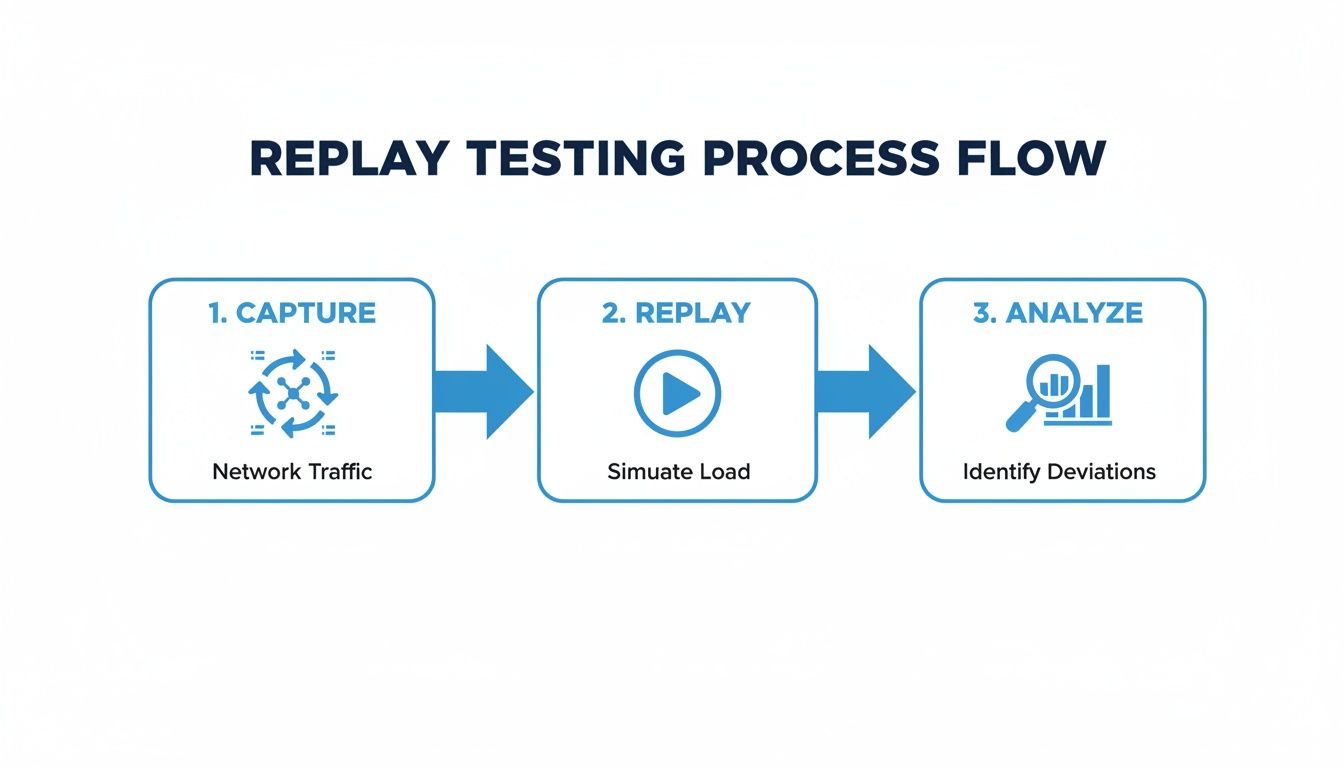
This process shows how you can capture real user traffic, replay it in a test environment, and analyze any differences, making your entire test plan much more robust and grounded in reality.
Ready to elevate your testing from synthetic scenarios to real-world validation? With GoReplay, you can capture and replay production traffic, ensuring your application is truly battle-tested before it reaches your users. Discover how to build a more resilient testing process at https://goreplay.org.