
Shadow Testing in Production with Live HTTP Traffic
Shadow testing sends a copy of live requests to a candidate service while users continue to receive responses from production. GoReplay captures HTTP traffic on the host and replays it to your test environment.
For live shadowing, capture plaintext HTTP after TLS termination and use an isolated target with test data and production side effects disabled.
sudo gor --input-raw :8080 --output-http="http://staging.example.com"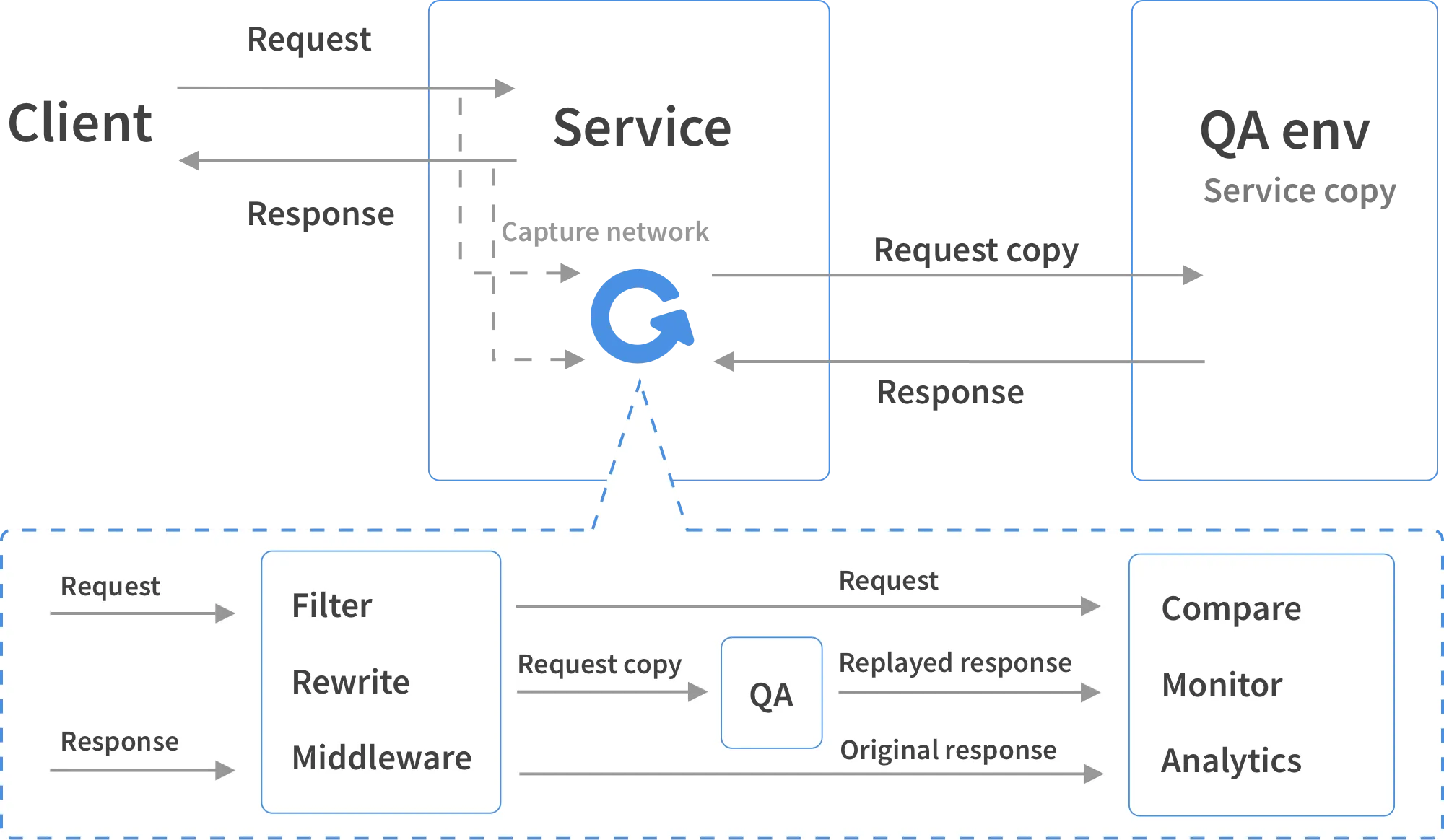
What GoReplay adds to a shadow test
Exercise migrations, service rewrites, or configuration changes with requests your application actually receives. Keep scripted tests for new behavior that has no production traffic yet.
Mirror live HTTP requests
Copy requests from the application host to a candidate service. Production continues to serve the original requests; the candidate responses are not sent back to users.
Record now, replay later
Save a capture to a file and replay it after preparing your test environment. Use the same captured workload when comparing builds or investigating a regression.
Compare the behavior that matters
Enable response tracking and use middleware or your analysis tooling to compare status codes, payloads, and latency. Define the differences that should fail your test.
When to use shadow testing
Shadow testing earns its setup cost when a change should behave the same as production for existing requests, and your scripted tests can't cover the variety of real traffic.
- Rewrites and language or framework migrations. A service ported from one stack to another should answer existing requests the same way.
- Dependency and runtime upgrades. New major versions of a framework, ORM, JVM or Go toolchain often change behavior in edge cases nobody wrote a test for.
- Database and infrastructure moves. A new database engine, a new cluster or a new region, checked for errors and latency under the real request mix.
- Performance work. Caching, connection pool or query changes, measured under real request distribution rather than a synthetic script.
- Model or ranking changes. Teams also shadow ML models and decision algorithms, comparing a new model's outputs with the current one before switching. The idea is the same; for HTTP services GoReplay handles the traffic side.
It's a poor fit for brand-new features with no matching production traffic, and for endpoints whose side effects you can't isolate.
Shadow testing vs canary vs blue-green
All three reduce release risk, but they answer different questions. Shadow testing asks "how does the new version handle real traffic?" before any user depends on it. Canary and blue-green decide how users get moved to it.
| Shadow testing | Canary release | Blue-green | |
|---|---|---|---|
| Who sees new responses | Nobody; responses are discarded | A small share of real users | Everyone, after the switch |
| User risk | None from responses; side effects must be isolated | Limited to the canary group | All users until you switch back |
| What it catches | Errors, crashes, latency and response differences on real requests | Problems that show up in real user sessions and business metrics | Deployment and environment problems, with instant rollback |
| Needs | A copy of the service, isolated data, traffic capture or mirroring | Traffic splitting and good metrics | A second full environment |
| Typical order | First | After shadowing passes | Alternative or complement to canary |
Ways to run a shadow test
There are three common ways to get production traffic to a candidate. They're not mutually exclusive.
Service mesh or proxy mirroring
Istio (mirror in a VirtualService), Envoy (request_mirror_policies)
and NGINX (mirror directive) can copy live requests to a second upstream. It's a good
choice if you already run one of them in the request path. Mirroring is live only: there's no recording to
inspect, replay again or speed up, and comparing responses is up to you.
Cloud packet mirroring
AWS VPC Traffic Mirroring and similar features copy network packets from an instance to a target. They need no application changes, but deliver raw packets, not HTTP requests, so you still need something to reassemble and replay them.
Application-level capture and replay
GoReplay listens to HTTP traffic on the host without sitting in the request path, and can forward it live or save it to a file. Recordings let you filter and rewrite requests, replay the same workload against several builds, and replay faster than real time for load tests. The trade-off is that it runs on the host and needs plaintext HTTP, so capture behind your TLS terminator.
Start with a controlled replay
Recording first gives you time to inspect the capture and prepare the candidate before sending it traffic. Stop capture with Ctrl+C after collecting the sample you need.
-
1. Prepare the candidate and select the traffic
Use a separate database and test credentials. Disable real payments, emails, and other downstream actions. Start with endpoints you have verified are safe to replay; even a GET endpoint can have side effects.
Use request filtering to choose endpoints and middleware to remove sensitive fields before recording. The examples below filter by method only.
-
2. Record a sample on the plaintext HTTP port
sudo gor --input-raw :8080 --http-allow-method GET --output-file requests.gor --output-file-appendUse a new filename for each sample.
--output-file-appendkeeps the capture in that file instead of numbered chunks. Inspect and protect it. For an HTTPS application, follow the TLS capture setup to find the correct port. Raw capture on port 443 cannot read encrypted request bodies. -
3. Replay the sample and inspect the candidate
gor --input-file requests.gor --output-http="http://staging.example.com"Check candidate errors, latency, resource use, and application behavior. If it uses different credentials or generated IDs, configure request rewriting or token mapping in middleware before expanding the replay.
The shadow testing guide covers live mirroring and response tracking. To increase the load from a recorded sample, continue with load testing with production traffic.
Decide what counts as a regression
Replay supplies the workload; your test needs an acceptance rule. A response with status 200 can still contain the wrong result. Compare the fields relevant to the change and normalize values that are expected to differ, such as timestamps or generated IDs.
For paired response analysis, enable --input-raw-track-response
and --output-http-track-response when capturing and
replaying. GoReplay middleware
can receive origin and replayed responses. Correlate them by request ID and implement
the comparison your application needs; they can arrive asynchronously.
Matching captured requests is evidence about that workload. It does not cover every possible input, guarantee a safe release, or replace tests for new features.
Shadow testing questions
What is shadow testing?
Shadow testing, also called traffic shadowing or dark traffic testing, sends a copy of production requests to a candidate service while production continues to answer users. It lets you observe how an existing workload behaves on a new build or configuration before routing users to it.
Is it okay to test in production?
Some testing in production is normal and useful, because staging never reproduces real traffic, data and scale exactly. The rule is to limit the blast radius. Shadow testing is one of the safest forms: the candidate gets a copy of real requests, but users only ever see responses from the current version. Canary releases and feature flags expose a small group of real users, so they need tighter monitoring and a fast rollback.
Will shadow testing affect production?
GoReplay captures traffic without acting as an inline proxy, but capture and replay still consume CPU, memory, and network capacity. Measure overhead on the capture host. Isolate the candidate’s databases and downstream services so replayed requests cannot trigger production writes, payments, or notifications.
Can GoReplay capture HTTPS traffic?
Raw packet capture does not decrypt TLS. Capture plaintext HTTP on the application side of your TLS terminator, such as the upstream port behind a reverse proxy. GoReplay can replay those requests to an HTTPS target. If that plaintext capture point is unavailable, plan a different capture setup.
Does replay automatically prove that responses match?
No. Sending the requests is only one part of the test. Enable origin and replay response tracking when your comparison needs both, then compare the fields relevant to the change. Account for timestamps, generated IDs, authentication tokens, and differences in test data. A successful HTTP response alone does not establish correct behavior.
How do I handle sensitive or stateful requests?
Use request filters, rewriting, and middleware to select traffic, remove sensitive fields, and map authentication tokens to the test environment. Review saved captures as well as outgoing requests. Method filtering alone does not remove secrets or guarantee that an endpoint has no side effects.
How is GoReplay different from AWS VPC Traffic Mirroring?
VPC Traffic Mirroring copies network packets to a monitoring target. GoReplay’s HTTP replay workflow sends application requests to a candidate HTTP service. Packet mirroring can supply captured traffic, but it does not by itself configure the candidate’s data, replay HTTP requests, or compare application responses.
Try a shadow test with your HTTP traffic
Start with the open-source capture and replay workflow. Explore GoReplay PRO if your deployment needs S3 storage, session-aware replay, or commercial support.