
Demystifying Replay Testing: Why Top Teams Swear By It
Replay testing offers a robust method for ensuring software quality. It captures and replays real user interactions, allowing developers to find and fix problems often missed by traditional testing. Think about those frustrating, sporadic bugs. These intermittent bugs are notoriously difficult to track down using conventional testing. That’s where replay testing excels.
Replay testing fundamentally differs from traditional methods. Traditional testing relies on pre-written scripts and simulated user behavior. Replay testing, on the other hand, captures actual user interactions: every click, scroll, and keystroke. This gives a much more accurate picture of real-world application usage. As a result, replay testing can uncover critical issues that might otherwise slip through the cracks.
The growing complexity of modern web applications makes replay testing even more crucial. Single-page applications, WebSockets, and complex third-party integrations often pose challenges for traditional testing. Replay testing navigates these complexities by capturing the exact sequence of events leading to a problem. This simplifies reproducing and debugging complex bugs. For more insights on how replay testing enhances accuracy, check out this article: How Traffic Replay Improves Load Testing Accuracy.
Unveiling Hidden Bugs: Real-World Examples
There are numerous cases where replay testing has uncovered critical issues that went undetected for long periods. One example involves a complex e-commerce platform. Intermittent errors during checkout were impacting sales, but traditional testing couldn’t identify the root cause. Replay testing revealed a subtle timing problem with a third-party payment gateway integration. This issue affected 10% of transactions for months before replay testing pinpointed it.
Another example involves a popular mobile game. Users reported random crashes, but the development team couldn’t consistently reproduce the problem. By using replay testing, the team captured a specific series of user inputs that triggered a rare memory leak. This led to a vital fix that significantly boosted the app’s stability. Replay testing has consistently evolved alongside software testing techniques. The increasing demand for advanced testing methods is driven by the rapid digitalization across industries. For instance, the software testing market is projected to reach USD 58.6 billion by 2025, highlighting the growing need for robust testing solutions like replay testing. More detailed statistics can be found here.
Dispelling Replay Testing Myths
Despite its proven effectiveness, several myths about replay testing can hinder its adoption. One misconception is that it’s overly complex to implement. Modern tools and frameworks have made replay testing much more accessible. Another myth is that replay testing is only for large organizations with vast resources. This isn’t the case. Replay testing benefits teams of all sizes, from small startups to large enterprises. These examples and statistics underscore the growing importance of replay testing in software development.
The Technical Engine Behind Effective Replay Testing
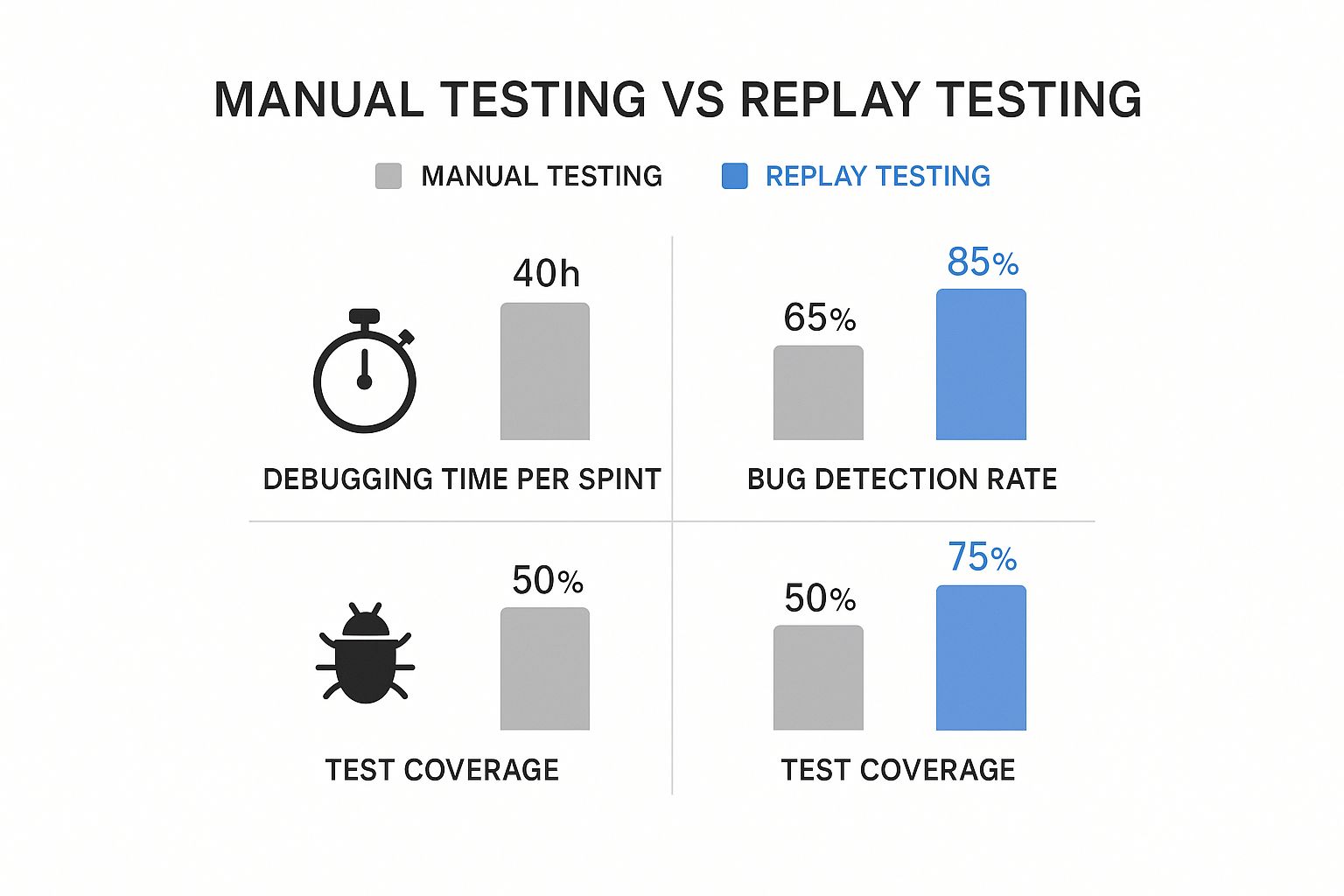
This section explores the technical aspects of replay testing, examining the key components and potential challenges. Understanding these elements is essential for successful implementation and maximizing the benefits of replay testing.
Event Capture Mechanisms: The Foundation of Replay Testing
Effective replay testing relies on precise capture of user interactions. This means recording every click, scroll, network request, and other relevant events. These captured events are the foundation of the replay, allowing you to recreate user sessions for testing.
There are various methods for capturing these events, each with its own advantages and disadvantages. One common approach uses injected JavaScript code within the application to directly monitor and record user actions in the browser. Another method captures network traffic at the server level.
The best capture mechanism depends on the application’s architecture and the required level of fidelity. Browser-level capture provides granular detail about user interactions, while server-level capture offers a broader system view. This choice significantly impacts the replay’s accuracy and ability to reproduce bugs.
Synchronization Challenges and Non-Deterministic Behavior
Replaying a user session involves more than just replaying events in sequence. Many applications utilize external services and display non-deterministic behavior, making precise replication difficult. For instance, data fetched from a live API during the original session might differ during replay.
Asynchronous operations and background processes can also introduce variations. This creates synchronization challenges in ensuring the replayed session aligns with the original timing and state. Addressing these challenges requires careful management of external dependencies and strategies for handling asynchronous events. Mocking or stubbing can control external services during replay. Recording and replaying event timestamps with original timing is another helpful technique. These methods enhance the reliability and accuracy of replay tests.
Mastering External Dependencies in Replay Testing
Modern applications often rely on third-party services, APIs, and databases. These external dependencies can introduce complexities during replay testing. Replaying a session that interacts with a live API, for example, could cause unintended side effects or return different data than the original session.
Managing these dependencies is vital for accurate and reliable replays. Techniques like service virtualization and mock servers can isolate the application and control external system behavior, allowing for greater control over the testing environment and preventing unforeseen issues.
To visualize the importance of these technical considerations, take a look at the data chart below. It illustrates how these factors influence the effectiveness of replay testing.
| Implementation Method | Capture Mechanism | Replay Fidelity | Integration Complexity | Best Use Cases |
|---|---|---|---|---|
| Browser-based | JavaScript injection | High | Low | UI testing, end-to-end testing |
| Server-based | Network traffic capture | Medium | Medium | Performance testing, load testing |
| Hybrid | Combination of browser-based and server-based | High | High | Complex scenarios requiring both UI and system-level insights |
The table above summarizes different approaches to implementing replay testing. It highlights the trade-offs between different methods.
High-fidelity event capture, robust synchronization, and effective management of external dependencies are crucial for maximizing the benefits of replay testing. Prioritizing these technical aspects during implementation is key to unlocking the full potential of this valuable testing strategy and significantly improving software quality.
The data chart below further visualizes the impact of these elements on the effectiveness of replay testing, highlighting the importance of each factor in achieving optimal results.
| Feature | Low Effectiveness (Estimated Impact) | High Effectiveness (Estimated Impact) |
|---|---|---|
| Event Capture Fidelity | 20% Bug Reproduction Rate | 90% Bug Reproduction Rate |
| Synchronization | 30% Time Saved Debugging | 75% Time Saved Debugging |
| External Dependency Management | 40% Test Reliability | 95% Test Reliability |
As the chart clearly shows, high-fidelity event capture significantly improves bug reproduction rates. Strong synchronization drastically reduces debugging time. Finally, effectively managing external dependencies is essential for reliable tests.
Integrating Replay Testing Into Your Development Workflow

Integrating replay testing effectively is key to reaping its full rewards. This involves a well-defined process, from selecting the right tools to seamlessly integrating with your CI/CD pipeline. Let’s explore how to implement replay testing within your development workflow.
Selecting the Right Replay Testing Tools
The first step is choosing the appropriate tools. Consider factors like platform compatibility, integration capabilities, and your team’s specific needs.
For instance, if your application relies heavily on browser interactions, a tool specializing in browser automation like Selenium is essential. If you need deep debugging, look for tools that provide detailed session analysis. Some tools focus on specific replay testing methods, such as capturing network traffic to replay server requests, particularly helpful for load testing.
Implementing Replay Testing in CI/CD
After selecting your tool, integrating it into your CI/CD pipeline is crucial. This ensures replay tests run automatically as part of your development process.
Running replay tests during the build process, before deploying to staging, enables early issue detection. Automating replay tests as part of the final deployment pipeline also helps catch regressions before they hit production, providing continuous feedback on software quality.
Managing Test Data and Authentication
Effective data management is essential for successful replay testing. Categorizing recorded sessions by user flow, feature, or other relevant criteria simplifies test analysis and debugging.
For example, labeling sessions by user type lets you quickly identify issues affecting specific user segments. Equally important is handling authentication scenarios, ensuring secure management of user credentials during replay. This might involve using test accounts or token-based authentication.
Handling Environmental Parity and Third-Party Dependencies
Maintaining consistent environments across testing and production is often challenging. Environmental parity ensures recorded sessions replay reliably in various environments. This might involve using containerization technologies like Docker or meticulously configuring testing environments to mirror production.
Similarly, managing third-party dependencies is vital for replay test accuracy. These dependencies can introduce unpredictable behavior during replay, potentially causing false positives. Strategies like mocking or stubbing can isolate your application and control external system behavior for consistent results.
This is particularly relevant as applications often rely on numerous external services. The electronic testing services market is projected to grow from USD 92.72 billion in 2025 to USD 143.97 billion by 2034, a CAGR of 5.01%. More detailed statistics can be found here: https://www.precedenceresearch.com/electronic-testing-services-market.
Implementation Roadmaps and Practical Strategies
Implementing replay testing can be adapted to various team sizes and development methodologies. Smaller teams might prefer a phased approach, starting with a few key user flows and gradually expanding coverage. Larger teams can leverage parallelization and automated test selection for maximum efficiency.
Regularly analyzing replay test results helps identify recurring issues and informs future development. Tools like GoReplay can simplify this integration by capturing and replaying live HTTP traffic for realistic testing scenarios. Building dashboards that provide meaningful insights into test results is essential for continuous improvement.
By addressing these critical aspects of integrating replay testing, teams can significantly improve software quality, reliability, and development efficiency. This approach catches bugs early and builds a more robust and resilient application.
Choosing Your Replay Testing Arsenal: Tools That Deliver
Picking the right replay testing tool is essential for finding bugs and improving software quality. This section explores different tools, both open-source and commercial, to help you make the best choice for your needs.
Open-Source Options: Flexibility and Control
Open-source tools provide flexibility and customization. GoReplay, for instance, excels at capturing and replaying live HTTP traffic. This makes it perfect for load testing and mimicking real user traffic. Being open-source allows for extensive customization and integration into your current systems.
GoReplay’s open-source nature makes it a flexible choice for many teams. Another strong open-source option is the Chrome Recorder. Built into Chrome DevTools, this tool offers a simple way to record and replay user actions right in your browser. It makes capturing user flows and creating reproducible test steps easy.
Commercial Solutions: Enhanced Features and Support
While open-source provides control, commercial tools often have advanced features, dedicated support, and better analytics. They are usually simpler to install and integrate, making them good for teams that want a quick setup.
Many commercial replay testing tools offer features like session filtering, letting developers zero in on specific users or actions. They often include dashboards to visualize test results, helping you quickly find problems. Plus, commercial solutions typically integrate easily with popular CI/CD platforms.
Key Criteria for Choosing a Replay Testing Tool
Choosing the best tool means looking at a few important factors:
-
Browser Automation: How well does the tool automate browser interactions? For applications using lots of JavaScript and dynamic content, strong browser automation is key.
-
Debugging Capabilities: Does the tool offer detailed info about replayed sessions? Things like network request inspection, console logs, and variable tracking are vital for debugging effectively.
-
Analytics and Reporting: How well does the tool present results? Clear dashboards and reports make it easier to analyze data and spot trends.
-
Integration Options: Does it work with your current tools, especially your CI/CD platform? Easy integration makes testing smoother.
-
Pricing Model and Support: Does the price fit your budget? Does the vendor give good support and documentation? These are important for long-term success with commercial tools.
Emerging Trends: AI and Test Maintenance
AI and machine learning are changing replay testing. New tools are using AI to automatically identify and maintain tests, saving manual work and improving test coverage. These AI-powered tools are also starting to predict potential problems and suggest solutions, streamlining development.
To help you compare, we’ve put together a table summarizing some popular replay testing tools. It highlights their key features, platform support, integration options, pricing, and hypothetical user ratings.
To help you compare, we’ve compiled a table summarizing popular replay testing tools.
Replay Testing Tools Comparison Detailed comparison of popular replay testing tools and frameworks
| Tool/Framework | Key Features | Platform Support | Integration Options | Price Range | User Rating (Hypothetical) |
|---|---|---|---|---|---|
| GoReplay | HTTP traffic capture and replay | Cross-Platform | CLI, API | Free, Pro Version | 4.5/5 |
| Chrome Recorder | Browser interaction recording and replay | Chrome | Chrome DevTools | Free | 4.0/5 |
| Commercial Tool A | Session filtering, advanced analytics | Cross-Platform | CI/CD, API | Paid | 4.2/5 |
| Commercial Tool B | AI-powered test maintenance, debugging tools | Cross-Platform | CI/CD, API | Paid | 4.7/5 |
This table gives you a quick overview of what’s out there. As you can see, there’s a lot of variety in features and pricing.
The right replay testing tool depends on your project’s needs, budget, and technical skills. Carefully considering these things is important for successfully using replay testing and getting the most out of it. This will help your team find and fix problems faster, leading to better software and a happier user experience.
Automating Replay Tests: From Manual to Continuous

Automating replay tests is essential for scaling your testing and finding bugs early. This enables continuous testing and quick feedback, resulting in better software. This section explains how to build a solid automation framework for replay testing.
Integrating Replay Tests into Your CI/CD Pipeline
Integrating replay tests into your CI/CD pipeline ensures they run automatically with each code change. This constant testing gives immediate feedback and prevents regressions in production. Top teams often trigger replay tests after builds and deployments to staging. Catching issues early saves significant debugging time. Learn more about replaying production traffic for realistic load testing: How to master replaying production traffic for realistic load testing.
Implementing Smart Parallelization and Test Selection
Smart parallelization is key to optimizing execution time, especially with many recorded sessions. Running multiple replay tests concurrently drastically reduces testing time. However, managing resources and dependencies across these tests requires careful planning.
Effective test selection is also crucial. Prioritizing tests based on code changes, user impact, or historical bug frequency maximizes coverage and minimizes execution time.
Managing Flaky Tests and Visual Regression
Flaky tests, which give inconsistent results, can undermine the reliability of your replay testing. Solid flaky test management, like automatic retries or quarantine mechanisms, is essential.
Visual regression testing is also vital. Comparing screenshots from replayed sessions against baselines automatically detects unintended UI changes, ensuring consistent user interface.
Analyzing Results and Building Dashboards
Effective result analysis helps developers find and fix issues quickly. Tools offering detailed logs, metrics, and visuals of replayed sessions simplify debugging. As replay testing scales, automation is key; automating document processing can further enhance efficiency.
Building dashboards to aggregate replay test results across your application offers valuable insights into overall software quality. These dashboards highlight problem areas and help prioritize development efforts. The automation testing market is projected to grow from USD 41.67 billion in 2025 to USD 169.33 billion by 2034. See more detailed statistics here. Automating replay tests and performing robust result analysis empowers teams to address potential problems, resulting in more reliable software releases.
Conquering Replay Testing Challenges Like a Pro
Replay testing, while a powerful tool, presents some unique challenges. This section explores these common obstacles and offers practical solutions for teams implementing and maintaining replay testing systems.
Overcoming Test Flakiness
Test flakiness, where tests give inconsistent results, is a frequent hurdle. This often arises from timing issues, asynchronous operations, or reliance on external services. Addressing flakiness requires robust strategies.
One effective approach is implementing retries for tests that fail intermittently. This can greatly improve the overall stability of your test suite. Another tactic involves isolating the application under test from external dependencies using mocks or stubs. This controlled environment minimizes external factors influencing test outcomes.
Managing Dynamic Content and UI Changes
Modern web applications are inherently dynamic. Dynamic content, loaded asynchronously or personalized, can make replays tricky. Capturing the relevant dynamic data during recording and ensuring its consistent replay is crucial for reliable tests.
Additionally, UI changes can break existing replay tests. Employing robust selectors that target underlying functionality, rather than superficial UI elements, is key. For example, using data attributes or unique identifiers instead of relying solely on CSS classes for element selection makes tests less brittle.
Handling State Dependencies and Third-Party Integrations
Applications often depend on internal state and third-party integrations. Replaying interactions tied to specific server-side state or external API responses requires careful planning. Techniques like seeding the application with the necessary state before replay or virtualizing external services can ensure consistent and predictable test execution.
This ensures replays accurately mirror the original user experience, including interactions with external systems. To further understand how replay testing fits into a broader testing strategy, explore the benefits of automated regression testing.
Modern Application Challenges: Single-Page Apps and WebSockets
Single-page applications (SPAs) and applications using WebSockets present additional complexities for replay testing. SPAs often involve extensive client-side state management, making capturing and replaying the full application state a challenge.
Similarly, WebSockets enable real-time, bidirectional communication, which traditional replay systems may not handle effectively. Implementing specialized capture mechanisms that record WebSocket messages and accurately reproduce their timing and order is essential for thoroughly testing these applications. This ensures complete test coverage, capturing every aspect of user interaction, even in highly dynamic environments.
Maintaining Test Stability and Troubleshooting
Maintaining test stability requires ongoing effort. As the application evolves, replay tests must adapt. Implementing a robust system for managing and updating recorded sessions is crucial. This might involve automatically updating selectors after UI changes or regularly re-recording key user flows.
Troubleshooting failed replays can be complex. Tools that provide detailed logs, screenshots, and network request information from the replayed session significantly simplify debugging and root cause analysis. This proactive approach ensures tests remain reliable and effective as the application changes, catching regressions and bugs early. Investing in proper tooling and processes makes maintenance and debugging more efficient, ultimately contributing to a more robust testing process and higher software quality.
The Future of Replay Testing: What’s Next
Replay testing is a constantly evolving field. This section explores emerging trends and technologies ready to reshape how we approach replay testing, preparing your team for the future of software quality.
AI and Machine Learning: Automating the Future of Testing
Artificial Intelligence (AI) and Machine Learning (ML) are transforming software development, and replay testing is no exception. These technologies offer the potential to automate test creation, maintenance, and even bug detection. Imagine AI automatically generating replay tests directly from user stories or identifying patterns in recorded sessions to predict potential issues. This automation could save significant time and drastically improve test coverage.
For example, AI could analyze past bug reports and automatically create replay tests designed to catch similar problems in the future. ML algorithms could identify unreliable tests and offer suggestions for improvement. This level of automation could significantly speed up the testing process, allowing developers to focus on building new features.
WebAssembly and Edge Computing: Expanding the Possibilities
WebAssembly (Wasm) and edge computing are also changing what’s possible with replay testing. Wasm allows web applications to perform at near-native speeds, enabling more complex and resource-intensive replay scenarios. Edge computing, which processes data closer to the user, facilitates more realistic and geographically diverse replay testing by capturing and reproducing real-world network conditions.
Consider needing to test the performance of a real-time application under different network conditions. Edge computing would allow you to replay user sessions from various locations, accurately simulating latency and bandwidth limitations. This ensures your application performs well for users worldwide.
Integrating with Observability Platforms: A Holistic View
Integration with observability platforms is another important trend. These platforms offer detailed insights into application performance and behavior by combining metrics, logs, and traces. Integrating replay testing with these platforms creates a more comprehensive testing environment. This allows developers to correlate replayed sessions with system-level data to pinpoint the root cause of problems more efficiently.
This means that when a bug is found during a replayed session, developers can immediately access performance metrics, logs, and other critical information to understand the underlying issue. This integrated approach streamlines debugging and accelerates the resolution process.
Adapting to Microservices and Distributed Systems: The Future of Architecture
Modern applications increasingly rely on microservices and distributed systems. This architectural shift introduces new challenges for replay testing. Traditional methods often focus on monolithic applications, but testing distributed systems requires a different strategy. Teams are developing new approaches to adapt replay testing to these complex environments.
One approach involves recording and replaying interactions between different microservices to capture the data flow and identify potential communication bottlenecks. Another strategy focuses on testing individual microservices in isolation while simulating the behavior of their dependencies. This allows for thorough testing of each component while ensuring the entire distributed system functions correctly.
Investing in these emerging trends and technologies now will prepare your team for testing success in the future. As software continues to increase in complexity, replay testing will become even more crucial for ensuring quality and reliability.
Ready to explore the power of replay testing? Explore GoReplay and transform your testing strategy.