
Store Traffic Data Securely: What to Keep and Mask

There’s a file on a shared drive right now that nobody wants to open in front of an auditor. An afternoon of production checkout traffic, captured last sprint to reproduce a bug, still holding session cookies, bearer tokens and a few thousand customer email addresses inside the request bodies. The bug got fixed. The file didn’t get deleted.
That’s where many teams start: treating a capture as a test fixture rather than a copy of production with the credentials still warm. Every choice about where that file lives, how long it survives and which fields make it through masking should be weighed against one question. What does a stranger get if this file leaks?
Choosing and Masking Traffic Fields Before Replay
Let’s fix the vocabulary first. Store traffic data means the HTTP requests and responses you captured and stored for later replay, not footfall counts at a retail door. The stored capture is the asset, and it’s sensitive production data from the moment the first byte hits disk.
Decide the fate of every field before you write anything. Redaction at capture time is cheap; redaction after the fact means the raw file already existed somewhere, on a volume with backups, reachable by whoever had the mount. I’d rather lose a field I later need than keep one I can’t justify.
| Field | Keep for replay? | Handling |
|---|---|---|
| Method and path | Yes | Store as recorded |
| Query string | Yes | Redact token and email parameters |
| Host header and timestamps | Yes | Keep; gaps drive replay timing |
| Authorization header | No | Strip or replace with a test token |
| Cookie header | No | Strip; rebuild the session in the test environment |
| Request body | Partly | Keep test fields, mask personal data |
| Response status and headers | Yes | Keep for comparison |
| Response body | Only when comparing | Store with the same retention limit as requests |
| Client IP address | Only if needed | Hash or drop |
Why the keep column isn’t negotiable
Method and path stay exactly as recorded because your router, your middleware chain and your cache keys all read them. Change a path and you’re testing a different application. The Host header matters just as much on any setup doing virtual hosting or tenant routing, since dropping it sends every request to the default site.
Timestamps look like metadata and aren’t. The gaps between requests are what let you reproduce a burst, a slow drip of retries, or the pacing of a real user filling a form. Response status and headers cost almost nothing to keep and give you a comparison baseline. Response bodies are the expensive ones, so store them only when the test diffs output, and put them under the same expiry as the requests that produced them.
Mask in this order
- Tag every field keep, mask or drop in a config file that lives in version control, not in someone’s shell history.
- Rewrite
AuthorizationandCookievalues with tokens your test environment issues. A stored session token is a live login until it expires, and plenty don’t expire on a schedule you control. - Replace emails and card-like numbers in bodies with format-preserving fakes. Keep the shape (length, character class, checksum validity where your validator checks it) so validation logic still exercises the same branches.
- Hash client IPs with a salt kept outside the capture, in your secrets store. An unsalted hash of an address space that small is reversible by brute force in an afternoon.
- Grep a sample of the masked output for leftover emails, phone numbers and session IDs. Sample by endpoint, not by line count, because the one leaking route is rarely the busiest one.
- Record a checksum and a row count for the masked file, so you can prove which artifact a test run used.
The mistake that survives most reviews is masking bodies while leaving tokens in query strings. Password reset links, magic-link logins, signed download URLs and ?email= search parameters all ride in the URL, which teams keep verbatim because routing depends on it. Check Referer headers too, since they carry the previous URL, tokens included.
Privacy guidance for in-store measurement has the same blind spot. The Mappedin footfall in retail overview points toward privacy-first architectures built on anonymous counting, edge processing and auditability, but coverage like that rarely quantifies what accuracy you give up when the controls go on. Captured HTTP traffic forces the same trade-off: strip cookies and you lose repeat-visitor and session-length analysis unless you rebuild sessions with a stable pseudonymous key. Decide which metrics you’re willing to lose, write that down, and test the masked file against those metrics before it reaches production use.
If a field can identify a person or unlock an account, it doesn’t leave the capture host unmasked.
Set Retention Rules Before Your Next Capture
The decision that comes before your next capture isn’t which tool to run. It’s how long each class of output lives, written down and enforced by something other than memory.
Sort captures into three classes. Raw captures with unmasked fields live for days, not months, on a dedicated volume, and exist only long enough to produce the masked version. Masked captures live for the length of the test cycle they were taken for; when that release ships, the file has no remaining job. Aggregated results (pass counts, error rates, latency summaries with no payloads attached) can stay for trend analysis, because there’s nothing in them to leak.
Three controls make those classes real:
- Automatic deletion: a lifecycle job that fires on each expiry date, with a failure alert. A retention policy nobody enforces is a comment in a wiki.
- Quarterly access review: walk each storage location and name every principal that can read it. Remove the contractor who left and the CI role that was scoped to
*for one debugging session. - Access logging: record who opened which capture and when, and keep that log longer than the captures themselves.
Our own inquiry form asks people to leave out credentials and production request data. Apply the identical rule to files: if you wouldn’t paste it into a support ticket, it doesn’t belong in an archive.
The open source edition of GoReplay covers capture, replay, filtering and rewriting, so the field rules above don’t require extra tooling to enforce. Start small this week: pick one service, capture one hour of masked traffic into encrypted storage with a 14-day expiry, and replay it into an isolated target.
How to Capture HTTP Traffic Without Exposing It
Capture where traffic is already plaintext, which normally means downstream of TLS termination at your load balancer or reverse proxy. GoReplay captures traffic after TLS termination and isolates the replay target, so the capture host copies decrypted requests without ever holding a private key. That separation is the whole security argument: a compromised capture box loses traffic, not your certificate identity.
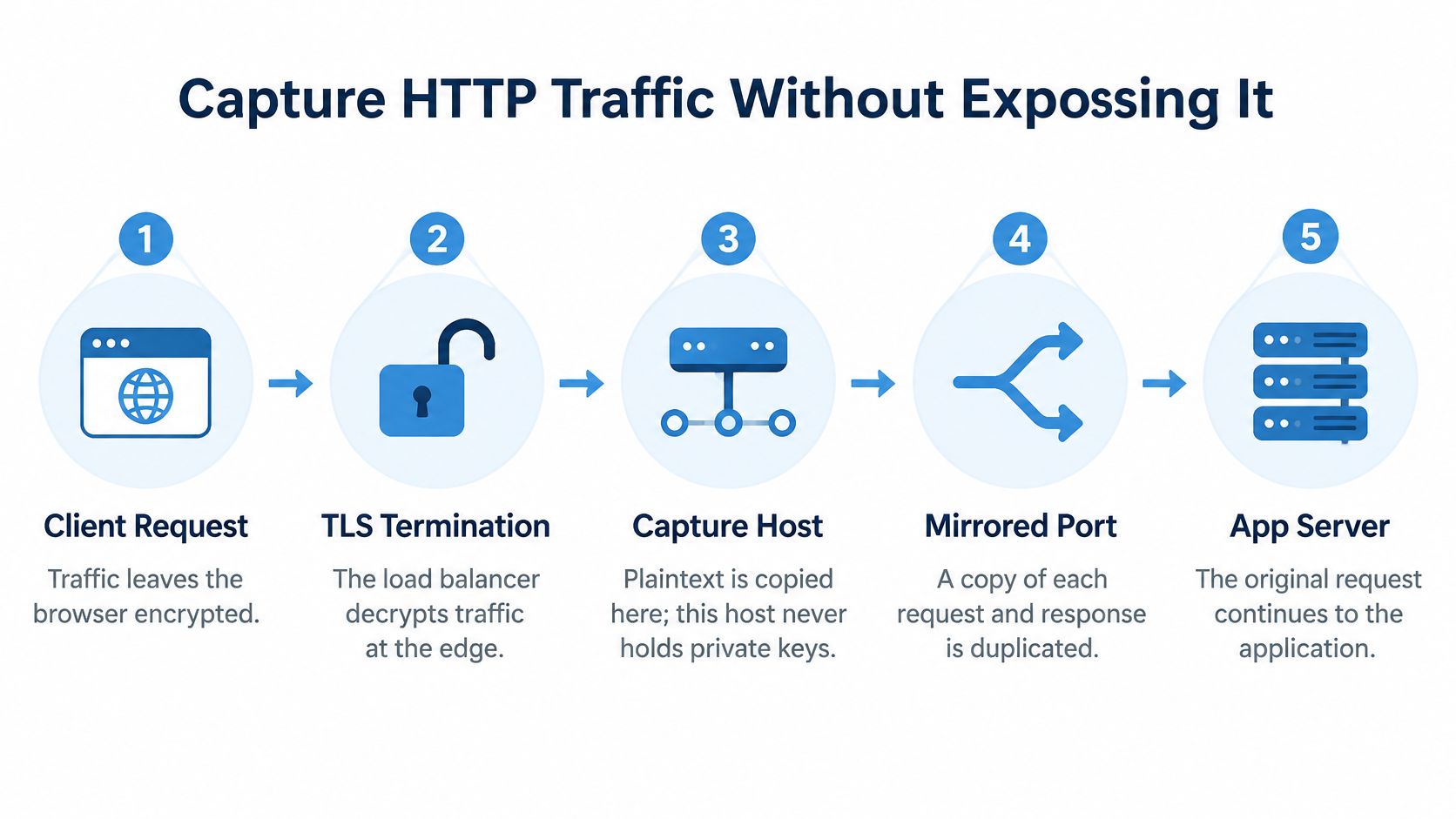
Running the capture
- Confirm the capture point sees plaintext. Choose a suitable plaintext interface, decide which requests you need, and plan to measure capture overhead. If you can read a method and path in the output, you’re in the right place; if you see TLS records, move downstream.
- Narrow the scope to one port and one application host. A filter on the listening port and Host header keeps unrelated services (admin panels, internal health endpoints, a neighbouring tenant) out of the file. Scope creep here is how captures end up holding data nobody approved.
- Write to a dedicated volume, not a home directory. File output on a mounted data volume with owner-only permissions keeps captures out of laptop backups, dotfile sync and shell autocomplete. The GoReplay capture walkthrough covers the output and filtering flags in detail.
- Measure overhead during your busiest realistic window. Dropped packets and added latency show up at peak, not in a quiet staging run. Watch CPU on the capture host and p99 latency on the application while the capture runs, and compare against the same window without it.
- Reconcile counts against the access log. Count requests in the capture for a fixed window and compare with the load balancer’s access log for the same window. A sustained gap means you’re testing a biased sample, usually the slow requests that got dropped under load.
- Lock permissions and record intent. Owner-only read and write on the output files, plus a note of who started the capture, why, and when it expires. That note is what an auditor asks for first.
A healthy capture is boring: files growing steadily, request counts matching the access log, and no error lines during peak load.
Anything else means you’re about to build a test suite on top of a partial recording.
Where to Store Captures and How to Encrypt Them
Storage decides who can read a capture long after the test ends, which is why the choice deserves more thought than “put it on the shared drive”. Ask the leak question of each option before you ask about convenience.

Plain local files are readable by anyone who gets the laptop, the backup, or the synced folder. Operating system permissions are the only gate, and there’s no expiry unless a human remembers. Fine for a lab session on a scratch machine, poor for anything that outlives the afternoon.
An encrypted local disk protects you if the hardware walks out of a building. It does nothing about the colleague already logged in, or the copy that ended up in a shared folder for a teammate. Copies spread across laptops, and each copy inherits whatever permissions that laptop happens to have.
Encrypted object storage with server-side encryption and a bucket policy is the option that scales past one person. Access is granted to named roles rather than to whoever can mount a disk, reads are logged, and a lifecycle rule deletes old captures without anyone filing a ticket. A database with role-based grants makes captured metadata queryable, which is useful when you’re hunting for the one request that triggered a bug, but rows accumulate for years and column encryption is usually optional and usually off.
| Option | Encryption | Access control | Retention risk |
|---|---|---|---|
| Plain local files | None built in; disk encryption needed | Operating system file permissions | High if nobody deletes them |
| Encrypted local disk | Full-disk encryption | Operating system accounts | Medium; copies spread across laptops |
| Encrypted object storage | Server-side encryption | Bucket and IAM policies | Low with lifecycle expiry rules |
| Access-controlled database | Optional column encryption | Role-based grants | High; data piles up for years |
For store traffic data I’d pick object storage with a lifecycle rule attached, and keep the raw-to-masked step on a short-lived local volume. Encryption at rest and masking solve different problems, and conflating them is how teams end up with a perfectly encrypted bucket full of live tokens. The comparison of data masking versus encryption is worth reading before you decide which one your storage layer is giving you.
Whatever you choose, confirm three settings by name: encryption at rest is on, access is granted to a named group rather than to individuals or a wildcard, and every object carries an expiry date.
Replaying Stored Traffic Without Side Effects
The failure mode is predictable. Someone replays a production capture into a staging environment that shares the production email service and a live payment key, and real customers get order confirmations for orders that don’t exist. A few get charged. The capture was masked, the target wasn’t isolated, and the masking work bought nothing.

Isolating the target
Replay only into an environment loaded with test data, and treat outbound integrations as part of the target. Email, SMS, payment capture and webhooks either get disabled outright or pointed at sandboxes, including the retry queues and the scheduled jobs that fire hours after the request. Check the async paths too, because a replayed order event can trigger a downstream worker that still holds production credentials.
Pacing is a separate decision from isolation. Replaying at the recorded timestamp gaps reproduces realistic concurrency and session behaviour; replaying at a chosen faster speed turns the same file into a load test that measures latency, errors and resource limits. Either way, completion order depends on the target, so don’t assert on response ordering across parallel requests.
Symptoms, causes and fixes
- 401s across the board: the tokens in the file expired, or you stripped them and never replaced them. Issue test tokens for the test environment before the run starts, not during it.
- 404s on specific IDs: production primary keys don’t exist in staging. Seed matching records, or rewrite IDs through a mapping table so referential integrity survives.
- 500s on checkout: dependent state is missing. Replay the setup requests (cart creation, address selection, session init) ahead of the payment call, in recorded order.
- Duplicate orders appearing: side effects weren’t disabled. Stop the run, clean the target, and fix the integration before you replay again.
- Response diffs that look like regressions: timestamps, nonces and generated IDs differ on every run. Normalize those fields before comparing, or you’ll chase noise for a day.
Keep a replay log: capture ID and checksum, target build version, pacing setting, and result counts by status class. Without it, a regression isn’t reproducible from the same file, and the next engineer starts from scratch.
GoReplay captures live HTTP traffic after TLS termination, lets you filter and rewrite requests before they’re stored, and replays the result against an isolated test service at recorded pace or a speed you choose. The PRO edition adds S3 capture storage and replay so a team can work from one shared, access-controlled source instead of passing files around. If you’re ready to turn that production capture into a test asset you can defend, start at GoReplay and run your first masked hour this week.