
A Guide to Zero Downtime Deployment with GoReplay
A zero downtime deployment is a pretty simple concept at its core: it’s a way to release new software without kicking users off or showing those dreaded “site down for maintenance” messages. The goal is to make updates completely seamless, so your users can keep using the application without ever knowing a new version just went live.
This approach isn’t just a nice-to-have anymore. It’s fundamental to keeping your users happy and your business running smoothly.
Why Zero Downtime Is Now a Business Necessity
Not long ago, scheduling maintenance windows overnight or on a quiet weekend was standard practice. Businesses just accepted that a few hours of downtime were part of the deal for rolling out updates. That whole mindset is basically obsolete today.
For any modern online service—whether it’s an e-commerce store, a B2B SaaS platform, or a mobile app—being “always on” isn’t just a feature. It’s the entire foundation of the business.
The financial stakes are just too high. The economic hit from unplanned downtime shows exactly why zero downtime deployments are so critical. Recent industry studies show that unplanned downtime costs businesses around $14,056 per minute, and that number jumps to a staggering $23,750 per minute for large enterprises. Those figures alone highlight the massive financial risk of any system outage.
But it goes beyond the direct financial loss. Downtime torpedoes your brand’s reputation and erodes customer loyalty. When users find your service is down, they don’t stick around—they immediately look for a competitor. You can dig deeper into the full impact of these costs and find more deployment strategy insights on binmile.com.
The True Cost of an Outage
While the per-minute financial loss is a scary number, the ripple effects are often far more damaging. An outage destroys the most valuable asset you have: customer trust.
A single significant outage can undo months or even years of brand-building. In a crowded market, reliability is what sets you apart and directly impacts whether you keep customers or lose them.
This is where a zero downtime deployment strategy becomes a powerful competitive edge. By making sure your service is always available, you deliver a dependable experience that builds confidence and turns users into loyal fans.
It’s Not Just About Customer-Facing Services
This need for continuous availability isn’t limited to what your end-users see. Your internal systems, APIs, and backend services are just as critical. An outage in one core microservice can set off a chain reaction of failures across your entire platform.
When that happens, development grinds to a halt, internal operations are disrupted, and other teams are left unable to do their jobs.
Just think about these common scenarios:
- E-commerce: A 10-minute outage during a flash sale could vaporize tens of thousands in revenue.
- SaaS Platforms: Unavailability means your customers can’t access the very tools they depend on to run their own businesses.
- API Providers: If your API goes down, it breaks every single one of your customers’ products that have integrated with it.
Ultimately, adopting a zero downtime deployment workflow is a direct investment in your business’s resilience. It transforms your release process from a high-stakes, stressful event into a routine, predictable, and safe operation.
Exploring Core Deployment Strategies

Before we can really dig into how GoReplay helps you pull off a zero downtime deployment, we need to talk about the foundational strategies that make seamless updates possible in the first place. These aren’t just textbook theories; they’re battle-tested methods that major tech companies rely on every single day to push new code without ever taking their service offline.
At their heart, all of these strategies are about managing risk. You’re moving away from the old, high-stakes “big bang” release where everything changes at once. Instead, these modern patterns let you introduce updates gradually and, most importantly, controllably. This gives you a critical safety net, allowing you to validate your changes with real traffic and roll back in an instant if anything looks off.
The Blue-Green Deployment Model
One of the most popular and straightforward methods out there is the Blue-Green deployment. The concept is pretty simple. Imagine you have two identical, parallel production environments. Let’s call them “Blue” and “Green.”
Right now, all your live traffic is flowing to the Blue environment. When you’re ready to release a new version of your application, you deploy it to the idle Green environment. Because it’s completely isolated from users, you can run your entire suite of tests—from integration checks to heavy performance testing—and make absolutely sure everything is working as expected.
Once you’re confident that the new version is solid, you just flip a switch at the router level. All incoming traffic now goes from Blue to Green. Just like that, your new version is live, and the old Blue environment becomes your standby.
This strategy is incredibly powerful because it makes rollbacks almost trivial. If you discover a critical bug after the release, you just flip the router back to Blue. There’s no frantic debugging or emergency hotfixes; the old, stable version is already warmed up and waiting.
This entire approach is designed to update your software without ever interrupting the user. You can discover more about zero downtime strategies on informatica.com to see how this fits into the bigger picture.
The Canary Deployment Method
Another highly effective strategy is the Canary deployment. This one is a bit more gradual and gets its name from the old “canary in a coal mine” idea. Instead of redirecting all your traffic at once, you release the new version to a small, controlled subset of your users.
This initial group, your “canary” cohort, might only be 1% or 5% of your total traffic. This is the real magic. You get to see how the new code performs under real-world load, but with a minimal blast radius if things go wrong. You’ll be closely monitoring key metrics like error rates, latency, and CPU usage for this tiny slice of traffic.
If all the metrics look healthy, you can start slowly dialing up the traffic to the new version—from 5% to 25%, then 50%, and eventually, 100%. If you spot any trouble at any point in this process, you can immediately roll back the canary traffic to the old version, affecting only that small fraction of your users.
Comparing Blue-Green vs Canary Deployments
Choosing between Blue-Green and Canary deployments often depends on your team’s risk tolerance, infrastructure, and release goals. Both are powerful, but they serve different purposes. Here’s a quick breakdown to help you decide which approach might be a better fit for your needs.
| Strategy | Core Concept | Best For | Key Advantage |
|---|---|---|---|
| Blue-Green | Two identical production environments; switch all traffic at once. | Applications where instant, full rollback is critical. | Simple, predictable, and incredibly fast rollback. |
| Canary | Gradually shift traffic to the new version for a small user subset. | Large-scale applications where even minor issues can have a big impact. | Minimizes risk and blast radius by testing with real users. |
Ultimately, both strategies aim to reduce the risk of a bad release. A Blue-Green deployment gives you a simple, all-or-nothing switch, whereas a Canary deployment provides a more cautious, data-driven path to a full rollout.
Capturing Live Traffic with GoReplay
Theory is great, but a zero-downtime deployment strategy only proves its worth when you put it into practice. Before you can validate anything, you need a realistic, high-fidelity source of test data. And let’s be honest, nothing is more realistic than the traffic from your actual users. This is where GoReplay becomes the cornerstone of your entire workflow.
The whole idea is to “shadow” or mirror your live production traffic without hurting performance. GoReplay pulls this off by acting as a lightweight listener at the network layer. It passively snoops on HTTP requests and their payloads as they hit your production service, creating a perfect, byte-for-byte copy of real-world user activity.
Setting Up the GoReplay Listener
Getting started with capturing traffic is surprisingly painless. You just run the GoReplay listener on your production server (or a network tap), point it to the network interface and port your app uses, and tell it where to save the captured requests.
For instance, capturing HTTP traffic on port 80 and saving it to a file is a simple, non-intrusive command. The listener just sits there, silently recording every request without adding any noticeable overhead. This is absolutely critical; a traffic mirroring tool that slows down production is a complete non-starter.
Capturing traffic is the foundational step. The file you create becomes a reusable, high-value asset—a snapshot of real user behavior that you can replay on demand to test any future release under genuine production conditions.
This process gives you the raw material for a truly reliable testing pipeline. The diagram below shows how this crucial first step fits into the bigger picture of a zero-downtime deployment.
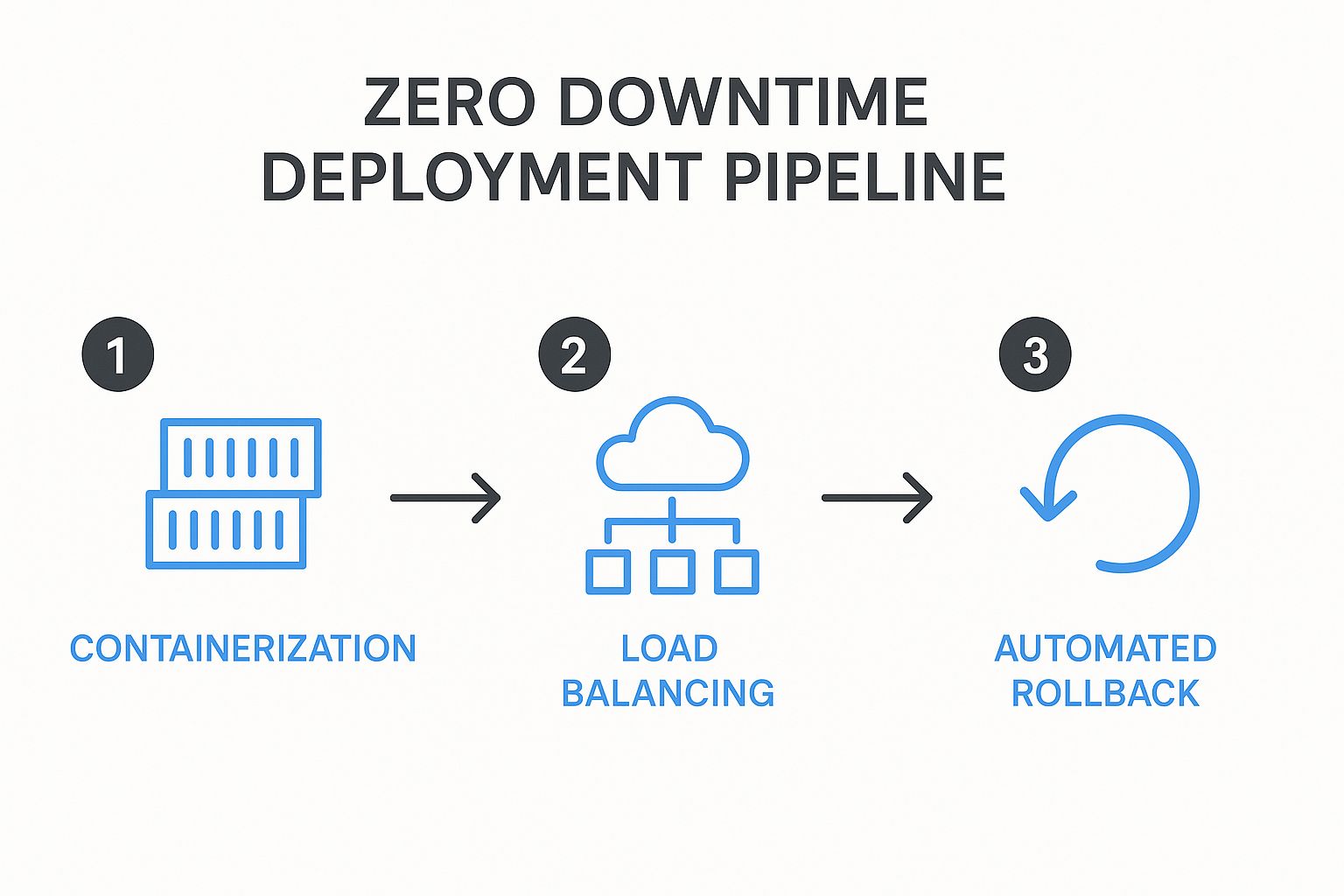
As the infographic shows, after containerizing your app, you need robust load balancing and automated rollbacks. Both of these are made infinitely more reliable when you can validate them against real traffic.
Key Considerations for Traffic Capture
While the basic command is simple, a real-world setup requires a bit more thought to make sure you capture the right data effectively.
- Filtering Unnecessary Traffic: You probably don’t want to capture every single request. GoReplay lets you filter traffic by HTTP methods, headers, or URL paths. This is perfect for zeroing in on critical API endpoints while ignoring noise like health checks.
- Traffic Volume and Storage: On a high-traffic app, those capture files can get huge, fast. You’ll need to plan for adequate disk space and think about strategies like rotating files hourly or daily to keep them manageable.
- Handling Sensitive Data: This is a big one. Mirroring production traffic means you might be handling Personally Identifiable Information (PII). GoReplay’s middleware capabilities are a lifesaver here, letting you rewrite traffic on the fly to hash, mask, or strip out confidential data before it ever gets written to a file.
By taking the time to configure the listener thoughtfully, you create a powerful and safe dataset. This captured traffic isn’t just another log file; it’s a blueprint of your application’s real-world usage patterns, ready to validate your next release with an accuracy you just can’t fake. This is the first practical step toward building a truly resilient zero-downtime deployment pipeline.
So, you’ve captured your production traffic. That’s a great start, but it’s only half the battle. Now comes the part where we really level up your zero downtime deployment strategy: using that captured data to put your new release through its paces. This is where the true power of traffic shadowing shines.
The goal here is simple but profound. We’re going to throw the full, unpredictable chaos of real user behavior at your new, pre-production code. Whether you call it a “green” environment or a “canary” instance, the idea is the same: replay the captured traffic against it and see exactly how it performs under real-world pressure before a single customer sees it.
This process involves pointing GoReplay to send all those recorded requests from your file straight to the new service instance. But replaying the traffic is just the mechanism. The real magic is in the analysis that follows.
Performance and Error Comparison
At the heart of this validation step is a direct, data-driven comparison. You need to know, without a doubt, if the new version is better, worse, or functionally identical to what’s currently live. This isn’t a time for gut feelings; it’s about hard data.
I always recommend focusing on three critical areas:
- Response Discrepancies: Does the new version return the exact same response as the old one for the same request? You’re hunting for any unexpected changes in the JSON payload, HTML structure, or data that could shatter downstream services or client-side applications.
- Performance Metrics: How’s the latency? A seemingly harmless code change can introduce devastating performance bottlenecks. By comparing response times side-by-side, you can catch regressions that you’d otherwise miss until users start complaining about a sluggish app.
- Error Rates: This one’s the most obvious but also the most critical. You have to know if the new version is spitting out more 5xx server errors or 4xx client errors than your production version when faced with identical traffic. Any spike in errors is an immediate, undeniable red flag.
By simulating real-world conditions in a safe, isolated environment, you shift your release process from a hopeful gamble to a data-driven decision. You are quite literally finding and squashing bugs that only surface under the specific, often bizarre, conditions of live traffic.
This proactive validation gives you the confidence to push the “deploy” button, knowing your update has already survived the ultimate test. If you want to get into the weeds on this, there’s a fantastic guide on how to replay production traffic for realistic load testing that goes even deeper.
Finding Regressions Before They Find You
A “regression” is developer-speak for any feature that used to work perfectly but is now broken in the new version. These are some of the most frustrating and frankly embarrassing bugs to ship, and traffic shadowing is your single best defense against them.
Imagine this scenario: your team just refactored a core authentication module. All the unit tests are green, and everything looks perfect in the staging environment. What you didn’t account for, however, is a legacy mobile app version out in the wild that sends a slightly non-standard auth header.
With traditional testing, this bug sails right into production, immediately locking out a whole segment of your user base. But with GoReplay in your corner, that real-world request is captured and replayed against your new code, flagging the failure instantly in your pre-production environment. You can fix it before it ever costs you a customer.
This is what a mature zero downtime deployment workflow really looks like. It’s not just about getting rid of maintenance windows; it’s about guaranteeing the quality and stability of every single release.
Automating Your Release and Rollback Process
Capturing and replaying traffic gives you a ton of confidence, but the final piece of the zero downtime deployment puzzle is taking human hands off the keyboard. The goal here is to build a completely hands-off release machine that’s both reliable and predictable. This is where you wire GoReplay’s validation smarts directly into your CI/CD pipeline.
The whole process involves scripting the traffic replay and comparison workflow. Your pipeline should automatically fire up GoReplay to send the latest captured traffic to your newly deployed version. Then, it crunches the numbers, comparing the new outputs against the production baseline.
This is where you define your go/no-go criteria. These aren’t just gut feelings; they are hard, non-negotiable thresholds baked right into your release scripts.
Establishing Automated Go/No-Go Decisions
Think of your CI/CD pipeline as a hyper-vigilant gatekeeper. Its one job is to slam the brakes on any release that fails to meet your quality bar. The logic for this decision comes directly from the comparison data GoReplay serves up.
You could set up rules like these:
- Error Rate Threshold: If the new version spits out more than a 0.1% increase in 5xx server errors compared to production, the deployment fails.
- Latency Spike Detection: If the average response time for the new version is 15% higher than production, the deployment fails.
- Response Mismatches: If more than 0.5% of responses have a different payload than their production counterparts, the deployment fails.
These rules transform your pipeline from a simple code-pusher into an intelligent quality-assurance system. If any threshold gets breached, the pipeline automatically triggers a rollback, reverting traffic to the last known stable version without anyone needing to lift a finger. This automated safety net is essential. The process of automating API tests provides many similar strategies for success you can borrow from.
The core idea is to make the safe choice the default choice. By scripting these go/no-go decisions, you eliminate the risk of human error or the temptation to “ship it anyway” under pressure.
Critical Considerations for a Fully Automated Flow
While this level of automation is powerful, it demands careful planning—especially around your data. Database migrations are a classic hurdle in any zero downtime deployment. You have to design schema changes to be backward-compatible, making sure both the old and new versions of your application can work with the same database without corrupting data.
Ultimately, by combining traffic shadowing with scripted validation and automated rollbacks, you build a resilient, hands-off release process. This frees up your team from stressful, manual deployments and lets them get back to building great features, confident that a robust safety net is always in place.
Got Questions About GoReplay? We’ve Got Answers.
When you’re looking at a tool as powerful as GoReplay, a few questions are bound to come up. Teams often wonder about the real-world performance impact, what kinds of traffic it can actually handle, and—most importantly—how to manage data security.
Let’s break down some of the most common questions we hear from engineers just like you.
Will GoReplay Slow Down My Production Environment?
This is usually the first thing on everyone’s mind. The fear that mirroring traffic will add latency or hog server resources is completely understandable.
The good news? It’s almost a non-issue. GoReplay was built from the ground up to be incredibly lightweight. It taps into traffic at the network layer, which keeps its performance footprint to a bare minimum. In most setups, the overhead is so low you won’t even notice it’s there.
Of course, it’s always smart to keep an eye on your system’s performance when you first roll out the GoReplay listener. A quick check will give you the peace of mind that its resource use is well within your comfort zone.
This low-impact design means you can capture high-fidelity traffic without putting your production services at risk. It’s a safe bet for even the most performance-sensitive systems.
Does It Work for More Than Just HTTP Traffic?
While this guide has focused a lot on HTTP, GoReplay is definitely not a one-trick pony. It’s far more versatile than you might think and is fully capable of capturing and replaying a whole host of protocols.
The tool has robust support for raw TCP traffic, which unlocks testing possibilities well beyond your typical web apps. You could use it to validate mission-critical changes in:
- Databases: See how a new schema or query optimization really behaves under a true production load.
- Message Queues: Make sure your producers and consumers can handle an update without dropping a single message.
- Custom Services: If it runs on TCP, you can probably test it. This is great for validating proprietary services.
The core workflow—capture, replay, and compare—is exactly the same. You’ll just need to tweak the command-line flags to point it at the right protocol and port you want to mirror.
How Do You Handle Sensitive Data When Mirroring Traffic?
This is the big one. Protecting user data isn’t just good practice; it’s non-negotiable. Mirroring production traffic absolutely requires a solid plan for handling PII, credentials, and other sensitive info.
GoReplay has this covered with its powerful middleware capabilities, which let you rewrite traffic on the fly. You can build simple scripts that intercept requests and responses to anonymize or completely mask private data, such as:
- Passwords
- API keys
- Credit card numbers
- Any other Personal Identifiable Information (PII)
This rewriting happens before the traffic is ever saved to a file or sent to your staging environment. It’s a critical step that lets you test with hyper-realistic traffic patterns without ever compromising user privacy or security.
Ready to build a truly resilient testing and deployment workflow? Discover how GoReplay can help you validate every release with real production traffic. Explore our advanced features and get started today.