
What Is Traffic Shaping Explained Simply

Traffic shaping is all about bringing order to network chaos. It’s a smart way to manage the flow of data across your network, ensuring critical applications get the bandwidth they need while less important traffic waits its turn. This keeps everything running smoothly, prevents congestion, and guarantees a predictable, high-quality experience.
What Is Traffic Shaping Really About?
Think of a busy highway during rush hour. If there are no controls, everyone floods the on-ramps at once, leading to instant gridlock where nobody gets anywhere fast. Traffic shaping is the network equivalent of a smart ramp meter. It doesn’t just let every car (or data packet) merge whenever it wants; it carefully manages the flow to prevent jams and keep traffic moving at a steady, predictable pace.
This analogy gets to the heart of what is traffic shaping: it’s a proactive strategy for regulating network traffic to a consistent, manageable rate. Instead of just dropping packets when things get too busy, it temporarily holds less critical data in a queue. These delayed packets are then sent out as soon as bandwidth frees up, effectively smoothing out sudden bursts of traffic into a much more stable stream.
The Goal of Guaranteed Performance
The main point isn’t to deliberately slow your network down. It’s actually the opposite—the goal is to improve its reliability and make sure the most important applications deliver a great user experience. By managing the data flow, traffic shaping helps you hit several key targets:
- Prioritize Critical Applications: It ensures that essential services like VoIP calls, video conferences, or core business software always have the resources to run without stuttering or dropping out.
- Prevent Network Congestion: By smoothing out those traffic spikes, it stops the network from getting overwhelmed, a common cause of dropped packets and poor performance for everyone.
- Optimize Bandwidth Usage: It gives network administrators the power to enforce policies that align network use with business priorities, making sure you get the most out of your available bandwidth.
At its core, traffic shaping is about using your existing network infrastructure more intelligently. The aim is to keep traffic predictable and give everyone fair access to the resources they need.
To quickly recap, here’s a look at the fundamental ideas behind traffic shaping.
Traffic Shaping at a Glance
| Concept | Primary Goal | Key Outcome |
|---|---|---|
| Traffic Regulation | Control the rate of data transmission. | Smooth, predictable network performance. |
| Queuing & Buffering | Delay non-critical packets instead of dropping them. | Reduced packet loss and retransmissions. |
| Prioritization | Allocate bandwidth based on application importance. | High-quality experience for critical services. |
| Burst Smoothing | Convert erratic traffic spikes into a steady stream. | Improved network stability and efficiency. |
Ultimately, traffic shaping transforms a chaotic free-for-all into a well-managed system.
Why It Matters in Modern Networks
Today’s networks are constantly hammered with traffic from every direction—video streaming, huge file downloads, real-time collaboration tools, you name it. Without some kind of management, this chaos can quickly make a network unusable. On unmanaged networks, it’s not uncommon to see packet loss rates climb over 15-20% during peak times, which is enough to cripple most applications. You can learn more about how organizations are improving network performance with these Quality of Service solutions. This is why traffic shaping has become so essential; it’s the tool that turns a data free-for-all into a reliable, high-performing system.
So, how does traffic shaping actually manage to wrangle all that data? It’s not magic, just clever algorithms that act like a meticulous gatekeeper for your network. They decide which data packets get to go and when, all based on a set of rules you define.
The core concept behind it all is queuing. When data arrives faster than your network can handle, the packets aren’t just dropped. Instead, they’re put into a temporary holding pen—a buffer or queue. The shaping algorithm then lets packets out of this queue at a controlled pace, turning a chaotic flood of data into a smooth, predictable stream.
The Token Bucket Algorithm: A Credit System for Data
One of the most popular ways to do this is with the Token Bucket algorithm. Picture a bucket that’s constantly being filled with tokens at a steady rate. To send a data packet, you have to “spend” a token from that bucket. If there are tokens available, your data goes through instantly.
This system is surprisingly flexible. During a quiet period with low traffic, tokens pile up in the bucket. Then, when a sudden burst of data hits, you can use those saved-up tokens to send packets much faster than the normal rate—but only until your token supply runs out.
- Token Rate: This sets the average, long-term data rate you can sustain.
- Bucket Size: This determines how much of a burst you can handle. A bigger bucket lets you absorb longer or larger traffic spikes.
Once the saved tokens are used up, your data transmission is capped at the speed new tokens are generated. This makes the Token Bucket perfect for networks that need to handle occasional bursts without letting them completely take over.
The Leaky Bucket Algorithm: A Funnel for Consistency
On the other hand, you have the Leaky Bucket algorithm. This one is all about maintaining a perfectly steady output, no matter what. Think of it like a funnel or a bucket with a small hole in the bottom. You can pour data in as fast as you like, but it only drips out at a constant, unchangeable rate.
If data pours in faster than it can drain, the bucket fills up. If the bucket becomes full, any new data that arrives is simply discarded—there’s no more room. This approach guarantees a consistent output stream, making it ideal for applications that demand a fixed, predictable amount of bandwidth.
The diagram below shows how the Leaky Bucket takes chaotic traffic bursts and smooths them into a completely uniform stream.
As you can see, the incoming traffic is all over the place, but the outgoing traffic is perfectly regular. This is the Leaky Bucket enforcing a strict ceiling on the data rate.
The key takeaway: Token Bucket allows for managed bursts, while Leaky Bucket enforces a strict, constant flow. Choosing between them comes down to what you’re trying to achieve with your network.
Getting a handle on these algorithms is the first step to really understanding network behavior. To see how these patterns play out in the real world, check out our guide on how to analyze network traffic. These mechanisms are the technical foundation of traffic shaping, bringing a much-needed sense of order to the chaos of data flow.
Shaping vs. Policing: Understanding The Difference
When you’re trying to manage network data, you’ll often hear the terms traffic shaping and traffic policing thrown around, sometimes even interchangeably. But they’re not the same thing at all. In fact, they represent two completely different philosophies for controlling how data flows through your network. Getting this distinction right is the first step toward building an effective network management strategy.
Think of traffic shaping like a patient, methodical traffic controller managing a busy freeway on-ramp during rush hour. This controller doesn’t just block cars; they meter them, letting one or two go at a time to ensure a smooth, steady merge with highway traffic. The whole point is to prevent gridlock by creating a predictable flow, even if it means some cars have to wait a few moments before getting on the highway.
Traffic policing, on the other hand, is more like a strict gatekeeper with a simple, unyielding rule. If the speed limit is 55 mph, any car going 56 mph is immediately pulled off the road and stopped. No waiting, no queuing—just immediate enforcement. Any excess traffic is simply dropped.
The Core Mechanical Difference
The fundamental difference comes down to how each method handles traffic that goes over the configured rate limit. Traffic shaping is proactive; it wants to create a smooth, predictable flow. Policing is purely reactive; it’s all about enforcing a hard limit, no matter the cost.
This is where the idea of a buffer, or a queue, comes into play. Shaping uses it, policing doesn’t.
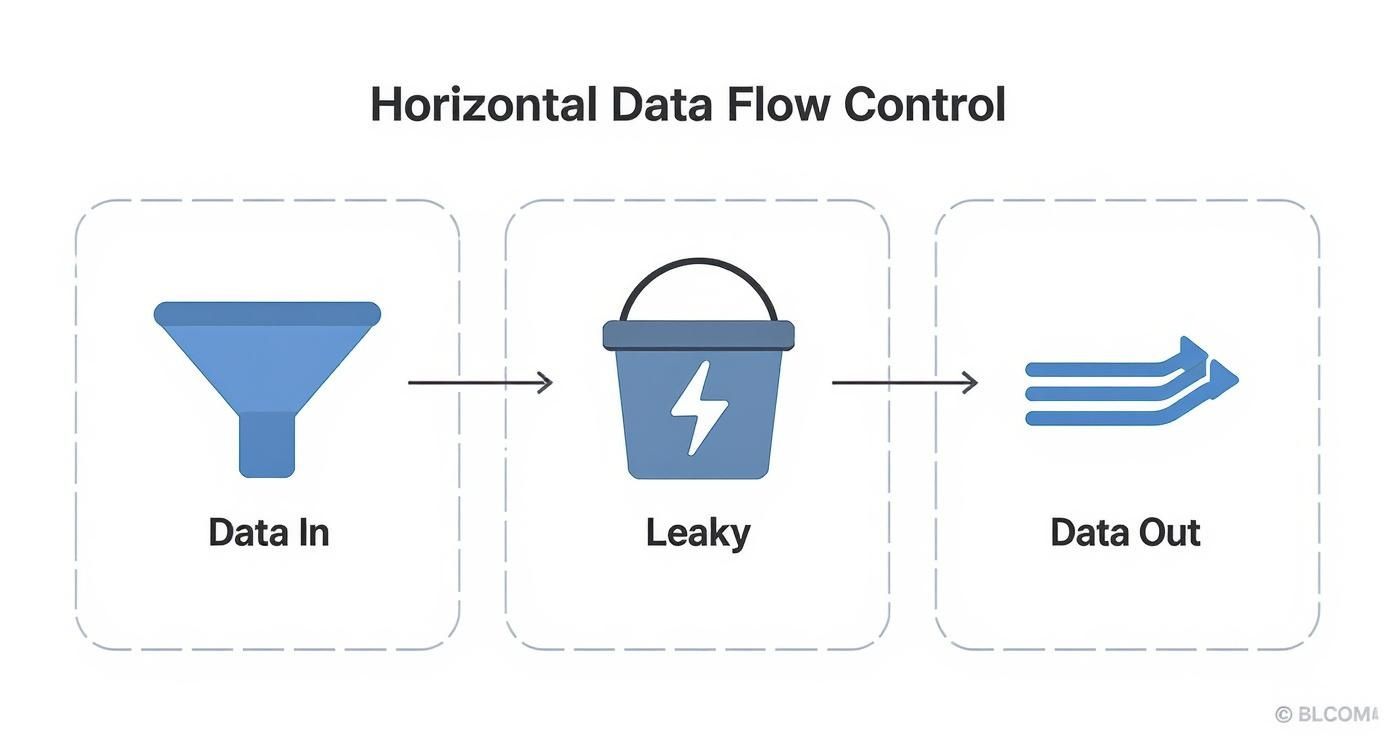
As you can see, shaping takes those irregular bursts of data, queues them up, and then lets them out at a nice, consistent rate. It smooths everything out to prevent overwhelming whatever is downstream.
Here’s a simple breakdown of what each one does with extra packets:
- Traffic Shaping: It delays excess packets by putting them in a buffer or queue. These packets aren’t lost; they just get sent a little later when there’s bandwidth available. It’s all about smoothing out the peaks and valleys of traffic bursts.
- Traffic Policing: It just drops any packets that exceed the rate limit. They don’t get queued, they don’t get delayed—they’re just gone.
The choice between shaping and policing boils down to a simple trade-off: delay versus discard. Shaping introduces a tiny bit of latency to save every packet, while policing avoids that latency by sacrificing the packets it doesn’t have room for.
How This Affects Application Performance
This “delay vs. discard” difference has huge, real-world consequences for how your applications perform and what your users experience. Because shaping hangs onto data packets, it’s far less disruptive for most kinds of traffic.
Take applications that are sensitive to packet loss, like video streaming, VoIP calls, or online gaming. They perform much, much better with shaping. A slight delay is often completely unnoticeable, but dropped packets? That’s what causes video to freeze, audio to stutter, and gameplay to lag while the application scrambles to request retransmissions of the lost data.
Policing isn’t useless, though. It’s actually great for setting firm boundaries on non-critical traffic. Let’s say you want to guarantee that peer-to-peer file sharing never hogs more than 10% of your total bandwidth. Policing is perfect for that—it will enforce that rule ruthlessly by dropping any excess P2P packets.
The table below gives you a quick side-by-side look at the key differences.
Comparison Traffic Shaping vs Traffic Policing
This comparison highlights the fundamental differences in how these two methods approach the same problem: managing network congestion.
| Attribute | Traffic Shaping | Traffic Policing |
|---|---|---|
| Primary Action | Queues and delays excess packets | Drops excess packets |
| Impact on Traffic | Smooths out bursts into a steady stream | Enforces a hard rate limit |
| Key Consequence | Introduces minor latency and jitter | Causes packet loss and retransmissions |
| Typical Use Case | Prioritizing critical, real-time applications | Capping low-priority or abusive traffic |
| Resulting Flow | Predictable, consistent data rate | Bursty, with discarded packet gaps |
Ultimately, which one you choose depends entirely on what you’re trying to achieve—preserving the integrity of your data stream or enforcing a strict bandwidth ceiling.
Real-World Scenarios Where Traffic Shaping Wins

Understanding the theory is one thing, but seeing traffic shaping solve real, everyday problems is where it all clicks. When you move from algorithms to practical application, you see exactly how it prevents those frustrating network slowdowns and keeps critical services running smoothly.
At its heart, traffic shaping is about enforcing your business priorities on your network. It answers simple but critical questions, like, “How do we make sure the CEO’s video call doesn’t freeze just because someone is uploading a huge file?” The answer is to create a clear hierarchy for your data.
Prioritizing Jitter-Free Video Conferencing
Imagine a company-wide town hall over Zoom or Microsoft Teams. It’s a high-stakes, real-time event. Even a few seconds of lag or a pixelated screen can completely derail the meeting and frustrate hundreds of employees.
This is a classic use case for traffic shaping. A network administrator can set up a policy that gives video conferencing traffic the highest priority, no questions asked.
- The Problem: Someone kicks off a large cloud backup or software download, instantly hogging all the available bandwidth.
- The Solution: The shaping policy spots the video packets and shuffles them to the front of the line. The packets from the large download are held back for a moment and sent out as bandwidth frees up.
- The Outcome: The video call stays crystal-clear, with almost no latency or jitter. The download still finishes, just a little later, without disrupting a critical business activity.
This simple act ensures that interactive, time-sensitive apps always get the resources they need, which has a direct impact on productivity and communication.
Guaranteeing Performance for Cloud Applications
Modern businesses pretty much live in the cloud. We rely on tools like Salesforce, Office 365, and countless other SaaS platforms for daily operations. When these apps get sluggish or unresponsive, work grinds to a halt.
Traffic shaping can guarantee these essential services a reserved slice of your network’s capacity. An admin can set a minimum bandwidth guarantee for traffic heading to and from these specific cloud services, making sure they always have a clear lane.
By allocating dedicated bandwidth to critical SaaS tools, businesses can transform unpredictable cloud performance into a reliable, utility-like service. This small technical change can yield significant returns in operational consistency and efficiency.
For example, a sales team can’t afford delays when they’re looking at a real-time CRM dashboard. Shaping ensures that even when the network is congested, CRM data gets priority, letting the team function without a hitch.
Fair Bandwidth Distribution by ISPs
Internet Service Providers (ISPs) have a massive challenge: keeping thousands or millions of customers happy on shared network infrastructure. Without any controls, a few users running high-bandwidth apps—like non-stop peer-to-peer file sharing—could ruin the experience for an entire neighborhood.
ISPs use traffic shaping all the time to ensure equitable bandwidth allocation. They implement policies that stop any single user from monopolizing the network.
This usually takes the form of a “fair use” policy. Once a user hits a certain data cap or maintains an unusually high transfer rate for too long, their connection is gently slowed to a lower, but still usable, speed. This frees up capacity for everyone else, solves the “noisy neighbor” problem, and keeps the quality of service stable for the whole customer base. It’s all about making sure everyone gets their fair share.
Tools and Techniques for Implementing Traffic Shaping
https://www.youtube.com/embed/oeJyxIQVs1g
Alright, let’s move from theory to the real world. Putting traffic shaping into practice requires the right set of tools, but the good news is you don’t need a massive enterprise network or expensive gear to get started. You can begin managing data flow with powerful software already built into common operating systems, or scale up to dedicated hardware when your needs grow.
The key is picking the approach that actually fits your environment and what you’re trying to accomplish.
For most engineers and developers, the journey starts with software. These tools are often open-source, incredibly flexible, and perfect for testing, development, or managing traffic on a single server. They give you a direct, hands-on way to see exactly how shaping policies affect your application’s performance without having to spend a dime.
This accessibility is huge—it lets you experiment with different algorithms and rules right on your own machine, making it an incredible resource for both learning and development.
Getting Started with Software Tools
One of the most powerful—and widely used—software tools for traffic shaping is baked right into the Linux kernel: the tc (traffic control) command. It’s a beast of a utility that gives you granular control over network traffic as it leaves your system.
While the syntax can feel a bit intimidating at first, tc provides direct access to the kernel’s queuing disciplines, which are the engines that actually do the shaping.
With tc, you can implement all sorts of strategies, from simple rate limiting to complex, class-based systems that prioritize one type of traffic over another. For example, you could use it to make sure your SSH connection stays snappy and responsive even while a massive file transfer is hogging the network on the same server. This is why it’s a favorite among network admins and DevOps pros.
A common starting point with
tcis to apply a simple Token Bucket Filter (TBF). This lets you set a rate, a maximum burst size, and a latency limit, giving you a basic but surprisingly effective way to smooth out traffic from a specific network interface.
Before you start applying rules, though, you need a clear picture of your network’s current behavior. Gaining visibility into your data streams is crucial. You can learn more about the best network traffic monitoring tools to get a solid baseline before you start shaping anything. This data helps you make smart decisions about what to prioritize and what rates to set.
Scaling Up with Hardware and QoS Features
While tools like tc are fantastic for server-level control, managing traffic for an entire organization often demands a more centralized approach. This is where dedicated network hardware and enterprise-grade Quality of Service (QoS) features enter the picture. Modern routers, switches, and firewalls come equipped with incredibly sophisticated traffic management capabilities right out of the box.
These devices operate at the edge or core of your network, letting you apply consistent shaping policies across all traffic that flows through them. Instead of configuring each server one by one, you can define a single, global policy that prioritizes video conferencing for the entire office.
Here’s how hardware-based approaches usually stack up:
- Centralized Management: Policies are configured in one place (like a router or firewall), which makes them far easier to manage, update, and audit.
- Dedicated Processing: Hardware solutions use specialized processors (ASICs) to handle traffic shaping. This means they can manage huge volumes of traffic without slowing down the device’s main job of routing or security.
- Application-Awareness: Many modern firewalls can identify traffic from specific applications like Salesforce or Microsoft Teams, allowing you to create highly specific rules without messing around with IP addresses or port numbers.
This approach is perfect for businesses that need to guarantee a certain level of service for critical applications across their entire network. It elevates traffic shaping from a server-by-server task to a holistic network management strategy.
Simulating Real-World Conditions with Emulators
One of the biggest headaches in development is trying to recreate the messy, unpredictable nature of real-world networks. Your app might fly on a pristine local network with zero latency, but how does it hold up for a user on a shaky mobile connection halfway across the globe? Network emulation tools are built to answer exactly that question.
Tools like netem (Network Emulator)—another component of the Linux tc suite—let you artificially introduce network problems. You can simulate conditions like:
- High Latency: Mimic the delay of a long-distance or satellite connection.
- Packet Loss: Simulate an unreliable wireless link or a congested network.
- Jitter: Introduce random variations in packet arrival time, which is death for real-time apps like VoIP.
- Bandwidth Limitation: Replicate what a user on a slow internet plan actually experiences.
By integrating these emulators into your testing pipeline, you can proactively find out how your application behaves under stress. It lets you discover and fix bugs, fine-tune timeouts, and build much more resilient software before it ever gets near your users. When you combine emulation with tools like GoReplay, which can shadow real production traffic, you create a powerful testing environment that is incredibly close to real-world conditions.
Fine-Tuning Your Traffic Management Strategy
Putting traffic shaping policies in place is a great start, but the real magic happens over time. This isn’t a “set it and forget it” kind of deal. To keep your network running smoothly, you need to constantly monitor, adjust, and troubleshoot your rules to make sure they’re still doing what you need them to do.
The bedrock of this whole process is watching the right metrics. Sure, bandwidth is a big one, but the true signs of network health—and a good user experience—are often more subtle. Keeping a close eye on these key performance indicators (KPIs) tells you if your shaping policies are actually working or just causing new headaches.
Key Metrics to Keep on Your Radar
To get a real feel for your network’s performance, you need to look beyond raw speed. These three metrics are where the truth lies:
- Latency: Think of this as the round-trip time for a data packet. High latency is what users feel as “lag,” and it can make real-time apps like video calls or online gaming completely unusable.
- Jitter: This measures the variation in packet arrival time. When jitter is high, packets arrive out of order, causing audio to stutter and video to freeze, even if the overall latency seems fine. Good shaping tames jitter for sensitive traffic.
- Queue Depth: This tells you how many packets are stuck waiting in a buffer. A queue is a necessary part of shaping, but if it’s constantly full, that’s a massive red flag. It usually points to a misconfiguration or a bigger bottleneck somewhere else.
A sudden spike in any of these is your cue to start digging. It might mean a new, unclassified app is eating up resources, or it could just be a sign that your existing rules need a little tweak.
Classify and Prioritize Like a Pro
The entire success of traffic shaping comes down to one thing: correctly identifying and classifying your traffic. You can’t prioritize what you can’t see. Start by building a clear hierarchy for your applications, separating the mission-critical stuff from everything else.
For example, VoIP and video conferencing should always be at the top of the list, no exceptions. Your core business tools, like a CRM or ERP system, come next. General web browsing falls somewhere below that, and things like large file downloads or background software updates can be pushed to the lowest priority, ensuring they never disrupt more important work.
Pro Tip: Don’t just guess what’s important. Use network monitoring tools to see what’s actually running on your network. You might be shocked to find “shadow IT” apps chewing up a surprising amount of bandwidth.
Steer Clear of the Bufferbloat Trap
One of the easiest mistakes to make in traffic management is setting up buffers that are way too big. A buffer is essential for queuing up excess packets, but an oversized one creates a nasty problem called bufferbloat. This is what happens when packets get stuck in the queue for so long that they cause a massive spike in latency for everyone.
The result is a network that feels sluggish and unresponsive, even when you have plenty of bandwidth to spare. The fix is to use smaller, smarter queues that manage congestion without adding a ton of delay.
It’s almost always worth trading a tiny fraction of your total bandwidth—often just 5-10%—to keep latency low and users happy. By setting realistic bandwidth limits just a hair below your maximum capacity, you prevent the queues from ever becoming the bottleneck themselves. This one simple adjustment can make a world of difference in how responsive your network feels.
Common Questions About Traffic Shaping
Even after getting the hang of the basics, a few practical questions usually pop up. Let’s tackle some of the most common ones to clear up any confusion.
Does Traffic Shaping Reduce My Internet Speed?
Not really, at least not in the way you might think. Traffic shaping isn’t about making your connection slower overall. It’s about making it smarter and more reliable. By intelligently delaying less critical data, it makes sure your important, time-sensitive stuff—like a video call—gets the bandwidth it needs to run without a hitch.
So while a big, non-urgent download might get held back slightly, that small trade-off is what keeps your call from freezing. You’re optimizing for a much better user experience, not just chasing raw speed. In fact, it’s often worth sacrificing a tiny amount of top-end bandwidth (5-10%) to slash latency when your connection is busy.
Is Traffic Shaping the Same as Throttling?
They both manage bandwidth, but their intentions are completely different. Throttling is a sledgehammer. It’s what Internet Service Providers (ISPs) often use to slow down your entire connection once you hit a data cap. It’s a hard limit applied to everything, no questions asked.
Traffic shaping is more of a scalpel. Instead of slamming the brakes on all your traffic, it prioritizes it based on rules you set. This means it can slow down something like peer-to-peer file sharing to make sure your online game stays fast and responsive. Shaping is all about smart management; throttling is just about raw limitation.
The key difference is intelligence. Throttling is a simple speed limit for all traffic. Traffic shaping is like a smart traffic cop, directing different types of data into the right lanes to keep everything flowing smoothly.
Can I Implement Traffic Shaping on My Home Network?
Absolutely. A lot of modern home routers have Quality of Service (QoS) settings built right in, which is just a user-friendly version of traffic shaping. These features let you prioritize certain devices or applications, like giving your gaming console or work laptop first dibs on bandwidth.
If you want to get more advanced, you can flash your router with open-source firmware like OpenWrt. It gives you access to powerful tools for setting up sophisticated shaping rules, often using Smart Queue Management (SQM). This can dramatically fix annoying issues like bufferbloat, where a maxed-out connection sends your latency through the roof. With a little setup, you can bring enterprise-level network stability right into your home.
Are you tired of performance issues slipping through to production? With GoReplay, you can capture and replay real user traffic to test your applications under the most realistic conditions. Ensure your updates are solid and reliable before they go live. Learn more about GoReplay.