
What Is the Benchmark Test Explained

Ever heard the term “benchmark test” and wondered what it actually means? Let’s cut through the jargon.
A benchmark test is really just a standardized way to measure how well something performs, whether it’s your software, a server, or a new piece of hardware. Think of it like a controlled fitness test that gives you a repeatable score. This score lets you compare performance against a known baseline, a competitor, or even a previous version of your own app.
What Is a Benchmark Test Really?

Let’s use a simple analogy. Imagine you’re buying a car and want to know its fuel efficiency. The manufacturer tells you it gets 30 MPG on the highway. That number isn’t just a guess; it’s the result of a standardized test run under specific, controlled conditions—like consistent speed, temperature, and terrain.
That MPG rating is a benchmark. It creates a common yardstick, so you can reliably compare the fuel efficiency of a Honda to a Toyota. A benchmark test does the exact same thing for your software. It’s not just about seeing if your app works; it’s about measuring how well it works under a defined workload.
The Foundation of a Fair Comparison
The whole point of a benchmark test is to generate quantifiable data in a repeatable way. Without a consistent standard, any performance comparisons you make are pretty much meaningless. It’d be like one car company testing its MPG while driving downhill and another testing its vehicle while driving uphill—the results would tell you nothing useful.
The two most important traits of any good benchmark test are repeatability and quantifiability. If you can’t get the same results running the same test twice, the data is unreliable. You can find more details on this testing methodology from the experts at LoadView.
To get a clearer picture, let’s break down the core ideas behind any benchmark test.
Key Aspects of Benchmark Testing at a Glance
| Core Concept | What It Means | Example |
|---|---|---|
| Workload | The specific set of tasks or requests the system will perform during the test. | Simulating 1,000 users simultaneously logging in and browsing product pages. |
| Metrics | The specific, measurable data points you’re tracking to evaluate performance. | Measuring API response time in milliseconds (ms), CPU utilization, or requests per second. |
| Environment | The hardware and software configuration where the test is run. | An AWS m5.large instance with 2 vCPUs and 8 GiB of RAM, running Ubuntu 22.04 and a Node.js app. |
| Baseline | The initial performance measurement that serves as your point of reference. | The current production server handles 500 requests per second with an average latency of 150ms. |
These components work together to create a test that delivers trustworthy results every single time.
A benchmark provides a point of reference against which measurements may be made. It’s the baseline that turns subjective feelings like “the app feels slow” into objective facts like “the new update increased API response time by 30%.”
Ultimately, this process gives you a stable baseline. That baseline is crucial for making smart, evidence-based decisions and helps you answer vital questions like:
- Did our latest code update improve performance or create a new bottleneck?
- How does our application stack up against our main competitor?
- Can our system handle the expected user load after we launch this new feature?
Why Benchmarking Suddenly Matters So Much
In the early days of computing, a benchmark was a pretty simple affair. You’d run a test to see how fast a CPU could crunch a set of calculations, and that was that. Raw processing power was the name of the game. But as our world became woven together with technology—from how we shop to the infrastructure that keeps the lights on—that simple speed check just wasn’t enough anymore.
Today, benchmarking isn’t just a technical task; it’s a core business strategy. In a world where users expect instant, flawless experiences, you can’t afford to guess. Rigorous benchmarking gives you the hard data to prove your application is fast, responsive, and reliable under the kind of pressure it will face in the real world. This has a direct line to customer satisfaction and, ultimately, your bottom line.
From a Techy “Nice-to-Have” to a Business “Must-Do”
This change shows how much our approach to building software has matured. We’ve moved way beyond basic performance checks. Now, we’re running sophisticated evaluations that cover everything from speed and stability to how much memory is being used and how many requests the system can handle at once.
This intense focus on quality is a global phenomenon. The worldwide density of software testers now averages 5.2 per 100,000 people, and in some tech-heavy countries, that number is much higher. It’s a clear signal that hitting high performance standards is no longer optional. You can get a deeper look at the global emphasis on software quality to see the trend.
This data-driven mindset is also crucial for meeting your Service Level Agreements (SLAs)—the promises you make to customers about uptime and performance. Miss those targets, and you could be looking at financial penalties and a serious hit to your reputation. That makes benchmarking a powerful risk management tool.
Benchmarking has become the bridge between what you promise in development and what you actually deliver to users. It’s the proof that your product doesn’t just work—it works well enough to meet the sky-high expectations of modern users.
Building a Culture of Constant Improvement
When you make benchmark testing a regular part of your development cycle, something powerful happens: you start building a culture of continuous improvement.
With a clear performance baseline, your team can see the impact of their work almost immediately. Did that new feature make the app faster, or did it introduce a subtle slowdown that will cause problems later?
This instant feedback loop helps developers catch performance regressions before they become major issues and constantly find ways to optimize the product. Performance stops being an afterthought and becomes a central part of how you build. By repeatedly asking, “what is the benchmark test telling us?”, teams make sure their software doesn’t just launch strong but keeps getting better, staying ahead of both user demands and the competition.
The Core Metrics That Actually Matter

To get anything useful out of a benchmark test, you have to look past a simple pass/fail score. The real story is in the numbers—the specific metrics that act like vital signs for your application. Each one tells you something different about its health, efficiency, and what your users are actually experiencing.
Instead of a dry, academic list, let’s break down the four most critical metrics and what they really mean for your system. These are the numbers that bridge the gap between technical behavior and business results.
Measuring Speed and Responsiveness
The first thing users notice is speed, which makes response time (or latency) our starting point. This is the total time it takes for your system to answer a request. Think of it as the delay between a customer clicking “Buy Now” and the order confirmation page appearing.
A low response time is the hallmark of a snappy, responsive app, and it has a massive impact on user satisfaction. Even tiny delays matter. Studies show a mere 100-millisecond delay can start chipping away at conversion rates. This metric is the purest signal of how fast your application feels.
But speed isn’t just about single requests. Throughput tells you how many requests your system can handle over a period of time, usually measured in requests per second (RPS) or transactions per minute (TPM).
Think of throughput as the number of customers a cashier can check out in an hour. A high throughput means your system is efficient and can handle lots of concurrent users without grinding to a halt—a must-have for scaling.
Evaluating Efficiency and Stability
A fast response time is great, but it doesn’t tell the whole story. We also need to know how much effort the system is expending to achieve that speed. That’s where resource utilization comes in. This metric tracks how much of your hardware—CPU, memory (RAM), and network bandwidth—is being consumed during the test.
High resource utilization isn’t inherently bad, but if your CPU is pinned at 95% during normal traffic, you’ve got a problem. It means there’s no room to handle unexpected spikes, and your system is likely either inefficient or seriously under-provisioned. You can dive deeper into these by checking out our guide to essential performance testing metrics.
Finally, there’s the error rate. This is simply the percentage of requests that fail during a test, whether it’s an HTTP 500 error or a request that just times out. A rising error rate is a massive red flag for stability, showing that your system cracks under pressure. Your goal here is to keep this as close to 0% as humanly possible.
Benchmark, Load, and Stress Testing Compared
When you start digging into performance testing, it’s easy to get tangled up in the terminology. A benchmark test is a specific type of performance evaluation, but it’s often confused with two other critical methods: load testing and stress testing.
Even though they’re all related, each one answers a very different question about your system’s capabilities. Knowing the difference is the key to choosing the right tool for the job.
Let’s think of your application as a brand-new bridge. Each type of test is like a different engineering inspection designed to check its structural integrity.
-
Load Testing: This is like checking how the bridge handles its expected daily traffic. You’d send a steady, realistic flow of cars and trucks across it—maybe the maximum number you expect during rush hour. The goal is to make sure it operates smoothly without buckling or causing a massive traffic jam. You’re verifying performance under normal to heavy, but anticipated, conditions.
-
Stress Testing: Now, imagine you need to find the bridge’s absolute breaking point. You’d send an endless stream of the heaviest trucks imaginable, one after another, until the structure starts to show signs of failure. The purpose isn’t to see if it works under normal conditions, but to discover exactly how much it can take before it collapses.
A Benchmark Test Is a Different Kind of Measurement
A benchmark test, returning to our bridge, is more like a quality assurance check against a specific, unchanging standard. You would send a precise number of vehicles—say, 500 cars per hour—across the bridge and measure how much it flexes. Then, you’d compare that measurement to its original design specs or to the performance of a neighboring, more modern bridge.
The key difference is that a benchmark test is all about establishing a repeatable performance score under a controlled, specific load for comparison. Load and stress testing, on the other hand, are about understanding how a system behaves under varying, often extreme, levels of demand.
To see how these concepts fit into practice, the chart below illustrates the typical time allocation for a standard benchmark test.
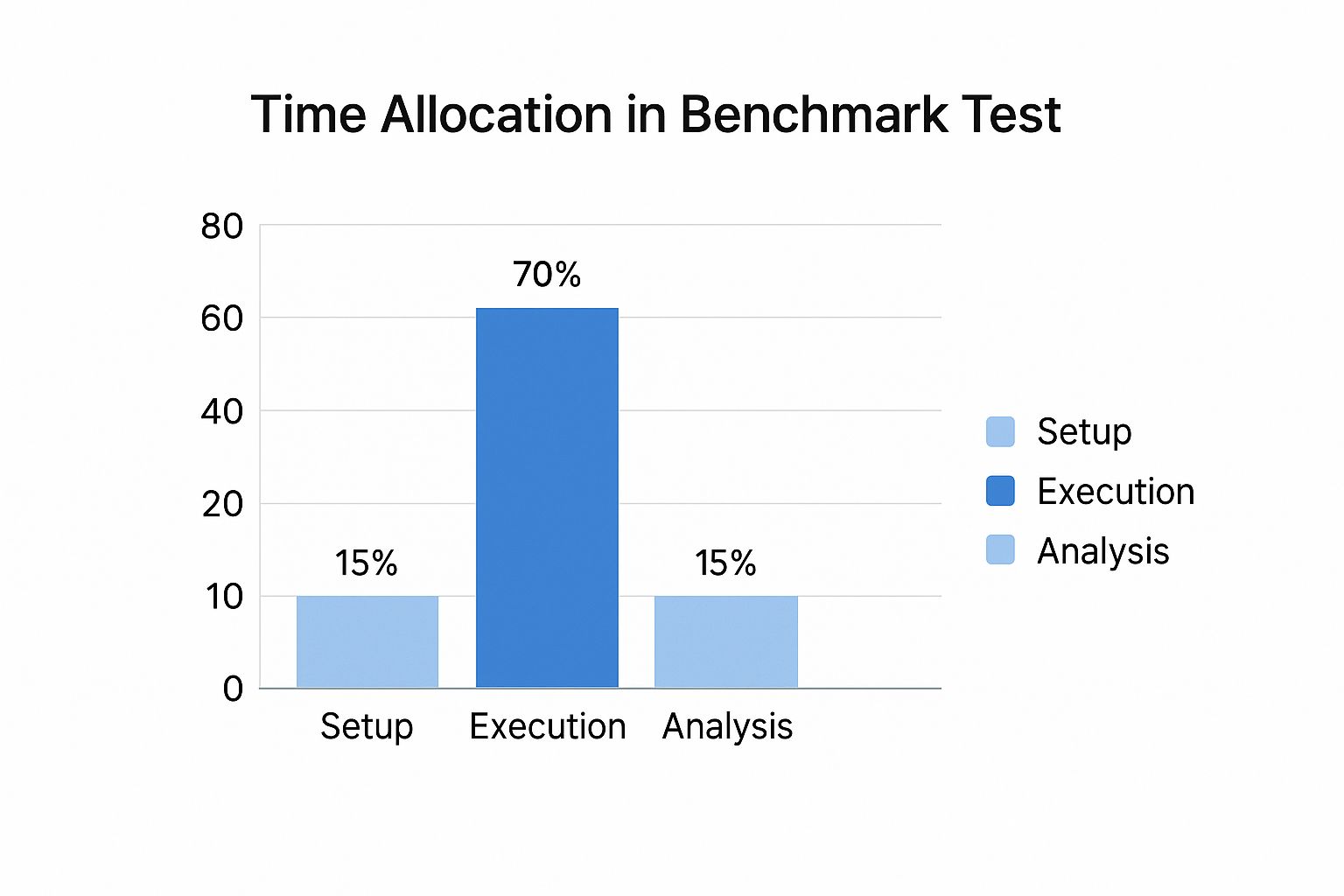
As the data shows, the execution phase takes up the most time, which really highlights how important it is to have a well-defined test environment and a solid methodology. While each test type serves a unique purpose, they are often used together to build a complete picture of your application’s performance.
For a deeper dive, check out our comprehensive guide comparing load testing vs. stress testing.
Benchmark vs Stress vs Load Testing Explained
To put it all together, here’s a simple table that breaks down the goals and questions answered by each performance test.
| Testing Type | Primary Goal | Typical Load | Question It Answers |
|---|---|---|---|
| Benchmark Test | To measure performance against a fixed baseline or standard. | A specific, consistent, and repeatable load. | ”How does our performance compare to our last version or our top competitor?” |
| Load Test | To verify performance under expected peak user conditions. | Simulates realistic, heavy user traffic. | ”Can our system handle our busiest day of the year without slowing down?” |
| Stress Test | To find the system’s breaking point and observe its recovery. | An extreme load that intentionally pushes the system to failure. | ”At what point will our application crash, and how does it behave when it does?” |
Each test gives you a different piece of the puzzle, helping you understand not just how your system works now, but how it will hold up when things get tough.
How to Run a Benchmark Test That Actually Gets Results

Running a benchmark test isn’t about hitting “start” and hoping for the best. To get real answers, you need a plan. Without one, you’re just collecting noisy, unreliable data that can point you in the completely wrong direction.
Think of it like a science experiment. You wouldn’t just throw chemicals together and see what happens. You’d start with a clear hypothesis, control your variables, and document everything. The same discipline applies here, and it’s what turns interesting numbers into trustworthy results.
Let’s walk through the steps to run a benchmark test that gives you genuine insight into your system’s performance.
Step 1: Define Your Objectives and Scope
Before you touch a single line of code, you have to answer one critical question: “What am I trying to learn?” A vague goal like “testing performance” is a surefire way to get useless results. Your objectives need to be specific, measurable, and tied to a real business or technical outcome.
For example, are you trying to confirm a new database version can handle queries 20% faster? Or maybe you need to prove a recent refactor didn’t push memory usage over 500MB under peak load. These kinds of clear goals will guide every single decision you make from here on out.
Defining your scope is just as crucial. Pinpoint exactly which parts of the system are being tested and—just as importantly—which are not. This focus prevents “scope creep” and keeps your test laser-focused on answering your most important questions.
Step 2: Establish a Reliable Baseline
A benchmark without a baseline is just a number floating in space. Your baseline is the “before” picture—it’s the initial performance measurement that all future results get compared against. It’s the stake in the ground that tells you if you’re actually improving things or making them worse.
You’ll want to establish this baseline on a stable, known version of your application running in a controlled environment. Make sure to capture all the key metrics you defined in the last step, like response time, throughput, and CPU utilization.
A baseline isn’t just a single number; it’s a comprehensive performance snapshot. Document it thoroughly, including the exact hardware, software versions, and test configuration used to generate it. This rigor is what makes your comparisons valid later on.
Step 3: Execute the Test and Analyze the Results
With your objectives set and your baseline recorded, it’s time to run the test. The name of the game here is consistency. Run the test under the exact same conditions as your baseline, changing only the one variable you want to measure, like that new code release or configuration tweak.
Once the test finishes, the real work begins. Your job is to turn all that raw data into a story. Start by putting the new results side-by-side with your baseline.
- Analyze the Metrics: Did response time get better or worse? By how much? Did resource usage spike in a way you didn’t expect?
- Identify Anomalies: Hunt for outliers or weird patterns in the data. A sudden nosedive in throughput or a jump in errors could point to a serious bottleneck.
- Draw Conclusions: Finally, tie the data back to your original goals. Did you actually hit that 20% performance gain you were aiming for?
Your final report should be clear and to the point, highlighting the key findings and giving data-backed recommendations. This structured approach is what transforms a simple test into a powerful tool for making smart, strategic decisions.
Best Practices for Trustworthy Benchmarking
Anyone can run a benchmark test. But getting data you can actually trust? That’s what separates amateur efforts from professional analysis.
Without a disciplined approach, you’re just guessing. You risk making critical decisions based on noisy, misleading results. Following a few core best practices is the only way to ensure your findings are accurate, repeatable, and genuinely useful.
The single most important rule is to isolate your test environment. Think of it like a soundproof room for your application. Running benchmarks on a machine that’s also juggling production traffic, background updates, or even your own development work is a recipe for disaster.
Those other processes eat up CPU and memory, creating unpredictable interference. You’ll never know if a performance dip came from your code or a random antivirus scan. A dedicated, clean environment isn’t a nice-to-have; it’s non-negotiable for reliable data.
Ensuring Consistency and Clarity
Once your environment is locked down, the next focus is repeatability. A trustworthy benchmark should give you nearly identical results every single time you run it under the same conditions.
To get there, you have to run each test multiple times—at least three to five is a good starting point. A single run can easily be an outlier, but averaging the results smooths out minor blips and reveals the true performance profile. If your results are all over the place between runs, that’s a huge red flag that your environment isn’t as controlled as you think.
The whole point of a benchmark is to create a stable point of reference. If that point moves every time you measure it, it’s not a benchmark—it’s just noise.
Another critical discipline is to change only one variable at a time. It’s tempting to do a bunch of optimizations at once, but it’s a terrible idea for testing.
If you update your database, refactor an API, and tweak a server setting all at once, you’ll have no clue which change actually made a difference. By testing one modification at a time, you can precisely attribute improvements—or regressions—to a specific cause. This methodical process is the key to accurately identifying bottlenecks and proving your optimizations work.
Common Benchmark Testing Questions Answered
Even with a good grasp of the basics, some practical questions always pop up when you start running benchmarks. Let’s tackle a few of the most common ones to help you get started on the right foot.
How Often Should You Run Benchmark Tests?
There isn’t a single magic number here. The best rule of thumb is to run a benchmark test whenever something significant changes. This could be a new code deployment, a hardware upgrade, or even a simple configuration tweak.
For a truly proactive approach, you should bake benchmarking right into your CI/CD pipeline. This catches performance regressions the moment they’re introduced. It’s also smart to run scheduled benchmarks—maybe once a quarter—to track performance over time and spot any slow, gradual degradation before it becomes a real problem.
What Is a Good Example of a Benchmark Test?
A classic example is testing a database’s query response time. Imagine you have a set of standard queries you run against your database. First, you run them on the current system and record how long each one takes to complete. That’s your baseline.
Now, let’s say you deploy a software update or change the database schema. You run the exact same queries under the exact same conditions. By comparing the new response times to your original baseline, you get a crystal-clear picture of whether the change helped, hurt, or had no impact on performance.
Can I Perform Benchmarking Without Specialized Tools?
Look, you can try to run simple benchmarks with a few manual scripts, but for any serious application, it’s a really bad idea. Specialized tools are built to simulate realistic user loads, gather precise metrics, and ensure your tests are repeatable.
Without the right tools, you lose the accuracy and consistency needed for meaningful results. You’re essentially guessing instead of measuring.
At GoReplay, we build tools that let you use real production traffic for truly accurate and reliable testing. See how you can run more effective benchmark tests by visiting https://goreplay.org.