
What Is Feature Flagging and How It Works

Feature flagging deploys both behaviors and chooses the path at runtime for a chosen audience, so a rollback is a flag change rather than a new release. The build is already in production, but only staff should reach the new checkout; the challenge is proving that both the new path and its fallback behave properly before more customers encounter them.
What Feature Flagging Means in a Release
Feature flagging keeps old and new behavior in the same deployment and chooses which one runs at runtime.
Think of a release engineer who has shipped a new checkout alongside the existing one. The application is live, but staff accounts alone are allowed to use the new flow. If it misbehaves, the engineer can direct those accounts back to the current checkout without building and deploying another version of the application.
A house-wiring analogy helps. The new circuit is installed, but a switch determines which circuit powers the room. Switching back doesn’t require tearing out the wiring and rebuilding the house. In an application, however, the switch controls running code, so the team must understand and test the behavior on both sides.
The four things a flag needs
To understand what is happening at runtime, you should be able to point to four things:
- The flag key is the stable name the application uses to ask for a decision, such as
new-checkout. - The evaluation context describes the request or caller. It might include a user ID, account, region, or app version.
- The variation is the value returned. It can be a simple on/off choice, or a named option such as
control,treatment A, ortreatment B. - The fallback is what the application does when it can’t get a usable flag decision. For a release flag, that should usually be the existing production behavior.
The fallback matters because a flag service can time out, return no value for a key, or be unavailable while an application starts. If the code treats those situations as permission to use the new path, a service problem can expose the very behavior the flag was meant to control. Make the safe outcome explicit in the code, rather than relying on an accidental default.
In 2026, the practical reason to separate deployment from exposure is straightforward: shipping code doesn’t have to mean showing the feature to everyone. A team can limit access while it checks how the new behavior works, then close that path quickly if it causes trouble. That control is only useful if the old path still works, too. A flag isn’t a config checkbox. It’s a decision between two live behaviors, each of which needs to be understood and proven.
The request flow below shows where that decision happens. The rollout table lays out common ways to choose who reaches each path.
How a Flag Chooses a Path
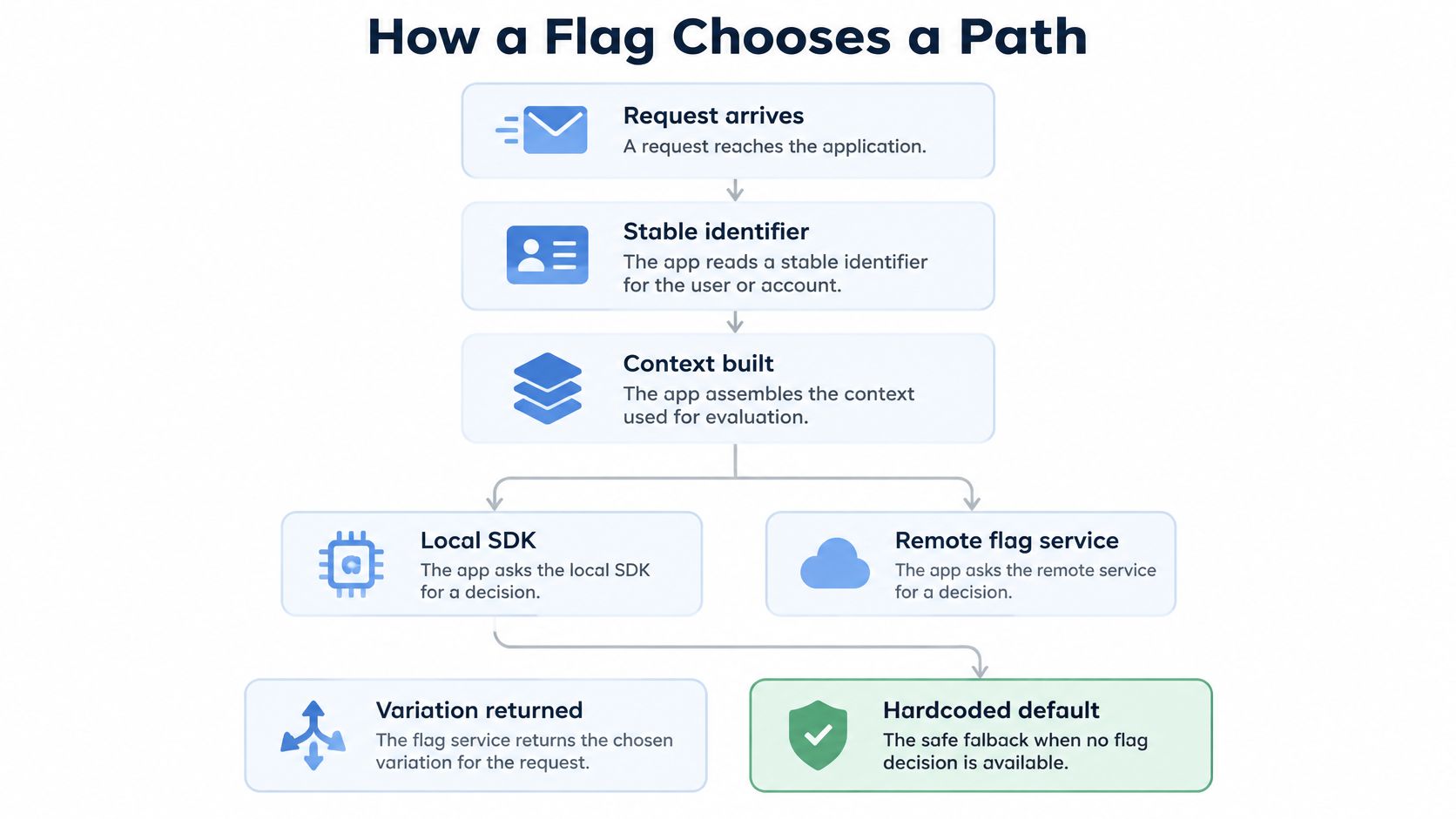
A flag evaluation happens as part of handling an application request. The application reads a stable identifier, assembles context, requests a decision, and follows the returned variation or its explicit safe default.
Follow one request
Suppose a user requests the checkout page. The application reads an identifier that remains stable for that user, then builds an evaluation context with relevant attributes such as account plan and region. It passes the flag key and context to its local SDK or the flag service.
The result might select the existing checkout, the new checkout, or a particular named variation. If evaluation times out, the key is missing, or a local cache has no usable value, the application should fall through to the hardcoded safe default. For a release, that is usually the current production behavior. Write this fallback directly into the calling code and test it as a real path, not as an unlikely edge case.
Keep assignments sticky. The same user should normally receive the same variation on later requests. If assignment changes between page loads, a person may see different checkouts during one session, and your measurements can mix behavior from different paths. If a percentage rollout uses a changing assignment seed, people can move between groups even though nothing about their account has changed.
The architecture is typically the application, a local SDK cache, and a remote flag service. The application asks the SDK for a value, and an evaluation timeout falls through to the code’s safe default.
A simplified code sketch shows the order of work:
user_id = read_stable_user_id(request)
context = { user_id, plan, region }

variation = flag_sdk.evaluate("new-checkout", context, default="control")

if variation == "treatment":
    return new_checkout(request)
else:
    return current_checkout(request)
Choose a rollout pattern deliberately
| Pattern | Who sees it | Typical start | Use when | Main risk |
|---|---|---|---|---|
| Kill switch | Everyone, or a troubled segment | On for all, off in seconds | A live defect or metric spike | Clients cache the old value and ignore the flip |
| Canary | Named cohort or one region | One internal team or a small regional slice | First exposure of a risky change | The cohort does not match real traffic |
| Percentage rollout | Random sticky slice of users | A small slice, then larger slices, then full exposure | Behavior should match production as exposure grows | Changing the seed reassigns users and breaks the read |
| User or account targeting | Named users, plans, or tenants | Staff, then beta accounts | Entitlements and early access | Flag rules drift away from billing rules |
| Ring or staged release | Successive environments or app versions | Development, staging, production staff, then customers | Mobile or regulated releases | Old app versions stay on the previous path |
The failure to watch for depends on the pattern. A canary cohort can look healthy if its members don’t use the slow dependency that affects customers. Percentage rollout results become hard to interpret if the assignment seed changes. Account targeting can create billing rules that disagree with the system of record. A remote change won’t help clients that keep using a cached value.
Choose the row that fits the release before writing the flag. That choice determines what context the application needs, how stable assignment must be, and what you’ll watch before widening exposure.
Benefits and the Risks That Linger
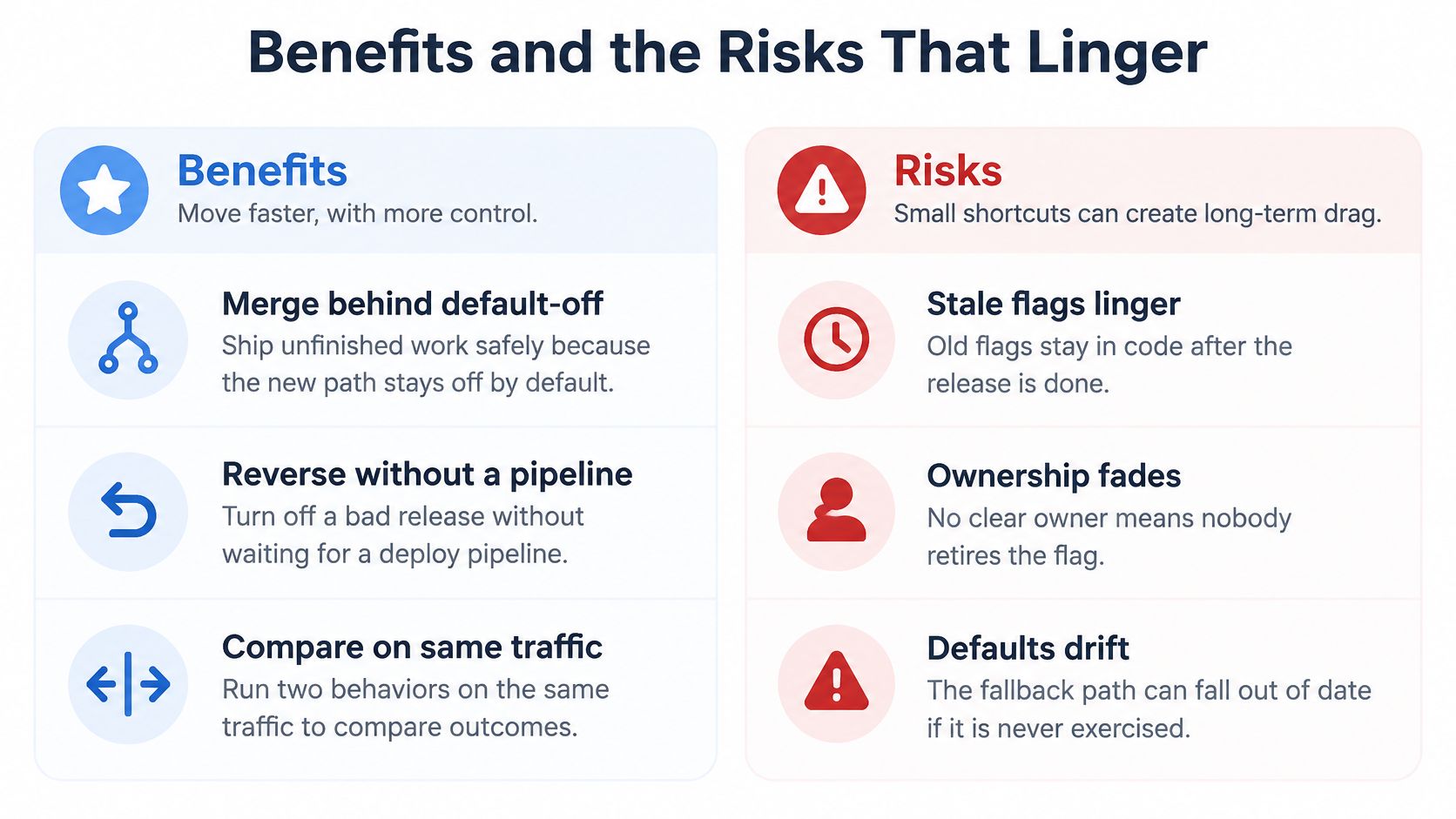
A feature flag can let a team merge unfinished work behind a default-off path, turn off a problematic release without waiting for a deployment, or compare two behaviors against the same live traffic. Each gain comes with a cost that can cancel it if the team treats the flag as temporary plumbing rather than working code.
What the control gives you
A default-off flag lets engineers merge related work without exposing an unfinished path to customers. It can also make a bad release easier to contain: the release engineer changes the flag decision instead of waiting for a new build. And when both behaviors are available on the same deployment, a team can compare how they handle comparable traffic.
Those controls don’t guarantee a safe release. The changed path might fail only under a request the internal team doesn’t make, or when a dependency is slow. The risk therefore depends partly on the audience and strategy the team chose, and partly on whether its checks exercise the traffic and conditions that matter.
Flags also multiply the behavior the team must maintain. A boolean can look small in a code review, but once the old and new branches have different assumptions, both are live paths that need tests and clear owners. If a temporary flag remains long after the rollout, new engineers may have to reason about an obsolete branch alongside the supported behavior.
A kill switch has a related limitation: clients may cache its value. A browser, mobile app, or edge process can keep using an old decision after the team changes the remote setting. Know where evaluation occurs and how clients refresh their values before assuming a flag change will immediately affect every request.
What makes the signals unreliable
An internal group may not behave like customers. A canary can look healthy if its members never exercise a slow integration, or if it doesn’t include the account types that use a different billing route. Measure relevant user and business outcomes as well as technical errors, and choose a cohort that can reveal the behavior you need to assess.
Don’t let multiple controls make the results ambiguous. If a rollout flag and a separate experiment both change the same screen, a change in conversion won’t tell you which decision caused it. Keep release control distinct from experiment measurement, or make the relationship between them explicit.
Evaluation context creates a privacy responsibility, too. Include only the attributes required to make the decision, such as a stable identifier or a plan and region when those are necessary. Don’t send raw emails, payment fields, or secrets through a flag system. Logs and dashboards can be accessible to more people than the application database that holds sensitive data.
Practical rule: Give every flag an owner and an expiry when you create it. After rollout, delete the flag and old branch once the new path is fully exposed and the old path has no callers.
Three Releases That Show Flags in Use
A payments team ships a new authorization path alongside its current one, with the new path off by default. Staff accounts get access first; the team then opens a small regional canary and checks status codes, latency, and completed checkouts. A rise in authorization errors or a slowdown that affects checkout triggers the kill switch. The flag controls the audience; the team doesn’t need to make a second deployment just to stop the new path.

For a release engineer comparing a canary rollout with other approaches, this guide to canary deployment strategy covers the pattern in more detail.
A SaaS team gives selected enterprise tenants a multivariate editor flag. Its variations represent the current editor, a beta editor, and a forced fallback to the current behavior. The team targets named tenants rather than combining plan eligibility with a random rollout, then watches error responses, response time, and successful saves. If the beta editor begins failing to save work, the team directs those tenants back to the current editor.
A mobile team releases offline sync through successive rings. It enables the path in staging, then makes it available to compatible production app versions while older binaries remain on the existing behavior. The team tracks sync failures, response status, and completed syncs. A rise in failed syncs or evidence that a compatible client cannot parse the payload is a reason to halt exposure and switch off the new behavior for that group.
Each story depends on observing requests that exercise the path. A flag can choose a behavior for existing traffic, but it can’t create traffic for a brand-new endpoint. Scripted tests still need to send requests to an endpoint that real users don’t call yet.
To see how captured HTTP traffic can support a release test, watch this overview.
How to Build Test and Widen a Flagged Path
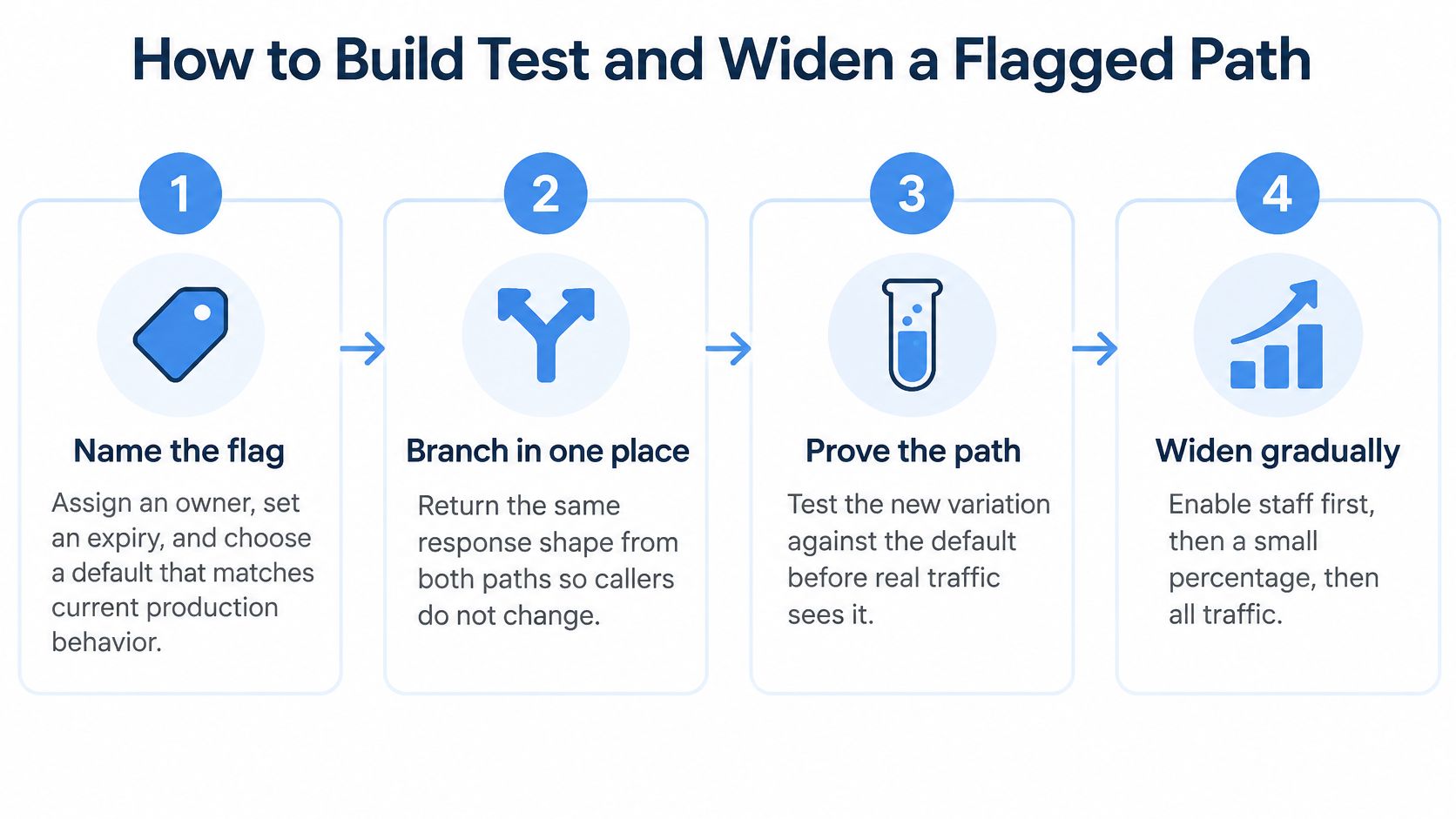
A flagged release carries two live behaviors inside one binary, and each one has to prove itself against production-like traffic before the audience grows. Build so the existing behavior stays reachable, test the decision plus both resulting paths, then widen in slices. Replayed HTTP requests surface differences a unit test misses, because they carry request shapes you never wrote. Replay earns that trust only when its destination and side effects are controlled.
-
Name the flag and its responsibility. Use a key that describes the feature and its release purpose. Assign a person or team as owner, set an expiry for a temporary rollout flag, and choose the existing production behavior as the default. A default that accidentally enables the new path turns an evaluation failure into an uncontrolled release.
-
Branch in one place. Put the decision where the application can choose between the two behaviors cleanly. Keep the response contract consistent: callers should receive the same general response shape whether the old or new implementation handles the request. Record which variation ran, but don’t log secrets or sensitive values from the request.
-
Test each decision outcome. Exercise the flag-off path, the flag-on path, and a failure to evaluate the flag. The failure case should behave like flag off. Confirm that the application still handles a missing key, timeout, or unavailable evaluation without exposing the new behavior.
-
Capture representative HTTP after TLS termination. Replay needs readable HTTP requests, so capture plaintext after the point where TLS has been terminated. Filter the capture to the routes that the flag changes, and keep a sample with the request details those routes need. Don’t assume that every captured request is appropriate for replay.
-
Make replay safe before sending requests. Remove unsuitable requests, then rewrite the sample so it targets an isolated test environment with controlled external side effects. In particular, prevent replay from charging a payment method, sending real email, or firing live webhooks. The patch-testing guide walks through testing application changes against captured traffic.
-
Replay both variations and inspect differences. Use GoReplay to run a filtered HTTP sample against the test environment once with the flag forced off and once with it forced on. Compare status codes, response payloads, and latency. Keep differences that you intended, such as a changed response body, and investigate differences that indicate errors, missing fields, or a slower dependency.
GoReplay’s debugging and reproduction feature lets users inspect a captured request, replay a filtered sample, and compare the target response with the expected behavior. Replayed requests carry the session identifiers that were captured with them, so the test environment needs those identifiers to still be valid. For a wider check, GoReplay can replay a captured HTTP workload at a chosen speed against a test environment, then measure latency, errors, and resource limits. That load test answers a different question from comparing a particular request’s response.
-
Widen only when the checks pass. Confirm that the default still selects the old path, evaluation failure behaves like flag off, replay differences are intended, and the current audience shows no error or latency regression. If a check fails, hold the rollout where it is and fix the path before exposing it to more users. If it passes, move to the next planned slice, then repeat the same checks.
When a replay or rollout exposes a defect, investigate the conditions that make the new path look falsely safe. An unstable identifier can make a user switch variations. A new-path default can expose customers during a flag-service outage. A missed slow dependency can make your test cohort look healthier than production. Correct the relevant cause before widening.
Misconceptions That Break a Flag Rollout
A feature flag isn’t a replacement for the deployment pipeline. The same binary contains both paths, so it still needs to pass build and health checks. If the build is faulty, changing a flag can’t repair the application itself; the team may need to roll back the deployment as code.
A rollout flag also isn’t an A/B test. The flag controls who reaches a behavior. An experiment needs a metric chosen in advance, a suitable method of assignment, and enough observations to interpret that metric. A small canary can reveal a clear technical failure, but that doesn’t make it evidence that one checkout converts better than another.
More variations mean more obligations
A multivariate flag isn’t a boolean with extra decoration. If it can return control, treatment A, or treatment B, the application has three supported outcomes to handle. Use named variations when they describe different choices that a true-or-false value can’t express, and test each value that the application may receive.
Finally, a flag left behind after rollout isn’t harmless documentation. Once all callers should use the new path, remove the old branch and the key. Otherwise, the next engineer may treat the dead fork as supported behavior, preserve it in tests, or add new logic around it.
A flag earns its place while the team can still ship and support both behaviors, and while it gives the team a deliberate way to control exposure. When the old path is no longer needed, keeping it live in the code adds confusion rather than release safety.
GoReplay captures, filters, and replays HTTP traffic so you can compare a flagged path with its fallback against realistic requests in a test environment. Use it to inspect request-level differences or replay a workload while keeping external side effects controlled. Visit GoReplay to explore how it can fit into your release testing workflow.