
What Are Benchmark Tests? Key Insights & Benefits
So, what exactly is a benchmark test? Think of it as a standardized fitness test for your software or hardware. It’s a repeatable process designed to measure and compare performance, giving you objective data instead of just a gut feeling.
Understanding Benchmark Tests and Their Purpose

Let’s use an analogy. When you shop for a new car, you don’t just take the salesperson’s word on its fuel efficiency. You look at the official miles-per-gallon (MPG) rating. That number comes from a standardized test run under controlled conditions, letting you make a fair, apples-to-apples comparison between models.
Benchmark tests do the exact same thing for technology. They take performance out of the fuzzy realm of “it feels faster” and into the world of hard, quantifiable data. By setting up a consistent baseline, you can objectively see how a system handles a specific task or workload. This is absolutely fundamental for making smart decisions.
Why a Standardized Baseline Matters
Without a standard, comparing performance is a lost cause. It’s like trying to figure out who the fastest runner is without agreeing on the race distance or even using a stopwatch. A benchmark creates that controlled environment, making sure everything is measured against the same yardstick.
This baseline becomes your single source of truth. After you push a software update, you can run the same benchmark to see if performance got better, worse, or stayed the same. This is crucial for catching performance regressions—those sneaky little bugs that slow things down. A tiny code change might accidentally cripple a key feature, and benchmarking is how you spot it fast.
A benchmark isn’t just about finding the fastest system. It’s about creating a reliable, repeatable standard of measurement. It’s the scientific method applied to performance, replacing guesswork with evidence.
The Core Objectives of Benchmarking
Ultimately, benchmark testing isn’t just some technical box-checking exercise. It’s a strategic activity that supports key business and development goals, driving continuous improvement and helping you make informed decisions.
The table below breaks down the primary goals of benchmarking, showing how it moves from a simple test to a powerful business tool.
| Objective | Description | Example Outcome |
|---|---|---|
| Establish a Performance Baseline | Create a clear, data-backed starting point for all future performance analysis. It’s the “before” picture for every change. | ”Our login API responds in 200ms on average under the current production load.” |
| Compare Components or Systems | Objectively evaluate different options, like choosing a new cloud server, database, or even a CPU for a product line. | ”Server option B handles 30% more requests per second than option A for the same cost.” |
| Identify Performance Bottlenecks | Pinpoint the specific parts of a system causing slowdowns, so developers can focus their efforts where it matters most. | ”The image processing module is taking 80% of the total request time; we need to optimize it.” |
| Validate Changes and Upgrades | Quantify the impact of new hardware, software updates, or configuration tweaks to confirm they actually worked. | ”The latest database optimization reduced query latency by 50% across the board.” |
By systematically applying these objectives, you turn performance management from a reactive fire-drill into a proactive, data-driven discipline.
The Evolution of Standardized Performance Measurement
To really get what benchmark tests are all about today, it helps to look back at where they came from. In the early days of computing, performance was a much simpler game. Machines ran straightforward calculations, and timing them was pretty easy. It was all about raw processing power.
But as technology exploded, the hardware scene turned into a “wild west” of competing claims. Every manufacturer shouted that its systems were the fastest, but with no common yardstick, these claims were just noise. It was like every carmaker inventing their own bizarre way to measure fuel efficiency—the numbers were totally meaningless for comparing one car to another.
This chaos created a massive need for a neutral, standardized way to measure performance.
The Rise of Standardized Testing
While the idea of benchmarking has been around since the 1960s, a huge moment came in 1988 with the founding of the Standard Performance Evaluation Corporation (SPEC). This non-profit brought together rival hardware vendors to create fair and realistic tests. What started with a handful of members ballooned into a global authority, growing to 125 members across 22 countries by 2018. That shows you just how committed the industry was to getting objective measurement right.
This infographic captures the journey from simple math problems to the complex, standardized benchmarks we rely on today.
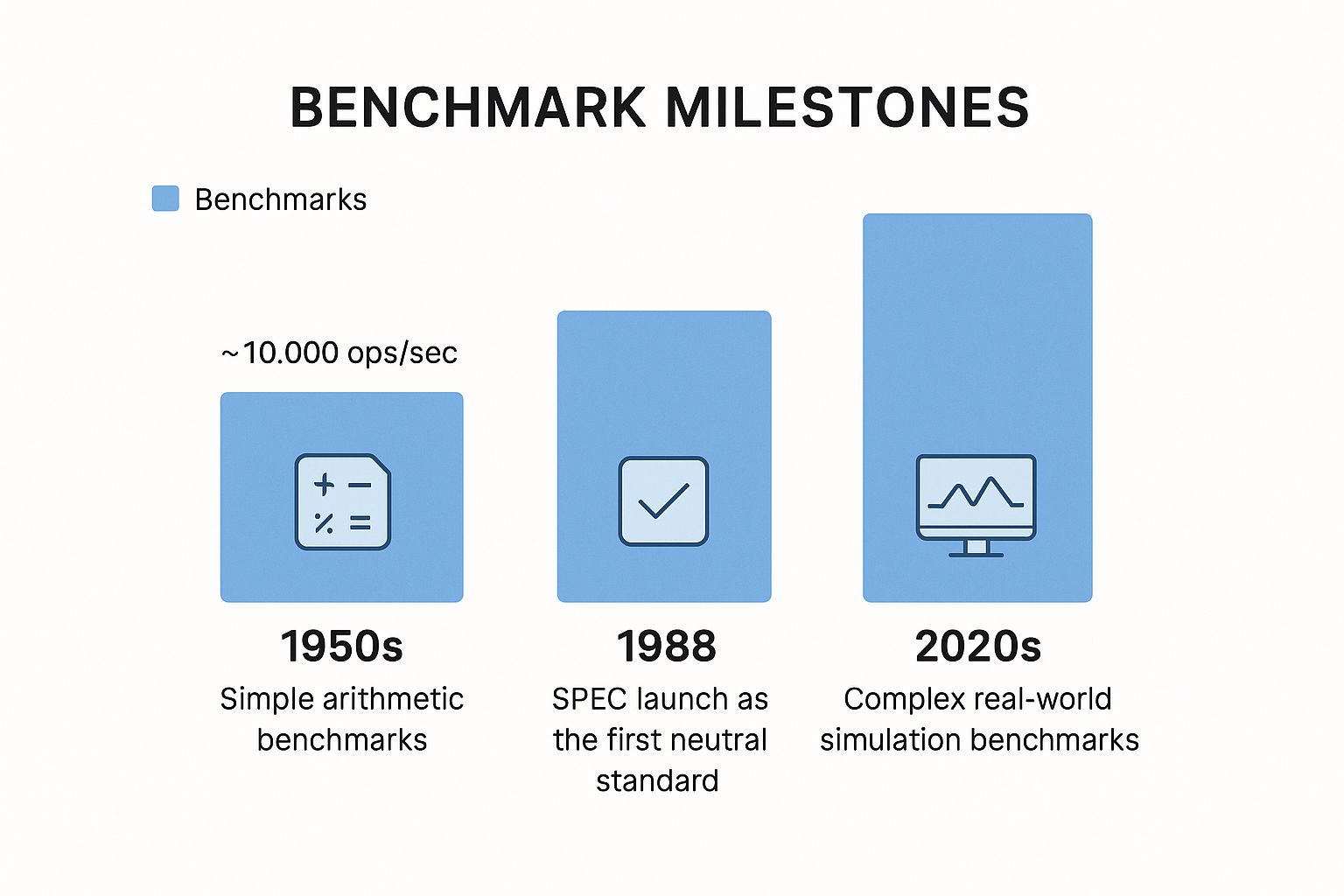
As you can see, performance measurement has matured from just counting basic operations per second to simulating intricate, real-world workloads. It’s a direct reflection of how much more complex our technology has become.
From Simple Math to Real-World Simulations
The creation of groups like SPEC signaled a fundamental shift in thinking. The industry moved away from measuring isolated, synthetic tasks and started evaluating performance based on how systems handled complex, real-world applications. This was a critical change because it painted a much more accurate picture of how a system would actually perform for a person doing real work.
Early benchmarks were like timing a sprinter in a 100-meter dash—a great measure of raw speed. Modern benchmarks are more like a decathlon, testing a system’s strength, endurance, and versatility across a wide range of realistic challenges.
Instead of just crunching numbers, new benchmarks began to simulate tasks that people and businesses actually cared about, like:
- Scientific computing: Running complex physics simulations or weather models.
- Graphics rendering: Measuring how fast a system could generate detailed 3D images.
- Web server performance: Gauging how many concurrent users a server could handle before it buckled.
This journey from simple calculations to sophisticated, standardized simulations is the key to understanding what benchmark tests are at their core. They aren’t just about speed; they’re about creating a trusted, transparent, and fair standard for measuring technological progress. This foundation paved the way for the diverse benchmarks we depend on today to make smart decisions, drive innovation, and build quality software.
Key Types of Benchmark Tests Explained
 Once you’ve bought into the need for a standardized baseline, you quickly realize not all benchmark tests are created equal. It’s a bit like an athlete who excels at sprinting but struggles with a marathon—different tests are built to measure entirely different kinds of performance.
Picking the right one is absolutely critical. Otherwise, you’re just collecting numbers that don’t mean anything for your actual goals.
Broadly speaking, benchmark tests fall into two main camps: synthetic benchmarks and application benchmarks. Each has a distinct job, and knowing which is which is fundamental to a solid testing strategy. Let’s break down what makes them tick.
Synthetic Benchmarks: Raw Power Unleashed
Imagine taking a brand-new sports car to a closed track. You put the pedal to the floor and see how fast it can go in a straight line. No traffic, no stoplights, no turns. You’re isolating a single variable to measure one thing and one thing only: the engine’s raw, unfiltered power.
That’s a synthetic benchmark in a nutshell. It’s a purpose-built program designed to push a single component—like a CPU, GPU, or hard drive—to its absolute theoretical limit. It doesn’t pretend to simulate a real-world task. Instead, it runs a series of standardized, artificial operations to spit out a score.
These scores are perfect for making direct, apples-to-apples hardware comparisons. For instance, a CPU benchmark might crank through millions of complex math problems to gauge its processing speed. The result is a clean, simple number that tells you exactly how one chip stacks up against another in pure computational muscle.
Application Benchmarks: Performance in the Real World
Now, let’s take that same sports car off the track and put it through a daily commute in a busy city. Suddenly, top speed isn’t the only thing that matters. You’re now evaluating its acceleration, braking, handling in traffic, and even fuel efficiency. This is a much more holistic test of how the car actually performs in a real-life scenario.
This is the whole idea behind application benchmarks, which you’ll also hear called real-world benchmarks. Instead of running artificial routines, these tests use actual software to measure how a system handles common, everyday operations.
A few practical examples make this clear:
- Video Encoding: Timing how long it takes a computer to convert a massive video file from one format to another.
- Web Browsing: Simulating a user juggling multiple websites, loading complex pages, and running web apps.
- Gaming Performance: Firing up a specific video game to measure its average frames per second (FPS) on a particular hardware setup.
Application benchmarks are like a decathlon for your system. They don’t just test one muscle; they test how well all the components work together to complete a complex, realistic task, giving you a much truer sense of overall performance.
Comparing Synthetic and Application Tests
Both test types have their place, but they solve very different problems. One is for drilling down into a single component, while the other is for evaluating the complete user experience. Understanding where each shines helps you choose the right tool for the job.
Here’s a quick table to break down the key differences between these two approaches.
Synthetic vs Application Benchmarks
| Feature | Synthetic Benchmarks | Application Benchmarks |
|---|---|---|
| Purpose | Measure the maximum theoretical performance of a single component (e.g., CPU, GPU). | Measure how well a complete system performs real-world tasks using actual software. |
| Analogy | A sprinter’s 100-meter dash—pure, isolated speed measurement. | A full day of work—a mix of tasks that test overall capability and endurance. |
| Use Case | Comparing the raw power of two different CPUs or graphics cards head-to-head. | Deciding which of two laptops will be better for your daily video editing workflow. |
| Result | An abstract score (e.g., points, GFLOPS) that is easy to compare. | A tangible metric (e.g., time to complete, frames per second) tied to a specific task. |
At the end of the day, you often need both to get the full picture. Synthetic tests help you pick the best individual parts, while application tests confirm that those parts play well together to deliver a smooth and responsive experience where it actually counts.
How GoReplay Changes Benchmark Testing
Traditional benchmark tests have a huge blind spot. The synthetic traffic they generate is clean, predictable, and orderly—it follows a script, sticks to a perfect path, and looks great on paper. But your real users are anything but predictable.
Real-world traffic is a chaotic mix of fast clicks, slow connections, abandoned carts, and completely unexpected API calls. Synthetic scripts almost always fail to replicate this messy reality, leaving critical performance gaps wide open. A system that aces a scripted benchmark might still crumble under the very real pressure of a genuine user base.
What if you could stop guessing and benchmark your system against the chaos of its own past? That’s the core idea behind traffic replay, and it’s where a tool like GoReplay completely changes the game.
Moving Beyond Synthetic Scripts
Instead of generating artificial traffic, GoReplay captures real HTTP traffic directly from your production environment. It records every user request exactly as it happened—preserving the original timing, headers, and payloads. This recorded traffic becomes a high-fidelity blueprint of actual user behavior.
You can then “replay” this captured traffic against a test or staging environment. This process, often called traffic shadowing, lets you hit your system with a realistic load that mirrors your production workload down to the last detail. It’s like having a ghost of your entire user base test your new code before it ever goes live.
By using real production traffic, you’re no longer guessing what user behavior looks like—you’re benchmarking against the genuine article. This approach uncovers edge cases and bottlenecks that synthetic tests would never find.
This method gives you a baseline that you can actually trust. A performance improvement isn’t just a theory; it’s validated against the very same conditions it will face in production.
The Power of High-Fidelity Testing
Using captured traffic for benchmark tests provides a massive advantage that scripted approaches simply can’t touch. It transforms your testing from a simulation into a true dress rehearsal.
The benefits are immediate:
- Uncover Hidden Bottlenecks: Real traffic patterns stress your system in unexpected ways, revealing database query inefficiencies or API rate limits that only show up under a genuine load.
- De-risk Deployments: Before you push a new feature or infrastructure change, you can replay production traffic against it to see exactly how it will perform. This drastically reduces the risk of post-launch failures.
- Ensure Accurate Baselines: Performance metrics derived from real traffic are trustworthy. You can confidently say a change improved response times by 15% because the test load was identical to your production load.
Ultimately, this moves performance testing from a theoretical exercise to a practical, risk-management tool. To go deeper, you can explore how traffic replay improves load testing accuracy and see the impact it has on system reliability.
Building Resilient Systems
When you integrate traffic replay into your development lifecycle, you create a powerful feedback loop. Developers get immediate, realistic performance data, allowing them to optimize code based on how it will actually be used—not how a script thinks it will be. This is especially vital for complex microservices architectures where dependencies are intricate and unpredictable.
GoReplay helps teams build truly resilient systems. It shifts the focus from passing a sterile, predictable test to surviving the messy, chaotic reality of production. For any organization serious about performance and stability, testing against real user behavior is no longer a nice-to-have—it’s an operational necessity.
Benchmark, Stress, and Load Tests Aren’t the Same Thing

In the world of performance testing, it’s easy to get your terms tangled. Benchmark, load, and stress tests often get thrown around interchangeably, but they answer very different questions. Confusing them can lead to misguided efforts and a false sense of security about your system’s stability.
Let’s clear things up with an analogy. Imagine you’re evaluating a new delivery truck. Each test has a specific job, just like you’d put the truck through different trials before sending it out on the road.
Benchmark Testing: Checking the Spec Sheet
A benchmark test is like verifying the truck’s official manufacturer specs. The brochure says it gets 20 miles per gallon with a cargo capacity of 5,000 pounds. So, you take it to a controlled test track and run a standardized procedure to see if those numbers hold up.
The goal here is to establish a baseline. You’re not simulating a chaotic delivery day; you’re just measuring the truck’s fundamental capabilities under ideal, repeatable conditions. This gives you a clear, objective standard to compare against other trucks or future versions of the same model.
Load Testing: Simulating a Busy Day
Now for the real world. A load test is like sending that truck out on a typically busy Tuesday. You fill it with a normal amount of packages—say, 80% of its max capacity—and put it on a real delivery route to see how it handles a standard workload.
We’re no longer just checking the specs on a sheet. We’re seeing how it performs under normal, anticipated pressure. Does the engine temperature stay stable in traffic? How does fuel efficiency hold up? A load test confirms your system can comfortably handle its expected daily traffic without performance taking a nosedive. It answers the question, “Can we handle business as usual?”
A benchmark test shows what a system can do in a lab. A load test confirms what it will do under a normal, real-world workload. Both are essential, but they serve very different strategic purposes.
Stress Testing: Finding the Breaking Point
Finally, a stress test is all about finding the absolute limit. This is where you intentionally overload the truck. Forget the 5,000-pound limit; you’re stuffing it with 7,000 pounds of cargo and driving it up the steepest hill you can find.
The point isn’t to see if it performs well—you already know it won’t. The real goal is to see how it fails. Does the engine overheat and shut down gracefully, or do the brakes give out completely? Stress testing pushes a system beyond its operational capacity to identify its weakest link and understand what happens when things go wrong. This is how you build resilient systems that can handle unexpected traffic spikes without a catastrophic collapse.
Getting these distinctions right is the first step to a rock-solid performance strategy. To explore this further, check out our detailed guide on the differences between load tests and stress tests.
Putting a Benchmarking Strategy Into Action
Knowing what a benchmark is gets you started. But turning that knowledge into a powerful, repeatable strategy is what actually drives real improvement.
A haphazard approach to testing usually just gives you noisy, unreliable data that can send you chasing ghosts. A solid strategy, on the other hand, is all about building a disciplined process that delivers clear, actionable insights every single time. This is more than just running some software and checking the score—it requires careful planning, a controlled environment, and a crystal-clear idea of what you’re trying to achieve.
A well-designed strategy is what turns raw performance numbers into a roadmap for building faster, more reliable systems.
First Things First: Define Clear Goals and Success Metrics
Before you run a single test, you have to answer the most important question: What does success look like? Without a clear goal, a benchmark is just a number floating in a void. Your objectives need to be specific, measurable, and tied directly to a business or user outcome.
Are you trying to:
- Get API response times under 200ms to make the user experience feel snappier?
- Prove a new database instance can handle 50% more concurrent users than the old one?
- Make sure a recent code change didn’t bump up CPU usage by more than 5%?
Each of these gives you a clear pass/fail line. This focus keeps you from getting lost in a sea of metrics and ensures your testing efforts are actually pointed toward tangible improvements. Vague goals like “make it faster” are a recipe for confusion and wasted time.
The best benchmarking strategies don’t just measure technical stats; they measure progress toward a specific business goal. Your benchmark isn’t done until you know what action you’ll take based on the results.
Selecting the Right Tools for the Job
Once your goals are locked in, you need the right tools. If you’re just comparing raw hardware, a standard synthetic benchmark might be all you need. Simple enough.
But for complex software applications, you need a tool that can replicate real-world conditions with incredible accuracy. This is exactly where solutions like GoReplay come in. Instead of relying on artificial scripts that are just guessing at user behavior, GoReplay lets you capture and replay your actual production traffic.
This gives you a hyper-realistic baseline, ensuring your tests reflect how your system truly behaves under pressure. Using real traffic takes the guesswork out of the equation and validates performance against what’s genuinely happening in production.
Creating a Controlled Test Environment
One of the easiest ways to ruin a benchmark is to run it in an inconsistent environment. A background process firing up, a hiccup in the network, or even a slightly different hardware configuration can totally skew your results and render them worthless.
To get repeatable, trustworthy data, your test environment must be as controlled and isolated as possible.
Stick to these key principles for a reliable setup:
- Isolate the System: Make sure no other applications or processes are running on the machine you’re testing. They will compete for resources and contaminate your results.
- Use Identical Configurations: When comparing two systems, their hardware, software, and network settings must be exactly the same—except for the one variable you’re actually testing.
- Run Tests Multiple Times: Don’t just run it once. Always run your benchmark at least three to five times and take the average. This simple step helps smooth out random performance blips and gives you a much more stable, trustworthy score.
By following this framework—defining clear goals, choosing realistic tools, and maintaining a controlled environment—you can build a benchmarking strategy that consistently delivers valuable insights and drives meaningful performance gains.
Common Questions About Benchmark Tests
As you start digging into performance testing, a few questions always seem to pop up. Knowing the theory is one thing, but the practical side—how often to run tests, what to actually measure, and how to make sense of the results—is where the real value is. This section tackles some of the most common questions people have when they start building a real strategy around benchmark tests.
Getting these details right is the difference between collecting truly useful data and just creating noise. Let’s clear up a few key points so you can make sure your testing efforts actually count.
How Often Should You Run Benchmark Tests?
There’s no single magic number here, but the best rule of thumb is to tie your benchmarks to change. Any time you make a significant modification to your system, you should run a benchmark. This gives you a clean before-and-after picture, letting you see the precise impact of your work.
Key moments to run benchmarks include:
- After a software update or patch: Even small patches can have surprising performance consequences. A quick benchmark is the best way to confirm everything is still running as expected.
- Following a hardware upgrade: If you’ve just added more RAM or a faster CPU, benchmarking is how you prove you got your money’s worth in real-world gains.
- Before and after a code deployment: For most teams, this is the big one. Benchmarking a new feature is non-negotiable to ensure it doesn’t drag down the overall user experience.
Beyond these event-driven tests, it’s also smart to run benchmarks on a regular schedule, like monthly or quarterly. This proactive approach helps you catch slow, creeping performance degradation that you might otherwise miss until it becomes a five-alarm fire. And for teams doing CI/CD, the gold standard is integrating automated benchmark tests right into the pipeline. This automatically flags performance regressions long before they have a chance to affect a single user.
What Are Some Common Metrics Measured in Benchmark Tests?
The metrics you track will always depend on your specific goals, but a handful of key performance indicators (KPIs) are almost universally important. Think of them as the vital signs for your application’s health, giving you a complete picture of how it’s handling a workload.
A “good” benchmark score isn’t some universal number. It’s always relative to your baseline, your goals, and the experience you’re trying to deliver. The first step is always defining what “good” actually means for you.
Here are the vitals you should be watching:
- Throughput: This is all about how much work your system can get done in a set period. It’s usually measured in requests per second (RPS) or transactions per second (TPS).
- Response Time (Latency): This is the time it takes for the system to answer a request. Lower is almost always better, as this directly impacts how fast your application feels to a user.
- CPU and Memory Utilization: These metrics tell you how hard your hardware is working. If utilization is pegged at the max, it’s a strong sign your system is struggling to keep up.
- Disk I/O Speeds: For any application that reads or writes a lot of data, this is critical. It measures how quickly the system can pull information from its storage.
While these technical metrics are essential, the best benchmarks also tie into business-specific outcomes. For an e-commerce site, measuring “customer checkouts completed per minute” directly connects system performance to revenue, making the results a whole lot more meaningful to everyone.
Can Benchmark Results From Different Systems Be Compared Directly?
This is a huge point of confusion, so let’s be clear: you can only compare benchmark results directly if the testing conditions were absolutely identical. A valid comparison means using the exact same tool, the same configuration, the same workload, and the same environment.
Even a tiny difference can throw the whole comparison out the window. Comparing a benchmark score from a test run on a laptop over Wi-Fi to one run on a server with a hardwired connection is like comparing a car’s MPG on a flat highway to its MPG while driving up a mountain. The numbers aren’t comparable because the conditions are wildly different.
This is precisely why standardized benchmarks and controlled, isolated test environments are so critical. They strip away all the external variables, ensuring the only thing you’re actually measuring is the performance of the system itself. Without that discipline, you’re not making an objective, head-to-head comparison—you’re just looking at two unrelated numbers.
Ready to stop guessing and start benchmarking with real, high-fidelity traffic? GoReplay allows you to capture and replay your actual production workload, giving you the most accurate baseline possible. De-risk your deployments and find hidden bottlenecks by testing against reality, not a script. Discover a better way to ensure performance and stability by visiting https://goreplay.org.