
Virtual Paralegals: A Practical Guide for Modern Law Firms

Monday morning starts with three problems at once. A partner needs a discovery set organized before a client call, an associate is chasing missing intake details, and the firm’s calendar contains filing windows that nobody wants to trust to memory. The obvious answer is to add capacity. The dangerous answer is to give a remote worker broad system access and hope the workflow sorts itself out.
Virtual paralegals work best as supervised workflow components, not as cheaper substitutes for attorney judgment. A strong program assigns discrete tasks, limits access to the matter involved, records handoffs, and requires attorney approval before work reaches a client, opposing counsel, or court. That model applies whether the support comes from an employee, an independent contractor, or an AI-assisted tool.
The occupation behind the remote model is substantial. In May 2023, the United States had an estimated 354,890 paralegals and legal assistants, with a mean annual wage of $66,460 and a mean hourly wage of $31.95, according to the U.S. Bureau of Labor Statistics occupation data. BLS doesn’t separately classify “virtual paralegal,” so firms should treat the phrase as a delivery model rather than a distinct credential or regulated occupation.
Table of Contents
- What Virtual Paralegals Actually Do in a Modern Law Firm
- Human, Freelance, and AI-Driven Models Compared
- Core Tasks and the Risk Level Each One Carries
- Confidentiality, Compliance, and the Hidden Cost of Going Remote
- How LatHire Can Help
- A Hiring and Vetting Checklist for Virtual Paralegals
- Sample SOPs and Quick-Start Workflows
- Pricing Models and How to Budget Realistically
- Integration, Tools, and FAQs for Firms Going Live
What Virtual Paralegals Actually Do in a Modern Law Firm
A virtual paralegal is a legal-support professional or supervised technology workflow that performs defined work remotely. The useful question isn’t whether the person is sitting in the firm’s office. It’s whether the firm has assigned the task at the right risk level, provided appropriate access, and established a reviewable handoff.
Start with the work already piling up. A remote human paralegal might triage client emails, update a matter timeline, prepare a first-pass discovery index, coordinate signatures, or assemble a filing packet. A freelance paralegal may handle a defined project, work part-time, or support a firm from another jurisdiction. An AI-driven virtual paralegal can summarize documents, extract clauses, classify files, or draft a preliminary response, but only within a workflow that preserves the source material and routes the output to a responsible attorney.
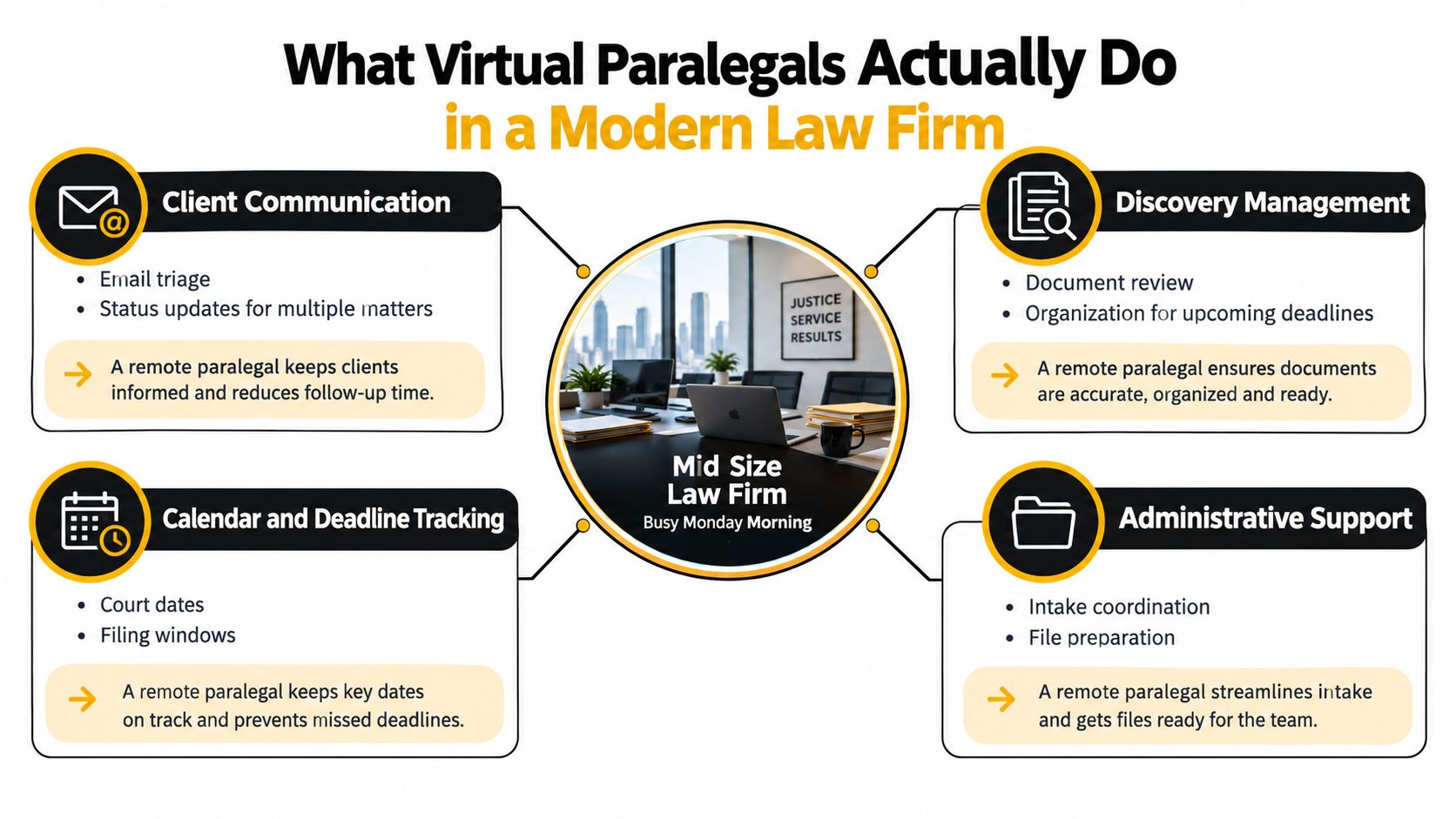
Three delivery models
Human virtual paralegals may be W-2 employees or agency-employed professionals working remotely. They usually provide the strongest continuity, institutional knowledge, and direct accountability. The trade-off is that the firm must manage hiring, onboarding, supervision, workload, and secure access.
Freelance virtual paralegals can provide useful flexibility for discovery surges, document-heavy transactions, or temporary coverage. They can also create more diligence work. The firm must verify identity, qualifications, confidentiality obligations, equipment security, location, subcontractor use, and limits on client-data access.
AI-assisted virtual paralegals are tools, not legal professionals. They can accelerate repeatable work, but their output may contain unsupported conclusions, incorrect summaries, or invented authorities. The American Bar Association’s Formal Opinion 512 requires lawyers using generative AI to understand its capabilities and limitations, independently verify outputs, and preserve duties involving competence, confidentiality, communication, candor, supervision, and reasonable fees, as summarized in this ABA Formal Opinion 512 resource.
Why the label matters
The model affects billing, supervision, confidentiality, and unauthorized-practice risk. A human paralegal may own a queue of approved administrative tasks. A contractor may require tighter matter-level restrictions. An AI tool should never receive unrestricted access just because it can process documents quickly.
The underlying labor market is large enough that remote delivery isn’t a niche workaround. It connects firms with an established legal-support workforce, while the technology layer can improve throughput when attorneys retain decision authority.
Treat “virtual paralegal” as an operating design decision. Define the task, identify the reviewer, restrict the data, preserve the work history, and specify what happens when the worker or tool encounters ambiguity.
Human, Freelance, and AI-Driven Models Compared
The right model depends less on novelty than on risk, continuity, and the shape of the workload. A litigation team with recurring discovery needs has a different requirement from a boutique handling occasional intake overflow. Don’t select a provider before deciding which work must remain under close human supervision.
| Model | Cost Posture | Supervision Burden | Scalability | Confidentiality Risk | Best Fit |
|---|---|---|---|---|---|
| Human employee or agency professional | Ongoing staffing commitment | Moderate, with clearer accountability | Scales through hiring and workload planning | Manageable with firm-controlled devices and access | Recurring matter support and long-term team capacity |
| Freelance contractor | Flexible project or part-time commitment | High unless scope and handoffs are explicit | Fast for defined surges | Higher if location, subcontractors, and systems are unclear | Temporary discovery, overflow, and specialized projects |
| AI-driven workflow | Tool and implementation commitment | High for legal judgment and output verification | High for repeatable, bounded tasks | High if prompts, histories, telemetry, or training reuse are uncontrolled | Summaries, extraction, classification, and first drafts under attorney review |
How to choose without chasing the lowest price
Choose a human model when the work involves context that accumulates across matters. A dedicated professional can learn a partner’s preferences, recognize recurring client issues, and escalate inconsistencies that a rigid workflow may miss.
Choose a freelance model when the assignment has a clear beginning and end. Discovery organization, exhibit preparation, and data cleanup can fit well if the contractor receives only the relevant matter and the firm documents the acceptance criteria.
Choose an AI-driven model only when the task can be tested against source documents and reviewed by someone qualified. Document summarization and clause extraction are reasonable pilots. Legal conclusions, settlement recommendations, and unsupervised client advice aren’t.
Selection rule: If the firm can’t name the reviewer, the permitted data set, and the escalation path, it isn’t ready to automate or outsource the task.
Don’t combine models casually. A contractor using an unapproved AI tool creates a compound risk, because the firm must evaluate both the human delegation and the technology’s data practices. Put approved tools in writing, prohibit personal accounts for client material, and require the worker to escalate any request that falls outside the assigned workflow.
Core Tasks and the Risk Level Each One Carries
Risk grading should happen at the task level, not the job-title level. A capable virtual paralegal may safely update a docket calendar and still require attorney review for a client-facing explanation of what that deadline means.
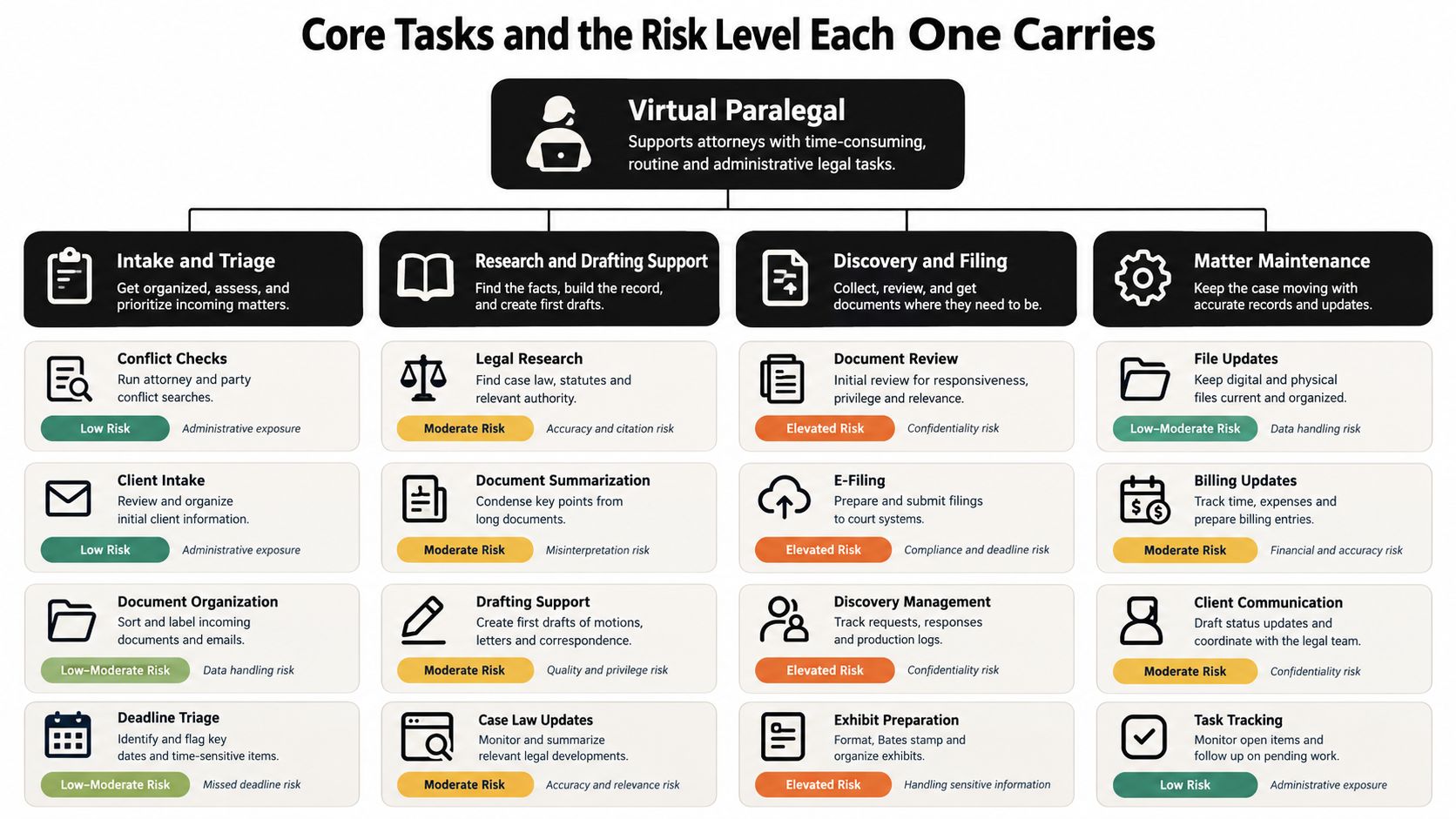
Low-risk administrative support
Low-risk work is structured, reversible, and unlikely to communicate legal judgment. Examples include:
- Calendar maintenance: Enter court dates, internal deadlines, and reminders from an attorney-approved source.
- Document organization: Apply naming conventions, folder rules, and metadata to files within an authorized matter.
- Intake completeness checks: Identify missing contact details, signed forms, or requested documents without advising the prospective client.
- Billing administration: Prepare time entries or flag missing descriptions for review, without deciding what a client should be charged.
The approval gate is operational. A supervising team member should confirm that the update matches the source and that no new legal interpretation has been introduced.
Medium-risk support
Medium-risk tasks affect matter strategy or create work product that may influence a legal decision. They include discovery batching, privilege-log preparation, chronology building, form preparation, document summaries, and research organization.
The virtual paralegal should preserve source references, assumptions, unresolved questions, and exception flags. An attorney or qualified reviewer then checks the output against the underlying material before it is used in a filing, advice, negotiation, or client communication.
BLS projected approximately 40,800 openings per year for paralegals and legal assistants, on average, from 2025 through 2035, while total employment was expected to show little or no change during that period, according to the BLS occupational outlook. That context supports using remote professionals for both additional capacity and replacement hiring, not treating them as disposable administrative labor.
High-risk work
High-risk tasks require attorney judgment or can create a direct representation problem. They include drafting legal advice, recommending settlement positions, selecting legal theories, communicating conclusions to clients, signing pleadings, and presenting work as counsel’s independent judgment.
A virtual paralegal can prepare a draft or organize the supporting facts. The attorney must decide what the facts mean, approve the language, and control the final communication.
Supervision principle: Delegate preparation, not legal judgment. Every high-risk output needs a named attorney, a visible review record, and an escalation route.
Confidentiality, Compliance, and the Hidden Cost of Going Remote
A remote paralegal can handle routine case support efficiently, yet one uncontrolled login or uploaded document can create a confidentiality problem, failed audit, emergency access review, or loss of client confidence. Treat confidentiality as a system-design requirement covering accounts, devices, vendors, prompts, logs, retention, and deletion, not as a clause in a contractor agreement.

The ABA states that lawyers must make reasonable efforts to prevent unauthorized disclosure or access to client information. Informed consent may also be required before representation-related information enters a self-learning generative-AI tool. Procurement should therefore examine data locations, retention and deletion procedures, incident notification, subprocessors, and whether customer data is used for model training.
Build access around least privilege
Give each virtual paralegal an individual identity, require multifactor authentication, and restrict access to the matters and folders assigned to that person. An intake workflow has no reason to expose the firm’s litigation archive. Use named accounts and attorney approval checkpoints so every handoff remains attributable.
Require encryption in transit and at rest, device-management controls, provider restrictions against training on customer data, documented retention limits, and immutable activity logs. Before data enters an AI tool, redact or tokenize personally identifiable and matter-sensitive information whenever the workflow permits it.
Software teams handling replay or test environments face the same exposure. Realistic traffic can improve testing, but legal inputs must be masked before entering QA or shared environments. Firms can review this guide to protect sensitive data in remote and shared workflows.
Audit the human and the vendor
For offshore or cross-border support, verify the worker’s location, systems used, subcontractor involvement, and applicable jurisdictional restrictions. Require written confidentiality commitments, approved devices or device controls, secure file transfer, access-revocation procedures, and documented deletion.
AI-assisted work needs a separate audit trail. Retain source documents, instructions, the model or tool version where available, generated output, exceptions, and attorney approval. The ABA guidance says lawyers must independently verify generative-AI outputs and cannot rely solely on a tool for work requiring professional judgment.
Price the workflow, not just the hourly rate. Include breach response, access recertification, cross-border transfer analysis, remediation, and attorney review time in the business case. Assign each task a risk grade, require attorney approval for high-risk outputs, and record every transfer of responsibility.
This three-minute walkthrough of secure remote workstation setup provides a practical discussion prompt for a partner meeting about device controls:
How LatHire Can Help
LatHire can be useful when a firm needs remote hiring infrastructure rather than a single freelancer found through a general marketplace. Its platform connects U.S. and Canadian companies with pre-vetted Latin American professionals across operations and other business functions, using skills evaluations, AI assessments, and human-led background checks. The company describes a talent pool of more than 800,000 candidates and offers support for HR, international payroll, benefits, and compliance.
That doesn’t remove the firm’s professional obligations. It may reduce recruiting friction, but the firm still owns task allocation, client confidentiality, attorney supervision, and approval of legal work.
Use a platform like LatHire when you need candidate screening, time-zone alignment, flexible engagement, and cross-border administration in one process. Its virtual paralegal hiring resource can help a firm assess the role before it grants system access.
Run the decision in this order
- Confirm qualifications: Match experience to the firm’s matter types and required software.
- Test the technical setup: Verify device security, MFA capability, reliable connectivity, and secure file handling.
- Check references: Ask how the candidate handled confidential material, escalations, deadlines, and attorney feedback.
- Use a pilot matter: Start with a bounded, noncritical workflow and defined acceptance criteria.
- Write the supervision agreement: Name the supervising attorney, permitted tasks, prohibited conduct, approval gates, and audit requirements.
LatHire is a stronger fit for firms that value managed recruitment and predictable administration. It isn’t a substitute for legal operations design. The firm’s written controls should remain specific enough to govern the engagement even if the staffing provider changes.
A Hiring and Vetting Checklist for Virtual Paralegals
A reliable hire starts with a narrow role definition. “Help with litigation” is not a role. “Prepare a first-pass document index for matters assigned by the supervising attorney, follow the firm’s naming convention, and make no privilege determination without review” is specific enough to manage.
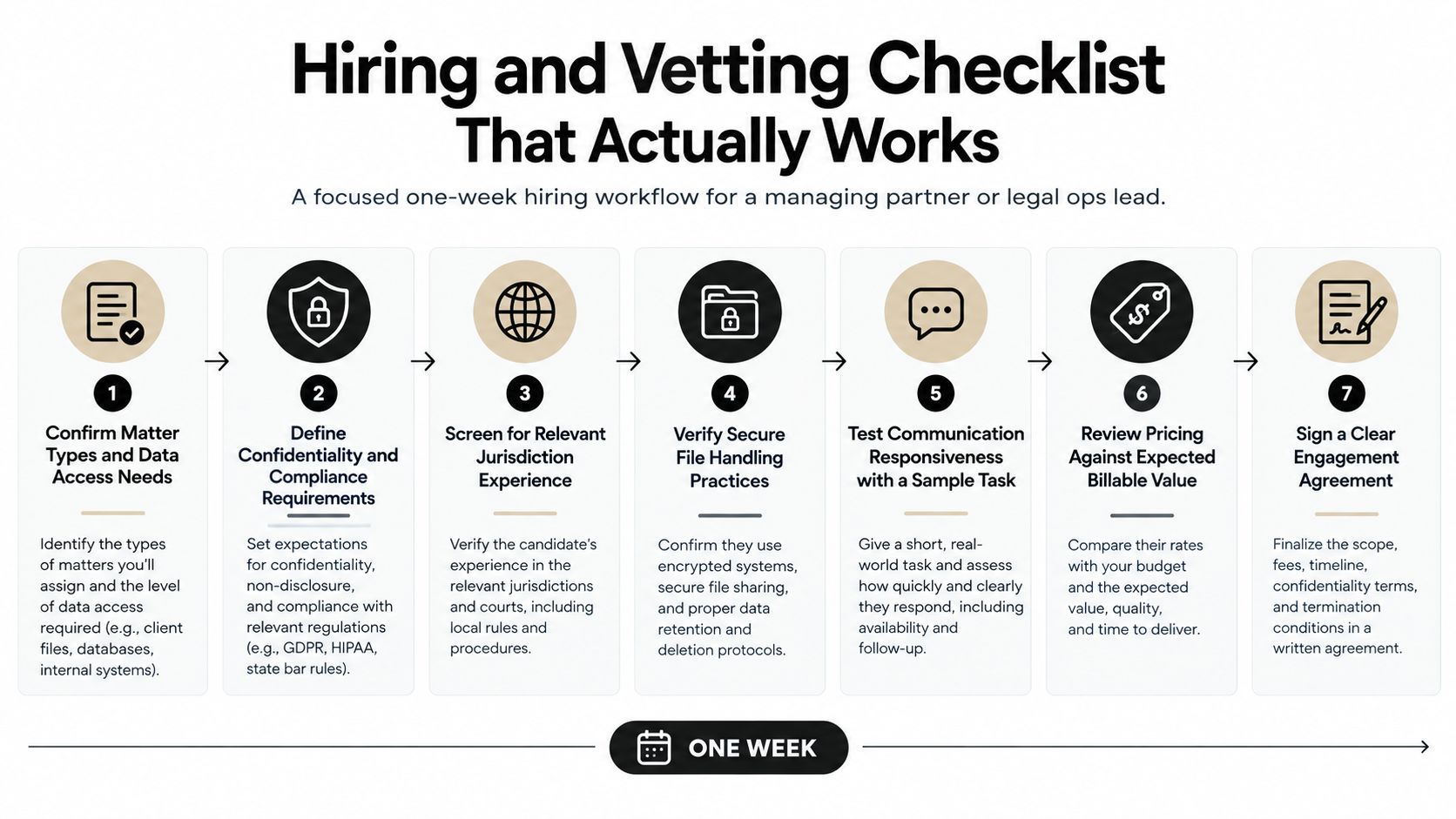
Define the engagement
Document the matter types, expected workload, working hours, required jurisdictions, systems, data categories, and success criteria. Separate legal-support responsibilities from administrative work. List prohibited tasks before interviews begin.
The written engagement should identify confidentiality obligations, approved tools, data-handling rules, subcontractor restrictions, access termination, work-product ownership, and the supervising attorney. Add explicit clauses covering the worker’s competence representation, confidentiality duties, and named approval authority. State that the worker cannot sign pleadings, provide unsupervised legal advice, hold themselves out as counsel, or make legal decisions for the firm.
Verify the person and the environment
Review credentials, employment history, references, and relevant matter experience. Give the candidate short scenarios involving an ambiguous client email, a suspected privilege issue, or a deadline that conflicts with an attorney instruction. Require a written response and assess whether it identifies the escalation point rather than guessing.
Then test the working environment:
- Identity and access: Use an individual account, MFA, least-privilege permissions, and prompt access revocation.
- Device and workspace: Confirm approved-device requirements, screen privacy, storage controls, and restrictions on local downloads.
- Communication: Test secure chat, email handling, escalation speed, and written clarity.
- Auditability: Require activity records showing who accessed, changed, prepared, and approved work.
- Cross-border controls: Document location, data transfers, applicable restrictions, and any subcontractor involvement.
Run a bounded pilot
Select a matter with clear inputs and a defined output. Do not begin with a live emergency filing or a client-sensitive strategic decision. Give the candidate a sample task, compare the result with the source, record corrections, and measure how efficiently the firm can review the work.
The pilot must produce an auditable record, not only a subjective impression. Retain the assignment, source set, output, reviewer comments, rework, and final approval. If an AI tool participates, preserve its instructions and output in the same record.
Apply the engagement terms to the workflow: name the supervising attorney, define approval gates, and specify what evidence must remain in the matter file. The summary of the ABA guidance can support that contract review, but it should not replace task-level controls or attorney judgment.
Sample SOPs and Quick-Start Workflows
A virtual paralegal program becomes dependable when the work moves through named states. The person doing the preparation should know what “ready for review” means, and the attorney should know exactly what they are approving.
Intake triage
- Capture: Create the prospective matter in the approved intake system and record the source of each fact.
- Screen: Check for missing information, obvious conflicts-process requirements, urgency, and communication preferences.
- Separate: Mark factual intake from any legal question raised by the prospective client.
- Escalate: Send legal questions, conflicts concerns, limitation issues, or urgent deadlines to the assigned attorney.
- Prepare: Draft a factual intake summary with links to the original responses.
- Approve: The attorney decides whether to follow up, decline, open the matter, or provide an approved communication.
- Handoff: Store the approved decision and message in the matter record.
Discovery batching and privilege logging
- Scope: The attorney defines the document universe, custodians or sources, naming rules, and review fields.
- Ingest: The virtual paralegal imports only the authorized collection and records its source.
- Batch: Group documents using the agreed criteria, preserving duplicates and exceptions for review.
- Extract: Record basic metadata, issue tags, and proposed privilege indicators without treating the proposal as a final determination.
- Flag: Escalate family relationships, mixed business and legal communications, personal data, and ambiguous attachments.
- Review: The attorney or designated reviewer resolves privilege and responsiveness questions.
- Handoff: Export only the approved set and retain the review log.
For teams that replay realistic application traffic, data anonymization techniques can inform the masking discussion before test data enters a shared environment. Legal matter data should never be copied into QA merely because production-like examples are convenient.
Filing quality control
- Assemble: Collect the approved pleading, exhibits, signature pages, forms, and filing instructions.
- Check: Compare captions, party names, dates, exhibit references, page order, formatting, and required attachments against the attorney’s checklist.
- Validate: Confirm that the filing package matches the jurisdiction-specific requirements supplied by the attorney or court process.
- Flag: Stop on inconsistent names, missing signatures, uncertain deadlines, or any change that affects substance.
- Attorney approval: The responsible attorney reviews the complete package and authorizes submission.
- Submit: The authorized person files through the approved system.
- Reconcile: Save confirmation, receipt, filed documents, and any deadline update in the matter record.
The approval gate is not a formality. It is the control that keeps preparation separate from legal judgment.
Pricing Models and How to Budget Realistically
A low hourly rate can hide an expensive workflow. Budget for supervision, correction, access administration, security review, software, and the time lost when a handoff is incomplete. Price the operating model, not just the person doing the task.
Use the BLS wage data as a labor-market reference, not as a quote for remote legal support or a firm’s client billing rate. A remote engagement also carries costs for attorney review, workflow controls, and matter-specific administration.
| Model | Cash Flow | Predictability | Risk of Misalignment | Best For |
|---|---|---|---|---|
| Hourly | Variable with usage | Moderate | Work expands without a defined output | Irregular research, overflow, and short projects |
| Monthly retainer | Recurring commitment | High | Unused capacity or vague priorities | Ongoing support with a stable queue |
| Subscription or seat-based | Recurring platform or staffing expense | High | Paying for access instead of completed work | Repeatable workflows and managed teams |
| Per-document or per-task | Tied to volume | Moderate | Speed can displace quality without acceptance criteria | Standardized documents and bounded processing |
Build the budget from work units
List recurring tasks, expected volume, attorney review time, rework, software access, and security administration. Assign each task a risk level, an owner, an approval checkpoint, and a handoff record. Then compare the total operating cost with the attorney time the workflow preserves.
A task is budgeted correctly only when its review burden is visible. A low-risk intake task may need limited checking, while a filing package or privilege-sensitive production requires attorney approval before release. Track completed units, returned work, review minutes, and missed handoffs so pricing reflects actual delivery.
Hourly pricing fits changing scope. Retainers fit a stable queue. Per-task pricing works only when a completed task has a precise definition and acceptance test. Subscription structures can support repeatable work, but require service levels, audit rights, clear ownership of work product, and exit terms.
Set client expectations with equal care. Describe the work performed, keep time records accurate, and separate substantive legal support from clerical activity. Do not bill for work the firm cannot explain, document, or defend. Review the model after the first operating cycle and adjust for rework rather than treating the initial quote as permanent.
Integration, Tools, and FAQs for Firms Going Live
The first production failure usually comes from access design, not talent. Provision individual identities through the firm’s identity provider, enforce SSO and MFA where available, restrict document-management permissions by matter, and log activity in a system that reviewers can search later.
Connect the workflow to the practice-management system without granting unnecessary administrative rights. Use secure chat for operational messages, approved storage for work product, and a documented process for revoking access. AI tools should receive only the data required for the task, with masking or tokenization applied before submission when possible.
A practical go-live checklist includes:
- Matter scope: Assign the first workflow and define prohibited tasks.
- Access scope: Create individual, least-privilege accounts and test revocation.
- Review scope: Name the attorney reviewer and approval artifact.
- Data scope: Confirm retention, deletion, vendor, and subcontractor rules.
- Escalation scope: Define the response path for ambiguity, urgency, and suspected exposure.
- Measurement scope: Track completed work, rework, review time, missed handoffs, and client-impacting errors.
Frequently asked questions
Can a virtual paralegal appear in court?
That depends on the role, jurisdiction, court rules, and the person’s authority. A virtual paralegal shouldn’t present themselves as counsel or exercise legal judgment. Confirm local requirements with the supervising attorney and restrict court-facing activity unless it is expressly authorized.
Can a firm use an overseas virtual paralegal?
It can, but location changes the diligence burden. Confirm data transfers, confidentiality protections, subcontractor access, device controls, applicable professional rules, and the limits of the person’s work. Cross-border convenience isn’t a waiver of the firm’s duties.
How should the firm measure return on investment?
Measure completed work against total operating cost, including attorney review and rework. Track whether attorneys recover time for higher-value work, whether deadlines become more reliable, and whether the workflow produces fewer avoidable escalations. Don’t count unreviewed output as capacity.
Can AI output go directly to a client?
No. ABA guidance warns that lawyers should treat AI-generated work with the same caution as work produced by a junior associate or paralegal, including independent review and finalization before it leaves the firm, as explained in this ABA guidance on AI-generated work.
Start with one workflow, one supervising attorney, one controlled matter set, and one auditable approval path. If your firm needs to test remote workflows against realistic traffic, use GoReplay to capture and replay application behavior while applying appropriate masking and access controls. Define the pilot this week, document the prohibited tasks, and require attorney approval before the first work product reaches a client, opposing counsel, or court.