
Master Testing in Continuous Integration for Better Software
Think of testing in continuous integration as an automated safety net. Every time a developer commits new code to the shared repository, a whole suite of tests kicks off automatically. This simple practice ensures that new changes don’t accidentally break something that was already working, protecting the overall quality of the software before problems ever have a chance to reach production.
Why Testing Is a Cornerstone of Modern CI
Imagine a car factory that builds an entire vehicle—paint, wheels, interior, everything—before even checking if the engine starts. That’s what a development pipeline without integrated testing feels like: slow, incredibly risky, and ultimately, very expensive to fix. In modern software development, testing isn’t a final hurdle to clear; it’s woven into the entire process from the very beginning.
This reflects a massive shift in thinking, moving away from “testing at the end” to a “continuous testing” mindset. Quality isn’t an afterthought; it’s built-in from the first line of code. Good testing in continuous integration works like an early warning system, giving your team the freedom to innovate faster and with a lot more confidence.
The True Cost of Late-Stage Bug Fixes
Finding and fixing a bug while you’re still coding is cheap. Finding that same bug after the product has been released can be a nightmare. When a defect is caught early in the CI pipeline, it’s a small, manageable task for the developer who just wrote the code and has all the context fresh in their mind.
By catching bugs when they are small and the context is fresh, teams can reduce the time and resources spent on fixes by a significant margin, preventing minor errors from escalating into major system failures.
This immediate feedback is the real magic of CI. Developers know within minutes if their changes created a new problem, so they can fix it on the spot. This approach completely avoids the painful, time-consuming investigations that happen when bugs are discovered weeks or even months down the line. To learn more about this philosophy, you can explore our guide on continuous testing best practices.
Driving Confidence and Speed
The market for CI tools really tells the story here. Valued at USD 1.43 billion in 2024, the continuous integration software market is on track to hit an estimated USD 8.06 billion by 2033. This incredible growth shows just how much teams now depend on automation to build better software, faster. You can read more about the growth of the CI software market and see the data for yourself.
Understanding the Layers of Automated CI Testing

When you’re building a solid CI testing strategy, it helps to think of it like building a house. You don’t just dump all the materials on-site and hope for the best; you inspect the foundation, check the framing, and do a final walkthrough. Each step validates the work done before it. Automated tests in a CI pipeline follow the same logic, creating layers of quality checks to make sure your software is built to last.
Each type of test has a distinct job to do. Knowing what each one is for—and where it fits—is the key to building a fast and reliable CI process that actually helps your team, instead of slowing them down. Let’s walk through the three main types of automated tests that are the bedrock of any serious testing in continuous integration pipeline.
Unit Tests: The Foundation
First up, we have unit tests. These are your ground-level checks, the most focused and granular part of your testing strategy. Think of them as quality-checking each individual brick before it ever goes into a wall. A unit test zooms in on one tiny piece of the codebase—a single function, method, or component—and makes sure it does exactly what you expect it to, in total isolation.
Because they’re so small and have no external dependencies, unit tests are blazingly fast. You can run hundreds, even thousands, in a matter of seconds. This speed makes them perfect for running on every single commit, giving developers immediate feedback right when they’re writing the code.
Integration Tests: Connecting the Pieces
Once you know your individual bricks are solid, it’s time to see how they work together. Do they form a sturdy wall when you mortar them together? That’s precisely what integration tests are for. They check the connections between different parts of your application to make sure they communicate correctly.
For example, an integration test might verify that your user authentication service can correctly talk to the database to fetch user credentials. These tests are naturally more complex than unit tests because they involve multiple moving parts. They take a bit longer to run and set up, so they’re usually triggered after all the unit tests have passed.
By testing the seams between different software modules, integration tests catch the kinds of issues that unit tests simply can’t see, like mismatched data formats or incorrect API calls that only appear when components interact.
This middle layer is absolutely critical for catching bugs that hide in the gaps between your application’s components.
End-to-End Tests: The Full Walkthrough
Finally, with the house fully built, it’s time for the final inspection. This is where End-to-End (E2E) tests come in. These tests mimic a real user’s journey through your application from start to finish. An E2E test might automate a full user story, like logging into a web app, adding an item to the shopping cart, and successfully checking out.
E2E tests give you the highest possible confidence that the entire system is working as intended. But that confidence comes with a price. These are by far the slowest and most brittle tests in your arsenal; a tiny change to the UI can easily break a complex test script. Because of their heavy-duty nature, teams typically run them more sparingly—maybe once a day against the main branch or just before a release.
To put it all together, here’s a quick breakdown of how these test types compare and where they fit into your CI pipeline.
Comparison of Automated Test Types in CI
| Test Type | Primary Goal | Execution Speed | CI Stage |
|---|---|---|---|
| Unit Tests | Verify a single, isolated piece of code works correctly. | Very Fast (milliseconds) | Run on every commit. |
| Integration Tests | Ensure different modules or services can communicate. | Moderate (seconds) | Run after unit tests pass, on pull requests. |
| End-to-End Tests | Validate a full user workflow through the entire system. | Slow (minutes) | Run less frequently, e.g., nightly or pre-deployment. |
As you can see, each layer builds on the last, providing a comprehensive safety net that helps you ship code quickly and confidently.
Building a Smarter Pipeline with the Testing Pyramid
Throwing a bunch of different tests at your CI pipeline without a strategy is a recipe for disaster. It’s an easy way to end up with a process that’s slow, expensive, and a nightmare to maintain. What you need is a blueprint, and that’s exactly what the Testing Pyramid provides. It’s a tried-and-true model for organizing your tests to build a fast, stable, and cost-effective suite for any testing in continuous integration workflow.
The concept is refreshingly straightforward: arrange your tests in layers. The fastest, cheapest, and most numerous tests form the wide base, while the slowest, most complex ones sit at the narrow peak. This structure helps you balance the classic trade-offs between speed, scope, and cost, giving you the most confidence for your effort.
This diagram shows you exactly how the layers stack up.
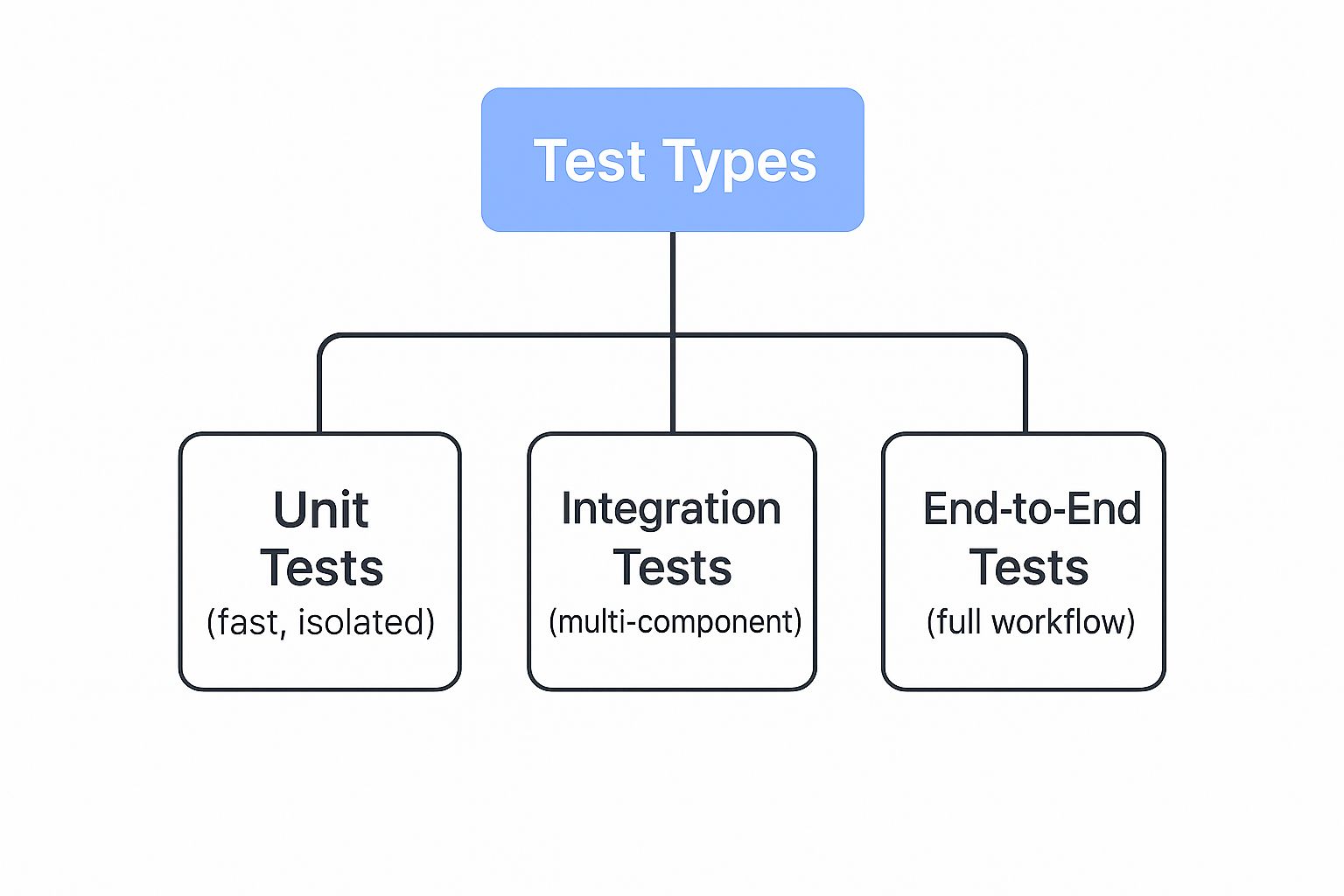
As you can see, the pyramid is built on a massive foundation of fast, isolated unit tests, which support a smaller layer of integration tests, and finally, just a few end-to-end tests at the very top.
A Strong Foundation with Unit Tests
The base of the pyramid is all about unit tests. You should have a ton of these. Why? Because they’re fast to run, cheap to write, and simple to maintain. They test one tiny piece of code—a single function or component—in complete isolation. This means you can run hundreds, or even thousands, in parallel and get feedback in seconds.
Think of this wide base as your first line of defense. It’s designed to catch the overwhelming majority of bugs right away, either on a developer’s machine before they even commit or immediately after the code hits the repository.
The Middle Layer with Integration Tests
Moving up a level, we get to integration tests. This layer is intentionally smaller. These tests are a bit more complex and take longer to run because they check how different parts of your system work together. Does your application API correctly talk to the database? Can your microservices communicate without issue? That’s what you verify here.
By focusing integration tests on the critical connection points between services, you gain significant confidence in your system’s architecture without the performance drag of testing every possible user workflow.
The Peak with End-to-End Tests
At the very top, the smallest and sharpest point of the pyramid, are the End-to-End (E2E) tests. These are incredibly powerful because they mimic a real user’s journey through your application from start to finish. But that power comes at a cost—they are by far the most expensive to run and notoriously brittle. Even a tiny UI change can cause them to fail.
Because of this, you want to be extremely selective. Reserve E2E tests for only your most critical, must-not-fail user paths, like the checkout process or user signup.
Avoiding the Ice Cream Cone Anti-Pattern
It’s surprisingly easy to get this all wrong. A common mistake is to flip the pyramid on its head, creating what’s grimly known as the “Testing Ice Cream Cone.” This anti-pattern is what happens when a team leans heavily on manual or automated E2E tests while skimping on the faster unit and integration tests below.
The result? A testing process that is painfully slow, constantly breaking, and blocks developers at every turn—the exact opposite of what CI is supposed to achieve. Sticking to the pyramid model is your best bet for keeping your pipeline fast, your feedback reliable, and your developers productive.
How Automation Transforms CI Testing
Automation is the powerhouse behind any continuous integration pipeline worth its salt. It’s the practical application that takes CI from a great idea on a whiteboard to a genuine, value-driving process. When you automate tests for every single code commit, you completely change the game for your developers. The feedback loop shrinks from a matter of days or weeks down to minutes.
This immediate feedback is everything. A developer gets an instant ping that their recent commit broke an old feature, and they can jump on the fix right away while the logic is still fresh in their mind. This simple change drastically cuts down the time and money spent on bug fixes, stopping them dead in their tracks long before they ever see a staging or production server.
Accelerating Delivery and Improving Quality
Let’s be honest, manual testing just can’t keep up. While it has its place for exploratory checks, it’s a massive bottleneck in any modern development cycle. It’s slow, tedious, and, because we’re all human, it’s prone to error. Automated testing in continuous integration shatters these limits, letting teams run thousands of tests with perfect consistency on every single build.
This rock-solid consistency builds a crucial safety net. It gives developers the confidence to refactor, innovate, and make bold changes without fearing they’ll break something unknowingly. The result is a direct impact on the business:
- Higher Software Quality: Automation is your best defense against regressions. It ensures that old bugs stay fixed and new features don’t break existing ones, leading to a far more stable product.
- Increased Developer Productivity: Instead of spending hours on manual regression checks or hunting down elusive bugs, developers can focus their brainpower on what they do best: building valuable new features.
- Faster Time-to-Market: With an automated quality gate you can trust, you can ship updates and new functionality to your customers much more frequently and with less risk.
By removing the potential for human error from all that repetitive validation, your CI pipeline becomes a reliable engine for innovation.
The real magic of test automation in CI isn’t just about catching bugs earlier. It’s about creating a culture of quality, where the entire team has an immediate, shared understanding of the codebase’s health.
The Growing Trend Toward Automation
This move away from manual testing isn’t just a fleeting trend; it’s a fundamental shift happening across the entire industry. The numbers tell the story. As of 2025, a significant 46% of software teams have already automated at least 50% of their testing workload. This isn’t a small-scale experiment; it’s a clear commitment to building more efficient and error-free development cycles. You can learn more about the growth of test automation statistics and see how teams are making the switch.
In the end, automation creates a powerful, self-reinforcing loop. Better tests lead to faster feedback, which leads to higher-quality code. That higher-quality code empowers your team to deliver more value to users, faster than ever before. It’s an indispensable part of any modern software delivery playbook.
Validate Your Code with Real-World Traffic Using GoReplay
So, what if you could test your new code against actual user traffic before it ever hits production? It sounds too good to be true, but it’s not. Traditional automated tests are essential, but let’s be honest—they’re terrible at catching the weird, unpredictable bugs that only crop up under the chaos of live user activity.
This is exactly where shadow testing with a tool like GoReplay changes the game for testing in continuous integration.
Think of GoReplay as a flight simulator for your application. It records the traffic hitting your production environment and lets you replay it against a staging or test version of your service. You get to see precisely how your code handles real-world requests, loads, and edge cases, all in a safe, isolated environment.
Here’s a simple visual of how it works.
GoReplay listens to live traffic, makes a copy, and fires it over to your testing environment. The original user request goes through to production completely unaffected.
Why This is a Huge Step Up
By mirroring real production traffic, shadow testing gives you a dose of reality that scripted end-to-end tests just can’t deliver. Instead of guessing at user behavior, you’re using the real thing. This lets your CI pipeline answer the tough questions that go way beyond a simple pass or fail:
- Does the new code introduce a tiny performance drop that only appears under heavy load?
- Are there any strange errors or memory leaks when processing real, messy user data?
- How does the new version really stack up against the old one when fed the exact same inputs?
Running these checks gives you a whole new level of confidence. You’re not just hoping your code works; you know it can handle the pressure because you’ve already put it to the test.
By replaying actual user sessions, you move from simulating user behavior to replicating it. This is the highest-fidelity testing you can achieve before a full release, catching issues that scripted scenarios would never anticipate.
How to Fit GoReplay into Your CI Pipeline
Adding GoReplay as a final validation step is surprisingly straightforward. The basic idea is to have your CI process trigger a replay of captured traffic against a fresh deployment in your staging environment.
The pipeline then watches the results. It can compare the responses from the old and new versions, look for new errors, and keep an eye on performance metrics. Based on that analysis, it gives you a final go/no-go for the release.
Building this into your workflow automates this powerful validation. For a step-by-step tutorial, take a look at our guide to the GoReplay setup for testing environments. Once it’s part of your pipeline, you’ll have a final quality gate that ensures every release isn’t just correct on paper, but truly ready for the real world.
The Future of CI Testing with AI

Looking down the road, Artificial Intelligence is set to completely reshape how we think about testing in continuous integration. AI is moving beyond basic automation and becoming a smart partner that helps developers across the entire software lifecycle. This shift brings new capabilities that make testing more intelligent, faster, and much better at catching tricky bugs early on.
Instead of just running scripts we’ve already written, AI can now analyze a codebase and generate new test cases all by itself. This is a huge deal for teams trying to boost their code coverage automatically. It means new changes get a thorough check-up without someone having to manually write every single test.
Smarter Diagnostics and Predictive Insights
One of the most exciting developments is AI’s use in predictive analytics. Picture a CI pipeline that analyzes an incoming code change and flags it as high-risk before a single test even runs. By learning from historical failures and code complexity, AI can point out which commits need a closer look, helping teams focus their efforts where it matters most.
This predictive muscle also flexes when it comes to failure analysis. When a test fails, AI-powered tools can jump in and perform a root cause analysis in seconds. They’ll sift through logs and system states to pinpoint the exact line of code or configuration change that broke things.
AI-driven root cause analysis can slash developer debugging time. It turns what used to be hours of manual log-digging into a few minutes of focused work.
AI as an Essential Testing Partner
Artificial intelligence is quickly becoming a non-negotiable part of modern quality assurance. In fact, as of 2025, over 75% of QA teams surveyed already view AI-driven testing as a core piece of their strategy. This wide adoption shows just how effective AI is at improving automation across all types of testing—from unit and functional to performance tests. You can get more details about AI’s growing role in CI/CD trends to see where the industry is headed.
At the end of the day, AI isn’t here to replace human expertise. It’s more like a powerful assistant, taking care of the repetitive, data-heavy lifting. This frees up developers and QA engineers to focus on what they do best: creative problem-solving and building great software.
Your Top CI Testing Questions Answered
When teams start digging into their continuous integration testing strategy, the same practical questions always seem to pop up. Let’s tackle a few of the most common ones I hear from developers and engineering leads.
What’s the Single Most Important Test Type in CI?
If I had to pick just one, it’s the humble unit test. They are the bedrock of a healthy CI pipeline, no question about it.
Think of it this way: unit tests give your developers the fastest possible feedback loop. They’re cheap to write, a breeze to maintain, and they catch the majority of regressions right where the code was written. This isn’t just theory; it’s the core principle of the Testing Pyramid in action.
Our Testing Pipeline Is Painfully Slow—What Can We Do?
Slow pipelines are a classic problem, and the first step is always to find the bottleneck. Nine times out of ten, the culprit is a bloated suite of slow, flaky end-to-end tests. The best fix is to “shift left”—move more of that testing logic down into faster unit and integration tests.
Beyond that, you can get some serious speed boosts by:
- Running tests in parallel: Don’t wait for one test to finish before starting the next. Spread the load across multiple containers or machines.
- Isolating your code: Mock out those slow external services and databases. You want to test your code, not your network latency.
Should We Really Run the Entire Test Suite on Every Single Commit?
Absolutely not. That’s a recipe for frustration and wasted resources. A much smarter approach is to tier your tests.
On every commit to a feature branch, run the quick stuff: unit tests and maybe a few key integration tests. Save the heavy hitters—like the full end-to-end and performance test suites—for when you merge into the main branch or run them on a nightly schedule. This way, you get the best of both worlds: rapid feedback for developers without bogging everything down.
Ready to validate your code with real-world traffic? GoReplay lets you capture and replay production traffic into your test environment, ensuring your updates are robust before they go live. Get started for free.