
Mastering the Test Scenario in Testing A Practical Guide
At its core, a test scenario is a high-level story about what you want to test. Think of it as answering the big-picture question: “What happens if a user tries to do this?” It’s the strategic starting point for any good quality assurance process, focusing on a specific user journey or a core piece of system functionality without getting bogged down in the tiny details right away.
Defining the Role of a Test Scenario

The best way to think of a test scenario is like the title of a chapter in a book. It gives you the main idea—the plot—without spelling out every single line of dialogue. In software testing, it’s a broad statement that describes what a feature should accomplish from a user’s point of view.
For example, a solid test scenario might be, “Verify a user can successfully log into their account.” Notice it doesn’t list the specific clicks, the exact data to enter, or what error messages might pop up. It simply defines a critical mission the software has to get right. This approach keeps your testing efforts grounded in real-world user needs and business goals.
The Blueprint for Quality Assurance
A test scenario isn’t just a casual suggestion; it’s the foundational blueprint for your entire testing strategy. It provides the “why” behind every test you run. When teams start with scenarios, they can naturally focus their efforts on the most critical parts of the application first.
A well-crafted test scenario is a powerful communication tool. It gets product managers, developers, and QA engineers on the same page about the scope of testing before anyone gets lost in the technical weeds.
This high-level perspective is a game-changer for a few key reasons:
- Ensures Complete Coverage: By mapping out all the different user journeys, scenarios help you spot and prevent gaps in your testing plan.
- Improves Prioritization: Teams can rank scenarios by business impact, making sure the most important features get the most attention.
- Facilitates Collaboration: It creates a shared language that even non-technical stakeholders can understand, aligning the entire team on what “quality” actually means.
Scenarios in the Testing Hierarchy
To really get it, you need to see where a test scenario fits in the grand scheme of things. It sits at the very top of a three-level hierarchy, guiding everything that comes after it.
-
Test Scenario (The ‘What’): This is the strategic goal. For an e-commerce site, a scenario could be, “Validate the entire checkout process.” It’s a broad statement of intent.
-
Test Case (The ‘How’): These are the detailed, step-by-step instructions. Spun out from the scenario, test cases get specific, like “Verify checkout with a valid credit card” or “Verify checkout fails with an expired card.”
-
Test Script (The ‘Automation’): This is the actual code. It’s the automated script that executes the steps laid out in a test case, often written in a language like Python using a framework such as Selenium.
This top-down structure creates a clear path from a high-level business requirement all the way down to a specific line of code. A single test scenario can branch into multiple test cases, and each of those might have its own automated test script. This methodical breakdown is how you build a robust, maintainable testing suite that truly reflects how people use your application.
Test Scenario vs Test Case vs Test Script
If you’ve spent any time in a quality assurance team, you’ve probably heard the terms test scenario, test case, and test script thrown around—often interchangeably. But they’re not the same thing. Nailing down the difference is critical for getting developers, testers, and product managers on the same page.
Think of it like planning a cross-country road trip.
Your test scenario is the high-level goal: “Drive from New York to Los Angeles.” It’s the “what” you want to accomplish, the big-picture journey you need to validate. It’s simple, direct, and anyone can understand it.
From that one goal, you need a plan. The specific, turn-by-turn directions become your test cases: “Take I-80 West,” “Stop for gas in Des Moines,” “Find a route around Chicago traffic.” Each test case is a detailed set of instructions with a clear starting point, specific actions, and an expected result.
Finally, the test script is the car that actually makes the trip. It’s the code, the automation, that executes the directions laid out in each test case.
A Practical E-commerce Example
Let’s bring this analogy into the real world with a feature everyone knows: an e-commerce shopping cart. Imagine your job is to make sure the cart works perfectly.
Your high-level test scenario would be something straightforward:
- Test Scenario: Validate the shopping cart functionality.
That’s way too broad to test effectively, so you break it down into smaller, verifiable chunks. These are your test cases:
- Test Case 1: Add a single item to an empty cart.
- Test Case 2: Add multiple, different items to the cart.
- Test Case 3: Increase the quantity of an item already in the cart.
- Test Case 4: Remove an item from the cart.
- Test Case 5: Apply a valid discount code to the cart total.
- Test Case 6: Attempt to apply an expired discount code.
- Test Case 7: Empty all items from the cart.
Each of these has a specific purpose and a measurable outcome, like “the cart total should update correctly.” Now, when you need to run these tests over and over, you bring in automation. That’s where the test script comes in.
For “Test Case 5,” a test script would be the actual code that logs in, finds a product, adds it to the cart, enters “DISCOUNT10” into the coupon field, and then confirms that the final price has dropped by 10%.
Comparing the Core Concepts
You can see the hierarchy here. One scenario leads to many test cases. Each test case can then be run manually or automated with a test script. The whole point is to move from a broad business need down to a specific, repeatable action.
A test scenario defines the user’s mission. A test case outlines the steps to complete that mission. A test script automates those steps for repeatable, efficient execution.
To make the differences even clearer, let’s break down their key attributes. This table shows how each element serves a distinct purpose in the software testing lifecycle.
Comparing Test Scenario vs Test Case vs Test Script
This table breaks down the fundamental differences between test scenarios, test cases, and test scripts across key attributes like purpose, detail level, and creation process.
| Attribute | Test Scenario | Test Case | Test Script |
|---|---|---|---|
| Purpose | To describe what needs to be tested from a high-level, end-user perspective. | To provide detailed, step-by-step instructions for validating a specific functionality. | To automate the execution of the steps defined in a test case. |
| Level of Detail | Very low detail. A one-line statement describing a user goal or business process. | High detail. Includes preconditions, steps, input data, and expected results. | Implementation detail. Consists of actual code in a programming language. |
| Focus | ”What to test” (The strategic goal). | ”How to test” (The tactical steps). | ”How to automate the test” (The execution). |
| Creation | Derived from user stories, requirements, and business use cases. | Derived from a test scenario. | Written by an automation engineer based on a test case. |
| Example | Verify user login functionality. | Test login with valid username and password. | A script that opens a browser, enters credentials, and clicks ‘Login’. |
Ultimately, understanding this hierarchy helps teams work more efficiently. It brings clarity to the testing process, ensuring that high-level business goals are systematically broken down into detailed, executable tests that truly validate the software.
How to Write Powerful Test Scenarios
Alright, you know what a test scenario is and how it’s different from a test case. Now for the fun part: writing scenarios that actually find problems.
Crafting a powerful test scenario isn’t about being a technical wizard. It’s about empathy. You have to get inside your user’s head and map out their most critical journeys. The goal is to anticipate their needs and frustrations before they ever experience them.
Where do you start? Your best sources are user stories, functional requirements, and business use cases. Think of these documents as treasure maps—they spell out exactly what the software is supposed to do. Your job is to turn those requirements into high-level testing missions.
For example, a user story might say, “As a customer, I want to reset my password so I can get back into my account.” Bam. Your first test scenario practically writes itself: “Verify the password reset functionality.” It’s simple, direct, and connects right back to a core user need.
Start with the User Journey
The best test scenarios come from seeing the bigger picture. Don’t get bogged down in isolated features. Instead, trace the entire path a user takes to get something done. This is how you pinpoint the functionality that truly matters.
Let’s imagine you’re testing a new e-commerce site. Forget about just the “Add to Cart” button for a second. Think about the whole shopping experience, from browsing to checkout. A quick brainstorming session could give you a list like this:
- Scenario 1: Verify a guest user can find a product, add it to their cart, and buy it.
- Scenario 2: Validate a returning customer can log in, check their order history, and re-order something.
- Scenario 3: Confirm a user can apply a discount code at checkout and see the price update correctly.
- Scenario 4: Check if a user can save items to a wishlist to buy later.
Each of these is a critical user journey. When you frame your tests this way, you guarantee you’re focusing on what actually impacts the business and its customers. This hierarchy shows how a high-level scenario guides the more granular test cases and scripts.
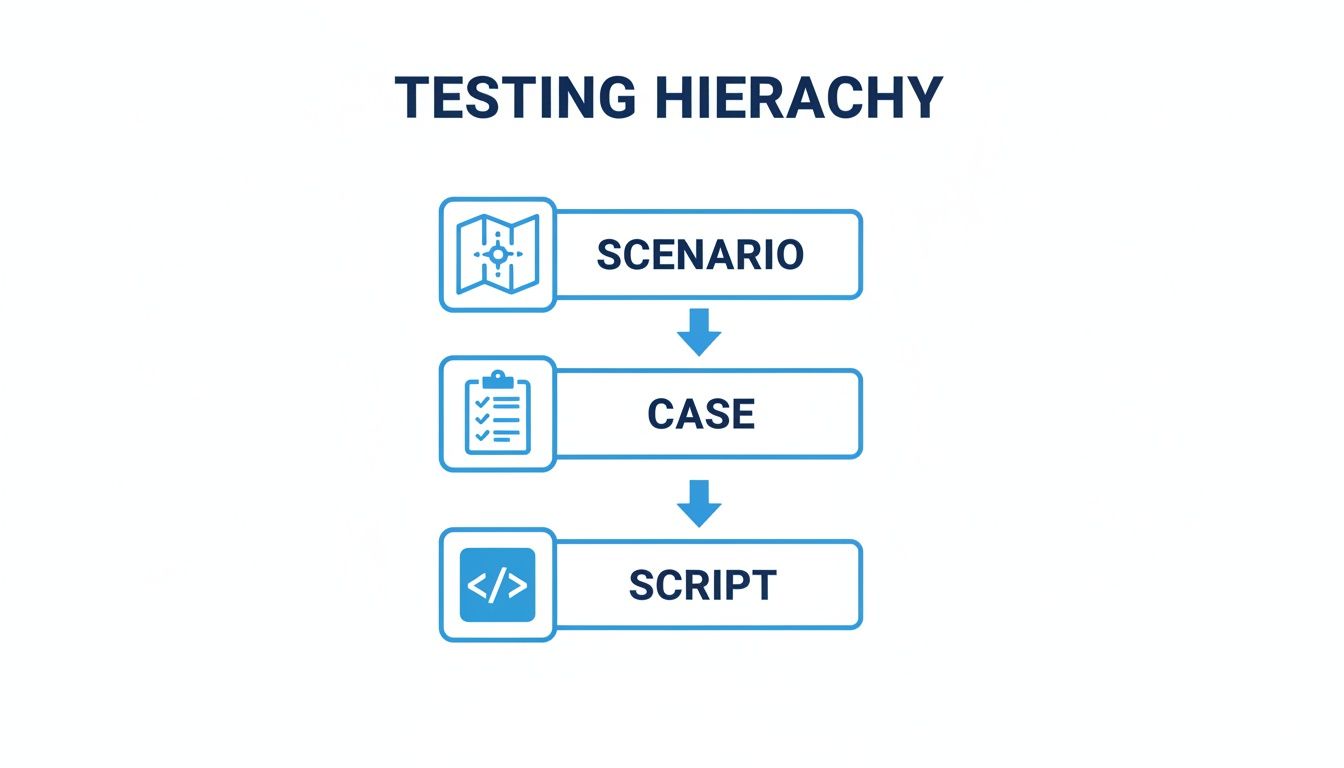
This top-down structure—from the strategic scenario to the tactical test case and finally the executable script—is the backbone of any organized, effective testing plan.
Cover All Your Bases with Different Scenario Types
A solid testing strategy can’t just focus on the sunny days when everything works perfectly. To build resilient software, you have to actively look for trouble. Great test scenarios cover the full spectrum of possibilities, from the ideal path to the downright weird.
Generally, your scenarios will fall into three buckets:
- Happy Path Scenarios: This is your baseline. You’re testing the main, intended functionality where the user does everything right and the system behaves perfectly. “Verify a user with valid credentials can log in successfully” is a classic example.
- Negative Scenarios: Now you start breaking things. These scenarios explore what happens when users make mistakes or enter bad data. Think: “Verify a user cannot log in with an incorrect password” or “Check that an error appears when a user enters an invalid email format.”
- Edge Case Scenarios: Here’s where you push the system to its limits. What happens with extreme values? For instance, “Verify the shopping cart handles an order of 999 units of one item” or “Test what happens if the user’s connection dies mid-transaction.”
By systematically designing scenarios for happy paths, negative paths, and edge cases, you create a comprehensive safety net that catches bugs across the full spectrum of user behavior, not just the ideal one.
Create a Standardized Test Scenario Template
Consistency is your best friend in a scalable testing process. A standardized template ensures everyone on the team captures the same essential information for every scenario. It also makes them way easier to review, prioritize, and assign.
Here’s a simple but effective template you can start with:
| Component | Description | Example |
|---|---|---|
| Scenario ID | A unique identifier for easy tracking. | TS-LOGIN-001 |
| Scenario Description | A concise, one-sentence statement of what is being tested. | Verify the complete user login functionality. |
| Priority | The business importance of the scenario (e.g., High, Medium, Low). | High |
| Preconditions | Any conditions that must be met before the test can begin. | The user must have a valid, registered account. |
| Test Cases Linked | IDs of the detailed test cases derived from this scenario. | TC-LOGIN-001, TC-LOGIN-002, TC-LOGIN-003 |
Using a structured format like this turns a loose idea into a concrete, actionable piece of your test plan. It brings discipline to the process and makes sure no critical user journey gets left behind.
See Test Scenarios in Action: Real-World Examples
Theory is one thing, but seeing how a test scenario in testing works in the real world is where it all clicks. Scenarios aren’t just for checking if a button works; their high-level, strategic nature makes them a perfect fit for all kinds of quality assurance. Let’s walk through a few concrete examples.
You’ll see how this one simple tool adapts to totally different challenges—from verifying new features to stress-testing an entire system and even preparing for a complete meltdown. Each example ties a high-level goal directly back to a specific business risk, showing why this approach is so fundamental.
Functional Test Scenario Example
The most common place you’ll find test scenarios is in functional testing. The goal here is simple: make sure the software does what it’s supposed to do. This is where you get into the core mechanics of your application.
Let’s use one of the most critical user journeys for any online service: signing up for a new account.
- Scenario ID: TS-REG-001
- Scenario Description: Verify a new user can successfully register, receive a confirmation email, and log in for the first time.
- Business Risk: If new users can’t create an account, customer acquisition grinds to a halt. This directly torpedoes revenue and growth, and the resulting frustration leads to negative reviews and a damaged brand.
That single sentence describes a complete user mission. It’s not about one click; it’s a multi-step process that is absolutely vital to the business. This high-level test scenario becomes the blueprint for several specific test cases, like:
- Testing registration with valid data.
- Checking for correct error messages when using an email that’s already registered.
- Verifying the confirmation email actually gets sent and the link inside works.
- Confirming the user can log in right after verifying their account.
By starting with the scenario, the team makes sure they’re covering the entire critical business flow, not just isolated pieces of it.
Performance Test Scenario Example
Performance testing doesn’t ask if a feature works, but how well it works when things get busy. Scenarios here are all about simulating real-world pressure—like a flood of user traffic or huge amounts of data—to find bottlenecks before your users do.
Imagine an e-commerce site gearing up for a massive sale like Black Friday.
- Scenario ID: TS-PERF-001
- Scenario Description: Assess application responsiveness and stability during a peak holiday shopping surge.
- Business Risk: Slow load times or a full-blown crash during a peak sales event can mean millions in lost revenue. A 2021 study showed that conversion rates can drop by over 4% for every extra second a page takes to load. That’s a direct financial hit.
This scenario isn’t testing a single button. It’s testing the endurance of the entire system. It sets the stage for a battery of detailed performance tests:
- Simulating 50,000 concurrent users browsing products.
- Modeling 10,000 users adding items to their carts at the same time.
- Pushing through 1,000 checkouts per minute.
This kind of test scenario forces teams to think about system-wide behavior. It shifts the focus from “Does the button work?” to “Does the entire infrastructure hold up when it matters most?”
This strategic thinking is what helps you find the weak spots—sluggish database queries, overwhelmed APIs, or not enough server power—before they can cause a real-world catastrophe.
Chaos Engineering Scenario Example
Chaos engineering is a different beast altogether. It’s about intentionally breaking things in a controlled way to see how your system reacts. You’re not testing for success; you’re building confidence in your system’s ability to survive when things go wrong. A test scenario in testing for chaos engineering is designed to prove resilience.
Think about a modern, cloud-native app that depends on a bunch of different microservices to work.
- Scenario ID: TS-CHAOS-001
- Scenario Description: Confirm system stability and graceful degradation when a key database connection fails.
- Business Risk: An unexpected database outage could bring the entire application down. Without a solid resilience plan, you’re looking at prolonged downtime, potential data loss, and a complete breakdown of customer trust.
The goal here isn’t to see if the system fails—you already know it will. The real question is how it fails. Does it just fall over, or does it handle the problem gracefully? This chaos scenario leads to experiments like:
- Intentionally blocking network access to the primary database.
- Simulating extreme latency on database connections.
- Killing the database instance to see if failover mechanisms kick in.
The ideal outcome? Maybe the application loses some functionality (e.g., users can’t see their order history), but it stays online and core actions (like browsing products) still work. These scenarios are essential for building truly resilient systems that can handle the unpredictable failures that inevitably happen in complex production environments.
Creating Realistic Scenarios with Production Traffic

Manually designed test scenarios are smart. They’re methodical. But they have a fundamental blind spot: they can’t predict the beautiful chaos of real human behavior. Even the most detailed test plan often misses the weird, wonderful, and unpredictable ways people actually interact with an application.
This is where a more modern approach comes in. Instead of just imagining what users might do, why not test against what they actually do? That’s the core idea behind using live production traffic to build your test scenarios.
The Limits of Scripted Reality
No matter how thorough your user stories are, they represent an idealized version of reality. Your test team might design a perfect “happy path” scenario and a dozen negative ones, but they will never anticipate the user who submits a form with an emoji in the name field. Or the bot that hammers an obscure API endpoint a thousand times a second.
Scripted tests operate in a sterile, predictable bubble. Production is messy. This disconnect is exactly why bugs and performance issues slip through even the most rigorous QA processes—they’re triggered by user behaviors no one ever thought to script.
A manually crafted test scenario is like a carefully rehearsed play. A test scenario built from production traffic is like filming a live, unscripted documentary—it captures the authentic, unpredictable reality of how your system is truly used.
This limitation becomes especially critical for performance and regression testing. You need to know if a new code change can handle the genuine load and unique request patterns of your user base, not just a clean, simulated version of it.
From Simulation to High-Fidelity Replay
This is where traffic replay tools like GoReplay enter the picture. They transform testing from a simulation into a high-fidelity replay of what really happened. Instead of writing scripts to mimic users, you capture the actual HTTP traffic from your live application and replay it against a staging or test environment.
This method gives you a test scenario in testing that is as real as it gets. It includes every strange API call, every unexpected user input, and every concurrent action that happens in the wild.
The process typically breaks down into a few key steps:
- Capture: Silently record live traffic from your production environment without impacting performance.
- Mask: Anonymize any sensitive user data (like passwords or personal information) to ensure privacy and compliance.
- Replay: Direct the captured and masked traffic to your testing environment at your desired speed.
- Analyze: Compare the responses between the production and testing environments to find regressions, errors, or performance degradation.
This approach is a game-changer for DevOps and enterprise teams. It’s why the performance testing tools market is projected to reach USD 1.64 billion in 2025, growing at a robust 14.23% CAGR to hit USD 3.19 billion by 2030. This growth shows just how many engineers are now using real traffic to find issues that scripted tests completely overlook.
By replaying production traffic, you can confidently answer critical questions before you deploy. If you’re interested in the specifics, our guide on how to replay production traffic offers a detailed walkthrough. This method allows you to conduct regression and performance tests that truly reflect real-world conditions, catching issues that scripted tests would never find.
Using GoReplay for High-Fidelity Test Scenarios
While writing scenarios by hand is great for testing expected behavior, replaying real production traffic lets you test for actual behavior. This is how you build test scenarios that are truly unbreakable.
Let’s walk through how to put this into practice with GoReplay, a tool designed specifically for this job. The process is a simple, four-step loop that lets you safely use real user traffic to validate your staging environment. You get to move beyond hypothetical situations and stress-test your app with the messy, unpredictable reality of production.
Step 1: Capture Live Traffic
First things first, you need to listen to the traffic coming into your production server. GoReplay does this by running a tiny, lightweight listener that records HTTP requests without adding any noticeable performance overhead. Think of it as a silent observer, capturing every single API call and user interaction exactly as it happens.
To start capturing traffic from port 80 and save it to a file named traffic.gor, you just run a simple command:
gor --input-raw :80 --output-file traffic.gor
This tells GoReplay to listen to all raw traffic on port 80 and dump it into a local file. That file now holds a perfect replica of your production activity.
Step 2: Mask Sensitive Data
Before you even think about replaying that traffic, you have to protect user privacy. This masking step is absolutely critical for anonymizing sensitive data like passwords, API keys, or any other personal information.
GoReplay lets you use regular expressions to find and replace sensitive values, making sure your test data is compliant and secure. For example, you could swap out all user email addresses in a request payload with a generic one. The structure of the traffic stays identical, but the sensitive details are completely scrubbed.
The goal is to keep the integrity of the user journey without compromising security. Masking lets you test with realistic patterns while sticking to strict data privacy standards like GDPR and CCPA.
Step 3: Replay Traffic in Your Test Environment
With your captured and anonymized traffic ready to go, it’s time to unleash it on your staging environment. You simply point GoReplay to your test server and tell it to start sending the recorded requests.
To replay the traffic.gor file to a staging server, the command looks something like this:
gor --input-file traffic.gor --output-http "http://staging.server"
GoReplay will send the requests precisely as they occurred in production, preserving the original timing and concurrency. You can even crank up the speed, multiplying the traffic to simulate heavy load for performance testing. For a deeper dive into configuration, check out our complete guide on the GoReplay setup for testing environments.
Step 4: Analyze the Results
The final step is the moment of truth: seeing what broke. GoReplay can capture the responses from both your production and staging environments, letting you compare them side-by-side. This analysis instantly flags any discrepancies.
By diffing the responses, you can immediately spot:
- Regressions: Did a feature that worked perfectly in production suddenly break in the new build?
- Performance Degradation: Are response times in staging noticeably slower than in production?
- Unexpected Errors: Are you seeing a bunch of new 500-level errors that weren’t there before?
This four-step loop—Capture, Mask, Replay, Analyze—automates the creation of hyper-realistic test scenarios. It gives you the confidence that your code is truly ready for the real world.
Frequently Asked Questions About Test Scenarios
Got a few more questions? Let’s clear up some of the common things people ask when they’re getting into test scenarios.
How Many Test Cases Should One Scenario Have?
There’s no magic number here. A simple scenario like “Verify login with valid credentials” might just need one straightforward test case. But something more complex, like “Validate the multi-step checkout process,” could easily spawn dozens of cases to cover different payment methods, shipping options, and every possible error state.
The real goal isn’t hitting a specific count—it’s fully covering the scenario’s objective.
Can Test Scenarios Be Fully Automated?
Absolutely. The scenario itself is your high-level game plan, but the test cases you create from it are prime candidates for automation. A great example is a scenario designed to validate system performance; you can automate it by replaying real user journeys, giving you a fast and efficient path to comprehensive coverage.
Who Is Responsible for Writing Test Scenarios?
Good testing is a team sport. While QA engineers usually take the lead, the best and most robust scenarios are born from collaboration.
Business analysts bring crucial insights into user requirements, product managers help clarify the feature’s true intent, and developers know the technical nuts and bolts. This kind of teamwork ensures every single test scenario is realistic, relevant, and covers all the critical paths.
Stop simulating and start replaying. With GoReplay, you can use your actual production traffic to create the most realistic test scenarios possible, ensuring your application is truly ready for the real world.