
How to Test RESTful API Performance and Reliability
To really test a RESTful API, you have to go beyond just checking the basics. It’s about validating its functionality, performance, security, and reliability under conditions that mimic the real world. This means firing off all sorts of HTTP requests (GET, POST, PUT, DELETE) to your endpoints and making sure the responses—status codes, headers, and the body—are exactly what you expect.
While manual tools like Postman are fantastic for quick spot-checks, a truly solid strategy weaves automated testing into every single stage of the development lifecycle.
Why Modern API Testing Is Non-Negotiable

In a world powered by interconnected services, APIs aren’t just a technical detail anymore; they are the literal backbone of modern applications. They’re the glue that connects mobile apps to backend services, links microservices, and enables countless third-party integrations.
When a single API fails, it can trigger a nasty cascade, leading to application-wide outages, data corruption, and a terrible user experience. This interconnectedness raises the stakes significantly. Simply checking if an endpoint returns a 200 OK just doesn’t cut it.
Beyond Basic Functional Checks
True reliability demands a layered strategy that validates every aspect of an API’s behavior in the wild, not just in a sterile lab environment.
We need to answer the tough questions:
- Performance Under Load: What happens when thousands of users hit the API all at once? Can it handle sudden traffic spikes without grinding to a halt?
- Security Vulnerabilities: Are the endpoints hardened against common threats like SQL injection, broken authentication, or accidental data exposure?
- Graceful Failure: When the API gets fed garbage data or a totally unexpected request, does it fail elegantly with a clear error message, or does it just crash and burn?
Answering these questions is critical. An API that works perfectly with one user might completely crumble under the pressure of a thousand. A seemingly minor security flaw can quickly escalate into a major data breach. The goal here is to build resilient systems that can withstand the chaos of real-world usage.
A critical shift in mindset is moving from testing with perfect, synthetic data to testing with the messy, unpredictable traffic of actual users. This is where many teams find the hidden bugs that traditional QA processes miss.
The Financial Impact of Untested APIs
The economic case for robust API testing is undeniable. Just look at the API management market, which is exploding because businesses know they need to monitor and maintain these critical services. The market shot up from $4.5 billion in 2022 to $5.76 billion in 2023—that’s a 28% jump in a single year.
Projections show it hitting $9.7 billion by 2025, which tells you just how vital reliable API infrastructure is to business operations. You can dig deeper into these API trends and their market impact.
This growth reflects a clear business reality: companies are pouring money into tools and strategies to ensure their APIs are scalable, secure, and reliable. In this climate, ignoring rigorous testing isn’t just a technical oversight—it’s a direct business risk.
Building Your Foundational Testing Toolkit
Before you can dive into complex performance or security scenarios, you need a solid foundation. Getting your functional testing right—both manual and automated—is the critical first step to ensuring every endpoint behaves exactly as it should under normal conditions.
The best place to start is with your own two hands. Manual testing is the quickest way to get a feel for your API, understand its quirks, and validate the basics without writing a single line of code.
Kicking Things Off With Manual Testing
Think of manual testing as your initial exploratory phase. It’s not about exhaustive checks but quick, targeted validation. For this, your best friends are tools like Postman and old-school command-line utilities like cURL.
Postman gives you a fantastic GUI to craft HTTP requests, fiddle with headers, build request bodies, and see what comes back. It makes constructing and debugging API calls straightforward, which is a huge win for developers and QA engineers alike.
For those who live in the terminal, cURL is your go-to. It’s powerful, scriptable, and gets the job done without any fuss. A simple GET request to fetch a user is as clean as it gets:
curl -X GET http://api.example.com/users/123 -H “Authorization: Bearer YOUR_TOKEN”
Need to create a new resource? Just switch to a POST request and pass in your JSON body:
curl -X POST http://api.example.com/users
-H “Content-Type: application/json”
-H “Authorization: Bearer YOUR_TOKEN”
-d ’{“name”: “Jane Doe”, “email”: “[email protected]”}’
These quick manual checks are your first line of defense. They instantly tell you if endpoints are reachable, if auth is working, and if the basic data shapes look right.
Transitioning to Automated Functional Tests
Manual testing is great for poking around, but it just doesn’t scale. That’s where automated functional tests come in, creating a repeatable, reliable process for verifying your API’s core logic.
For a Node.js API, a classic and effective combo is Jest as the test runner and Supertest for HTTP assertions. Together, they let you write clean, expressive tests that are easy to understand.
Check out this example for a user creation endpoint:
const request = require(‘supertest’); const app = require(’../app’); // Your Express app instance
describe(‘POST /users’, () => { it(‘should create a new user and return 201’, async () => { const response = await request(app) .post(‘/users’) .send({ name: ‘John Smith’, email: ‘[email protected]’ });
expect(response.statusCode).toBe(201);
expect(response.body).toHaveProperty('id');
expect(response.body.name).toBe('John Smith');
}); });
This single script automates several crucial checks:
- It sends a
POSTrequest with a valid payload. - It asserts the HTTP status code is 201 Created.
- It verifies the response body contains what you expect, like a new user
id.
With automation, you build a safety net. Every code change gets validated against these rules, catching regressions long before they have a chance to hit production.
Verifying the Contract Between Services
In a world of microservices, APIs are constantly talking to each other. A tiny, undocumented change in one service can easily break another one that depends on it. This is precisely where contract testing shines.
Contract testing isn’t about checking a service’s internal logic. It’s about verifying that two separate services can actually communicate. It ensures the “contract”—the expected requests and responses—between a consumer and a provider is always honored.
Tools like Pact are built for this. The consumer service defines its expectations in a “pact file.” The provider service then uses that file to prove it can fulfill the contract. It’s a brilliant way to prevent breaking changes from ever getting deployed.
Still, the industry has some catching up to do. According to Postman’s latest report, while 82% of organizations have an API-first approach and 67% perform functional testing, contract testing adoption lags at just 17%. This gap highlights a massive opportunity for teams to build more resilient distributed systems. You can dig into more insights from Postman’s 2023 State of the API Report.
API Testing Types at a Glance
To tie it all together, here’s a quick breakdown of the foundational API testing methods. Each serves a different purpose, but they work together to build a comprehensive quality strategy.
| Testing Type | Primary Goal | Common Tools | Best For |
|---|---|---|---|
| Functional | Verify that each API endpoint behaves correctly according to specifications. | Postman, Jest, Supertest | Validating core business logic, status codes, and response payloads. |
| Integration | Ensure that different services or components work together as expected. | Jest, Supertest, Cypress | Testing end-to-end workflows that span multiple services or database interactions. |
| Contract | Confirm that two separate services (consumer and provider) can communicate. | Pact, Pactflow | Preventing breaking changes between microservices in a distributed architecture. |
| Performance | Measure the API’s responsiveness, stability, and scalability under load. | JMeter, k6, GoReplay | Identifying bottlenecks, planning capacity, and ensuring reliability under stress. |
| Security | Identify vulnerabilities like injection flaws or improper authentication. | OWASP ZAP, Burp Suite | Protecting sensitive data and preventing unauthorized access to your API. |
Choosing the right mix of these testing types is key. By starting with a strong base of manual exploration, automated functional tests, and a solid contract testing strategy, you’ll be well-equipped to build a truly reliable API.
Simulating Real-World Conditions with Performance Testing
An API that works flawlessly for a single user might completely collapse under the weight of a thousand simultaneous requests. This is precisely why performance testing is non-negotiable; it’s the bridge between an API that works and one that’s genuinely ready for production.
When you test a RESTful API for performance, you’re not just checking for correctness—you’re discovering how well it works under pressure. This process usually breaks down into two key disciplines: load testing and stress testing. They sound similar, but they answer very different questions about your API’s reliability.
- Load Testing: Can your API handle its expected, everyday traffic volume without a sweat? Think of it as simulating a busy Tuesday afternoon. The goal is to measure response times and resource usage under normal conditions to ensure a smooth user experience.
- Stress Testing: This is about finding the breaking point. You intentionally push the API well past its expected capacity to see how it fails. Does it crash gracefully with a
503 Service Unavailableerror, or does it take the whole server down with it? The point is to understand failure modes and ensure your system is resilient.
While traditional tools like JMeter or k6 are fantastic for generating predictable, synthetic load, they often miss the chaotic, unpredictable nature of real users. People don’t follow neat scripts; they click erratically, abandon requests, and generate a messy mix of traffic patterns that synthetic tests just can’t replicate.
Embracing Authenticity with Traffic Replay
To truly understand how your API will behave in the wild, the most effective strategy is to test it with the traffic it will actually get. This is where traffic shadowing—or replay testing—comes into play. Instead of guessing at user behavior, you capture live production traffic and replay it against a staging or test environment.
This approach offers unparalleled realism. It uncovers hidden bottlenecks that only emerge from the complex interplay of different endpoints being hit in a specific, chaotic sequence—something a scripted test would almost certainly miss.
GoReplay is an open-source tool built exactly for this. It lets you listen to live HTTP traffic on your production server, capture it, and then forward it to a different environment for analysis. This method provides the most authentic load test possible, short of testing directly in production (which you should almost never do).
By replaying actual user interactions, you move from simulation to duplication. You’re no longer approximating production load; you are testing with an identical copy of it, complete with all its quirks and complexities.
A Practical Scenario: Capturing and Replaying Traffic
Let’s walk through a common real-world scenario. Imagine you have a new version of your user-service API deployed to a staging environment. Before you push it to production, you need to be sure it can handle the current production load without any performance regressions.
With GoReplay, the process is surprisingly straightforward. First, you install it on the production server that’s currently handling live traffic for the existing user-service.
Next, you start GoReplay in capture mode, telling it to listen on port 80 and forward a copy of the captured traffic over to your staging server.
On your production server
Capture traffic from port 80 and send it to your staging environment
sudo ./gor —input-raw :80 —output-http=“http://staging.api.example.com”
This single command kicks off the traffic shadowing process. GoReplay now silently captures every incoming request to your production API and duplicates it to your staging environment in real-time. Your production users are completely unaffected; they continue to get responses from the stable production server as usual.
Meanwhile, your staging environment is being bombarded with an exact replica of your production traffic. This lets you:
- Identify Performance Regressions: Monitor the CPU, memory, and response times on the staging server to see if the new code introduces any performance hits under real load.
- Uncover Hidden Bugs: Some bugs only show up under specific concurrent conditions, like race conditions or database deadlocks. Replaying real traffic is one of the best ways to trigger these elusive issues.
- Validate Caching Strategies: See how your new caching layers perform with authentic request patterns, rather than idealized, synthetic ones.
If you want to dive deeper into this technique, GoReplay has an excellent guide on how to replay production traffic for realistic load testing.
Why Traffic Replay Is a Game Changer
Don’t get me wrong, traditional performance testing tools are still valuable, especially for setting baselines and stress testing individual endpoints. The problem is, they can create a false sense of security. An API that aces a scripted load test might still fall apart under the spiky, unpredictable nature of real user traffic.
By incorporating traffic replay into your testing strategy, you add a layer of validation that is as close to reality as you can get. It ensures your API isn’t just functionally correct but is genuinely battle-hardened and ready to handle the chaos of the real world. This approach lets teams deploy with much greater confidence, knowing their changes have been vetted against the most realistic conditions possible.
Right, you’ve confirmed your API can handle the expected traffic and even survive a major load test. Now for the fun part. This is where we go beyond the predictable and start actively trying to break things. These are the advanced strategies that separate a good API from a truly great, resilient one, and they’re designed to smoke out the subtle, hidden flaws that cause the most painful production failures.
First up: security. An API is a direct doorway into your application’s data and business logic, which makes it a massive target. “Hope for the best” isn’t a security strategy; you have to proactively hunt for vulnerabilities before someone else does.
Probing for Security Vulnerabilities
To do this right, you have to think like an attacker. The goal is to find and slam shut the common loopholes they love to exploit. We’re talking about insecure endpoints that leak data, broken authentication that lets anyone in, or injection flaws that could let an attacker run their own code on your system.
A fantastic place to start is with an automated security scanner. A tool like the OWASP Zed Attack Proxy (ZAP) is built for this. It can crawl your API and hammer it with a whole range of known vulnerability tests. You can set up ZAP to sit between your client and the API, letting it inspect and even tamper with the traffic to find weak spots.
When you’re running a security audit, focus your energy on these key areas:
- Authentication and Authorization: What happens if a user tries to access data they shouldn’t? Can you replay an old, expired token? What about sending a request with no credentials at all?
- Input Validation: Is the API properly sanitizing everything a user sends? The classic test here is to fire off payloads packed with SQL injection or cross-site scripting (XSS) attempts.
- Rate Limiting: Can a single IP address bury your API under thousands of requests? Proper rate limiting is your first line of defense against Denial of Service (DoS) attacks.
By systematically poking and prodding these areas, you’ll build a much tougher, more hardened API.
Mastering Edge Case and Negative Testing
A truly robust API doesn’t just handle valid requests well; it fails gracefully when it gets garbage. That’s the whole point of negative testing and edge case testing. You’re intentionally sending malformed data, bizarre values, and completely unexpected requests just to see how the system reacts. Does it fire back a clean 400 Bad Request with a useful error message, or does it fall over and return a generic 500 Internal Server Error?
The goal of negative testing isn’t just to find bugs—it’s to verify that your API’s error handling is predictable, consistent, and helpful. A well-designed error response is a feature, not a failure.
Let’s say you have an endpoint that expects a user’s age. Your edge case tests should absolutely include:
- Sending a negative number (
-1) - Sending zero (
0) - Sending a ridiculously large number (
999999) - Sending a string instead of an integer (
"twenty-five") - Sending a null or completely empty value
Every single one of these tests should trigger a predictable, documented error. This is how you ensure your API is not only functional but also resilient and communicative when things inevitably go wrong.
The Rise of AI in API Test Generation
While doing this all by hand is crucial, it’s also time-consuming and, frankly, limited by our own imagination. This is where AI is starting to make a real difference. Modern AI-driven testing tools can analyze real traffic patterns to automatically generate smarter, more creative test cases than we could ever dream up.
Instead of just throwing random inputs at the wall, these tools learn what “normal” API usage looks like and then intelligently create tests that push the boundaries of that behavior. They can generate complex, realistic payloads that are far more likely to uncover those tricky edge cases that manual testing often misses.
This AI-powered approach is a massive time-saver. We’re seeing teams achieve 60-80% reductions in test creation time and run their entire testing cycles 2-3x faster. AI really shines when you have a large, complex system, sniffing out subtle bugs and handling edge cases that traditional tools just can’t see because it learns from real data patterns. You can dig into some of the findings on AI’s impact in API testing if you want to learn more.
By weaving these advanced strategies—from tough security scans to intelligent, AI-driven negative testing—into your workflow, you build a much deeper confidence in your API’s reliability. You’re no longer just verifying that it works; you’re actively ensuring it’s resilient enough for the real world.
Automating Your API Tests in a CI/CD Pipeline
A solid test suite is a great safety net, but its real power comes alive when it runs automatically on every single code change. When you weave your API tests directly into a Continuous Integration and Continuous Deployment (CI/CD) pipeline, they transform from a periodic check-up into an always-on quality gate. This is how you stop regressions before they ever see the light of day.
The whole point is to create a tight, reliable feedback loop. Every time a developer pushes code or opens a pull request, a battery of automated checks should kick off immediately. This setup ensures every change gets validated against your functional, contract, and even performance tests, giving your team the confidence to merge and deploy much faster.
Implementing API Testing with GitHub Actions
GitHub Actions has become a go-to for building these automated workflows right inside your repository. You define the entire pipeline in a YAML file, spelling out the triggers, jobs, and individual steps. Keeping this automation logic version-controlled alongside your application code is a massive win for consistency and transparency.
A smart pipeline for an API usually involves a few distinct jobs that run in stages:
- Lint and Build: This is your first line of defense. It’s a quick sanity check to make sure the code is clean and the application actually builds.
- Functional and Integration Tests: Here, you run your Jest and Supertest suite to confirm the core business logic and endpoint behavior are solid.
- Contract Verification: Next, you execute Pact tests to guarantee you haven’t introduced breaking changes for any downstream services that depend on your API.
- Performance Sanity Check: Using a tool like GoReplay, you can replay a small, curated slice of production traffic against the new build to catch any major performance regressions early.
This staged approach gives developers feedback fast. If a simple linting rule fails, they know about it in seconds instead of waiting for the entire, lengthy test suite to complete.
The diagram below shows a more advanced testing flow, one that brings in security scans and negative testing.
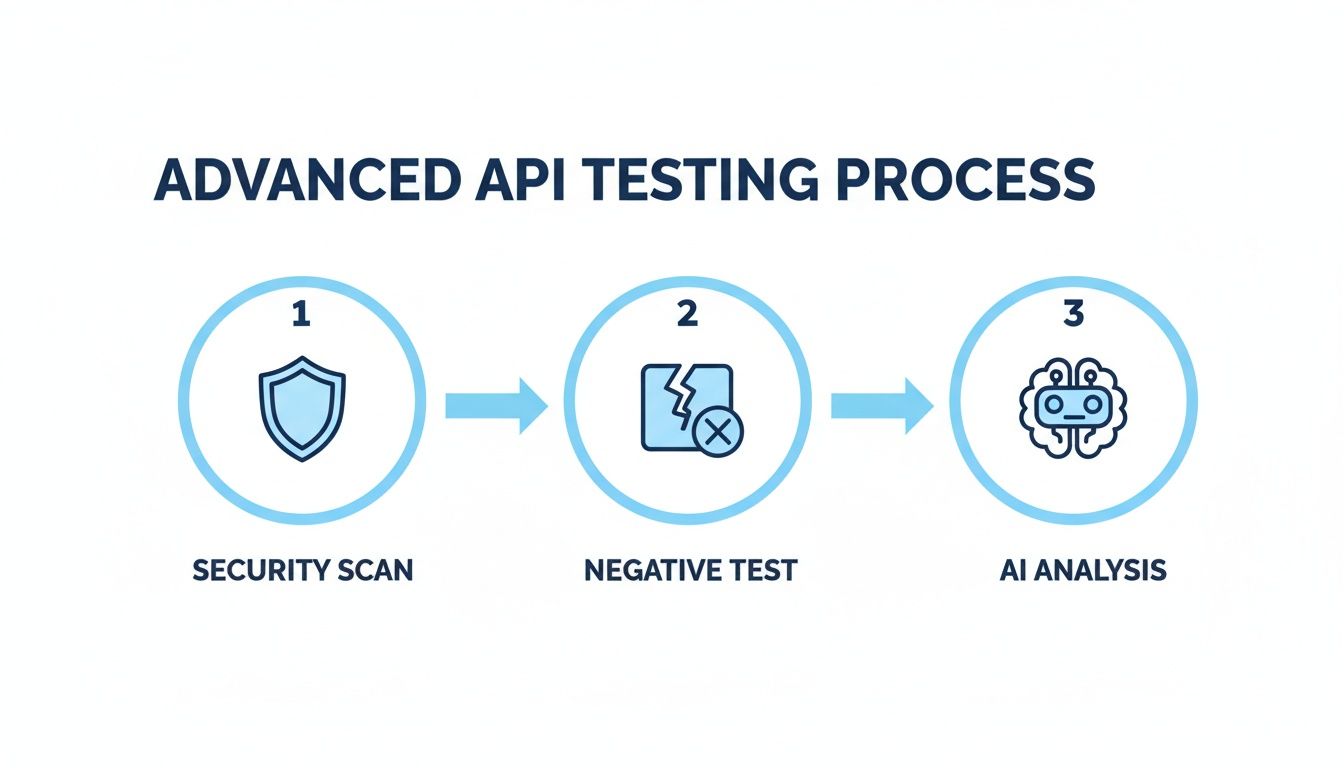
This illustrates how a mature CI/CD pipeline moves beyond basic checks to include comprehensive security and resilience validation at each step of the way.
A Practical GitHub Actions Workflow
Here’s what a sample YAML configuration looks like. This workflow runs your functional tests on every single pull request. It’s a straightforward process: check out the code, install dependencies, and run the test script.
name: API Test Suite
on: pull_request: branches: [ main ]
jobs: test: runs-on: ubuntu-latest steps: - name: Checkout repository uses: actions/checkout@v3
- name: Set up Node.js
  uses: actions/setup-node@v3
  with:
    node-version: '18'

- name: Install dependencies
  run: npm install

- name: Run functional tests
  run: npm test
  env:
    API_KEY: ${{ secrets.STAGING_API_KEY }}
    DATABASE_URL: ${{ secrets.STAGING_DB_URL }}
Take note of the secrets block. Never, ever hardcode API keys, database connection strings, or any other sensitive credentials in your workflow files. Store them as encrypted secrets in your repository settings and reference them in the pipeline. It’s a non-negotiable security practice.
For a deeper look, check out our guide on the best tools and strategies for automating API tests.
Best Practices for Pipeline Success
To get the most out of your automated pipeline, you have to nail your test environments and notifications.
The core idea behind CI/CD is to make doing the right thing the easiest option. If a test fails, the pipeline must stop immediately and give clear, actionable feedback directly to the developer who broke the build.
Finally, you need to close the loop by integrating notifications with your team’s communication tools, like Slack or Microsoft Teams. A failed build should fire off an immediate, automated alert in the right channel, tagging the developer who authored the change. This ensures problems are seen and fixed right away, keeping development moving without sacrificing code quality.
Gotchas and Grey Areas in API Testing
As you get deeper into testing your APIs, you’ll inevitably run into the same practical questions and tricky scenarios that every team faces. Let’s tackle a few of the most common ones I see pop up time and time again.
What’s the Real Difference Between PUT and PATCH?
This question comes up a lot. While both PUT and PATCH are used to update a resource, how they do it is fundamentally different, and getting it wrong can cause real problems.
A PUT request completely replaces the resource. You send the entire object, and whatever you send becomes the new state. If you leave out a field, it gets wiped out. Poof. Gone.
A PATCH request, on the other hand, is for partial updates. You only send the fields you want to change, and the rest of the resource remains untouched.
Think of it like this:
PUTis like uploading a whole new version of a config file.PATCHis just editing one line in it. For most updates,PATCHis safer and more efficient—it prevents you from accidentally deleting data.
How Should We Handle Authentication in Automated Tests?
Managing authentication across hundreds of tests is another classic headache. Hardcoding tokens into your tests is a massive security no-no and a maintenance nightmare waiting to happen.
The best way to handle this is to automate the login process right within your test suite. Set up a dedicated pre-test script or a “before all” hook that does the following:
- It calls your
/loginor token endpoint using a dedicated test user’s credentials. - It grabs the auth token (like a JWT) from the response.
- It saves that token to an environment variable where all subsequent tests can pull from it.
This approach keeps your credentials out of your test code and ensures every test run uses a fresh, valid token. It’s clean, secure, and mimics exactly how a real client application would operate.
Is It Ever Okay to Test Against the Live Database?
I’ll make this one short: No. Just don’t do it.
Running automated tests against a live production database is playing with fire. One wrong assertion or a cleanup script that fails could corrupt or delete real customer data, leading to a very bad day for everyone.
Your testing strategy needs a dedicated test database, completely isolated from production. Before each test run, this database should be seeded with a known, consistent dataset. This makes your tests predictable, repeatable, and safe. For integration testing, using Docker to spin up a fresh, containerized database for each test suite is a fantastic way to guarantee a clean slate every single time.
Ready to test your API with real production traffic without risking your live environment? GoReplay is an open-source tool that captures and replays live HTTP traffic, allowing you to run realistic load tests, catch performance regressions, and validate changes with unparalleled confidence. Check out GoReplay here.