
How to Test REST API Performance and Reliability
To really test a REST API, you’ve got to do more than just see if it works. You need to hammer its endpoints to validate functionality, performance, and security. This means sending all kinds of requests, checking every part of the response—status codes, headers, and the body—and making sure it gracefully handles both good and bad data.
Proper testing is what stops bugs from getting out, keeps your service reliable, and ultimately ensures your users have a good experience.
Why Rigorous REST API Testing Is a Business-Critical Move

In a world where apps are all tangled together, a shaky API isn’t just a technical problem—it’s a direct threat to your business. A poorly tested API can lead to corrupted data, gaping security holes, and system-wide failures that crush customer trust and tank your revenue.
Just imagine a payment gateway API that keels over during a Black Friday sale. The financial and reputational damage from something like that can be catastrophic.
This is exactly why API testing has shifted from a simple QA checkbox to a foundational part of modern development and DevOps. It’s not just about squashing bugs anymore. It’s about building in resilience and proving that the digital services powering your business won’t crumble under pressure.
The World Is Now API-First
The entire digital economy is built on APIs. They’re the glue holding together microservices, mobile apps, and countless third-party integrations. As more companies move to API-first architectures, the need for rock-solid testing has exploded.
Today, 93% of organizations worldwide depend on REST APIs, making them the absolute backbone of digital infrastructure.
This reliance has kicked off massive growth in the tools and strategies designed to keep them reliable. To give you an idea, the global API testing market is expected to jump from USD 1.5 billion in 2023 to a whopping USD 12.4 billion by 2033. This isn’t just a market trend; it’s a sign of a fundamental shift where deep, thorough testing is non-negotiable for survival. You can get more details on the API testing market’s rapid expansion and its drivers.
A well-tested API is a promise you make to your users: a promise of reliability, security, and a consistent experience. If you break that promise, you break their trust, and rebuilding trust is a lot harder than fixing code.
Knowing how to properly test a REST API is no longer an optional skill. It’s essential for building applications that can handle the real world and consistently deliver value.
Before we dive into the “how,” let’s quickly break down the different kinds of testing you’ll encounter. Each one serves a unique purpose in making sure your API is production-ready.
Key API Testing Methods and Their Core Function
| Testing Method | Primary Goal | Best Used For |
|---|---|---|
| Manual Testing | Quick validation and exploratory checks. | Early development, sanity checks, and one-off endpoint verification. |
| Automated Functional Testing | Ensure endpoints work as expected under various conditions. | Regression testing, validating business logic, and CI/CD pipelines. |
| Integration Testing | Verify that the API works correctly with other services. | Complex systems with multiple dependencies, like microservices. |
| Contract Testing | Confirm that API consumers and providers meet an agreed-upon contract. | Preventing breaking changes between independent services. |
| Performance & Load Testing | Measure speed, responsiveness, and stability under heavy traffic. | Preparing for production launch, sales events, or scaling infrastructure. |
| Security Testing | Identify and fix vulnerabilities like injection or auth flaws. | Pre-release security audits and ongoing compliance checks. |
This table gives you a high-level map of the landscape. Now, let’s get into the practical steps for each of these methods, starting with the hands-on tools you can use right now.
Exploring Endpoints with Manual API Testing
Before you write a single line of automated test code, you have to get your hands dirty. Manual testing isn’t just some preliminary step to check off a list; it’s a critical exploratory phase where you build an intuition for how your API actually behaves in the wild.
Think of it as having a direct conversation with your endpoints. You’ll use tools like Postman or Insomnia to ask questions, poke at things, and interpret the answers that come back. This hands-on approach is, without a doubt, the fastest way to truly understand the request-response lifecycle of your API, building a foundation that makes your future automation work that much smarter.
A Real-World Scenario: Creating a New User
Let’s make this tangible and walk through a classic scenario: testing a brand new POST /users endpoint designed for user signups. Your mission is to verify that it correctly creates a user, gracefully handles bad data, and doesn’t allow duplicate accounts.
First, you’d open up a tool like Postman and start crafting your request. You’ll set the method to POST and plug in the URL, something like https://api.yourapp.com/v1/users. Next, you build the request body with some valid user data.
- Request Body (JSON): This is where you’ll provide the essential fields, like
email,password, andfullName. - Headers: Don’t forget to set the
Content-Typeheader toapplication/json. It’s a small detail, but it tells the server exactly how to interpret your payload.
Once you send this “happy path” request, you’re looking for a very specific, successful outcome.
The gold standard for a successful creation request is a
201 Createdstatus code. This code confirms not only that the request worked but that a new resource—your user—was created as a result. A generic200 OKis fine, but201is more precise and communicative.
The response body should then return the newly created user object, ideally with a unique ID the server assigned. Crucially, it should not include sensitive data like the password you sent.
Time to Probe for Edge Cases and Errors
Okay, now the real testing begins. A truly robust API handles failure just as elegantly as it handles success. This is where you get to send requests specifically designed to break things, just to see how the API responds. This is how you really test an API’s resilience.
Here are a few essential negative tests we’d run against our /users endpoint:
- Duplicate Email: Send the exact same valid request a second time. The API should flat-out reject it, ideally returning a
409 Conflictstatus code to make it clear that the email address already exists. - Missing Required Fields: What happens if you try to create a user without a password? The expected response is a
400 Bad Request, and a well-designed API will also return a clear error message explaining which field was missing. - Invalid Data Formats: Let’s try sending a request with a garbage email address like “test@test”. This should also trigger a
400 Bad Request, confirming your server-side validation logic is doing its job.
By manually stepping through these scenarios, you’re doing more than just checking boxes. You are actively learning the API’s contract, its validation rules, and its error-handling strategies. This deep, practical understanding is invaluable, and it’s exactly what you need before you can even think about building out a solid automated test suite.
Building Repeatable and Automated API Test Suites

Manual testing is great for poking around and discovering issues, but it just doesn’t scale. If you want to test a REST API consistently, with speed and accuracy, you have to graduate from one-off checks to a proper automated test suite.
Think of automation as your safety net. It catches regressions before they ever see the light of day, giving your team the confidence to ship changes without fear. This shift from manual clicks to repeatable code turns testing from a bottleneck into a reliable quality gate. Instead of a human having to re-validate the same endpoints after every single commit, an automated suite does all the heavy lifting in seconds.
Setting Up Your First Automated Test
First thing’s first: you need the right tools for the job. If you’re in the JavaScript world, the go-to combination is often Jest as the test runner paired with Supertest for making HTTP requests. For Python folks, Pytest and the beloved requests library are a fantastic duo. Both stacks give you a solid foundation for writing clean, maintainable API tests.
Let’s look at a quick example with Jest and Supertest. Here, we’re just making sure our POST /users endpoint does what it’s supposed to do: return the right status code and a predictable response body when given a valid request.
const request = require(‘supertest’); const app = ‘https://api.yourapp.com/v1’; // Your API base URL
describe(‘POST /users’, () => { it(‘should create a new user and return 201’, async () => { const newUser = { email: ‘[email protected]’, password: ‘aSecurePassword123!’, fullName: ‘Test User’ };
const response = await request(app)
  .post('/users')
  .send(newUser);

expect(response.status).toBe(201);
expect(response.body).toHaveProperty('id');
expect(response.body.email).toBe(newUser.email);
}); });
This little snippet is doing more than just firing off a request. It’s defining clear expectations. Those expect lines are the heart of the test—they’re validating that the API behaves exactly as you designed it.
Structuring Tests for Long-Term Success
I’ve seen it happen a thousand times: a disorganized test suite quickly becomes a maintenance nightmare. To keep your tests from turning into dead weight, you need to structure them properly right from the start.
It’s a staggering statistic, but developers can spend up to 81% of their time on testing, and a huge chunk of that is just wrestling with poorly written tests.
Here are a few practices I swear by:
- Isolate Your Configuration: Whatever you do, don’t hardcode API keys or base URLs in your tests. Use environment variables (like a
.envfile) to manage them. This keeps your tests portable and secure, so they can run on anyone’s machine or in a CI/CD pipeline without changes. - Group Tests by Resource: Keep things sane by organizing test files by the API resource they cover. For example, have
users.test.js,products.test.js, andorders.test.js. When something breaks, you’ll know exactly where to look. - Use Descriptive Naming: Your test descriptions should read like plain English. A name like
it('should return 409 Conflict for duplicate email')tells you everything you need to know, whileit('tests user creation error')is practically useless.
By investing in a well-structured automated suite, you’re not just finding bugs—you’re building a system that prevents them from ever recurring. This repeatable process is fundamental for any team serious about software quality and delivery speed.
If you’re looking to go deeper, our guide on automating API tests with effective tools and strategies covers more advanced techniques. Once you have this foundation in place, you’ll be ready for the next step: integrating it all into a CI/CD pipeline to create a fully automated feedback loop.
Moving Beyond the Basics: Advanced API Testing Strategies
Once you’ve nailed down your functional and automated tests, you’ve confirmed your API’s core logic works as expected. That’s a great start. But in today’s world of distributed systems, that’s only half the battle.
To keep your entire ecosystem stable, secure, and resilient, you need to think bigger. It’s time to test the connections between your services, actively hunt for security holes, and make sure you’re handling sensitive user data responsibly. This is where we move from testing a service in a vacuum to validating the integrity of the whole system.
One of the sharpest double-edged swords of microservices is independent deployment. It’s fantastic for velocity, but a seemingly small change in one service can silently break another. Suddenly, you’re chasing down subtle, maddening failures in production. This is precisely the problem contract testing was born to solve.
Verifying Service Agreements with Contract Testing
Forget about spinning up a massive, slow, and flaky integration environment just to see if two services can still talk to each other. Contract testing offers a much smarter way. It simply verifies that a service provider (your API) and a consumer (like a front-end app) both stick to an agreed-upon “contract.”
For this, tools like Pact are the gold standard.
Here’s how it works: the consumer defines its expectations in a contract file. It specifies the exact request it will send and the response it needs back. This contract is then thrown over the fence to the provider, which runs it to prove it can deliver on its promise. If the provider pushes a breaking change, the contract test fails immediately—alerting you long before that code ever sees the light of day. It’s a brilliant solution to the age-old “well, it worked on my machine” headache.
Contract testing isn’t trying to test the entire business logic of another service. It has one job: confirming that the communication lines are open and both sides are speaking the same language. It’s a fast, lightweight, and incredibly effective way to kill integration bugs before they hatch.
Getting Proactive About API Security
With the connections between your services locked down, the next target is security. APIs are a massive attack vector, so you can’t afford to be reactive. You have to actively probe for weaknesses instead of waiting for a security incident to force your hand. The usual suspects are broken authentication, injection flaws, and accidental data exposure.
To properly test a REST API for security vulnerabilities, you should build these checks right into your automated test suites:
- Authentication and Authorization: Can a user without a token hit a protected endpoint? Can “User A” sneak a peek at “User B’s” data? Your tests must ensure the API correctly fires back
401 Unauthorizedand403 Forbiddenresponses. - Input Validation: Get creative with malicious payloads. Try sending SQL injection strings like
' OR 1=1;--and make sure the API doesn’t fall for it. A clean400 Bad Requestis what you want to see. - Rate Limiting: Hammer your API with a burst of requests. Does it correctly push back with a
429 Too Many Requests? If not, you’re wide open to denial-of-service attacks.
Protecting Privacy with Data Masking
Testing with realistic data is non-negotiable for finding tricky bugs. But using real production data is a privacy disaster waiting to happen. This is where data masking becomes your best friend, especially when replaying production traffic.
You need a way to keep the structure and feel of real-world data without exposing a single name, email, or credit card number.
This is an area where a tool like GoReplay truly shines. It has powerful data masking features built right into the traffic replay pipeline. As traffic is being captured or replayed, you can set up rules to find and replace sensitive data on the fly.
This approach gives you the best of both worlds: you get to stress-test your staging environment with hyper-realistic traffic patterns, all while ensuring every last piece of personally identifiable information (PII) is safely anonymized. It’s the perfect balance between rock-solid testing and ironclad data privacy.
Load Testing with Real Production Traffic
Scripted load tests have a major blind spot: they’re just too clean. You can write all the user journeys you want, but you’ll never capture the chaotic, unpredictable nature of real people using your system. They just don’t follow the script.
To really put your REST API through its paces, you need to go beyond synthetic tests and use the one thing that’s guaranteed to be realistic: your actual production traffic.
This is exactly where traffic replay tools like GoReplay shine. Instead of guessing what your users do, you capture their actual request patterns and replay them against a staging environment. This is how you find the tricky bottlenecks, concurrency bugs, and subtle performance regressions that scripted tests almost always miss.
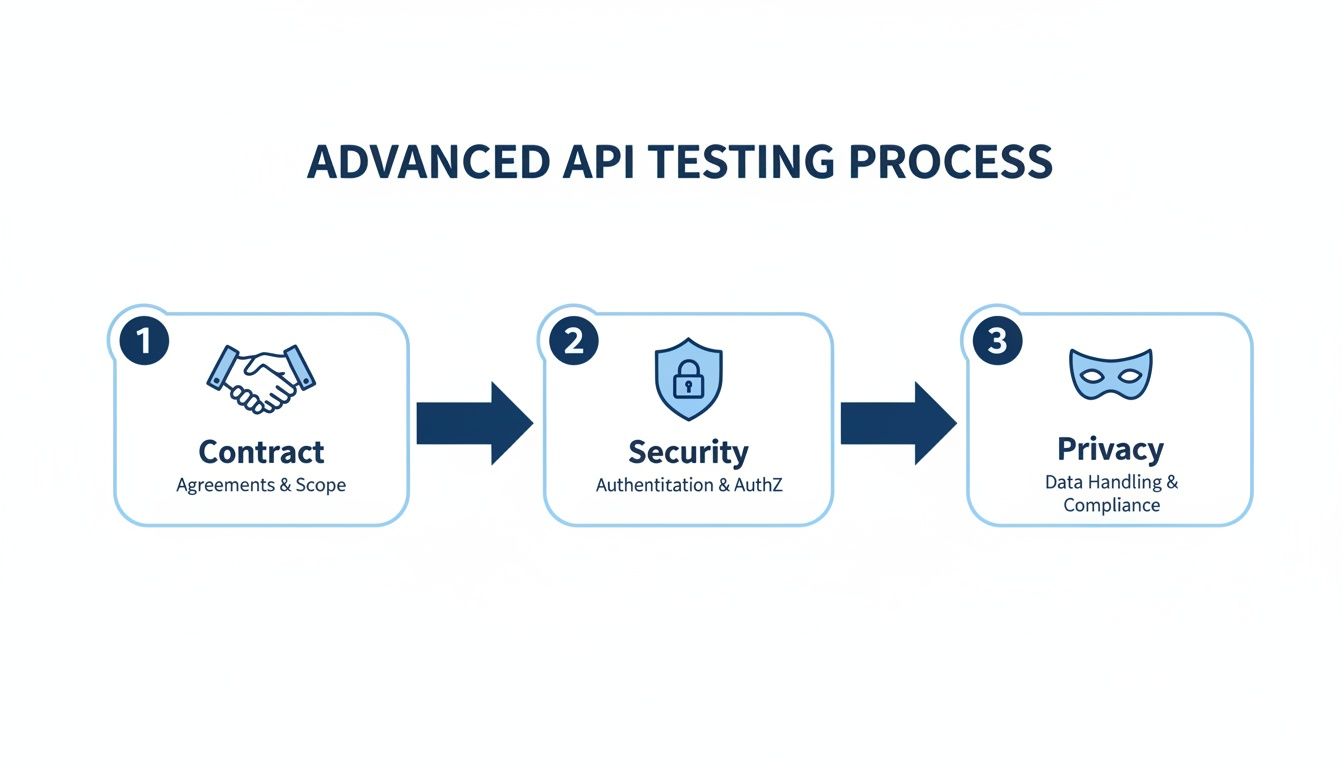
The diagram below shows how this fits into a broader, more advanced testing strategy. It’s not just about function anymore; it’s about contracts, security, and data privacy, all of which become more robust when you use real-world data.
Capturing and Replaying Live Traffic
The concept is brilliantly simple. You run a listener on your production server that silently records incoming HTTP traffic and saves it to a file. No impact on your users, just a perfect recording of their activity.
Once you have that file, you can replay it against your staging environment to simulate a genuine load.
Here’s a quick look at how you’d capture traffic on port 80 and save it to a file called prod-traffic.gor:
sudo ./gor --input-raw :80 --output-file prod-traffic.gor
With the recording in hand, you can head over to your staging environment and unleash the traffic. This command replays the requests against your staging API:
./gor --input-file prod-traffic.gor --output-http "http://staging-api.yourapp.com"
This kind of realistic testing is becoming non-negotiable. The API management market is exploding—projected to hit $22.11 billion by 2031. With Asia-Pacific alone accounting for 43% of API developers, the pressure to deliver reliable, high-performance APIs to a global audience is immense. Tools that let you test with real user behavior are no longer a luxury; they’re essential.
The beauty of traffic replay is its authenticity. You’re not testing against a simulation of your users; you’re testing against a recording of them. It’s the closest you can get to production conditions without actually being in production.
Stress Testing with Amplified Traffic
Replaying traffic one-for-one is fantastic for catching regressions, but what about finding your API’s breaking point? This is where amplifying traffic comes in.
Tools like GoReplay let you take an hour’s worth of production requests and fire them off in just a few minutes, creating a controlled, high-intensity stress test.
For instance, if you wanted to see how your system handles a massive spike, you could replay your captured traffic at 10 times the original speed using a multiplier.
./gor --input-file prod-traffic.gor --output-http "http://staging-api.yourapp.com|1000%"
This single command simulates a sudden, overwhelming surge in activity, pushing your API to its limits. It shows you exactly how things will hold up when a real-world event sends your traffic through the roof.
You can dive deeper into more examples and see how to replay production traffic for realistic load testing. Ultimately, testing with real traffic is what gives you true confidence that your API is ready for whatever your users throw at it.
Integrating API Testing into Your CI/CD Pipeline
To get real value from your API tests, they can’t be an afterthought you run manually every few weeks. They need to be a core, automated part of your development workflow. This is where integrating your test suite into a Continuous Integration/Continuous Deployment (CI/CD) pipeline comes in.
Think of it as an automated quality gate. Every single time a developer pushes code or opens a pull request, the pipeline kicks off your test suite automatically. This simple habit creates a powerful feedback loop that catches bugs long before they have a chance to impact users. It transforms testing from a chore into a safety net.
Automating Tests with GitHub Actions
Getting this set up is probably more straightforward than you think, especially with tools like GitHub Actions. You can create a simple workflow file that defines exactly when and how your tests should run.
For instance, you can trigger your test suite on every pull_request. Here’s a quick look at what that might look like in your workflow file:
name: API Tests on: [pull_request]
jobs: test: runs-on: ubuntu-latest steps: - uses: actions/checkout@v3 - name: Install Dependencies run: npm install - name: Run API Tests run: npm test
This snippet does three simple things:
- It checks out the latest code.
- It installs the necessary project dependencies (using
npmin this case). - It runs your test command,
npm test.
By embedding tests directly into your pipeline, you create a system where quality is enforced automatically. This lets your team ship code faster and with greater confidence, knowing a safety net is always in place.
Common Questions About REST API Testing
When you’re getting into API testing, a few questions always seem to pop up. People often wonder where to start, what tools to pick, or even what the point is compared to the testing they’re already doing. Let’s clear up some of the most common ones.
Getting the fundamentals right is the first step toward building a solid testing strategy for your REST API.
API Testing vs. UI Testing
It’s easy to mix these two up, but they operate in completely different worlds and for very different reasons.
API testing goes straight to the source—the business logic layer of your application. You’re bypassing the user interface entirely, which makes these tests incredibly fast and reliable. This is where you verify your core functionality, check that data validation is working, and make sure your error handling is solid. Think of it like checking the engine of a car without having to sit in the driver’s seat.
UI testing, on the other hand, is all about the end-user experience. It simulates a real person clicking through your application in a browser. It’s absolutely essential for catching visual bugs and confirming user workflows, but it’s also much slower and notoriously brittle. Even a tiny change to the front-end can break your UI tests.
How to Choose the Right API Testing Tools
There’s no single “best” tool. The right choice completely depends on what you’re trying to accomplish at that moment.
- Just Exploring? For sending a few one-off requests to see how an API responds, you can’t go wrong with Postman or Insomnia. They’re perfect for manual, exploratory testing.
- Ready to Automate? When you need to write tests that run over and over, you’ll want a code-based solution. Libraries like Supertest (for JavaScript) or Pytest (for Python) are industry workhorses.
- Need Realistic Load Testing? To find real performance bottlenecks, you need real traffic. Synthetic scripts just don’t cut it. A tool like GoReplay is in a class of its own here because it lets you use actual requests from your production environment.
A truly effective strategy doesn’t rely on just one tool. You’ll use one to explore, another to automate the functional checks, and then bring in traffic replay to make sure your API can actually handle the chaos of the real world before you deploy.
Ready to test your API with real production traffic? GoReplay is an open-source tool that captures and replays live HTTP traffic, allowing you to find performance issues before they impact your users. Get started for free at https://goreplay.org.