
Why Your Test Environment Setup Makes or Breaks Success
A well-configured test environment is essential for successful software development. It’s the proving ground for your code, where you ensure everything works as expected before it reaches your users. A robust setup allows for thorough testing of every aspect of an application, from basic functionality and performance to security and usability. This results in a higher quality product and a better user experience, ultimately leading to greater user satisfaction and a healthier bottom line.
The Importance of a Reliable Setup
Think of building a house on a shaky foundation. Even with a beautiful structure, the house is destined to fail. Similarly, a flawed test environment can undermine even the most carefully written code. Inconsistent environments can produce inaccurate test results, allowing bugs to sneak into production. This can lead to expensive fixes, damage your reputation, and even drive customers away. A reliable test environment provides a stable platform for accurate testing, giving developers confidence in their code.
Resource Allocation and the Rise of Cloud Solutions
Historically, securing resources for test environments has been a major challenge. Allocating sufficient hardware and software, including processing power, memory, and storage, often presented a significant hurdle. Between 2013 and 2018, surveys showed that acquiring adequate hardware and software resources, including sufficient CPU cores, optimal processor speeds, and fast load times, was a major obstacle for many companies. The rise of cloud computing and services like Test Environment as a Service (TEaaS) has significantly mitigated these challenges by providing scalable and cost-effective alternatives. The Crucial Role of Test Environment Setup in Software Testing explains the evolution of these test environments. These cloud-based solutions allow teams to adjust their testing resources as needed, eliminating the burden of managing physical infrastructure.
Real-World Impact
The consequences of a poorly configured test environment can be severe. Imagine an e-commerce website launching a major update without sufficient load testing. A crash during peak traffic could result in significant revenue loss and reputational damage. Conversely, a robust test environment can lead to substantial gains. Some companies report 200% faster delivery cycles after improving their testing infrastructure. These improvements facilitate more frequent and efficient testing, leading to quicker releases and faster time-to-market for new features and products. This agility offers a vital competitive edge in today’s market. Investing in a robust test environment helps organizations avoid costly errors and realize significant benefits, paving the way for continued success.
Building Test Environments That Actually Deliver Results
A well-structured test environment is essential for reliable testing outcomes. It’s the foundation of efficient processes that deliver trustworthy results, moving beyond basic configurations to create a system that truly reflects real-world conditions. This involves carefully balancing hardware and software configurations.
Reproducibility: Eliminating the “Works on My Machine” Myth
The dreaded “works on my machine” scenario stems from inconsistencies between development and testing environments. Reproducibility is key to eliminating this problem. Ensure every developer and tester works with the same basic configuration, minimizing environment-specific bugs. Think of it like baking: consistent oven temperatures are crucial for consistent results. Standardized test environments ensure consistent “baking” conditions for your code.
Infrastructure as Code: The Foundation of Consistency
Many teams now use Infrastructure-as-Code (IaC) for consistent, version-controlled, and reproducible environments. IaC manages and provisions infrastructure through code instead of manual processes. This allows for automated setup and teardown, reducing human error and saving time. Automating environment setup transforms a potentially days-long task into a process completed in minutes. You might find this helpful: How to master GoReplay setup for testing environments.
Monitoring for Performance Bottlenecks
Effective monitoring helps identify performance bottlenecks before they impact your testing cycles. Use appropriate monitoring tools like Prometheus to track key metrics like resource utilization, response time, and error rates. This data provides valuable insights into application performance under various conditions, allowing you to proactively address potential issues and prevent small problems from becoming major testing roadblocks. Consider it a health check for your test environment, ensuring smooth and efficient operation.

Key Considerations for Test Environment Setup
The following table provides a comparison of different test environment approaches. It highlights key components and considerations for each.
Test Environment Components Comparison
This table compares traditional on-premises test environments with modern cloud-based solutions across key dimensions
| Component | Traditional On-Premises | Cloud-Based Environment | Hybrid Solution |
|---|---|---|---|
| Hardware | Dedicated servers, often underutilized | On-demand resources, scalable | Mix of dedicated and on-demand |
| Setup Time | Lengthy, manual configuration | Rapid, automated provisioning | Moderate, depending on configuration |
| Cost | High upfront investment, ongoing maintenance | Pay-as-you-go, potentially lower cost | Balanced approach, cost optimization |
| Scalability | Limited, requires hardware upgrades | Highly scalable, adapts to demand | Scalable to a degree, limited by on-premises resources |
| Control | Full control over infrastructure | Shared responsibility with cloud provider | Shared control, requires coordination |
| Maintenance | Manual updates and patching | Automated updates and management | Combination of manual and automated tasks |
By prioritizing reproducibility, using IaC, and implementing robust monitoring, you build effective test environments. This leads to better software quality, faster release cycles, and a superior product. This strong foundation ensures your software is ready for real-world use.
Cloud-Powered Testing: When to Make the Leap
Migrating your testing to the cloud offers appealing advantages like scalability and flexibility. But it’s not a universal solution. Making an informed decision requires understanding both the benefits and the challenges involved in such a transition. A thorough evaluation of your specific needs is essential.
Advantages of Cloud-Based Test Environments
Cloud testing offers significant advantages, starting with remarkable flexibility. You can easily scale resources up or down as needed, which is particularly helpful for load testing that simulates numerous users. Load testing is crucial for determining application performance. Cloud environments can also significantly reduce costs by eliminating the need for physical hardware and ongoing maintenance. This allows for more efficient allocation of resources.
The Hidden Challenges of Cloud Migration
Despite the benefits, cloud migration does present challenges. Security is a primary concern, especially ensuring data safety in a shared environment. Vendor lock-in is another potential issue. Choosing the right cloud provider is a crucial decision because migrating between them can be complex. Finally, reliance on a third-party provider introduces the possibility of downtime due to provider outages.
Evaluating Your Testing Needs
The decision to migrate depends on factors like application complexity, testing frequency, and budget. For complex applications with frequent testing and a limited budget, the cloud is often ideal. However, simpler applications with less frequent testing might find a traditional on-premises setup more cost-effective. A small startup, for example, might prefer the cloud’s pay-as-you-go model over investing in costly hardware.
Understanding IaaS, PaaS, and SaaS for Testing
The cloud offers different service models: Infrastructure as a Service (IaaS), Platform as a Service (PaaS), and Software as a Service (SaaS). IaaS offers control over the underlying infrastructure, while PaaS provides a ready-made platform for building and deploying applications. SaaS delivers complete software solutions, including testing tools. Choosing the right model hinges on your team’s technical expertise and the level of control required. If your team has in-house expertise and needs full control, IaaS might be the best option. If a managed solution is preferred, PaaS or SaaS could be more suitable.
Migration Strategies for a Smooth Transition
Cloud migration requires careful planning. Begin by assessing your current test environment. Identify your needs and select the appropriate cloud model. Create a step-by-step migration plan that minimizes disruptions. This could involve gradually migrating components to the cloud or adopting a hybrid approach. The market for test environment setup is expanding, with Test Environment as a Service (TEaaS) becoming increasingly important. In 2024, the global TEaaS market was valued at about USD 15.2 billion. It’s projected to reach USD 62.0 billion by 2033, growing at a 16.06% CAGR from 2025-2033. This growth highlights the demand for flexible and scalable testing. Find more statistics here: Test Environment as a Service Market Report
Maximizing Cloud Flexibility
After migrating, maximize the cloud’s benefits. Use automation to streamline environment setup and teardown, saving time and resources. Leverage features like auto-scaling to adjust resources dynamically. Regularly monitor cloud costs to optimize spending and prevent unexpected bills. These steps help you harness the cloud’s power for efficient and effective testing, creating a streamlined and cost-effective environment that adapts to changing needs.
From Zero to Testing Hero: Your Step-by-Step Blueprint
This section offers a practical guide to setting up a robust test environment. We’ll cover the essential steps, from initial planning to ongoing maintenance, providing a blueprint for testing success. A structured approach ensures efficient and effective testing, minimizing future problems. When exploring cloud-based options, consider the features of different cloud testing platforms like Umano.
Defining Your Test Environment Needs
The first step is understanding your specific needs. What kind of software are you testing? What are your performance and security objectives? What resources are available? Answering these questions defines the scope of your test environment and avoids unnecessary complexity and costs. For example, testing a mobile app has different requirements than testing a web application.
Automated Provisioning: From Days to Minutes
Modern test environments often use automated provisioning tools like Jenkins or Ansible to streamline setup. These tools automatically configure the required hardware and software, significantly reducing setup time. This efficiency lets testers focus on testing, not managing infrastructure. Automation also minimizes human error, creating more consistent and reliable environments.
Data Management: Balancing Realism and Security
Test data needs to be realistic while protecting sensitive information. Techniques like data masking and synthetic data generation help achieve this balance. Data masking replaces sensitive data with realistic but non-sensitive substitutes. Synthetic data generation creates entirely new data that mimics real data without containing sensitive information. This ensures realistic test scenarios without security risks.
Containerization: Portability and Consistency
Containerization technologies like Docker offer portable and consistent test environments. Encapsulating the entire environment in a container ensures it runs identically across different platforms. This consistency eliminates the “works on my machine” problem, making test results more reliable. Containerization also simplifies environment management, making it easier to deploy, update, and scale your test infrastructure.
The following process flow illustrates the key steps in test environment setup, starting with defining requirements and moving through automated provisioning, data management, and containerization to continuous monitoring.
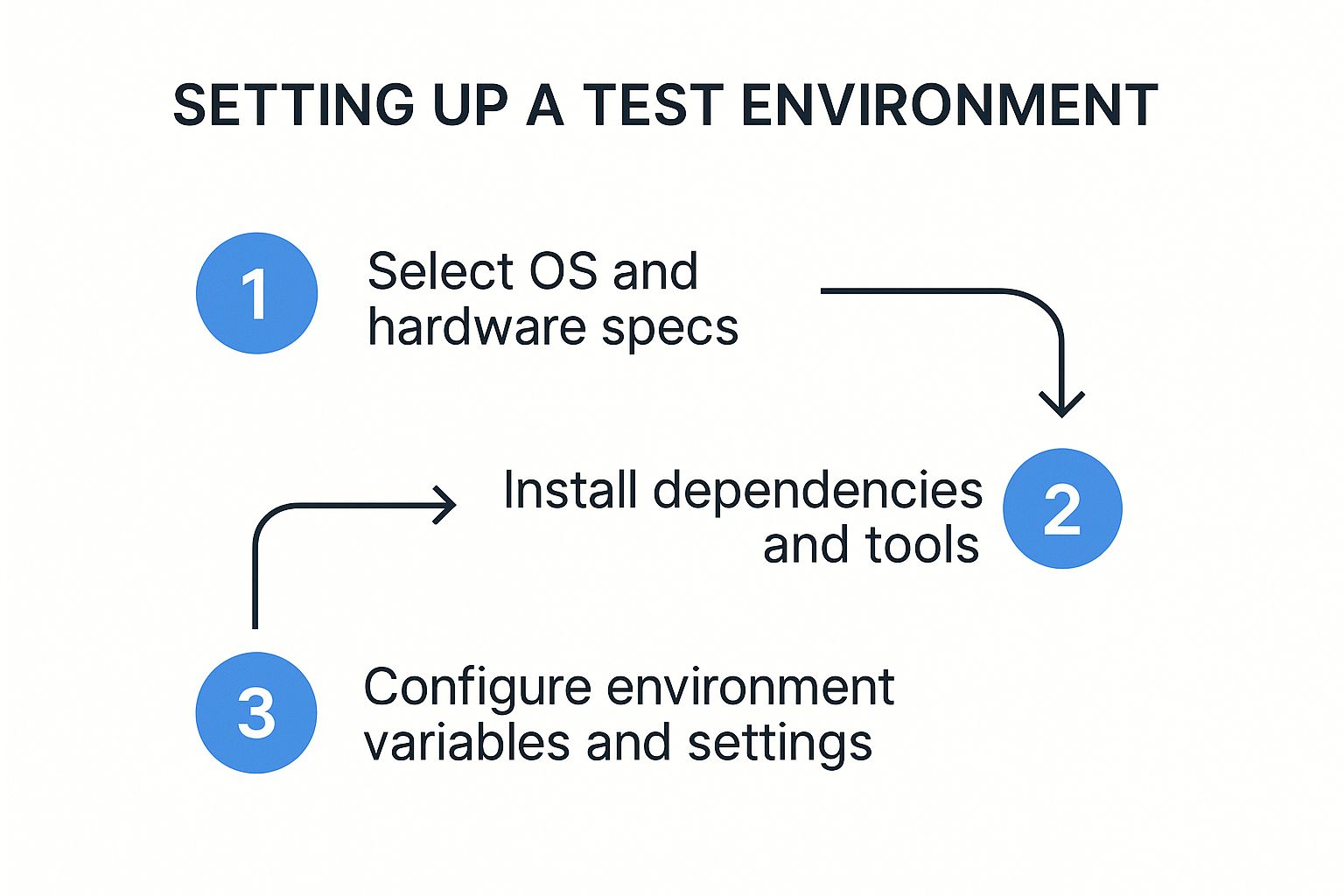
This sequential approach is crucial for building a robust and reliable test environment, with each stage building upon the previous one. The process culminates in a fully functional and optimized environment that supports accurate and efficient testing.
Before diving into setting up your environment, it’s beneficial to review a comprehensive checklist of steps and considerations. The following table outlines key activities, common pitfalls, and best practices for each setup phase.
| Setup Phase | Key Activities | Common Pitfalls | Best Practices |
|---|---|---|---|
| Requirements Definition | Documenting software requirements, performance goals, and security needs | Unclear or incomplete requirements | Use a standardized template for capturing requirements; Involve stakeholders from different teams |
| Automated Provisioning | Selecting and configuring automation tools, scripting infrastructure setup | Overly complex automation scripts; Lack of error handling | Use modular and reusable scripts; Implement robust error handling and logging |
| Data Management | Identifying sensitive data, implementing data masking or synthetic data generation | Using production data directly; Inadequate data masking | Develop a clear data management policy; Regularly review and update test data |
| Containerization | Building and deploying containers, managing container images | Inconsistent container environments; Difficulty managing dependencies | Use a container orchestration platform; Document container configurations |
| Continuous Monitoring | Setting up monitoring tools, defining performance thresholds, configuring alerts | Lack of monitoring; Ignoring alerts | Establish clear monitoring metrics; Define escalation procedures for alerts |
This checklist provides a helpful framework for ensuring a thorough and well-executed test environment setup process. By addressing each phase diligently and adhering to best practices, you can minimize potential issues and create a robust foundation for testing.
Continuous Monitoring: Proactive Problem Detection
Ongoing monitoring of your test environment is essential for detecting and resolving problems before they impact testing. Monitoring tools track resource usage, performance, and error rates, providing early warnings of potential issues. This proactive approach maintains a stable and reliable testing environment, prevents testing disruptions, and ensures accurate results. This continuous feedback allows for proactive adjustments and optimizations, keeping your test environment reliable and effective.
Overcoming Test Environment Nightmares That Plague Teams

Every software project, regardless of size, faces challenges setting up test environments. This isn’t simply a technical hurdle; it directly affects the final product’s quality and the entire development process. Imagine a team diligently coding, only to find bugs slipped through because of an unreliable testing setup. This wastes time and resources and can damage a company’s reputation and disappoint customers. Addressing common test environment pitfalls is essential for project success.
Common Challenges and Solutions
Budget limitations are a major obstacle. Teams struggle to secure enough resources for hardware, software, and upkeep. However, using cloud-based solutions can help. Cloud platforms like Amazon Web Services (AWS) offer flexible, pay-as-you-go models, allowing teams to adjust resources without large upfront costs. This makes cloud-based testing appealing, especially for startups and smaller businesses. Test Environment as a Service (TEaaS) is also gaining popularity.
Another common problem is configuration drift. Differences between development, testing, and production environments can appear over time, causing unreliable test results. Using Infrastructure-as-Code (IaC) practices, such as those offered by Terraform, helps ensure consistency across all environments. IaC lets you define and manage infrastructure through code, simplifying setup automation, change tracking, and reverting to earlier configurations. This guarantees everyone works with the same baseline, minimizing environment-specific bugs. This is especially important for continuous integration and continuous delivery pipelines, where consistency is vital for smooth deployments.
Historically, setting up test environments has been difficult. Resource allocation was a major concern for organizations between 2013 and 2018. Cloud-based solutions are now tackling some of these challenges. The global Test Environment as a Service market is projected to grow from $14.32 billion in 2024 to $17.19 billion in 2025, a 20.0% CAGR. Learn more about the Test Environment as a Service Market.
The Test Data Dilemma
Getting and managing test data is another significant challenge. Testing with realistic data is essential for accurate results, but using production data directly risks security and privacy breaches. Strong data management strategies, like data masking or synthetic data generation, are crucial for balancing realism and security. Data masking substitutes sensitive information with realistic but safe alternatives. Synthetic data generation creates new data that mimics real-world patterns but contains no personal information. These methods allow thorough testing without compromising sensitive data.
Turning Challenges into Opportunities
While test environment setup can be complex, tackling these challenges head-on transforms potential issues into opportunities. By adopting strategic approaches, organizations can build robust and reliable testing systems that support high-quality software development. This results in faster releases, lower costs, and happier customers.
Integrating Test Environments Into Your CI/CD Pipeline
Integrating your test environment setup directly into your Continuous Integration/Continuous Delivery (CI/CD) pipeline is essential for rapid software development. This integration enables automated testing with every code change, allowing teams to quickly identify and address issues. This proactive approach improves software quality and streamlines the development process.
Automating Test Environment Creation and Teardown
Mature DevOps organizations automate the creation, configuration, and teardown of test environments within their CI/CD pipeline. With each build, a fresh environment is automatically created, tests are run, and the environment is decommissioned. This automation eliminates manual intervention, reducing human error and saving time. For instance, Jenkins can be configured to automatically provision cloud-based test environments with each code commit.
Orchestrating Parallel Testing
Effective environment orchestration is key to maximizing CI/CD pipeline efficiency. This involves managing multiple test environments to enable parallel testing. Running tests concurrently across different environments significantly reduces overall testing time. However, careful planning and management are crucial to avoid resource conflicts and ensure each environment has the necessary resources. This approach provides faster feedback on code changes, accelerating the development lifecycle.
Implementing Environment-Specific Configurations
Different tests often require specific environment configurations. Performance testing might need a simulated high-traffic environment, while security testing requires a more isolated setup. Leading teams implement environment-specific configurations within their pipelines without increasing maintenance overhead. Configuration management tools help define and apply settings based on the test type, ensuring each test runs in the optimal environment. This improves test accuracy and effectiveness while minimizing configuration drift. Read also: Load Testing Software Guide for 2024.
Maintaining Clean-Slate Environments
Reliable and repeatable test results depend on clean-slate environments for each test run. Leftover data or configurations from previous tests can skew results, making it difficult to identify new issues. Clean-slate environments offer a neutral backdrop, maximizing accuracy and simplifying debugging. This involves automatically resetting the environment to a known good state before each test, ensuring reliable and uninfluenced results.
Balancing Testing and Speed
The goal is comprehensive testing without sacrificing the speed of continuous delivery. This requires a balance between test suite thoroughness and release frequency. One effective strategy is prioritizing tests based on risk. Critical functionalities and frequently changed areas should be tested more often, while lower-risk components can be tested less frequently but more thoroughly. This risk-based approach allows for rapid feedback on essential changes while maintaining code quality. By implementing these strategies, organizations can successfully integrate their test environment setup into their CI/CD pipeline, ensuring continuous quality and faster delivery cycles.
Future-Proofing Your Test Environment Strategy
The software testing world is constantly evolving. To keep up, your test environment strategy needs to be flexible and forward-looking. This means embracing new technologies and adjusting to changes in software design. By proactively addressing these changes, organizations can ensure their testing processes remain efficient, effective, and ready for what’s next.
AI and Machine Learning: Predictive Provisioning
Artificial intelligence (AI) and machine learning (ML) are changing how we provision test environments, shifting from a reactive to a predictive approach. Artificial Intelligence can analyze past data and current testing needs to predict future resource requirements. This allows for proactive scaling and resource allocation, which optimizes efficiency and cuts costs.
For example, ML algorithms can predict peak testing times and automatically provision additional resources beforehand. This prevents bottlenecks and delays. This predictive capability helps teams stay ahead of demand and maintain a smooth testing workflow.
Microservices and Test Environment Requirements
Microservices architectures create unique challenges for setting up test environments. Testing individual microservices in isolation is crucial, but so is testing how they interact within the whole system. Successful teams use strategies like service virtualization and containerization to address these complexities. Service Virtualization simulates the behavior of dependent services, enabling isolated testing even when those services aren’t available.
Containerization) creates portable and consistent environments for each microservice, ensuring reproducibility and simplifying deployment. These techniques help manage the complexity of microservices and ensure reliable testing outcomes.
The Potential of Serverless Testing Environments
Serverless computing offers an exciting way to further optimize test environments. By using serverless platforms, organizations can dramatically reduce infrastructure overhead and improve scalability. Serverless Computing automatically provisions and scales resources as needed, eliminating manual management and significantly lowering costs.
This on-demand approach means teams only pay for the resources they use, optimizing spending and freeing up budget for other priorities.
Incrementally Evolving Your Strategy
Moving to a future-proof test environment strategy doesn’t have to mean a complete system rebuild. Start by pinpointing areas for improvement without disrupting current testing. This might involve experimenting with AI-powered resource management or adopting containerization for some of your services.
By making gradual changes, you can slowly integrate new technologies and practices while minimizing risk and keeping a consistent testing process.
Practical Implementation Approaches
Begin by assessing your current test environment setup. Identify where AI, microservices, or serverless technologies can offer the greatest advantages. Start small, testing these technologies in a controlled environment before wider implementation.
For example, you could pilot an AI-powered resource management tool for a single project or containerize a non-critical microservice to evaluate the approach. This lets you learn from these initial tests and adjust your strategy as you go. This measured approach minimizes disruption and maximizes the chances of a successful transition.
Ready to improve your testing process and gain valuable insights from your production traffic? Explore GoReplay, the open-source solution for capturing and replaying live HTTP traffic.