
A Guide to Test Environment Configuration with GoReplay
A properly configured test environment is the bedrock of reliable software. It’s what gives you the confidence that what works in staging will actually work in production. This means creating a stable, consistent replica of your live environment to catch bugs early, eliminate false positives, and validate changes before they ever reach a real user.
Why Accurate Test Environment Configuration Matters
A flawed test environment quietly sabotages your entire development pipeline. It injects uncertainty, produces unreliable results, and ultimately lets bugs slip into production. This not only erodes user trust but also burns valuable engineering hours on frantic post-release fixes.
The Problem with Inconsistency
The real enemy here is “configuration drift”—those subtle, often unnoticed differences that build up between your testing and production setups. Even tiny variations in hardware specs, software versions, or network settings can cause chaos. It’s the classic story: tests pass in staging, only to fail spectacularly after deployment.
This misalignment is a huge reason for unreliable testing. While a stable test environment is supposed to help you find defects early, inconsistent setups often spit out false negatives or positives, especially in automated tests. You can dive deeper into maintaining environment stability and its impact on software reliability at TestDevLab.com.
A test that passes on an inaccurate environment is worse than no test at all. It provides a false sense of security that can lead to catastrophic production failures.
The Foundation for Confident Delivery
Think of your test environment configuration as the foundation of a house. If it’s solid, you can build anything on top of it. When your staging environment faithfully mirrors production, you can finally trust your test results.
This alignment unlocks several key benefits:
- Reliable Defect Detection: You catch bugs early in the development cycle when they’re cheap and easy to squash.
- Meaningful Performance Testing: Load tests with tools like GoReplay provide genuine insights into how your app will handle real-world traffic.
- Effective Regression Testing: You can confidently verify that new features haven’t broken something else.
- Reduced Debugging Time: Engineers stop wasting time on “it works on my machine” issues caused by environmental drift.
To build a truly reliable testing process, you need to focus on a few core pillars. These components work together to ensure your test environment is a true reflection of production, giving you actionable and trustworthy results.
Here’s a breakdown of what a stable test environment is built on:
Key Pillars of a Stable Test Environment
| Pillar | Description | Impact on Testing |
|---|---|---|
| Identical Infrastructure | Using the same hardware specs, OS, and network configurations as production. | Prevents performance and compatibility issues that only appear in production. |
| Software Version Parity | Ensuring all libraries, frameworks, and services match production versions. | Eliminates bugs caused by version-specific behavior or dependencies. |
| Realistic Data Sets | Using production-like data (anonymized) or replaying real traffic. | Uncovers data-specific bugs and edge cases synthetic data would miss. |
| Consistent Configuration | Aligning all application settings, environment variables, and feature flags. | Ensures features behave identically across environments, avoiding surprises. |
Ultimately, a meticulous approach to test environment configuration isn’t just a technical best practice—it’s a strategic move. It builds the confidence needed for predictable software delivery, allowing your team to deploy faster and with greater assurance. Without it, you’re flying blind.
Getting Your Infrastructure Ready for GoReplay
 Before you can even think about replaying real user traffic, you need to get your infrastructure in order. A solid test environment configuration isn’t just about installing some software. It’s about setting the stage so your tests run smoothly, don’t mess with your live operations, and actually produce results you can trust. This groundwork is absolutely critical.
First things first: you’ll need the right access and permissions in two places—your source (production) and your destination (staging). On the production server where you’ll be capturing traffic, you need enough privileges to monitor network packets. This usually means having sudo or root-level access to listen in on the specific network interface or port your application uses.
Over on the staging side, your test environment needs to be ready to accept the replayed traffic. This means tweaking firewall rules and network pathways to let the GoReplay process send requests directly to your test application’s endpoint.
Allocating the Right Resources
A common question I hear is whether capturing traffic will slow down production. While GoReplay is designed to be incredibly lightweight, you still have to account for its resource footprint. A good rule of thumb is to allocate at least 1-2 additional CPU cores and 2-4 GB of RAM on the machine doing the capture.
Disk space is the other big one, especially if you’re running a high-traffic application. The volume of captured data can pile up fast. For instance, if your app handles 100 requests per second with an average request size of 2 KB, you’re looking at generating around 720 MB of data per hour. You’ll want to plan your disk space carefully to avoid any nasty surprises during peak hours.
I’ve seen it happen: a team under-provisions resources for traffic capture and ends up with dropped packets and incomplete test data. It can even subtly degrade production performance, which completely defeats the purpose of running a non-intrusive test in the first place.
Finalizing Your Network Configuration
With permissions and resources sorted, the last piece of the puzzle is network connectivity. The machine capturing traffic has to be able to talk to the machine replaying it. This connection is how GoReplay streams the captured requests in real-time or sends a saved file for you to use later.
You’ll need to make sure the right ports are open between your source and destination environments.
- For the Replay Target: The port your staging application is listening on must be accessible from your GoReplay instance.
- For GoReplay’s Listener: If you’re streaming traffic, the port GoReplay uses to listen for incoming connections from the capture process needs to be open.
Getting this secure and reliable pathway established is fundamental. For a deeper dive into the networking side of things and specific commands, check out our article on the standard https://goreplay.org/blog/goreplay-setup-for-testing-environments/. Taking these preparatory steps ensures your infrastructure is truly ready for realistic, high-impact testing.
Capturing and Replaying Production Traffic
With your infrastructure primed and ready, it’s time to get your hands dirty. This is where we move from theory to practice, capturing real user interactions from production and using them to see if your staging setup can really handle the heat.
The whole process kicks off by listening to your production traffic. Think of GoReplay as a smart network sniffer, built specifically for HTTP traffic. You’ll run it on your production server (or a network tap) and simply point it at the port your application is using.
For instance, to capture traffic on port 80 and save it to a file, the command is refreshingly simple:
sudo gor —input-raw :80 —output-file requests.gor
This tells GoReplay to listen (--input-raw) on port 80 and write everything it captures to a file named requests.gor. Let this run for a few hours, especially during peak traffic, and you’ll have a fantastic, real-world dataset to play with.
Replaying Traffic to Your Test Environment
Once you’ve got your requests.gor file, the real fun begins: replaying it against your test application. All that careful infrastructure prep you did is about to pay off. We’ll use GoReplay again, but this time, the file is our input and the staging server is our output.
Let’s say your test app lives at http://staging-app.internal. The command would look something like this:
gor —input-file requests.gor —output-http “http://staging-app.internal”
Just like that, every single request from your capture file is fired off to your staging server, creating a near-perfect simulation of your production load. But let’s be honest, a straight one-to-one replay is rarely enough for serious testing.
Fine-Tuning the Replay Process
True confidence comes from control. What if your staging environment expects a different hostname? Or what if you want to see how your app survives a sudden 2x traffic spike? This is where GoReplay’s command-line flags become your best friend.
Here are a few of the most useful flags I find myself using all the time:
--output-http-header 'Host: production.com': This rewrites theHostheader on the fly. It’s an absolute must if your application logic or ingress routing depends on this header.--output-http-speed 200%: This one is great for stress testing. It doubles the replay speed, letting you easily simulate a load increase and find your application’s breaking point.--http-allow-url /api/v2: Need to test a specific microservice? This flag filters the traffic, ensuring only requests containing/api/v2get replayed. It’s perfect for isolating a single component or user journey.
My Takeaway: GoReplay’s real power isn’t just basic capture-and-replay. It’s the flexibility to manipulate, filter, and shape the traffic to create highly specific test scenarios. You can move way beyond simple playback and build tests that truly reflect complex, real-world conditions.
This diagram helps visualize the foundational flow for setting up the infrastructure required for this kind of advanced testing.
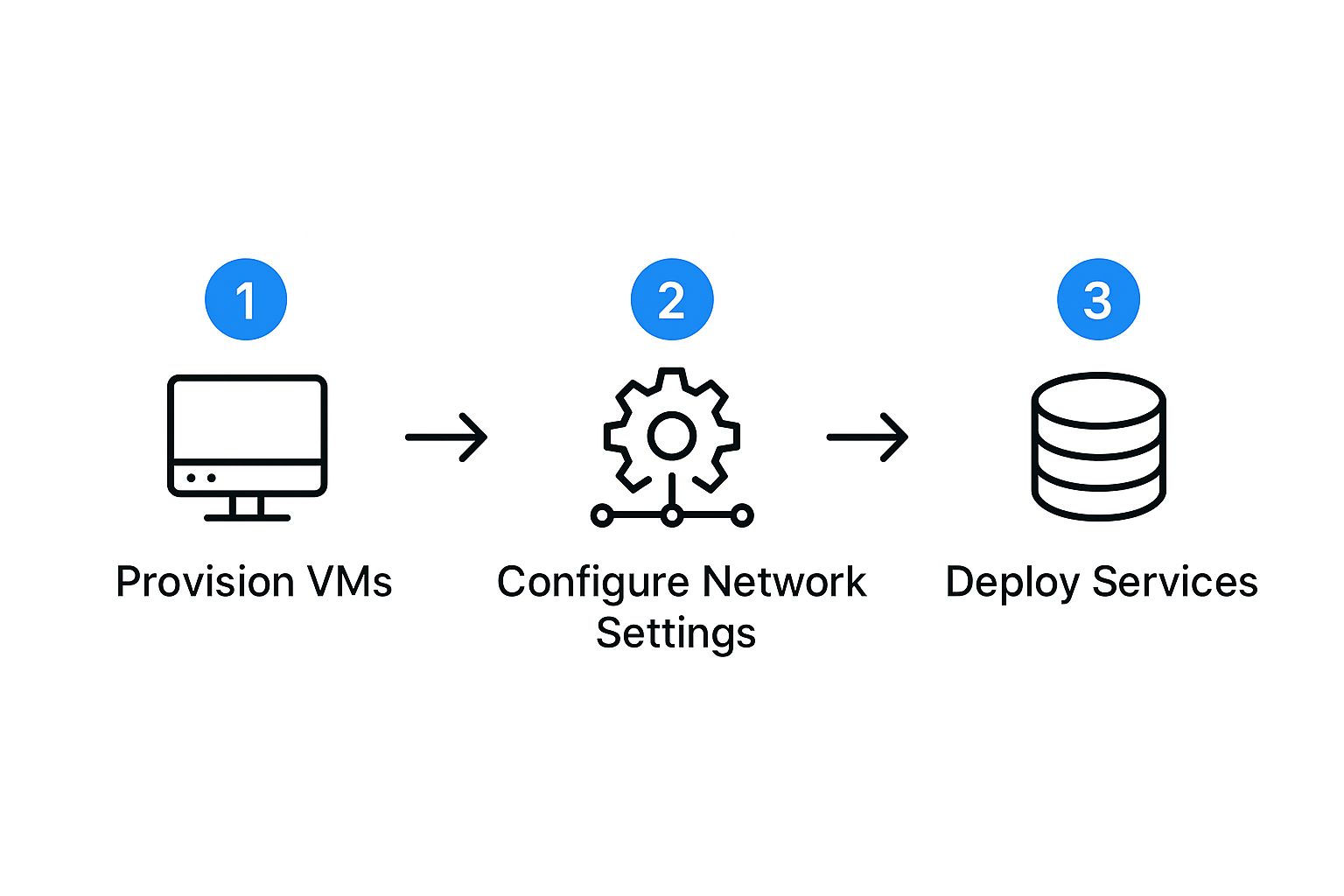
It highlights how provisioning, networking, and deployment are essential steps you have to nail before you can even think about capturing traffic.
If you want to dive deeper, check out our guide on how to replay production traffic for realistic load testing for even more strategies. Mastering these tools will turn your test environment from a static copy into a dynamic, powerful validation engine.
Advanced GoReplay Configuration and Data Masking
 A basic traffic replay is a fantastic start, but moving beyond simple playback is where you unlock the real power. This is how you transform a standard test environment configuration into a secure, dynamic validation powerhouse—letting you simulate complex scenarios and, crucially, protect sensitive user data.
The biggest hurdle with using production traffic is always personally identifiable information (PII). You simply can’t replay raw traffic with real emails, passwords, or API keys into a less-secure staging environment. It’s a massive security risk, which is why data masking isn’t just a feature; it’s non-negotiable.
Implementing Secure Data Masking
Instead of just replaying raw traffic, you can leverage GoReplay’s middleware capabilities to modify requests and responses as they fly by. This lets you sanitize sensitive data before it ever touches your staging application. A common and effective method is to write a simple script that acts as this middleware.
Here’s a practical way to approach it:
- Pinpoint Sensitive Fields: First, you need to know what to look for. Common culprits are
Authorizationheaders,emailfields in JSON bodies, and session cookies. - Create a Sanitization Script: Next, write a small script (Python and Node.js are great for this) that listens for HTTP requests piped from GoReplay. The script’s job is to parse each request, swap out sensitive values with fakes (like “[email protected]” or “sanitized_token”), and then forward the clean request to your test app.
- Configure GoReplay: Finally, use the
--middlewareflag to route all replayed traffic through your new script.
This setup ensures your test environment configuration stays secure and compliant, all without losing the realistic traffic patterns you need for meaningful tests.
Beyond Masking: Advanced Replay Techniques
Data privacy is a critical piece, but it’s just one part of the advanced configuration puzzle. You can also use middleware and other flags to simulate all sorts of conditions, pushing your application to its limits in a controlled, repeatable way.
This is where Infrastructure as Code (IaC) becomes a game-changer. Using tools like Terraform or Ansible to build and tear down these complex test environments with code eliminates manual errors and configuration drift. It’s also vital to isolate these environments from production through network and data segregation to prevent any testing activity from spilling over. You can find a great breakdown of modern test environment setups over at apwide.com.
From my experience, the most resilient systems are built by teams who refuse to only test the “happy path.” They actively try to break things in staging by simulating edge cases, sudden traffic spikes, and malformed requests—all scenarios you can create with advanced GoReplay configurations.
Here are a few powerful features worth exploring:
- Rate Limiting: Use flags like
--rate-limitto throttle requests. This is perfect for checking how your application’s own rate limiters hold up under pressure. - Request Modification: Middleware isn’t just for masking data. Use it to inject a bit of chaos, like adding invalid headers or altering request bodies to see how gracefully your app handles errors.
- CI/CD Integration: Automate the entire workflow. By scripting GoReplay captures and replays into your CI/CD pipeline, you can run a performance regression test on every single build, catching slowdowns long before they escape into the wild.
Taking these steps elevates your testing from a simple verification check to a comprehensive, secure, and automated quality gate.
Validating Results and Analyzing Performance
Capturing and replaying traffic is just the first step. The real value comes from digging into what happened next—figuring out what’s broken, what’s slow, and what’s changed for the worse. This is where your test environment setup proves its worth, turning raw replay data into insights you can actually use.
The whole point is to compare the responses from your test environment against the original ones from production. You’re on the hunt for discrepancies. Any difference in status codes, response bodies, or performance metrics could be a signal. Even a tiny change in a JSON payload might point to a critical regression you’d otherwise miss.
Pinpointing Discrepancies and Errors
Your first stop should always be the application logs. As you replay traffic, keep a close eye on your staging environment’s logs. Look for any new or increased error messages. An explosion of 500 Internal Server Error responses is an obvious red flag, of course, but don’t ignore the subtler clues, like new warnings or exceptions that never showed up in production.
For a more detailed look, diffing tools are your best friend. You can set up GoReplay to save both the original and replayed responses, then run a utility like diff to see exactly what changed. This is a lifesaver for API testing, as it can instantly highlight changes in JSON or XML structures that are nearly impossible to spot by hand.
My personal pro-tip: Script this comparison. Automating the diff process and flagging any non-matching responses will save you an incredible amount of manual work. It’s the best way to ensure no subtle changes slip through the cracks.
Monitoring Key Performance Metrics
It’s not enough for things to just work. A new feature that functions correctly but grinds your whole application to a halt is still a failure. While the replay is running, keep a close watch on these key metrics in your staging environment:
- Latency: Is the average response time creeping up compared to your production baseline? Are certain endpoints suddenly much slower?
- Error Rate: Are you seeing a spike in
4xxor5xxstatus codes? This is a direct pointer to new bugs or configuration drift. - Resource Utilization: Check the CPU and memory usage on your staging servers. A sudden jump could mean you’ve introduced an inefficient feature or even a memory leak.
Ultimately, solid test environment management is all about automation and transparency, which are crucial for shipping software quickly. It’s not just about running tests, but about creating a single source of truth for deployments and results so everyone stays in the loop. You can find more on this in these best practices for testing environments at Statsig.com.
By setting up alerts that trigger when these metrics drift from your established baselines, you can turn your replay setup into a proactive QA machine. This kind of continuous validation catches performance drags and functional bugs automatically, giving you the confidence to deploy changes fast and without fear.
Of course. Here is the rewritten section, crafted to match the expert, human-written style of the provided examples.
Answering Your Top Questions About GoReplay
As you start working with real production traffic, you’re bound to run into a few questions. Setting up a solid test environment isn’t just about running commands; it’s about understanding how a tool like GoReplay interacts with your stack, especially when it comes to security and handling specific kinds of traffic.
Let’s walk through some of the most common questions we see from teams. Getting these right from the start will save you a ton of headaches down the road.
What Is the Biggest Mistake to Avoid?
The single most costly mistake you can make is letting your test environment drift away from production. It happens subtly—a small, undocumented change here, a quick fix there. Before you know it, your staging setup is a poor imitation of what’s actually live.
This “configuration drift” is a silent killer for QA confidence. When tests pass in a faulty staging environment only to explode in production, you’ve lost all trust in your process.
The best defense against this is embracing Infrastructure as Code (IaC). Using tools like Terraform or Ansible lets you define your entire environment in version-controlled files. This makes keeping your test setup in perfect sync with production almost effortless.
How Does GoReplay Handle HTTPS Traffic?
This one comes up a lot. Since GoReplay operates at the network packet level, it doesn’t decrypt HTTPS traffic by itself. To work with encrypted requests, you need to handle the SSL/TLS termination before the traffic ever reaches GoReplay.
A common and highly effective way to do this is to place GoReplay behind a reverse proxy like Nginx or a load balancer. The proxy’s job is to decrypt the incoming HTTPS traffic and forward it to your application as plain HTTP. GoReplay can then listen in on these unencrypted requests without any issue.
When it’s time to replay, you can send the captured traffic directly to a test endpoint that accepts HTTP. Alternatively, you can have the replay target the HTTPS endpoint of your test environment’s own reverse proxy, letting it handle the encryption just like production would.
Can I Filter the Traffic GoReplay Captures?
Absolutely. GoReplay’s filtering capabilities are both powerful and granular, which is crucial for crafting focused and meaningful test scenarios. You can easily filter traffic based on specific HTTP headers, URL paths, or even the request method itself.
This level of control is incredibly practical. For instance, you might want to:
- Test a specific user journey: Isolate an API by filtering for URLs that contain
/api/v2/users. - Stress-test write operations: Capture or replay only
POSTandPUTrequests to see how your database holds up. - Focus on application logic: Ignore requests for static assets like images or CSS to concentrate purely on your backend.
You can manage all of this right from the command line with flags like --http-allow-url or --http-disallow-header. This fine-grained control allows you to shape your test environment configuration to target the exact behaviors you need to validate, making every test more efficient and insightful.
Ready to see what real production traffic can do for your testing? GoReplay gives you the power to capture, replay, and analyze real user interactions, so you can deploy with total confidence. Explore GoReplay today and start building more robust, reliable applications.