
Stress Testing Load Testing: Key Differences & Best Practices
The real difference between stress testing and load testing boils down to a single question: Are you preparing for a busy day or a total disaster?
Load testing is about making sure your system can handle an expected spike in traffic. Stress testing is about intentionally pushing your system past its limits to discover exactly where, when, and how it breaks.
Understanding The Core Differences
Even though they both fall under the performance testing umbrella, stress and load testing answer completely different questions about your system’s stability. Confusing the two can give you a false sense of security, leaving your application exposed right when performance is most critical.
Load testing is your predictable, proactive health check. Its goal is to confirm your system can perform as expected and meet its service-level agreements (SLAs) under a known peak load. Think of an e-commerce site prepping for Black Friday—they’d run a load test to ensure the servers can handle the anticipated traffic surge without crashing or slowing to a crawl. It’s all about confirming stability under heavy, but normal, conditions.
Stress testing, on the other hand, is about exploring the breaking points. You deliberately overload the system to find out: Where is the weakest link? At what specific point does it fail? And, most importantly, how does it recover? This isn’t simulating a busy day; it’s simulating a full-blown crisis.
You can explore our detailed breakdown of these concepts to better understand their unique applications.
The stakes couldn’t be higher. In 2023, inadequate testing was a factor in an estimated $50 billion in losses from IT system failures globally. A staggering 67% of enterprises reported unexpected outages. These numbers show just how essential both types of testing are.
Core Purpose At A Glance
To put it simply, each test has a distinct job. This table cuts through the noise and summarizes the primary objective of each.
| Attribute | Load Testing | Stress Testing |
|---|---|---|
| Primary Goal | Validate performance under expected peak loads. | Identify the system’s breaking point and recovery behavior. |
| Traffic Volume | Simulates high but anticipated user traffic. | Pushes traffic far beyond normal operational capacity. |
| Key Question | ”Can we handle our busiest day?" | "What happens when we are overwhelmed?” |
Ultimately, load testing gives you confidence in your current capacity, while stress testing reveals what you need to fix to improve it.
A Visual Comparison
This chart provides a clear picture of how a system reacts differently to a load test versus a stress test. You can see the dramatic impact on response time and error rates when the user load is pushed beyond the system’s design limits.
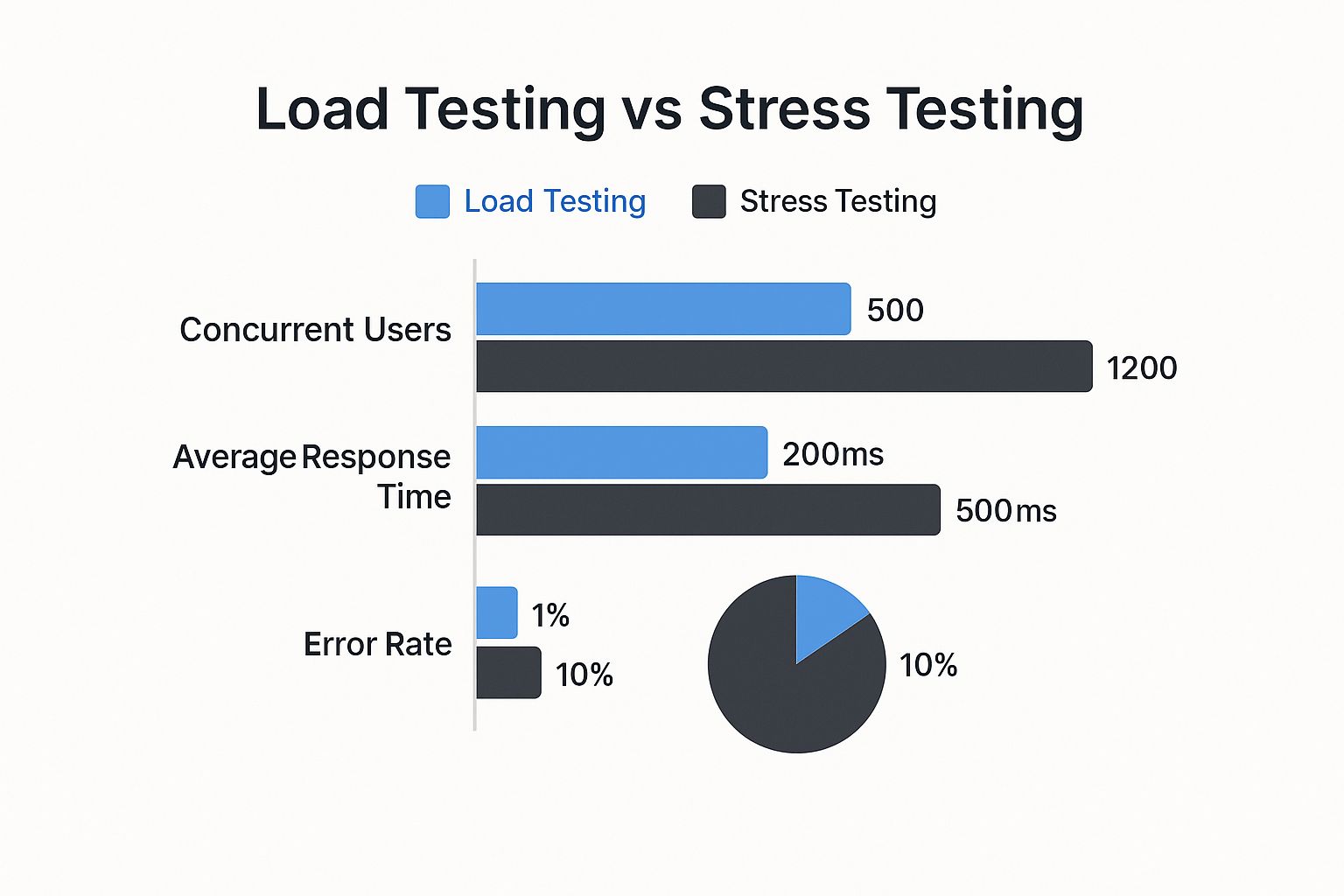
As the data shows, the stress test doesn’t just increase the load; it forces a system failure. The response time skyrockets, and the error rate jumps tenfold, showing precisely how the system degrades under extreme pressure.
Comparing Test Objectives And Key Metrics

While both stress and load tests flood a system with traffic, their core goals are worlds apart. This fundamental difference dictates what you measure and, ultimately, what you learn. Getting the metrics right is everything.
Load testing is all about assurance. You’re trying to prove that your system can handle an expected, specific workload—like the traffic you anticipate on Black Friday—while staying within your Service Level Agreements (SLAs). It’s a controlled experiment. You’re asking a simple question: “Can we handle the heat we know is coming?”
Load testing confirms your system meets its promises. Stress testing reveals what happens when those promises can no longer be kept.
Because it’s about validation, the metrics for load testing are focused on performance quality under a defined, heavy load.
Key Metrics For Load Testing
When you kick off a load test, the team hones in on metrics that tell a story about user experience and system efficiency. You’re looking for stability, not chaos.
- Average Response Time: How long does a user wait for a response? A healthy system keeps this time low and stable, even as traffic climbs to its peak.
- Throughput: This is the number of requests your system chews through per second. Your goal is to see this number hit your SLA target and stay there without faltering.
- Resource Utilization: How hard are your CPU, memory, and network working? A good load test shows resources being used efficiently, not maxed out at 95-100%, which is a clear sign of a bottleneck waiting to happen.
A load test passes when these numbers stay within acceptable limits for the entire test. It gives you the confidence to face predictable traffic spikes head-on.
The Mindset Shift For Stress Testing
Stress testing, on the other hand, is about discovery. You aren’t trying to validate anything; you’re on a mission to find the absolute breaking point of your system by pushing it until it fails. A stress test asks a much grimmer question: “Where’s the cliff, and what happens when we go over it?”
Here, the entire focus shifts from performance quality to system failure and, just as importantly, recovery. Success isn’t a low response time. Success is a system that fails gracefully and comes back to life.
Key Metrics For Stress Testing
Since the goal is to find the breaking point, the metrics are completely different. You’re looking for signs of weakness and measuring how well the system recovers from a total meltdown.
The primary indicators you’ll be watching are:
- Error Rate: This is your canary in the coal mine. A sudden spike in the error rate is the first clear signal that the system is buckling under pressure. The whole point is to find the exact load that triggers this spike.
- Recovery Time Objective (RTO): After you’ve pushed the system to its breaking point and backed off the load, how long does it take to become fully operational again? A short RTO is the hallmark of a resilient, well-architected system.
- The Breaking Point: This isn’t one metric but the conclusion you draw from all the others. It’s the specific number of users or transactions per second where your system gives up, becomes unresponsive, or starts spewing critical errors.
By zeroing in on these failure-focused metrics, stress testing gives you the hard data you need to build a tougher, more fault-tolerant system.
When to Use Each Test in the Real World

Knowing the theory behind stress and load testing is one thing. Knowing exactly when to use each is what separates teams who are prepared from those who get caught flat-footed. Your decision really boils down to your specific business goals and what you need to find out about your system.
Load testing is your go-to for predictable, high-stakes events where performance is tied directly to your bottom line. It answers the question, “Are we ready for our biggest planned day?”
Stress testing, on the other hand, is about exploring the unknown. It’s for finding out what happens when everything goes wrong, answering the question, “How and when do we break?”
Use Cases for Load Testing
You should turn to load testing when you’re expecting a significant, yet manageable, spike in traffic. The goal isn’t to break the system but to guarantee a smooth user experience under expected peak loads.
Think of these common scenarios:
- Preparing for a Holiday Sale: An e-commerce site knows its Black Friday event will triple traffic. A load test would simulate that exact level to ensure the checkout process stays snappy and inventory systems don’t fall out of sync. This prevents lost sales due to a sluggish site.
- Onboarding a Major Client: A B2B SaaS platform is about to bring on an enterprise customer that will bump the concurrent user count by 40%. Load testing confirms this new load won’t slow things down for your existing customers.
- Launching a Marketing Campaign: Your company bought a Super Bowl ad. Marketing projects a surge of 500,000 visitors within an hour. A load test confirms your landing pages and backend services can handle that flood without buckling.
By simulating these very specific scenarios, load testing gives you the confidence that your infrastructure will meet its service-level agreements (SLAs) when it counts. You can get a deeper look at the tools for the job in our guide on what is load testing software.
Use Cases for Stress Testing
Stress testing is all about building resilience. You run a stress test when you need to find your system’s absolute limits and see how it behaves under extreme pressure.
Here are some critical moments where stress testing is invaluable:
- Simulating a DDoS Attack: What happens when a malicious, overwhelming flood of traffic hits your servers? A stress test can show you which service falls over first and whether your mitigation systems actually kick in as expected.
- A Viral Social Media Moment: Your product gets an unexpected shout-out from a huge influencer, causing traffic to explode 10x beyond any forecast. Stress testing shows you your system’s true breaking point and how it recovers once the chaos subsides.
- Critical Hardware Failure: Imagine your primary database server goes offline. A stress test helps you verify that your system fails over to a replica gracefully and can keep chugging along, even if it’s in a degraded state.
This focus on resilience isn’t just for tech companies. The European Banking Authority, for example, is running a massive 2025 stress test on 68 banks to see how they’d hold up against major economic shocks, analyzing everything from credit risk to operational failures. You can see how they’re preparing banks for volatility in this regulatory update from Moody’s.
Of course. Here is the rewritten section, crafted to sound like an experienced human expert while adhering to all your requirements.
How To Implement Testing With GoReplay
Many teams still rely on synthetic scripts for stress and load testing. While those scripts have their place, they’re a clean, predictable version of reality. They almost never capture the messy, unpredictable ways real people actually use your software.
That’s where a tool like GoReplay flips the script. By shadowing and replaying real production traffic, you move beyond idealized scenarios. You get to test against the chaos of actual user behavior, giving you a much truer picture of your system’s performance and stability.
Using GoReplay For a Load Test
The whole point of a load test is to see if your system can handle a specific, expected amount of traffic. Think of it as a dress rehearsal for your biggest day. With GoReplay, you can replay captured traffic to perfectly mimic that projected peak.
Let’s say you’re expecting a 150% traffic surge after a big product launch. You’d start by capturing real traffic from your live environment, then configure GoReplay to replay it at exactly 1.5x the original speed. This lets you see with certainty whether your system holds up and meets its SLAs under that pressure.
This screenshot from GoReplay’s website shows its fundamental value—capturing real traffic to feed into your testing or staging environments.
As the diagram shows, GoReplay sits between your users and your application, silently copying live HTTP requests. These requests become a high-fidelity data source you can aim at a test environment, giving you the most realistic performance test imaginable.
Configuring For a Stress Test
A stress test asks a completely different question: where does my system break? The goal isn’t to simulate a known peak but to push past it until something gives way. This is the key difference between stress testing and load testing—one validates known limits, the other discovers unknown ones.
To run a stress test with GoReplay, you’d start by replaying traffic at a normal 100% rate. Then, you methodically crank up the volume—200%, 400%, 800%, and keep going. You’re looking for the exact point where error rates spike, latency goes through the roof, or services start to fall over.
The most valuable part of a GoReplay stress test isn’t just seeing the system fail. It’s understanding how it fails. You get to observe the cascade—which component is the first to crack, and does the system recover gracefully when you finally back off the load?
GoReplay Configuration For Test Scenarios
Switching between a load test and a stress test in GoReplay is as simple as tweaking a few command-line flags. Your testing goals directly map to how you configure the tool, making it easy to pivot from one scenario to the other.
Here’s a quick guide showing how you’d adjust GoReplay’s settings to fit either a load or stress testing objective.
GoReplay Configuration For Test Scenarios
| Parameter/Flag | Load Testing Goal | Stress Testing Goal |
|---|---|---|
| Traffic Source | Use —input-raw to capture live production traffic for a realistic baseline. | Use the same —input-raw traffic to find the system’s breaking points. |
| Traffic Rate | Set a fixed, high number of workers (e.g., —output-http-workers 10) to simulate a specific peak load. | Use an extremely high number of workers (e.g., —output-http-workers 100) to intentionally overwhelm the system. |
| Replay Speed | Apply a reasonable timeout (e.g., —output-http-timeout 5s) to measure performance and latency under sustained load. | Set an aggressive timeout (e.g., —output-http-timeout 1s) to quickly flag any request that slows down under pressure. |
| Duration | Run for a defined period (e.g., —input-raw-expire 30m) to ensure stability over time. | Run the test indefinitely with an ever-increasing load until the system finally breaks. |
This table illustrates just how differently you approach the two tests. For a load test, you operate within a defined, controlled boundary to validate performance. For a stress test, you intentionally remove those boundaries to discover where they truly lie.
How To Analyze Test Results For Actionable Insights

Running a stress or load test is just the beginning. The real payoff comes when you translate that raw data into concrete improvements for your system. Think of the metrics as clues pointing directly to your application’s weaknesses and strengths.
But how you interpret those clues depends entirely on which test you just ran. With load testing, you’re on a mission to find performance bottlenecks under expected peak conditions. The goal is efficiency.
Stress testing is a completely different beast. You’re performing a post-mortem. You aren’t hunting for smooth performance—you’re looking for the exact point of failure and how well the system recovers.
Interpreting Load Test Results
After a load test, your job is to connect the dots between what users experience (response times) and what your servers are doing (resource usage). You’re searching for signs of strain that suggest performance is about to fall off a cliff if the load inches any higher. A good analysis goes far beyond glancing at a low average response time.
Your analysis checklist should zero in on a few key areas:
- Correlating Response Times with Resource Usage: Pinpoint the exact moments when response times start to climb. Do those spikes line up with high CPU usage, memory swapping, or I/O wait times? That correlation is your smoking gun—it points directly to a resource bottleneck that needs to be scaled or optimized.
- Identifying Throughput Plateaus: Did your system’s throughput (requests per second) hit a wall even as the simulated user load kept increasing? A plateau is a crystal-clear sign that a component, like a database connection pool or an API gateway, has hit its limit.
The core task in load testing analysis is to find the “point of diminishing returns”—that spot where throwing more hardware at the problem no longer improves performance. This is crucial for making smart, cost-effective infrastructure decisions.
Analyzing Stress Test Data
With stress testing, your focus shifts from performance to resilience. You’re no longer asking, “Is it fast?” Instead, you’re asking, “How does it break, and how quickly does it come back to life?” This kind of analysis is what separates a fragile system from a truly fault-tolerant one.
The key questions to answer from your stress test data are:
- What Was the Weakest Link? Find the very first component that buckled under the pressure. Was it the database? A third-party API? An internal microservice? This tells you exactly where to direct your efforts to harden the system.
- Did the System Degrade Gracefully? A well-built system should degrade, not shatter. It might disable non-essential features or start serving cached content instead of just throwing 500 errors. Your analysis should confirm that this graceful degradation actually happened.
- What is the Mean Time To Recovery (MTTR)? Once you backed off the extreme load, how long did it take for the system to become fully operational again? A low MTTR is the signature of a highly resilient architecture.
This idea of pushing systems to their limits to ensure they can survive the unexpected is so important it’s used in other critical fields. For instance, the Federal Reserve’s 2025 stress testing program will simulate a severe global recession to make sure major banks can handle deep economic shocks. You can see the details of their macroeconomic stress test scenarios on FederalReserve.gov.
By systematically finding and reinforcing your system’s weakest points, you build confidence that it will stay standing, even when faced with the unexpected.
Answering Your Common Questions
As your team starts weaving performance testing into your development cycle, a few common questions always pop up. Getting straight, practical answers is the key to sidestepping common mistakes and actually getting value out of your tests. The line between stress testing and load testing can seem blurry, but they’re used in completely different ways.
Let’s tackle some of the most frequent questions we hear from teams putting these practices into action. Understanding these differences will help you design tests that work and build systems that last.
Can I Perform Stress And Load Testing At The Same Time?
It might feel like a shortcut, but running both tests at once is a bad idea. Each test has a very specific job and a unique goal. If you try to combine them, you’ll just muddy the waters and end up with results you can’t trust.
Load testing is all about validation—it confirms your system can handle the traffic you expect it to. In contrast, stress testing is about discovery. You’re intentionally pushing past your system’s limits to find out exactly where and when it breaks.
Mixing the two is like trying to clock your 100-meter dash while also seeing how many miles you can run before you collapse. You’ll get a confusing answer for both questions. Always run them as separate, focused experiments: first, validate your baseline with a load test, then find your boundaries with a stress test.
How Often Should My Team Run These Tests?
The right testing frequency really depends on what you’re trying to achieve. There’s no one-size-fits-all schedule.
-
Load Testing: This should be a regular part of your CI/CD pipeline. You’ll want to run load tests before any major release, a significant architectural change, or when you’re expecting a big traffic spike from something like a marketing campaign. This steady rhythm helps you catch performance regressions early, long before they hit your users.
-
Stress Testing: This one happens far less often. Think quarterly, or maybe right before you make a huge change to your core infrastructure. The goal here is to understand your system’s absolute capacity and how it recovers from failure—things that don’t change nearly as often as your application code.
What Is The Biggest Mistake Teams Make When Testing?
The single most critical mistake we see is using unrealistic traffic. Far too many teams fall back on synthetic scripts that generate neat, predictable requests. It’s better than nothing, sure, but it completely misses the chaotic, unpredictable reality of how real people use an application.
Your system might hum along perfectly under a clean, scripted load, only to fall apart when faced with the messy truth of production traffic. This creates a dangerous false sense of security, because your tests aren’t telling you how your application will actually behave when it matters.
This is exactly why tools that capture and replay real production traffic are so powerful. By using a faithful copy of your live traffic, you ground both your stress testing and load testing in reality, giving you insights you can actually trust.
Ready to run tests that mirror reality? GoReplay empowers you to capture and replay real production traffic, giving you confidence that your system can handle real-world pressure. Start testing with GoReplay today.