
Software Testing Components: Key Elements of software testing components for QA
Software testing components are the individual parts of your quality assurance strategy. They cover everything from the initial plan and the design of your test cases to the environments and automation frameworks you use to run them.
Think of it like building a high-performance engine. Each part—pistons, crankshaft, cylinders—has to be perfectly crafted and work in total harmony with the others. If one piece is off, the whole system sputters and fails. These interconnected components are what make up a powerful quality machine.
Decoding the Blueprint of Software Quality
Building great software is a lot like constructing a complex machine. You can’t just toss a bunch of parts together and hope for the best. You need a detailed blueprint where every single component has a clear purpose. That’s the core idea behind software testing components. They are the distinct, yet deeply interconnected, elements that work together to validate an application’s quality, performance, and reliability before it ever reaches a user.
Getting these pieces right is more critical than ever. The software testing market is expected to jump from USD 48.17 billion in 2025 to a massive USD 93.94 billion by 2030, a surge driven by the sheer complexity of modern applications. This growth underscores just how essential every single component has become.
Let’s take a look at the essential pieces that form a modern, effective testing strategy.
The Core Components of a Modern Testing Ecosystem
To bring some clarity to this, we can organize the key components into a simple table. Each one has a distinct job but ultimately relies on the others to deliver a truly reliable product.
| Component | Core Purpose | Example Activity |
|---|---|---|
| Test Objectives | Defining what you want to achieve with your testing. | Verifying that the new checkout process handles 500 concurrent users without errors. |
| Test Planning | Creating a detailed strategy and roadmap for testing activities. | Outlining the scope, resources, and timeline for an upcoming release. |
| Test Cases | Writing step-by-step instructions to validate specific functionalities. | Documenting the exact actions to test a user login with a valid password. |
| Test Data | Supplying the inputs needed to execute test cases. | Creating a set of realistic user profiles, some with missing information. |
| Test Environments | Setting up the infrastructure (servers, databases) where tests will run. | Configuring a staging server that mirrors the production setup. |
| Automation Frameworks | Providing the structure and rules for writing automated tests. | Implementing a Page Object Model (POM) structure for UI tests. |
| Test Tools | Using specialized software to perform and manage testing tasks. | Employing a traffic replay tool like GoReplay to simulate production load. |
| Metrics & Reporting | Measuring and communicating the results of testing efforts. | Creating a dashboard showing pass/fail rates and critical bug trends. |
| Governance | Establishing the standards and processes that guide all testing. | Defining the bug triage process and entry/exit criteria for each testing phase. |
These pillars aren’t isolated stages; they form a continuous, interlocking cycle. This concept map gives you a great visual of how the four foundational pillars connect.
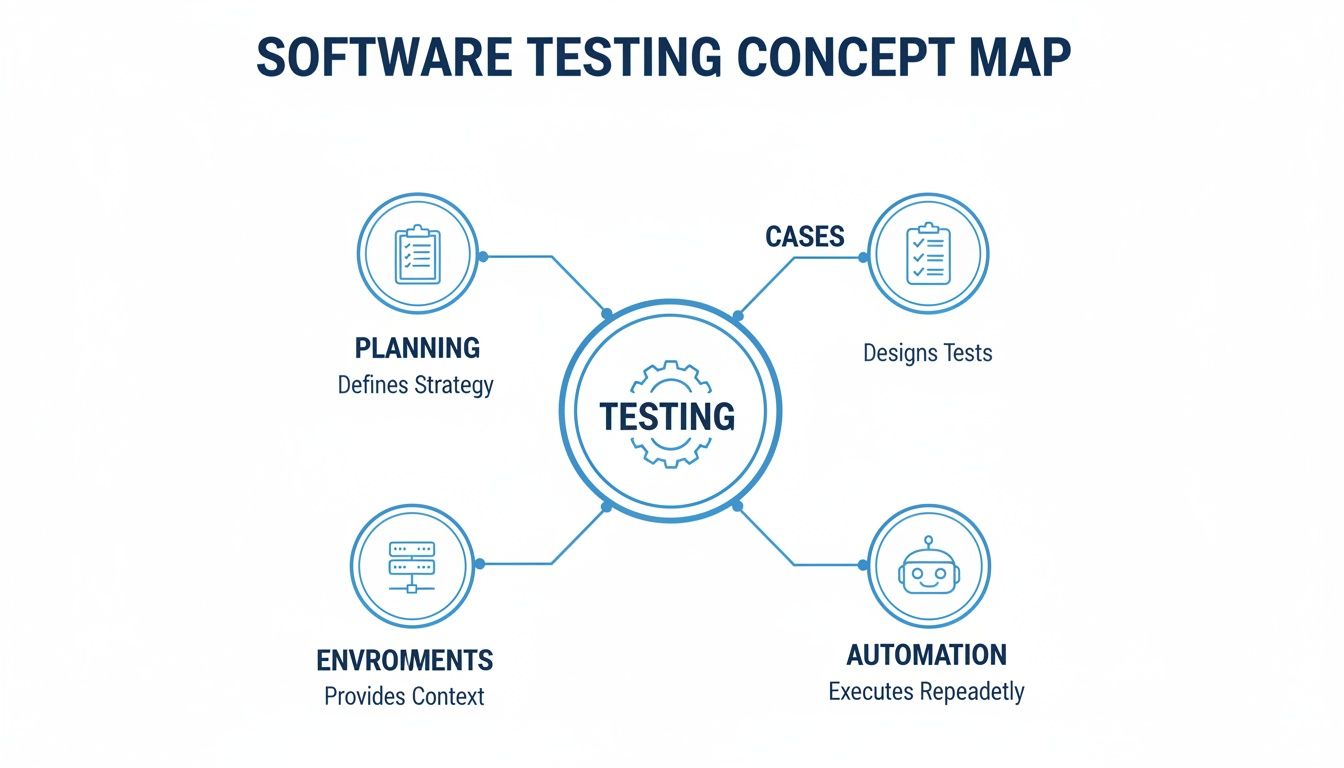
As the map shows, planning, test cases, environments, and automation are all knotted together. For instance, what you learn from an automated test running in a staging environment feeds directly back into the planning for the next sprint. The whole process is structured within a defined framework. To see how these components fit into a broader timeline, check out our guide on the software testing life cycle.
A robust testing strategy isn’t about running more tests; it’s about making each test more meaningful. The goal is to shift from simply finding bugs to building confidence in every release.
This guide will break down each of these essential software testing components, exploring their individual roles and, more importantly, how they fit together. We’ll examine how modern tools, particularly those involving traffic replay, have transformed these components from a series of isolated checks into an integrated, realistic validation process.
Building Your Strategic Foundation for Testing
Before you write a single line of test code, you need to build a solid foundation. This early strategic work boils down to two critical components: setting clear Test Objectives and creating a detailed Test Plan. Trying to skip this part is like building a house without a blueprint—it’s a recipe for a costly, unstable, and unpredictable mess.
This initial stage really sets the direction for everything that follows. It’s what turns testing from a reactive bug-hunt into a proactive process that actually supports the business’s bottom line.
Establishing Clear Test Objectives
Test objectives are the specific goals you’re trying to hit. Think of them like punching a destination into your GPS; without a clear target, you’re just driving around aimlessly. Vague goals like “test the new feature” don’t cut it—they lead to unfocused work and fuzzy results.
Instead, your objectives need to be precise and measurable. A great way to frame them is by using the SMART goals framework, making sure they are:
- Specific: Nail down exactly what you need to validate. For instance, “Verify the new payment gateway successfully processes Visa transactions.”
- Measurable: Define success with numbers. Something like, “Achieve a transaction processing time under two seconds for 95% of users.”
- Achievable: Make sure the goal is actually possible with your team and timeline.
- Relevant: Tie the objective back to a bigger business goal, like improving checkout conversion rates.
- Time-bound: Give it a deadline. For example, “Complete all payment gateway tests before the sprint ends.”
When you set these kinds of clear targets, your whole team shares the same picture of what “done” and “successful” really mean. This clarity is the first step toward a truly effective quality process.
Architecting a Data-Driven Test Plan
With your objectives locked in, the next piece of the puzzle is the Test Plan. This is your roadmap, detailing exactly how you’ll get to your destination. A good test plan will always cover the basics like scope, schedules, resources, and risks. But a modern test plan does more than that—it uses real-world data to make sure the strategy isn’t just a fantasy.
A great test plan doesn’t just list what to test; it explains why those tests matter. It connects testing activities directly to user behavior and business risk, ensuring every bit of effort is focused on what provides the most value.
This is where pulling insights from your production traffic becomes a game-changer. Instead of just guessing which user journeys are most popular or which API endpoints get hammered the most, you can use actual data to shape your strategy. A traffic replay tool like GoReplay can capture this live traffic, giving you a perfect, realistic snapshot of user behavior.
By analyzing this captured traffic during the planning phase, you can:
- Identify High-Risk Areas: Pinpoint the most frequently used features or complex user flows that need the most rigorous testing.
- Define Realistic Load Scenarios: Base your performance tests on actual peak traffic numbers, not just a shot in the dark.
- Prioritize Test Cases: Focus your team’s energy on validating the paths that the majority of your users actually take.
Baking this data into your test plan from day one ensures your strategy is grounded in reality, not assumptions. This data-driven foundation makes every other part of your testing process more effective, relevant, and far better at catching issues before they ever hit a real user.
Crafting the Tools for Realistic Validation
With a strategic plan in place, we can now shift our focus to creating the actual instruments of validation. This is where two deeply connected software testing components come into play: Test Cases and Test Data. If your test plan is the blueprint, think of these as the specialized tools and raw materials you’ll use to build and stress-test your application.
A Test Case is like a highly detailed recipe. It gives a chef (or an automated script) explicit, step-by-step instructions to follow precisely. The goal is to see if a dish (a feature) turns out exactly as expected. A recipe that just says “bake a cake” is useless. A good one specifies ingredients, measurements, temperatures, and timing.
In the same way, a well-written test case doesn’t just say “test the login.” It details every single action:
- Navigate to the login page.
- Enter a valid username in the ‘username’ field.
- Enter a corresponding valid password in the ‘password’ field.
- Click the ‘Submit’ button.
- Expected Result: The user is redirected to their dashboard, and a “Welcome” message is displayed.
The clarity and reusability of these “recipes” are absolutely vital for getting consistent and reliable results, test after test.
The Challenge of Finding Authentic Ingredients
A perfect recipe is worthless without the right ingredients. This is where Test Data comes in—it’s all the inputs, variables, and conditions your test cases will use. And honestly, this is often where testing strategies completely fall apart.
Most teams lean on synthetic data, which is data artificially created just to meet specific test requirements. While it has its place for simple checks, synthetic data rarely captures the messy, unpredictable nature of the real world. Users make typos, enter data in bizarre formats, and interact with your application in ways you could never anticipate. In fact, one study found that 65% of companies use production data for testing, but often without proper security, creating massive risk.
Test data is the lifeblood of validation. Using generic or synthetic data is like crash-testing a car with perfectly uniform dummies; it tells you something, but it doesn’t prepare you for the chaos of a real-world accident.
This gap between clean, synthetic data and chaotic production data is a huge reason bugs slip right through the cracks and into the hands of your users.
Bridging the Gap with Realistic Test Data
To truly validate an application, your test data has to mirror the diversity and complexity of how people actually use your software. This means moving beyond simple, hand-crafted datasets and embracing a much more realistic approach.
This is exactly where tools that capture and replay production traffic, like GoReplay, become indispensable.
Instead of trying to invent thousands of realistic user scenarios from scratch, you can capture the actual payloads from your live traffic. This gives your test cases the authentic “ingredients” they need to be genuinely effective.
Here’s how this completely changes your testing:
- Diverse Scenarios: You get data representing a massive range of user inputs, from the most common clicks to the rarest edge cases you’d never dream up.
- Real-World Complexity: The data includes the exact headers, cookies, and request structures your application deals with in production every second.
- Unbiased Validation: It strips away developer bias. You’re no longer testing what you think users do, but what they actually do.
By feeding your test cases a steady diet of realistic data captured from production, you transform your validation process. Your tests stop being sterile lab experiments and become high-fidelity simulations of real-world use. That’s how you build real confidence in every single release. A fundamental component in ensuring code quality is unit testing. For a deeper dive into effective strategies, explore these essential unit testing best practices.
5. Building the Arena: Test Environments & Execution
You’ve got a solid plan, a book of recipes (test cases), and the right ingredients (test data). Now it’s time to build the kitchen—the arena where the real action happens. This is where the Test Environment and Test Execution come into play, working together to create a full-scale dress rehearsal for your software.
Think of your test environment as the stage, lighting, and sound system for a concert. If it doesn’t perfectly match the conditions of the real venue, the whole performance will feel off. You’ll have no idea if the band is truly ready for the main event. In the same way, your test environment must be a high-fidelity replica of your production setup.

The Treachery of “Environment Drift”
One of the most common and costly mistakes is letting “environment drift” creep in. This is what happens when your staging or testing environment slowly falls out of sync with production. A developer applies a quick hotfix to staging but forgets to document it. A dependency gets updated in one place but not the other.
These tiny inconsistencies pile up, and before you know it, your test environment is a poor imitation of reality. Tests that pass with flying colors in staging can still fail catastrophically in production because the “arena” was different. This is the root cause of those dreaded “it worked on my machine” headaches that drive teams crazy.
To fight this, you have to prioritize environment parity—keeping your testing and production environments as identical as possible. This means:
- Matching hardware specifications
- Using the same OS versions and patches
- Aligning all software dependencies and libraries
- Ensuring network configurations and security rules are identical
Perfect parity is a constant battle, but it’s the only way to get reliable test results.
The goal of a test environment isn’t just to be a sandbox for running tests. It’s to be a place where those tests produce trustworthy results. Without environment parity, every passed test comes with a giant asterisk.
From Rehearsal to Live Show: Test Execution
With the stage perfectly set, Test Execution is the act of actually running the show. It’s the moment your test cases, powered by your test data, are unleashed on the application inside the test environment. This can be a manual process, with a QA engineer methodically clicking through each step, or an automated one where scripts do the heavy lifting.
The quality of your test execution is only as good as the components that came before it. A vague test case, fake data, or a drifted environment will only produce meaningless results. That’s why the global market for software testing services—which covers crucial components like environment management and execution—is projected to grow by an incredible USD 24,487.3 billion between 2024 and 2029. Sectors like retail and finance are driving this massive investment, proving just how critical it is to get this phase right. You can find more market insights for software testing services at Technavio.
Using Traffic Replay to Build a Battle-Hardened Arena
So, how can you truly validate performance under real-world conditions and solve the environment parity problem at the same time? Simple: use real-world activity to drive your tests.
This is exactly what tools like GoReplay were built for. By capturing real user traffic from your production environment, you can replay it directly into your staging environment. This approach supercharges both your environment and execution in a few powerful ways:
- Instantly Spot Environment Drift: If replayed production traffic causes errors in staging that don’t exist in production, you’ve just found a critical environment drift. No guesswork needed.
- Create Truly Realistic Load: Forget about trying to script load profiles. You’re hitting your application with the exact volume, variety, and chaos of requests it handles every single day.
- Uncover Bugs Hiding in Plain Sight: Real user traffic is messy. It contains a mix of edge cases, unexpected sequences, and weird user behaviors that scripted tests almost always miss.
By replaying traffic, you’re no longer just running a rehearsal; you’re creating a live simulation. Your test execution becomes a true measure of production readiness, ensuring that when the real performance begins, your software is prepared for absolutely anything.
Scaling Quality With Automation and Smart Tooling
Manual testing just can’t keep up with modern development. To scale your quality efforts without burning out your team, automation frameworks and test tools are no longer optional—they’re essential. Think of it as building a team of tireless robots to handle the repetitive, mind-numbing checks. This frees up your human experts to do what they do best: complex problem-solving and exploratory testing.
An Automation Framework is the blueprint for your entire automated testing operation. It’s not just one tool; it’s a complete system that sets the rules for how you create, run, and manage tests. It defines coding standards, how you handle test data, and how everything plugs into your CI/CD pipeline. Without a solid framework, your automation efforts will quickly devolve into a chaotic mess of brittle, high-maintenance scripts.
Choosing Your Automation Framework
Picking the right framework is a huge decision that will shape your team’s efficiency for years. Different frameworks are built for different needs, team skills, and application types.
Here are a few of the most common flavors:
- Linear Automation Framework: The simplest approach where you just record and replay steps. It’s great for small, one-off projects but falls apart at scale.
- Modular Driven Framework: This strategy breaks the application into smaller, independent modules, each with its own set of test scripts. This makes your tests far easier to reuse and maintain.
- Data-Driven Framework: Here, the test logic is kept separate from the test data. This is perfect for running the same test script with hundreds of different data sets, like testing a login form with a long list of user credentials.
- Behavior-Driven Development (BDD) Framework: These frameworks use natural language (like Gherkin) to spell out how the application should behave, making tests easy for non-technical folks to understand.
A well-chosen framework is the backbone of any serious plan for software test automation, helping you scale up quality and ship code faster.
The Broader Ecosystem of Test Tools
Beyond the framework itself, a whole ecosystem of Test Tools supports the testing lifecycle. This includes everything from bug trackers like Jira, to performance monitors like Grafana, to API clients like Postman. Each tool has a specific job to do.
The market gets it. The automation testing industry is on track to become a USD 68 billion behemoth, and for good reason—the ROI is massive. Mature teams often see manual effort drop by up to 70% while speeding up release cycles and embedding quality directly into their DevOps workflows.
Smart tooling isn’t about replacing human testers; it’s about amplifying their intelligence. The best tools handle the repetitive, predictable work, freeing up human creativity to find the subtle, complex bugs that scripts miss.
This is exactly where traffic replay tools like GoReplay come in as a force multiplier. While traditional automation relies on pre-written scripts, traffic replay feeds your testing process a constant stream of real-world scenarios straight from production.
Here’s how it works: You record live user traffic and replay it in your test environment. This lets you:
- Validate Performance Under Real Load: Stop guessing what your traffic patterns look like. Use the real thing.
- Uncover Elusive Edge Cases: Replay the weird, unpredictable interactions that real users have—the stuff your scripted tests would never dream of.
- Enhance Existing Automation: Use captured traffic as an endless source of realistic test data for your data-driven frameworks.
By plugging in traffic replay, you supercharge your entire testing toolkit. Your automation is no longer limited by what your team can imagine; it’s driven by the reality of how your users interact with your application every single day. This creates a far more resilient and reliable quality process. Building a powerful system requires a smart test automation strategy that blends scripted checks with real-world simulation.
8. Measuring Success for Continuous Improvement
Quality isn’t a destination you arrive at once; it’s a process of constant refinement fueled by data. To steer that process, you have to measure what’s working and what isn’t. This is where the final pieces of the software testing puzzle click into place: Metrics, Reporting, and Governance.
Think of these components as the dashboard and control system for your quality engine. They tell you how fast you’re going, if you’re burning too much fuel, and whether you’re still pointed in the right direction. Without them, you’re just driving blind and hoping for the best.
Turning Data into Actionable Insights with Metrics
Metrics are the vital signs of your testing process. They’re the raw, quantifiable data points that give you an objective look at your software’s health and the effectiveness of your quality efforts. Just running tests isn’t enough—you need to track specific numbers to understand your progress and spot weak points before they spiral into major problems.
Some of the most crucial metrics include:
- Defect Density: This tracks the number of confirmed defects found in a system, usually divided by code size (e.g., defects per 1,000 lines of code). It’s a great way to pinpoint which parts of your application are the most fragile.
- Test Coverage: This metric calculates the percentage of your codebase that your automated tests actually execute. While aiming for 100% coverage isn’t always practical, low coverage in critical areas is a massive red flag.
- Defect Escape Rate: This measures the number of bugs that slipped through testing and were found by users in production. A high escape rate is a clear signal that your testing strategy needs a serious rethink.
These numbers give you the hard evidence needed to make informed decisions instead of just relying on gut feelings.
Crafting a Narrative Through Reporting
Data by itself is just noise. Reporting is the art of turning that noise into a clear story that drives action. A good report doesn’t just dump a list of numbers on you; it provides context, highlights trends, and offers clear takeaways for everyone from developers to the C-suite.
A report’s value isn’t in the data it contains, but in the decisions it enables. The goal is to move from “Here’s what happened” to “Here’s what we should do next.”
Effective reporting means tailoring the message to the audience. A developer needs a detailed bug report with logs, while a product manager wants a high-level dashboard showing pass/fail trends for a new feature.
This is where insights from real-world traffic testing become incredibly powerful. Instead of just showing synthetic test results, you can show stakeholders exactly how a new build performs against actual production load. That provides a far more convincing and realistic picture of release readiness.
Establishing the Rules with Test Governance
Finally, Test Governance is the rulebook that ensures consistency and high standards across all your testing activities. It defines the processes, roles, and responsibilities that guide your entire quality strategy.
This governance model sets the standards for things like:
- Entry and Exit Criteria: What conditions must be met before a feature can enter a testing phase, and what truly defines “done”?
- Tooling Standards: Which tools should teams use for automation, bug tracking, and reporting? Getting everyone on the same page is key.
- Release Decisions: Who has the authority to give the final go/no-go call for a release, and what data must they have to make it?
By integrating metrics from traffic replay into your governance, you can build a data-driven model where release decisions are made with confidence. They’re no longer guesses—they’re backed by hard evidence of how the software behaves under real-world stress. This transforms governance from a bureaucratic checklist into a strategic tool for managing risk and shipping quality code.
Frequently Asked Questions About Software Testing
Even when you know all the parts, putting them together in the real world brings up questions. Here are a few common ones I hear from developers, QA engineers, and managers trying to connect the dots and get past the usual sticking points.
What Is the Most Important Software Testing Component?
This is the classic trick question. The answer isn’t one thing; it’s all of them working together. A brilliant test plan is just a document without realistic test data. A perfect automation framework is useless on a broken test environment.
Think of it like a car engine. You can’t ask if the piston is more important than the spark plug. The engine only runs when every part does its job in sync with the others. The real power of your testing strategy comes from how tightly you integrate these components.
The goal isn’t to make one component perfect. It’s to build a seamless, reliable flow across the entire testing lifecycle, from planning all the way to reporting.
How Can We Make Our Test Data More Realistic?
The gap between fake data and how real users behave is where most bugs love to hide. A lot of teams resort to using production data—one report found that 65% of companies do—but this opens up a huge can of worms with security and privacy.
A much better (and safer) way is to use tools that capture the patterns and payloads from your production traffic without grabbing sensitive information. This gives you the best of both worlds:
- High Fidelity: Your tests run against the same complex, messy, and unpredictable interactions your real users generate.
- Data Security: You can mask or anonymize PII during the capture or replay, keeping everything compliant.
You get all the realism without any of the risk.
Where Does Traffic Replay Fit into the Testing Process?
Traffic replay doesn’t replace your existing testing components. It makes them better. Think of it as a force multiplier that instantly enhances several key areas:
- Test Data: It becomes your source for an endless stream of authentic, real-world data to fuel your tests.
- Test Environments: It helps you spot “environment drift” by showing you exactly how staging behaves differently from production under the same load.
- Test Execution: It lets you run performance and regression tests with the kind of real-world load you could never script by hand.
By plugging it in, you anchor your entire validation process in reality, not just theory.
Ready to close the gap between your test environment and production? GoReplay is the open-source tool built to capture and replay live HTTP traffic, turning your real user activity into your most powerful testing asset. Stop guessing and start validating with confidence.
Discover how to enhance your software testing components with GoReplay