
Replace Substring SQL Across Five Databases
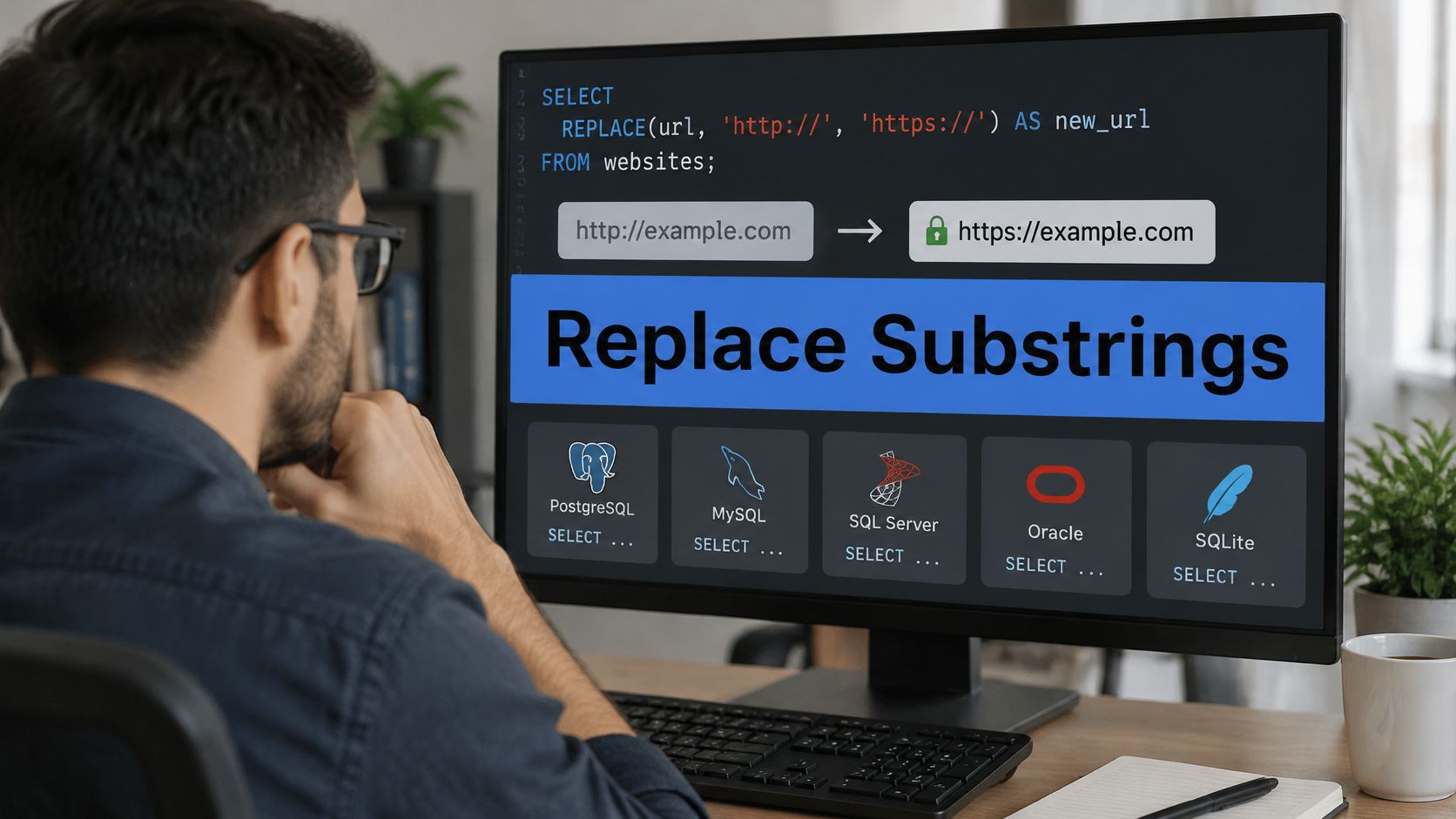
You’ve got a migration ticket open, a column full of stored URLs pointing at an old host, and a one-line REPLACE that looks finished. Then you notice the same text shows up in query strings, product codes, and one JSON blob nobody owns. That’s the moment when replacing a substring in SQL stops being a syntax question and becomes a blast radius question, and it’s worth choosing the method before you touch a single row.
Replace Syntax for Each Major Database
Say you’re rewriting a host inside stored URLs, moving values from old.example.com to new.example.com. The call you copy depends on your engine, even though all five versions do the same basic job. Each one below replaces every non-overlapping match in the value, not just the first hit. That all-occurrence behavior is convenient for a clean token swap and dangerous for everything else.
The Five Literal Calls
Pick your engine row before you write any update. Note the engine version too, because string functions shift between releases in ways that break scripts.
| Engine | Literal call | All matches | Case | Pattern alternative |
|---|---|---|---|---|
| MySQL 8 | REPLACE(str, from_str, to_str) | Yes | Case-sensitive | REGEXP_REPLACE |
| PostgreSQL | replace(string, from, to) | Yes | Case-sensitive | regexp_replace |
| SQL Server | REPLACE(expression, pattern, replacement) | Yes | Follows input collation | REGEXP_REPLACE in SQL Server 2025 |
| Oracle | REPLACE(char, search [, replacement]) | Yes | Case-sensitive | REGEXP_REPLACE |
| SQLite | replace(X, Y, Z) | Yes | Case-sensitive by default | No built-in regex replace |
MySQL 8 gives you REPLACE(str, from_str, to_str). It’s case-sensitive, so a lowercase search won’t touch an uppercase variant. PostgreSQL uses lowercase replace(string, from, to) with the same case-sensitive, all-match behavior. If you need pattern logic in PostgreSQL, you’re reaching for regexp_replace, not bending replace into something it isn’t.
Where the Engines Diverge
SQL Server is the outlier on case. Its REPLACE(expression, pattern, replacement) replaces all matches under the input collation, so a case-insensitive collation and a case-sensitive collation produce different results from identical SQL. Oracle uses REPLACE(char, search_string [, replacement_string]) and replaces every match, and a null search string returns the source unchanged. SQLite uses replace(X, Y, Z), replaces every occurrence of Y, and stays case-sensitive with the default collations.
Practical rule: Copy the call for your engine, then write down its case behavior next to the ticket. Most substring bugs start as an assumption ported from a different database.
Don’t confuse extraction with replacement. The standard substring(string FROM start FOR count) form only pulls characters out, as the PostgreSQL string functions documentation shows with substring(‘Thomas’ FROM 2 FOR 3) returning hom. It doesn’t write anything back, so it isn’t a substitute for REPLACE when you need an edited value.
Version Differences That Break Scripts
Standards history explains why these tools feel similar but don’t match exactly. The PostgreSQL pattern matching documentation notes that SQL:2008 added regular-expression functions including LIKE_REGEX, OCCURRENCES_REGEX, POSITION_REGEX, SUBSTRING_REGEX, and TRANSLATE_REGEX, moving string work beyond fixed-position slicing into pattern-driven extraction.
SQL Server shows the version risk in miniature. Through SQL Server 2022, the length argument in SUBSTRING(expression, start, length) is required. SQL Server 2025 lets you omit it, returning characters from the start position through the end of the expression, and adds REGEXP_REPLACE. A script that’s valid on 2025 can fail outright on 2022.
That’s why I’d record the engine and version alongside any rewrite script, the same way you’d pin down formatting rules before writing date logic like the patterns in this guide to formatting dates in SQL queries. If your team replays captured traffic or validates transformed payloads across environments, boundary tests for positions, lengths, empty strings, and multibyte text belong in the script from the start, not after the first mismatch.
Literal Position or Pattern Replacement
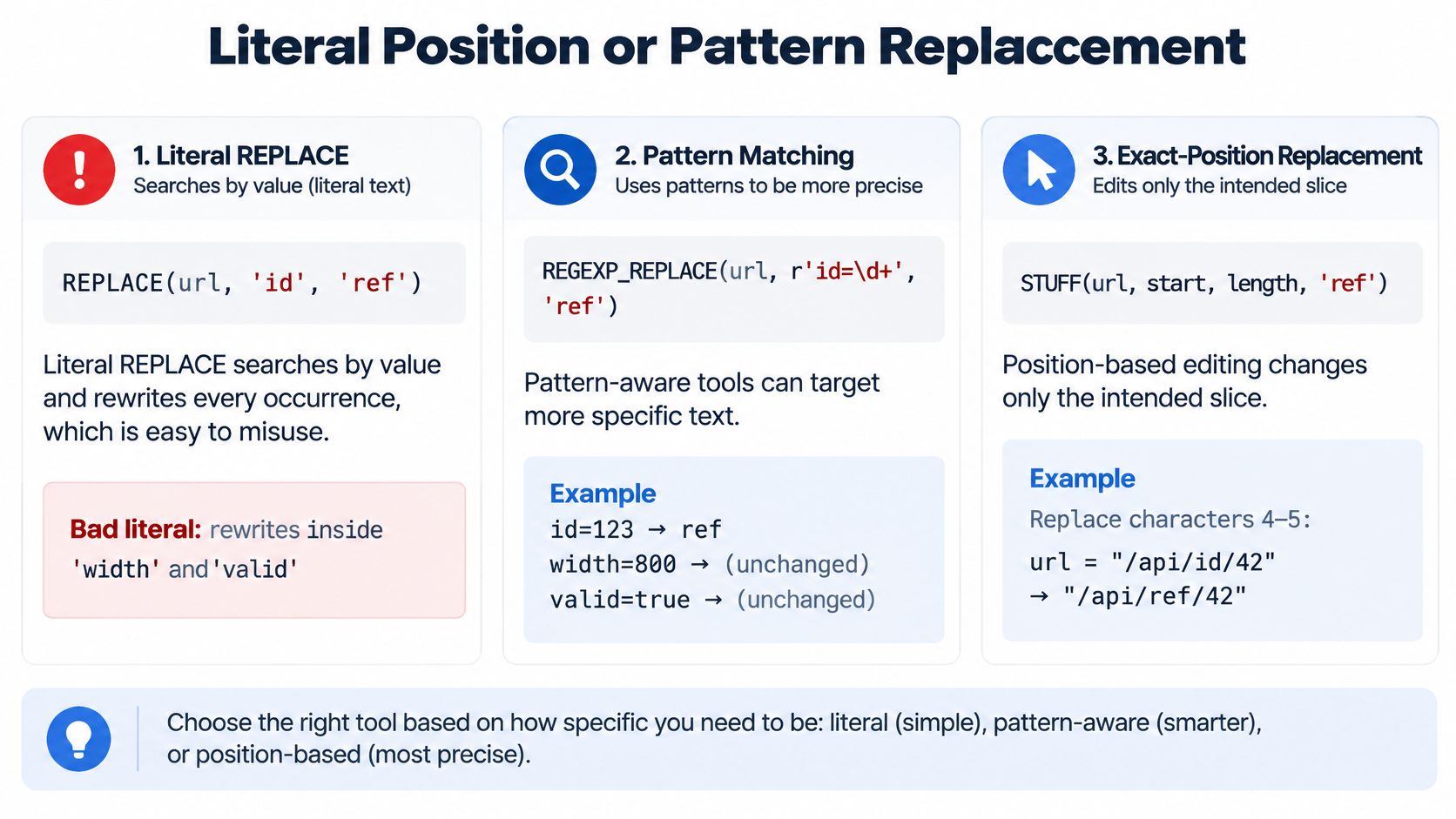
Start with the bad literal. REPLACE(url, ‘id’, ‘ref’) doesn’t just rename the id parameter you were aiming at. It also rewrites inside ‘width’ and ‘valid’, and it’ll happily mangle an identifier or a JSON fragment on the same row. Nothing errors. The update succeeds, the row count looks fine, and you find out later from a broken link.
Three Tools, Three Blast Radii
Literal REPLACE searches by value and rewrites every occurrence. The InterSystems SQL REPLACE reference draws the distinction cleanly, noting that REPLACE searches by string value while STUFF operates by position and length. Literal is the easiest method to audit in a code review, since the old and new text sit right there in the call. It’s wrong the moment the target text can appear inside a larger token, a URL, or an unrelated identifier.
| Method | Matches by | Typical functions | Use when | Avoid when |
|---|---|---|---|---|
| Literal | Exact string value, every hit | REPLACE / replace | The old text is a whole controlled token | The text can sit inside a larger token or URL |
| Positional | Start index and length | STUFF, overlay, SUBSTR concat | One known offset from POSITION or CHARINDEX | The location varies per row |
| Regex | Pattern, optionally all matches | REGEXP_REPLACE, regexp_replace | Repeated formats with boundaries | The engine lacks regex or the pattern is hard to audit |
| Application parse | Structure such as JSON fields | App code or JSON functions | Payload is JSON, XML, or an identifier list | A single plain token is all that changes |
Positional edits change a known offset and length. SQL Server gives you STUFF(expression, start, length, replacement), PostgreSQL gives you overlay(string PLACING new FROM start FOR count), and Oracle and SQLite expect you to concatenate SUBSTR or substr slices around the replacement. These work well when CHARINDEX, POSITION, INSTR, or instr already found exactly one boundary for you, because you’re editing a located slice instead of hunting by value.
When Patterns Earn Their Complexity
Pattern replacement covers the middle ground. MySQL, Oracle, and SQL Server 2025 offer REGEXP_REPLACE, and PostgreSQL’s regexp_replace takes a g flag when you want all matches instead of the first. SQLite has no built-in regex replace, so you’re loading an extension or doing the work in application code.
A boundary-aware pattern can change only the host in a URL, anchoring on the scheme delimiter before it and the path delimiter after it, so the same text in a query parameter survives untouched. Watch the replacement text itself, because backslashes and group references in the new value may need escaping or they’ll be read as pattern syntax. Regex expresses boundaries and repeated formats well, but a pattern nobody on the team can read is its own production risk.
Regex is not automatically the grown-up choice. A literal you can audit beats a clever pattern you can’t, and a structured parser beats both when the value is JSON or XML.
My decision runs like this. Use literal when the old text is a whole token you fully control, positional when the offset is known and stable, and regex when the format repeats but the text inside it varies. If the payload is JSON or XML, parse it in application code or with JSON functions and edit the field, rather than string-replacing serialized structure. Whichever method wins, run the same preview select against representative rows before any update, because one toy string will never show you the accidental matches hiding in real data.
NULL Empty Strings and Case Rules
A replacement that works on 'Cat' in one database may leave it unchanged in another. For a search value of 'c' and replacement 'X', case sensitivity determines whether the uppercase C matches.
| Case or NULL input | MySQL | PostgreSQL | SQL Server | Oracle | SQLite |
|---|---|---|---|---|---|
| NULL source or NULL search | NULL | NULL | NULL | NULL source is NULL; NULL search returns source | NULL |
| Empty search string | Source unchanged | Source unchanged | Source unchanged | Source unchanged | Source unchanged |
| Search differs only by case | No match | No match | Depends on collation | No match | No match by default |
Case Is a Collation Question on SQL Server
MySQL, PostgreSQL, Oracle, and SQLite are case-sensitive by default, so lowercase 'c' does not match the uppercase 'C' in 'Cat'. SQL Server follows the input collation: a case-insensitive collation returns 'Xat', while a case-sensitive or binary collation leaves 'Cat' unchanged.
The Microsoft REPLACE reference for Transact-SQL states that matching uses the input collation, an empty pattern leaves the source unchanged, and the result is nvarchar if any input is nvarchar, otherwise varchar. That type rule can affect storage width and downstream interfaces that expect single-byte text.
A case-insensitive collation can replace case variants that a business rule treats as distinct, such as product codes where 'AB' and 'ab' have different meanings. Check the column’s collation before choosing literal REPLACE; if matching must distinguish case, use a case-sensitive or binary collation.
NULL and Empty Are Not the Same
A NULL source or NULL search yields NULL in MySQL, PostgreSQL, SQL Server, and SQLite. Oracle returns NULL for a NULL source, but returns the source when only the search value is NULL. Use COALESCE only when the intended stored value is blank rather than NULL.
An empty search string returns the source unchanged on every engine in the table. It does not insert the replacement between characters. Before an update, check the preview expression with a NULL input, a mixed-case value, and an empty pattern.
How to Preview Then Update a Substring
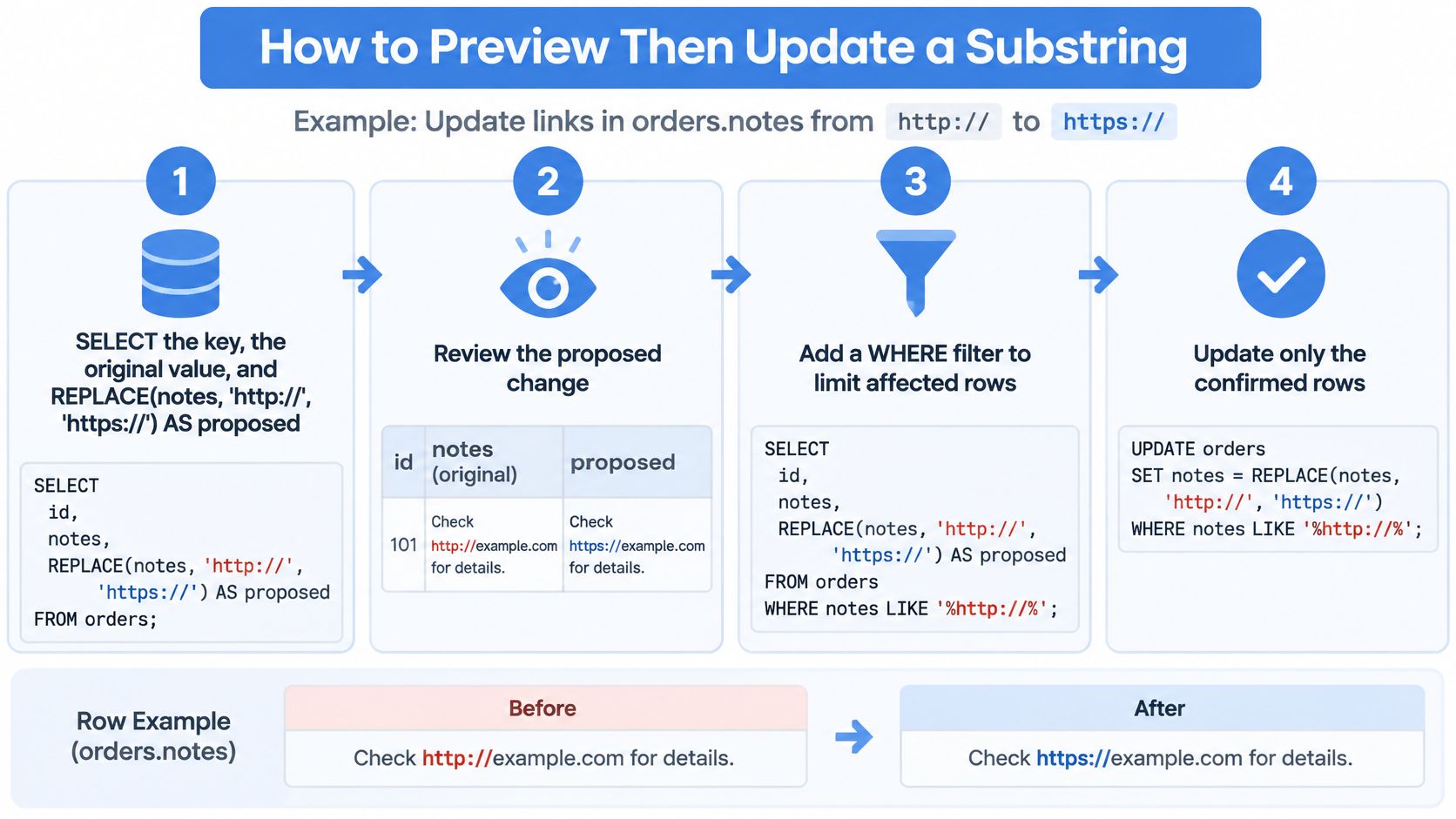
Suppose orders.notes contains URLs, and the change is http:// to https://. Before updating, check how the preview expression handles a NULL input, a mixed-case value such as 'Cat', and an empty search string. If any result differs from your engine’s expected behavior, correct the expression before it reaches the update.
The Numbered Path
- Preview the exact expression. Select the key, the original value, and
REPLACE(notes, 'http://', 'https://') AS proposed. Filter for rows containing the old text. Inspect sample results, including notes where a URL appears inside longer free text. - Count both ways. Count rows that contain the old text and rows where the proposed value differs from the original. A gap means the filter and replacement expression do not select the same set of rows.
- Open a transaction. Run the update inside a transaction so you can roll it back if the sample or count is wrong.
- Update with the same predicate. Use the same
REPLACEexpression andWHEREclause as the preview. Capture the affected-row count before proceeding. - Re-run the preview select. Confirm the old text is gone where intended, and check that already-correct rows do not have a doubled
https://prefix. - Commit or roll back. Commit when the count and sample match the plan. If either surprises you, roll back and revise the expression.
Two Slips That Undo Careful Work
An unfiltered update still rewrites every row, even when REPLACE returns the original value because the pattern is absent. That can fire triggers and bloat the table. Keep the WHERE clause aligned with the preview; scoped writes are also covered in this walkthrough of updating rows safely in Oracle SQL.
On SQL Server, match the comparison rule to the business requirement. If the default collation is unsuitable, apply an explicit COLLATE rule consistently in the preview and update expressions.
Release gate: Run the update only when the preview sample and row count agree. If they do not, revise the filter or expression before making the change permanent.
For PostgreSQL and SQLite, use replace; for Oracle, use REPLACE. Keep the preview and update expressions consistent across engines. Literal replacement changes every matching occurrence, including text inside URLs or identifiers, so inspect production-shaped rows before committing. Teams that need repeatable checks can apply validation checks across CEF operations.
Performance Tips for Large Column Rewrites
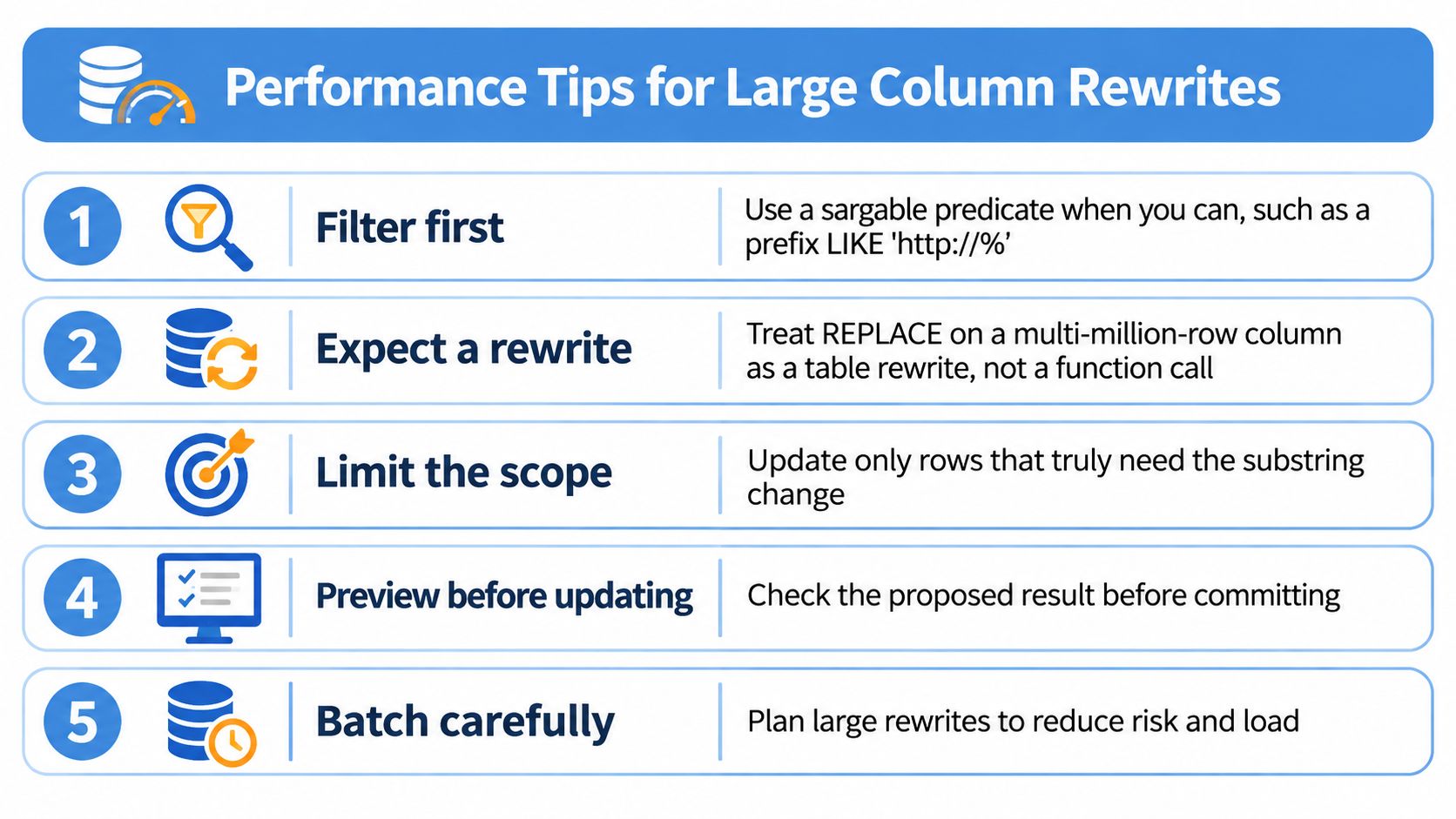
The costly mistake is treating a REPLACE across a multi-million-row column as a cheap function call. It isn’t. Every row you touch gets rewritten, logged, and reindexed where indexes cover the column, so plan it like the table rewrite it is.
Five Practices That Keep the Rewrite Bounded
- Filter first with a sargable predicate. A prefix condition such as LIKE ‘http://%’ can use an index on engines that support it, while wrapping the indexed column in REPLACE inside the WHERE clause forces a scan. Keep the function in the SET list, where you compute the new value, and keep the predicate plain.
- Batch by primary-key ranges. Work through a few thousand to tens of thousands of rows per transaction, so locks, WAL, and transaction-log growth stay bounded and a failed batch is cheap to retry. One giant transaction holds locks longer and gives you an all-or-nothing rollback.
- Skip rows that don’t change. If the value already equals the replacement, exclude it. That extra write still creates a new row version in PostgreSQL and SQL Server, so a no-op update costs nearly as much as a real one.
- Watch type changes. An nvarchar result on SQL Server can widen storage and break a downstream varchar interface, so check the result type of your expression before the first batch, not after the last one.
- Measure characters, not bytes, for positional edits. Multibyte text, emoji, and combining marks make byte length and character length diverge, and a STUFF or overlay offset computed in bytes will land in the middle of a character.
One-Time Migration or Ongoing Cleanup
That distinction decides where the work belongs. A one-time migration belongs in a maintenance window, followed by a statistics update so the planner sees the new value distribution. Ongoing cleanup belongs in the application or a queue, because running a column scan on the hot path to fix values at write time punishes every request for a data problem that arrives gradually.
Estimate the row count before you estimate the runtime. A rewrite that’s fast on a staging copy with a fraction of production rows tells you almost nothing about lock time.
I’d close the plan with a short checklist and refuse to start without it. Confirm the estimated rows, the batch size, the log headroom, the trigger behavior on the table, and a tested rollback batch. If any item is a guess, the rewrite isn’t ready, whatever the calendar says.
Confirm the Rewrite on Real Rows
A demo string such as 'Cat' turning into the expected output proves the expression parses. It does not show whether the rewrite will spare tokens inside URLs, identifiers, or other production values. Base the decision on a fixture built from rows shaped like the data you will update.
Build a Fixture That Can Fail
Include a URL with the token in both the host and a query parameter, a mixed-case value, a NULL, an empty string, a row that is already correct, and a JSON or identifier field that must remain unchanged. Each case should test a specific risk.
- Save the preview results. For each fixture row, record the old value, proposed value, and whether the row should change. Fail the check if a protected field changes.
- Record the database engine and version. A script validated on SQL Server 2022 should not be assumed to work unchanged on another SQL Server version or on PostgreSQL.
- Keep the fixture with the migration. The checks should remain available if the migration is run again against a restored copy.
Check the Application Path, Not Just the Column
If the application writes these strings through HTTP, the column can be correct while the application still fails. GoReplay can capture live HTTP traffic and replay it into a testing environment. Replay a representative traffic slice against staging with the rewritten rows in place and external side effects disabled.
Keep SQL assertions as the source of truth for the column. Replay checks how the application behaves when it reads the rewritten values, but cannot prove that a replacement spared a protected substring. Use both checks for their distinct purposes.
Before shipping, compare three counts: rows changed, rows intentionally unchanged, and accidental token hits. The last count must be zero.
If any count differs from the fixture’s expected result, stop before deployment and revisit the method. A literal REPLACE that changes the wrong occurrence may need to give way to a positional edit or a more specific pattern. Make that choice against the fixture, not against live rows.