
Level Up Your Software Quality with These Proven QA Testing Best Practices
This listicle presents eight QA testing best practices to enhance software quality and streamline your development process. Learn how to build more robust and reliable software by implementing strategies like shift-left testing, the test automation pyramid, risk-based testing, and more. These QA testing best practices empower teams to deliver high-quality software efficiently by optimizing testing efforts and improving collaboration. From continuous testing to performance integration and behavior-driven development, we’ll cover key techniques to elevate your QA game and achieve superior results.
1. Shift-Left Testing
Shift-left testing is a crucial QA testing best practice that fundamentally alters the traditional software testing approach. Instead of relegating testing to the final stages of development, shift-left integrates it from the very beginning, starting with the planning and design phases. This proactive strategy emphasizes early defect detection, recognizing that bugs are significantly less expensive and easier to fix when identified earlier in the software development lifecycle (SDLC). Imagine building a house – it’s far simpler and cheaper to correct a blueprint error than to demolish a wall after construction. Similarly, addressing a software defect during the design phase can save substantial time, resources, and frustration down the line.

Shift-left testing is characterized by several key features: early test planning and design, seamless integration with development workflows, continuous feedback loops, a preventive rather than reactive approach, and close collaboration between developers and testers. This collaborative approach ensures that quality is baked into the product from the outset, rather than being an afterthought. This isn’t just about finding bugs; it’s about preventing them. Learn more about Shift-Left Testing for further insight into optimizing your QA process.
This method works by incorporating various testing activities throughout the SDLC. For instance, static code analysis can be employed during the coding phase to identify potential vulnerabilities and coding errors. Simultaneously, developers can write unit tests to verify the functionality of individual code components. As the software progresses through different stages, integration testing, system testing, and user acceptance testing are performed iteratively, ensuring that defects are identified and addressed at each level.
Several industry giants have successfully implemented shift-left testing. Microsoft integrates testing within its Azure DevOps pipeline, automating tests at each stage of the development process. Google employs a similar approach for Chrome development, emphasizing continuous integration and testing. Netflix, known for its robust streaming platform, uses continuous testing to ensure a seamless user experience. These examples demonstrate the scalability and effectiveness of shift-left testing across diverse and complex projects.
To effectively implement shift-left testing, consider the following actionable tips:
- Start small and scale gradually: Begin with unit tests and gradually expand to other testing types as your team gains experience.
- Invest in test automation: Early investment in automation tools streamlines the testing process and ensures consistent results.
- Train developers on testing fundamentals: Empowering developers with testing skills promotes a shared responsibility for quality.
- Establish clear communication channels: Foster seamless communication between developers and testers to facilitate quick feedback and issue resolution.
- Utilize static code analysis tools: Implement tools that automatically analyze code for potential issues early in the development cycle.
Shift-left testing offers numerous benefits, including a dramatic reduction in bug fixing costs (often by a factor of 10-100x), faster time to market, improved product quality, enhanced team collaboration, and reduced technical debt. However, it’s crucial to acknowledge the potential drawbacks:
- Cultural shift: Implementing shift-left requires a significant change in organizational mindset and practices.
- Initial overhead: There’s an initial investment required for tooling, training, and process adjustments.
- Potential initial slowdown: Initially, the increased focus on testing may slightly slow down the development pace as teams adapt to the new workflow.
Despite these challenges, the long-term advantages of shift-left testing far outweigh the initial hurdles. This approach is particularly beneficial for projects with tight deadlines, stringent quality requirements, and a focus on continuous delivery. By prioritizing quality from the beginning, shift-left testing empowers teams to deliver high-quality software efficiently and effectively, ultimately contributing to greater customer satisfaction and business success. This justifies its place as a top QA testing best practice for modern software development.
2. Test Automation Pyramid
The Test Automation Pyramid is a crucial QA testing best practice that provides a strategic framework for structuring your automated tests. It emphasizes building a solid foundation of numerous, fast-running unit tests, followed by a smaller layer of integration tests, and finally, a minimal set of end-to-end (E2E) tests. This hierarchical approach ensures comprehensive test coverage while optimizing resource utilization and providing rapid feedback during the development lifecycle. By adhering to this model, teams can establish a robust and efficient QA process that contributes significantly to delivering high-quality software.
This method works by addressing different levels of software complexity in a structured manner. Unit tests focus on isolating and verifying individual components or functions of the codebase. Integration tests then assess the interactions between these units, ensuring they work harmoniously together. Finally, E2E tests simulate real-world user scenarios, validating the entire system’s functionality from start to finish.
The Test Automation Pyramid is designed to be fast, reliable, and cost-effective. By catching bugs early at the unit test level, teams can address them quickly and prevent them from propagating to higher levels, where they become more complex and expensive to fix. The pyramid structure naturally promotes better test stability and easier debugging due to the isolated nature of unit tests. This layered approach supports continuous integration by allowing for quick and frequent test runs.
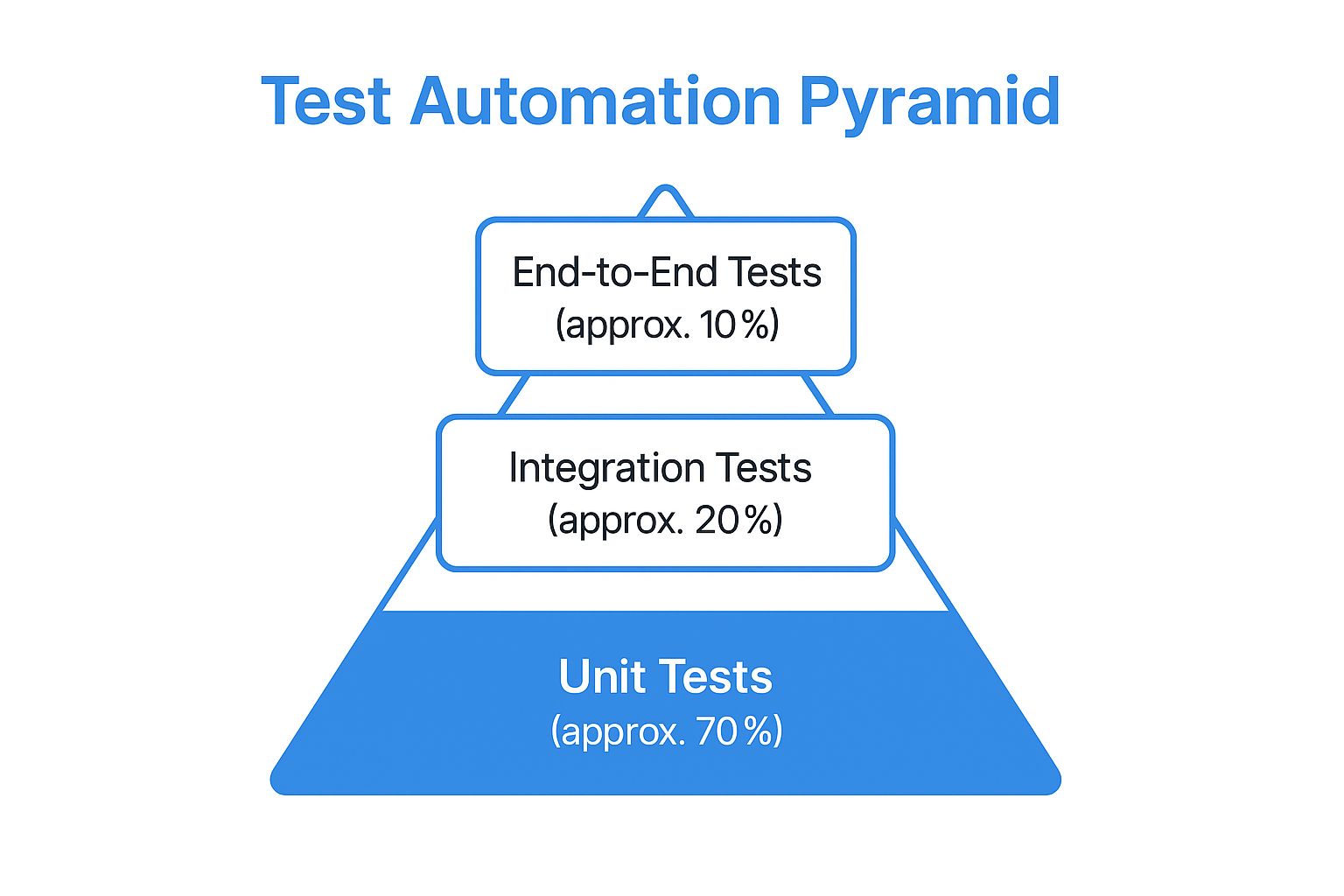
The infographic above visualizes the Test Automation Pyramid hierarchy, displaying the recommended distribution of testing effort across the three levels. It illustrates the emphasis on unit tests as the foundation, followed by a smaller proportion of integration tests, and culminating in a minimal set of E2E tests at the top. This visualization highlights the importance of balancing test coverage with efficiency.
Companies like Spotify, Atlassian, and Amazon have successfully implemented the Test Automation Pyramid in their testing strategies. Spotify, for example, uses this approach to ensure the stability and reliability of their music platform by prioritizing unit tests and supplementing them with integration and E2E tests. Learn more about Test Automation Pyramid to gain a deeper understanding of how this strategy is applied in real-world scenarios.
Here are some actionable tips for implementing the Test Automation Pyramid:
- 70/20/10 Rule: Aim for a distribution of roughly 70% unit tests, 20% integration tests, and 10% E2E tests. This ratio provides a good balance between coverage and efficiency.
- Dependency Injection: Utilize dependency injection to isolate units during testing, making them easier to manage and more reliable.
- Contract Testing: Implement contract testing for service boundaries to ensure proper communication between different components.
- Focus on User Journeys: Prioritize critical user journeys for E2E tests, maximizing their impact and minimizing redundancy.
- Regular Review and Adjustment: Continuously review and adjust the pyramid balance based on your specific project needs and evolving complexities.
While the Test Automation Pyramid offers substantial benefits, it also has some potential drawbacks:
- Complex Integration Issues: While the pyramid emphasizes unit testing, it may miss complex integration issues that arise from the interaction of multiple components.
- Disciplined Implementation: The Test Automation Pyramid requires disciplined implementation and adherence to best practices to be effective.
- Legacy Systems: Implementing the pyramid can be challenging for legacy systems with limited testability.
- User Experience: The pyramid’s focus on lower-level tests may not fully capture all user experience issues.
Despite these challenges, the Test Automation Pyramid remains a powerful tool for QA testing. Its structured approach, emphasis on fast feedback, and cost-effectiveness make it a valuable asset for any development team striving to deliver high-quality software.
3. Risk-Based Testing
Risk-based testing is a crucial QA testing best practice that prioritizes testing efforts based on the probability and impact of potential software failures. In a world of tight deadlines and limited resources, risk-based testing allows QA teams to optimize their efforts by focusing on the most critical areas of an application. This ensures that high-risk components receive the attention they deserve, ultimately minimizing the likelihood of critical issues impacting end-users and maximizing the return on investment for testing activities. This approach is a cornerstone of effective QA strategies for software developers, quality assurance engineers, enterprise IT teams, DevOps professionals, and tech-savvy business leaders alike.
Instead of aiming for exhaustive testing, which is often impractical, risk-based testing strategically allocates resources where they matter most. It involves a systematic process of identifying, analyzing, and mitigating risks throughout the software development lifecycle. This practice directly contributes to achieving higher quality software within time and budget constraints, solidifying its position as a core QA testing best practice.
How Risk-Based Testing Works:
Risk-based testing involves a systematic process that can be broken down into these key steps:
-
Risk Identification: Collaborate with stakeholders (developers, business analysts, product owners, etc.) to identify potential risks. This involves brainstorming possible failure points, considering factors like complex code, new technologies, integration points, and user dependencies.
-
Risk Analysis: Analyze each identified risk based on its likelihood (probability of occurrence) and impact (severity of consequences). For example, a minor UI glitch might have a high probability but low impact, while a security vulnerability in payment processing has a lower probability but potentially catastrophic impact.
-
Risk Prioritization: Use a risk matrix or other prioritization method to rank risks based on their combined likelihood and impact. This creates a clear hierarchy for testing focus. High-probability, high-impact risks are assigned the highest priority.
-
Test Strategy Development: Develop test cases and test suites specifically designed to address the highest-priority risks. This ensures that critical functionality is thoroughly tested and validated.
-
Test Execution and Monitoring: Execute the tests and carefully monitor the results. Track identified defects and analyze their root causes.
-
Risk Reassessment: Regularly reassess risks as the software evolves and new features are added. Priorities might shift based on changes in the codebase, user behavior, or external factors. This continuous monitoring ensures that the testing strategy remains aligned with the evolving risk landscape.
Examples of Successful Implementation:
Risk-based testing has proven its value across diverse industries:
- Banking Applications: Focus on transaction processing, security measures, and regulatory compliance – areas with high financial and reputational risks.
- Healthcare Systems: Prioritize patient data integrity, system interoperability, and adherence to HIPAA regulations, where failures could have serious health implications.
- E-commerce Platforms: Emphasize payment processing, order fulfillment, and user experience related to purchasing, as these directly impact revenue and customer satisfaction.
Actionable Tips for Implementing Risk-Based Testing:
- Involve Business Stakeholders: Engage business analysts, product owners, and other stakeholders early and often in the risk identification process. They bring valuable insights into business priorities and potential impact.
- Use Historical Data: Analyze past bug reports, customer feedback, and system logs to inform risk assessments. Historical data can reveal patterns and highlight recurring issues.
- Create Risk Matrices: Visualize risk assessments using risk matrices. This helps communicate risk levels clearly and facilitates prioritization discussions.
- Regularly Update Risk Assessments: Re-evaluate risks throughout the software development lifecycle. Changes in requirements, code, or the external environment can introduce new risks or alter existing ones.
- Document Risk Decisions: Keep a record of risk assessments, prioritization rationale, and test strategies. This documentation provides valuable context for future testing efforts.
Pros and Cons of Risk-Based Testing:
Pros:
- Optimal use of testing resources
- Focus on business-critical functionality
- Better alignment with business objectives
- Improved test coverage where it matters most
- Enhanced communication with stakeholders
Cons:
- Requires extensive domain knowledge
- Risk assessment can be subjective
- May overlook low-risk but important features
- Needs regular reassessment and updates
Risk-based testing is an essential QA testing best practice that helps teams deliver high-quality software under real-world constraints. By prioritizing testing efforts based on risk, organizations can ensure that critical functionality receives the attention it deserves, ultimately minimizing potential negative impact on users and maximizing the value of their testing investment.
4. Continuous Testing: A Cornerstone of QA Testing Best Practices
In today’s fast-paced software development landscape, delivering high-quality applications quickly and efficiently is paramount. Continuous testing, a critical component of QA testing best practices, plays a vital role in achieving this goal. It integrates automated testing seamlessly throughout the software delivery pipeline, providing immediate feedback on potential business risks and enabling rapid, confident software releases. This practice ensures that testing keeps pace with accelerated development cycles and supports continuous integration and continuous delivery (CI/CD) workflows. By adopting continuous testing, organizations can significantly improve their software quality, reduce time to market, and boost overall developer productivity.
Continuous testing works by automating the execution of various tests at different stages of the development pipeline. These tests can include unit tests, integration tests, system tests, and acceptance tests. When developers commit code changes, the CI/CD pipeline automatically triggers these tests, providing instant feedback on the impact of the changes. This immediate feedback loop allows developers to catch and address issues early in the development process, preventing them from propagating to later stages where they become more complex and expensive to fix. This proactive approach is essential for minimizing technical debt and ensuring the overall health and stability of the software.
A successful continuous testing strategy hinges on several key features:
- Automated test execution in CI/CD pipelines: This is the core of continuous testing, enabling automated triggering and execution of tests with every code change.
- Real-time feedback and reporting: Provides instant visibility into test results, enabling quick identification and resolution of issues.
- Parallel test execution: Significantly reduces test execution time, especially important for large and complex projects.
- Environment provisioning automation: Automates the creation and configuration of test environments, ensuring consistency and reducing manual effort.
- Integration with monitoring and alerting systems: Provides proactive notifications of test failures and other critical events.
The benefits of implementing continuous testing are numerous:
- Faster feedback on code changes: Enables developers to identify and fix issues quickly, reducing development time.
- Reduced time to market: Streamlines the release process by automating testing and ensuring faster feedback cycles.
- Early detection of regressions: Helps prevent the reintroduction of previously fixed bugs, maintaining software stability.
- Improved developer productivity: Automates repetitive testing tasks, freeing up developers to focus on building new features.
- Better software quality: Promotes a proactive approach to quality assurance, resulting in higher quality software.
However, adopting continuous testing also presents some challenges:
- High initial setup complexity: Implementing continuous testing requires careful planning, configuration, and integration with existing systems.
- Requires significant tooling investment: Effective continuous testing relies on robust automation tools, which can be costly.
- Need for stable test environments: Consistent and reliable test environments are essential for accurate and repeatable test results.
- Maintenance overhead for test suites: As the software evolves, test suites need to be maintained and updated regularly.
Several organizations have successfully implemented continuous testing and reaped significant benefits. Etsy, known for its rapid deployment cycles, deploys code to production over 50 times a day thanks to its robust continuous testing infrastructure. Facebook utilizes continuous testing extensively for its mobile applications, ensuring a high-quality user experience across various devices. Adobe also leverages continuous testing for its Creative Cloud services, allowing them to deliver frequent updates and new features while maintaining a high level of stability and performance. These examples showcase the power and effectiveness of continuous testing in diverse environments and highlight its importance as a QA best practice.
To successfully implement continuous testing, consider the following tips:
- Start with critical user journeys for automation: Prioritize automating tests for the most important user flows to maximize impact.
- Implement proper test data management: Ensure access to clean and reliable test data for accurate and repeatable test results.
- Use containerization for consistent environments: Leverage container technologies like Docker to create and manage consistent test environments.
- Establish clear failure notification protocols: Ensure that the right people are notified immediately when tests fail.
- Monitor test execution metrics regularly: Track key metrics like test execution time, pass/fail rates, and code coverage to identify areas for improvement.
Continuous testing, championed by DevOps experts like Jez Humble and Dave Farley and supported by testing platform companies like Tricentis, has become an indispensable practice in modern software development. By embracing continuous testing as a core element of your QA testing best practices, you can deliver high-quality software faster, reduce risks, and gain a competitive edge in the market.
5. Exploratory Testing: Unearthing Hidden Issues in QA Testing Best Practices
Exploratory testing stands as a crucial element in any robust QA testing strategy, earning its place among the best practices. Unlike its scripted counterpart, exploratory testing adopts a dynamic and investigative approach, empowering testers to simultaneously learn about the application, design tests, and execute them in real-time. This hands-on method leverages human creativity, critical thinking, and domain expertise to uncover subtle issues that often elude the rigid structure of pre-defined test cases. It’s particularly effective in identifying usability problems, edge cases, and unexpected behaviors that impact the overall user experience. Think of it as a detective investigating a crime scene – they don’t have a predetermined script, but they follow clues, analyze evidence, and adapt their investigation based on their findings.

This approach is characterized by its unscripted, investigative nature. Testers are encouraged to explore the software freely, following their intuition and experience to identify potential weaknesses. This freedom fosters a more natural interaction with the application, mimicking real-world user behavior and uncovering issues related to user experience and workflow. It emphasizes adaptability; as testers uncover new information or observe unexpected behavior, they adjust their testing strategy on-the-fly, delving deeper into specific areas of concern. This real-time adaptation makes exploratory testing incredibly valuable in fast-paced development environments where requirements and functionalities may evolve rapidly. Finally, session-based time management helps structure exploratory testing by allocating specific time blocks for exploration, ensuring focused and efficient testing efforts.
Exploratory testing has proven its worth in numerous real-world scenarios. Microsoft has employed exploratory testing extensively for validating the user interface of its Windows operating systems, contributing to a more intuitive and user-friendly experience. Slack utilizes exploratory testing to validate new features before release, ensuring a smooth and seamless experience for its users. Similarly, Spotify leverages this technique to test its music discovery algorithms, ensuring users are presented with relevant and engaging content. These examples showcase the versatility and effectiveness of exploratory testing across various applications and industries.
While exploratory testing offers significant advantages, understanding its limitations is equally crucial for effective implementation. It can be challenging to reproduce and track identified issues due to the unscripted nature of the tests. The effectiveness of this method heavily relies on the skill and experience of the tester, making it crucial to have skilled QA professionals on board. Comprehensive documentation of test coverage can also be a challenge. Furthermore, exploratory testing can be time-intensive and difficult to estimate completion time, making it important to manage expectations and allocate sufficient resources.
To maximize the benefits of exploratory testing, consider these actionable tips:
- Session-Based Test Management: Divide testing into focused sessions with clear objectives and timeframes. This ensures a structured approach while preserving the flexibility of exploratory testing.
- Document Findings and Test Paths: Maintain clear records of identified issues, the steps to reproduce them, and the test paths explored. This aids in further investigation and facilitates communication with developers.
- Combine with Automated Testing: Integrate exploratory testing with automated tests for optimal coverage. Automated tests can handle repetitive tasks, freeing up testers to focus on complex and nuanced scenarios.
- Focus on User Workflows and Personas: Design exploratory tests around real-world user workflows and personas to ensure the application meets user expectations and provides a positive experience.
- Rotate Testers: Introducing different testers to the exploratory testing process brings diverse perspectives and can uncover issues that might be overlooked by a single individual.
Exploratory testing, popularized by software testing experts like Cem Kaner, James Bach, and Michael Bolton, holds a crucial position within QA best practices. By leveraging human intuition and creativity, this method complements traditional scripted testing, revealing hidden issues that contribute to a higher quality and more user-friendly software product. Incorporating these best practices will empower QA teams to deliver superior software that meets and exceeds user expectations.
6. Test Data Management
Test Data Management (TDM) is a crucial aspect of QA testing best practices, encompassing the processes and tools used to create, manage, and provision data for testing purposes. Effective TDM ensures that your testing environments have realistic, secure, and sufficient data, enabling thorough testing while addressing privacy concerns and regulatory compliance requirements. Without a robust TDM strategy, QA testing can be hampered by inconsistent data, slow test cycles, and security vulnerabilities, ultimately impacting the quality and reliability of the software. This is why TDM deserves its place among the essential QA testing best practices.
TDM goes beyond simply copying production data. It involves a systematic approach to managing the entire lifecycle of test data, from creation and storage to retrieval and disposal. It aims to provide testers with the right data at the right time, in the right format, and within the right context, facilitating comprehensive test coverage and accurate validation. This includes considering factors like data volume, variety, velocity, and veracity to ensure the data accurately reflects real-world scenarios.
Key Features of Effective Test Data Management:
- Data Provisioning and Refresh Strategies: This involves defining how test data is acquired, populated, and updated in test environments. Strategies can range from full data copies to subset creation and on-demand provisioning. Regular data refreshes ensure the test environment remains relevant and mirrors production data changes.
- Data Masking and Anonymization: Protecting sensitive data is paramount. Data masking techniques replace real data with realistic but fictional data, while anonymization removes any identifiable information. These techniques enable testing with realistic data while complying with privacy regulations like GDPR and HIPAA.
- Synthetic Data Generation: This involves creating artificial data that mimics the statistical properties and patterns of real data without containing any sensitive information. Synthetic data is particularly useful for performance testing and load testing scenarios.
- Data Versioning and Backup: Similar to code versioning, TDM maintains different versions of datasets, enabling rollback to previous states if needed. Regular backups ensure data integrity and recovery in case of data corruption or loss.
- Compliance with Privacy Regulations: TDM must adhere to relevant data privacy regulations and industry standards, ensuring that sensitive data is handled securely and responsibly.
Why and When to Use Test Data Management:
TDM is essential whenever software testing involves data interaction. This applies to various testing types, including:
- Functional Testing: Ensuring software features work as expected with various data inputs.
- Performance Testing: Assessing system performance under different data loads.
- Security Testing: Identifying vulnerabilities related to data handling and access.
- Integration Testing: Verifying data flow and consistency across different systems.
- User Acceptance Testing (UAT): Allowing end-users to test the software with realistic data in a controlled environment.
Pros of Implementing Test Data Management:
- Consistent and Reliable Test Results: Standardized data leads to repeatable and comparable test results.
- Reduced Dependency on Production Data: Minimizes the need to access and manipulate production data for testing, reducing security risks.
- Improved Test Environment Stability: Dedicated test data prevents conflicts and inconsistencies in the test environment.
- Better Compliance with Data Privacy Laws: Data masking and anonymization techniques ensure compliance with privacy regulations.
- Faster Test Environment Setup: Automated data provisioning accelerates the creation and configuration of test environments.
Cons of Implementing Test Data Management:
- Complex Implementation for Large Datasets: Managing massive datasets can be challenging and require significant resources.
- Ongoing Maintenance Requirements: TDM requires continuous monitoring and maintenance to ensure data quality and relevance.
- Potential Performance Overhead: Data masking and synthetic data generation can introduce performance overhead.
- Need for Specialized Tools and Expertise: Implementing and managing a robust TDM strategy requires specialized tools and skilled personnel.
Examples of Successful Test Data Management Implementation:
- JPMorgan Chase utilizes synthetic data generation to test their financial systems without exposing real customer data.
- Healthcare providers employ anonymized patient data to conduct clinical trials and research while protecting patient privacy.
- Retail companies create realistic customer datasets for testing their e-commerce platforms and personalized recommendation engines.
Actionable Tips for Effective Test Data Management:
- Implement Data Subsetting: Use smaller, representative subsets of data for faster testing cycles.
- Use Data Masking Tools: Leverage data masking tools to protect sensitive information while maintaining data realism.
- Create Data Templates for Common Scenarios: Define reusable data templates for frequently used test cases.
- Establish Data Refresh Schedules: Regularly refresh test data to ensure it remains current and relevant.
- Monitor Data Quality Metrics Regularly: Track key metrics like data completeness, accuracy, and consistency to ensure data quality.
Popularized By:
The importance of TDM has been championed by industry leaders like the IBM InfoSphere team, Informatica data management specialists, and experts focused on GDPR compliance. These organizations have developed tools and methodologies that have significantly advanced the field of TDM.
By incorporating these best practices, organizations can establish a robust TDM strategy that streamlines testing processes, enhances software quality, and mitigates risks associated with data privacy and security. Implementing a well-defined TDM strategy is a key step towards achieving QA testing excellence.
7. Behavior-Driven Development (BDD)
Behavior-Driven Development (BDD) is a powerful approach to software development and a crucial QA testing best practice that emphasizes collaboration and shared understanding between technical teams and business stakeholders. It bridges the communication gap by using a common, natural language to define the desired behavior of the software. This shared language, focused on user needs and expected outcomes, forms the basis for both automated tests and living documentation. This approach ensures that everyone involved, from developers to testers to business analysts, is on the same page regarding what the software should do and how it should behave. This makes BDD a vital component of modern QA testing best practices, fostering higher quality software and faster delivery cycles.
At its core, BDD revolves around concrete examples of how the software should function from the user’s perspective. These examples are written in a structured format, often using the “Given-When-Then” scenario structure. This format describes a specific context (Given), an action or event (When), and the expected outcome (Then). For instance, a scenario for a login feature might look like this:
- Given: A user is on the login page
- When: The user enters valid credentials and clicks the login button
- Then: The user is redirected to the home page and a welcome message is displayed.
These scenarios, written in plain language, are easily understandable by everyone on the team, regardless of their technical background. This shared understanding is a key benefit of BDD, promoting alignment between business requirements and the actual implementation. Moreover, these scenarios serve as executable specifications, meaning they can be automated using BDD testing frameworks like Cucumber, SpecFlow, or Behat. This allows for continuous testing throughout the development process, ensuring that the software always adheres to the defined behaviors.
BDD offers several compelling advantages as a QA testing best practice:
- Improved Communication: BDD facilitates clear communication between business stakeholders, developers, and testers. Everyone speaks the same language, minimizing misinterpretations and fostering a shared understanding of the system’s behavior.
- Better Alignment with Business Requirements: By focusing on user scenarios, BDD ensures that the software being developed meets the actual needs of the business. The executable specifications act as a direct link between business requirements and the code.
- Self-Documenting Test Scenarios: BDD scenarios serve as living documentation that evolves alongside the software. This eliminates the need for separate, often outdated, documentation, saving time and effort.
- Reduced Ambiguity in Requirements: The structured format of BDD scenarios helps to clarify requirements and eliminate ambiguity, leading to a more precise and robust implementation.
- Easier Maintenance of Test Cases: As the software evolves, the BDD scenarios can be easily updated to reflect the changes, ensuring that the tests remain relevant and effective.
However, adopting BDD also presents some challenges:
- Initial Learning Curve: Teams need to learn the BDD process and the specific syntax of the chosen framework, which can require an initial time investment.
- Requires Discipline: Writing effective BDD scenarios requires discipline and a consistent approach. Teams need to commit to writing scenarios for all key functionalities.
- Can Become Verbose for Complex Logic: For extremely complex scenarios, the Given-When-Then format can sometimes become verbose and difficult to manage.
- May Slow Down Initial Development: The upfront effort required to define scenarios can sometimes slow down the initial stages of development, although it often leads to faster delivery in the long run.
Successful implementations of BDD can be seen in various organizations. The BBC utilized BDD for the development of their iPlayer platform, improving collaboration between developers and stakeholders. Typeform implemented BDD for their form building features, enabling them to deliver features faster with higher quality. Skyscanner adopted BDD for its flight search functionality, leading to more reliable and user-centric software.
To effectively implement BDD as a QA testing best practice, consider the following tips:
- Write Scenarios from the User Perspective: Focus on the user’s goals and how they interact with the system.
- Keep Scenarios Focused and Atomic: Each scenario should test a single, specific behavior.
- Use Domain-Specific Language Consistently: Develop a common vocabulary that everyone understands.
- Involve Business Stakeholders in Scenario Writing: This ensures that the scenarios accurately reflect the business requirements.
- Regular Review and Refactoring of Scenarios: Keep the scenarios up-to-date and easy to understand.
By embracing BDD, organizations can significantly improve their QA testing processes, leading to higher quality software, better alignment with business needs, and faster delivery cycles. The collaborative and user-centric approach of BDD makes it an invaluable asset for any team striving for excellence in software development.
8. Performance Testing Integration
Performance testing integration is a crucial aspect of modern QA testing best practices, representing a shift from traditional, end-of-cycle performance testing to a continuous and integrated approach. Instead of treating performance as an afterthought, it’s woven into the fabric of the software development lifecycle (SDLC), ensuring that applications meet performance expectations from the earliest stages. This proactive strategy helps identify and address performance bottlenecks early, preventing costly and disruptive issues in production.
This approach works by incorporating performance testing into various stages of the SDLC. It begins with establishing a performance baseline early in development, using it as a benchmark against which future performance is measured. As new features are developed and integrated, performance testing is executed continuously, often automated as part of the Continuous Integration/Continuous Delivery (CI/CD) pipeline. This allows teams to monitor performance trends, identify regressions, and ensure that performance remains within pre-defined budgets and thresholds.
Features of Performance Testing Integration:
- Early Performance Baseline Establishment: Creating a performance baseline at the beginning of the development process sets the performance expectations for the application.
- Continuous Performance Monitoring: Regular and automated performance testing provides continuous feedback on the application’s performance.
- Automated Performance Test Execution: Integrating performance tests into the CI/CD pipeline automates the process, enabling frequent and efficient testing.
- Performance Budgets and Thresholds: Defining acceptable performance limits helps ensure that performance remains within acceptable parameters.
- Integration with CI/CD Pipelines: Seamless integration with CI/CD pipelines ensures that performance is tested automatically with every code change.
Benefits of Incorporating Performance Testing Integration:
- Early Detection of Performance Issues: Identifying performance bottlenecks early in development reduces the cost and effort required to fix them.
- Prevents Performance Regression: Continuous monitoring helps prevent performance degradation as new code is introduced.
- Reduces Production Performance Incidents: Proactive performance testing minimizes the risk of performance-related issues in production, leading to a better user experience.
- Better User Experience: Improved performance translates to a faster and more responsive application, enhancing user satisfaction.
- Cost-Effective Performance Optimization: Addressing performance issues early is significantly more cost-effective than fixing them in production.
Drawbacks to Consider:
- Requires Specialized Tools and Expertise: Implementing performance testing integration may require specialized tools and skilled personnel.
- Additional Infrastructure Requirements: Performance testing often requires dedicated infrastructure to simulate realistic load conditions.
- Increased Complexity in Testing Pipelines: Integrating performance testing into CI/CD pipelines can add complexity to the testing process.
- May Extend Development Cycles Initially: The initial setup and integration of performance testing might slightly extend development cycles.
Real-world Examples:
- Netflix’s Chaos Engineering: Netflix utilizes chaos engineering principles to proactively test the resilience of its systems under stress, ensuring optimal performance even during unexpected failures.
- LinkedIn’s Performance Testing for Social Network Features: LinkedIn leverages extensive performance testing to ensure the smooth operation of its social networking features, accommodating massive user traffic and data volumes.
- Shopify’s Load Testing for Black Friday Traffic: Shopify conducts rigorous load testing to prepare its platform for the peak traffic during Black Friday, ensuring a seamless shopping experience for millions of users.
Actionable Tips for Implementing Performance Testing Integration:
- Establish Performance Baselines Early: Create a baseline for key performance indicators early in the development process.
- Use Realistic Load Patterns and Data Volumes: Simulate real-world user behavior and data volumes during performance testing.
- Monitor Key Performance Indicators Continuously: Track key performance indicators such as response time, throughput, and error rate continuously.
- Implement Performance Budgets in CI/CD: Define performance budgets and integrate them into the CI/CD pipeline to automatically flag performance regressions.
- Test Individual Components and Full System: Test both individual components and the entire system to identify performance bottlenecks at different levels.
Why Performance Testing Integration is a QA Best Practice:
In today’s fast-paced digital landscape, performance is paramount. Slow-loading applications and performance issues can lead to user frustration, lost revenue, and damage to brand reputation. Performance testing integration is no longer a luxury but a necessity for delivering high-quality software that meets user expectations. By proactively addressing performance throughout the SDLC, organizations can ensure a positive user experience, reduce operational costs, and gain a competitive edge. This proactive approach, championed by industry leaders like Google’s Web Performance team, Netflix Engineering, and BlazeMeter performance testing experts, has cemented its place as a cornerstone of QA testing best practices.
8 Best Practices Comparison Matrix
| Best Practice | Implementation Complexity 🔄 | Resource Requirements 💡 | Expected Outcomes ⭐📊 | Ideal Use Cases 💡 | Key Advantages ⭐ |
|---|---|---|---|---|---|
| Shift-Left Testing | Medium - Requires cultural change and training | Moderate - Tooling and continuous collaboration | Early defect detection, reduced bug fix cost, faster release | New development with focus on quality and prevention | Cost reduction, improved quality, team collaboration |
| Test Automation Pyramid | Medium - Structured discipline needed | Moderate - Automation tools and test maintenance | Fast, reliable feedback with optimal coverage | CI/CD environments, scalable testing needs | Fast execution, lower maintenance, stable testing |
| Risk-Based Testing | Medium - Needs domain knowledge and regular updates | Moderate - Risk analysis and stakeholder involvement | Focused testing on high-risk areas, optimal resource use | Critical systems with limited testing budget | Resource optimization, business alignment |
| Continuous Testing | High - Complex setup and maintenance | High - Tooling, stable environments, pipeline integration | Rapid feedback, early regression detection, faster release | Fast-paced CI/CD pipelines | Speed, early defect detection, improved productivity |
| Exploratory Testing | Low-Medium - Depends on tester skill | Low - Minimal tooling, relies on expertise | Discovery of edge cases and usability issues | UX-focused, new or rapidly changing features | Finds unexpected issues, adapts quickly |
| Test Data Management | Medium-High - Complex setup and ongoing maintenance | Moderate - Specialized tools and compliance needs | Reliable, compliant, and realistic test environments | Regulated industries, data-sensitive applications | Data consistency, privacy compliance, environment stability |
| Behavior-Driven Development (BDD) | Medium - Learning curve and discipline required | Moderate - Collaboration tools and training | Clear communication, living documentation, aligned features | Projects needing strong business-technical collaboration | Reduced ambiguity, improved alignment, maintainability |
| Performance Testing Integration | Medium-High - Specialized tools and integration | Moderate-High - Infrastructure and expertise | Early performance issue detection, stable production | High-load systems, performance-critical apps | Early detection, regression prevention, cost-effective optimization |
Taking Your QA Testing to the Next Level
Implementing QA testing best practices is crucial for delivering high-quality software. Throughout this article, we’ve explored key strategies, from shift-left testing and the test automation pyramid to risk-based testing and continuous testing. We also delved into the importance of exploratory testing, efficient test data management, behavior-driven development (BDD), and integrating performance testing into your pipeline. By mastering these concepts, you can transform your QA approach from a reactive process to a proactive force that drives quality and accelerates development. This not only reduces costly bugs and rework later in the cycle but also fosters greater collaboration between development and QA teams, leading to improved software and increased customer satisfaction.
The most important takeaway is that effective QA testing isn’t about finding every single bug; it’s about building a robust and adaptable system that prioritizes quality at every stage. By implementing these QA testing best practices, you gain a competitive edge, delivering exceptional user experiences and building a reputation for reliability. Embracing these practices positions your team to effectively address the evolving demands of the software development landscape and build better software, faster.
Ready to elevate your performance testing and ensure your application performs flawlessly under real-world conditions? Check out GoReplay (https://goreplay.org), a powerful tool that allows you to capture and replay live HTTP traffic, simulating real user behavior to identify potential bottlenecks and optimize your application’s performance as part of your QA testing best practices. Start optimizing your performance testing today and unlock the full potential of your QA strategy!