
.NET Application Performance Monitoring Explained
You shipped the build, the dashboards stayed green, and then checkout started timing out for a slice of customers. CPU looks calm. Average response time looks calm. The people waiting do not.
That gap is what .NET application performance monitoring is supposed to close. Host charts tell you the service is up. They don’t tell you why one route stalls for one region after one release. The useful version names the signals, shows where the runtime exposes them, and proves a candidate build still behaves like production before you ship it.
What .NET Performance Monitoring Covers and Why It Matters
A car dashboard shows speed and fuel. A mechanic still has to know why the engine knocks under load. .NET application performance monitoring is that mechanic’s view: continuous measurement of how an application’s requests behave in production, covering how long they take, which calls they wait on, what the runtime is doing (CPU, memory, garbage collector, thread pool), and where errors begin.
Detection and diagnosis are different jobs. Monitoring shows that checkout is slow. Diagnosis shows which dependency, method, or release causes it. A 200 ms average can sit beside a tail where about 2 percent of requests take 4 seconds. Those are the users who leave, and an average chart will never name them.
In 2010, Google published its Dapper paper, documenting a production distributed-tracing system that had already been deployed and used for more than two years. Dapper followed one transaction across services and attached timing to individual operations, instead of stopping at isolated server metrics. Zipkin, Jaeger, and OpenTelemetry came later as separate projects. The working rule stayed the same: instrument continuously, propagate request context, and find latency in the trace rather than in uptime alone.
The order from here is practical. Metrics and alert points, then network quality, instrumentation choices, traces and logs, bottleneck checks, replay against a real workload, and a baseline you can set this week.
Key .NET Metrics and the Thresholds to Alert On
These nine signals are starting points. Tune every threshold against your own baseline. A limit that is noisy on one API is late on another.
| Metric | What It Reveals | Starting Alert Point | Where to Read It |
|---|---|---|---|
| p95 and p99 request latency | Tail slowness that averages hide | Breaches your SLO for 5 minutes | APM histograms or ASP.NET Core request metrics |
| Error rate | Failed requests and unhandled exceptions | Above 1% of requests for 5 minutes | Request logs and exception counters |
| CPU utilization | Process or host saturation | Sustained above 70-80% of available cores | dotnet-counters or host metrics |
| Working set and private bytes | Memory footprint and possible leaks | Rising across load cycles without plateau | dotnet-counters and heap snapshots |
| GC pause time and gen 2 collections | Time threads pause for garbage collection | GC above about 10% of CPU time | Runtime GC counters |
| Thread pool queue length | Work waiting for a free worker thread | Queue growing for seconds under steady load | Thread pool counters |
| Database call duration and count | Slow or chatty data access | Query count per request above normal baseline | APM database spans |
| Outbound HTTP call duration | Slow or failing downstream services | p95 above the caller’s timeout budget | HttpClient telemetry |
| Connection pool usage | Pool exhaustion before CPU limits | Active connections near maximum pool size | SQL and HttpClient counters |
Latency belongs on p95 and p99 per endpoint. Error rate counts 5xx responses and unhandled exceptions per endpoint and per app version, so a bad deploy doesn’t hide inside a healthy fleet average. CPU above roughly 70 to 80 percent of available cores, held there, leaves no headroom for a spike. Working set and private bytes should plateau after warm-up. A line that climbs across load cycles is a leak until a snapshot says otherwise.
GC pause time near 10 percent of CPU time, plus a rising gen 2 count, means threads are waiting on the collector. A thread pool queue that grows for seconds under steady load means work is queued, not running. Database and outbound HTTP duration and count per request catch chatty data access and slow partners. Connection pools often exhaust before CPU moves, so watch active connections against the configured maximum.
Histograms beat averages
OpenTelemetry’s metrics model treats a histogram as the instrument for request latency, including counts of requests under a defined threshold. Averages hide a small, operationally painful set of slow calls. Buckets support SLO math and percentile alerts. Exemplars and shared resource attributes connect a spike to a service, deployment, host, or trace.
Tag each request with route, status, version, region, and a correlation id. Export latency histograms, request counts, error counts, and network read and write metrics. Compare the distributions before and after a deploy so you can tell application time from a dependency or the network.
What to page on first
Page on the user-facing SLO first: latency, errors, availability. Page on CPU, GC, pools, and queues second. Runtime charts explain a breach. They shouldn’t wake someone when users are fine.
Practical rule: If p99 is inside the SLO and errors are flat, a high CPU reading is a capacity note, not a page.
Network QoS Signals Behind Slow .NET Requests
Bandwidth is a poor predictor of whether a .NET request feels fast. A link can move more bytes and still deliver a worse request, because the app waits on delay, variation, and loss, not on the size of the pipe.
A controlled comparison of traditional and virtualized networks makes the split concrete. In that comparison, published by the Journal of Information Security and Information Systems, latency was 25 ms versus 37 ms, jitter 5 ms versus 8 ms, packet loss 0.5% versus 0.9%, throughput 88 versus 92 Mbps, and availability 99.8% versus 99.5%. The virtualized side had the higher throughput and the worse latency, jitter, loss, and availability. Extra megabits did not pay for the rest.
Put the two families of signals side by side. Application histograms say the request got slower. Host CPU, GC, and thread-pool counters say whether the process is the reason. Network quality says whether the path between hosts changed.
- Record the path. Capture latency, jitter, packet loss, and retransmissions for each host pair that serves the app.
- Share the window. Attach those values to the same time range as the request histograms and the trace spans.
- Check the network before the profiler. When p95 rises and CPU and GC stay flat, inspect path quality before you sample the process.
- Separate code from path in replay. Compare read and write network metrics on the baseline build and the candidate, so a path regression isn’t filed as an application bug.
Alert on percentile latency, loss, and jitter together. A bandwidth threshold alone will stay quiet while users wait.
Choosing Between Profilers, APM Agents and OpenTelemetry
A slow request in production does not always need a profiler attached. Choose the collection method based on whether you need a one-time code-level diagnosis or continuous visibility, and on who will maintain the instrumentation and backend.
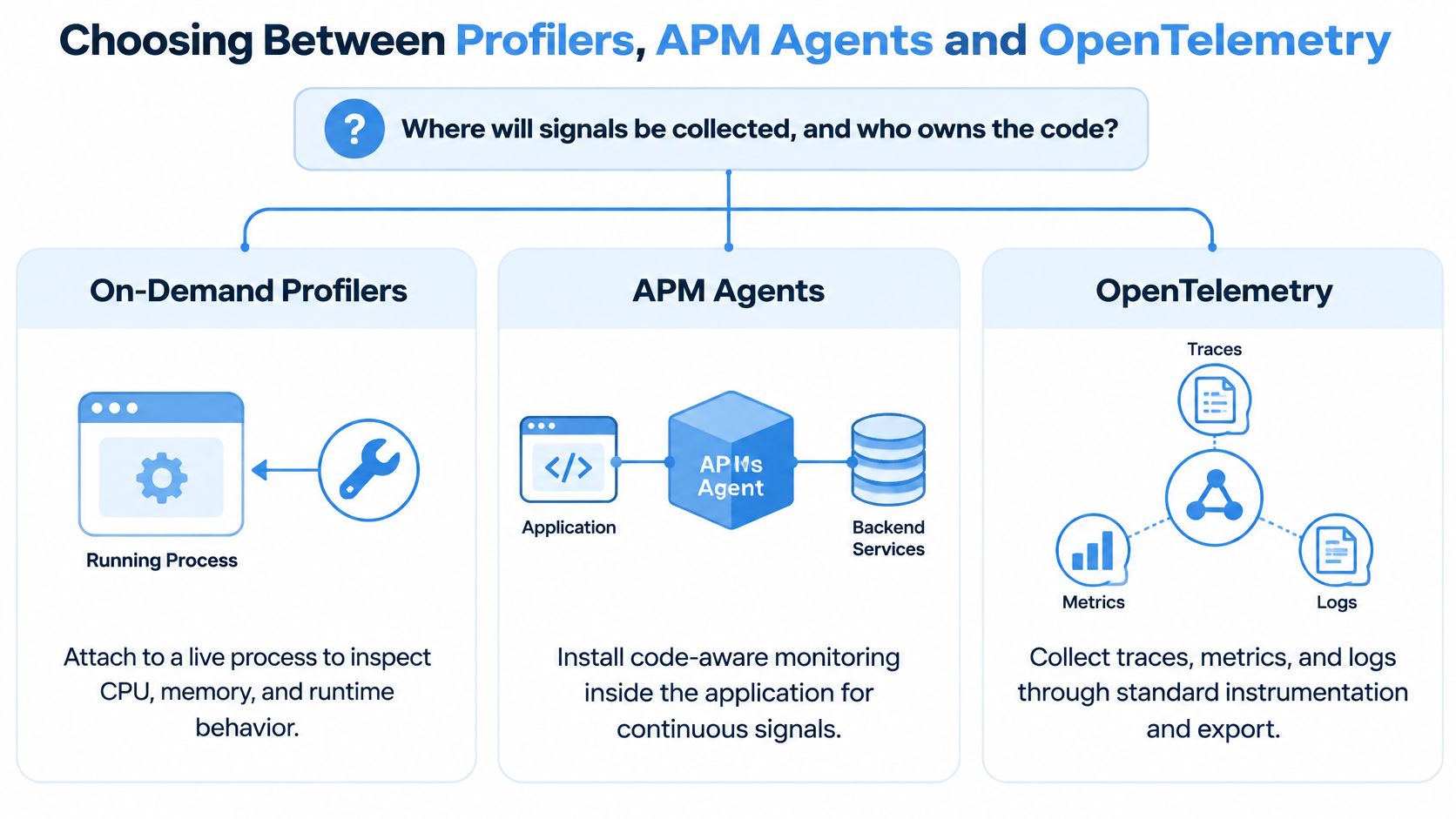
| Approach | Setup Effort | Data It Gives You | Best Fit | Main Risk |
|---|---|---|---|---|
On-demand profiler (dotnet-trace, dotnet-counters) | Low, one command | Hot methods, allocations and GC events for one session | Investigating a known slow process | No history, and overhead while attached |
| Commercial APM agent | Low to medium, auto-instrumented | Traces, metrics, errors and dashboards | Teams wanting a managed backend quickly | Licence cost and vendor lock-in |
| OpenTelemetry SDK with Collector | Medium, you choose exporters | Traces, metrics and logs in one standard format | Multi-service estates and backend flexibility | You own sampling, dashboards and backend choice |
| Hybrid: OpenTelemetry plus profiler | Medium to high | Continuous signals plus deep dives | Teams with steady production traffic and targeted investigations | Two toolchains to maintain |
On-demand profilers such as dotnet-trace and dotnet-counters attach to a live process and capture hot methods, allocations, and GC events. They are useful when another signal has narrowed the problem to a process, but they provide no continuous history and add overhead while attached. Keep the capture focused, then detach when it answers the question.
Commercial APM agents auto-instrument ASP.NET Core, Entity Framework, and HttpClient, providing traces, metrics, errors, dashboards, and alerts after installation. The trade-off is licence cost and dependence on the vendor’s instrumentation and backend. Measure overhead under production-like concurrency in staging before rollout, and account for the work of redoing instrumentation if you switch vendors.
The OpenTelemetry .NET SDK and Collector provide a standard route for exporting traces, metrics, and logs to a backend you choose. That flexibility shifts operational work to your team: you configure sampling, dashboards, and retention, and maintain the Collector and backend.
A practical hybrid uses OpenTelemetry for continuous production signals and a profiler when a trace points to work inside the process. To prove those signals reflect real user workloads, compare production traces with repeatable pre-release tests that replay representative traffic. If the same request paths and bottlenecks appear, the test is a useful release baseline; if they do not, investigate differences in traffic or environment before trusting the result.
For a small team with a few hosts, start with counters and a time-boxed APM trial. For a multi-service estate that may change backends, standardize on OpenTelemetry. In either case, compare overhead at production-like concurrency and keep the chosen tool focused on the question it can answer.
Tracing and Logging Strategies That Connect Requests
A checkout request can call cart, payment, and inventory services in sequence. If its trace shows payment taking 2.3 seconds while the other spans finish in under 50 milliseconds, the trace tree points to the slow hop.
A trace groups timed spans into a parent-child tree. Logs connect to that tree when each entry carries the matching trace and span identifiers.
Keep the tree and the log line together
- Propagate context. Send the W3C
traceparentheader on everyHttpClientcall, including calls between internal services. A missing hop splits the trace. - Add useful span attributes. Record route, status code, app version, region, and deployment ID. These bounded fields let you filter slow requests by release without creating a separate trace for every request value.
- Correlate logs. Include trace ID and span ID in each log entry through
Activityor a logger enricher. Structured templates make fields easier to search than concatenated strings. - Set severity by meaning. Log business events at Information and failures at Warning or Error. Exclude personal data and full payloads.
- Choose sampling deliberately. Fixed-rate head-based sampling limits collection cost, but may miss rare failures. Tail-based sampling in a Collector can retain errors and slow traces, at the cost of more Collector resources. Keep error and slow-request traces, and sample healthy traffic.
If responders cannot open a failed request’s trace within five minutes, check whether trace IDs survive every service and logging boundary before adding dashboards.
Cardinality affects ingestion and storage costs. Keep span and metric attributes bounded, such as route templates, rather than using raw order IDs or user names. Estimate monthly cost using spans per request, request volume, and retention before enabling full capture.
A 2025 Checkmk survey of 192 IT professionals in 27 countries found that 61% called rising complexity their biggest challenge. More traces and alerts can increase cost and noise without speeding diagnosis. After changing sampling, compare SLO compliance, MTTR, and escaped defects, using the same period to assess full-fidelity traces against targeted sampling. Logging and monitoring practices are more useful when log entries and spans share identifiers and the captured traffic reflects workloads worth replaying.
Common Bottlenecks and Their First Checks
Match the symptom before you change code. Most production slowdowns in .NET land in one of seven patterns.
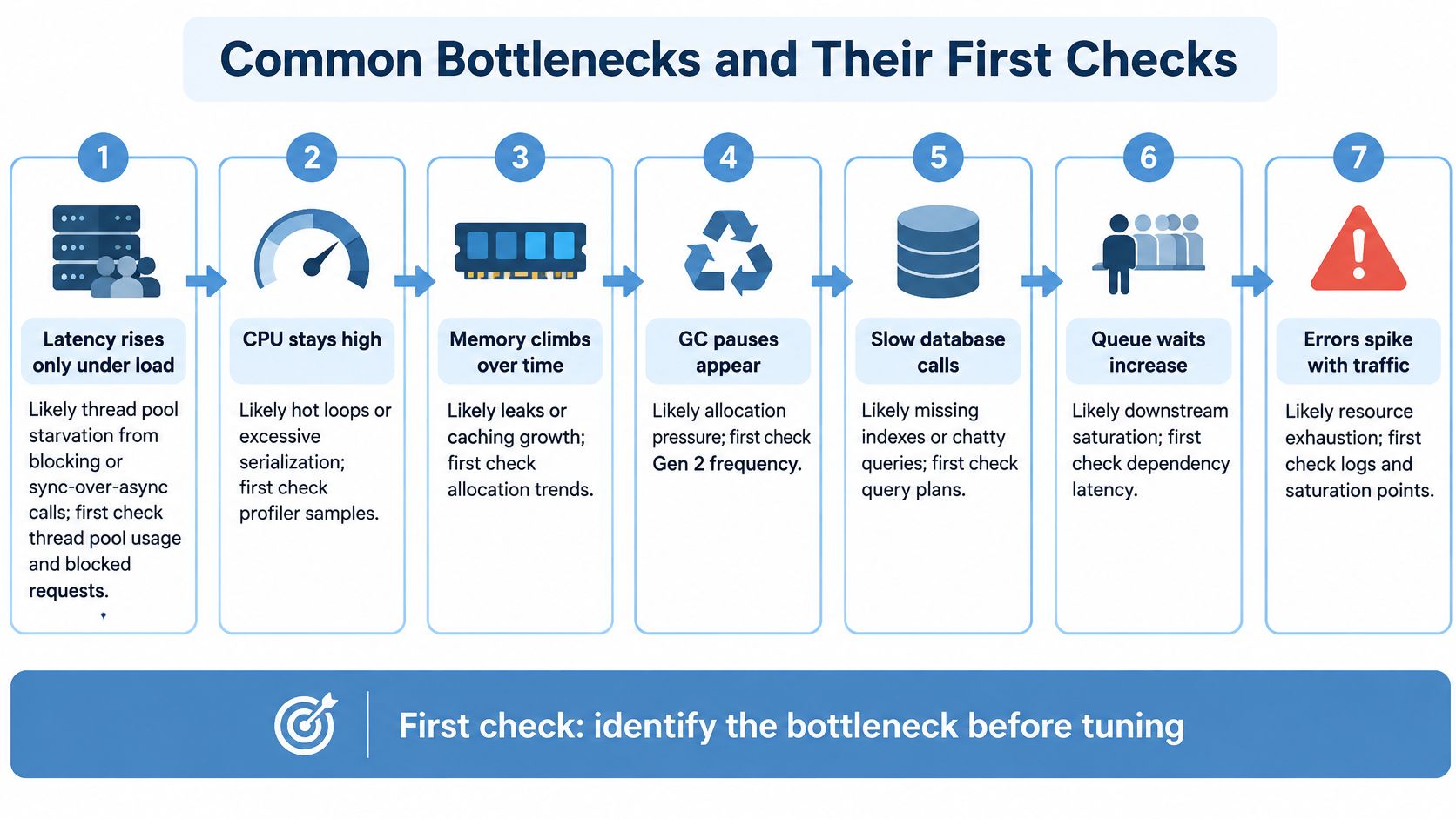
| Symptom | Likely .NET Cause | First Check |
|---|---|---|
| Latency rises only under load | Thread pool starvation from blocking calls | Thread pool queue length and blocked thread count |
| Memory climbs and never falls | Event handler leaks or unbounded caches | Compare two heap snapshots under similar load |
| Pauses every few seconds | Frequent gen 2 collections from large allocations | GC pause time and allocation rate |
| One endpoint slow | N+1 queries or a missing index | Query count and duration per trace |
| Timeouts to a partner API | Downstream latency or HttpClient connection exhaustion | Outbound p95 and connection pool counters |
| CPU at 100% with flat throughput | Tight loops, regex backtracking or large payload serialization | CPU profile captured at peak |
| Errors right after a deploy | Configuration or dependency version change | Error rate compared by version tag |
Latency that appears only under load is usually thread pool starvation from blocking calls or sync-over-async. Memory that never falls back points at event-handler leaks, unbounded caches, or retained collections. Compare two heap snapshots taken under similar load, not one snapshot after a quiet period. Pauses every few seconds usually mean large allocations driving gen 2 collections. One slow endpoint is often N+1 queries or a missing index, visible as query count on a single trace. Partner timeouts are downstream latency or HttpClient pool exhaustion. CPU pinned at 100 percent with flat throughput is a hot loop, catastrophic regex backtracking, or huge payload serialization. Errors that start at deploy time are configuration or a dependency version, which is why the version tag has to be on the error counter.
Work the symptom in order
- Confirm the user-facing breach against the SLO, not against a single slow sample.
- Scope it by endpoint, version, and region so you aren’t profiling the healthy half of the fleet.
- Read runtime counters for CPU, GC, thread pool, and pools before you open a profiler.
- Open one slow trace and see whether time sits in your code, the database, or an outbound call.
- Profile at peak only if the trace points inside the process. A CPU sample of an idle box wastes the afternoon.
Change one variable, then measure again. Two fixes in one deploy leave you guessing which one worked.
Using Traffic Replay and Load Tests in a QA Process
Scripted load tests cover the requests someone imagined. Production sends the mix users generate, including odd headers, retries, and bursts no script author wrote down. Dashboards of that traffic don’t prove the next build will survive it. A replay does, if the replay is faithful.
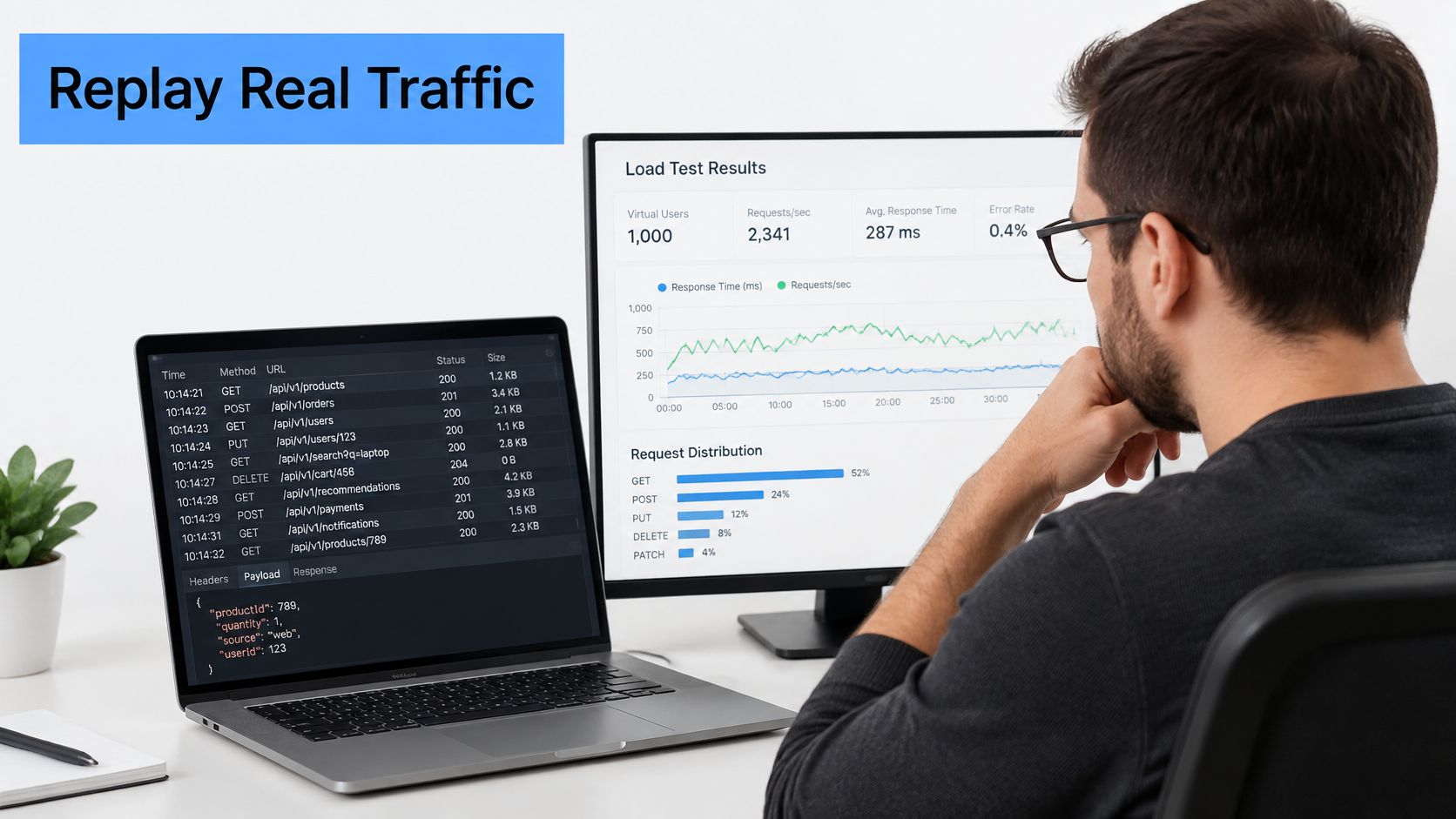
The loop is short. Capture production HTTP traffic, or a representative slice of one critical flow. Replay it into staging at the same rate and concurrency. Compare p95, p99, error rate, GC time, and thread pool queue length with the baseline build. GoReplay is one open-source way to capture and replay that HTTP traffic from a file, so both builds see the same workload. Replay is HTTP-level. Confirm that headers, host names, and session state still reach the .NET service intact, or the comparison is fiction.
Recent research on application-level replay found that naively replaying recorded production traces achieved a success rate below 80%, while templating dynamic values raised replay success to 98.3% across 291 attempts. Stale timestamps, reused idempotency keys, and other state-dependent fields were the failures. A pretty latency chart from a replay that mostly 400s is not evidence.
A readiness checklist before you trust a pass
- Mask personal data before the capture leaves production.
- Substitute tokens, timestamps, and idempotency keys so the run isn’t rejected for stale state.
- Disable side effects such as payments and email, or point them at fakes.
- Tag replayed requests with the app version under test.
- Set pass and fail thresholds before the run, using the baseline distributions.
- Check fidelity. The replayed latency shape should resemble the original, not just return 200s.
How traffic replay improves load testing accuracy is the difference between a script you invented and a workload you recorded. For capacity, step the request rate up until p95 breaches the target. That knee is real capacity for this mix, not a round number from a spreadsheet.
A walkthrough of reading those curves against a live replay is easier to follow than a screenshot alone.
A pass means the candidate matches the baseline within the thresholds you set, not that the service is fast in absolute terms.
Confirm Your Baseline Before the Next Release
You can start this week. The point is a number the team can read in five minutes, and a release that has to match it.
- Pick three user-facing SLOs on each critical endpoint: p95 latency, error rate, and availability.
- Turn on the runtime counters from the metrics table on every instance, not only on the box you happen to SSH into.
- Choose one instrumentation route and export traces with the trace id written into logs.
- Capture one day of one critical flow and replay it into staging with masked data and side effects disabled.
- Record the baseline p95, p99, error rate, and GC time for the current build.
- Gate the next release on the candidate staying inside those thresholds. File-based HTTP replay is enough for the capture and the gate. Start with a single critical flow.
I would replay checkout first. It crosses cart, payment, and inventory, so it exposes the most latency and error signals in one pass. Add other flows only after the checkout baseline holds for two consecutive releases.
GoReplay captures live HTTP traffic and replays it into a test environment so you can compare latency, errors, and runtime signals on a real request mix before a .NET release. That is the missing check when dashboards and averages still look fine. See how to start from one critical flow at GoReplay.