
Mastering managing test data: A Practical Guide

Managing test data isn’t just a task; it’s an engineering discipline. It’s the art and science of creating, controlling, and maintaining the data you use to validate your software. Think of it as a strategic process for sourcing, sanitizing, and delivering realistic data to your dev and QA environments so you can be sure your testing is both effective and secure.
This practice has moved from a “nice-to-have” to a core part of building reliable applications.
Why Managing Test Data Is No Longer Optional
In modern software development, your tests are only as good as the data they run on. Period.
Using simplistic or dummy data is like crash-testing a new car with cardboard cutouts instead of realistic dummies. Sure, you might see if the airbags deploy, but you’ll completely miss the critical, nuanced failures that only show up under real-world stress. This is the core challenge every engineering team faces: finding data that’s realistic enough to uncover bugs yet secure enough to prevent a breach.

This tension between realism and security is exactly why you need a formal test data management strategy. On one hand, your developers need data that mirrors the beautiful chaos and unpredictability of a production environment. Without it, tests just won’t catch those subtle bugs that only surface with real user interactions.
On the other hand, privacy regulations like GDPR and CCPA hand out steep penalties for exposing sensitive customer information. Just copying a production database to a staging environment isn’t just bad practice anymore—it’s a massive legal and financial gamble.
The Real Cost of Poor Data
When you neglect a proper strategy for managing test data, you’re signing up for very real problems that grind development to a halt and ramp up risk. When teams can’t get their hands on high-quality, safe data, they inevitably run into:
- Escaped Bugs: Tests pass with flying colors in development, only to fail spectacularly in production because the test data never covered real-world edge cases.
- Security Vulnerabilities: Unmasked production data sitting in less-secure test environments becomes a glowing target for data breaches.
- Slower Development Cycles: Developers and QA engineers waste precious time manually creating, hunting for, or just plain waiting for usable test data. It’s a huge bottleneck.
This reality has elevated test data management from a tedious chore to a core engineering discipline. Recognizing this, the market is exploding. Industry analysis predicts the global Test Data Management (TDM) market will swell to over $1.54 billion by the early 2030s, driven by regulatory pressure and the relentless push for automation in CI/CD pipelines. You can discover more insights on TDM market trends to see why investment is pouring into this space.
A modern solution involves capturing live production traffic, sanitizing it on the fly to strip out sensitive information, and then replaying it into test environments. This approach gives you the best of both worlds: the raw realism of production usage patterns without the security nightmares. This guide will show you exactly how.
Choosing Your Tools: Production vs. Synthetic Data
When it’s time to source your test data, you hit a fundamental fork in the road. Do you use a copy of real-world data from your production systems, or do you generate completely new, artificial data from scratch? This decision is a lot like planning a crash test for a new car.
Using a real car—our stand-in for production-derived data—gives you the highest possible realism. Every dent, scratch, and system failure will perfectly mirror what would happen in a real collision. But it’s expensive, risky, and you can’t exactly crash a priceless prototype every time you want to test a minor change.
On the other hand, you could use a specialized crash test dummy, which is our synthetic data. It’s safe, repeatable, and you can design it to test very specific scenarios, like a side-impact collision at a precise angle. But no matter how advanced that dummy is, it will never perfectly replicate the complex, unpredictable behavior of a human body in an accident.
Both approaches have clear strengths, and the right choice depends entirely on what you need to test.
The Unmatched Realism of Production-Derived Data
Production data is the gold standard for realism because it captures the genuine complexity and chaos of user behavior. It contains the exact data relationships, unexpected values, and usage patterns that are nearly impossible to invent. When you need to validate that your application can handle the messy reality of its live environment, nothing beats the real thing.
But this realism comes with serious strings attached. Raw production data is brimming with Personally Identifiable Information (PII) like names, email addresses, and financial details. Using it directly in less-secure test environments is a massive compliance violation and a security nightmare waiting to happen.
To use it safely, you absolutely must apply crucial sanitization techniques.
- Data Masking: This is the process of replacing sensitive data with realistic but fake information. For example, a real customer name like “John Smith” might become “Mark Jones.” The data format stays the same, but the confidential information is protected. It’s a critical step for compliance, and you can dive deeper into the core principles of masking production data for testing.
- Data Subsetting: Instead of copying your entire multi-terabyte production database, you can extract a smaller, targeted slice. You could pull just the last month of user activity for customers in a specific region, which is much faster and cheaper to manage while still keeping all the data relationships intact.
The Total Control of Synthetic Data
Synthetic data is artificially generated information that mimics the structure and format of production data without being derived from it. Its biggest advantage is control and safety. Since it contains zero real user information, it completely sidesteps privacy concerns. This makes it perfect for sharing with offshore teams, third-party developers, or in any environment where security is paramount.
More importantly, synthetic data is often the only way to test scenarios that don’t even exist yet in your production environment.
Imagine you’re developing a brand-new feature. You can’t use production data to test it because no one has used it yet. Synthetic data lets you create thousands of hypothetical user interactions, covering every edge case you can dream up before a single real user touches the code.
This makes it invaluable for:
- Edge Case Testing: Easily generate data to test improbable but possible scenarios, like usernames with special characters or transactions with negative values.
- Load Testing: Create millions of user profiles or transactions to simulate peak traffic and pinpoint performance bottlenecks under controlled conditions.
- New Applications: When you’re building a product from the ground up, synthetic data is your only choice for that initial round of testing.
To make the choice clearer, let’s break down the key differences between these two approaches.
Production-Derived vs. Synthetic Test Data
| Attribute | Production-Derived Data | Synthetic Data |
|---|---|---|
| Realism | Highest possible fidelity; reflects actual user behavior and data complexity. | Can be realistic, but may miss subtle, real-world data patterns. |
| Primary Use | Regression testing, bug reproduction, and performance validation. | Edge case testing, load testing, testing new features, and initial development. |
| Privacy Risk | High. Contains PII and sensitive information; requires masking and sanitization. | None. Contains no real user data, making it inherently safe and compliant. |
| Coverage | Limited to historical data; cannot cover new or untested scenarios. | Excellent. Can be generated to cover any imaginable scenario or edge case. |
| Cost & Effort | Can be costly and slow due to storage, transfer, and sanitization processes. | Generation can be computationally intensive but offers more control and repeatability. |
Ultimately, the best strategy for managing test data isn’t about choosing one over the other. It’s about using them together, for the right jobs.
Use sanitized production data for regression tests that demand high fidelity, and lean on synthetic data for performance tests, security validation, and exploring the unknown. This hybrid approach gives you the best of both worlds: the realism of the real and the safety of the artificial.
Building Your Test Data Management Workflow
Solid test data management isn’t a one-time project you can set and forget. It’s a living, repeatable engineering workflow that should run right alongside your development lifecycle. When you treat it like a proper process, you stop wrestling with ad-hoc data scripts and start building a systematic, automated approach that delivers consistency and reliability.
This entire workflow breaks down into five key stages, turning raw, messy data into a clean, powerful testing asset.
A structured approach like this makes it clear which data source to use for any given task. Sometimes you need the raw, chaotic realism of production data, and other times, you need the controlled safety of synthetic alternatives.
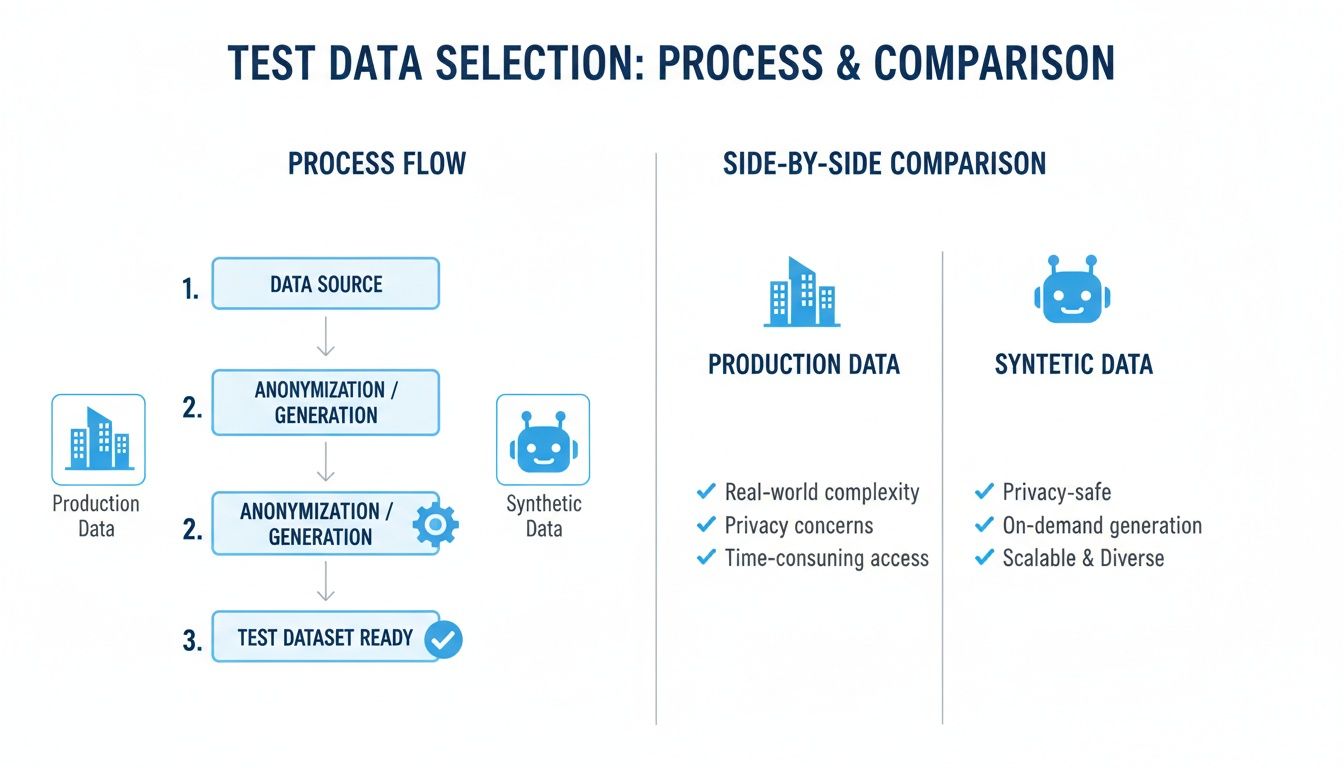
The flowchart above gets right to the point. Production data gives you unmatched realism for hunting down those tricky, complex bugs. Synthetic data, on the other hand, gives you the control and safety you need for testing edge cases and staying compliant. A mature workflow uses both.
The Capture Stage: Collecting Raw Inputs
First things first, you need to get your hands on the data. When you’re using production-derived data, this usually means capturing live user interactions as they happen.
A killer technique for this is traffic shadowing, where you quietly make a copy of production HTTP traffic without ever slowing down or affecting live users. This gives you a perfect snapshot of real-world behavior—every API call, request header, and payload.
This method is miles better than just copying a database because it captures the dynamics of your system. You get the actual sequence of actions and the flow of information that leads to a certain state, which is the most realistic input you could ever hope for.
The Store Stage: Creating an Accessible Repository
Once you’ve captured the data, it needs a place to live. Storing this test data efficiently is absolutely critical for keeping your testing pipelines fast and accessible. You can’t have your teams sitting around for hours waiting on a massive data transfer or fumbling with clunky access protocols.
The goal here is a central, well-organized repository. This could be anything from a dedicated database to a cloud storage bucket or a specialized platform. The key is making it dead simple for your automated test pipelines to pull whatever data they need, on-demand, so tests run fast without anyone having to step in manually.
The Sanitize Stage: Ensuring Data Privacy
This is, without a doubt, the most critical step when you’re working with data pulled from production. Before any of that data touches a non-production environment, it must be completely scrubbed of all sensitive information.
This process involves:
- Data Masking: Swapping out personally identifiable information (PII) like names, emails, and phone numbers with realistic but fake values.
- Anonymization: Irreversibly scrambling data so there’s no way to link it back to a real person, keeping you compliant with regulations like GDPR.
Failing to sanitize data properly isn’t just a technical slip-up; it’s a massive business risk. Industry reports show a lot of companies are still way behind on this. A 2025 survey found that only 7% of organizations feel fully compliant with data privacy rules in their testing, while a staggering 40% struggle just to find and mask PII. You can dive into the full research on the 2025 state of test data management to see the real operational risks.
The Replay Stage: Injecting Data into Tests
With clean, sanitized data ready to go, the replay stage is where the magic happens. This is where you feed that prepared data into your staging, QA, or performance testing environments.
Tools like GoReplay are built for this. They can replay captured traffic at scale, perfectly simulating real-world load and user interactions.
This step lets you:
- Validate Functionality: Confirm that new code changes didn’t break anything by throwing real user scenarios at them.
- Conduct Load Testing: Find out how your app really holds up under realistic peak traffic.
- Reproduce Bugs: Easily recreate those tricky production bugs by replaying the exact sequence of events that caused them in the first place.
The Version Stage: Linking Data to Code
Finally, to make your testing truly repeatable and trustworthy, you have to version your test data. It’s the same principle as versioning your application code with Git—your datasets should be tied directly to specific code versions.
By versioning your test data, you create an immutable link between the code being tested and the data used to test it. If a build fails, you know exactly which data set was used, making it simple to reproduce, debug, and resolve the issue.
This practice is the final piece of the puzzle for integrating your test data management into a CI/CD pipeline. It guarantees that every automated build is tested against a known, consistent, and relevant dataset. This is how you turn testing from a chaotic art into a reliable science.
A Practical Test Data Walkthrough with GoReplay
Theory is great, but let’s be honest—seeing it in action is where the lightbulb really goes on. It’s time to move from concepts to code. I’m going to walk you through a real-world scenario using GoReplay to show you exactly how to capture live traffic, sanitize it, and then replay it in staging for tests you can actually trust.

This process isn’t magic. It’s a powerful, realistic testing loop that lets you tap into the rich, complex patterns of your actual users to validate every change with confidence.
Step 1: Capture Live HTTP Traffic
First things first, we need the raw material for our tests. That means capturing live HTTP traffic straight from your production server. GoReplay does this passively by just listening to the network traffic, which means it has zero performance impact on your live app. Think of it like putting a microphone in a concert hall to record the music—it captures everything without ever disturbing the performance.
To get started, you’ll use the gor command. Just tell it which port your app is listening on and where you want to save the traffic.
If your production app is running on port 8000, the command is this simple:
gor capture —input-raw :8000 —output-file requests.gor
Let’s quickly break that down:
--input-raw :8000: This tells GoReplay to start listening for all traffic coming into port 8000.--output-file requests.gor: This saves every captured request and response into a single file namedrequests.gor.
That’s it. With that one command running, GoReplay is silently creating a perfect, high-fidelity recording of every single user interaction. This file is now our source of truth.
Step 2: Sanitize and Transform the Captured Data
Okay, we have a file packed with real user traffic. Now for the most critical step from a security and compliance perspective: sanitization. You can’t just replay this data as-is. It’s almost certainly full of sensitive info like auth tokens, user IDs, or other personally identifiable information (PII).
This is where GoReplay really shines. Its middleware lets you modify traffic on the fly during replay, which is perfect for data masking and subsetting. For this example, let’s say we need to strip a sensitive Authorization header and filter out any requests hitting a private /admin endpoint.
We can use the --middleware flag to run a script that processes every single request before it’s replayed.
gor replay —input-file requests.gor —output-http “http://staging-server.com” —middleware “node modifier.js”
The key piece here is --middleware "node modifier.js". It pipes each request through a simple Node.js script called modifier.js before sending it on.
Inside modifier.js, we can write some simple logic to inspect and change the payload. To remove a header and filter out a URL path, the script would look something like this:
const readline = require(‘readline’); const rl = readline.createInterface({ input: process.stdin, });
rl.on(‘line’, (line) => { const payload = JSON.parse(line); // We only care about HTTP request payloads (Type 1) if (payload.Type === 1) { // Filter: if the path starts with /admin, we skip it entirely if (payload.Path.startsWith(‘/admin’)) { return; } // Mask: find and delete the sensitive Authorization header delete payload.Headers[‘Authorization’]; } // Forward the modified (or original) payload to stdout process.stdout.write(JSON.stringify(payload) + ‘\n’); });
This script gives us surgical control. It ensures no sensitive credentials ever touch our staging environment and that we only test with relevant, user-facing traffic. That kind of precision is what a robust test data strategy is all about.
Step 3: Replay Sanitized Traffic into Staging
With our capture file and sanitization script ready, the final step is to unleash the traffic. The command we just built orchestrates the entire flow, letting us validate our staging environment under truly realistic conditions.
Let’s look at the full command one more time:
gor replay —input-file requests.gor —output-http “http://staging-server.com” —middleware “node modifier.js”
When you run this, GoReplay reads a request from requests.gor, passes it through the modifier.js script to be cleaned, and then forwards the sanitized request to your staging server.
By replaying sanitized traffic, you achieve the ultimate goal: validating your application with data that is structurally and behaviorally identical to production, but is completely safe and compliant.
This opens the door to some incredibly valuable types of testing:
- Regression Testing: Catch bugs by replaying a known set of user interactions against every new code deployment.
- Load Testing: Simulate realistic peak traffic by replaying captured data at a faster speed (e.g., using the
--output-http-workersflag). - Bug Triage: Replicate those tricky production bugs by isolating and replaying the exact sequence of requests that caused them.
This three-step process—capture, sanitize, and replay—creates a workflow that is both repeatable and easy to automate. You can plug it directly into your CI/CD pipeline, empowering your team to test every single build against a fresh, relevant, and safe dataset. For a deeper dive, check out our guide on the ideal GoReplay setup for testing environments for more advanced setups.
Best Practices and Common Pitfalls to Avoid
Getting test data management right means building habits that boost speed and security. It also means dodging the common traps that slow down development and introduce needless risk. The difference between a smooth release and a late-night production fire drill often comes down to this.
The goal isn’t just to run scripts; it’s to build a resilient testing culture where high-quality, safe data is a natural part of your workflow. The most successful teams stop making manual data requests and start treating their test data with the same discipline they apply to their application code.
What to Do: Adopt These Best Practices
To build a strategy that actually works, you need to focus on automation, solid processes, and security from day one. These practices will make your testing cycles faster, more reliable, and fundamentally safer.
-
Automate TDM in Your CI/CD Pipeline: Manually provisioning data is a huge bottleneck. Instead, you should integrate data generation, masking, and provisioning right into your CI/CD pipeline. When a developer pushes code, the pipeline should automatically spin up an environment and seed it with the correct, sanitized data for that build. No more waiting around.
-
Treat Test Data Like Code: Test data isn’t just a pile of records; it’s a critical asset. Store your data generation scripts, masking rules, and subsetting logic in a version control system like Git. This keeps your test data versioned alongside your application code, which makes tests repeatable and debugging way easier.
-
Embed Privacy by Design: Don’t treat data masking like a final cleanup step. Security needs to be baked into your data workflow from the very beginning. Define your masking rules upfront and make sure no raw production data ever makes its way into a lower environment. This proactive stance is the only way to maintain compliance and prevent accidental data exposure.
Market analysis clearly shows that teams are prioritizing these practices. Synthetic data generation, data masking, and data subsetting are the most adopted TDM features. In fact, synthetic data generation held around 27% of the market share in 2022 and its popularity is only growing as privacy becomes non-negotiable. You can dig into more insights on the growing test data management market on Technavio to see why AI-enabled tooling is becoming so critical.
What Not to Do: Avoid These Common Pitfalls
Knowing what not to do is just as important as knowing what to do. Too many organizations fall into the same traps, which leads to brittle tests, security holes, and wasted engineering hours.
The biggest mistake we see is underestimating the risk of using production data. A single unmasked database copy in a staging environment can instantly negate millions spent on production security. It creates a vulnerability that is both severe and completely avoidable.
Here are the most common pitfalls to watch out for:
-
Using Unmasked Production Data: This is the cardinal sin of TDM. Copying raw production data to dev or staging environments exposes sensitive customer information and creates massive compliance risks under regulations like GDPR and CCPA. You must always mask or anonymize data before it leaves the production environment.
-
Relying on Stale Data: Using a data snapshot from six months ago isn’t going to help you catch bugs in a feature developed last week. Stale data doesn’t reflect your current application state or user behavior, leading to tests that are either passing incorrectly or failing for the wrong reasons. Refresh your test data regularly.
-
Creating Brittle Tests: Stop writing tests that rely on specific, hardcoded values (like
userID = 123). This makes your tests incredibly fragile—they break the moment the underlying data changes. Instead, design your tests to be data-agnostic, so they can run against any dataset that fits the required schema. -
Neglecting Edge Cases: It’s easy to test the “happy path” where everything works perfectly. The real value comes from testing the edge cases: users with special characters in their names, zero-value transactions, or weird account states. If your test data only covers the obvious scenarios, you’ll miss the bugs that cause the most painful production failures.
Got questions about getting a test data management strategy off the ground? You’re not alone. Even the best-laid plans run into practical hurdles. Let’s tackle some of the most common concerns we hear from teams in the trenches.
What’s the Biggest Risk if We Don’t Manage Test Data Properly?
It boils down to a nasty one-two punch: a major security screw-up followed by a nosedive in product quality. When you don’t have a formal game plan for test data, you’re inviting two equally painful headaches.
First up is the security nightmare. Using raw, unmasked production data in your dev or staging environments is just asking for a breach. If one of those less-secure environments gets popped, you’re looking at a serious data leak, massive fines, and a complete evaporation of customer trust.
Then there’s the quality problem. If your tests run on stale, oversimplified, or just plain fake-looking data, they aren’t testing anything meaningful. You’re guaranteed to miss the gnarly, real-world bugs—the performance bottlenecks, concurrency issues, and weird edge cases that only your actual users will find. And they’ll find them in production.
How Can We Get Started with Limited Resources?
You don’t need a huge budget or a dedicated team to make a real dent in this. The trick is to start small, hit the highest-impact areas first, and show some quick wins.
Forget about building the perfect, all-encompassing system from day one. Instead, find the absolute most sensitive data in your app—think user credentials, PII, contact info. Just start by masking that.
An iterative approach is your best friend. Automate one piece of the puzzle at a time, like capturing traffic for a single, critical service. This proves the value right away and builds momentum for a bigger strategy.
Lean on powerful open-source tools to get the ball rolling without any upfront cost. This step-by-step method makes it way easier to justify more resources down the line because you’ll have tangible results to show for it.
Will Using Real Production Traffic for Testing Tank Our Performance?
That’s a super common worry, but modern tools are built specifically to avoid this. The process of capturing production traffic—often called traffic shadowing—is designed to be completely passive.
Tools like GoReplay work by listening in on a mirrored network port or using a tiny agent that has a practically invisible impact on your application’s response time. All the heavy lifting, like processing and replaying the data, happens on entirely separate infrastructure, safely isolated from your live production servers.
So while there’s a resource cost to store and replay that data, it’s completely disconnected from your user-facing environment. It’s a safe and incredibly effective way to generate a realistic load without slowing anything down for your actual customers.
Is Synthetic Data Ever Better Than Production Data?
Absolutely. Production data gives you unmatched realism, but synthetic data is the clear winner in a few key situations where production data is either a bad fit, doesn’t exist, or just isn’t enough.
-
Testing New Features: Building something brand new? There’s no user data for it yet. Synthetic data is literally your only option to kick the tires and validate how it works before you launch.
-
Covering Edge Cases: It’s perfect for intentionally creating those weird, rare scenarios that might not show up in your production logs for months. Think users with ridiculously long names, zero-value transactions, or funky leap-year date calculations.
-
Controlled Load Testing: When you need to hammer a specific API with a predictable, repeatable stream of inputs, synthetic data is often far easier to generate and control than trying to wrangle and sanitize production traffic.
Honestly, the strongest strategies we see use a hybrid approach. You lean on sanitized production data for realism and then sprinkle in synthetic data to cover all the bases. It’s the best of both worlds.
Ready to transform your testing with real, sanitized production traffic? With GoReplay, you can capture and replay live user sessions to find bugs before they impact your customers. Start building more reliable applications today!