
How to Create a Test Case That Actually Works
Think of a test case as a detailed recipe for quality. You’re defining its purpose, laying out clear, step-by-step actions, and specifying the exact expected result. A well-written test case is like a blueprint—it ensures anyone on your team can run the test and consistently verify if a feature actually works the way it’s supposed to. It’s your best bet for catching bugs before they ever reach a user.
Why Great Test Cases Are a Project’s Secret Weapon
Before you even start writing step one, it’s critical to understand why a well-crafted test case is the bedrock of quality software. These are far more than just a simple QA checklist. They’re a project’s first line of defense against costly post-release bugs and a key part of any successful Agile or DevOps practice. Honestly, you should see them as a strategic activity that safeguards your entire development lifecycle.
Meticulous test design has a direct, tangible impact on product reliability and, maybe more importantly, user trust. When a user has a smooth, error-free experience, their confidence in your product skyrockets. That kind of trust is invaluable.
Connecting Test Cases to Team Efficiency
I’ve seen it time and time again: well-documented test cases dramatically improve team efficiency. They create a shared understanding of how a feature is supposed to behave, cutting down on the ambiguity that often crops up between developers, testers, and product managers. This clarity prevents a ton of rework and drastically shortens feedback loops.
A clear test case is really a communication tool. It ensures that when a developer says a feature is “done,” it matches the exact same definition of “done” that a QA engineer will use for validation. This alignment is absolutely key to moving faster without sacrificing quality.
On top of that, these documents form the core logic needed to guide your automated scripts. As automation becomes more and more common—the market is projected to grow from USD 41.67 billion in 2025 to USD 169.33 billion by 2034—the human-written test case provides the crucial context and intent. This synergy ensures your scripts test what truly matters to both the user and the business.
The Foundation of Modern Quality Assurance
In today’s fast-paced development cycles, robust testing isn’t just some final step you tack on at the end. It’s woven into every single stage. Creating effective test cases is fundamental to this modern approach.
- Enables Traceability: Linking test cases back to specific requirements or user stories proves that every business need is actually being validated.
- Facilitates Regression Testing: A solid suite of test cases makes it much easier to check if new changes have accidentally broken existing functionality.
- Improves Maintainability: When tests are clear and atomic (meaning they test one thing at a time), they’re far easier to update as the application evolves.
A great test case includes several key pieces of information to make it effective.
Core Components of a High-Quality Test Case
This table summarizes the essential elements every effective test case should include for clarity, reusability, and accuracy.
| Component | Purpose |
|---|---|
| Test Case ID | A unique identifier for easy tracking and reference. |
| Title/Summary | A concise, clear description of the test’s objective. |
| Prerequisites | Any conditions that must be met before the test can be executed. |
| Test Steps | A sequential list of actions to be performed by the tester. |
| Test Data | Specific input values required to execute the test steps. |
| Expected Results | The exact outcome anticipated after performing the test steps. |
| Actual Results | The observed outcome after the test is executed. |
| Status | The final result of the test (e.g., Pass, Fail, Blocked). |
Getting these components right from the start saves a massive amount of time and confusion down the road.
By investing the time upfront to write high-quality test cases, you’re not just checking a box; you’re building a reusable, long-term asset for your team. To explore this topic further, check out our guide on modern software testing best practices.
Setting the Stage for Success Before You Write
 Jumping straight into writing test cases without a plan is a classic mistake. I’ve seen it happen countless times. What separates a truly effective test from a mediocre one is the prep work you do beforehand. This initial phase makes sure your efforts are targeted, relevant, and perfectly aligned with what the project actually needs to accomplish. It’s an investment that saves you countless hours down the line.
Your first move should always be to get intimately familiar with the project’s documentation. This means really digging into business requirements, functional specs, and especially the user stories. These aren’t just background noise; they are the absolute source of truth for what the software is supposed to do. A simple user story like, “As a customer, I want to filter products by color,” immediately hands you a clear, tangible testing objective.
Think of it this way: a test case without a clear link to a requirement is just guesswork. By rooting every test in a specific business need or user story, you ensure you’re validating what truly matters, not just testing features in a vacuum.
This initial research is what helps you define what you’re actually trying to achieve. Are you aiming to validate a successful user workflow? Or maybe you’re hunting for security flaws or verifying complex data processing. Your goal dictates everything about how you’ll build the test case.
Defining Test Scope and Priorities
Once you have a solid grasp of the requirements, it’s time to define your test scope. Let’s be realistic—you can’t test everything with the same level of intensity, especially when deadlines are looming. You have to be strategic about what gets rigorous testing now versus what can wait.
When you’re trying to prioritize, here are a few things I always consider:
- High-Risk Areas: Which features would cause the most damage if they broke? The payment gateway on an e-commerce site is always going to be a higher priority than its “About Us” page. It’s a no-brainer.
- New Functionality: Anything brand-new is inherently less stable and demands thorough validation. This is where bugs love to hide.
- Frequently Used Paths: Features like user login and product search are hit constantly. They need more attention than some obscure admin setting that gets used once a month.
Finally, you need to get your test environment and data ready. A stable, predictable environment isn’t a nice-to-have; it’s non-negotiable. You need to ensure it mirrors the production setup as closely as possible—hardware, software, network configs, all of it.
You’ll also need good, realistic test data. For a user registration form, this means having valid data for the “happy path” tests, but also a whole suite of invalid inputs for negative testing. Think poorly formatted emails, weak passwords, or special characters. This groundwork is absolutely essential for writing tests that produce reliable, trustworthy results.
The Anatomy of a Perfect Test Case
Alright, once the prep work is out of the way, it’s time to actually build a rock-solid test case. We’re going to move past those generic templates and really dissect the structure, field by field, using examples that make sense in the real world. This is how you craft a test case that’s not just robust and maintainable, but a genuinely invaluable asset for your QA process.
Think of it as creating a detailed blueprint. The goal is for anyone on your team—from a senior dev to a brand new tester—to be able to pick it up and get the exact same, predictable result every single time. A great test case is more than a simple checklist; it’s a formal document where every component plays a role in eliminating guesswork and ensuring absolute clarity.
Core Structural Components
Let’s break down the essential fields that form the backbone of any high-quality test case. Getting these right provides the structure you need and ensures nothing critical gets missed along the way.
-
Test Case ID: Every single test case needs a unique identifier. This isn’t just for tidy organization; it’s absolutely crucial for traceability and reporting. A simple, consistent naming convention like
[ProjectAbbreviation]-[Feature]-[ID]—for example,ECOMM-LOGIN-001—makes it instantly recognizable and easy to link to in bug reports or your test management tools. -
Title and Summary: The title needs to be a crystal-clear, concise statement of what the test is for. Ditch vague descriptions like “Test Login.” Instead, be specific: “Verify Successful User Login with Valid Credentials.” A short summary can add that extra bit of context if the title isn’t quite enough to explain the “why” behind the test.
-
Preconditions: What has to be true before you can even start the test? This is where you list every single prerequisite. For a test verifying that an item can be added to a shopping cart, a precondition would be: “User must be logged into an active account, and the target product must be in stock.” Listing these out prevents tests from failing because of a bad setup, rather than an actual bug.
This flow chart gives a great visual summary of the core logic, showing how each piece builds on the last.
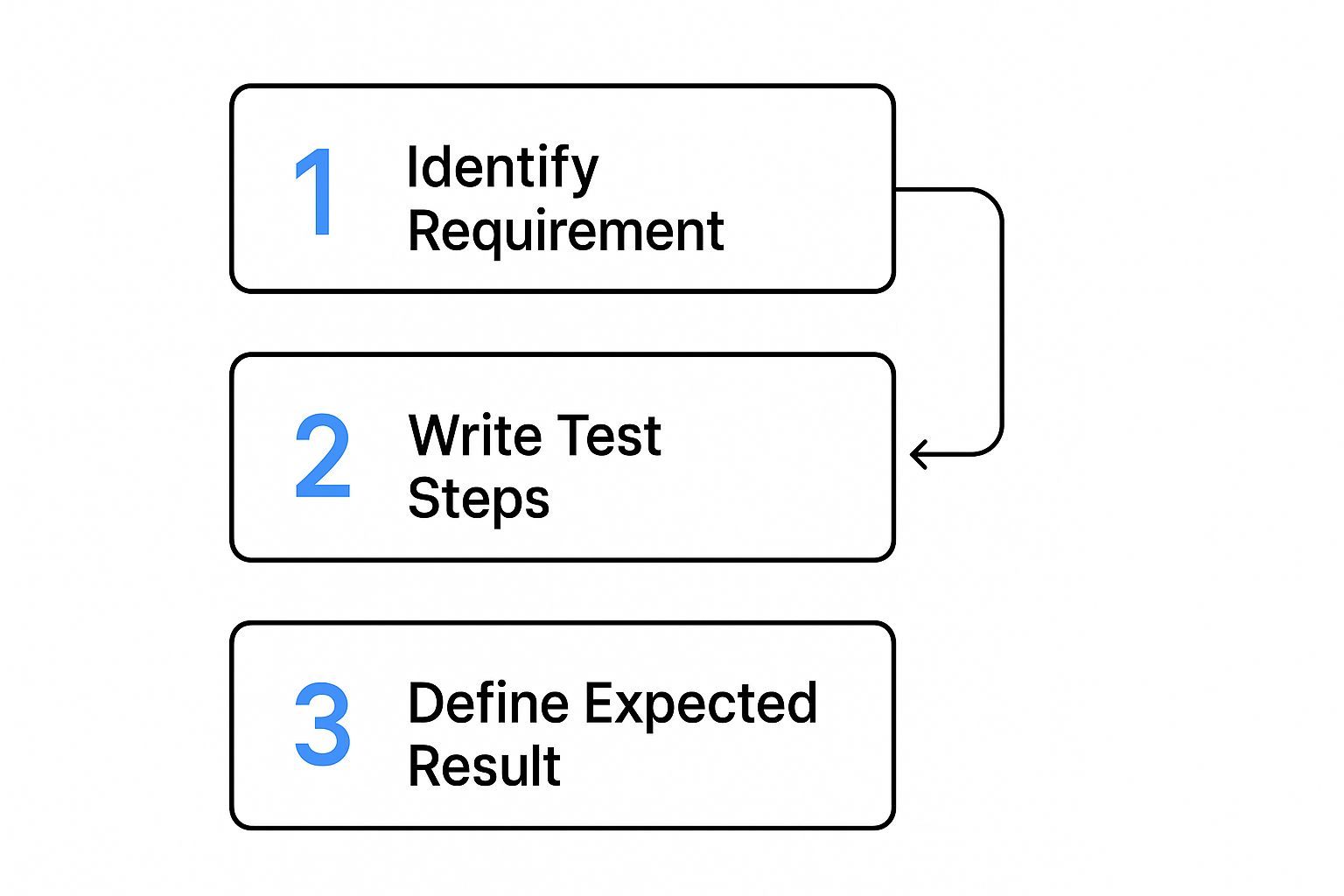
As the chart highlights, writing effective test steps and defining your outcomes are a direct result of first understanding the requirement you’re actually trying to validate.
Crafting Actionable Steps and Expected Results
The real heart of any test case lies in its steps and the expected results. This is where clarity is completely non-negotiable. Each step must be a single, unambiguous action.
The ultimate goal is to write steps so clear that a new team member with zero prior knowledge of the feature could execute the test flawlessly. If there’s any room for interpretation, the step needs to be rewritten.
Let’s say you’re testing a password reset feature. The steps aren’t just “reset password.” They are a precise sequence of actions:
- Navigate to the login page.
- Click the “Forgot Password?” link.
- Enter a valid, registered email address into the email field.
- Click the “Send Reset Link” button.
For every single action, you have to define a corresponding Expected Result. This is maybe the most critical part of the whole process. It’s not good enough to say “it should work.” You have to describe the exact outcome.
For step 4 above, the expected result would be: “A success message ‘Password reset link sent to your email’ is displayed on the screen, and an email containing a unique reset link is delivered to the specified address.” This level of precision is what makes pass/fail decisions objective, not subjective.
Adding Essential Metadata
Finally, a few extra fields add crucial context that makes your test suite infinitely more manageable and effective down the road.
- Priority/Severity: Priority tells you how important the test is in the current cycle (e.g., P1 - Critical, P2 - High). Severity, which is usually assigned to the bug you find, defines the impact of a potential failure on the system itself.
- Postconditions: What should the state of the system be after the test has been run? For a user registration test, a postcondition might be: “A new user account is created in the database and is in an ‘active’ state.”
- Requirements Traceability: Always, always link your test case back to the specific requirement, user story, or bug report it’s meant to validate. This creates a clear, unbroken line between development goals and QA efforts, giving you proof that all requirements are covered.
Writing Test Cases for Real-World Scenarios
 Theory is one thing, but actually applying that knowledge is what separates a good tester from a great one. So, let’s put our understanding into practice by crafting test cases for some common software features. This hands-on approach is the best way to learn how to think like a user and find those critical bugs before they ever see the light of day.
We’ll kick things off with a feature you’ll find in almost every application out there: the user login flow. It’s the perfect starting point because it lets us clearly demonstrate both positive and negative testing paths.
Crafting a Positive Login Test Case
A positive test case—what many of us call the “happy path” test—is all about verifying that a feature works exactly as intended under normal conditions. The goal here isn’t to break the system. It’s to confirm its core functionality is solid.
Think about a standard login screen. Your positive test case would simply use a valid, registered username and the correct password. The steps are straightforward, and the expected result is just as clear: the user is authenticated and lands on their dashboard. This is your baseline check, confirming the system works for legitimate users. It’s always the first priority.
Building a Negative Login Test Case
This is where the real fun begins. With a negative test case, we get to play the part of a curious or mistaken user, intentionally feeding the system invalid inputs to see how it handles mistakes. This kind of testing is absolutely crucial for building a robust, user-friendly application.
For that same login form, a negative test might involve a correct username but an incorrect password. Or maybe you test an invalid email format, or even an empty password field. The expected result isn’t a successful login anymore. Instead, you’re looking for a specific, helpful error message, like “Invalid credentials. Please try again.” This proves the system fails gracefully instead of confusing the user or, worse, exposing a security hole.
The real value of negative testing is ensuring a bad user experience doesn’t happen. A clear error message is infinitely better than a silent failure or a generic, unhelpful alert. It guides the user toward a solution.
This disciplined approach to building test cases is what drives the modern software world. In fact, the automation testing market was valued at USD 17.71 billion in 2024 and is projected to hit USD 63.05 billion by 2032, largely because methodologies like Agile and DevOps depend on a solid suite of tests to keep feedback cycles fast and reliable.
To see just how different these two approaches are, let’s put them side-by-side for our login form example.
Positive vs. Negative Test Case Example Login Form
This table clearly illustrates the different goals and details involved when writing positive and negative test cases for the exact same feature.
| Test Case Element | Positive Test Case (Successful Login) | Negative Test Case (Invalid Password) |
|---|---|---|
| Title | Verify Successful Login with Valid Credentials | Verify Error Message with Invalid Password |
| Prerequisites | User account ‘[email protected]’ exists and is active. | User account ‘[email protected]’ exists and is active. |
| Test Data | Username: [email protected], Password: ValidPassword123 | Username: [email protected], Password: WrongPassword |
| Test Steps | 1. Navigate to Login Page. 2. Enter valid username. 3. Enter valid password. 4. Click ‘Login’ button. | 1. Navigate to Login Page. 2. Enter valid username. 3. Enter invalid password. 4. Click ‘Login’ button. |
| Expected Result | User is redirected to the dashboard page. A “Welcome!” message is displayed. | An error message “Invalid credentials. Please try again.” is displayed below the password field. User remains on the login page. |
As you can see, the structure is similar, but the inputs and expected outcomes are polar opposites. One confirms success, the other validates a graceful failure.
Tackling a Complex E-commerce Scenario
Now let’s apply these same principles to something a bit more complex, like an e-commerce workflow. Imagine a user adding an item to their cart and trying to check out. This process touches multiple components and has far more dependencies, making the test cases more intricate.
A solid positive test for this flow might look something like this:
- Log in as a valid user.
- Navigate to a specific product page.
- Verify the product shows as “in stock.”
- Click the “Add to Cart” button.
- Confirm the cart icon in the header updates with the correct item count.
- Navigate to the cart page itself to verify the right product and price are displayed.
Each step has its own specific, expected outcome. When you’re dealing with these kinds of multi-step processes, ensuring every part of the user journey is validated is key. If you’re looking to streamline this kind of testing, our guide on automating API tests with powerful tools and strategies for success can give you some powerful ideas.
Managing and Maintaining Your Test Suite

Learning how to create a test case is just the beginning. The real, long-term value comes from actively managing those tests so they evolve right alongside your application. A neglected test suite quickly becomes a source of noise and a maintenance headache, not the powerful quality asset it should be.
The secret is to treat your test suite as a living part of your codebase. This means applying the same discipline to its organization as you would to your application’s source code. Simple practices like clear naming conventions are a great place to start. A test named LOGIN-NEG-004_InvalidEmailFormat is instantly more useful than a generic Login Test 4.
Your test suite is a direct reflection of your application’s health and your team’s commitment to quality. When it’s organized and up-to-date, it inspires confidence. When it’s messy and outdated, it creates doubt and slows everyone down.
This organizational rigor is a cornerstone of modern development. The global automation testing market was valued at USD 25.43 billion in 2022 and is projected to hit USD 92.45 billion by 2030. That growth is fueled by teams adopting Agile and DevOps, a rapid pace that demands well-managed test suites just to keep up. You can dig deeper into this market growth and its connection to testing practices in this detailed industry analysis.
Strategies for a Healthy Test Suite
Beyond just naming, think about how you group your tests. Using a folder structure or labels within your test management tool can bring incredible clarity. We’ve seen teams succeed by organizing tests by:
- Feature: Grouping all login-related tests together (e.g.,
/login/). - Test Type: Separating
smoke,regression, andperformancetests. - Priority: Creating a
P1-Criticalsuite that must pass for any release.
Another powerful technique we champion is peer review. Just as developers review each other’s code, having another QA engineer review your test cases catches ambiguities and improves quality before a test is ever run. It’s a simple, low-cost way to elevate the entire suite.
When to Update, Archive, or Delete
Finally, you need a clear policy for a test’s lifecycle. Not every test should live forever. Here’s our rule of thumb:
- Update: When a feature’s requirements change, the corresponding tests must be updated immediately. No exceptions.
- Archive: If a feature is deprecated but might come back, archive the tests. This keeps them out of active runs but available if needed.
- Delete: When a feature is permanently removed, delete its tests. Keeping them around creates noise and gives you a false sense of security in your coverage metrics.
Modern tools like GoReplay and other test management platforms can automate a lot of this, turning a potential chore into a reliable engine for quality.
Common Questions About Writing Test Cases
Even with a solid game plan, you’re bound to run into questions when you’re deep in the trenches writing test cases. Let’s tackle some of the most common hurdles I’ve seen teams face. Getting these small details right can make a world of difference in how clear and effective your testing really is.
One of the first things that trips people up is the distinction between a test scenario and a test case. It’s actually pretty simple when you break it down.
A test scenario is the high-level goal. It’s the “what” you want to validate, like “Verify user login functionality.” Think of it as the chapter title in your testing story.
A test case, on the other hand, gets into the nitty-gritty. It provides the detailed, step-by-step instructions on “how” to execute the test, complete with specific inputs and exact expected outcomes. These are the detailed paragraphs that bring the chapter to life.
How Many Test Cases Are Enough?
This is the classic question: “How many test cases do I need for this feature?” Honestly, there’s no magic number. The real focus should always be on getting solid coverage, not just hitting some arbitrary count.
A simple UI button might only need two test cases—one for a successful click and another to make sure it doesn’t show up when it shouldn’t. But a complex feature, like a payment processing form, could easily require dozens of tests to cover every possible path, error, and edge case.
The goal is comprehensive validation. You need at least one positive test case for the main success path, then multiple negative cases to check for common user errors, invalid data inputs, and boundary conditions. This ensures both functionality and resilience.
Take a password field, for instance. You obviously need a test for a valid password. But you also need to check for passwords that are too short, too long, missing required characters, or even match a user’s old password.
Should I Automate Every Test Case?
Automation is a lifesaver, but it’s not a silver bullet. The key is to be strategic about what you automate and what you leave for manual review.
- Good for Automation: Repetitive, data-heavy tests are prime candidates. Anything covering critical regression paths is perfect for automation, as it saves a ton of time and eliminates human error.
- Better for Manual Testing: Some tests just need a human eye. This includes usability (UX) testing or validating complex visual designs. Trying to automate tests for highly unstable or rapidly changing features is also often a waste of effort.
In the end, a smart hybrid approach almost always delivers the best results and the highest return on your time investment.
Another pitfall I see all the time is writing vague or bundled test cases. People write ambiguous steps, forget to clearly state the expected result, or cram too many checks into a single case. Always aim for clarity, atomicity (one distinct test per case), and maintainability. That’s how you build a test suite that remains a valuable asset for years to come.
Ready to transform your real user traffic into powerful, repeatable tests? With GoReplay, you can capture and replay production traffic to validate your application with realistic scenarios, ensuring updates are safe and reliable before they go live. Discover a smarter way to test at https://goreplay.org.