
Functional Testing vs Unit Testing A Complete Guide
The real difference boils down to scope and perspective. Unit testing is a microscope, looking at individual code components in isolation—a single function, a specific method—to make sure it works perfectly on its own. In contrast, functional testing is a wide-angle lens, validating the application’s overall behavior from a user’s point of view to confirm that all the integrated parts play nicely together.
Understanding The Core Difference

To really get the distinction, think about building a car. Unit testing is like checking each part on the assembly line—the spark plug, the piston, the fuel injector—to confirm it meets its design specifications. This is a developer-led activity, happening in a controlled environment, completely isolated from the rest of the car.
Functional testing, on the other hand, is getting in the finished car for a test drive. At this stage, you don’t care if a single spark plug fires perfectly on a workbench. What matters is if the engine starts, the car accelerates smoothly, and the brakes engage when you hit the pedal. This is a QA-driven process, centered entirely on the complete user experience.
Unit Testing vs Functional Testing At a Glance
The two methodologies serve distinct but complementary roles in the software development lifecycle. This table cuts through the noise and gives you a quick rundown of the essential differences.
| Aspect | Unit Testing | Functional Testing |
|---|---|---|
| Scope | Tests the smallest testable part of an application (a single function or method) in isolation. | Tests a complete feature or workflow from the user’s perspective, involving multiple integrated components. |
| Goal | To validate that a specific piece of code performs its logic correctly. | To verify that the software meets specified business and user requirements. |
| Who Performs It | Primarily software developers during the coding phase. | Primarily QA engineers or dedicated testers after components are integrated. |
| Testing Type | White Box Testing (knowledge of internal code structure is required). | Black Box Testing (focuses on input and output without knowledge of internal code). |
| Execution Speed | Extremely fast, typically running in milliseconds. | Slower, as it often involves launching the application and interacting with a UI or API endpoints. |
While they have different goals, both are critical for a robust testing strategy. Unit tests provide a strong foundation, while functional tests ensure the final product delivers on its promises.
Unit testing has been a staple of software development ever since agile methodologies took hold. A 2021 global survey revealed that 52% of developers spend about half their time testing code, with unit tests being their primary tool for catching bugs early. This intense focus on isolated components lets developers find and fix defects right away, which dramatically cuts down on costs later in the project. You can find more insights on the role of testing over at Global App Testing.
A Deep Dive Into Unit Testing
 Think of unit testing as the developer’s first line of defense—a microscopic look at the smallest, most fundamental pieces of your software. In our world, a unit is just a single, self-contained piece of code, like a function, a class method, or a tiny module. The whole game is about isolation; you need to be certain the test is only verifying that specific unit’s logic, without any noise from databases, APIs, or other dependencies.
This is all about getting things right at a granular level. When you can prove each building block works exactly as intended, you’re building the entire application on solid ground. That confidence is what lets you move fast and maintain code quality as the project grows.
Core Goals and Benefits
The real purpose of unit testing goes way beyond just catching bugs. It’s about building a safety net that lets your team refactor code and add features without fear. A good suite of unit tests will immediately scream if a change breaks something unexpected, effectively killing regressions before they start.
Another massive, often overlooked, benefit is that unit tests become a form of living documentation. A well-written test shows you exactly how a function is supposed to be used and what it should spit out. This is worlds better than static documentation that inevitably goes stale.
Key Takeaway: Unit tests aren’t just for bug-squashing. They are a powerful design tool that pushes for better architecture, makes debugging way easier, and gives future developers executable documentation.
Making Isolation a Reality
Achieving true isolation is where the rubber meets the road. Since code units almost never live in a vacuum, we use “test doubles”—basically, stand-in objects that pretend to be real dependencies—to keep the test environment clean and predictable.
You’ll most often hear about two types:
- Mocks: These are smart fakes. You program them with expectations about how they should be called, and the test fails if the code doesn’t interact with them in precisely that way.
- Stubs: These are simpler. They just provide canned responses to calls made during the test. Their job is to supply the data your unit needs to run its course without roping in a real dependency.
Using these techniques is absolutely essential for keeping tests fast, reliable, and laser-focused on the unit’s behavior. If you want to get into the nitty-gritty of how they differ, we have a detailed guide on stubs vs mocks.
Frameworks and Methodologies
Nobody writes this stuff from scratch. We all lean on powerful frameworks to make writing and running unit tests manageable. You’ve got your mainstays like JUnit for the Java world, NUnit for .NET, and PyTest for Python. These tools give us the scaffolding to define tests, make assertions, and get clean reports.
Unit testing is also the absolute bedrock of methodologies like Test-Driven Development (TDD). With TDD, you actually write a failing unit test before you write the code to make it pass. This “red, green, refactor” cycle forces you to think about testability from the get-go.
And this isn’t just theory; the numbers back it up. A granular testing approach can catch 70-80% of bugs inside individual code modules long before they have a chance to infect the rest of the system. In one real-world case, an e-commerce platform found that unit tests caught 75% of logic errors in their discount engine before a single customer ever saw them.
Diving Into the World Of Functional Testing
If unit testing is the microscope, then functional testing is the wide-angle lens. It’s all about the big picture—confirming that your software actually behaves the way a real person expects it to. This is where you validate the application against business requirements, not code implementation.
Simply put, functional testing doesn’t care how the code works. It only cares about the results.
This approach is famously known as black-box testing. A QA engineer provides a specific input and then checks to see if the system spits out the correct output. The application itself is treated like a sealed, mysterious box. All the internal logic and code structure are completely irrelevant to whether the test passes or fails.
The core question it answers is simple but absolutely critical: “Does this feature do what the user and the business actually need it to do?”
The Layers Of Functional Validation
Functional testing isn’t just one single activity. It’s really a spectrum of validation methods, each with a very specific job. Knowing these layers helps your team apply the right kind of scrutiny at the right time.
- Smoke Testing: Think of this as a quick, preliminary check to make sure the absolute most critical functions are working. If a new build fails a smoke test—like users can’t even log in—it gets rejected immediately. No more time wasted.
- Sanity Testing: This is a much more focused check you run after minor code changes. It verifies that the specific part that was just changed still works and hasn’t obviously broken anything right next to it.
- Regression Testing: Here’s your comprehensive safety net. The whole point is to make sure that new features or bug fixes haven’t unintentionally broken existing parts of the application that were working just fine before.
- User Acceptance Testing (UAT): This is the final gate. Real end-users or client stakeholders get their hands on the software in a production-like environment to give the final “yes, this meets our needs” before it goes live.
Key Insight: At its heart, functional testing is all about building confidence. It gives assurance not just to the dev team, but to business stakeholders and, most importantly, the end-user that the application is ready for the real world.
The People And Tools Behind The Process
While developers typically own unit tests, functional testing is the home turf of Quality Assurance (QA) engineers. They come in after individual components have been coded, tested, and pulled together into a feature or workflow. Their outside perspective is invaluable for spotting issues that developers, who are deep in the code, might naturally miss.
To get the job done efficiently, QA teams lean on powerful automation frameworks. Tools like Selenium and Cypress are the industry go-to’s for automating web browser interactions—simulating user clicks, filling out forms, and navigating through the app. To see this in action, check out this practical guide to functional API testing.
But automation isn’t the whole story. The human element is still irreplaceable. Manual exploratory testing, where a skilled tester creatively and intuitively prods and pokes the application, is often the only way to find complex usability flaws, tricky edge-case bugs, and weird interaction problems.
This combination of strict automation and insightful manual testing is what creates a truly robust quality gate. It’s a complete view of the user journey—not just isolated code paths—that stands as a key differentiator in the functional testing vs unit testing discussion.
Comparing The Critical Attributes
So, we’ve got the basic definitions down. But to truly get a feel for functional testing vs unit testing, we need to dig into the practical differences that shape how you actually build and ship software. The distinctions in scope, speed, and the kind of feedback they provide aren’t just for textbooks—they directly impact your project timelines, where you put your resources, and ultimately, the quality of your product. Getting this right is how you build a testing strategy that works.
The most glaring difference is the scope. Unit testing is a precision tool, operating at a microscopic level. It zones in on the smallest testable chunk of your code, like a single function or method, and tests it completely cut off from everything else.
Functional testing, on the other hand, is all about the big picture—the macroscopic level. It looks at whole user journeys and workflows, making sure different parts of your application work together to deliver what the business actually asked for. It’s the difference between checking a single spark plug and taking the whole car for a test drive.
Scope And Granularity
Let’s stick with the e-commerce example. A unit test might check if a calculateDiscount() function spits out the right number when you feed it a price and a percentage. This test has no idea there’s a user interface, a database, or even a network. Its entire world is that one piece of logic. This tight focus is its superpower, giving you pin-point confidence that the internal code is correct.
Now, a functional test for that same feature would act like a real user. It would simulate someone adding a product to their cart, typing in a promo code, and heading to checkout. The test passes only if the final price on the screen is correct. This broad scope confirms the whole feature hangs together from the user’s point of view, validating everything from the UI to the business logic and the services behind the scenes.
Speed And Resource Cost
This massive difference in scope has a direct knock-on effect on speed and cost. Unit tests are built to be incredibly fast and lightweight. Since they run in isolation and use “mocks” to stand in for slow dependencies like databases or external APIs, you can rip through thousands of them in just a few minutes.
Functional tests are the opposite; they’re inherently slower and hungrier for resources. They need a fully stood-up application environment and have to interact with a real UI, APIs, and databases. A single test might take several seconds or even a few minutes to complete, which means running the full suite can become a significant time investment.
A 2022 benchmark analysis of Fortune 500 tech firms really put a number on this, finding that unit tests typically run 5 to 10 times faster than their functional cousins. This speed is why developers lean on unit tests for instant feedback while they code. Functional tests are saved for more deliberate checks later in the process. If you’re interested in the nitty-gritty of these performance metrics, you can explore the full benchmark findings on Simform.
Defect Detection And Feedback Loop
Each testing type is engineered to hunt down a different species of bug. Unit tests are fantastic at catching logic errors inside a single component. They answer questions like, “Does this sorting algorithm actually sort?” or “Does this function gracefully handle a null input?” The feedback is instant and points a developer straight to the line of code that broke.
Functional tests are on the lookout for integration and workflow failures. These are the sneaky bugs that only crawl out when different parts of the system start talking to each other. They answer questions like, “Does logging in actually take the user to their dashboard?” or “Did the payment gateway process the transaction and update the order status correctly?”
Critical Differentiator: Unit testing gives developers immediate, surgical feedback on the logic inside their code. Functional testing gives the business confidence that the software actually delivers the experience users expect.
When a functional test fails, the feedback is broader. It tells you what feature is broken, but not always where the root cause is. Debugging often means tracing the problem back through several integrated components, which is exactly why having a solid foundation of unit tests is so critical.
To make these distinctions crystal clear, let’s lay them out side-by-side.
In-Depth Comparison of Testing Attributes
This table breaks down the two methodologies across the most important technical and strategic criteria, giving you a comprehensive view of where each one fits.
| Attribute | Unit Testing | Functional Testing |
|---|---|---|
| Primary Goal | Verify the logical correctness of a single, isolated code unit. | Validate that a feature meets business requirements from end-to-end. |
| Scope of Test | A single function, method, or class. | A complete user workflow or application feature. |
| Execution Speed | Very Fast (milliseconds per test). | Slower (seconds to minutes per test). |
| Typical Defects | Logic flaws, boundary errors, incorrect calculations. | Integration issues, UI/UX bugs, workflow failures, requirement gaps. |
| Required State | No application deployment needed; uses mocks and stubs. | Requires a deployed application in a stable test environment. |
| Primary Audience | Developers seeking immediate feedback on their code changes. | QA teams, product managers, and business stakeholders needing system validation. |
At the end of the day, the functional testing vs unit testing debate isn’t about picking a winner. Any mature engineering team knows they’re two sides of the same quality coin. Unit tests lay a reliable foundation, brick by brick, while functional tests make sure the finished building is structurally sound and ready for people to use.
Choosing The Right Test For The Job
Knowing the theory behind functional and unit testing is one thing. Knowing exactly when to use each one is what really separates the pros from the pack. This isn’t about which test is “better”—it’s about picking the right tool for the task at hand. Context is king.
The choice really boils down to a single question: are you trying to validate a tiny, isolated piece of code, or are you trying to confirm a complete user workflow? This decision tree lays it out perfectly.
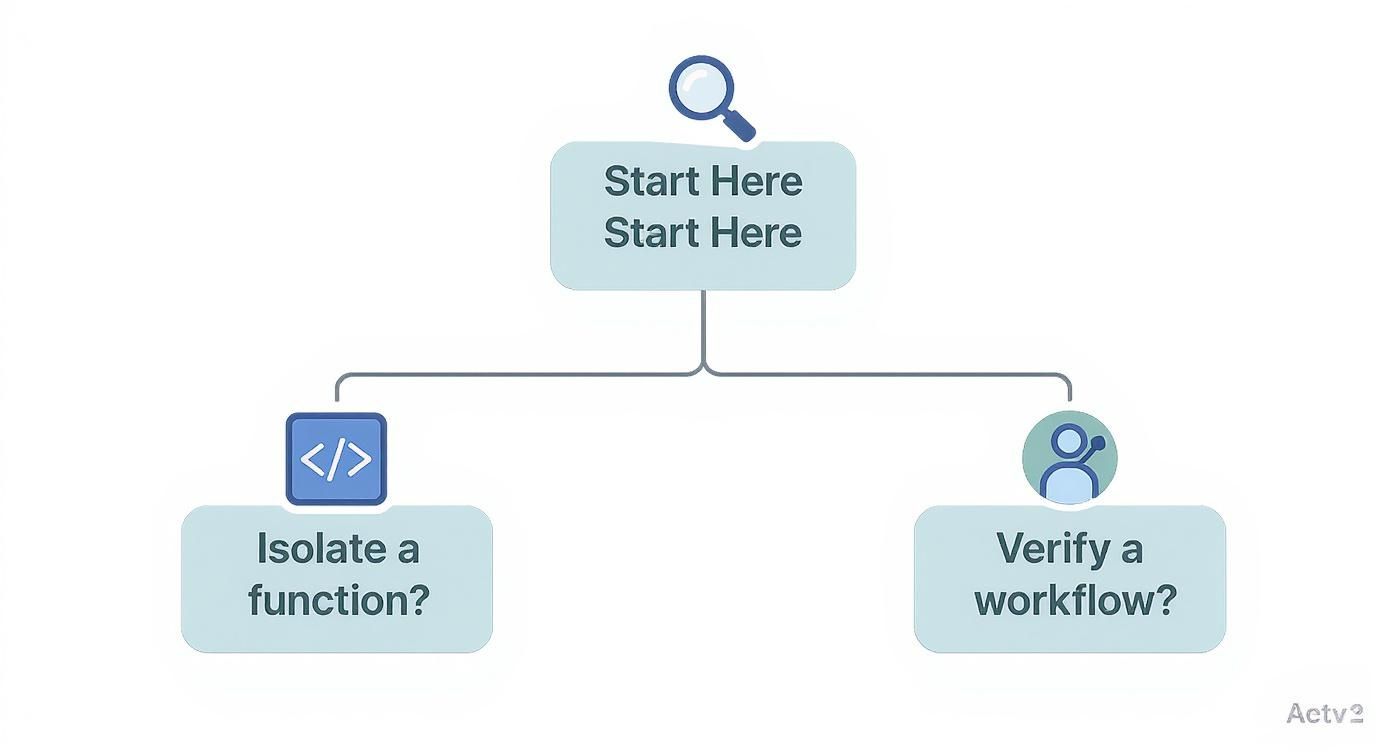
As you can see, the path splits based on scope. If you’re isolating a single function’s logic, you’re heading straight for unit testing. If you’re verifying a user’s journey from start to finish, functional testing is your answer.
When To Use Unit Testing
Unit tests are the undisputed champs when you need to check the internal correctness of a small, self-contained piece of code. They are fast, precise, and perfect for catching logic errors early—long before they ever have a chance to mess up a user’s experience.
Here are a few classic scenarios where they shine:
- Validating a Complex Algorithm: Think about a sophisticated pricing engine on an e-commerce site. It might calculate discounts based on user history, promo codes, and bulk pricing. A unit test can throw hundreds of different inputs at this function—various prices, percentages, and edge cases—to prove its math is flawless, all without needing a UI or database.
- Ensuring Robust Error Handling: You’ve built an API endpoint that parses incoming data. A unit test is the perfect tool to confirm it correctly handles malformed requests, missing fields, or invalid data types by throwing the right error codes. This happens in total isolation, guaranteeing the component is resilient on its own.
- Verifying a Utility Function: Small helper functions, like one that formats a date or sanitizes user input, are prime candidates. You can quickly run them against a known set of inputs to confirm they behave exactly as expected, every single time.
When To Use Functional Testing
Functional testing is what you reach for when you need to confirm that multiple parts of your application are playing nicely together to deliver a complete feature from the user’s point of view. It’s about validating workflows, not just isolated logic.
This is where functional testing becomes indispensable:
- Confirming the User Login Workflow: A successful login is so much more than a password check. A functional test automates the entire sequence: a user enters credentials, the system authenticates them, a session is created, and they are correctly redirected to their dashboard. This test proves the UI, authentication service, and database are all working in harmony.
- Testing an E-commerce Checkout Process: This is a classic multi-step journey. A functional test would simulate a user adding items to their cart, hitting checkout, entering shipping and payment info, and getting that final order confirmation. It validates the integration between the shopping cart, inventory system, payment gateway, and order module.
Key Takeaway: Choose unit tests for verifying the internal logic of a single component. Choose functional tests to validate a complete user journey that spans multiple components and services.
At the end of the day, a solid quality strategy doesn’t force a choice between functional vs. unit testing. It recognizes that you need both. Unit tests lay a foundation of reliable components, while functional tests ensure those components come together to create a seamless, bug-free user experience.
How Unit and Functional Tests Work Together
It’s a common mistake to frame this as “functional testing vs. unit testing.” That phrasing suggests a rivalry, but nothing could be further from the truth. In any solid quality strategy, these two aren’t competitors—they’re partners. They work in tandem, each making up for the other’s blind spots to help you build a resilient, high-quality application.
A truly effective testing suite isn’t just about having a lot of tests; it’s about having the right balance. This idea is perfectly captured by the Testing Pyramid, a model that’s become the gold standard for visualizing a healthy test suite structure.
Understanding The Testing Pyramid Model
Picture a pyramid. The wide, stable base is built from unit tests. This layer should be the largest part of your suite by far. Why? Because unit tests are fast, cheap to run, and easy to maintain. They give you a solid foundation by proving that every individual component works correctly on its own.
The middle layer is for integration tests. You’ll have fewer of these. Their job is to make sure different units or microservices can actually talk to each other and work together as expected. This is where you catch the tricky bugs that only show up when components start interacting.
At the very top, you have the narrow peak: end-to-end tests, which is where functional testing lives. These are the slowest and most expensive tests to run, so you want to keep them to a minimum. They validate complete user workflows from start to finish, giving you the final confirmation that the whole system is delivering what it promised.
A healthy testing strategy has a wide base of fast unit tests, a smaller middle layer of integration tests, and a very narrow peak of end-to-end functional tests. An imbalance—often called an “Ice Cream Cone” anti-pattern with too many slow functional tests—leads to a brittle and expensive testing process.
A Complementary Feedback Loop
When you structure your tests this way, you create a powerful feedback loop. That massive base of unit tests acts as a safety net for developers, giving them the confidence to refactor and iterate quickly. When a unit test fails, the feedback is instant and points directly to the line of code that broke. It keeps the development cycle tight.
Functional tests, on the other hand, provide a different kind of feedback—one that’s aimed at stakeholders and the business. They answer the big question: “Does this feature actually work for a real user?” A passing functional test suite gives the whole team the green light to ship, knowing that critical user journeys are working as they should.
When a functional test fails, it signals a problem somewhere in a user workflow. At that point, developers can drop down to the lower levels of the pyramid, using the more granular unit and integration tests to pinpoint exactly which component caused the breakdown. Without that strong foundation of unit tests, trying to debug a failed functional test is just a frustrating, time-consuming guessing game.
In short, unit tests make sure your building blocks are solid. Functional tests confirm the finished structure is sound. You really can’t build a reliable application without both.
Frequently Asked Questions
When you’re deep in the weeds of software testing, a few common questions always seem to pop up. Let’s clear the air on the practical differences between functional and unit testing so your team can make smarter decisions.
Can Functional Tests Replace Unit Tests?
Absolutely not. This is probably one of the biggest misconceptions out there. If you try to swap out a solid base of fast, focused unit tests for slow, high-level functional tests, you’ll end up with an unstable and clunky strategy known as the “Testing Ice Cream Cone.”
Functional tests are fantastic for making sure a user workflow actually works from start to finish. The problem is, they’re slow, and when one fails, the feedback is often too vague. A strong foundation of unit tests is what lets you pinpoint the exact location of a bug in seconds. They’re partners, not rivals, and each has a completely different job.
A Simple Rule of Thumb: Use unit tests to verify the ‘how’—how a single piece of code behaves on its own. Use functional tests to verify the ‘what’—what a complete feature actually does for the user.
What Is a Good Unit Test Coverage Target?
Chasing 100% code coverage might feel like the ultimate goal, but it often leads to diminishing returns. A high number on a dashboard doesn’t automatically mean you have high-quality tests. It’s much better to focus on the quality of your tests, not just the raw percentage.
Instead of getting fixated on a number, make sure you’re covering the most critical and complex parts of your application. Your priority should be testing all business-critical logic, the main success paths, and common failure scenarios. A well-tested 80% of your core code is way more valuable than a poorly tested 100% of everything. The real goal is confidence in your code, not just hitting a metric.
Ready to accelerate your testing and ship with confidence? Use real user traffic to make sure your application is truly production-ready. GoReplay lets you capture and replay live HTTP traffic in your staging environments, giving you ultimate assurance in every release. See how it can supercharge both your unit and functional testing strategies by visiting GoReplay.org.