
Docker in Testing: A Practical Guide for Repeatable Tests
Your test suite passes on your laptop, but the CI agent fails before it reaches the assertions. You check the commit, rerun the job, and compare dependencies. Eventually, you discover that the runner has a different database version, a missing system library, or data left behind by another build.
Docker in testing helps you control those environmental variables. It doesn’t make the tests themselves correct, and it doesn’t turn a laptop into a production server. Used carefully, though, it gives you a repeatable place to run tests and a clearer way to distinguish application failures from setup failures.
Where Docker Fits in Each Type of Test
A laptop-versus-CI failure often starts outside the code under test: the runtime, database, configuration, or filesystem differs. Docker supplies the environment around the test logic, not the test logic itself. Your assertions still determine whether the application behaves correctly.
This is an established use of containers. In Docker’s User Research Team’s survey of 885 completed responses, 65% of container-using developers reported using containers for testing in 2023, according to the 2024 State of Application Development survey coverage.
Docker’s role across testing types
| Testing type | Docker’s role | Typical setup | What to watch |
|---|---|---|---|
| Unit tests | Pinned language runtime and toolchain | One image with the test runner and no external services | Often fine on the host; containers add little unless toolchains differ |
| Integration tests | Real databases, queues, and caches beside the app | Docker Compose or Testcontainers with dynamic ports | Wait for service readiness, not just container start |
| End-to-end tests | Full stack on an isolated network | Compose stack plus a browser runner container | Slow; keep to critical user paths |
| Contract tests | Provider verification and stub services | Container running a contract broker or provider mock | Version contracts so old consumers keep passing |
| Acceptance tests | Staging-like stack with seeded data | Compose with fixture files mounted as volumes | Reset data between runs or results drift |
| Load and performance tests | Repeatable load generator and target | Load tool container on a dedicated Linux runner | Host CPU, memory, and storage limit the result |
| Security scan tests | Scanner run against the exact image | Scanner container as a CI job | Different scanners report different findings |
| Traffic replay tests | Candidate build receiving recorded requests | Replay container next to the candidate service | Needs data masking and session handling |
The distinction between unit and integration testing matters most when choosing where to start. A pure function doesn’t need a container to verify its return value. A checkout service that depends on PostgreSQL transactions, Redis expiration, and queue acknowledgments benefits much more from having those actual services available.
Load tests also benefit from a repeatable setup, but their results require more interpretation. Packaging a load generator makes its dependencies consistent; it doesn’t guarantee that the generator has enough CPU to produce the requested workload.
Practical rule: Containerize the dependency that’s causing uncertainty, not every process simply because you can.
You don’t need a cluster to begin. Docker Compose can coordinate a local test stack, while Kubernetes addresses a different orchestration problem. This comparison of Docker and Kubernetes helps separate those responsibilities.
Choose containers when the environment is part of what you’re testing. Keep lightweight host-based tests where they already give you clear, trustworthy feedback.
Why Containers Make Test Runs Repeatable
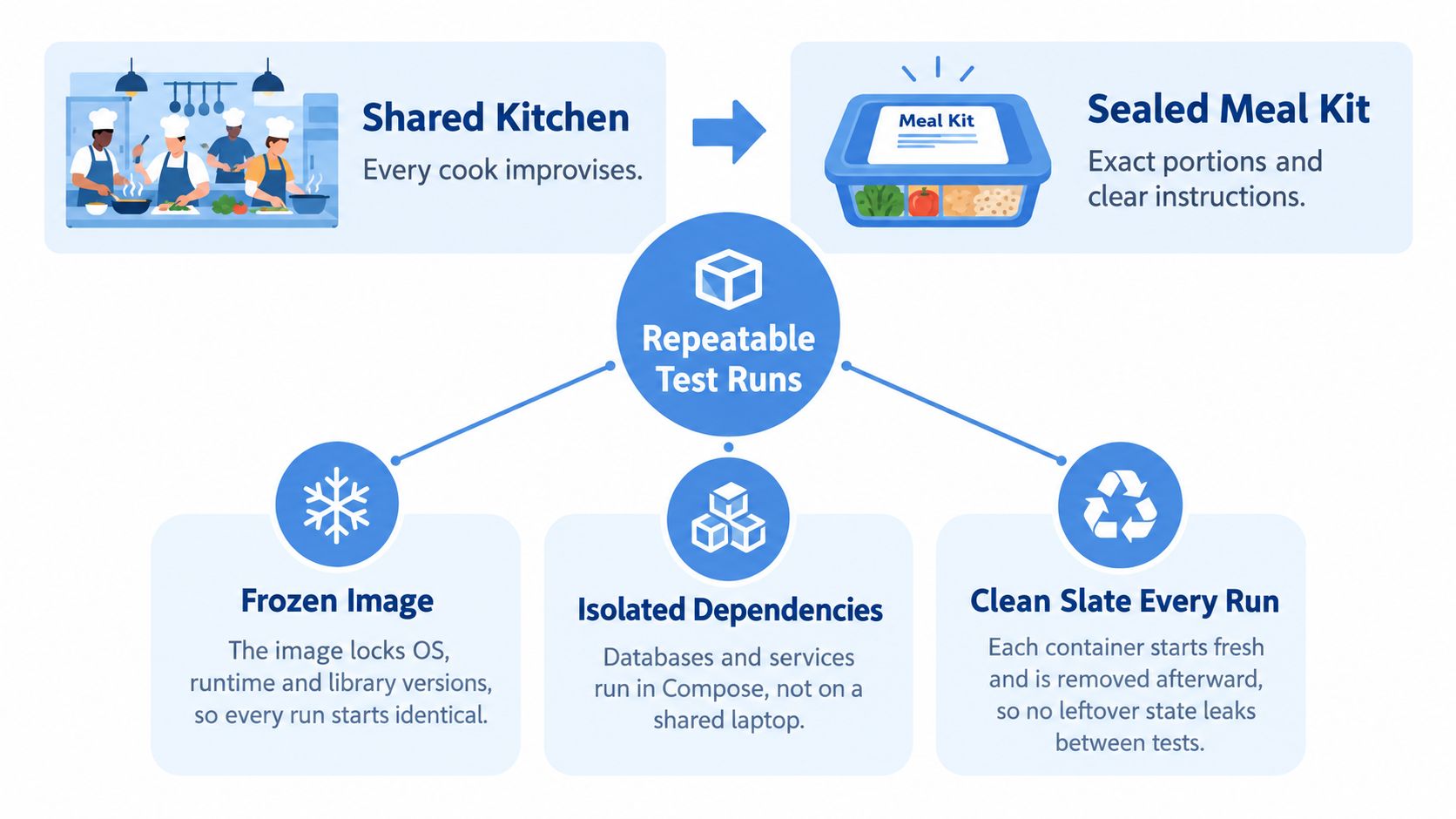
A shared development machine can resemble a communal kitchen: every cook changes ingredients, moves equipment, and leaves something behind. A containerized test setup is closer to a sealed meal kit, with specified ingredients and instructions. It reduces improvisation, provided you actually control what goes into it.
An image is the packaged blueprint: the operating-system user space, runtime, libraries, and application files. A container is a running instance of that image. The Dockerfile is the recipe used to build it, although reproducible rebuilding also requires pinned dependencies and controlled inputs.
Fresh execution without a guest operating system
Starting a new container gives you a fresh writable layer. Removing it discards that layer, but mounted volumes and external services survive unless you reset them deliberately. Disposable containers only produce clean tests when your data lifecycle is disposable too.
Linux containers use kernel namespaces and cgroups rather than a separate guest operating system. In an HPC-oriented benchmark comparing Docker, KVM, and bare metal, CPU-intensive, highly optimized workloads showed no statistically significant performance difference among the environments.
A repeatable execution environment isn’t the same thing as identical hardware.
CPU-focused tests are generally less sensitive to container overhead than storage-heavy tests. Filesystem drivers, mounted volumes, networking, and host contention can still change observed behavior, so benchmark your actual workload.
A container isolates dependencies, not the physical machine beneath them. Treat capacity results as measurements of a particular host and resource configuration, not as a universal property of the image.
How to Run Tests in Containers Step by Step
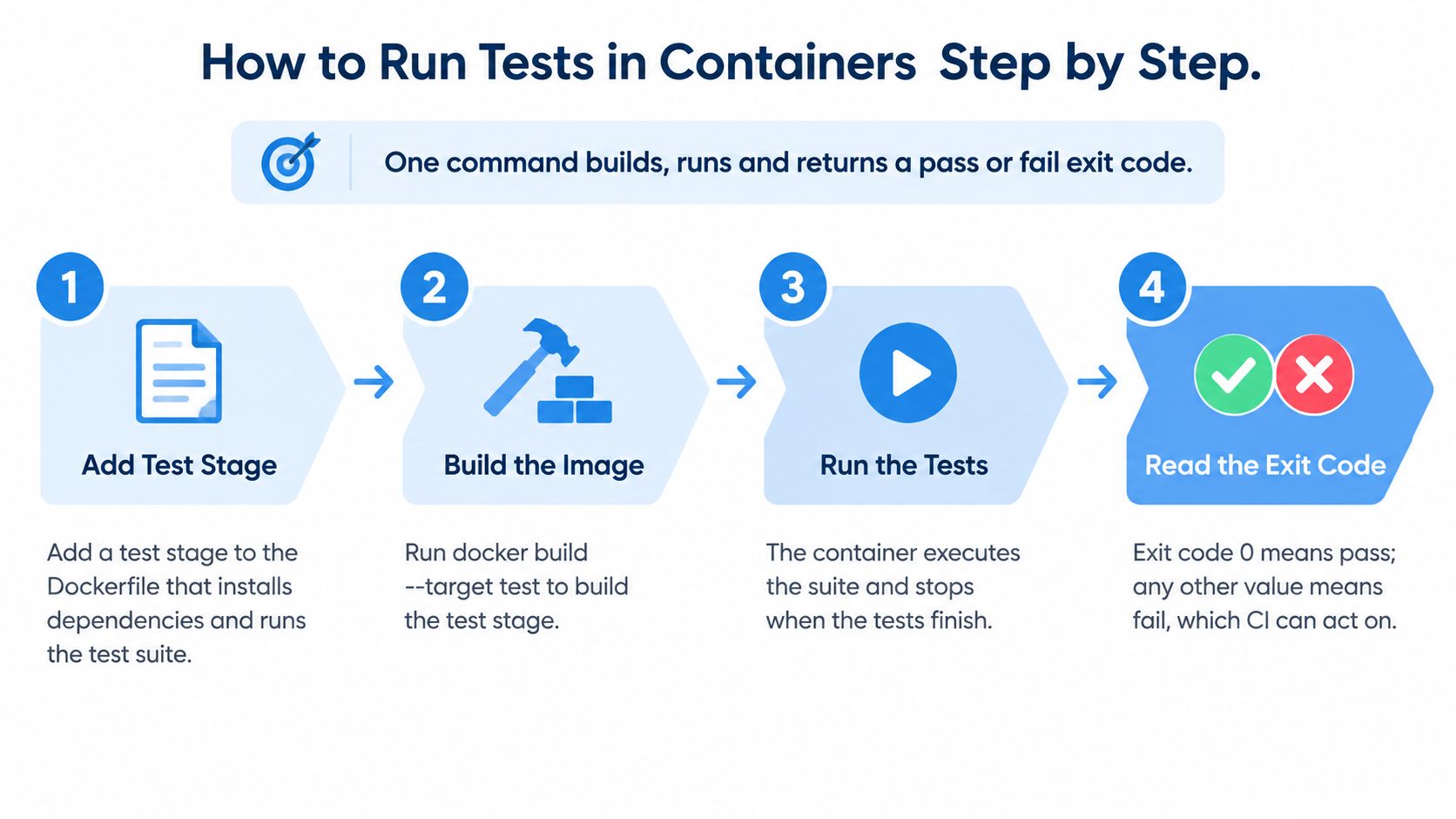
Aim for one repeatable entry point that builds the test environment, executes the suite, and returns an exit status CI can trust. Start with a standalone test image, then add service orchestration when the suite needs it.
Build and execute the test image
-
Add a named test stage. For a Python example, start with
FROM python:3.12-slim AS test, setWORKDIR /app, copy your dependency manifests, and install them withRUN pip install -r requirements-test.txtbefore copying the application. Finish withCMD ["python", "-m", "pytest"]; a version tag narrows the runtime choice, but use a digest when you need an immutable base, and don’t leave test dependencies unpinned. -
Build that stage with
docker build --target test -t myapp:test .. The target selects the test environment rather than the default final stage, so check that its name matches the Dockerfile and that.dockerignorehasn’t excluded fixtures the suite requires. -
Run the suite with
docker run --rm myapp:test. The container exits with the test runner’s status when that runner is the main process; in a shell, inspect it immediately withecho $?or let CI capture it directly. Avoid wrapper scripts that swallow failures, and don’t run another command before saving the status you need.
Add dependencies and retain evidence
-
Create
compose.test.yamlwith separateapp,database, andtestsservices, then rundocker compose -f compose.test.yaml up --build --abort-on-container-exit --exit-code-from tests. Configure the tests service to use the test stage and address dependencies by Compose service name, notlocalhost; omitting--exit-code-from testsmeans you aren’t explicitly selecting the test service’s result for the job. -
Make readiness explicit. Add a database healthcheck using its native probe, such as
pg_isready, then configure dependent services withdepends_onandcondition: service_healthy. A running database process isn’t necessarily ready for queries, and a successful connection doesn’t prove that migrations or seed jobs have completed. -
Export reports with a writable mount, for example
docker run --rm -v ./reports:/app/reports myapp:test python -m pytest --junitxml=/app/reports/junit.xml. Create the host directory with permissions suitable for the container user, and configure CI to upload it even after failure; reports stored only inside a removed container won’t be available for diagnosis. -
Tear down the test stack with
docker compose -f compose.test.yaml down -v. Run cleanup through an always-run CI step or shell trap, preserve the test exit status before cleanup, and verify that the project contains only disposable test volumes because-vremoves its declared named volumes and attached anonymous volumes.
Keep credentials test-only and configuration explicit. A suite that accidentally reaches a developer’s database is neither isolated nor safe, even if its test runner lives in a container.
Container Test Patterns and Anti-Patterns
A fixed sleep before connecting to the database is a fragile readiness check. It wastes time when startup is quick and still fails when a busy runner takes longer. Replace the delay with an observable condition, then wait separately for schema initialization if the tests require it.
Replace convenience with explicit control
| Anti-pattern | Better replacement | Why it matters |
|---|---|---|
| Sleeping before database access | Native healthcheck and readiness dependency | Startup duration isn’t a readiness signal |
Using latest | Reviewed version tag, preferably an image digest | The environment shouldn’t change without review |
| Sharing a long-lived test database | Fresh database state with deterministic seed data | Leftover rows make execution order significant |
| Building inside every test | Build once and reference the resulting image | All tests should exercise the intended artifact |
| Mocking every database interaction | Real service container for integration coverage | Mocks won’t expose actual SQL semantics or locking |
| Running as root with writable host mounts | Non-root user, deliberate ownership, and named volumes where appropriate | Prevent permission problems and unnecessary host access |
| Writing mutable test data into the container layer | Dedicated mounted storage | Make storage behavior and data lifetime explicit |
A fresh database container isn’t enough if it attaches to an old volume. Similarly, a named volume doesn’t automatically solve permissions: initialize ownership for the user that will write to it.
Choose mocks for the behavior you intentionally want to isolate. Use a real database when the question concerns transactions, constraints, query syntax, or concurrent access.
Faster tests aren’t better if they pass because you’ve removed the behavior you needed to verify.
A useful pattern keeps the result honest as well as efficient. Review shortcuts by asking which variable they control and which failure they might hide.
Plugging Docker Tests into CI/CD Pipelines
A reliable container pipeline connects each test result to an identifiable artifact. Commit tags help humans track builds; image digests identify the actual content that passed the checks.
Use an ordered pipeline with clear responsibilities:
- Build and identify. Build the application artifact, tag it with the commit SHA, and push it to your registry. Produce a related test-runner image when development dependencies shouldn’t ship.
- Run unit checks. Execute independent suites in parallel containers using the same application revision and locked toolchain.
- Verify integration. Start the application image with its dependencies through Compose, and retain service logs alongside test reports.
- Scan separately. Generate a software bill of materials, or SBOM, and scan the release image as its own gate.
- Measure under controlled load. Schedule load or replay jobs on a dedicated Linux runner rather than sharing resources with compilation.
- Promote without rebuilding. Move the application digest that passed into staging and production, while supplying environment-specific configuration at runtime.
Cache builds without changing what you release
Order Dockerfile instructions so dependency work can be reused. Copy dependency manifests and lockfiles, install dependencies, then copy frequently changing source files. That lets ordinary code changes avoid invalidating the dependency layer.
Keep test tooling outside the production stage when possible. Integration tests should exercise the release application image, even if a separate runner sends requests and evaluates assertions.
Handle scanner disagreement deliberately
A 2025 study of Docker image scanning workflows evaluated 48 Docker Hub images and found that the strongest pairwise agreement between Trivy and Grype was only 69%. A clean report therefore isn’t proof that an image is safe, and a disagreement isn’t automatically evidence that either scanner is broken.
Compare scanners for release-sensitive images and record the scanner version, vulnerability database state, SBOM generator, image digest, and findings. Investigate differences in package identification and advisory interpretation rather than reducing everything to a finding count.
Check runtime settings separately, including privileges, mounts, and secret handling. Set a clear gate: block fixable critical findings, require an explicit risk decision for unresolved critical exposure, and record remaining findings with an owner and remediation deadline.
Replaying Production Traffic with GoReplay in Docker
A Compose stack can reproduce your dependencies without reproducing your users. Synthetic fixtures rarely capture the full mix of request ordering, session state, payload shapes, retries, and connection reuse. Production-request replay helps test that missing dimension, alongside tools such as k6 for deliberately designed load scenarios.
A capture process observes HTTP traffic and forwards copies to a candidate service while production continues answering users. For example, sudo gor --input-raw :8080 --output-http=http://staging.example.com captures requests on the specified listener and sends them to the example staging target. Don’t run this against an unprepared destination: it doesn’t, by itself, sanitize sensitive data or disable side effects.
Replay modes for container test environments
| Replay mode | What it proves | Key caveat |
|---|---|---|
| Live shadowing to a candidate | Whether the candidate handles observed real requests without serving users | Target must be isolated, with side effects disabled and data masked |
| Record to file, replay later | Whether candidate builds handle the same captured workload | Recorded timestamp gaps are reused; throughput depends on the generator |
| File replay for load | Capacity under a recorded traffic pattern | Achieved throughput and completion order depend on generator and target |
| Session-aware replay (PRO) | Connection grouping for multi-request flows | Tokens, cookies, and IDs still need valid values in the test environment |
When capturing from a container, the process needs visibility into the relevant network traffic. On an appropriate Linux host, host networking can provide that visibility, but it also changes the isolation boundary. Plan capture placement and permissions using this testing-environment setup guide before adding the command to automation.
Protect state and verify the workload
A TCP connection isn’t a user account. Connection grouping can preserve useful relationships, but authentication cookies, bearer tokens, anti-forgery values, and generated resource IDs still need valid test-environment equivalents. Use middleware or a mapping layer when a production response introduces an identifier that later requests consume.
TCP-session recognition and built-in data masking belong to the PRO offering, not the open-source baseline. Whatever edition you use, disable outbound payments, email delivery, webhooks, and other production side effects at the destination.
Test the intended release artifact too. An analysis of container-image vulnerabilities examined 6,292 images and found vulnerabilities in nearly 71%, reinforcing the need to evaluate the exact image and runtime configuration rather than treating a familiar repository name as assurance.
Before trusting a replay result:
- Compare workload shape. Check endpoint and method mix, status-code distributions, and latency percentiles against a production window of the same duration.
- Inspect privacy controls. Sample sanitized payloads for emails, payment-card data, and tokens before forwarding, and keep raw captures access-controlled.
- Investigate mismatches. Widen an unrepresentative capture window, but fix filtering, session mapping, or generator saturation when those caused the difference.
Replay timing and completion order still depend on both the generator and the target. A replay is evidence about an observed workload, not a guarantee that every future user sequence will succeed.
Troubleshooting Slow, Flaky and Misleading Container Tests
A test passes, fails, then passes again without a code change. Start with the symptom and collect container evidence before changing application logic. Otherwise, you can accidentally hide an infrastructure problem with retries.
Container test symptoms, causes and fixes
| Symptom | Likely cause | Fix |
|---|---|---|
| Passes locally, fails in CI | Different image tag or host architecture | Pin the image and build for the runner’s platform |
| Timeouts waiting for the database | Container started before the service was ready | Healthcheck with depends_on condition service_healthy |
| Port already in use | Fixed host port collides with another process | Publish a dynamic port or use the Compose network |
| Process exits with a kill signal | Memory limit or external termination | Inspect OOM state, runner logs, and resource limits |
| Slow startup and writes on Docker Desktop | Hypervisor layer and filesystem overhead | Use a Linux runner for load and replay; mount storage for writes |
| Stale results after code change | Cached layer or old image reused | Check build inputs and rebuild without cache for diagnosis |
| Parallel runs interfere | Same Compose project name or fixed container names | Assign a unique project name with -p |
| Load results differ from production | Smaller host or slower storage tier | Calibrate CPU, memory, and storage limits |
Run docker compose -f compose.test.yaml ps to inspect service state. For a stopped container, docker inspect -f '{{.State.ExitCode}} {{.State.OOMKilled}}' CONTAINER helps distinguish an out-of-memory kill from an ordinary application failure. Use docker build --no-cache to investigate reused build layers, remembering that it doesn’t replace an explicit base-image pull policy.
Separate startup cost from application latency
A reproducible container-startup and storage study found 2.5% startup variation for images from 5 MB to 155 MB on SSD infrastructure, but startup took 568 ms on cloud SSD versus 1,157 ms on cloud HDD, a 2.04x penalty. In that same study, Docker Desktop introduced a 2.69x startup penalty relative to native Linux, while OverlayFS writes could degrade by up to two orders of magnitude compared with SSD volume mounts.
Those are workload-specific measurements, not universal multipliers. Treat storage and virtualization as suspects, measure startup separately from request handling, and move timing-sensitive runs onto controlled Linux infrastructure before blaming application code.
Pick Your First Container Test and Run It
Start with an integration suite that already needs a real database, not with the whole pipeline. Its dependencies are known, and you can compare containerized behavior against a suite that already passes on a developer machine. That makes the first migration easier to diagnose.
Choose a bounded workflow, such as creating an order and verifying its persisted state. Keep the assertions unchanged initially so you’re evaluating the environment migration rather than rewriting the test at the same time.
Check readiness before making it mandatory
- Executable suite. The test image runs through a single
docker runcommand when its dependencies are available. - Coordinated services. Compose starts the database with a meaningful healthcheck and handles migrations explicitly.
- Reliable failure reporting. CI receives the test process’s pass or fail status and retains diagnostic artifacts.
- Owned configuration. The team agrees on the pinned image reference and names someone to review environmental failures.
- Demonstrated stability. Require consecutive clean CI runs before making the suite a required check, and investigate intermittent failures rather than retrying them away.
Release discipline: Make a check mandatory when the team can explain its failures, not merely when it has passed once.
Wait on traffic replay until you have an isolated staging target, masked data, and a written inventory of tokens and IDs that require mapping. Without those controls, a realistic workload can produce unsafe side effects or misleading authentication failures.
Once the first suite is dependable, choose the next test by the uncertainty you need to remove. Contract tests are a useful next step for service boundaries before introducing the additional state and privacy requirements of production replay.
GoReplay captures and replays HTTP traffic so you can exercise containerized candidate builds with production-shaped requests. Visit GoReplay to plan a replay setup for an isolated test environment, then validate masking, session handling, and workload coverage before adding it to your release checks.