
Your Guide to a Modern Development Environment in the Cloud
A development environment in the cloud is essentially a remote, server-based workspace where you and your team can write, test, and debug code. It moves the entire development lifecycle off of everyone’s individual laptops and into a shared, standardized, and scalable environment that’s accessible from anywhere.
Moving Beyond Localhost into the Cloud
Every developer has heard it—or said it: “it works on my machine.” That one phrase perfectly captures the core weakness of traditional local development. When every engineer codes on their own laptop, their setups inevitably drift apart. You end up with a mess of different dependency versions, OS quirks, and unique configurations.
Think of your local machine as a personal workshop. It’s comfortable and customized just for you, but it’s also totally isolated. If a colleague needs to jump in and test your work, they first have to waste time trying to perfectly replicate your entire setup. This friction is a killer for collaboration, makes onboarding new hires a nightmare, and creates a painful gap between what you build and what actually runs in production.
A cloud development environment gets rid of this problem by moving the entire “workshop” into a shared, standardized factory.
The Shift to a Centralized Factory
A development environment in the cloud is that centralized factory. Instead of each developer cobbling together their own isolated workspace, the team provisions identical environments from a single, version-controlled template. This guarantees that every developer, every automated test, and every staging deployment is running on the exact same foundation.
This consistency finally puts the “works on my machine” excuse to rest and unlocks some serious advantages:
- Seamless Collaboration: Developers can just share a live link to their environment. This makes pair programming, code reviews, and debugging sessions incredibly efficient.
- Unlimited Scalability: Need more horsepower for a heavy build? You can instantly scale up resources on-demand. No more waiting for a new laptop.
- Production Parity: Cloud environments can be configured to perfectly mirror your production infrastructure, dramatically cutting down the risk of surprise bugs after a release.
The Economic and Productivity Impact
This isn’t just about making life easier for developers; it’s driven by huge industry trends. The explosive growth of cloud computing has completely reshaped how software gets made, giving teams access to powerful infrastructure whenever they need it. By 2025, public cloud services are projected to hit $593.7 billion in total spending, as part of an overall market reaching $832.88 billion. This is because cloud-native platforms are expected to handle over 80% of digital workloads. Explore more cloud computing statistics.
By standardizing setups, a cloud development environment transforms the development process from a series of disconnected, individual efforts into a unified, predictable, and highly efficient workflow.
Ultimately, shifting to a cloud-based approach is the foundation for more advanced practices. It’s what enables powerful CI/CD pipelines, ephemeral environments for every pull request, and sophisticated testing methods—like replaying real user traffic—to validate changes against production-like conditions long before they ever go live.
Comparing Different Cloud Development Models
So, you’ve decided to move development to the cloud. That’s a great first step, but it’s not the last. The way you set up your cloud environment has a massive impact on your team’s workflow, speed, and even your monthly bill.
Let’s break down the most common approaches to help you figure out what makes sense for your team. Each model strikes a different balance between control, consistency, and pure convenience. Getting this right is key.
The whole journey usually starts when you hit that classic “works on my machine” wall. That’s the moment a standardized, cloud-based setup starts to look like the only sane path forward.
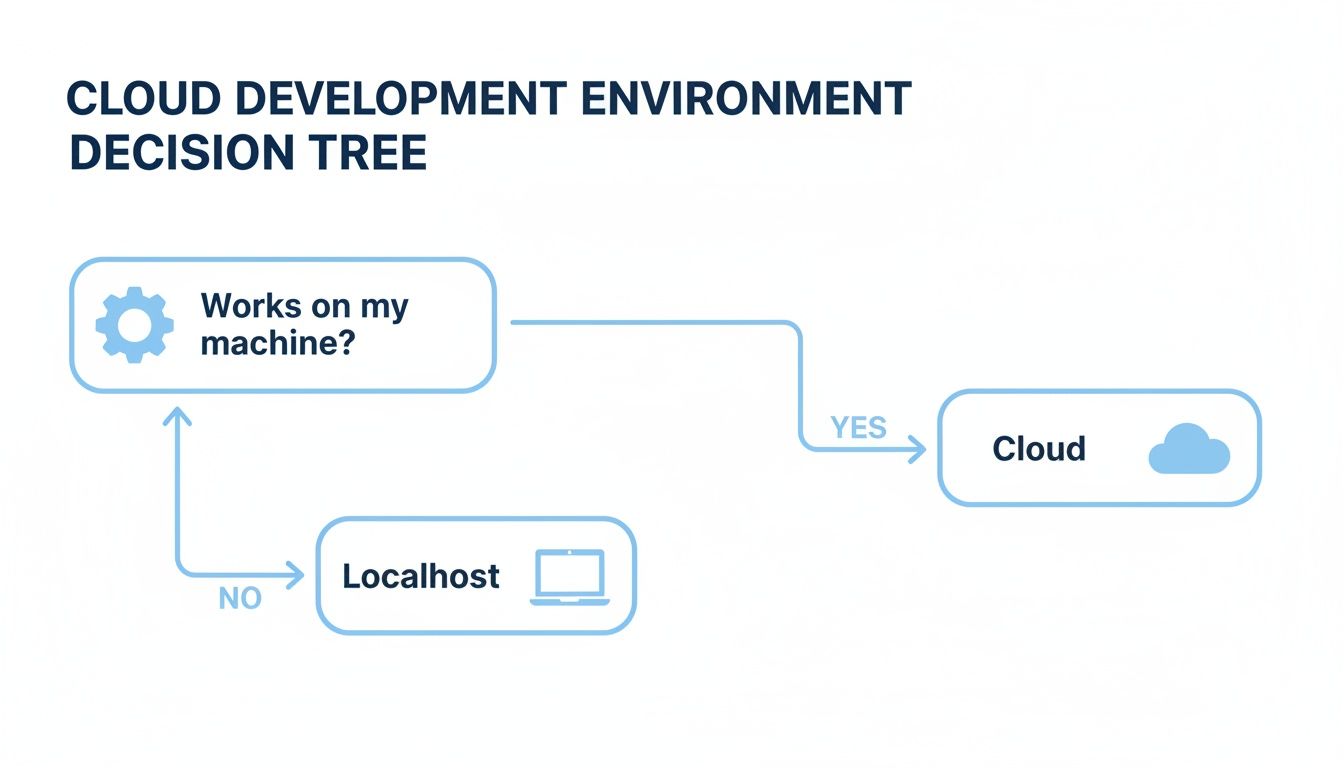
As the diagram shows, once local setups cause consistency headaches, the cloud becomes the clear solution.
Persistent Cloud-Based Virtual Machines
The most direct leap from a local machine is a persistent cloud-based virtual machine (VM). Just picture your powerful desktop, but it’s hosted in a data center somewhere. You connect to it over a remote desktop connection and get a familiar graphical interface. It’s straightforward.
This setup is great for centralizing everything and making sure everyone starts with the same base operating system. The big catch? It can get pricey if you leave those powerful VMs running 24/7, and “configuration drift” is still a real problem as developers inevitably customize their own persistent spaces over time.
Remote Development Containers
This is where things get really interesting. Remote development containers take standardization to a whole new level by defining the entire environment in code. All the dependencies, tools, and configs get packed into a container image. Developers then connect their local IDE, like VS Code, straight into that remote container.
This model absolutely crushes the “works on my machine” problem. Every developer, every time, gets an identical, perfectly reproducible environment. You get to keep the fast, snappy feel of your favorite local IDE, while all the heavy lifting happens on a beefy remote server. It’s a fantastic sweet spot between local control and remote consistency.
By defining the entire environment as code, remote containers make onboarding new developers as simple as running a single command. The environment is always pristine, version-controlled, and perfectly aligned with production.
Fully Managed Cloud IDEs
For teams that want to move at top speed, fully managed Cloud IDEs are the answer. Platforms like GitHub Codespaces or Gitpod give you a complete, ready-to-code environment right in your web browser. You just click a button on a repository, and boom—you have a pre-configured workspace in seconds.
These services handle all the messy infrastructure stuff for you—provisioning, networking, security, all of it. Your team can just focus on shipping code. They’re a perfect fit for open-source projects or any team that wants to get setup time down to zero.
Ephemeral Environments for CI/CD
This last model is less about day-to-day coding and more about bulletproof quality assurance. Ephemeral environments are temporary, on-demand workspaces created automatically by your CI/CD pipeline. For every single pull request, a brand-new, isolated environment spins up with the proposed changes.
This allows for incredibly thorough automated testing in a true-to-production setting before any code gets merged. It’s the ultimate safety net. Once the pull request is merged or closed, the environment vanishes, keeping costs to a minimum. You catch bugs way earlier and can deploy with a ton more confidence.
To pull all this together, here’s a quick side-by-side look at how these models stack up.
Cloud Development Model Comparison
| Model | Best For | Key Advantages | Potential Drawbacks |
|---|---|---|---|
| Persistent VMs | Teams transitioning from local setups needing a familiar desktop experience. | Centralized resources, simple to understand, good for GPU-intensive work. | Can be costly, prone to configuration drift, potential for network latency. |
| Remote Containers | Teams that want to standardize environments while keeping their local IDE. | High consistency, fast local IDE feel, version-controlled setups (IaC). | Requires familiarity with containerization (e.g., Docker). |
| Cloud IDEs | Fast-paced teams, open-source projects, and organizations wanting zero setup time. | Extremely fast onboarding, accessible from anywhere, zero infrastructure management. | Less flexibility than other models, potential for vendor lock-in. |
| Ephemeral Environments | Teams focused on high-quality releases and robust automated testing. | Perfect for CI/CD, ensures isolated testing, reduces risk of bad merges. | Not for active development; purely for validation and testing workflows. |
Choosing the right model depends entirely on your team’s priorities. Whether you need the familiar feel of a VM or the iron-clad consistency of ephemeral environments, there’s a cloud setup that fits.
How to Architect Your Cloud Development Environment
Architecting a development environment in the cloud isn’t that different from designing a city’s infrastructure. You need solid foundations, secure pathways, and repeatable blueprints. Without them, you get chaos—inconsistent environments, security gaps, and costs that spiral out of control.
Get the architecture right, though, and you’ve built a stable, productive foundation for your entire development lifecycle.
The first step is to stop doing things by hand. You wouldn’t build a skyscraper with a hammer and nails, so why provision cloud resources by clicking around in a console? Manual setups are slow, riddled with errors, and impossible to replicate consistently across a team. You need a better way. You need a blueprint.
Laying the Foundation with Infrastructure as Code
Infrastructure as Code (IaC) is that blueprint. It’s the practice of defining your entire cloud setup—servers, databases, networks, everything—using code. Tools like Terraform or Pulumi let you write simple configuration files that become the single source of truth for your environment.
The benefits here are huge:
- Repeatability: Spin up an identical, pristine dev environment for a new hire with a single command. No more “works on my machine” issues.
- Version Control: Your infrastructure lives in Git, just like your application code. You can track changes, review pull requests, and roll back if something breaks.
- Automation: IaC is the engine that drives everything. It’s what makes it possible to create ephemeral environments on the fly for testing a PR and tear them down afterward to save money.
By treating your infrastructure like software, you kill configuration drift and guarantee every developer works in an environment that truly mirrors production.
Securing Your Cloud Environment
With a solid foundation in place, security has to be your next focus. A cloud dev environment is a direct extension of your organization, and it needs to be locked down just as tightly as your production systems. This all starts with the principle of least privilege—only give users and services the absolute minimum access they need to do their jobs.
This is where Identity and Access Management (IAM) comes in. Instead of handing out admin keys, you create specific roles and policies. A developer might get permission to start and stop their own virtual machine, but they should never be able to modify network security groups or nuke a shared database.
A well-architected cloud development environment bakes security in from the start. It’s not a feature you bolt on later; it’s a core component managed through code and automated policies. This minimizes risk without getting in your developers’ way.
Networking is just as critical. You absolutely have to isolate your development environments from production using Virtual Private Clouds (VPCs) or similar segmentation. This creates a hard boundary that prevents a bad day in a dev environment from ever touching live customer data. This isn’t optional; it’s non-negotiable.
Designing for Production Parity
At the end of the day, your goal is production parity. Your dev environment should look, feel, and behave as much like production as possible. When you use the same operating systems, dependency versions, and service configurations, you all but eliminate those frustrating “it works on my machine” bugs.
Containerization with tools like Docker is your best friend here. By packaging your application and all its dependencies into a container, you ensure it runs the exact same way everywhere—from a developer’s cloud workspace to the final production server.
Combine that with IaC, and you can create a high-fidelity development environment that gives you real confidence. What you test is exactly what you’ll deploy. That alignment is the secret to shipping reliable software, faster.
Integrating Automation and Advanced Testing Workflows
A development environment in the cloud truly comes alive when it stops being a static workspace and starts acting as a dynamic, integrated part of your delivery pipeline. By connecting your cloud environment to automation, you move beyond just coding remotely. You begin building a system that actively improves the quality and speed of your releases.
The real magic happens when you pair your cloud setup with a robust CI/CD (Continuous Integration/Continuous Deployment) pipeline. This is where you transform a simple remote workspace into an intelligent, self-testing factory for your software. The goal is simple: catch issues automatically, long before they ever have a chance to impact users.
This integration isn’t just a nice-to-have; it’s a fundamental shift in how you validate code. Instead of relying only on manual checks or basic unit tests, you create a powerful safety net that operates on every single change.
Ephemeral Environments for Every Pull Request
One of the most effective automation strategies is using ephemeral environments. Think of these as disposable, single-use copies of your application, created for one specific purpose: to test a pull request.
When a developer pushes a new branch, the CI/CD pipeline automatically kicks into gear. Here’s what it does:
- Provisions a new, clean environment in the cloud that perfectly mirrors your production setup.
- Deploys the proposed code changes into this isolated space.
- Runs a full suite of automated tests against the new feature or fix.
This process is incredibly effective. Because the environment is a perfect replica of production, you can catch bugs that would never show up in a simplified local setup. Once the pull request is merged or closed, the environment is automatically destroyed. You only pay for what you use.
Going Beyond Mock Data with Traffic Shadowing
Standard automated tests are great at catching predictable bugs, but what about the unpredictable ones? How do you find those subtle performance issues or rare edge cases that only appear under the chaos of real-world user behavior?
This is where an advanced technique called traffic shadowing comes in.
Traffic shadowing involves capturing a copy of your live production traffic and replaying it against your test environment. You’re not just using fake, scripted data; you’re testing your new code with the exact same requests, in the same sequence, that your actual users are generating right now.
This method provides the highest possible fidelity for pre-release testing. By simulating real user interactions, you can validate application performance, uncover hidden concurrency bugs, and deploy updates with a level of confidence that traditional testing simply cannot provide.
It’s like giving your new feature a final dress rehearsal with a live audience before the big show.
A Practical Example Using GoReplay
Tools like GoReplay make this sophisticated technique accessible. GoReplay is an open-source tool that listens to your production network traffic, records the HTTP requests, and then replays them against any environment you choose—like an ephemeral environment for a pull request.
Here’s how a typical workflow looks:
- Capture Traffic: You configure a lightweight GoReplay agent to passively listen to traffic on your production server. It captures requests without adding any performance overhead.
- Trigger Replay: When a CI/CD job creates an ephemeral environment for a new pull request, it triggers a GoReplay command.
- Validate Changes: GoReplay then streams the captured production traffic to the new test environment.
- Analyze Results: The pipeline monitors the test environment for errors, performance regressions, or crashes. If any issues are detected, the build fails, and the developer is notified immediately—preventing a bad deploy.
This workflow lets you see exactly how your new code will behave under real production load. You can confidently answer critical questions like, “Does this change introduce a memory leak?” or “Can our database handle the query patterns this new feature creates?” It’s a game-changer for building resilient systems.
By implementing these automated workflows, your cloud development environment evolves. It becomes an active partner in ensuring code quality, transforming from a simple coding space into a sophisticated validation platform that lets you ship better software, faster.
For those looking to dive deeper, you can find a comprehensive breakdown of API testing strategies that pair perfectly with traffic replay. Learn more about automating API tests with modern tools and strategies.
Managing Costs and Optimizing Your Cloud Resources
Moving your development to the cloud gives you incredible speed and consistency, but it comes with a classic catch: the surprise bill at the end of the month. Without a bit of foresight, the convenience of on-demand resources can quickly burn through your budget. The solution isn’t to lock down developers, but to build a cost-aware culture backed by smart automation.
Think of it like the electricity in a huge office building. Leaving the lights on in empty rooms all night is just throwing money away. The same goes for cloud development environments—letting them run idle overnight or on weekends is one of the biggest, and most avoidable, sources of wasted spend. The good news? Fixing this is easier than you think.
Implement Smart Automation and Scheduling
The most powerful way to slash costs is to make sure you only pay for what you’re actively using. Idle environments are absolute budget killers.
This is where automated shutdown and startup schedules come in. You can easily set up scripts or use built-in cloud tools to power down all non-essential dev environments at 7 PM every evening and spin them back up at 8 AM the next morning.
This one change can cut costs from idle resources by over 60%. It turns a constant 24/7 expense into a much more reasonable 8/5 cost, all without slowing down a single developer. It’s a low-effort, high-impact move that ties your spending directly to active work hours.
Right-Sizing and Using Spot Instances
Overprovisioning is another silent offender. It’s common for developers to request beefier instances than they need “just in case,” which means you’re paying a premium for capacity that just sits there.
Instead, encourage a culture of right-sizing. Teams should start with smaller, cheaper instances and only scale up when a specific task truly demands more horsepower. On modern cloud platforms, resizing a machine is a quick and painless operation.
For workloads that can handle an interruption—like certain automated tests or builds—spot instances are your secret weapon. Cloud providers offer their unused compute capacity at a massive discount, often up to 90% off the standard price. While they can be taken back with short notice, they’re perfect for any task that can be easily restarted.
Effective cost management in the cloud isn’t about being cheap; it’s about eliminating waste. By automating shutdowns, right-sizing instances, and using the right tool for the job, you can maintain a powerful development workflow that your finance team will actually approve of.
Establish Visibility with Cost Allocation Tagging
You can’t manage what you can’t measure. This is why a clear tagging strategy is non-negotiable for understanding where your money is actually going. By assigning tags to every single resource—like project:alpha, team:backend, or developer:jane-doe—you can generate incredibly detailed spending reports.
This level of visibility is a game-changer. It allows you to:
- Pinpoint Cost Drivers: Instantly see which projects, features, or teams are consuming the most resources.
- Create Accountability: Give teams real ownership and visibility into their cloud spend.
- Optimize Budgets: Make smart, data-driven decisions about where to invest or implement new cost-saving measures.
Proper tagging transforms your cloud bill from a single, scary number into an actionable dashboard. It gives you the governance you need to run a cost-effective development environment without sacrificing the very agility that brought you to the cloud in the first place.
Building Your Modern Cloud Development Toolkit
Assembling a development environment in the cloud feels a lot like stocking a high-end workshop. It’s all about picking the right tools for the right jobs, making sure everything works together to create a smooth, efficient workflow. Getting the components right is the difference between a powerful system your team loves and one that just gets in the way.
This guide breaks down the essential pieces of a modern cloud development stack. Each tool plays a specific, vital role in creating a frictionless and repeatable process, taking you all the way from a single line of code to a fully validated release.
Core Infrastructure and Orchestration
At the very foundation of any cloud setup are the tools that define and manage your resources. This is where real automation starts.
- Infrastructure as Code (IaC): Tools like Terraform and Pulumi are pretty much non-negotiable these days. They let you define your entire cloud setup in code that you can version control, guaranteeing that every environment is perfectly consistent and reproducible. No more “it works on my machine” mysteries.
- Containerization: Docker is the de facto standard for packaging applications and all their dependencies into neat, portable containers. When you’re running lots of containers at scale, Kubernetes steps in as the undisputed king of orchestration, handling deployment, scaling, and operations automatically.
Developer Experience and Automation
Once the foundation is solid, the focus shifts to the tools that directly boost developer productivity and code quality. These are the components that streamline the day-to-day coding, testing, and shipping cycles.
Cloud IDEs, for instance, have been a total game-changer for getting new developers up to speed and improving collaboration.
Cloud IDEs like GitHub Codespaces and Gitpod completely do away with local setup headaches. They fire up pre-configured, browser-based environments in seconds, letting developers start coding on any project, from any machine, almost instantly.
Then you have the CI/CD platforms, which are the real engines of your automated workflow. Services like GitHub Actions or GitLab CI/CD connect your code repository directly to your cloud environment. They automatically build, test, and deploy your code every time you push a change, making it possible to spin up ephemeral environments for every single pull request.
Finally, specialized testing tools add a layer of confidence that basic unit or integration tests just can’t provide. A tool like GoReplay is indispensable for validating changes against real-world chaos by capturing and replaying actual production traffic. This ensures your updates are resilient before they ever go live.
While each tool has its place, understanding how they fit together is key. You can dive deeper into the different approaches in our ultimate guide to development environment setup strategies.
Frequently Asked Questions
Switching to a development environment in the cloud always kicks up a few questions. Let’s tackle the big ones teams usually run into when they leave their local machines behind.
Is a Cloud Development Environment Truly Secure?
It absolutely is. In fact, it’s often a huge security upgrade compared to managing a fleet of individual developer laptops. A central cloud environment means your security team can set and enforce one consistent set of rules, control access with IAM, and watch over everything from a single place.
Think about it: instead of trying to lock down dozens of different machines, you’re securing one well-defined, version-controlled architecture. This model completely sidesteps the risks of lost or stolen laptops and guarantees that your valuable source code never even has to leave your secure cloud perimeter.
How Does a Cloud IDE Differ from a Remote Desktop?
They both give you remote access, but they’re built on completely different ideas. A remote desktop (or VDI) is really just a window into a full-blown virtual machine sitting somewhere in a data center. It’s your desktop, just hosted somewhere else.
A Cloud IDE, however, is a purpose-built, browser-based coding tool that’s wired directly into a containerized backend. It’s designed from the ground up for development workflows, with built-in features like pre-configured environments, deep git integration, and real-time collaboration that a generic remote desktop simply can’t touch. One is a focused tool, the other is just a remote screen.
What’s the Best Way for a Small Team to Get Started?
For a small team, the path with the least friction and the biggest immediate win is almost always a managed Cloud IDE platform like GitHub Codespaces or Gitpod. These services take care of all the tricky infrastructure setup for you, so your team can be up and running in minutes.
A small team can get going by just adding a simple
devcontainer.jsonfile to their main repository. This one file spells out all the tools and dependencies needed, letting anyone launch a perfectly configured, one-click development environment instantly.
This approach gives you 90% of the benefits of a full-blown cloud environment—like consistency, collaboration, and speed—with only 10% of the setup headache. As your team’s needs get more sophisticated, you can always explore more customized setups using containers or IaC. The key is to start simple, solve that “it works on my machine” problem first, and build from there.
GoReplay adds that critical layer of confidence to your cloud development workflow, letting you validate every change against real production traffic. You can safely test your updates in an isolated environment before they ever see the light of day. Learn more about GoReplay.