
Mastering Data Management Tests for Flawless Systems
At its core, data management testing is all about verifying the accuracy, integrity, security, and performance of your data, no matter where it is in its lifecycle. It’s the set of practices that ensures data is stored correctly, validated during a tricky migration, and transformed without a single byte getting corrupted. A solid testing strategy is your best defense against data corruption, compliance nightmares, and outright system failures.
Why Data Management Tests Are Mission Critical
In a business world that runs on data, bad information isn’t just an annoyance—it’s a direct threat to your revenue, your reputation, and your ability to operate. From botched product launches to headline-grabbing compliance breaches, the fallout from poor data quality can be devastating. This is exactly why robust data management testing has shifted from a “nice-to-have” to a non-negotiable part of any modern development workflow.

The High Cost of Untested Data
Picture this: a major retail giant pushes a database schema change right before their biggest holiday sale. They skimped on testing, so a subtle indexing error slips through unnoticed. The moment the sale goes live, the huge influx of traffic makes the database lock up, triggering a system-wide crash.
What’s the damage? Hours of downtime, millions in lost sales, and a hit to customer trust that’s nearly impossible to repair. This isn’t some far-fetched hypothetical; it’s the reality for companies that treat data testing as an afterthought. Good testing is your primary line of defense against these kinds of catastrophes.
What Data Testing Really Involves
Data management testing isn’t just one thing. It’s a collection of specialized practices, all designed to protect your most critical asset. To really cover your bases, you need a strategy that addresses several key areas.
We’ve put together a quick overview of the essential test categories you’ll need to consider.
Key Categories of Data Management Tests
| Test Category | Primary Goal | Example Scenario |
|---|---|---|
| Integrity & Accuracy | Verify data is complete, correct, and follows predefined business rules. | Checking that all new user sign-ups have a valid email format and a unique user ID. |
| Migration & ETL | Ensure data moves from a source to a target system without loss, corruption, or errors. | Validating that customer records from an old CRM match the records in a new cloud-based system after migration. |
| Performance & Load | Confirm databases and data pipelines can handle expected loads without slowing down. | Simulating 10,000 concurrent users to ensure database query times remain under 200ms. |
| Security & Compliance | Validate that sensitive data is properly masked, anonymized, and protected per regulations. | Ensuring that personally identifiable information (PII) is removed from datasets used in staging environments to comply with GDPR or CCPA. |
Each of these categories plays a crucial role in building a resilient and trustworthy data ecosystem.
A proactive testing strategy is fundamentally about risk mitigation. By catching and fixing data-related bugs early, you stop them from snowballing into expensive production failures that hurt your bottom line and your customers.
This growing focus is clearly visible in market trends. The global test data management (TDM) market, valued at $1.34 billion in 2023, is expected to skyrocket to $3.84 billion by 2033. This surge is largely fueled by cloud-based TDM solutions that not only boost data quality but also help companies slash software testing costs by 5-10%. You can find more details on the test data management market over at Fortune Business Insights.
Core Techniques for Data Integrity and Migration
The bedrock of any system you can actually trust is its data. It’s that simple. This means ensuring your data is accurate and consistent right where it lives (integrity) and that it stays pristine when you move it (migration). Getting these core testing techniques right is the only way to prevent the kind of data corruption that quietly ruins systems and leads to terrible business decisions.

Everything begins by validating data at its source. Think of data integrity tests as your first line of defense—the gatekeepers that enforce the rules of your database schema. These aren’t just polite suggestions; they are hard constraints that should make it impossible for bad data to even exist.
Ensuring Foundational Data Integrity
The most powerful integrity tests are the ones that hammer on the structural rules of your database. By verifying these constraints, you’re not just cleaning up data; you’re stopping quality issues before they even start. It’s like making sure the bricks are solid before you build the house.
You’ll want to focus your firepower on a few key areas:
- Foreign Key Constraint Verification: This one is non-negotiable. Your tests should actively try to insert records with invalid foreign keys—for example, an order that points to a customer ID that doesn’t exist. The test only passes if the database flat-out rejects the insert, proving your referential integrity is working.
- Data Type and Format Validation: Every column has an expected data type (integer, date, string, etc.). Your job is to try and break it. A solid test will attempt to inject mismatched types, like shoving text into a numerical field, just to confirm the database throws the right error. This prevents a world of pain from subtle data corruption later on.
- NULL Value Checks: For any column marked as NOT NULL, your tests must try to insert or update records with null values. You’re looking for failure here. A successful test is one where the database operation fails exactly as it should, ensuring mandatory fields are never left empty.
A classic mistake is assuming the application layer will catch everything. While app-level checks are vital, enforcing integrity at the database level provides a final, unbreakable safeguard against orphaned records and corrupted data. It’s your last stand.
Mastering Data Migration and ETL Testing
Moving data is notoriously risky, whether it’s a one-time migration or a continuous ETL (Extract, Transform, Load) pipeline. Without hardcore testing, data gets lost, duplicated, or mangled during transformation. The result? Your target system is unreliable from day one.
The guiding principle here is source-to-target validation. Your one job is to prove that what left the source system arrived correctly in the target system, accounting for any transformations along the way.
A robust migration testing strategy should have several layers:
- Record Count Reconciliation: The simplest check, and often the most revealing. Does the row count in the source table match the row count in the target? Any discrepancy is an immediate red flag that data went missing.
- Schema and Data Type Mapping: Go field by field. Verify that source columns map correctly to target columns and that the data types are compatible. You don’t want a
DATETIMEfield from the source accidentally getting chopped down to aDATEfield in the target, losing valuable information. - Transformation Logic Verification: This is where things get tricky. For every single transformation rule—converting currency, concatenating fields, applying business logic—you need a dedicated test. If you’re combining
first_nameandlast_nameintofull_name, your tests better check edge cases like names with apostrophes, hyphens, or middle initials. - Duplicate Data Checks: Once the dust settles, run queries on the target database to sniff out duplicates based on unique business keys. ETL processes, especially ones that get re-run, can easily create duplicate records if they weren’t designed to be idempotent.
Stress-Testing Data Performance
Data-heavy operations can bring a perfectly good system to its knees if you haven’t tested their performance. It’s not enough for your database queries and ETL jobs to be correct—they also have to be fast enough to handle real-world pressure.
Simulating realistic loads is everything. Don’t just test a query with 100 rows when you know production has 10 million. You need to use production-sized datasets (or synthetically generated ones that mimic them) to find the true bottlenecks.
Focus your performance tests on these critical zones:
- Query Response Times: Pinpoint slow-running queries under heavy load. The next step is to analyze their execution plans to see if you’re missing indexes or if the database is using them inefficiently.
- ETL Job Duration: Clock how long your data transformation jobs take with a full-scale dataset. A job that hums along in 10 minutes with test data might crawl for 10 hours in production, completely missing its processing window.
- Concurrency Testing: You have to simulate multiple users or processes hitting the database at the same time. This is the only way to uncover nasty locking issues and deadlocks that never show up in single-user testing.
By weaving these elements together—rigorous integrity checks, meticulous migration validation, and realistic performance testing—you build a data management strategy that guarantees your data isn’t just there, but that it’s correct, consistent, and ready to perform.
Building Your Test Data Generation Strategy
Any serious data management test is doomed from the start without the right fuel—high-quality, relevant test data. Your entire effort hinges on data that’s not just realistic, but also secure and compliant. This is where you need a deliberate strategy, balancing the hunt for production-like fidelity with the non-negotiable demands of data privacy.

It really comes down to a critical tradeoff: do you use a sanitized version of your real production data, or do you create entirely new, artificial data from scratch? Each path has its place, and knowing when to choose which is fundamental to building a strategy that actually works.
The Case for Masked Production Data
Using a copy of production data is often seen as the gold standard for realism. It’s got all the messy relationships, statistical quirks, and hidden patterns your live system sees every day. When it comes to performance testing or rooting out those obscure, hard-to-reproduce bugs, nothing beats the authenticity of real-world data.
Of course, using it raw is a massive security and compliance nightmare. That’s where data masking comes in. Masking (or anonymization) is all about replacing sensitive, personally identifiable information (PII) with realistic-but-fake data, all while keeping the original data’s structure intact.
Common masking techniques include:
- Substitution: Swapping out real names or addresses with plausible fakes from a predefined library.
- Shuffling: Randomizing values within a column, like mixing up all the birth dates in a user table.
- Encryption: Applying an algorithm to obscure data, which can be reversed if you need it for specific tests.
When to Generate Synthetic Data
While masked data is incredibly realistic, it might not have the specific edge cases you need to test new features or validate error handling. Your production data, for instance, might not have a single customer record from Alaska, making it impossible to test a new shipping rule for that state. This is where synthetic data generation really shines.
Synthetic data is artificially created to meet specific testing requirements. It gives you total control over the conditions of your tests, letting you cover scenarios your live data might never see.
By generating data that intentionally breaks business rules or pushes system limits, you can proactively test failure scenarios. It’s about designing data to answer specific questions, like “What happens when a user’s name contains 150 characters?” or “How does the system handle an order with a zero-dollar total?”
The catch, of course, is that creating truly realistic synthetic data can be tricky. It often requires sophisticated tools and a deep understanding of your data’s patterns to avoid generating datasets that are too simple or uniform. For teams exploring this path, our guide on the top test data generation tools is a great place to start looking for the right solution.
Choosing Your Approach
Deciding between masked production data and synthetic data isn’t an either-or choice. A mature strategy uses both. The right tool for the job depends entirely on your testing goals.
| Testing Scenario | Recommended Data Type | Why It’s a Good Fit |
|---|---|---|
| Load & Performance Testing | Masked Production Data | Provides the most accurate simulation of real-world query patterns and database load, crucial for identifying performance bottlenecks. |
| Edge Case & Boundary Testing | Synthetic Data | Allows you to create specific, controlled inputs needed to test system limits and failure conditions that don’t exist in live data. |
| Regression Testing | Masked Production Data | Ensures that new code changes haven’t unintentionally broken existing functionality by testing against a consistent, realistic dataset. |
| New Feature Validation | Synthetic Data | Perfect for creating data that matches the exact requirements of a new feature before any real data for it exists. |
Ultimately, a strong test data strategy is a cornerstone of effective data management tests. It demands a thoughtful approach to data security and a clear-eyed view of what you’re trying to accomplish.
This is especially true given today’s regulatory minefield. A recent survey revealed a startling statistic: only 7% of companies report full compliance with data privacy standards during their testing processes. This highlights a critical need for robust data masking and generation solutions.
By combining secure, masked data with targeted synthetic datasets, you build a comprehensive testing foundation that is both powerful and responsible.
Testing with Production Traffic Using GoReplay
Synthetic and masked production data are solid starting points for data management tests, but they just can’t replicate one crucial thing: the chaotic, unpredictable nature of real user behavior. Your standard tests often miss subtle performance regressions, concurrency issues, and those weird edge-case bugs that only pop up under the specific sequence and timing of live production traffic.
This is where shadow testing, powered by tools like GoReplay, becomes a total game-changer. Instead of simulating user behavior, you capture and replay actual production HTTP traffic against a staging or test environment. It’s the highest fidelity testing you can get, uncovering problems that sterile, predictable test scripts would never find.
Why Real Traffic Uncovers Hidden Bugs
Imagine a team is ready to release a new version of their e-commerce platform. All the standard performance tests, run with a clean synthetic dataset, pass with flying colors. But once it’s deployed, the site grinds to a halt during checkout—a problem that never once appeared in staging.
What happened? A subtle database locking issue was being triggered, but only when specific API calls—adding to cart, applying a discount, and updating shipping info—happened in a very particular, rapid sequence. This sequence was common for real shoppers but was never replicated in the automated test scripts. Capturing and replaying live traffic would have exposed this performance bottleneck before a single customer was affected.
By replaying real user interactions, you are essentially testing for the “unknown unknowns.” You validate how your data layer responds not just to individual requests, but to the complex, overlapping, and often messy symphony of traffic that defines a live production environment.
Getting Started with GoReplay
GoReplay is an open-source tool that makes capturing and replaying traffic surprisingly straightforward. It works by listening to network traffic on your production server and saving the HTTP requests to a file. You can then replay those requests against another environment, like a staging server, at any speed you want.
Here’s a quick look at the GoReplay interface, which gives you a great overview of traffic monitoring and replay stats.
The dashboard helps you visualize key metrics, making it easy to understand traffic volume and the success rate of replayed requests—which is crucial for spotting regressions.
The whole process boils down to two main commands: one for capturing and one for replaying.
Step 1: Capturing Live Traffic
On your production server, you’ll run GoReplay to listen for traffic on a specific port (like port 80 for standard HTTP) and save it to a file.
sudo gor —input-raw :80 —output-file requests.gor
This simple command tells GoReplay to:
--input-raw :80: Capture raw TCP traffic from port 80.--output-file requests.gor: Save the captured traffic to a file namedrequests.gor.
You can let this run for a few hours during peak traffic to get a realistic snapshot of user activity.
Step 2: Replaying Traffic Against a Test Environment
Once you’ve captured enough traffic, you can move the requests.gor file over to a machine that can access your staging environment. From there, you just run the replay command.
gor —input-file requests.gor —output-http “http://staging.your-app.com”
This tells GoReplay to:
--input-file requests.gor: Read the traffic from your saved file.--output-http "http://staging.your-app.com": Fire off the requests to your staging server.
GoReplay will replay the requests with their original timing, perfectly simulating the production load. Now you can watch your staging server’s logs, database performance metrics, and error dashboards to see how it holds up.
For a more detailed walkthrough, check out this comprehensive guide on setting up GoReplay for testing environments.
Sanitizing Sensitive Data on the Fly
Of course, a major concern with using production traffic is handling sensitive data like passwords, API keys, or PII. GoReplay has you covered with powerful middleware capabilities that can modify requests in real-time before they are saved or replayed.
For instance, you can use flags like --http-rewrite-url to change URL paths or --http-set-header to overwrite auth tokens. For more complex data scrubbing, you can pipe traffic through custom scripts to perform find-and-replace operations on request bodies. This ensures no sensitive data ever leaves your production environment.
By integrating this kind of high-fidelity testing into your workflow, you create a powerful feedback loop. You’re no longer just hoping your data layer is correct—you’re proving it can withstand the pressure of real-world user activity.
Automating Data Tests in Your CI/CD Pipeline
Kicking off data tests manually just doesn’t cut it anymore. It’s a classic bottleneck that slows down releases, invites human error, and completely clashes with the whole point of agile development. To build a real culture of continuous validation, these tests have to be a seamless, automated part of your CI/CD pipeline.
The endgame here is to orchestrate the entire data testing lifecycle without anyone having to lift a finger. Every time a developer commits code that touches the data layer, the pipeline should kick in: spin up an environment, seed the right test data, run the validation scripts, and shoot the results back. All in minutes.
Orchestrating Data-Centric Stages
Plugging data tests into a pipeline isn’t the same as running your standard unit or integration tests. You’re dealing with stateful things—managing database states, provisioning potentially huge datasets, and cleaning everything up afterward. It just requires a more thoughtful setup.
Tools like GitHub Actions or Jenkins are more than capable of handling this, but you have to design your pipeline stages with data in mind. You’re not just checking code; you’re testing how that code behaves with complex, living data.
A solid automated workflow usually looks something like this:
- Environment Provisioning: The pipeline spins up a fresh, isolated test environment. Think containers, like Docker, to guarantee a consistent state every single time.
- Data Seeding: Scripts jump in to populate the test database. This could be a masked subset from production or a highly targeted synthetic dataset built for the feature being tested.
- Test Execution: Your data integrity, migration, or ETL test suites run against the prepped environment.
- Results Reporting: The outcomes get piped right back to the team, ideally showing up directly in the pull request so fixes can happen immediately.
- Environment Teardown: Once the dust settles, the pipeline tears down the environment to free up resources. Simple and clean.
This process becomes even more powerful when you incorporate real-world traffic. The workflow below shows how you can automate capturing, sanitizing, and replaying production requests right inside your pipeline.
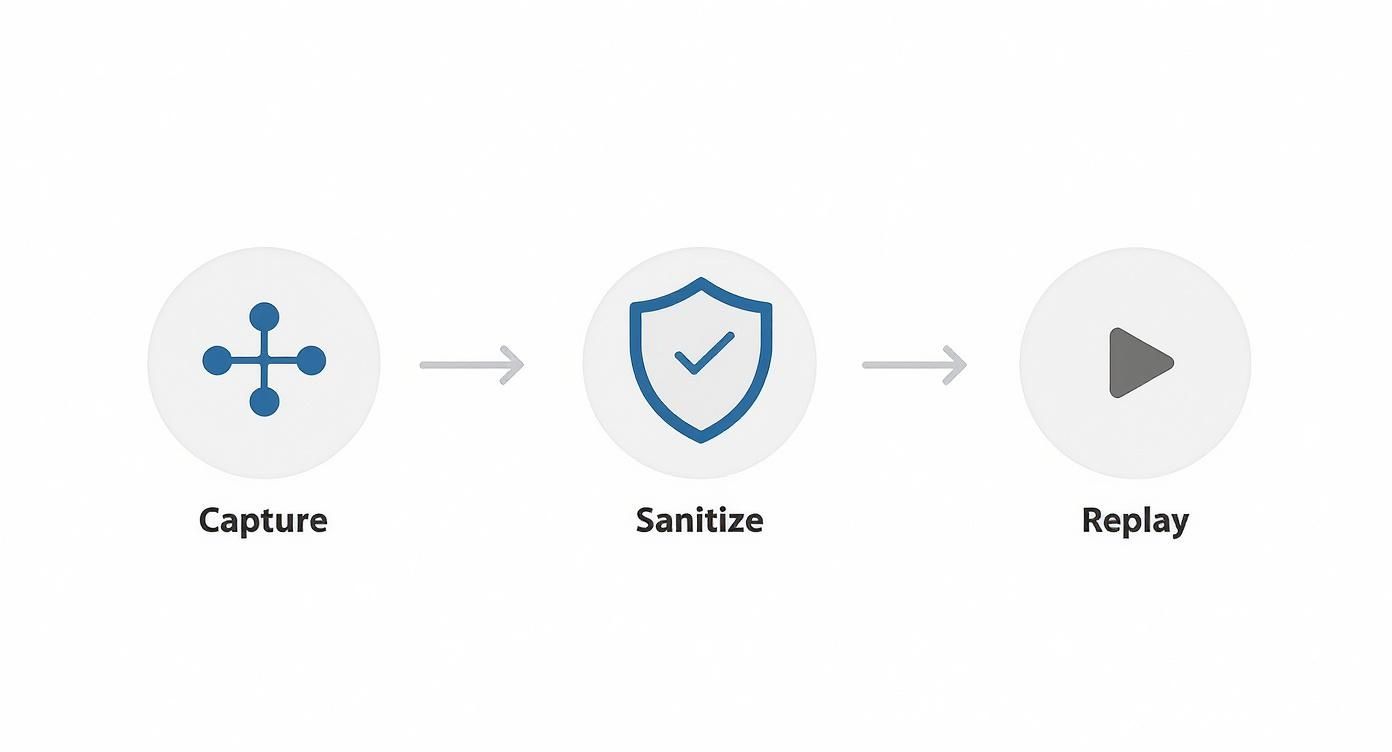
This automated loop—capture, sanitize, replay—lets you constantly check your system against actual user behavior, catching those sneaky performance regressions before they ever see the light of day.
The Rise of AI in Test Automation
And now, AI is starting to really change the game in test automation. Instead of just running scripts we wrote, AI-powered tools can analyze code changes to predict where data-related bugs might pop up. They can intelligently generate new test cases for weird edge cases we hadn’t thought of and even analyze test results to spot hidden failure patterns.
This isn’t just a niche trend. The global automation testing market is expected to jump from $25.4 billion in 2024 to $29.29 billion in 2025, with AI being a huge part of that growth. Early studies are showing that AI can boost test reliability by 33% and cut defect counts by 29%. The momentum is real, with forecasts predicting that 75% of enterprise software engineers will be using AI code assistants by 2028. You can explore more software testing statistics to get a feel for how fast things are moving.
Automation isn’t just about going faster; it’s about being consistent and reliable. When you take out the manual steps, you guarantee that every single code change gets put through the exact same rigorous data validation. It’s a powerful safety net that catches issues the moment they’re introduced.
By baking these tests directly into your CI/CD pipeline, you shift data quality from a reactive headache to a proactive, automated habit. It not only speeds up your development cycle but also builds a massive amount of confidence, ensuring every release is built on a rock-solid foundation of clean, reliable data.
CI/CD Integration Tools for Data Tests
Choosing the right CI/CD tool is a key step in successfully automating your data tests. While most modern tools can handle the job, some have features that make them particularly well-suited for the unique demands of data-centric workflows, like managing stateful environments and large datasets.
Here’s a look at how a few popular options stack up for this specific task.
| Tool | Key Strengths for Data Testing | Considerations |
|---|---|---|
| Jenkins | Highly extensible with a vast plugin ecosystem. Offers robust control over complex, multi-stage pipelines. Great for on-premise setups where data can’t leave the network. | Can have a steep learning curve. Managing the Jenkins server and its plugins requires dedicated maintenance and operational overhead. |
| GitHub Actions | Tightly integrated with GitHub repositories, making it incredibly easy to trigger workflows on code commits and pull requests. Matrix builds are great for testing against multiple database versions. | Hosted runners might have limitations on execution time or resources for very large data tests. May require self-hosted runners for more demanding jobs. |
| GitLab CI/CD | A single, unified platform for the entire DevOps lifecycle. Built-in container registry and review apps simplify the process of spinning up isolated test environments. | Can feel opinionated. If you’re not already using GitLab for source control, adopting it just for CI/CD might be a heavy lift. |
| CircleCI | Known for its speed and performance. Excellent caching capabilities can significantly reduce the time it takes to set up environments and provision data. Orbs (reusable packages of configuration) simplify complex setups. | The free tier has limits on concurrent jobs and build minutes, which can be a constraint for teams running frequent, resource-intensive data tests. |
Ultimately, the best tool often depends on your existing ecosystem and team expertise. The key is to pick one that allows you to easily script the entire lifecycle—provision, seed, test, and teardown—so you can build that reliable, automated safety net for your data.
Answering Your Top Data Testing Questions
Even with the best strategy, you’re going to run into questions. It’s just part of the process. Getting your data testing right often means navigating a few common hurdles. Here are some of the most frequent questions that pop up and my take on them.
What’s the Single Biggest Challenge in Data Management Testing?
Hands down, the biggest struggle is creating and maintaining realistic, secure, and compliant test data. It’s a tough balancing act, and I’ve seen many teams get stuck here.
On one side, you have production data. It offers perfect fidelity and is the best way to smoke out those weird, hard-to-find bugs. But using it straight-up is a massive security and privacy minefield. You just can’t do it.
On the other side, you have purely synthetic data. While safe, it often feels sterile and misses the quirky, messy edge cases that your real-world data has accumulated over years. Getting the balance right—often through a smart mix of data masking, subsetting, and targeted synthetic generation—is where the magic happens. This isn’t just a technical problem; it requires a solid grasp of regulations like GDPR or CCPA.
How Often Should We Run Full Data Migration Tests?
This isn’t a one-and-done deal. Think of your comprehensive data migration tests as a series of dress rehearsals. Each one gets you closer to a flawless opening night.
A good rhythm usually looks something like this:
- An Early Full-Scale Test: Run one of these early on. It’s your first real shakedown of the entire process, designed to catch major architectural problems and set a performance baseline.
- Iterative Tests During Development: As your team makes changes to schemas or transformation logic in each sprint, run smaller tests on just the relevant data subsets. This gives you fast, focused feedback.
- The Final Dry-Run: In the days right before you go live, you need one last, full-scale migration test. This should happen on a staging environment that is a perfect clone of production. No surprises.
Can We Fully Automate Data Management Testing?
Yes and no. A huge chunk of your data tests can—and absolutely should be—automated. Anything repetitive is a perfect candidate for automation and should live inside your CI/CD pipeline.
The most effective approach is a hybrid one. You automate the predictable stuff: data integrity regression checks, ETL validation, performance benchmarks. But you save your human experts for the nuanced work, like exploratory testing to hunt for subtle quality issues or validating a complex financial report where context is everything.
Aim for automation where it makes sense, but never forget that a smart human eye is still your best tool for validating what the data actually means for the business.
What’s the Real Difference Between Data Quality and Data Integrity Tests?
People often use these terms interchangeably, but they focus on two very different things. Nailing the distinction helps you build a much stronger testing plan.
- Data Integrity Tests are about structure. They’re technical and live close to the schema. Think: checking foreign key constraints, ensuring data types are correct, and making sure a
NOT NULLcolumn is actually never null. - Data Quality Tests are about business purpose. They ask, “Is this data fit to be used?” This is where you check for accuracy (is this a real mailing address?), completeness (are all the fields needed for a report filled in?), and consistency (does the customer’s name match across three different systems?).
Put simply: integrity ensures the data can technically exist in your database, while quality ensures it should.
Ready to push your data management tests to the next level with real-world traffic? With GoReplay, you can capture and replay live production requests to find issues that synthetic tests will always miss. See how it works and start testing with true confidence. Learn more at https://goreplay.org.