
Unlocking Software Reliability with Data Driven Testing

Data driven testing is a deceptively simple idea with a huge impact: you separate your test scripts from your test data. This lets you run a single script against countless different inputs.
Think of it like having one master key that can unlock hundreds of different doors. You can check how your application handles a massive range of real-world scenarios without writing a single new line of code for each one.
What Is Data Driven Testing and Why It Matters
Imagine you’re testing a new car. A traditional, static test is like driving it on a perfectly flat, sterile track. Sure, it proves the car works under ideal conditions, but that’s about it.
Data driven testing, on the other hand, is like driving that same car on thousands of real-world roads. You throw everything at it: bumpy country lanes, winding mountain passes, wet city streets, and unpredictable highways.

This approach solves a huge problem in software development: static tests almost always miss the bugs that only crawl out under genuine user conditions. The core principle is straightforward but incredibly powerful.
The test logic (the “action,” like logging in or adding an item to a cart) is kept separate from the test data (the “conditions,” like different usernames, passwords, and product IDs).
This separation is where the magic happens. Instead of hardcoding a single username and password into a login test, you connect your test script to an external data source. This could be anything from a spreadsheet or database to a live capture of real production traffic.
From Static to Dynamic Testing
Let’s take a look at how this changes the game. Here’s a quick comparison of the two mindsets:
| Aspect | Traditional Scripted Testing | Data Driven Testing |
|---|---|---|
| Data Handling | Data is hardcoded directly into the test script. | Data is stored externally and fed into the script. |
| Flexibility | Rigid. Changing data requires modifying the code. | Highly flexible. New tests can be added just by adding data. |
| Test Coverage | Limited to the specific scenarios coded into the script. | Massively expanded; one script covers many data variations. |
| Maintenance | High. One change can require updates to many scripts. | Low. Update the data source, not the code. |
| Realism | Low. Often based on “ideal” or simplistic scenarios. | High. Can use real user data for authentic validation. |
By decoupling the what (the test logic) from the with (the test data), you can execute a single test script hundreds or even thousands of times, each time with a new set of data.
The Shift Toward Realistic Validation
This approach dramatically boosts test coverage and efficiency, revealing defects that would otherwise stay hidden. Suddenly, you can quickly find out if your system breaks when it encounters:
- Usernames with special characters
- Passwords that are unusually long
- Product orders with zero or negative quantities
- API requests with unexpected headers
This method is becoming a cornerstone for application reliability, especially as production traffic volumes explode. The global software testing market, valued at USD 54.68 billion in 2025, is projected to surge to USD 99.79 billion by 2035, a trend that highlights this industry-wide shift.
Teams are moving away from brittle, hardcoded scripts and toward flexible, data-driven approaches that use real-world traffic for more accurate validation. In fact, QA engineers report that this strategy can slash debugging time by 40-50%, because tests using real traffic patterns expose performance bottlenecks under genuine load. You can explore more about these market trends and their implications for software quality.
Ultimately, data-driven testing transforms your QA process from a predictable exercise into a dynamic simulation of actual user behavior. You’re no longer just confirming that a feature works in a vacuum. You’re building confidence that it will stand up to the messy, unpredictable nature of the real world—and that makes all the difference.
The Core Components of a Data-Driven Framework
A solid data-driven testing setup isn’t just about a single tool—it’s a complete architecture. To build a system that’s both powerful and easy to live with, you need to understand its three essential pillars. Think of it like a high-performance race car: every part has a job, and they all need to work together perfectly.

Each component plays a distinct role, but the real magic is how they interact while staying independent. This separation is the secret sauce for creating a scalable, adaptable testing machine that can handle new scenarios without you having to constantly rewrite your code.
1. The Test Script: The Engine
The test script is the engine of your testing vehicle. It holds the core logic—the step-by-step actions your application needs to take. For example, a login script would contain instructions like “go to the login page,” “find the username field,” “find the password field,” and “click submit.”
But here’s the key: the script itself is generic. It doesn’t contain any hardcoded data like “testuser123” or “Password123!”. Instead, it uses placeholders or variables that get filled in on the fly. This design choice makes a single script reusable for a virtually infinite number of test cases.
By keeping the logic pure and the data separate, you only have to write and maintain one script for a given workflow. If the UI changes, you update a single file, not hundreds. That’s a huge win for maintenance.
2. The Data Source: The Fuel
If the script is the engine, the data source is the fuel that makes it run. This is where all the variations, edge cases, and real-world conditions live. The data source is simply an external file or system that feeds information into your test script’s placeholders at runtime.
Your choice of “fuel” can be as simple or as complex as you need it to be:
- Spreadsheets (CSV, Excel): The go-to for many teams. They’re easy for non-technical folks to create and manage, making them perfect for testing a login form with 50 different user accounts.
- Structured Files (JSON, XML): Ideal for testing APIs or applications with complex data structures where you need to maintain hierarchy and specific data types.
- Databases (SQL, NoSQL): A powerhouse option for massive datasets. You can run queries to pull specific subsets of data for highly targeted test runs.
- Live Traffic Captures: This is the ultimate fuel source. Tools like GoReplay capture real user requests from your production environment, giving you the most realistic and comprehensive dataset imaginable.
This separation means that expanding your test coverage is as simple as adding a new row to a spreadsheet or capturing fresh traffic—no code changes needed.
The core principle is simple: the “what” (the test script) should never be mixed with the “with what” (the test data). This modularity is the foundation of any scalable automation framework.
3. The Execution Engine: The Driver
Finally, the execution engine is the driver. It’s the automation tool or framework that brings the engine and the fuel together. The engine reads the test script, connects to the data source, and then methodically runs the test for each and every row of data it finds.
The execution engine is responsible for a few key jobs:
- Iterate: It loops through each record in your data source.
- Populate: It grabs the data from the current record (like a username and password) and injects it into the test script’s variables.
- Execute: It runs the newly populated script against your application.
- Report: It logs the outcome—pass or fail—and compares the actual result against the expected result you defined in your data source.
This component is the conductor of the orchestra, making sure everything works in harmony. Popular test automation frameworks like Selenium, Cypress, or Playwright all act as execution engines that can be configured for data-driven testing. When you combine these three components, you get a robust system where logic, data, and execution are cleanly separated, giving you maximum efficiency and killer test coverage.
Mastering Your Test Data Management Strategy
The power of data-driven testing comes down to one thing: the quality of its fuel. Great test scripts are useless without realistic data. It’s like having a Formula 1 car with an empty tank. To get real confidence in your application, you need a solid strategy for sourcing, managing, and securing the data that drives your tests.
This means getting past simple spreadsheets and adopting more robust methods. The goal is a data pipeline that truly mirrors real-world user behavior, uncovers those nasty hidden edge cases, and gives you unshakable confidence every time you deploy.
Let’s break down the three main ways to get there.
Generating Synthetic Data
The most direct approach is creating synthetic data. This is where you manually or programmatically generate fake datasets from scratch. You might, for example, write a script to create a thousand user profiles with random names, emails, and addresses.
This method gives you total control and is great for security since no real user information is ever involved. It’s also handy for testing very specific conditions that are rare in production, like seeing how your system handles a username that’s exactly 255 characters long.
But its biggest weakness is realism. Synthetic data almost never captures the subtle complexities and weird patterns of real user behavior. It’s a clean, sterile version of a messy, unpredictable world, which means you’ll almost certainly miss the bugs that only show up under real-world conditions.
Subsetting Data From Production
A more realistic option is production data subsetting. This involves grabbing a small, targeted slice of your live production database, anonymizing it, and pulling it into your test environment. This gives you data with real-world complexity, structure, and relationships.
For instance, you could pull all user orders from the last 24 hours to test a new checkout flow. The data is authentic, which makes your tests far more meaningful. You can learn more about the core principles of handling data effectively in our complete guide to test data management best practices.
The main headaches here are technical complexity and data privacy. The whole process of extracting, sanitizing, and loading the data can be a real pain. More importantly, making absolutely sure all personally identifiable information (PII) is properly masked is a huge responsibility. One slip-up can lead to a serious data breach.
Capturing and Replaying Real User Traffic
For the highest-fidelity testing, the gold standard is capturing and replaying real user traffic. Instead of pulling static data from a database, this method records the actual HTTP requests flowing through your production environment and replays them against your test server.
This is the closest you can get to cloning reality. It preserves not just the data but also the sequence, timing, and concurrency of user interactions, providing a level of realism that synthetic data or database subsets simply cannot match.
Tools like GoReplay are built specifically for this. They act like a recorder for your application’s traffic, letting you create a perfect mirror of production activity for your tests. Global spending on big data and analytics is projected to hit $420 billion in 2026, driving demand for this level of testing. And with privacy laws now in over 140 countries, features like data masking are essential. This approach prevents critical outages by catching up to 75% more issues before they ever hit production. You can discover more insights about these data trends and their business impact.
Comparing Test Data Sourcing Methods
Choosing the right approach depends on your specific needs, balancing realism against complexity and risk. Here’s a quick breakdown of how the three methods stack up.
| Method | Realism | Coverage of Edge Cases | Setup Complexity | Data Privacy Risk |
|---|---|---|---|---|
| Synthetic Generation | Low | High (for known cases) | Low | Very Low |
| Production Subsetting | Medium | Medium | High | High |
| Live Traffic Replay | Very High | Very High (uncovers unknown cases) | Medium | Medium (mitigated by masking) |
Ultimately, live traffic replay provides the most accurate reflection of reality, but it requires the right tools to manage privacy and complexity effectively.
Solving Complex Challenges with Traffic Replay
The capture/replay model directly solves some of the toughest problems in data-driven testing. Here’s how a tool like GoReplay helps:
- Data Masking: It can automatically find and replace sensitive information (like API keys, passwords, or credit card numbers) in traffic before it’s even saved. Your tests stay realistic without ever putting user privacy at risk.
- Handling Stateful Sessions: Many user journeys are stateful (think login, add to cart, checkout). GoReplay is session-aware, so it understands the sequence of requests from a single user and replays them in the correct order to accurately test these complex workflows.
- Filtering and Rate Limiting: You don’t always need to replay everything. You can filter traffic to focus on specific API endpoints or user flows. You can even adjust the replay speed to simulate different load levels and stress-test your system.
By adopting a capture/replay strategy, your team gets a blueprint for building a data pipeline that truly reflects the chaos and complexity of your production environment. Every user interaction becomes a potential test case, ensuring your application is not just functional, but genuinely production-ready.
Putting Data-Driven Testing into Practice with GoReplay
Theory is one thing, but the real magic of data-driven testing happens when you roll up your sleeves and put it to work. This is exactly where tools like GoReplay come in, turning the abstract idea of using production data into a concrete, repeatable workflow. GoReplay lets you capture real user HTTP traffic and replay it against your staging or development environments, giving you the most authentic test data imaginable.
Let’s walk through a practical workflow you can use today. This process is a game-changer for load testing, regression testing, and API validation because it’s fueled by the most realistic data possible—your own users’ interactions.
Capturing Live Traffic from Production
First things first, you need to “record” the traffic hitting your production application. GoReplay listens to network traffic on a specific port without getting in your application’s way. Think of it like attaching a high-fidelity microphone to your server that only picks up user requests.
Let’s say you want to capture all traffic coming into your server on port 80 and save it to a file called production-traffic.gor. The command is surprisingly simple:
sudo gor --input-raw :80 --output-file production-traffic.gor
That’s it. GoReplay now silently records every incoming request and its response, creating a perfect snapshot of real-world activity. This file becomes the fuel for your tests. For a deeper dive, check out our guide on configuring GoReplay for different testing environments.
Replaying Traffic Against a Staging Server
With your captured traffic file in hand, you can now unleash it on any environment you want. This is where the real testing begins. If your staging server is running at staging.yourapp.com, you’d replay the traffic with a command like this:
gor --input-file production-traffic.gor --output-http "http://staging.yourapp.com"
GoReplay reads the production-traffic.gor file and fires off each captured request to your staging server, perfectly simulating the user behavior from production. You get to see exactly how your new code or infrastructure handles a realistic load and a diverse mix of inputs.
The big data testing market is exploding for a reason—it was valued at USD 4.5 billion in 2024 and is projected to hit USD 12.5 billion by 2033. Why? Because this level of realism works. In enterprise settings, this approach has been shown to boost test coverage by 60-80% by catching edge cases that manual scripts always miss. GoReplay’s session-aware replay has even been shown to cut down false positives in load tests by 35%. Find more stats on the big data testing market here.
The diagram below shows the different ways teams can source test data, with replay being the most direct path to reality.
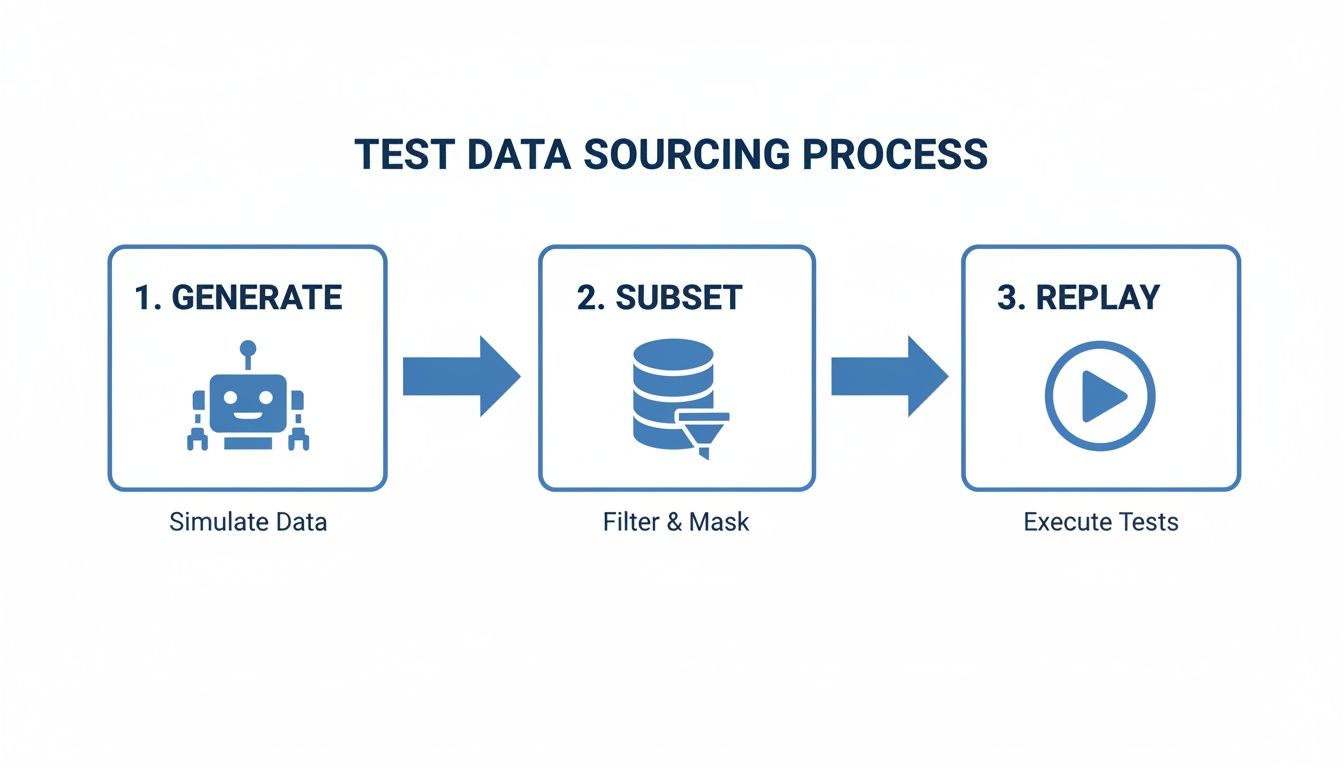
While generating or subsetting data has its place, replaying traffic offers an unmatched level of fidelity.
Advanced Filtering and Traffic Manipulation
Of course, real-world testing often needs more finesse than just a fire-and-forget replay. GoReplay gives you powerful tools to filter traffic and even modify it on the fly for incredibly precise test scenarios.
Here are a few ways you can use it:
- Isolate Specific Endpoints: Focus your test on a single, critical API endpoint. For example, you can use
--http-allow-pathto only replay requests hitting/api/v2/checkout. - Simulate Different Loads: Want to see how your app handles a traffic spike? The
--output-http-workersand--output-http-queue-lenflags let you control the replay concurrency to stress-test your system. - Modify Requests with Middleware: This is where things get really powerful. You can use middleware to change requests as they are replayed. A common use case is rewriting authentication tokens—if your staging environment uses different credentials, a simple script can swap the production auth header with a valid staging one before the request is sent.
By combining capture, replay, and modification, you move beyond simple data-driven testing. You are essentially conducting a full-scale dress rehearsal for your production environment, using your actual users as the scriptwriters.
This hands-on approach ensures your tests are not just comprehensive but deeply relevant to how your application is actually used. It’s a practical way to build confidence, squash critical bugs, and make sure every deployment goes off without a hitch.
Best Practices for a Successful Implementation
Getting data-driven testing right is about more than just flipping a switch on new tech. It’s a strategic shift in how your team approaches quality. To sidestep the usual roadblocks and get real value from your efforts, you need a solid playbook.
Think of it like building a new habit. You don’t try to change everything overnight. You start small, build momentum, and slowly weave the new process into your everyday workflow.
Start Small and Target a Critical Journey
It’s tempting to go big and apply data-driven testing across your entire app right away, but that’s a quick recipe for getting overwhelmed. A much smarter approach is to pick a single, high-value user journey and nail it first.
Maybe it’s the user registration flow, the checkout process, or a core API endpoint that gets hammered with traffic. By narrowing your focus, you can:
- Learn the Process: Your team gets to learn the tools and the rhythm on a manageable scale.
- Demonstrate Value Quickly: A successful pilot on a critical feature is the best way to get buy-in from other teams.
- Refine Your Approach: You’ll hit snags and figure out optimizations before you roll it out everywhere else.
Once you’ve got one workflow down, you can expand to the next one, building on a foundation of real experience.
Maintain a Clean and Isolated Test Environment
The integrity of your test results hinges on the stability of your test environment. If your staging server is flaky or cluttered with messy data from other tests, you’ll waste more time debugging the environment than your actual application.
A core principle of effective testing is isolation. Your data-driven tests should run in a clean, predictable environment that mirrors production as closely as possible but is completely separate from it.
This means your staging environment needs the same configurations, dependencies, and resources as production. It’s also a good idea to reset the environment to a known “good” state before any big test run. This ensures your results are a true reflection of your code’s quality, not just a side effect of a messy setup.
Version Your Test Data with Your Code
Treat your test data like a first-class citizen—just like your application code. Your captured traffic files, CSVs, or database dumps are critical assets. They belong in your version control system (like Git) right alongside the code they’re meant to test.
This practice, often called Data as Code, unlocks a few huge benefits:
- Reproducibility: Anyone on the team can check out a specific version of the code and instantly get the exact data needed to reproduce a test or a bug.
- Traceability: It creates a crystal-clear link between a code change and the data that validated it.
- Collaboration: Teams can work on test data using the pull request workflows they already know, keeping data quality high.
Build a Reusable Library of Test Scenarios
Don’t just capture traffic and then toss it. Instead, build a curated library of traffic files that represent specific, important scenarios.
For instance, you could create dedicated files for things like:
- A Black Friday Surge: Capture traffic during a peak sales event to use for future load tests.
- New User Onboarding: Isolate the traffic from the first hour of a new user’s activity.
- A Specific Bug: Save the exact traffic that triggered a past production outage to create a bulletproof regression test.
This library becomes an incredibly valuable asset. The next time you need to test a specific condition, you can just pull the right traffic file and replay it, making your entire testing process faster and far more targeted.
Got Questions About Data-Driven Testing?
As teams start to explore data-driven testing, a few common questions always seem to pop up. It’s a powerful strategy, but it introduces new workflows and ways of thinking. Having questions about security, scope, and how to get started is completely normal.
Let’s walk through some of the most frequent queries we hear. Getting these answers straight will help you and your team navigate the shift with confidence.
How Do You Handle Sensitive User Data?
This is the big one, and for good reason. Modern tools and frameworks tackle this head-on with data masking and sanitization. When you use a tool that captures production traffic, you can set up middleware to find and replace sensitive info—like passwords, API keys, or personal data—before it’s ever saved or replayed.
This usually works with pattern matching (think regex) to swap out real data for fake, anonymized values that keep the same structure. That way, your tests get all the benefits of realistic traffic patterns without ever exposing confidential user information, keeping you compliant with regulations like GDPR and CCPA.
Is Data-Driven Testing Only for Big Enterprise Teams?
Not at all. While massive companies get a ton of value from it, the core idea is simple and scales to fit any team. At its heart, data-driven testing is just about separating your test logic from your test data.
A solo developer testing an API endpoint with a few dozen variations from a CSV file is doing data-driven testing. The real beauty of this approach is its flexibility.
You don’t need a massive budget or a sprawling infrastructure to get started. Open-source tools make advanced techniques like traffic replay accessible to everyone, allowing you to begin with a scope that fits your resources and expand from there.
This means teams of any size can enjoy better test coverage and more reliable software without a huge upfront investment.
Can Data-Driven Testing Replace Everything Else?
Nope. Think of it as a powerful new tool in your quality assurance toolkit, not a silver bullet that makes everything else obsolete. It’s fantastic for validating how your application behaves with a huge variety of inputs, catching regressions, and running realistic load tests.
But it works best when it complements other testing methods. For instance:
- Unit Tests are still non-negotiable for checking individual functions and components in isolation.
- Integration Tests are crucial for making sure different parts of your system play nicely together.
- Exploratory Testing, driven by curious humans, is still the best way to find weird usability quirks, logical flaws, and other subtle bugs that automated checks will always miss.
A truly solid QA strategy layers these different testing types to build confidence from every possible angle.
How Do I Manage Application State During a Replay?
Testing stateful applications—things with user logins or multi-step shopping carts—is a classic challenge. Just replaying a jumble of unrelated requests is guaranteed to fail because the context is missing.
Modern traffic replay tools solve this with something called ‘session-aware’ replay. This feature is smart enough to identify and group all the requests that belong to a single user’s session.
When it’s time to replay, the tool makes sure all requests from that one session are sent in the right order, preserving the state. It knows the ‘add to cart’ request has to happen before the ‘checkout’ request for the same user. This is a game-changer for accurately testing the complex, stateful workflows that your users depend on.
Ready to see how real traffic can transform your testing? GoReplay makes it easy to capture and replay production traffic, giving you the most realistic test data possible. Eliminate guesswork and ensure your application is truly production-ready. Start testing with GoReplay today.