
Unlock Flawless Releases: Your Guide to Modern Testing
In today’s hyper-competitive digital landscape, rapid delivery of high-quality software is no longer a luxury—it’s a necessity. Continuous testing forms the backbone of this capability, ensuring each release is stable, reliable, and meets user expectations. This guide unpacks 8 pivotal Continuous Testing Best Practices that will empower your team to build superior software, faster, throughout 2025 and beyond.
1. Test Automation Pyramid Strategy
The Test Automation Pyramid strategy stands as a cornerstone among continuous testing best practices, offering a structured and effective approach to distributing test types within a software development lifecycle. Originally conceptualized by Mike Cohn and further promoted by thought leaders like Martin Fowler, this model emphasizes a hierarchical allocation of tests to optimize for speed, reliability, and cost-efficiency in automated testing suites. It proposes a bottom-heavy distribution: a large foundation of fast and isolated unit tests, a smaller middle layer of integration tests, and a minimal top layer of broad, slower end-to-end (UI) tests. This strategic balance is crucial for enabling rapid feedback loops, a key tenet of continuous integration and continuous delivery (CI/CD) pipelines.
The core principle of the Test Automation Pyramid is to execute the majority of tests at the lowest, most granular level possible. Here’s how it typically breaks down:
- Unit Tests (Base - approx. 70%): These form the largest portion of the pyramid. Unit tests verify the smallest pieces of code, like individual functions, methods, or classes, in isolation from other parts of the system. They are written by developers, run extremely quickly (often in milliseconds), are highly reliable, and provide precise feedback, making it easier to pinpoint and fix bugs. Due to their speed and focus, tens of thousands of unit tests can be run in minutes, forming a strong safety net against regressions.
- Integration Tests (Middle - approx. 20%): This layer focuses on verifying the interactions between different components, modules, or services within the application. For example, testing if a service correctly interacts with a database, or if two microservices communicate as expected. Integration tests are more complex and slower to run than unit tests because they involve multiple parts of the system. They are crucial for catching issues that unit tests, by their isolated nature, cannot detect, such as interface mismatches or data flow problems between components.
- UI/End-to-End (E2E) Tests (Top - approx. 10%): At the apex of the pyramid are the UI tests (often synonymous with E2E tests in this context). These tests validate the entire application flow from the user’s perspective, typically by driving the application through its graphical user interface. While they provide the highest confidence that the system works as a whole, they are also the slowest, most brittle (prone to flaking due to UI changes), and most expensive to write, run, and maintain. Therefore, the strategy dictates keeping them to a minimum, focusing only on critical user journeys.
The following infographic visually represents the ideal distribution of tests within the Test Automation Pyramid strategy:
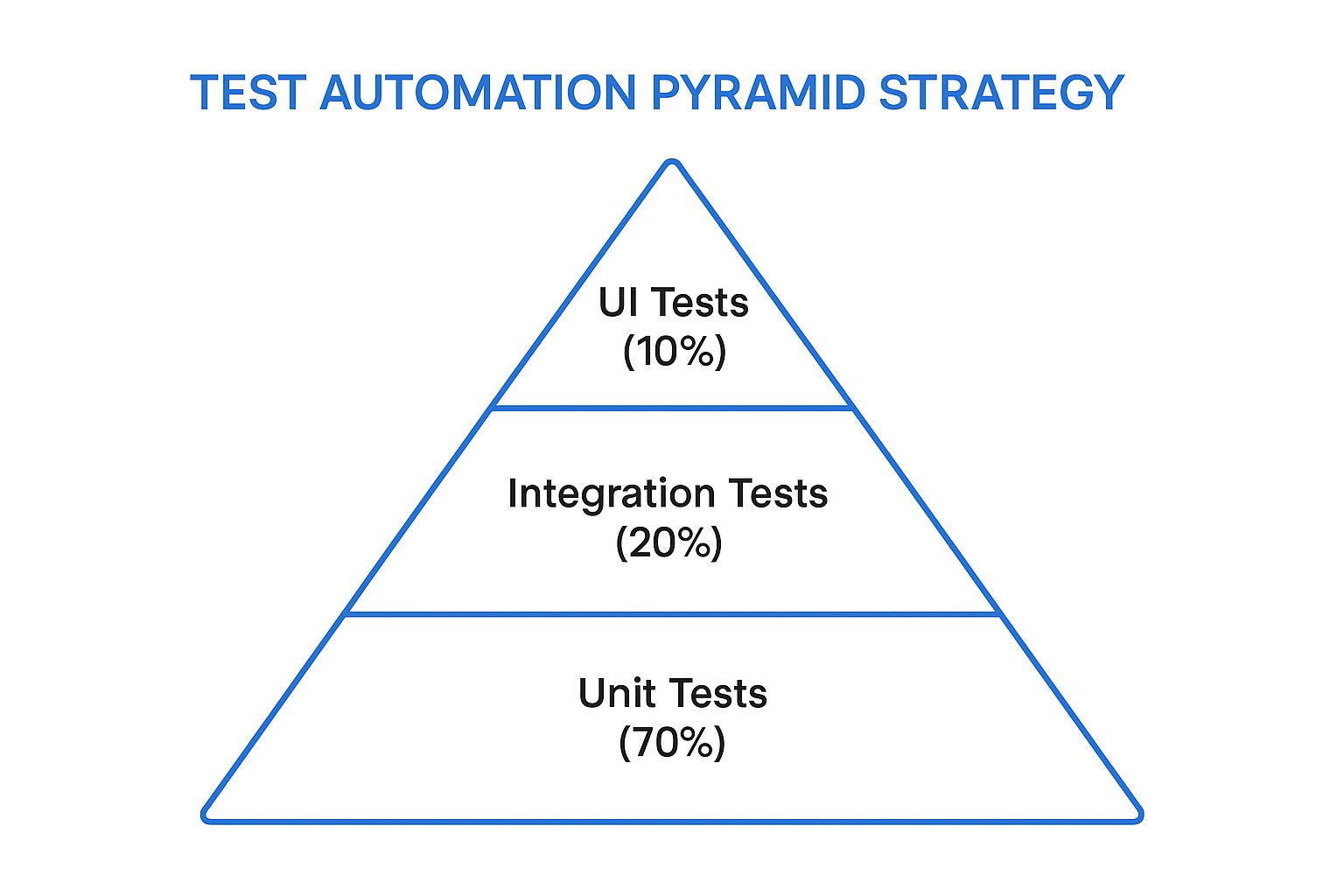
This hierarchical model, as depicted, emphasizes a strong foundation of unit tests, illustrating how the quantity and frequency of tests should decrease as we move up the pyramid towards more complex and slower UI tests. The broad base signifies the high volume of unit tests, while the narrowing structure towards the peak represents the progressively fewer integration and UI tests.
Why It’s a Premier Continuous Testing Best Practice
The Test Automation Pyramid earns its place due to several compelling benefits crucial for modern software delivery:
- Faster Feedback Loops: With the bulk of tests being rapid unit tests, developers receive feedback on their changes within seconds or minutes, enabling them to fix issues quickly. This is fundamental to effective continuous testing best practices.
- Lower Maintenance Costs: Unit tests are generally more stable and less prone to breakage from UI changes compared to E2E tests. Focusing on lower-level tests reduces the overall maintenance burden of the test suite.
- Better Isolation of Failures: When a unit test fails, it points directly to a small, isolated piece of code, making debugging significantly easier and faster.
- Reduced Flakiness: UI tests are notoriously flaky due to their dependence on browser behavior, timing issues, and UI element changes. Minimizing these reduces false positives and increases the reliability of the CI/CD pipeline.
- Cost-Effectiveness: Writing and maintaining unit tests is generally cheaper in the long run than managing an oversized suite of slow, brittle E2E tests.
Challenges and Considerations
Despite its advantages, implementing the pyramid strategy has its hurdles:
- Upfront Investment: Building a comprehensive suite of unit tests requires significant upfront effort and a shift in developer mindset to write testable code.
- Integration Gaps: An over-reliance on unit tests without sufficient integration testing can sometimes miss issues that only manifest when components interact.
- Discipline Required: Maintaining the proper distribution and resisting the temptation to write too many E2E tests requires ongoing discipline and team alignment.
- Legacy Systems: Applying this model to legacy systems with tightly coupled code and poor testability can be particularly challenging, often requiring refactoring efforts.
Successful Implementations and Actionable Tips
Companies like Google, with their millions of unit tests, Netflix, employing contract testing in their microservices architecture, and Spotify, applying the pyramid across their distributed systems, have demonstrated the scalability and effectiveness of this approach.
To successfully implement or refine your Test Automation Pyramid:
- Measure and Rebalance: Start by analyzing your current test distribution. Identify imbalances and create a roadmap to gradually shift towards the pyramid model.
- Invest in Mocking/Stubbing: Utilize mocking and stubbing frameworks (e.g., Mockito for Java, Moq for .NET, Jest’s mocking for JavaScript) to effectively isolate units of code for testing.
- Embrace Contract Testing: For microservices or distributed architectures, use contract testing (e.g., with Pact) to verify interactions between services without requiring full end-to-end environments, effectively strengthening the integration test layer.
- Monitor Test Execution Times: Regularly review the execution time of tests at all levels. If unit tests become slow, investigate. If integration tests are too broad, consider breaking them down or pushing certain aspects to E2E tests if absolutely necessary.
In conclusion, the Test Automation Pyramid strategy is not just a theoretical concept but a practical, proven methodology that underpins robust and efficient continuous testing best practices. By prioritizing fast, reliable, and focused tests at the lower levels, teams can achieve quicker feedback, higher quality, and more sustainable test automation, ultimately supporting faster and more confident software delivery.
2. Shift-Left Testing
One of the most impactful continuous testing best practices is the adoption of Shift-Left Testing. At its core, this approach revolutionizes traditional software development by moving testing activities much earlier in the lifecycle. Instead of treating testing as a distinct phase that occurs only after development is ‘complete,’ shift-left integrates testing methodologies right from the design and development stages. This proactive stance enables the early detection of defects, significantly reduces the cost and effort required for fixing them, and ultimately leads to a higher quality software product delivered faster.

So, how does shift-left actually work in practice? It’s about embedding quality checks throughout the early stages of the software development lifecycle (SDLC), rather than concentrating them at the end. This fundamental change involves several key features that collectively redefine how quality is approached:
- Early Involvement of Testers: In a shift-left model, testers, or Quality Advocates, are not just gatekeepers at the end of the line. They participate actively in requirements analysis and design discussions. Their early input helps clarify ambiguities, identify potential usability or functional issues, and define clear acceptance criteria before a single line of code is written. This early collaboration helps shape more testable, user-friendly, and robust designs from the outset.
- Developer-Led Testing Practices: A significant aspect of shift-left is empowering and expecting developers to take more ownership of quality. Practices like Test-Driven Development (TDD), where unit tests are written before the application code they verify, and Behavior-Driven Development (BDD), which uses natural language specifications to define software behavior from a user’s perspective, become integral. These ensure that code is intrinsically testable and meets specified requirements from its inception.
- Automated Early-Stage Analysis: Automation is a cornerstone of effective shift-left testing. Static Code Analysis (SAST) tools are integrated directly into developers’ Integrated Development Environments (IDEs) and Continuous Integration (CI) pipelines. These tools automatically scan code for potential bugs, security vulnerabilities, code style violations, and anti-patterns as it’s being written or committed, providing immediate feedback. Similarly, early security scanning helps identify and mitigate vulnerabilities before they become deeply embedded and expensive to fix.
- Continuous Validation Throughout Development: Instead of a single, large validation phase towards the end, shift-left promotes continuous validation. This means performing various types_of tests (unit, component, API, integration) frequently and automatically throughout the development sprints. This ongoing feedback loop helps catch regressions and new bugs quickly, allowing for immediate remediation when the context is still fresh in developers’ minds.
The rationale for embracing shift-left as a fundamental continuous testing best practice is compelling, driven by its substantial and measurable benefits:
- Dramatically Reduced Cost of Defect Fixing: This is arguably the most significant advantage. Industry studies, including seminal work by IBM, have consistently shown that a defect found during the design or coding phase can be up to 100 times cheaper to fix than one discovered in production. Early detection means simpler, less entangled fixes, saving enormous time and resources.
- Improved Collaboration and Shared Ownership: Shift-left fosters a culture of shared responsibility for quality. It breaks down traditional silos between development, testing, and operations teams, encouraging closer collaboration, better communication, and a unified team approach to building high-quality software.
- Faster Time-to-Market with Fewer Post-Release Defects: By catching and fixing issues early and continuously, teams avoid lengthy and costly bug-fixing cycles later in the development process or, worse, after release. This streamlined process, with fewer surprises and delays, allows for quicker, more predictable, and more confident releases of new features and products.
- Enhanced Test Coverage and More Testable Code Architecture: When testing is considered from the very beginning of the lifecycle, software is inherently designed to be more testable. This leads to better overall test coverage, including areas often missed in traditional models, and often results in a more modular, maintainable, and robust code architecture. Early feedback from testing activities can guide architectural decisions for the better.
Despite its clear advantages, implementing shift-left is not without its challenges, which teams must be prepared to address:
- Cultural Change and Upskilling: It requires a significant cultural shift, moving from a “developers code, testers test” mentality to one where quality is truly everyone’s responsibility. Developers may need upskilling in various testing techniques and tools, and testers might evolve into quality coaches or automation specialists.
- Initial Setup and Tool Integration Complexity: Integrating new tools for static analysis, automated testing frameworks, and configuring CI/CD pipelines for early and continuous testing can be complex and time-consuming initially.
- Potential Initial Slowdown in Development Velocity: During the transition period, as teams adapt to new processes, learn new tools, and write more tests upfront, there might be a temporary slowdown in perceived development velocity. This is usually a short-term investment that pays off with long-term gains in efficiency and reduced rework.
- Requires Investment in New Tools and Training: Adopting shift-left effectively often necessitates investment in modern testing tools, automation frameworks, and comprehensive training programs for both development and QA team members.
The efficacy of shift-left testing isn’t just theoretical; it’s been demonstrated by numerous industry leaders:
- Microsoft: Has famously implemented shift-left principles, particularly in their Security Development Lifecycle (SDL), leading to a reported 50% reduction in security vulnerabilities in their products by embedding security checks, tools, and education earlier in the development lifecycle.
- Amazon: Their robust DevOps pipeline is a testament to early and continuous testing practices. Automated testing at every stage, from developer commits to deployment, is key to their ability to deploy changes frequently and reliably while maintaining high quality.
- IBM: Has been a proponent of DevSecOps, which is essentially shift-left applied with a strong emphasis on security. By integrating security testing, threat modeling, and secure coding practices from day one of the development process, they aim to build more secure software from the ground up.
For teams looking to implement or enhance their shift-left strategy as part of their evolving continuous testing best practices, here are some actionable tips:
- Start with Static Analysis Tools Integrated with IDEs: Begin by introducing static analysis tools (e.g., SonarLint, PMD, Checkstyle, ESLint) that plug directly into developers’ Integrated Development Environments. This provides immediate, private feedback on code quality and potential bugs without disrupting established workflows.
- Implement Pre-Commit Hooks for Basic Quality Gates: Set up pre-commit hooks in version control systems (like Git) to automatically run quick checks (e.g., linters, formatter checks, critical unit tests) before code is even committed to the shared repository. This acts as an essential early quality gate.
- Train Developers on Testing Techniques and Tools: Invest in training developers on modern testing techniques such as unit testing best practices, Test-Driven Development (TDD), Behavior-Driven Development (BDD), and effective use of mocking/stubbing frameworks and testing tools.
- Create Shared Responsibility Between Dev and Test Teams: Actively work to break down silos. Encourage pair programming, mob programming, and ensure testers are involved in sprint planning and backlog grooming. Quality is a team sport, not a department.
- Use Pair Programming and Rigorous Code Reviews: These collaborative practices are excellent for early defect detection and knowledge sharing. Having another set of eyes review code or developing features in pairs can catch logic errors, design flaws, and non-adherence to standards before they escalate into bigger problems.
Shift-left testing is particularly beneficial and often essential in modern software development paradigms like Agile and DevOps. If your organization aims for rapid iteration, continuous integration, continuous delivery, and consistently high-quality software, then shifting testing activities earlier in the process is not just a good idea—it’s a necessity. It aligns perfectly with the core goals of continuous testing best practices by ensuring that quality is proactively built-in, not reactively bolted on or inspected at the end. Any team struggling with long bug-fixing cycles, high defect escape rates to production, or a disconnect between development and QA teams can significantly benefit from adopting shift-left principles, transforming testing from a perceived bottleneck into an accelerator for delivering value.
The concept of “shift-left testing” was notably coined by Larry Smith. Its adoption and popularization have been significantly championed by the wider DevOps community and practitioners who recognized its profound alignment with agile principles and the demands of continuous delivery. Agile testing advocates like Lisa Crispin and Janet Gregory have also been instrumental in promoting practices that support early and continuous testing, which are foundational to the shift-left philosophy.
3. Parallel Test Execution
Parallel Test Execution is a cornerstone technique in modern software development, particularly vital for implementing effective continuous testing best practices. It involves running multiple automated tests simultaneously—across different threads, processes, or even distributed machines/containers—rather than sequentially. This concurrency dramatically reduces overall test suite execution time, essential for the rapid feedback loops crucial in Continuous Integration/Continuous Delivery (CI/CD) pipelines. As test suites grow, parallelization ensures testing doesn’t become a bottleneck, enabling effective scaling of quality assurance.

The mechanics involve multi-threaded execution on a single machine using multi-core processors, or distributed execution where tests are spread across multiple machines or containers. Advanced systems may use intelligent test distribution, allocating tests based on historical execution times for optimal load balancing. Crucially, resource isolation is maintained to prevent concurrently running tests from interfering with each other, for example, by avoiding contention for shared database records or state, thus preventing false test outcomes.
Why Parallel Execution is a Continuous Testing Best Practice
Parallel Test Execution earns its place as one of the foremost continuous testing best practices because it directly addresses a fundamental challenge: speed. In a continuous delivery model, developers need rapid feedback. Long-running sequential test suites delay this, slowing the development lifecycle and hindering iteration. By drastically cutting test execution time, parallel testing allows comprehensive coverage without sacrificing agility. It transforms testing from a potential roadblock into an efficient quality gate, enabling confident and frequent releases, aligning perfectly with the core tenets of CI/CD.
Features and Benefits (Pros)
The advantages of adopting parallel test execution are substantial:
- Significant Reduction in Test Execution Time: This is the most celebrated benefit. Often slashing runtimes by 5-10x or more, turning hours into minutes.
- Better Resource Utilization: Efficiently uses available hardware, whether it’s the cores on a single powerful server or a cluster of distributed machines, minimizing idle CPU cycles.
- Faster Feedback to Developers: Quicker bug identification and fixes improve development efficiency and enable rapid iteration.
- Scalable Approach: Accommodates growing test suites by adding more resources (threads, machines, containers). This scalability is crucial for long-term adherence to continuous testing best practices.
Challenges and Considerations (Cons)
However, implementing parallel testing is not without its challenges:
- Increased Complexity in Test Design & Data Management: Requires independent, stateless tests and careful management of shared test data (e.g., unique user accounts, isolated database states) to prevent collisions and ensure test reliability.
- Potential for Race Conditions & Test Flakiness: Concurrent execution can lead to intermittent, hard-to-debug failures (flaky tests), especially with tests interacting with shared resources or complex UI flows.
- Higher Infrastructure Costs for Distributed Execution: While utilizing existing hardware more efficiently is a pro, scaling out to many machines or cloud-based execution environments can increase operational expenses.
- Debugging Failures Can Be More Challenging: Identifying root causes is harder with distributed logs and non-deterministic concurrency issues. Reproducing the exact conditions of a failure can be difficult.
When and Why to Use This Approach
Implement parallel execution when test suite runtimes become a CI/CD bottleneck, delaying builds and critical feedback. It’s vital for teams practicing agile or DevOps, where rapid iteration is paramount, and for projects with large, complex applications requiring extensive automated testing (especially end-to-end and integration tests). If your organization values comprehensive test coverage but struggles with the associated time penalty of sequential runs, parallelization is a key strategy. Essentially, if lengthy test cycles hinder your velocity, adopting this approach is a crucial step in refining your continuous testing best practices.
Actionable Tips for Successful Implementation
To effectively leverage parallel test execution, consider these practical tips:
- Design Tests for Independence: Ensure each test is atomic, self-contained, and stateless, managing its own data, setup, and teardown without side effects on other tests.
- Strategic Test Data Management: Use test data factories to generate unique data for each test or test thread. Alternatively, employ separate database instances/schemas per parallel worker or implement robust data partitioning and cleanup strategies.
- Implement Intelligent Retry Mechanisms: Handle transient failures (e.g., network glitches, temporary unavailability of a service) common in parallel environments with smart retries; however, be cautious not to mask genuine application bugs.
- Monitor and Optimize Parallelism Levels: Continuously track resource usage (CPU, memory, network I/O, database connections) on your test runners to find the optimal number of parallel threads or workers, preventing resource contention and maximizing throughput.
- Leverage Containerization and Orchestration: For distributed testing, use technologies like Docker for containerizing test environments and Kubernetes for orchestrating them. This provides scalability, consistency, and efficient resource management.
- Utilize Framework and Tool Support: Exploit built-in parallel execution capabilities in modern testing frameworks (e.g., TestNG, JUnit 5, pytest, NUnit) and CI/CD tools (e.g., GitHub Actions, Jenkins, GitLab CI).
- Consider Intelligent Test Distribution: For very large suites, explore tools or strategies that can distribute tests based on past run times or resource needs, ensuring no single runner becomes a bottleneck and optimizing overall execution time.
Examples of Successful Implementation
Major tech companies exemplify parallel testing’s impact. Facebook’s infrastructure is designed to run thousands of tests concurrently to validate changes across its massive codebase rapidly. Uber developed a distributed testing platform that drastically reduced their mobile test execution times from hours down to minutes, facilitating faster release cycles. Similarly, GitHub Actions allows users to easily configure parallel job execution across multiple runners, a feature widely used to speed up CI pipelines by running test suites concurrently. These examples showcase how parallelization is a critical enabler for achieving speed and scale in testing, reinforcing its status as a vital continuous testing best practice.
Popularized By
The adoption of parallel test execution has been significantly advanced and popularized by various tools and frameworks. The Selenium Grid project was a pioneer in enabling parallel execution of browser-based UI tests across multiple machines and browser instances. Test automation frameworks like TestNG and JUnit (especially JUnit 5) incorporated parallel execution capabilities directly, allowing developers to run unit and integration tests concurrently with simple configuration changes. Furthermore, cloud-based testing platforms such as Sauce Labs and BrowserStack have built their entire business model around providing scalable, parallel testing infrastructure on demand, making this powerful technique accessible to teams of all sizes.
4. Test Data Management
In the dynamic landscape of software development, where speed and quality are paramount, Test Data Management (TDM) emerges as a critical pillar supporting effective continuous testing best practices. TDM is far more than just having data for tests; it’s a comprehensive, strategic approach to creating, maintaining, provisioning, and governing test data throughout the entire software testing lifecycle. In a continuous testing environment, where automated tests run frequently and across various stages, the availability of appropriate, consistent, and compliant data is non-negotiable for reliable and meaningful test outcomes.
How Test Data Management Works
At its core, TDM aims to provide testers and automated test suites with the right data, in the right place, at the right time. This involves several key processes:
- Data Creation and Generation: This can involve extracting subsets of production data, creating synthetic data from scratch to match specific profiles, or cloning existing test datasets. The goal is to generate data that accurately reflects production scenarios without using sensitive live information.
- Data Masking and Anonymization: To comply with privacy regulations like GDPR, CCPA, and HIPAA, TDM solutions incorporate robust data masking, obfuscation, or anonymization techniques. This ensures that sensitive customer information is protected when using production-like data in non-production environments.
- Data Provisioning: Automated mechanisms are established to deliver the required test data to different test environments on demand. This could involve refreshing databases, injecting data via APIs, or making pre-configured data sets available.
- Environment Synchronization: TDM ensures that data across various test environments (development, QA, staging) is consistent or appropriately tailored for the specific needs of each environment. This helps in identifying environment-specific issues and ensures tests behave predictably.
- Data Maintenance: This includes versioning test data sets, enabling rollback capabilities, refreshing stale data, and archiving old data. It ensures that test data remains relevant and manageable over time.
By orchestrating these processes, TDM helps organizations overcome common data-related testing bottlenecks, making it an indispensable component of mature continuous testing best practices.
Why Test Data Management is a Crucial Best Practice
Without a robust TDM strategy, continuous testing efforts can quickly derail. Common challenges include:
- Flaky Tests: Inconsistent or outdated data leads to tests failing unpredictably, eroding trust in automation.
- Slow Test Cycles: Manual data setup and refresh processes create significant delays.
- Compliance Risks: Using unmasked production data in test environments can lead to severe regulatory penalties.
- Inefficient Defect Reproduction: Difficulty in recreating the exact data conditions under which a bug occurred.
TDM directly addresses these issues, making it a cornerstone of effective continuous testing best practices. It ensures that tests are not just automated, but also reliable, repeatable, and run against data that accurately reflects real-world conditions while upholding security and privacy.
Key Features and Benefits
Effective TDM solutions typically offer a suite of powerful features:
- Automated Test Data Generation and Provisioning: Tools can automatically create realistic, fit-for-purpose test data and deliver it to test environments as needed, significantly reducing manual effort.
- Data Masking and Anonymization: Built-in capabilities to de-identify sensitive data, ensuring compliance with privacy mandates.
- Environment-Specific Data Management and Synchronization: Allows for tailored data sets for different environments and ensures consistency where required.
- Data Versioning and Backup/Restore Capabilities: Enables testers to roll back to previous data states or quickly restore environments, crucial for debugging and re-testing.
The adoption of these features translates into tangible benefits:
- Pros:
- Consistent and Reliable Test Execution: Ensures tests run against predictable and appropriate data, leading to more trustworthy results across all environments.
- Compliance with Data Privacy Regulations: Mitigates the risk of data breaches and associated penalties by protecting sensitive information.
- Reduced Dependency on Production Data: Minimizes risks associated with using live data and allows for more flexible data generation tailored to specific test cases.
- Faster Test Environment Setup and Teardown: Automation in data provisioning dramatically speeds up the process of preparing environments for testing.
Challenges to Consider
While the benefits are substantial, implementing TDM is not without its hurdles:
- Cons:
- Complex Setup and Maintenance: Initial setup of TDM systems and processes can be intricate and require ongoing maintenance.
- Potential for Data Drift: Ensuring data consistency and relevance across multiple, evolving environments can be challenging.
- Storage and Infrastructure Costs: Maintaining various versions and large volumes of test data can incur significant storage and infrastructure expenses.
- Coordination Challenges: Effective TDM often requires collaboration across development, QA, operations, and data governance teams, which can be complex.
Examples of Successful Implementation
Several forward-thinking organizations have successfully integrated TDM into their testing strategies:
- Capital One: Developed a sophisticated synthetic data generation platform to support financial testing, allowing them to create realistic, yet non-sensitive, data for various scenarios, crucial for agile development and continuous testing best practices in a highly regulated industry.
- PayPal: Manages test data for systems handling millions of transactions daily. Their TDM system ensures that test environments can simulate complex financial flows with accurate and compliant data, vital for maintaining service reliability.
- Healthcare.gov: Implemented compliant test data management practices to handle sensitive health data, ensuring that testing processes adhere to strict privacy regulations like HIPAA while still enabling thorough system validation.
Actionable Tips for Implementing Test Data Management
To effectively integrate TDM into your continuous testing best practices, consider the following:
- Implement Data Factories: Develop or utilize tools that can generate specific data sets on-demand (e.g., “a new customer with no transaction history” or “an existing customer with a specific product subscription”).
- Use Database Snapshots: Leverage database snapshot capabilities for quick environment resets to a known good data state, speeding up test cycles.
- Automate Data Cleanup: Implement automated scripts or processes to clean up or reset test data after test execution, ensuring a clean slate for subsequent runs.
- Create Data Subsets: Instead of using full production database copies, create smaller, representative subsets of data that cover critical test scenarios. This reduces storage and speeds up provisioning.
- Implement Data Lineage Tracking: Understand where your test data comes from and how it’s transformed. This is invaluable for debugging test failures caused by data issues.
When and Why to Prioritize Test Data Management
Prioritizing TDM is particularly crucial when:
- Your application deals with complex data interdependencies.
- You operate in a regulated industry with strict data privacy requirements (e.g., finance, healthcare).
- Multiple teams require isolated yet consistent test environments.
- You are heavily invested in test automation and CI/CD, where data bottlenecks can cripple progress.
- Test environment setup and data refresh times are significantly impacting development velocity.
Ultimately, effective Test Data Management is not just a tool or a technique; it’s a fundamental discipline. Its adoption has been championed by test data management vendors like Informatica and Delphix, DevOps practitioners who see it as an extension of “infrastructure as code” principles, and data privacy advocates promoting the responsible use of synthetic data. For any organization serious about achieving the speed, reliability, and quality promised by continuous testing best practices, a robust TDM strategy is an essential investment.
5. Continuous Test Environment Management
In the fast-paced world of software development, the ability to test frequently and reliably is paramount. One of the most significant roadblocks to achieving this goal has traditionally been the test environment itself – often a source of inconsistency, delays, and the dreaded “it works on my machine” syndrome. Continuous Test Environment Management (CTEM) emerges as a critical solution and a cornerstone among continuous testing best practices. It is the practice of automatically provisioning, configuring, and managing test environments on-demand to seamlessly support continuous testing workflows. This approach ensures that every test run, whether automated or manual, executes in a predictable, clean, and fit-for-purpose environment.
At its core, CTEM leverages modern DevOps principles and technologies. It moves away from static, manually configured test environments towards dynamic, software-defined landscapes. Key to its operation are:
- Infrastructure as Code (IaC): Tools like Terraform, AWS CloudFormation, or Azure Resource Manager are used to define environment infrastructure (servers, networks, databases, load balancers) in configuration files. This means environments can be created, modified, and destroyed programmatically and reproducibly.
- Containerization: Technologies like Docker allow applications and their dependencies to be packaged into lightweight, portable containers. This ensures consistency across different stages (dev, test, prod) and isolates test environments, preventing interference.
- Environment Orchestration: Platforms like Kubernetes or tools like Spinnaker automate the deployment, scaling, and management of these containerized applications and their underlying infrastructure, enabling on-demand creation and teardown.
By embracing CTEM, organizations can significantly enhance their continuous testing best practices. The primary goal is to provide development and QA teams with self-service access to consistent, reliable testing environments that can be spun up in minutes, not days or weeks, and then decommissioned just as quickly to conserve resources.
Key Features and Their Impact
Continuous Test Environment Management offers several powerful features:
- Infrastructure as Code for Environment Provisioning: This ensures that every environment is created based on a version-controlled, standardized definition, eliminating configuration drift and manual errors.
- Container-based Environment Isolation and Consistency: Containers package an application with all its necessary libraries and dependencies, guaranteeing that what is tested is an accurate representation of what will be deployed. This isolation also allows multiple tests or test suites to run in parallel without impacting each other.
- Automated Environment Configuration and Dependency Management: Beyond just provisioning infrastructure, CTEM automates the setup of application configurations, test data, and any required service dependencies, making environments test-ready immediately.
- Dynamic Scaling and Resource Optimization: Environments can be scaled up or down based on testing demand. Resources are allocated only when needed and released when tests are complete, leading to significant cost savings, especially in cloud environments.
The Upside: Why Embrace CTEM?
The benefits of implementing Continuous Test Environment Management are compelling:
- Consistent Environments Eliminate ‘Works on My Machine’ Issues: By ensuring every test runs in an identical, version-controlled environment, CTEM drastically reduces discrepancies between development, testing, and production setups.
- Faster Environment Provisioning Reduces Testing Bottlenecks: On-demand, automated provisioning means testers and developers no longer wait for environments, significantly speeding up the feedback loop.
- Cost Optimization Through On-Demand Resource Allocation: Paying only for resources actively used for testing, rather than maintaining idle static environments, can lead to substantial cost reductions.
- Improved Testing Reliability with Fresh, Clean Environments: Each test run can start with a pristine environment, free from leftover data or configurations from previous tests, leading to more accurate and dependable results.
Navigating the Challenges
While highly beneficial, adopting CTEM comes with its own set of considerations:
- Initial Complexity in Setting Up Infrastructure Automation: Implementing IaC and orchestration tools requires specialized skills and an initial investment in time and effort.
- Potential Costs from Cloud Resource Usage: While on-demand usage optimizes costs, unmanaged or poorly configured automation can lead to unexpected cloud bills if environments are not properly decommissioned.
- Learning Curve for Infrastructure as Code Tools: Teams need to be trained on tools like Terraform, Kubernetes, or Docker, which can involve a significant learning curve.
- Coordination Needed Between Dev, Test, and Ops Teams: Successful CTEM implementation requires strong collaboration and shared responsibility across development, testing, and operations (DevOps) teams.
Real-World Success Stories
Several leading tech companies have showcased the power of CTEM:
- Netflix: Leverages Spinnaker for sophisticated automated environment provisioning, enabling them to deploy changes rapidly and reliably across their vast infrastructure.
- Airbnb: Uses Kubernetes for dynamic test environment creation, allowing engineering teams to quickly spin up isolated environments for testing new features.
- Shopify: Implemented containerized testing environments, which reportedly reduced their environment setup time by an impressive 90%, dramatically accelerating their development cycles.
Actionable Tips for Implementation
To effectively integrate Continuous Test Environment Management into your continuous testing best practices:
- Start with Infrastructure as Code (IaC): Adopt tools like Terraform, Pulumi, or CloudFormation to define and manage your environment infrastructure programmatically.
- Implement Environment Templates: Create standardized, version-controlled templates for different testing scenarios (e.g., integration testing, performance testing, UAT).
- Automate Environment Health Checks and Monitoring: Ensure that provisioned environments are healthy and performing as expected before tests are run.
- Use Blue-Green or Canary Deployment Patterns for Environment Updates: Gradually roll out changes to environment configurations to minimize risk and allow for quick rollback if issues arise.
- Implement Automatic Cleanup Policies: Set up automated scripts or policies to tear down environments after tests are completed or after a certain period of inactivity to control costs.
For teams looking to delve deeper into sophisticated environment setups, particularly for replicating production traffic and conditions, resources like Learn more about Continuous Test Environment Management offer valuable insights into advanced techniques.
When and Why to Use This Approach
Continuous Test Environment Management is particularly beneficial:
- For organizations practicing Agile and DevOps with frequent release cycles.
- When dealing with complex applications that have multiple microservices or dependencies.
- In scenarios requiring multiple, isolated test environments for parallel testing or different test stages.
- For teams aiming to “shift left” and empower developers to test earlier and more often.
The “why” is clear: CTEM directly addresses critical bottlenecks in the software delivery pipeline, fostering speed, reliability, and efficiency in testing. By providing stable, on-demand environments, it enables teams to confidently integrate testing throughout the development lifecycle, a fundamental tenet of effective continuous testing best practices.
Here’s a visual overview of related concepts that contribute to effective environment management:
In conclusion, Continuous Test Environment Management is not just a technical improvement; it’s a strategic enabler. It empowers teams to build higher-quality software faster, making it an indispensable practice for any organization serious about modern software delivery and robust continuous testing.
6. Test Automation Framework Design
A cornerstone of successful continuous testing best practices is a meticulously planned Test Automation Framework Design. This isn’t merely about writing automated scripts; it’s the strategic, architectural approach to building a maintainable, scalable, and reusable ecosystem for your test automation efforts. Without a solid framework, automation initiatives often falter under the weight of maintenance, failing to deliver the rapid, reliable feedback essential in modern software development lifecycles. Its thoughtful implementation is what elevates test automation from a mere task to a strategic enabler of quality and speed.
What is Test Automation Framework Design and How Does It Work?
Test Automation Framework Design refers to the blueprint and set of guiding principles for constructing and organizing automated tests and their supporting infrastructure. It aims to establish a standardized environment that promotes efficiency and robustness. This is achieved by incorporating proven design patterns (like the Page Object Model), creating abstraction layers to separate test logic from application specifics, and defining standardized practices for test creation, data management, and reporting.
Essentially, a framework provides a collection of tools, libraries, and conventions that simplify the automation process. Instead of each test script being an isolated entity, it becomes part of a cohesive system. Key components typically include:
- Test data management solutions
- Object repositories (for UI elements or API endpoints)
- Reusable utility functions and test step libraries
- Drivers for interacting with the application under test (AUT)
- An execution engine to run tests and orchestrate flows
- Integrated reporting and logging mechanisms
This structured approach ensures that tests are not only easier to write and understand but, more importantly, significantly easier to maintain and scale as the application evolves.
Key Features and Their Impact on Continuous Testing:
A well-designed framework incorporates several critical features that directly support the goals of continuous testing:
- Modular Architecture with Reusable Components: This involves breaking down the framework into independent, interchangeable modules (e.g., for reporting, logging, UI interactions). Reusable components, like common test steps or page interaction methods, eliminate code duplication. The impact is a significant reduction in maintenance effort—a change in a common functionality needs updating in only one place—and faster test development as testers leverage existing, proven components.
- Page Object Model (POM) or Similar Abstraction Patterns: Patterns like POM (for UI testing) or service/endpoint abstractions (for API testing) are fundamental. For instance, POM creates an object repository where each page of the application is represented as a class, its elements as variables, and user interactions as methods. This decouples the test logic from the application’s UI structure. If a UI element’s locator changes, only the corresponding page object needs an update, not every test script that interacts with that element. This drastically improves test resilience and maintainability, a core tenet of effective continuous testing best practices.
- Built-in Reporting and Logging Capabilities: Continuous testing thrives on clear, immediate feedback. A good framework integrates comprehensive reporting dashboards (showing pass/fail status, execution trends, duration) and detailed logging (including test steps, assertions, errors, and often screenshots or video recordings on failure). This allows teams to quickly diagnose issues, understand test coverage, and make informed decisions, accelerating the feedback loop.
- Configuration Management and Environment Handling: Applications are typically tested across multiple environments (development, QA, staging). A robust framework allows for easy configuration of test parameters—such as browsers, operating systems, datasets, and API endpoints—without altering the test scripts themselves. This ensures tests are versatile and can be reliably executed in various contexts within the CI/CD pipeline.
Pros and Cons of Investing in Framework Design:
Pros:
- Reduced Maintenance Effort: Abstraction and reusability minimize the ripple effect of application changes on test scripts.
- Faster Test Development: Standardized patterns and pre-built components accelerate the creation of new, consistent tests.
- Improved Test Reliability: Consistent practices, robust error handling, and well-managed test data lead to more stable and trustworthy results.
- Better Collaboration: Shared standards and a common framework facilitate contributions from multiple team members and improve overall understanding.
Cons:
- Significant Upfront Investment: Designing and building a comprehensive framework requires considerable initial time, effort, and expertise.
- Risk of Over-Engineering: It’s possible to create an overly complex framework that is difficult to use, maintain, or adapt.
- Learning Curve: Team members will need time and training to effectively adopt and utilize the framework.
- Potential Bottlenecks: If framework maintenance or updates rely on a small number of experts, they can become a chokepoint.
Examples of Successful Implementation:
- Selenium WebDriver-based frameworks: Large tech companies like LinkedIn employ sophisticated frameworks built around Selenium WebDriver for their extensive web UI testing. These often feature advanced POM implementations, custom reporting, and deep CI/CD integration to manage vast test suites.
- Rest Assured API testing frameworks: Financial institutions frequently rely on frameworks using libraries like Rest Assured for robust API testing, ensuring the integrity, security, and performance of their critical backend services.
- Custom mobile testing frameworks: Companies like Spotify and WhatsApp often develop bespoke mobile testing frameworks (using Appium, Espresso, or XCUITest) tailored to address the unique challenges of mobile platforms, such as device diversity and complex user interactions.
Actionable Tips for Effective Framework Design:
- Start simple and evolve: Begin with core functionalities addressing immediate needs. Incrementally add features based on actual project requirements to avoid premature optimization and over-engineering.
- Implement clear separation between test logic and test data: Utilize external data sources (CSVs, JSON files, databases, APIs) to make tests data-driven, more flexible, and easier to maintain.
- Use Dependency Injection (DI) where appropriate: DI can enhance modularity, making components easier to test, substitute, and manage, particularly for services like reporting or configuration.
- Include comprehensive logging and diagnostic aids: When tests fail (especially in CI), detailed logs, screenshots, and even video recordings of the execution are invaluable for rapid debugging. This is a crucial element of continuous testing best practices.
- Design for a diverse team: While built by technical experts, aim for a framework that is understandable and usable by team members with varying technical skills, perhaps by integrating BDD tools or providing clear helper libraries.
Popularized By:
The principles underpinning modern test automation framework design have been significantly advanced by the Selenium community and WebDriver contributors, who championed patterns like POM. Thought leaders such as Alan Richardson (The Evil Tester) have long advocated for pragmatic and maintainable automation. Additionally, the creators of widely adopted tools like Robot Framework and Cucumber have embedded many of these design principles into their solutions, making sophisticated framework architectures more accessible.
Investing in a well-architected test automation framework is a strategic imperative for any organization serious about implementing continuous testing effectively. It transforms test automation from a tactical activity into a foundational element supporting rapid, high-quality software delivery.
7. Risk-Based Testing Strategy
In the relentless pursuit of speed and quality, continuous testing best practices must prioritize efficiency. A Risk-Based Testing (RBT) strategy (#7 on our list) embodies this by directing testing efforts towards areas posing the greatest business risk. This intelligent resource allocation is crucial in time-sensitive continuous integration/continuous delivery (CI/CD) environments, ensuring critical functionalities are robustly validated.
What is Risk-Based Testing and How Does It Work?
Risk-Based Testing (RBT) prioritizes test activities based on systematic risk assessment, focusing on “what matters most” rather than “test everything equally.” The process involves:
- Risk Identification: Collaboratively pinpointing potential failure points considering business impact (financial, reputational), technical complexity, change frequency, and historical defects. Business stakeholder involvement is vital.
- Risk Analysis: Evaluating each risk’s likelihood and impact, often using a risk assessment matrix.
- Test Prioritization: Allocating testing scope, depth, and urgency based on risk levels; high-risk items are tested more thoroughly and earlier.
- Dynamic Adaptation: Modern RBT uses dynamic test prioritization based on code changes and historical data, and can employ automated risk scoring from code metrics and change frequency to stay current.
This ensures focused, relevant testing aligned with potential impacts.
Why RBT is a Core Continuous Testing Best Practice (Benefits)
RBT is fundamental to effective continuous testing best practices, especially with rapid feedback demands. Its value includes:
- Optimized Resource Use: It directs limited testing time and resources to the most critical application areas, maximizing the ROI of testing activities.
- Faster Feedback on Critical Issues: High-risk features tested first yield early warnings on major defects, enabling quicker fixes.
- Stronger Business Alignment: By linking testing efforts to business-defined risks, quality assurance activities ensure the protection of what the business values most.
- Improved Defect Detection in High-Impact Areas: Concentrating testing on these volatile or crucial zones naturally uncovers more significant bugs before they reach production.
- More Confident and Faster Release Decisions: A clear understanding of tested risks allows for more informed decisions on release readiness, accelerating delivery without compromising core stability.
RBT empowers teams to manage quality proactively and efficiently within high-velocity development.
Examples of RBT in Action
RBT’s principles are widely applied across industries:
- Banking Applications: Testing rigorously prioritizes payment processing, fund transfer functionalities, and security features (like multi-factor authentication) due to the severe financial and trust implications of failures.
- E-commerce Platforms: During peak seasons or new product launches, intense focus is given to checkout funnels, payment gateway integrations, and inventory accuracy to prevent revenue loss and customer dissatisfaction.
- Healthcare Systems: Patient data security (e.g., HIPAA compliance), critical care monitoring modules, and drug interaction algorithms receive the highest testing priority due to potential life-or-death consequences.
Actionable Tips for Implementing Risk-Based Testing
To effectively integrate RBT into your continuous testing best practices:
- Involve Business Stakeholders: Regularly collaborate with product owners and business analysts to define and rank risks based on business impact. Their insight is invaluable.
- Use Historical Defect Data: Analyze past incidents and defect clusters. Modules with a history of bugs often represent ongoing risk.
- Automate Risk Indicator Tracking: Implement tools to monitor code complexity (e.g., cyclomatic complexity), code churn (change frequency), and areas with low test coverage. This data can inform risk assessments.
- Regularly Review and Update Risk Assessments: Risks are not static. Re-evaluate and adjust your risk matrix at the start of new development cycles, major feature additions, or significant architectural changes.
- Visualize Risk Priorities: Use risk heat maps or dashboards. These visual aids help communicate testing priorities clearly to the entire team and stakeholders.
- Start Small and Iterate: Don’t aim for perfection immediately. Begin by applying RBT to your most critical application modules and refine your process over time.
Challenges and Considerations (Cons)
While highly beneficial, RBT comes with considerations:
- Ongoing Assessment Effort: Risk landscapes change, requiring continuous risk assessment and strategy updates, which can be time-consuming.
- Potential for Blind Spots: Areas deemed low-risk might receive minimal testing. If initial assessments are flawed or conditions change, critical defects could be missed.
- Complexity in Risk Modeling: Developing and maintaining accurate, comprehensive risk models can be complex, especially for large-scale applications.
- Dependency on Stakeholder Input: The quality of RBT heavily relies on the availability and accurate input from business stakeholders; lack of engagement can skew priorities.
Mitigation strategies involve integrating risk reviews into regular planning, using exploratory testing for low-risk areas, starting with simpler models, and fostering strong stakeholder relationships.
Popularization and Conclusion
Pioneered by risk management professionals and championed by testing thought leaders like James Bach and Michael Bolton, Risk-Based Testing has become a staple for Agile and DevOps practitioners seeking to optimize testing efficiency.
In conclusion, a Risk-Based Testing strategy is an indispensable element of modern continuous testing best practices. It provides a pragmatic, intelligent framework for allocating scarce testing resources, ensuring that software is delivered faster, with greater confidence in its most critical aspects. Its adoption signifies a mature approach to quality assurance in today’s rapid development cycles.
8. Continuous Test Monitoring and Analytics
In the realm of continuous testing best practices, simply automating test execution falls short of achieving true quality agility. Continuous Test Monitoring and Analytics elevates this by systematically collecting, analyzing, and visualizing test execution data, trends, and metrics. This practice provides ongoing insights into test performance, quality trends, and areas for optimization within your continuous testing pipelines, transforming raw data into actionable intelligence. It’s about understanding not just if tests pass or fail, but why, how efficiently, and what trends are emerging.
How It Works and Its Importance
Continuous Test Monitoring and Analytics operates as a vital feedback mechanism. It starts with data collection from every test cycle: results, execution times, environment specifics, failure patterns, and coverage metrics. This data is then analyzed to identify trends (e.g., increasing test flakiness, slowing test suites), correlate failures with code changes, and pinpoint performance bottlenecks. The analyzed information is then visualized through dashboards and reports, making complex data understandable for all stakeholders, from engineers to management.
This approach is crucial because it shifts testing from a reactive, often opaque, activity to a proactive, data-driven discipline. It’s indispensable for continuous testing best practices because it:
- Enables Data-Driven Decisions: Test strategies, resource allocation, and tool choices are based on hard evidence, not guesswork.
- Facilitates Early Issue Detection: Problems like degrading test performance, emerging code quality issues, or unstable test environments are spotted quickly.
- Provides Transparency and ROI: Clearly demonstrates the effectiveness and value of testing efforts to the wider organization.
- Drives Continuous Improvement: Highlights inefficiencies in test suites and processes, fostering a culture of ongoing optimization.
Key Features to Look For:
Effective systems for Continuous Test Monitoring and Analytics typically offer:
- Real-time Monitoring & Alerting: Immediate notifications for critical test failures or performance anomalies (e.g., a test suite suddenly running 30% slower).
- Comprehensive Metrics Dashboards: Centralized views of key performance indicators (KPIs) like pass/fail rates, test execution duration trends, defect density, and test flakiness reports.
- Trend Analysis & Predictive Capabilities: Historical data analysis to spot long-term trends, identify chronically problematic tests, and sometimes even predict future problem areas in the code.
- CI/CD Pipeline Integration: Seamless, automated collection of test data and generation of reports with every build, ensuring insights are always current.
Examples of Success:
Industry leaders exemplify the benefits:
- Google leverages sophisticated internal analytics across millions of daily tests to maintain velocity and quality at an immense scale.
- Microsoft’s Azure DevOps provides integrated test analytics, empowering teams to track quality trends and improve their testing strategies directly within their development ecosystem.
- Netflix uses real-time test monitoring and analytics to ensure the reliability of its microservices, enabling rapid deployments while safeguarding user experience.
When and Why to Implement
Continuous Test Monitoring and Analytics is valuable for any team practicing continuous testing, but it becomes essential:
- When: Operating in high-velocity Agile/DevOps environments, managing complex applications or microservices, scaling automated testing efforts, or aiming to make testing more autonomous.
- Why: To proactively manage test suite health (e.g., reduce flaky tests), optimize resource usage, ensure test relevance, and provide clear, quantifiable evidence of product quality and testing effectiveness. For organizations heavily reliant on APIs, understanding the performance and reliability of these interfaces through dedicated monitoring is paramount. Learn more about Continuous Test Monitoring and Analytics and how specialized monitoring techniques can be applied to these critical components.
Actionable Tips for Effective Implementation:
- Prioritize Actionable Metrics: Focus on metrics that lead to concrete actions (e.g., “top 10 flakiest tests,” “test execution time trend for critical path tests”) rather than vanity metrics (e.g., “total tests run”).
- Automate Alerting: Set up alerts for critical failures, significant performance degradation, or unusual trends to enable rapid response.
- Visualize for Clarity: Use dashboards and charts that make data easily digestible for diverse stakeholders.
- Correlate with Business Value: Whenever possible, link test metrics to business outcomes like customer satisfaction or release cadence.
- Establish Baselines: Measure your starting point to track improvements and the impact of changes over time.
Pros and Cons:
- Pros:
- Dramatically improves test strategy through data-driven insights.
- Enables early detection of both application quality issues and test performance problems.
- Increases visibility into testing ROI and overall effectiveness.
- Automated alerts ensure rapid responses to critical issues.
- Cons:
- Initial setup of monitoring tools and dashboards can involve overhead.
- Risk of information overload if metrics aren’t carefully chosen and curated.
- Requires ongoing maintenance to ensure metrics remain relevant as the application evolves.
- Needs personnel skilled in data interpretation to translate analytics into actionable improvements.
By embracing Continuous Test Monitoring and Analytics, teams can significantly enhance their continuous testing best practices, leading to higher quality software, delivered more efficiently.
Continuous Testing Best Practices Comparison
| Best Practice | Implementation Complexity 🔄 | Resource Requirements ⚡ | Expected Outcomes 📊 | Ideal Use Cases 💡 | Key Advantages ⭐ |
|---|---|---|---|---|---|
| Test Automation Pyramid Strategy | Medium (requires upfront investment, discipline) | Moderate (mocking frameworks, test infrastructure) | Fast, reliable feedback; comprehensive coverage; reduced flakiness | Complex applications needing layered test coverage | Faster execution; lower maintenance; better failure isolation |
| Shift-Left Testing | High (cultural change, tool integration) | Moderate to High (tools, training resources) | Early defect detection; reduced fixing cost; improved quality | Early-stage development; Agile and DevOps teams | Cost reduction; improved collaboration; faster time-to-market |
| Parallel Test Execution | High (complex test design, data management) | High (infrastructure for distributed execution) | Significantly reduced test execution time; scalable testing | Large test suites; CI pipelines demanding speed | Dramatic speed-up; efficient hardware use; scalable tests |
| Test Data Management | Medium to High (complex setup, data compliance) | Moderate to High (storage, privacy tools) | Consistent, reliable testing data; compliance; faster environment setup | Regulated industries; environments needing data consistency | Compliance assurance; reliable data; reduced prod data usage |
| Continuous Test Environment Management | Medium to High (automation setup, coordination) | Moderate (cloud resources, infrastructure tools) | Consistent, rapidly provisioned environments; cost optimization | Continuous testing pipelines; dynamic environment needs | Eliminates environment issues; faster setups; cost savings |
| Test Automation Framework Design | High (significant upfront design and development) | Moderate (development effort, skill training) | Scalable, maintainable automation; faster test development | Teams requiring reusable, reliable automation frameworks | Reduced maintenance; standardization; improved reliability |
| Risk-Based Testing Strategy | Medium (requires ongoing risk assessment) | Low to Moderate (tools for metrics and analysis) | Optimized testing focus; better defect detection on critical areas | Projects with constrained resources; high business impact | Resource optimization; business alignment; improved prioritization |
| Continuous Test Monitoring and Analytics | Medium (monitoring infrastructure setup) | Moderate (tools, skilled analysts) | Data-driven improvements; early issue detection; visibility | Mature CI/CD pipelines; quality-focused organizations | Informed decisions; early alerts; ROI and effectiveness insights |
Propel Your Testing Forward: Key Takeaways
Embarking on the path of continuous testing best practices by adopting the eight strategies discussed—from the foundational Test Automation Pyramid and Shift-Left Testing to robust Test Data Management and advanced Continuous Test Monitoring—will significantly upgrade your software delivery pipeline. This commitment paves the way for higher quality products and more dependable releases. While the journey to fully implement these continuous testing best practices involves dedication, the rewards are substantial: reduced costs, accelerated feedback loops, and enhanced team synergy.
To further amplify your testing efforts, especially in complex areas like achieving realistic Test Data Management and dynamic Test Environment Management, consider leveraging specialized tools. For instance, GoReplay captures and replays real user traffic, offering invaluable insights and scenario simulation to ensure your applications are truly production-ready. Your actionable next step is to assess your current processes, identify which of these practices offers the most immediate leverage for your team, and begin the integration process. Embrace these approaches to cultivate a resilient, efficient, and forward-thinking testing culture, ultimately leading to more robust and reliable software.
Ready to elevate your continuous testing with powerful, production-like data? Discover how GoReplay can help you master realistic test data and environment simulation—crucial components of advanced continuous testing best practices—by effortlessly capturing and replaying live traffic. Take your testing realism to the next level and ensure your applications are truly prepared for any scenario.