
Mastering the Continuous Integration Test
Imagine an automotive assembly line where every single part is automatically inspected the moment it’s added. That’s the essence of a continuous integration test: it’s an automated quality control system built right into your coding workflow. Instead of waiting until the very end to find flaws, this strategy runs tests automatically every time a developer commits new code.
Understanding the Continuous Integration Test Framework

A continuous integration test isn’t just one action; it’s a whole practice woven into the fabric of modern software development. It blends the philosophy of Continuous Integration (CI) with the discipline of automated testing.
In a traditional workflow, testing was a separate, walled-off phase that happened late in the game. This almost always created a massive bottleneck. Finding a mountain of bugs all at once led to huge delays and expensive rework.
The CI approach flips this model on its head. Developers integrate code changes into a central repository multiple times a day, ensuring the application is always in a buildable state. Each integration then automatically triggers a suite of tests, giving instant feedback on the health of the codebase.
The Power of Immediate Feedback
Think of it like a conversation. In the old way of doing things, developers would “speak” (write code) for weeks, and only then would testers “listen” and point out all the mistakes. With a continuous integration test, the feedback is instant.
If a commit breaks something, the developer knows within minutes, not weeks. This lets them fix the problem while the code is still fresh in their mind, which is a far more efficient way to work.
This whole process is driven by a set of automated tests that validate the code’s integrity, which typically includes:
- Unit Tests: Making sure individual functions or components of the code work as expected.
- Integration Tests: Checking that different parts of the application play nicely together after being combined.
- Acceptance Tests: Confirming the software actually meets business requirements and user expectations.
To make this all work, you need a few key pieces in place. The table below outlines the core components of a solid CI testing strategy.
Core Components of a Continuous Integration Test Strategy
| Component | Purpose | Key Benefit |
|---|---|---|
| Version Control System (VCS) | To store and manage all code changes from multiple developers. | Creates a single source of truth for the codebase. |
| CI Server/Service | To monitor the VCS for new commits and trigger automated builds. | Automates the entire integration and testing process. |
| Build Automation Tool | To compile source code and package it into an executable artifact. | Ensures consistent and repeatable builds every time. |
| Automated Test Suite | To run a battery of tests (unit, integration, etc.) on the new build. | Provides immediate feedback on code quality and health. |
| Feedback Mechanism | To instantly notify developers of build or test failures. | Allows for rapid bug fixes and keeps the codebase stable. |
Putting these components together creates a powerful, self-correcting system that keeps your project moving forward without sacrificing quality.
Why This Approach Is Gaining Momentum
The shift to CI testing is more than just a trend; it’s a strategic response to the demand for faster, more reliable software delivery. The market’s rapid expansion tells the same story.
The global continuous integration market was valued at around USD 1.7 billion in 2024 and is projected to more than double to USD 4.2 billion by 2031. This growth is fueled by the widespread adoption of DevOps and the need for automated, cloud-native development. You can read more about the growth of the CI/CD market to see its full trajectory.
A successful continuous integration test strategy acts as a safety net, giving development teams the confidence to innovate quickly without sacrificing quality. It transforms testing from a dreaded final gate into a continuous, collaborative process.
Ultimately, this approach lowers the risk of defects, prevents messy integration conflicts, and ensures your codebase stays stable and ready to deploy at all times. By catching bugs early, teams avoid the compounding “technical debt” that plagues projects with long release cycles, paving the way for a much smoother and more predictable development lifecycle.
The Core Principles of Effective CI Testing
Real continuous integration testing is more than just a box to check or a few scripts to run. It’s a full-on development philosophy built on a handful of core principles. These aren’t rigid rules you must follow to the letter, but they are the guiding ideas that shape a stable, fast, and reliable development workflow. Getting these right is how teams move from a chaotic, reactive process to one that’s predictable and proactive.
Think of it like building a house. You wouldn’t just show up and start stacking bricks. You need a solid foundation, a clear blueprint, and a disciplined process to make sure everything fits together. These CI principles are that blueprint.
Maintain a Single Source Repository
First things first: you absolutely need a single, shared source code repository. This is the undisputed source of truth for your entire project. Every single developer, no matter what they’re working on, works from and contributes back to this one central place.
This simple discipline prevents the dreaded “merge hell”—that nightmare scenario where developers work in their own isolated branches for weeks, only to face a mountain of conflicting changes when they finally try to bring it all together. With one central repository, everyone is on the same page, all the time.
A single repo just simplifies everything:
- Version Control: It’s dead simple to track every change, see who made it, and understand why.
- Collaboration: Developers can easily pull the latest code, which dramatically cuts down the chances of working on outdated versions.
- Automation: Your CI server has one place to watch for new commits, making it easy to kick off automated builds and tests instantly.
Automate the Build and Test Process
The next principle is to automate anything and everything you can, especially the build and testing phases. A self-testing build is the heart of any solid CI strategy. The moment a developer pushes new code, the CI server should automatically grab it, compile it, and run a whole suite of tests.
This creates an immediate feedback loop. If a change introduces a bug, the build “breaks,” and the team finds out within minutes, not days. This lets the developer fix the issue while the code is still fresh in their mind, which is worlds more efficient than trying to debug something they wrote a week ago.
A broken build isn’t a failure—it’s a success. It means your automated safety net caught a problem before it could mess up other developers or, even worse, your users. It’s the system doing exactly what it was designed to do.
This is all about making the build process repeatable, reliable, and totally independent of any single developer’s computer. It puts a stop to the classic “it works on my machine” problem by ensuring every build happens in a clean, consistent environment.
Commit Frequently to the Mainline
To make the first two principles actually work, developers have to get into the habit of committing their changes frequently. We’re not talking about massive, week-long features. Instead, they need to break tasks down into small, digestible chunks and integrate them into the mainline—often multiple times a day.
This habit of frequent, small commits has some huge upsides:
- Reduced Integration Risk: Merging tiny changes is way less complex and risky than trying to merge a monster one. Conflicts are rare and usually trivial to fix.
- Faster Feedback: Every little commit kicks off a build and test run, giving you a constant pulse on the health of your codebase.
- Increased Visibility: The entire team gets a real-time view of the project’s progress as new code constantly flows into the repository.
This practice keeps the codebase in a perpetually deployable state. Since every single commit is tested and verified, the main branch is always stable and ready for a release. This eliminates those frantic, last-minute scrambles and high-stakes deployment days.
Why Bother Integrating Automated Tests in CI?
Let’s be honest, setting up a solid continuous integration testing strategy is more than just catching a few bugs. It fundamentally changes how your team builds and ships software. You stop playing defense—reactively fixing things—and start playing offense with proactive quality assurance.
The entire development process becomes more efficient, predictable, and, frankly, more innovative.
Picture two teams. Team A finishes a two-week sprint, pushes all their code, and then waits for QA to find the problems. This creates a huge bottleneck, delays the release, and forces developers to dig back into code they wrote days ago. Context is lost, and frustration mounts.
Team B, on the other hand, lives and breathes continuous integration tests. Every single commit automatically triggers a test suite. Bugs are found and fixed in minutes, not weeks. This immediate feedback loop is the game-changer—it frees developers from tedious manual work and empowers them to build better software, faster.
Slash Release Cycles and Ship Faster
One of the first things you’ll notice is how dramatically release times shrink. Manual testing is a natural speed bump between development and deployment. Automated tests, however, run in a fraction of the time, validating code changes almost instantly.
This constant validation keeps your codebase in a state of perpetual readiness. Forget about stressful “release days” filled with last-minute bug hunts. Instead, your team can push small, incremental changes with confidence, whenever they’re ready.
It’s not just about raw speed; it’s about agility. Faster releases mean you can respond to market feedback or user needs in a flash, delivering value as a continuous flow rather than in big, risky batches.
Drastically Cut the Cost of Fixing Bugs
Finding a bug late in the game is expensive. The developer who wrote the code has already moved on, and the mental context is gone. Fixing it means dropping everything, re-learning the old code, and then trying to untangle the mess.
A core principle of the continuous integration test is to catch bugs early. When a test fails minutes after a commit, the developer still has all the context fresh in their mind. The fix is quick and cheap. This simple shift reduces the cost and effort of bug-fixing by an order of magnitude.
Think of it like a leaky pipe. Fixing a small drip right away is a simple repair. But if you ignore it, you’ll soon be dealing with water damage, mold, and a massive renovation bill. Software bugs work the same way.
The industry gets it. By 2025, it’s expected that around 70% of software teams will have automated tests baked into their CI/CD pipelines. This isn’t just a trend; it’s a response to the clear economic advantage of finding and fixing problems sooner. You can dig into more of the latest test automation statistics to see the full picture.
Boost Developer Productivity and Focus
Ultimately, a good CI testing pipeline frees up your developers to do what you hired them for: innovate and solve complex problems. Without that automated safety net, they burn huge amounts of time on repetitive manual tests or just waiting around for feedback from QA.
Automation handles the grunt work, giving developers immediate confirmation that their changes didn’t break anything. This builds confidence and helps them maintain momentum. By removing the friction and anxiety of the old way, CI empowers developers to be more creative, more productive, and more engaged. That leads directly to better software and a happier team.
Building Your Continuous Integration Test Suite
Think of your CI test suite as a multi-layered safety net for your code. It’s not just one big net; it’s a series of different, specialized nets designed to catch different kinds of problems at different stages. A well-designed suite gives you fast feedback where you need it most while still having the power to catch complex, system-wide bugs.
This structure is often visualized as the Testing Pyramid. The whole idea is to build a large base of fast, simple tests and then add progressively fewer, slower, more complex tests as you move toward the top. This approach is all about striking the right balance between speed and comprehensive coverage.
Understanding the Testing Pyramid
The tests at the bottom of the pyramid are quick to run and easy to write. As you go up, the tests get more involved, cover more ground, but also take longer to execute. Getting these layers right is what makes a CI pipeline truly effective.
A solid test suite usually comes down to three main types of automated tests:
- Unit Tests: These form the wide, sturdy base of the pyramid. They are small, isolated tests that check a single “unit” of code—like a function or a method—completely separate from the rest of the application. They run incredibly fast and give you pinpoint accuracy when something breaks.
- Integration Tests: This is the middle layer. These tests are all about making sure different units or modules of your code play well together. For instance, does your application correctly query the database? Does the API layer talk to the service layer like it should? They’re a bit slower than unit tests but are absolutely essential for finding bugs in the interactions between components.
- End-to-End (E2E) Tests: Sitting at the very top of the pyramid, E2E tests simulate a full user journey through your application. They test the entire system, from the user interface right down to the database, making sure the complete workflow runs as expected. They are powerful, but they’re also the slowest and most fragile tests to maintain.
To see how these tests influence your pipeline’s health, it’s good to keep an eye on a few key metrics.
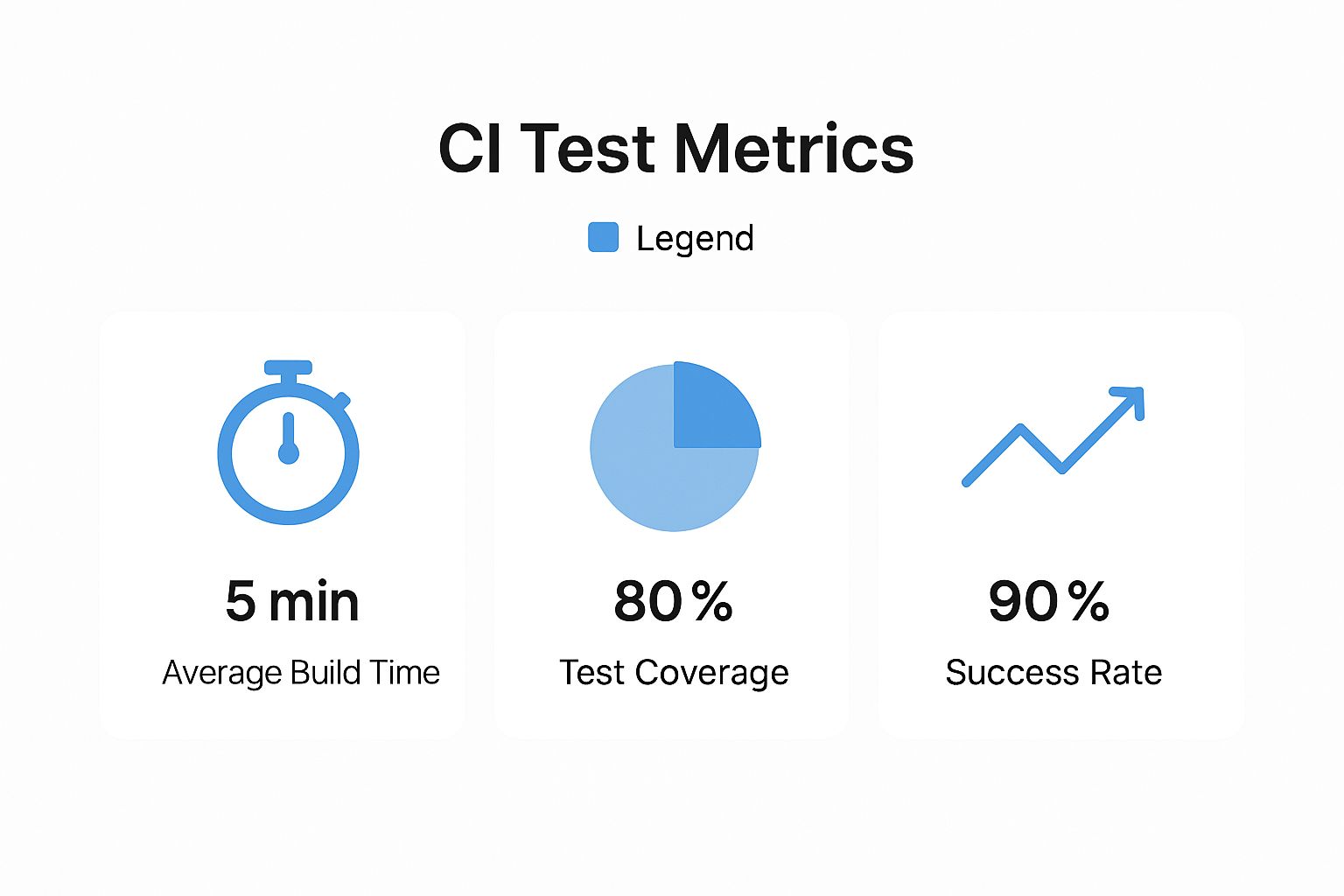
The image above shows what a healthy balance looks like: build times stay low, coverage is high, and the success rate is stable. That’s the sign of a solid continuous integration test strategy.
Comparing CI Testing Types
Every test type has its place, and knowing when to use each one is crucial for building an efficient CI pipeline. The table below breaks down the key differences to help you decide where to focus your efforts.
| Test Type | Scope | Execution Speed | Ideal Use Case |
|---|---|---|---|
| Unit Test | A single function or component in isolation. | Very Fast | Validating specific business logic and individual code behaviors. |
| Integration Test | Interaction between two or more components. | Fast | Verifying API endpoints, database connections, and service interactions. |
| End-to-End Test | The entire application workflow from start to finish. | Slow | Simulating critical user journeys, like a signup or purchase process. |
Choosing the right mix depends entirely on your application’s needs, but this gives you a great starting point for making those decisions.
Selecting the Right Tools and Frameworks
Once you have a strategy, it’s time to pick the tools to make it happen. Your technology stack is the biggest factor here. A Java project might use JUnit for unit tests and Selenium for E2E, while a JavaScript project could lean on Jest and Cypress.
The goal is to choose frameworks that integrate smoothly with your CI server, whether that’s Jenkins, GitHub Actions, or GitLab CI. This tight integration is what powers the automated feedback loop that’s so central to CI, automatically triggering the right tests on every commit.
Your tools should make it simple to write, run, and analyze tests. Look for features like parallel execution to speed things up and clear reporting to help developers diagnose failures without a headache. Building a solid plan is the first step, and for a deeper look, check out our complete guide on creating a successful test automation strategy.
Finally, remember that your test suite is a living, breathing part of your codebase. It needs maintenance, refactoring, and improvement—just like your application code. As you ship new features, you have to add new tests. By thoughtfully building and caring for your continuous integration test suite, you’re creating a powerful asset that helps your team ship high-quality software with speed and confidence.
Best Practices for Maintaining a Healthy CI Pipeline
A CI pipeline is a lot like a high-performance engine. When it’s running smoothly, it’s a massive asset, but it needs regular maintenance to stay that way. Just setting it up and walking away isn’t enough.
Over time, even the best pipelines can get bogged down—becoming slow, unreliable, and clogged with junk. This completely undermines the speed and quality CI was supposed to deliver in the first place.
Think of it as a highway system. When it’s working well, developers can merge changes into the main branch without any friction. But neglect it, and you’ll get bottlenecks and breakdowns, grinding all development to a halt.
The good news is, a few proactive strategies can keep your CI engine humming. It all boils down to optimizing for speed, guaranteeing test reliability, and building a culture where everyone owns the health of the build.
Speed Up Your Builds
The number one complaint I hear about CI pipelines is that they just get too slow. A build that drags on for an hour completely shatters the fast feedback loop that makes CI so powerful. By the time it finishes, developers have already moved on, and the context for fixing a bug is long gone.
Your primary goal should be to keep build times under ten minutes. Here’s how you get there:
- Parallelize Your Tests: Stop running tests one by one. Modern CI tools are built to run tests in parallel, splitting the work across multiple machines or containers. This is easily the most effective way to crush long build times.
- Optimize Your Test Suite: Every so often, take a look at your test suite. You’ll often find a few slow, poorly written tests causing major bottlenecks. Refactor them.
- Use Caching: Cache your dependencies and build artifacts. Not having to download or rebuild everything from scratch on every single run can shave precious minutes off your build time.
Fast builds keep your pipeline an express lane for shipping code, not a frustrating traffic jam.
Eliminate Flaky Tests
A “flaky test” is one that passes sometimes and fails other times, even when the code hasn’t changed. These are the potholes in your CI highway. They’re incredibly damaging because they destroy the team’s trust in the entire process.
Before you know it, developers start ignoring build failures, just assuming it’s “that flaky test again.” That’s when real bugs slip through.
A flaky test is worse than no test at all. It introduces noise and uncertainty, undermining the reliability of your entire continuous integration test strategy. Treat every flaky test as a critical bug and fix it immediately.
Getting rid of flakiness takes discipline:
- Isolate and Quarantine: The moment you spot a flaky test, pull it from the main pipeline. Don’t let it block other developers.
- Investigate the Root Cause: Open a high-priority ticket to figure out why the test is unreliable. It’s usually a timing issue, a dependency on an external service, or messy test data.
- Rewrite or Delete: Fix the problem. If you can’t, it’s often better to just delete the test and replace it with something more reliable.
Foster a Culture of Ownership
A healthy pipeline isn’t just one person’s job—it’s a team responsibility. Everyone who commits code owns a piece of the build’s health. You want to foster a mindset where a broken build is a “stop-the-line” event, and the whole team feels empowered to jump in and fix it.
This cultural shift is even more critical as automation becomes standard. Recent data shows that 46% of development teams have already replaced half or more of their manual testing with automation. With such a heavy reliance on automated suites, a broken CI pipeline is more than an inconvenience; it’s a showstopper.
By focusing on speed, reliability, and shared ownership, you can turn your CI pipeline into a true strategic asset. For a deeper dive, check out our guide on continuous integration best practices.
Common Questions About Continuous Integration Testing
As teams start folding CI into their workflow, a few questions and hurdles always seem to pop up. Moving from theory to practice uncovers real-world obstacles that need clear, practical answers. Here’s how to tackle the most common ones and get your CI testing strategy on the right track.
How Do We Handle Database Testing in CI?
Database testing is usually the first big speed bump. Unlike your application code, which is typically stateless, databases have… well, state. That makes automated testing a bit tricky. The secret is to create a totally fresh, predictable environment for every single test run.
A solid, widely-used approach is to spin up a temporary database for each CI build. This could be an in-memory database for speed or a dedicated containerized one using something like Docker. Before any tests kick off, you “seed” this database with a very specific, known set of test data. Now, every test starts from the exact same baseline, wiping out any chance of flaky results.
Once the tests are done, that temporary database is simply destroyed. This whole process gives you complete isolation, ensures tests can’t mess with each other, and keeps your CI pipeline clean and reliable every time.
What Is the Best Way to Manage Test Data?
Right after solving the database problem, the next logical question is how to handle all that test data. Hardcoding data directly into your tests is a recipe for a maintenance nightmare. A far better strategy is to keep your test data separate from your test code.
Here are a few proven ways to manage test data that actually work:
- Fixture Files: Keep your test data in simple, human-readable files like YAML or JSON. Commit them right alongside your code. Your tests can then load this data when they run, making it super easy to see, manage, and version your test scenarios.
- Data Generation Libraries: For more complex situations, you can use libraries like Faker to generate realistic-but-fake data on the fly. This is perfect for testing edge cases or when you need a ton of data without checking massive files into your repository.
- Database Seeding Scripts: As we just talked about, these are scripts that load your test database with a predefined dataset before a test run. This guarantees a consistent starting point for any test that hits the database.
The goal is to treat your test data just like you treat your code. It needs to be version-controlled, easy to manage, and completely separate from any real production data. Getting this right prevents a whole class of data-related test failures and makes your test suite infinitely more robust.
By separating your test logic from your test data, you’re building a testing setup that can actually scale.
How Do We Start with a Large Legacy Codebase?
Trying to add a continuous integration test strategy to a massive, existing codebase with few or no tests can feel completely overwhelming. The key is to avoid trying to do everything at once. You have to start small and be strategic.
First, focus your energy on new code and critical bug fixes. Make a simple rule for the team: no new feature or bug fix gets merged without automated tests to back it up. This immediately stops the bleeding and lets you start building a test suite organically.
Next, find the most critical or high-risk parts of your existing application. These are usually the areas that change all the time or would cause the biggest problems if they broke. Start by writing “characterization tests” for these modules—these are tests that don’t change the code but simply document its current behavior. This creates a safety net, giving you the confidence to refactor those areas later on.
Over time, this incremental approach builds a solid testing foundation without derailing development or demanding a huge upfront investment. It’s a marathon, not a sprint. Every single test you add makes the whole system more stable and reliable, proving the value of CI one commit at a time.
For teams that want to test their applications against the chaos of real-world scenarios, GoReplay offers a powerful alternative. It lets you capture and replay live production traffic in your staging environment. This is the ultimate integration test—using actual user behavior as your test suite to make sure your updates are rock-solid before they go live.