
Mastering Capacity Planning for Web Applications
Capacity planning for web applications is all about looking ahead and figuring out the resources you’ll need to keep your app fast, reliable, and online. Think of it as a strategic playbook that keeps you from getting knocked offline during a traffic surge, saving you from lost revenue and a tarnished reputation.
Why Your Business Can’t Afford to Ignore Capacity Planning
Let’s be honest, “capacity planning” sounds like a dry, technical task best left to the IT department. But in reality, it’s the critical difference between a thriving online business and one that crumbles under the pressure of its own success. Getting this wrong has immediate and painful consequences.
Imagine you’ve just launched a massive Black Friday campaign, only to have your website crash the second the traffic starts pouring in. Every minute of downtime is a direct hit to your sales and your brand’s credibility. Or consider a more subtle failure: a consistently slow app that frustrates users into abandoning their shopping carts or sign-ups, silently bleeding revenue day after day. This isn’t just about managing servers; it’s a fundamental business strategy.
Establishing Your Performance Baseline
Good capacity planning isn’t guesswork. It’s a data-driven process that kicks off by setting clear, measurable goals for your application’s performance. We call these Service Level Objectives (SLOs), and they are the absolute foundation of your strategy. Without them, you’re just flying blind.
An SLO is a specific, quantifiable target for your application’s reliability. For example, you might aim for 95% of user login requests to complete in under 200 milliseconds. This simple statement transforms a vague goal like “a fast website” into a concrete target your team can actually work toward and measure against.
To hit these goals, you have to define SLOs for core metrics like your maximum acceptable response time, target throughput (like handling 1,000 requests per second), and your uptime commitment (say, 99.95% availability). Then, you must constantly measure real-world performance metrics—CPU utilization, memory usage, request rates—to see how you’re tracking. It’s an iterative loop of measuring, analyzing, and tuning to make sure your servers can handle whatever comes their way. For a deeper dive, check out the specifics of web server capacity planning and how these metrics come together.
The Core Metrics You Must Track
To build a plan that actually works, you need to be looking at the right data. It’s easy to get lost in a sea of metrics, but focusing on a few key areas will give you the insight you need to make smart decisions about your infrastructure.
Here’s a quick rundown of the essential metrics you should have on your dashboard. This table breaks down what to track and why it’s so critical for planning.
Core Metrics for Web Application Capacity Planning
A summary of the essential metrics you must track to effectively plan your web application’s capacity and meet your performance goals.
| Metric Category | Key Metrics to Track | Why It Matters |
|---|---|---|
| System Resources | CPU Utilization, Memory Usage, Disk I/O | These are the fundamental health indicators of your servers. High CPU or memory usage is often the first sign that your system is approaching its limits and needs scaling. |
| Application Performance | Response Time (Latency), Error Rate | Response time directly impacts user experience—it’s what they feel. A rising error rate can signal underlying software bugs or infrastructure problems that need immediate attention. |
| Traffic & Throughput | Requests per Second (RPS), Active Connections | This tells you exactly how much traffic your application is handling. Tracking RPS helps you identify peak hours and prepare for surges, ensuring your app stays online when it matters most. |
By keeping a close eye on these metrics, you move from reacting to problems to proactively managing your application’s health and performance. This is the core of effective capacity planning.
Profiling Your Traffic to Predict Future Demand

Effective capacity planning for web applications isn’t just about servers and specs—it starts with understanding people. Before you can hope to forecast your infrastructure needs, you have to dig into how real users actually interact with your application. This means going way beyond simple page-view counts to create detailed traffic profiles that tell the story of user behavior.
This is all about turning raw data into an actionable narrative. By diving into your historical data, you can uncover the natural rhythms of your user base: the daily lulls, the weekly peaks, and the seasonal surges that truly define your traffic. This insight is the foundation you’ll build on for a system that’s both resilient and cost-effective.
Defining Your Service Level Objectives
First things first: you need to define what “good performance” actually means for your application. Vague goals like “make the website fast” are completely useless for technical planning. You need concrete Service Level Objectives (SLOs) tied directly to specific user actions.
An SLO is a hard target for a performance metric. For example, you might decide that 99% of all product page loads must complete in under 500ms. Or perhaps the checkout process must maintain a success rate of 99.9%, even during your busiest sales event. These objectives give you clear, non-negotiable benchmarks for your testing and optimization efforts.
Think about the most critical user journeys. Which actions have a direct line to revenue or user retention? Those are the places where you need to set your most aggressive SLOs.
Analyzing Historical Traffic Data
With your SLOs in hand, it’s time to put on your data detective hat. Your server logs and analytics platforms are gold mines of information just waiting to be explored. The goal here is to spot the patterns that let you predict future demand with some real accuracy.
Start by looking for the obvious, predictable cycles in your traffic:
- Daily Patterns: When are your peak hours? For an e-commerce store, that might be weekday evenings. For a B2B SaaS platform, it’s almost always standard business hours.
- Weekly Trends: Does traffic reliably spike on certain days? Many food delivery apps, for instance, see their highest usage on Friday and Saturday nights.
- Seasonal Events: Pinpoint the big, calendar-driven events that cause massive traffic surges. For retailers, it’s Black Friday. For tax software, it’s the weeks just before the filing deadline.
Understanding these cycles is what allows you to be proactive instead of reactive. If you know a big marketing campaign is about to launch, you can look at data from similar past events to estimate the traffic increase and get your resources ready before the wave hits.
A classic mistake is to plan your capacity based on average traffic. The problem is, peak traffic can easily be 10 to 100 times higher than your baseline. A system built for the average will absolutely crumble when it matters most. Your planning has to be all about the peaks.
Mapping User Journeys to Resource Usage
Here’s a crucial point: not all user actions are created equal. Some interactions put a much heavier strain on your system than others. A key part of profiling is identifying these resource-intensive journeys and truly understanding their impact.
For example, a user just browsing static blog posts is barely touching your resources. Contrast that with a user who runs a complex search, applies a dozen filters, and then starts the checkout process. That single journey could trigger a cascade of database calls and API requests, consuming the load equivalent of a hundred simple browsers.
You need to create a map that connects your most common user journeys to their resource costs.
| User Journey | Key Actions | Primary Resource Impact |
|---|---|---|
| Product Discovery | Browsing categories, viewing product pages | Low (Primarily CDN and cache hits) |
| Personalized Search | Using search bar, applying filters | Medium (Database reads, search index) |
| Account Management | Logging in, updating profile, viewing order history | Medium (Database reads/writes, authentication service) |
| Checkout Process | Adding to cart, applying coupon, payment processing | High (Multiple database writes, API calls to payment gateways) |
This mapping exercise immediately helps you find your bottlenecks. If you discover that 80% of your server load is coming from just 20% of user actions (like search and checkout), you know exactly where to focus your scaling and optimization work to get the biggest bang for your buck. This targeted approach beats blindly adding more servers every single time.
Using Traffic Shadowing to Test Without Risk
What if you could test your application with real production traffic, but without a single user knowing? It sounds like magic, but this is exactly what traffic shadowing lets you do. It’s a game-changer for capacity planning for web applications because it moves you beyond synthetic, scripted scenarios that often miss the mark.
Instead of guessing what your users might do, traffic shadowing captures their actual behavior in real time. This live traffic gets duplicated—or “shadowed”—and replayed against a test or staging environment. Your production system hums along, completely untouched, while the test environment gets hit with the exact same messy, unpredictable, and authentic user activity happening right now.
How Traffic Shadowing Works with GoReplay
Tools like the open-source GoReplay make this surprisingly easy to set up. Think of GoReplay as a listener that you place on your production server. It silently captures incoming HTTP requests and forwards them to another endpoint you specify, like your staging server. This gives you a crystal-clear picture of how new code or infrastructure changes will hold up under a genuine production load.
Here’s a glimpse of the GoReplay interface, which offers a lot more than just basic forwarding.
As you can see, it provides sophisticated features for things like session-aware replay and deep analytics—both crucial for running tests that give you meaningful, actionable results.
This approach helps you answer critical questions before you deploy. Will that new API endpoint create a database bottleneck during peak traffic? Does the latest code refactor introduce a subtle memory leak under sustained pressure? Traffic shadowing finds these problems in a safe, isolated environment.
Real-World Scenario: An e-commerce site was gearing up for a massive Black Friday sale. Using GoReplay, they shadowed their live traffic to a staging environment running a new version of their checkout service. The test immediately uncovered a critical flaw their synthetic tests had missed: a third-party payment API was timing out under heavy load. By catching this, they were able to fix the integration, deploy with confidence, and sidestep a disaster that could have easily cost them millions in lost sales.
Best Practices for Shadowing Configuration
Getting the most out of traffic shadowing requires a bit more thought than just flipping a switch. You can’t just flood a test environment and hope for the best. A well-configured setup is key to ensuring your results are both accurate and useful.
Here are a few tips to get you started:
- Filter the Noise: You probably don’t need to shadow every single request. Consider filtering out static assets like images, CSS, or JavaScript files to focus the test on what matters—the dynamic, resource-intensive API calls that hit your database and business logic.
- Scale Your Replay Rate: You don’t always have to replay traffic at a 1:1 ratio. GoReplay lets you amplify the load by replaying at 2x, 5x, or even 10x the original speed. This is perfect for stress-testing your system to see how it will handle future growth or sudden marketing spikes.
- Anonymize Sensitive Data: You’re working with real user requests. It’s absolutely critical to have a process in place to scrub or anonymize any Personally Identifiable Information (PII) before it ever hits your staging environment’s logs or databases.
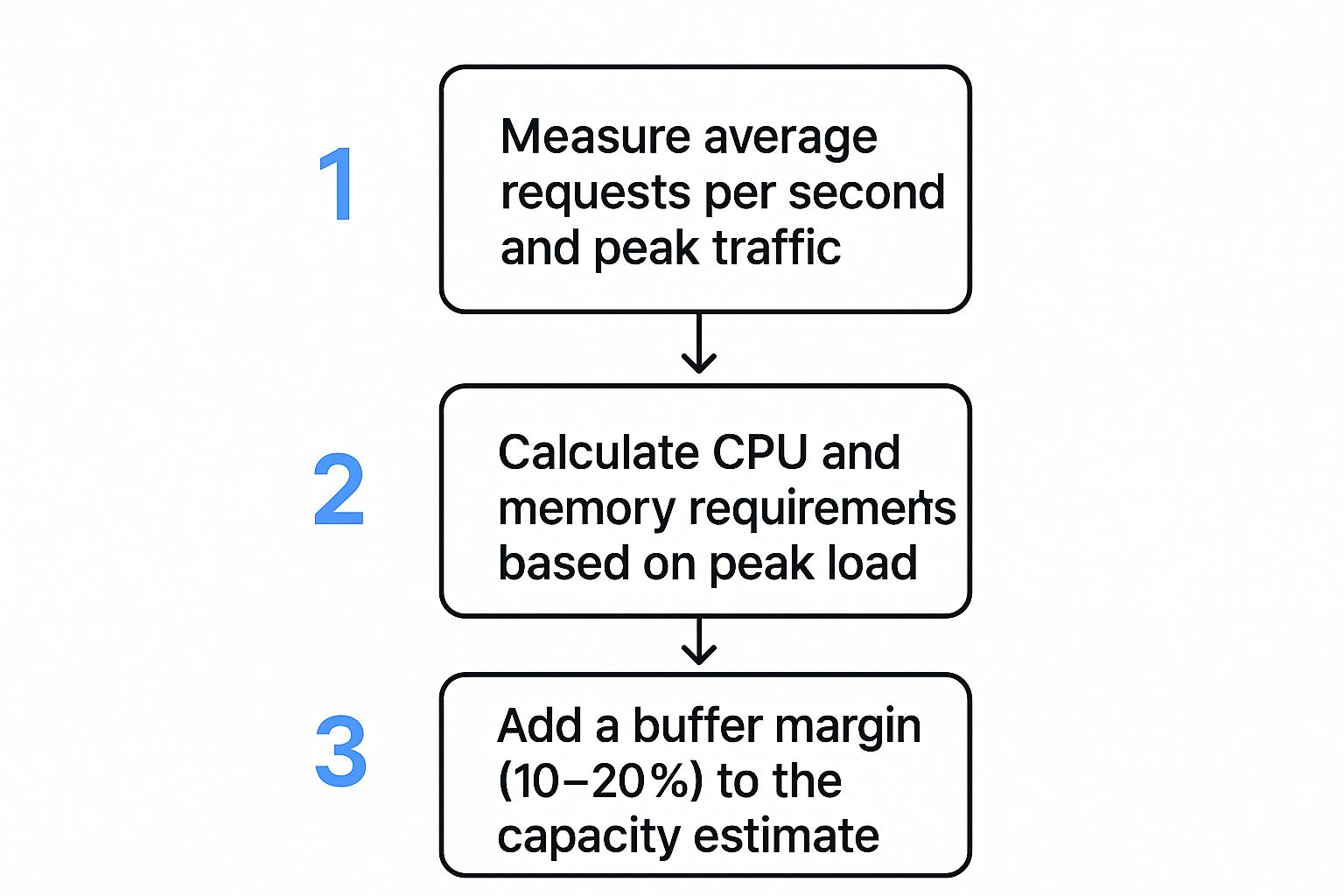
By following this process, you can make your capacity planning far more accurate. Shadowing helps validate every step, from initial traffic measurement to final resource allocation.
Running Load Tests That Give You Real Answers

Alright, you’ve profiled your traffic and have your tools ready. Now for the fun part: putting your system to the test. This is where capacity planning for web applications gets real, moving from theory to hard data. Running a load test isn’t about aimlessly throwing traffic at your app. It’s a scientific process designed to give you clear, actionable answers about how your system behaves under pressure.
Forget those generic, scripted tests. They rarely capture the messy, unpredictable nature of real user behavior. To get results that actually mean something, your tests need to simulate the specific, high-stress scenarios you discovered in your traffic profiles.
Choosing the Right Test for the Job
Not all performance tests are created equal. Each one answers a different question about your application’s resilience. Using the wrong one is like trying to turn a screw with a hammer—you might make something happen, but it won’t be the result you were looking for.
Let’s break down the main types and, more importantly, when to use them.
- Stress Tests: The goal is simple: find the breaking point. You methodically crank up the load on your system until something fails. This tells you the absolute upper limit of your current architecture and pinpoints the first component to buckle under pressure.
- Soak Tests (Endurance Tests): Think of these as a marathon, not a sprint. You run a moderate, sustained load for hours or even days. The whole point is to uncover sneaky problems like memory leaks or database connection pools that don’t show up until the system’s been running for a while.
- Spike Tests: These simulate those sudden, massive surges in traffic—think a flash sale or a post going viral. You’re testing how quickly your system can scale up to handle the insanity and how gracefully it recovers when things calm down.
So, which test should you run? It depends entirely on what you need to know. Gearing up for a big product launch? A spike test is your best friend. Worried about system stability over a long holiday weekend? A soak test will let you sleep at night.
Designing Tests Based on Traffic Profiles
Those traffic profiles you built are the blueprints for your load tests. A test for a B2B SaaS app with steady 9-to-5 usage will look nothing like one for a consumer app that gets hammered on Friday nights.
For instance, if your profiling showed the checkout flow is your most resource-hungry user journey, your load test script should hammer that specific workflow. You can get deep into creating these kinds of realistic scenarios by exploring techniques for accurate session-based performance testing, which helps ensure your tests truly mimic how users interact with your site.
Here’s how you might map tests to different real-world situations:
| Scenario | Primary Goal | Recommended Test Type | Key Metrics to Watch |
|---|---|---|---|
| Black Friday Sale | Survive a massive, sudden traffic surge | Spike Test | Autoscaling response time, error rate under peak load, payment gateway latency |
| New Feature Launch | Ensure stability for a new, complex feature | Stress Test | CPU/Memory on specific microservices, database query performance, API response times |
| Long-Term Stability | Find hidden issues like memory leaks | Soak Test | Gradual increase in memory usage, open file descriptors, database connection counts |
The most insightful tests push your system just beyond its expected limits. If you’re bracing for a peak of 10,000 concurrent users, design your stress test to hit 12,000 or even 15,000. This buffer shows you exactly what happens when things get worse than you planned.
Monitoring Vital Signs During a Test
When a load test is running, you’re like a doctor monitoring a patient’s vital signs. Just checking if the site is “up” or “down” is nowhere near enough information. The real magic happens when you correlate user-facing metrics with what’s happening on your servers.
Your monitoring dashboard becomes your command center. You need to be tracking these key metrics in real-time:
- Response Time (Latency): This is what the user actually feels. Don’t just look at the average; pay close attention to the 95th and 99th percentile response times. A decent average can easily hide a terrible experience for a small but important slice of your users.
- Error Rate: See a sudden jump in HTTP 500s or 503s? A rising error rate is a screaming signal that a component is either overloaded or failing completely.
- Throughput (Requests Per Second): This tells you how much work your system is actually doing. If you’re cranking up the load but your throughput has flatlined, you’ve almost certainly hit a bottleneck somewhere.
- System Resources: Keep a sharp eye on CPU Utilization, Memory Usage, and Disk I/O across your entire stack, from web servers to databases. A maxed-out CPU is a classic sign of either a hardware limit or some seriously inefficient code.
Reading these signals is an art. For example, if response times are slowly climbing but CPU and memory look fine, your bottleneck might be an external dependency, like a slow third-party API, or a database struggling with lock contention. By watching all these vitals together, you can diagnose the root cause instead of just patching the symptoms.
Right, so you’ve run your tests and now you’re swimming in gigabytes of performance data. This is where the real work begins. Collecting metrics is one thing, but turning those numbers into real, tangible improvements for your application is a whole different ballgame.
The analysis phase is all about bridging that gap—moving from a scary-looking chart with high latency spikes to a concrete plan of attack.
First things first, you need to prioritize. Not all bottlenecks are created equal. A slow-down in a rarely touched admin panel is an annoyance; a performance drag on your main checkout flow is a five-alarm fire.
A simple way to decide what to fix first is to weigh two things: business impact and implementation effort. That high-impact, low-effort fix—like optimizing a single, sluggish SQL query that’s gumming up the works—should jump straight to the top of your to-do list.
Choosing Your Scaling Strategy
Once you’ve zeroed in on a bottleneck, you’ll hit a fork in the road. How do you actually add more capacity? Your choice boils down to two main paths: scaling up or scaling out. The right answer depends entirely on your application’s architecture and the specific problem you’re trying to solve.
- Vertical Scaling (Scaling Up): This is all about making your current servers beefier. You add more CPU, throw in more RAM, or upgrade to faster storage on the same machine. It’s often the simplest path forward, especially for monolithic apps, but it has a hard ceiling. You can only make a single server so big.
- Horizontal Scaling (Scaling Out): Instead of one massive server, you add more machines to the pool. Think ten smaller servers humming along behind a load balancer. This is the go-to strategy for modern, microservices-based systems and gives you almost limitless room to grow.
For a new app, starting with a horizontal scaling mindset is usually the way to go. But if your bottleneck is a single, overworked database server, sometimes the most direct fix is to scale it vertically first.
The real magic happens when you mix and match. You might vertically scale your database server for raw power while horizontally scaling your stateless web application servers for flexibility. The trick is to match the scaling strategy to the specific part of your system that’s feeling the heat.
Common Optimization Techniques
Beyond just throwing more hardware at the problem, you can squeeze out massive performance gains by making your existing setup more efficient. After running detailed tests with load testing software, you’ll almost certainly find opportunities to optimize in a few key areas. If you’re still choosing a tool, check out our guide on what to look for when selecting your load testing software.
Here are some of the most impactful places to start digging:
- Database Query Tuning: This is the low-hanging fruit of performance optimization. I’ve seen a single, poorly written SQL query bring an entire application to its knees. Fire up your database’s query analyzer, find the slowest and most frequent queries, and get to work adding indexes or rewriting the logic.
- Implementing Caching Layers: Why bother the database if you don’t have to? A caching layer, using tools like Redis or Memcached, keeps frequently accessed data in super-fast memory. This slashes database load and makes response times for common requests incredibly quick.
- Using a Content Delivery Network (CDN): A CDN is a game-changer for static assets like images, CSS, and JavaScript. It copies these files to servers all over the world, so your users download them from a location that’s geographically close. This dramatically cuts latency and takes a huge load off your primary servers.
- Code Profiling and Optimization: Sometimes, the problem is just clunky code. Use a profiler to see exactly which functions are hogging all the CPU or memory. A bit of refactoring in these hotspots can lead to incredible performance boosts.
This proactive approach is exactly how the big players operate. Take Amazon Web Services (AWS), for example. They use AI-powered forecasting and tools like AWS Auto Scaling to manage their enormous global infrastructure. By dynamically balancing their resources, AWS improved service reliability by about 30% and cut costs. As explained in this deep dive on capacity planning from edstellar.com, these principles aren’t just for hyperscalers—they apply whether you’re managing a global network or a single web application.
The Future of Smart Capacity Planning

Let’s be clear: effective capacity planning for web applications isn’t a one-and-done task you check off a list. It’s a living, breathing process that has to adapt to new tech, shifting business goals, and whatever users throw at it next. The entire discipline is making a hard pivot away from last-minute, reactive fixes and toward an intelligent, predictive, and automated approach to managing resources.
The biggest game-changer here is the rise of AIOps (AI for IT Operations) and machine learning. These aren’t just buzzwords. These systems can chew through mountains of historical performance data, spot incredibly complex patterns, and predict future resource demands with an accuracy that makes manual forecasting look like guesswork. This is what lets us get ahead of the curve, scaling proactively and stamping out bottlenecks before they ever touch a user.
Emerging Priorities in Modern Planning
Beyond just getting smarter with automation, a couple of other major forces are reshaping how we think about capacity: cost efficiency and sustainability. The pressure to avoid overprovisioning has always been there financially, but now it’s getting a powerful nudge from a growing sense of environmental responsibility. A well-oiled plan doesn’t just save money; it directly contributes to a greener operation.
This shift in focus means we’re prioritizing a few key areas:
- Reducing Carbon Footprint: When you optimize server utilization, you’re directly cutting down on the energy consumption and carbon footprint of your data centers. It’s a simple equation.
- Cost Optimization: Intelligent, dynamic scaling ensures you only pay for the resources you actually need. In the cloud, this is non-negotiable for keeping costs from spiraling out of control.
- Regulatory Alignment: As compliance gets tighter in sectors like finance and healthcare, having precise, well-documented capacity planning becomes a business necessity, not just a best practice.
The core idea is shifting from “Can we handle the load?” to “How can we handle the load in the most efficient, cost-effective, and sustainable way possible?” This forward-looking perspective is key.
The ground is moving fast. Today’s best capacity strategies are built on real-time analytics and dynamic resource scaling, often stretched across hybrid and multi-cloud setups. This drive for agility and environmental responsibility is becoming a cornerstone of operational excellence. To get a better handle on where things are headed, it’s worth exploring the top capacity planning trends and statistics that are defining the field today.
Common Capacity Planning Questions
When you start digging into capacity planning for web applications, a few questions always seem to pop up. Let’s walk through some of the most common ones we hear from engineering and operations teams.
How Is This Different From Performance Testing?
One of the first things people ask is about the difference between capacity planning and performance testing. It’s a great question, and the distinction is important.
Think of it like this: performance testing is a specific action you take, while capacity planning is the overarching strategy. The tests you run—like stress tests or soak tests—are just tools in your toolkit. They give you the hard data you need to inform your broader capacity planning framework and validate your system’s real-world limits.
Capacity planning is the continuous strategic process of making sure your resources can handle future demand. Performance testing is a tactical event that gives you the crucial data points for that strategy.
Is This a One-Time Task?
Another frequent question is how often this whole process needs to happen. The short answer? Capacity planning is never truly “done.” It’s a living, breathing activity, not a project you can check off a list and forget about.
Your planning rhythm should be tied directly to your business and development roadmap. A good rule of thumb is to revisit your plan right before:
- Major feature launches that could change user behavior or put a new kind of load on your resources.
- Big marketing campaigns or sales events that you know will drive traffic spikes.
- Hitting growth targets, like quarterly or annual increases in your user base.
Can Startups Even Afford This?
Finally, we hear a lot from startups worried about the cost. There’s a common assumption that you need a suite of expensive, enterprise-grade tools to do this right.
That’s a myth. Effective capacity planning is about having the right principles and processes, not about pricey software. In fact, proactive planning almost always saves you money by helping you sidestep costly downtime and avoid the classic mistake of over-provisioning hardware “just in case.”
For teams on a tight budget, there’s a huge ecosystem of free and open-source tools that can get the job done beautifully. It just goes to show that being proactive about your infrastructure’s future is one of the smartest financial moves you can make, no matter how big your company is.
At GoReplay, we believe in testing with real-world scenarios, not just scripts. By capturing and replaying your actual production traffic, you can uncover issues before they impact customers, ensuring every deployment is a safe one. Discover how at https://goreplay.org.