
8 Key Benefits of Testing Automation in 2025

In a competitive software market, the pressure to accelerate release cycles while maintaining exceptional quality is immense. Manual testing, once a staple of quality assurance, is now a significant bottleneck. It’s slow, prone to human error, and struggles to scale with the complexity of modern applications. Relying solely on manual processes means slower feedback loops, increased risk of defects reaching production, and a higher total cost of ownership for your software projects.
This article moves beyond surface-level discussions to provide a detailed, actionable breakdown of the core benefits of testing automation. We will explore eight critical advantages that directly impact your development lifecycle, team productivity, and bottom line. From accelerating time-to-market to enhancing test coverage and enabling robust CI/CD pipelines, you will gain a clear understanding of how to implement automation strategically.
Each point is supported with practical examples and metrics, offering a roadmap for transforming your quality assurance from a cost center into a powerful driver of business value. You will learn not just what the benefits are, but how to realize them within your own organization, ensuring your team can deliver higher-quality software faster and more reliably.
1. Faster Test Execution and Reduced Time-to-Market
One of the most significant benefits of testing automation is the dramatic acceleration of the software development lifecycle. Automated test scripts execute tasks at a speed and frequency that is simply unattainable through manual effort. While a manual tester might spend days methodically working through a complex regression suite, an automated framework can run thousands of test cases overnight, providing comprehensive feedback by the next morning.
This continuous, high-speed execution eliminates bottlenecks and enables a much faster feedback loop for developers. Instead of waiting weeks for quality assurance (QA) sign-off, teams receive near-instantaneous validation after every code commit. This allows them to identify and fix bugs earlier in the development process when they are less complex and cheaper to resolve. The result is a substantial reduction in the overall time-to-market.
Real-World Impact on Release Velocity
Leading technology companies leverage this benefit to maintain their competitive edge. For instance, Amazon famously executes automated tests continuously, supporting a deployment cycle that averages a new production release every few seconds. Similarly, Netflix relies on a massive suite of automated tests to confidently deploy code changes thousands of times per day, ensuring new features and fixes reach customers without delay.
The following infographic highlights key metrics demonstrating how automation accelerates delivery pipelines.
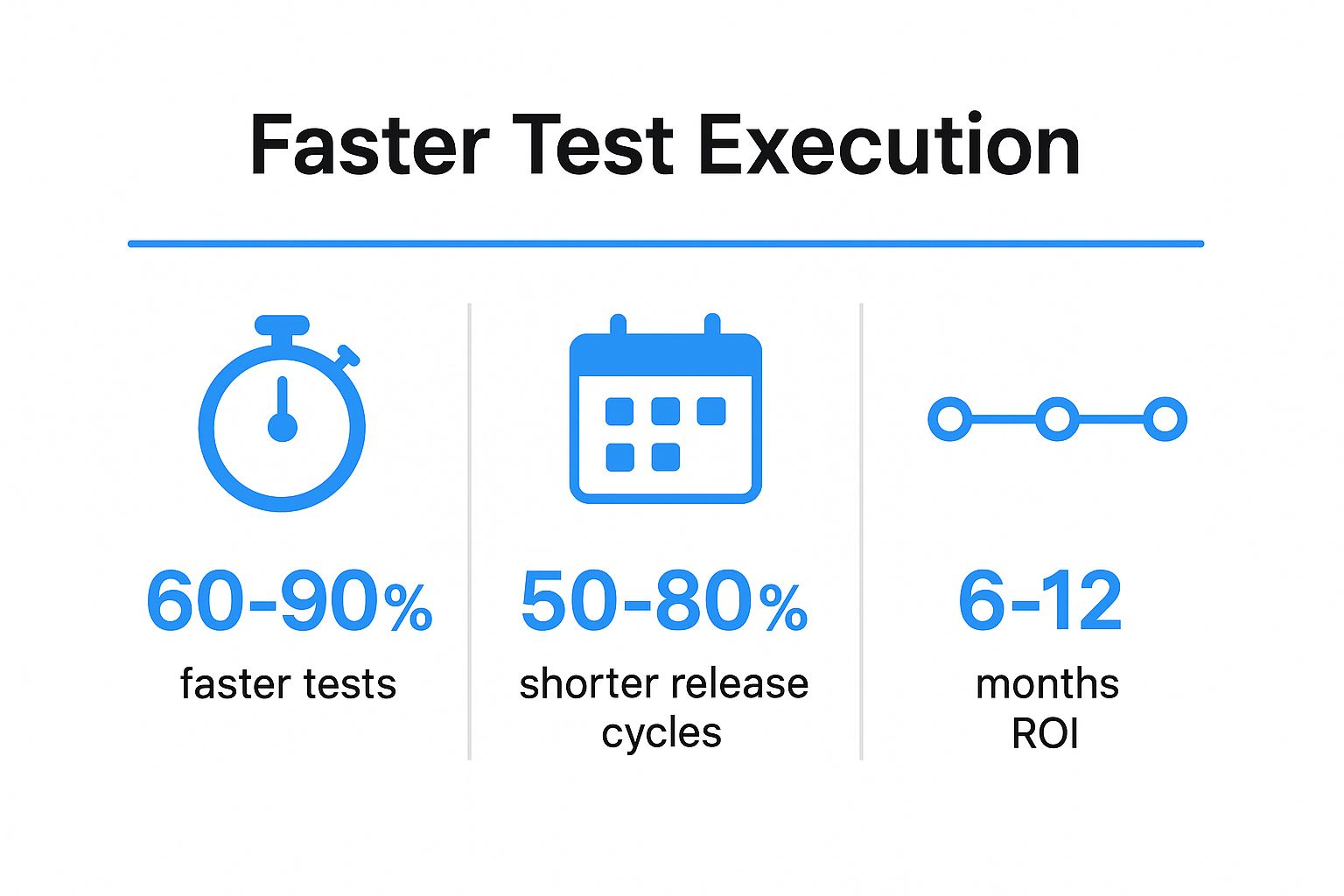
These figures illustrate a clear correlation between automation and efficiency, showing that organizations can expect to see a return on their investment within the first year.
Actionable Strategies for Implementation
To achieve these results, a strategic approach is essential.
- Start with High-Impact Scenarios: Begin by automating smoke tests and critical-path user journeys. These “quick wins” provide immediate value and build momentum for the automation initiative.
- Integrate into CI/CD Pipelines: Embed automated tests directly into your Continuous Integration/Continuous Deployment (CI/CD) pipeline. This ensures that tests run automatically with every code change, making quality an integral part of the development process from day one.
- Leverage Parallel Execution: Use cloud-based testing platforms to run multiple tests simultaneously across different environments and browsers. This drastically cuts down the total execution time for your entire test suite.
- Schedule Off-Peak Execution: Maximize resource utilization by scheduling long-running test suites to execute during off-peak hours, such as nights and weekends.
2. Improved Test Coverage and Quality
Another core benefit of testing automation is the ability to achieve a breadth and depth of test coverage that is simply not feasible with manual testing. Automation allows teams to execute thousands of test cases across a vast matrix of devices, browsers, operating systems, and data combinations. This systematic approach ensures that even obscure edge cases and uncommon user pathways are thoroughly validated, leading to a significant reduction in escaped defects and a higher quality final product.
By removing the constraints of human capacity, automated tests can meticulously check every feature with every release. This relentless consistency guarantees that new code changes do not inadvertently break existing functionality, thereby maintaining application stability and reliability over time.

Real-World Impact on Product Reliability
Top-tier organizations rely on expansive automated test coverage to protect their brand and user experience. For instance, Google uses automation to validate Chrome’s functionality across more than 150 device configurations and over 20 operating systems before each release. Similarly, Salesforce maintains a staggering 100+ million automated tests to ensure quality across its massive platform, a scale impossible to manage manually. This comprehensive coverage is fundamental to delivering a consistently reliable service.
These examples underscore how automation directly translates to superior product quality, catching bugs that manual efforts would likely miss and building customer trust through dependable performance.
Actionable Strategies for Implementation
To maximize test coverage and quality, a deliberate strategy is crucial.
- Implement Data-Driven Testing: Create test scripts that pull input data from external sources like spreadsheets or databases. This allows you to cover thousands of data permutations and boundary conditions with minimal code.
- Integrate Visual Regression Tools: Use tools like Applitools or Percy to automatically detect unintended visual changes in the user interface. This is especially effective for catching UI bugs across numerous page variations.
- Prioritize with Risk-Based Testing: Focus your initial automation efforts on high-risk, business-critical areas of the application. Use code coverage tools to identify gaps and ensure essential functionalities are always protected.
- Automate Negative Test Scenarios: Systematically include tests that validate how the application handles invalid inputs and unexpected user behavior. This ensures the system is robust and gracefully manages error conditions.
3. Significant Cost Reduction Over Time
While testing automation requires an initial investment in tools, infrastructure, and skilled personnel, it delivers substantial long-term financial returns. Automated tests replace the immense manual effort required for repetitive regression testing, freeing up human testers to focus on more complex, exploratory scenarios. This shift dramatically reduces the person-hours needed for each release cycle.
Furthermore, automation catches bugs earlier in the development process when they are exponentially cheaper to fix. A defect found in production can cost over 100 times more to resolve than one identified during the coding phase. By preventing these costly late-stage issues, automated testing directly lowers development expenses and mitigates the financial risks associated with production failures, such as system downtime and customer churn.
Real-World Impact on ROI
The financial benefits of testing automation are well-documented across industries. For example, HP reported saving an estimated $830,000 annually by automating just 500 test cases. In another case, British Telecom achieved a remarkable 85% reduction in their testing costs through a strategic automation initiative. Similarly, a major financial institution slashed its annual QA budget from $2 million to just $400,000 by effectively leveraging automation, showcasing a clear and powerful return on investment.
These examples underscore how a well-implemented strategy translates directly into significant operational savings, making automation a key driver of financial efficiency.
Actionable Strategies for Implementation
To maximize the cost-saving potential of automation, a focused approach is necessary.
- Calculate and Track ROI: Begin by calculating your potential ROI, considering direct costs (tools, labor) and indirect savings (cost of production bugs, faster time-to-market). Continuously track metrics like “cost per test execution” and “defect cost avoidance” to validate your investment.
- Prioritize High-Value Tests: Focus initial automation efforts on high-frequency, high-risk test scenarios, such as regression suites and critical business workflows. Automating these first will deliver the fastest and most significant ROI.
- Leverage Open-Source Tools: Minimize initial software licensing costs by adopting powerful open-source frameworks like Selenium, Cypress, or Playwright. This allows you to allocate more of your budget toward building skills and robust infrastructure.
- Build for Maintainability: Invest in creating a scalable and maintainable test framework from the start. Well-structured, reusable test scripts drastically reduce long-term maintenance costs, which can otherwise erode your savings.
4. Enhanced Accuracy and Reliability
One of the core benefits of testing automation is the exceptional level of precision it brings to the quality assurance process. Automated scripts execute predefined steps with perfect consistency every time, eliminating the risk of human error. Manual testing, while valuable for exploratory scenarios, is susceptible to mistakes like skipped steps, incorrect data entry, or inconsistent verification, especially during repetitive tasks.
Automation removes these variables. Every test runs exactly as designed, ensuring that any detected failure is a genuine product defect, not a testing error. This reliability is crucial for building confidence in the software’s stability and is non-negotiable in regulated or mission-critical industries. Automated tests do not suffer from fatigue, distraction, or subjective interpretation, providing objective and repeatable results that form a trustworthy baseline for quality.
Real-World Impact on Mission-Critical Systems
This level of accuracy is essential where failure is not an option. For example, NASA leverages extensive automated testing for its flight software, where 99.99%+ reliability is a baseline requirement for mission success. In the healthcare sector, medical device companies depend on automated validation to meet strict FDA compliance standards, which often mandate 100% test accuracy. Similarly, financial services firms use automation to create verifiable audit trails for SOX compliance, ensuring every transaction is processed correctly.
These industries rely on automation not just for efficiency but for the guarantee of precision. The integrity of their systems and their regulatory standing depend on the unwavering accuracy that only automated testing can provide.
Actionable Strategies for Implementation
To maximize the accuracy and reliability of your test suite, consider these strategies:
- Implement Robust Test Data Management: Ensure each test run starts with a clean, consistent, and predictable dataset. This prevents data from a previous test from influencing the outcome of the next.
- Use Assertions and Checkpoints Liberally: Validate every critical state and outcome within your test scripts. Don’t just check the final result; verify intermediate steps to pinpoint failures with greater accuracy.
- Create Comprehensive Test Logs: Configure your framework to produce detailed logs and screenshots upon failure. These artifacts are indispensable for debugging and provide a clear audit trail for compliance purposes.
- Address Flaky Tests Immediately: Regularly review test results to identify and remediate “flaky” tests that fail intermittently. These tests erode trust in the automation suite and must be fixed or quarantined promptly.
5. Better Resource Utilization and Team Productivity
One of the most transformative benefits of testing automation is its ability to optimize your most valuable asset: your team. Automation liberates skilled QA professionals from performing mundane, repetitive regression checks, allowing them to redirect their expertise toward high-value activities. Instead of just confirming that existing features still work, they can focus on complex exploratory testing, user experience evaluation, and designing sophisticated test strategies that require human intuition and creativity.
This shift doesn’t just benefit QA; it creates a more efficient ecosystem for developers as well. With automated tests providing immediate feedback on code changes, developers can identify and resolve defects while the context is still fresh in their minds. This eliminates long waits for manual verification, reduces context switching, and significantly boosts overall team productivity and morale.

Real-World Impact on Team Productivity
Companies that embrace automation see a clear redefinition of roles and a surge in efficiency. For instance, LinkedIn successfully transitioned its QA team from spending 80% of their time on manual testing to dedicating 80% to strategic quality initiatives after implementing a robust automation framework. Similarly, Mozilla was able to reassign half of its QA team to focus on critical exploratory testing after automating its extensive regression suites. These examples show how automation empowers teams to work smarter, not harder.
The following data further illustrates how optimizing team focus leads to tangible improvements in product quality and team satisfaction. You can discover more about how automation enhances team productivity and drives strategic growth.
Actionable Strategies for Implementation
To effectively reallocate resources and boost productivity, a thoughtful approach is necessary.
- Create Clear Role Definitions: Establish distinct responsibilities that balance automated script maintenance with essential manual and exploratory testing. This ensures all aspects of quality are covered without overlap.
- Provide Upskilling Opportunities: Invest in training and mentorship to help manual testers develop automation skills. This empowers your team, improves job satisfaction, and builds a sustainable automation culture.
- Implement Developer-Friendly Frameworks: Choose and configure test frameworks that are easy for developers to use. When developers can run tests locally before committing code, they take greater ownership of quality and reduce the burden on QA.
- Measure Productivity and Morale: Track metrics beyond bug counts, such as developer wait times and team satisfaction surveys. Celebrate the productivity gains and quality improvements achieved through automation to reinforce its value.
6. Continuous Integration and Delivery Enablement
Test automation is the foundational pillar of modern DevOps practices, specifically Continuous Integration and Continuous Delivery (CI/CD). It acts as the quality gatekeeper within the automated pipeline, validating every code change before it progresses. This integration creates a rapid, self-reinforcing feedback loop where developers are alerted to issues minutes after a code commit, rather than days or weeks later.
By embedding automated tests directly into the CI/CD workflow, teams can confidently merge and deploy code multiple times a day. Automated scripts automatically verify that new changes haven’t introduced regressions or broken existing functionality. This enables a culture of continuous delivery, where software is always in a releasable state, fundamentally accelerating the development lifecycle while enhancing overall product quality.
Real-World Impact on Release Velocity
The world’s leading tech companies have built their deployment velocity on this principle. For instance, Google supports over 25,000 daily code changes by running more than four billion automated tests per day. Similarly, financial institutions like Capital One transitioned from sluggish quarterly releases to dynamic daily deployments by embedding test automation at the core of their CI/CD strategy. These examples showcase how automation is not just a benefit but a prerequisite for high-frequency, reliable software delivery.
This integration of testing into the delivery pipeline is a key aspect of modern software development. For a deeper understanding of this process, you can explore some well-established continuous integration best practices that successful teams follow.
Actionable Strategies for Implementation
To effectively integrate automation into your CI/CD pipeline, consider these strategies:
- Keep Tests Fast and Focused: Structure your tests for speed. Unit tests should run in under a minute, with integration and end-to-end suites completing in under 10 and 30 minutes, respectively, to avoid pipeline bottlenecks.
- Implement Test Parallelization: Drastically reduce overall pipeline execution time by configuring tests to run simultaneously across multiple agents or environments, rather than sequentially.
- Create Tiered Test Suites: Develop different test suites for various pipeline stages. Use lightweight smoke tests for pre-commit hooks and more comprehensive regression suites for pre-merge or post-deployment validation.
- Use Feature Flags for Continuous Deployment: Deploy new code to production behind feature flags. This allows you to continuously merge code while precisely controlling when new features are released to users, separating deployment from release.
7. Comprehensive Documentation and Knowledge Preservation
A significant, yet often overlooked, benefit of testing automation is its role in creating a living, executable form of documentation. Automated test scripts capture critical business rules, user workflows, and expected system outcomes in code. Unlike static documents that quickly become outdated, these tests must be actively maintained to pass, ensuring they accurately reflect current application behavior and preserve institutional knowledge.
This executable documentation provides an unambiguous source of truth for how the system is intended to function. When developers need to understand a feature or new team members are onboarding, they can review the corresponding tests to see practical examples of its usage. This process drastically reduces ambiguity and accelerates knowledge transfer, ensuring that critical information remains with the organization even as team members change.
Real-World Impact on Knowledge Transfer
The concept of using tests as documentation is a cornerstone of modern software development methodologies like Behavior-Driven Development (BDD). For instance, Cucumber, a framework created by Aslak Hellesøy, allows teams to write tests in a natural, business-readable language. This enables non-technical stakeholders to understand and validate system behavior, bridging the gap between business requirements and technical implementation. Similarly, companies like Shopify use their automated test suites as onboarding material for new developers, helping them quickly grasp the codebase and its intended functionality.
Actionable Strategies for Implementation
To transform your test suite into effective documentation, consider these strategies:
- Implement BDD Frameworks: Use tools like Cucumber or SpecFlow to write tests in a Gherkin syntax (Given-When-Then) that is easily understood by everyone on the team, including product owners and business analysts.
- Use Descriptive Naming Conventions: Name tests and test steps clearly and descriptively. A test name like
ShouldPreventCheckoutWithEmptyCartis far more informative thanTest_ID_1024. - Organize Tests Logically: Structure your test suites to mirror the application’s feature set or user journeys. This makes it intuitive for someone to find the tests relevant to the part of the system they are working on.
- Generate Living Documentation: Leverage tools like Allure or Serenity BDD to automatically generate rich, readable reports and documentation directly from your test execution results, providing an up-to-date view of application features.
8. Scalability and Test Reusability
Another core benefit of testing automation is its inherent ability to scale alongside your application. As software grows in complexity with new features and integrations, automated suites can expand to cover these additions without requiring a proportional increase in manual effort or resources. Test scripts, once created, become valuable, reusable assets that multiply the return on your initial investment.
This reusability is a powerful force multiplier. A single automated test can be run across different environments (development, staging, production), multiple product versions, and various browser or device configurations. This allows teams to validate application behavior at a scale that is simply unfeasible with manual testing. By building a library of reusable test components, organizations create a sustainable and efficient quality assurance process.
Real-World Impact on Enterprise Efficiency
Global technology leaders rely on this scalability to manage vast and complex product ecosystems. For example, Microsoft reuses its core automated test frameworks across more than 200 distinct products and services, ensuring consistent quality standards. Similarly, Salesforce shares automation frameworks across its multiple cloud products, successfully reducing duplicated testing efforts by over 70%. These examples demonstrate how a strategic approach to reusability drives enterprise-level efficiency.
The following infographic highlights key data points on how reusable test assets impact long-term project costs and coverage.
These figures show that designing for reusability not only saves time but also significantly enhances test coverage and reduces maintenance overhead.
Actionable Strategies for Implementation
To build a scalable and reusable automation suite, a principled design approach is crucial.
- Design with Reusability in Mind: From day one, structure your test framework to be modular. Use design patterns like the Page Object Model (POM) to separate test logic from UI element locators, making tests easier to maintain when the interface changes.
- Create Shared Test Libraries: Develop centralized libraries of common functions, test data, and utilities that can be shared across different teams and projects. This promotes consistency and avoids redundant code.
- Use Configuration Management: Implement a robust configuration system that allows the same test script to run in different environments (e.g., QA, UAT, Production) simply by changing a configuration file.
- Establish Cross-Team Standards: Define and enforce clear automation standards and best practices across the entire organization. This ensures all teams are building compatible and reusable test assets.
Benefits Comparison Matrix of 8 Key Automation Advantages
| Aspect | Faster Test Execution and Reduced Time-to-Market | Improved Test Coverage and Quality | Significant Cost Reduction Over Time | Enhanced Accuracy and Reliability | Better Resource Utilization and Team Productivity | Continuous Integration and Delivery Enablement | Comprehensive Documentation and Knowledge Preservation | Scalability and Test Reusability |
|---|---|---|---|---|---|---|---|---|
| Implementation Complexity 🔄 | Moderate to high; initial setup and script development needed | High; requires careful planning and broad test design | High; upfront tooling and training investment | Moderate; requires precise scripts and data management | Moderate; requires team training and role shifts | High; needs robust infrastructure and fast tests | Moderate; demands discipline in writing maintainable tests | High; needs architectural planning and framework design |
| Resource Requirements ⚡ | Requires parallel execution environment and CI/CD integration | Extensive device/browser matrix and data inputs | Investment in tools, infrastructure, and skilled engineers | Skilled automation engineers for test creation and upkeep | Training and upskilling for whole team | Continuous infrastructure for running many tests | Time and discipline for writing/documenting tests | Cloud or container infrastructure for large-scale tests |
| Expected Outcomes 📊 | 60-90% faster tests; 50-80% shorter release cycles | 15-60% increased bug detection; 70-90% code coverage | 20-70% QA budget savings; ROI in 6-18 months | 40-70% error reduction; 95%+ test stability | 30-50% productivity boost; faster developer feedback | 60-90% reduced lead time; 200x more frequent deploys | 30-50% reduced onboarding time; 40%+ better stakeholder understanding | 50-80% code reuse; 60%+ effort reduction cross-platform |
| Ideal Use Cases 💡 | Organizations aiming to accelerate releases and feedback loops | Teams needing broad, deep testing coverage and reliability | Companies seeking long-term QA cost efficiency | Projects demanding high test consistency and compliance | Agile/DevOps teams optimizing skilled resource usage | Teams implementing CI/CD pipelines with frequent deployments | Teams needing living documentation and knowledge transfer | Large, complex projects requiring reusable, scalable tests |
| Key Advantages ⭐ | Rapid feedback; supports continuous deployment; faster release | Covers complex, multiple scenarios; detects hard-to-find bugs | Significant cost savings; reduces manual effort | Eliminates human error; provides reliable, consistent results | Frees testers for high-value tasks; faster dev cycles | Prevents broken builds; fast developer feedback | Tests as living documentation; aids onboarding | Enables scalable testing; promotes framework reuse |
From Theory to Practice: Taking the Next Step in Automation
Throughout this article, we’ve explored the transformative power of test automation, moving beyond abstract concepts to examine tangible, real-world outcomes. The journey from manual, time-consuming testing to a streamlined, automated workflow is not merely an operational upgrade; it’s a strategic business decision. The compounding benefits of testing automation create a powerful flywheel effect: faster execution leads to quicker releases, which pleases customers and generates revenue sooner. Simultaneously, improved accuracy and expanded test coverage directly translate to higher-quality products, reducing the risk of costly post-release bugs and protecting your brand’s reputation.
We have seen how automation liberates skilled engineers from repetitive tasks, allowing them to focus on complex problem-solving and innovation, thereby boosting team productivity and morale. This strategic reallocation of human capital is one of the most underrated yet significant advantages. Furthermore, the integration of automation into CI/CD pipelines is no longer a luxury but a foundational element of modern software development, enabling the rapid, reliable delivery that today’s market demands. The ability to reuse and scale test suites ensures that these benefits grow with your application, providing a sustainable return on your initial investment.
Key Takeaways and Strategic Imperatives
To truly harness the power of automation, it’s essential to distill these benefits into a clear action plan. Your primary takeaways should be:
- Automation is an investment, not an expense: The upfront cost and effort are repaid multiple times over through reduced manual labor, faster development cycles, and fewer critical bugs in production.
- Coverage quality over quantity: While automation allows for broader coverage, the true goal is meaningful coverage. Your tests must reflect real user behavior and critical business workflows to be effective.
- Empowerment through efficiency: Automation is a force multiplier for your team. It removes bottlenecks, reduces human error, and fosters a culture of quality and continuous improvement.
Your Actionable Next Steps
Translating this knowledge into practice requires a deliberate and phased approach. Begin by identifying the most critical, repetitive, and high-risk areas of your application. These are your prime candidates for initial automation efforts. Start small, prove the value with measurable metrics like reduced testing time or bug detection rates, and then strategically expand your automated suite.
A crucial challenge that often emerges is the creation of realistic test data and scenarios that accurately mirror production environments. Simulating user behavior is notoriously difficult, and synthetic data can miss subtle, real-world edge cases. This is where advanced tooling can bridge the gap. Consider integrating solutions that capture and replay actual user traffic. This method ensures your automated tests are running against authentic, dynamic scenarios, validating system performance and reliability under true production conditions. This final step elevates your testing strategy from a simple check to a genuine dress rehearsal for live deployment, providing the ultimate confidence that the benefits of testing automation are fully realized.
Ready to validate your system with real user traffic? Discover how GoReplay can elevate your automated testing strategy by capturing and replaying production scenarios, ensuring your application is truly battle-tested. Visit GoReplay to learn how to bridge the gap between staging and production.