
A Guide to Automated Test Engineering in Modern Software Development

Automated test engineering is the discipline of designing, building, and maintaining systems that test software automatically. But it’s not just about writing a few scripts to hunt for bugs. It’s about applying real software engineering principles to the entire practice of quality assurance. The goal is to create robust, scalable testing frameworks that become a natural, integrated part of the development lifecycle.
The Architect Behind Software Quality

Here’s a good way to think about it: an automated test engineer isn’t like a building inspector who shows up after construction to manually check for cracks. They’re more like the architect who designs a self-diagnosing skyscraper from the ground up.
The inspector finds problems after they already exist. The architect, on the other hand, builds a system designed to prevent, detect, and report on issues automatically. That mindset shift is the very core of automated test engineering.
This is a move beyond simple, repetitive checks. It’s about engineering durable and maintainable testing systems that give developers rapid, reliable feedback. In modern Agile and DevOps shops where speed and quality have to go hand-in-hand, this isn’t optional—it’s foundational.
Why This Discipline Is Essential Now
Let’s be honest, the demand for high-quality software delivered at a blistering pace has turned manual testing into a massive bottleneck. Automated test engineering breaks that bottleneck by treating testing as a first-class software development problem. This isn’t just a trend; it’s a financial and operational necessity for any organization that wants to stay competitive.
The numbers back this up. The global automation testing market is on track to grow from USD 28.1 billion in 2023 to a staggering USD 55.2 billion by 2028. This explosion is driven by the universal need for faster, more reliable software delivery. You can dive deeper into this growth in the full automation testing report.
This engineering-first approach is critical because it directly supports business goals. The aim isn’t just to find bugs; it’s to build genuine confidence throughout the entire development process.
The real purpose of test automation is not to replace human testers, but to augment them. It automates the soul-crushing repetitive tasks to free up human creativity for complex, exploratory testing where intuition and critical thinking really shine.
To truly appreciate the shift, let’s compare the old way with the new.
Manual Testing vs Automated Test Engineering At a Glance
This table breaks down the fundamental differences between traditional manual testing and the modern engineering discipline that’s replacing it.
| Aspect | Manual Testing | Automated Test Engineering |
|---|---|---|
| Primary Goal | Find defects in existing code. | Prevent defects and build confidence. |
| Method | Repetitive, human-driven execution. | Design and build reusable test systems. |
| Scope | Limited by human capacity and time. | Scalable across the entire application. |
| Feedback Loop | Slow (days or weeks). | Fast (minutes). |
| Key Skillset | Attention to detail, product knowledge. | Software development, systems architecture. |
| Role in CI/CD | A bottleneck or a separate phase. | A fully integrated, automated stage. |
The contrast is clear: one is a reactive process, while the other is a proactive engineering discipline designed for the speed of modern development.
The Core Goals in Practice
Ultimately, automated test engineering is built around a few key objectives that completely change how teams approach quality. The practice aims to:
- Accelerate Feedback Loops: Developers get immediate feedback on their code changes. This means they can fix issues in minutes, not days or weeks later when the context is lost.
- Improve Accuracy and Consistency: An automated system runs the same tests perfectly, every single time. This completely eliminates the human error that’s unavoidable in repetitive manual tasks.
- Enable True Exploratory Testing: By automating the routine checks, QA professionals are freed up to focus on high-value work—like usability testing, hunting for security vulnerabilities, and exploring weird edge-case scenarios that only a human can dream up.
This disciplined approach ensures that as your application gets bigger and more complex, its quality doesn’t suffer. Instead, the testing system scales right alongside it, creating a safety net that lets your team innovate and release new features with real confidence.
Core Principles and Goals of Test Automation

Real automated test engineering isn’t just about writing scripts to click buttons. It’s a discipline guided by principles that make sure the whole system actually delivers value.
Think of your automated test suite as the dashboard of a high-performance car. It’s not there just to tell you the engine blew up. It’s there to give you immediate, actionable feedback on the health of every single critical component, all at a glance.
A failing test is like a check-engine light—it signals a problem right now that demands attention. This rapid feedback is the absolute cornerstone of modern software development. It lets teams move fast without constantly breaking things.
The mission shifts from just “finding bugs” to enabling continuous delivery and building genuine confidence. It’s about creating a safety net so developers can refactor code, ship new features, and deploy to production knowing a robust system is watching their back.
The Testing Pyramid as a Blueprint
To build a healthy, efficient test suite, engineers lean on the Testing Pyramid. It’s a simple but incredibly powerful model for balancing different kinds of tests, making your strategy both effective and sustainable over the long haul.
It breaks tests down into three main layers:
- Unit Tests (The Foundation): This is the wide base of the pyramid. Unit tests check individual functions or components in total isolation. They’re lightning-fast to run and cheap to write and maintain. A strong foundation here is non-negotiable.
- Integration Tests (The Middle Layer): Moving up, these tests make sure different parts of your application play nicely together. For example, does your API talk to the database correctly? They’re slower than unit tests but crucial for catching problems where different systems meet.
- End-to-End (E2E) Tests (The Peak): At the very top, you have E2E tests, which simulate a real user’s journey through the application. While they give you the highest confidence that a feature works, they’re also the slowest, most expensive, and most brittle. Use them sparingly for your absolute most critical user workflows.
A classic mistake is to flip this pyramid upside down, creating a slow, flaky, and unmaintainable mess. A balanced approach is the only way to get a high return on your testing investment.
Goals Beyond Just Finding Bugs
Sure, catching defects is a nice perk, but the true goals of automated test engineering are much more strategic. The ultimate aim is never 100% automation; it’s about smart, targeted automation that speeds up the entire development lifecycle.
The goal should never be to automate yourself out of a job. On the contrary, tester augmentation frees up time for creativity, learning, and exploratory testing. It augments, not replaces, the tester.
This gets to the heart of it: the real value is in what automation enables.
The key strategic goals are:
- Providing Rapid Feedback: Tests must run automatically with every single code change, giving developers feedback in minutes, not hours or days. This slashes the cost and effort of fixing bugs.
- Ensuring Regression Coverage: Automated tests are your safety net. They guarantee that new changes don’t accidentally break something that was already working—a task that is nearly impossible for humans to do reliably at scale.
- Creating Living Documentation: A well-written test is executable documentation. It describes exactly how the system is supposed to behave, giving you a single source of truth that is always in sync with the code.
Designing a Robust End-to-End Testing Architecture
Let’s move from principles to practice. Building an effective automated testing system isn’t just about writing scripts; it demands a true architectural mindset. You’re not just creating one-off tests. You’re designing a sustainable, scalable system that grows right alongside your application.
Think of it like laying out a city’s electrical grid. A poorly planned grid is a recipe for constant brownouts. It’s impossible to repair and collapses under pressure. A well-architected one, on the other hand, is resilient, easy to maintain, and can handle a massive surge in demand without so much as a flicker. Your testing architecture needs that exact same level of thoughtful design.
This means you need clear patterns and practices that keep your test suites manageable, readable, and strong. Without a solid architectural foundation, even the most brilliantly written tests will eventually crumble into an unmaintainable mess we call “test debt.”
Key Architectural Patterns for Maintainability
To avoid that fate, engineers lean on proven design patterns that bring much-needed structure and scalability to test automation. Two of the most foundational are the Page Object Model (POM) for UI testing and Data-Driven Testing for separating logic from data.
- Page Object Model (POM): This pattern is a complete game-changer for UI automation. Instead of scattering UI selectors and interaction logic across hundreds of different test scripts, POM bundles all the elements of a specific page or component into a single, dedicated class. If the UI changes, you only have to update one file—not every single test that touches that page. The reduction in maintenance overhead is massive.
- Data-Driven Testing: This approach cleanly separates the test logic (the steps) from the test data (the inputs and expected outputs). The script is written just once, then it can run in a loop, pulling different data sets from a spreadsheet, database, or simple file. This makes it incredibly efficient to check countless scenarios, edge cases, and user inputs without duplicating a single line of code.
When you combine these patterns, you start to build a testing framework that’s both powerful and easy to live with, ensuring your efforts deliver real value for the long haul.
Integrating Tests into Your CI/CD Pipeline
A test architecture is only as good as its integration into the daily development workflow. This is where Continuous Integration/Continuous Deployment (CI/CD) becomes essential. Your automated tests absolutely must become a critical quality gate inside this pipeline.
What does that look like? Every time a developer commits new code, the CI/CD server automatically kicks off the relevant test suites. If even a single test fails, the build is immediately marked as “broken,” stopping flawed code in its tracks before it can move down the line or, worse, hit production. It creates a rapid, self-correcting feedback loop that’s central to modern development.
An automated test suite that isn’t plugged into a CI/CD pipeline is like a smoke alarm with no batteries. It might look the part, but it offers zero protection when you actually need it.
This automated gating process is fundamental to modern DevOps and a core pillar of any mature automated test engineering practice.
Bridging the Gap with Realistic Traffic Replay
While patterns like POM and data-driven testing are crucial, they often rely on synthetic, scripted scenarios. A truly robust end-to-end testing architecture also has to prove the system can handle the chaotic, unpredictable conditions of the real world. This is where a tool like GoReplay enters the picture.
GoReplay lets you capture real user traffic from your production environment and replay it against a staging or test environment. This technique bridges the critical gap between sterile test conditions and live production reality. Instead of just guessing what users might do, you’re testing with what they actually do. This is invaluable for:
- Realistic Load Testing: Simulating thousands of real user sessions to see how your infrastructure really holds up.
- High-Fidelity Regression Testing: Ensuring a new deployment can handle the exact same requests as the previous version without errors or slowdowns.
- Shadowing Deployments: Safely sending a copy of live traffic to a new service version to validate its stability before a full rollout.
This approach adds a powerful layer of confidence to any release. The market is clearly showing the need for more advanced testing, with the global software testing market projected to hit USD 93.94 billion by 2030. This growth is fueled by trends like AI integration, with 75% of enterprise engineers expected to use AI code assistants by 2028. You can find more insights in the automation testing industry research here. For those exploring tools to help design their end-to-end testing architecture, you might consider checking out e2eagent.io.
A Practical Workflow Using Traffic Replay with GoReplay
Theory is great, but let’s get our hands dirty. The real magic of automated test engineering happens when you see it in action. We’re going to walk through a practical, step-by-step workflow using traffic replay with GoReplay to validate a new feature deployment. This is how you move past brittle, synthetic scripts and start testing with the messy, unpredictable reality of live user traffic.
Picture this: a DevOps engineer is about to push a critical update to an e-commerce platform’s checkout service. A basic scripted test might confirm a user can add an item to their cart and pay. Simple enough. But what about the hundreds of weird edge cases, API interactions, and user behaviors that flood your production environment every day? That’s where traffic replay becomes a total game-changer.
The core of this process breaks down into three stages: Architect, Integrate, and Replay.
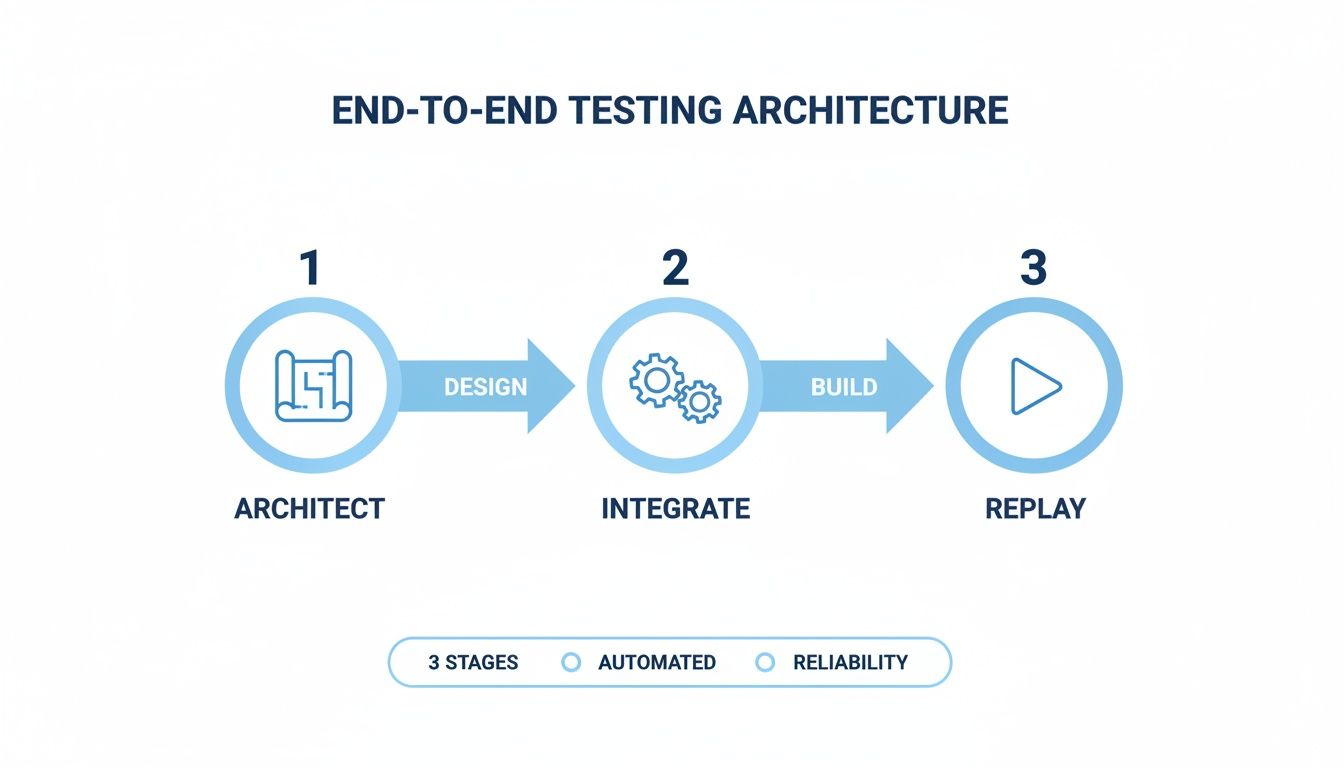
This simple flow drives home the point: replaying real traffic isn’t just a nice-to-have, it’s the final, crucial step to confirm your system can actually handle what your users throw at it.
Step 1: Capturing Production Traffic
First things first, you need to grab a realistic sample of traffic from your live production environment. Using GoReplay, the engineer deploys a lightweight listener agent right alongside the existing checkout service. This agent passively listens to all incoming HTTP requests without adding any noticeable latency or performance drag.
It’s critical to capture a representative sample. Think about snagging traffic during peak shopping hours or a big sales event to make sure your test data covers a wide range of real-world user interactions.
Step 2: Filtering and Masking Sensitive Data
Okay, you’ve captured raw traffic. Now for the most important part: handling sensitive information. Production traffic is packed with private user data—names, addresses, credit card details. Before this data ever leaves the production environment or gets written to a file, you use GoReplay’s middleware to filter and mask it.
This process involves a couple of key actions:
- Filtering Irrelevant Requests: You don’t need health checks or admin API calls for this test, so you strip them out.
- Masking PII: You replace any personally identifiable information (PII) with anonymized or placeholder data. Security and compliance are non-negotiable.
This step ensures your testing process is both secure and laser-focused on actual user behavior. Once the traffic is sanitized, it’s saved to a file, ready for the main event. For a deep dive into this crucial setup, check out our guide on the proper GoReplay setup for testing environments.
Step 3: Replaying Traffic Against a Test Environment
Now for the fun part. The new version of the checkout service is live in a staging environment that’s a mirror of production. The engineer points GoReplay at the sanitized traffic file and lets it rip against this staging server.
But this isn’t just a brute-force replay. GoReplay brings some serious intelligence to the table with features like session-aware replay and connection pooling. It simulates realistic user behavior by preserving session integrity, preventing your test from just becoming a stateless flood of requests that overwhelms the application.
This sophisticated approach is what modern automated test engineering is all about. This isn’t just a software trend; the value of this kind of hardware-software synergy is seen across industries. Automated test equipment (ATE) is now used in over 7,800 manufacturing facilities globally. The demand is especially intense in automotive electronics, where semiconductor testing is projected to account for over 27% of ATE demand by 2026. It all comes back to the need for reliable testing under real-world conditions.
Step 4: Analyzing the Results
As the traffic replay runs, the engineer keeps a close eye on the new service. The goal is simple: compare the responses from the staging environment with the original responses captured from production.
The analysis is all about spotting the differences:
- Functional Bugs: Are we seeing new 5xx server errors or unexpected 4xx client errors?
- Performance Regressions: Has the average response time for key endpoints jumped up?
- Data Inconsistencies: Do the responses from the new service contain different data than the old one?
By using real production traffic, the engineer can unearth subtle bugs and performance bottlenecks that synthetic tests would have almost certainly missed. This workflow delivers high-fidelity validation, giving the team the confidence to deploy the new feature knowing it has been rigorously tested against the only benchmark that truly matters: reality.
Best Practices and Key Metrics for Success
Having a solid test architecture is a great start, but what separates the winners from the losers in automated testing are the day-to-day practices. Get them right, and your tests deliver real, tangible value. Get them wrong, and you’ll drown in a sea of maintenance and noisy, untrustworthy failures.
The core idea is simple: treat your test code like you treat your production code. That means it belongs in version control, it goes through peer reviews, and it’s written with clean, readable design in mind.
Without that discipline, a test suite inevitably rots. It becomes a fragile, unreliable system that everyone on the team learns to ignore. A few key habits can stop this decay before it starts, laying the groundwork for a system that actually helps you move faster.
Foundational Best Practices
To build a healthy and sustainable test automation program, you need to integrate a few non-negotiable practices into your workflow. Think of these as the bedrock of reliable automated test engineering.
- Write Atomic and Independent Tests: Each test should check one specific thing and never, ever depend on another test’s outcome. This isolation makes debugging a failure exponentially faster because you know exactly what behavior broke.
- Keep Scripts Simple: A test script is not the place for fancy
if-elseblocks, loops, or complex calculations. Keep it direct and to the point. If a test is getting complicated, that’s a huge red flag that it’s probably trying to do too much. - Manage Test Environments and Data: An unstable environment will always produce flaky, unreliable results. Period. Make sure your environments are consistent and that test data is reset to a known, clean state before every single run. It’s the only way to guarantee your tests are reproducible.
Test code is not second-class code. It should be written, reviewed, and maintained with the same professional standards as the application code it is meant to validate. Neglecting it is a direct path to technical debt and a failing test suite.
Measuring What Truly Matters
Forget vanity metrics like how many tests you ran last night. Success in automated testing is measured by its real-world impact on your development cycle and product quality. The right dashboard tells a clear story about your program’s health and proves its value.
These are the metrics you should be laser-focused on.
- Mean Time to Detect (MTTD): How long does it take to find a bug after it’s introduced? A low MTTD is your holy grail. It means your automated tests are catching issues almost immediately in the CI/CD pipeline, right where they should be.
- Mean Time to Resolution (MTTR): Once a bug is found, how long does it take to fix it? A low MTTR is a sign of a healthy feedback loop, where developers get clear, actionable reports from the tests and can jump on a fix right away.
- Test Suite Execution Time: If your full regression suite takes hours to run, developers will start ignoring it. You need to keep that execution time as low as possible to maintain a rapid, useful feedback loop.
- Flaky Test Rate: A flaky test is one that passes and fails randomly without any code changes. This number needs to be as close to 0% as humanly possible. Flaky tests are poison; they erode all trust in your entire automation suite.
- Code Coverage (with a Caveat): Coverage is a useful guide, but it’s not the goal. It shows which lines of code were executed, not if they were tested correctly. Use it to find blind spots in your codebase, but don’t chase 100% coverage like it’s the ultimate prize.
The table below breaks down these essential KPIs, shifting the focus from just running tests to engineering a truly quality-driven process.
Essential Metrics for Automated Test Engineering
| Metric | What It Measures | Why It Matters |
|---|---|---|
| Mean Time to Detect (MTTD) | The average time from when a bug is introduced to when a test finds it. | A low MTTD means your tests are effective at catching issues early in the development cycle. |
| Mean Time to Resolution (MTTR) | The average time it takes to fix a bug after it has been detected. | Indicates the efficiency of your feedback loop and how actionable your test failure reports are. |
| Test Suite Execution Time | The total time required to run a specific test suite (e.g., full regression). | Shorter times mean faster feedback for developers, which is critical in a CI/CD environment. |
| Flaky Test Rate | The percentage of tests that pass and fail intermittently without code changes. | A high rate erodes trust in the entire test suite. The goal should always be 0%. |
| Code Coverage | The percentage of code lines executed by the test suite. | Helps identify untested areas of the codebase but doesn’t guarantee quality on its own. |
Tracking the right metrics transforms your testing from a simple checklist item into a strategic advantage. It gives you the data you need to make smart decisions and continuously improve your process.
For a deeper analysis, you might be interested in our article which covers more essential metrics for software testing.
The Common Traps That Derail Test Automation
Getting started with automated testing is one thing, but avoiding the common traps that turn a promising initiative into a maintenance nightmare is another. Plenty of teams start with the best intentions, only to find themselves bogged down by efforts that create more problems than they solve.
One of the biggest mistakes is chasing the myth of 100% automation. It sounds great in a meeting, but in practice, it’s a disaster. Think of it like this: you wouldn’t spend a fortune paving a rarely used hiking trail deep in the woods. The return just isn’t there. The same logic applies here. Trying to automate every single test case, especially obscure edge cases or constantly shifting UI components, creates a brittle and unmanageable test suite.
The real goal is smart, strategic automation focused on what actually matters.
Creating Brittle and Unstable Tests
Another massive pitfall is writing “brittle” tests. A brittle test is like a house of cards—the smallest change in the application, like a minor UI tweak, causes the whole thing to collapse. This usually happens when tests are built on fragile foundations, like specific CSS paths, instead of stable identifiers designed for testing.
When a simple button color change breaks ten different tests, developers lose faith fast. The suite gets a reputation for being “flaky,” full of noise and false alarms, until eventually, the team just starts ignoring the failures. That’s a dangerous place to be.
The moment your team says, “Oh, just ignore that failure, it’s probably the test being flaky,” your automation strategy has already started to fail. Trust is the currency of a successful test suite.
Build resilience into your tests from day one. Use stable selectors, implement smart waits instead of hard-coded delays, and use proven design patterns like the Page Object Model (POM) to keep UI changes from wrecking your entire test suite.
Forgetting About Maintenance and Test Environments
Finally, many teams treat test code like a second-class citizen. They let it rot. A test suite without ongoing maintenance is like a garden without a gardener—it quickly gets overrun with weeds until it’s completely useless. Your test code deserves the same respect as your production code: version control, code reviews, and regular refactoring.
Tied directly to this is the problem of an unstable test environment. You can have the best tests in the world, but if you run them on a flaky or poorly configured server, the results are meaningless. If your test environment doesn’t reliably mirror production, you can’t trust what it tells you. You’ll waste hours trying to figure out if a failure is a real bug or just another hiccup in the environment.
Getting this right requires a shift in how you think:
- Be ruthless with prioritization: Focus your automation on critical user paths and stable features.
- Build for resilience: Write tests that can handle minor application changes without breaking.
- Treat test code like real code: Give it the same discipline and respect you give your production code.
Steer clear of these pitfalls, and your automated testing will become a powerful asset that helps you move faster and build confidence, not a constant source of frustration.
Frequently Asked Questions
Jumping into automated test engineering brings up a lot of questions, whether you’re a developer, QA pro, or a manager trying to see the bigger picture. Here are some straight answers to the most common ones.
Test Automation Versus Automated Test Engineering
What’s the real difference? People often use these terms interchangeably, but they operate on completely different levels.
Test automation is the act of writing a script to run a repetitive test. It’s a specific task, like automating a login sequence or a checkout flow. It’s focused on a single, manual process and making it hands-off.
Automated test engineering, on the other hand, is the discipline of building the entire system. It’s about designing scalable test architectures, choosing the right tools, weaving tests into the CI/CD pipeline, and defining the metrics that tell you if you’re actually succeeding.
Think of it like this: a bricklayer (automation) lays bricks, but an architect (engineering) designs the entire building. One is a task, the other is owning the entire quality strategy.
How to Prioritize Your First Automated Tests
It can be tough to know where to begin. The classic Testing Pyramid is your best friend here, helping you focus your efforts for the biggest and fastest payoff.
Here’s where you’ll get the most impact:
- Unit Tests First: Build a massive foundation of unit tests. They’re fast, cheap, stable, and give developers instant feedback right where they’re coding.
- Then, Integration Tests: Next, shift your focus to integration tests for your most important workflows. Think about critical API endpoints and key spots where different services have to talk to each other.
- Finally, Selective E2E Tests: Be extremely picky with end-to-end (E2E) UI tests. These are the slowest and most brittle tests you’ll write, so only automate the absolute must-have user journeys.
A good rule of thumb is to start with stable features, regression suites, and any task that’s mind-numbingly tedious or easy for a human to mess up. That’s how you get the most value right out of the gate.
Can Traffic Replay Replace Other Testing?
So, can a tool as powerful as GoReplay just replace everything else? In a word, no.
Traffic replay is a game-changing addition to a modern testing strategy, but it’s not a silver bullet. It’s brilliant for realistic load testing, high-fidelity regression tests, and seeing how your system really behaves under the pressure of real-world conditions. Nothing else comes close to that.
But you absolutely still need other types of tests. Unit tests are non-negotiable for checking small, isolated pieces of code. And you’ll always need sharp-eyed manual and exploratory testing to find weird usability quirks and edge cases that would never show up in your captured traffic. GoReplay fills a massive gap, but it shines brightest as part of a multi-layered defense.
Ready to bridge the gap between staging and production? GoReplay helps you test with the reality of live traffic, ensuring your updates are robust and reliable before they ever reach a user. Start replaying real traffic today at https://goreplay.org.