
Array in SQL: How Postgres, MySQL and Oracle Differ
Ask a room of developers whether SQL has an array type and most hands go up for PostgreSQL only. Ask what happens to a stored list when the database changes, and the hands come down. The gap between those two answers is where most array problems start.
Syntax is the easy part, and it’s the part tutorials spend all their time on. The harder part is that the same logical list gets stored, indexed and returned differently in every engine. A design that reads well in one database can lose rows, skip an index or fail a migration somewhere else. Getting an array in SQL right means choosing the storage model before you type the brackets.
Array Support in Major Databases at a Glance
Start with the answer that decides your schema. PostgreSQL ships a native array type. MySQL and SQL Server don’t, so lists there usually live in JSON columns or a child table. Oracle has declared collection types, and SQLite handles lists through its JSON1 functions.
The table pairs each engine’s storage choice with the question people skip, which is whether a membership filter can use an index at all. Read the last column first. It decides whether “does this list contain x” is an indexed lookup or a scan of every row in the table.
| Database | Native array type | Typical alternative | Membership index support |
|---|---|---|---|
| PostgreSQL | Yes, typed one-based arrays | Not needed for most cases | GIN index with && and @> operators |
| MySQL | No | JSON column or child table | Multi-valued index on a JSON array, or index on the child table |
| SQL Server | No | JSON text parsed with OPENJSON | Computed column over JSON_VALUE, or a child table |
| Oracle | Yes, VARRAY and nested table types | PL/SQL collections or nested tables | Index on the nested table or a child table |
| SQLite | No | JSON1 functions such as json_each | Expression index on json_extract() |
PostgreSQL is the outlier in a useful way, since one column type covers storage, containment and indexing without extra machinery. Oracle’s collections are declared types rather than a casual column choice, so filtering one usually means MEMBER OF or TABLE(). MySQL, SQL Server and SQLite all push you toward JSON, which stores the list as text and parses it while the query runs.
Design rule: confirm the engine you run today and the engine you expect to run in two years before you commit a list to a column.
Three different things get called an array, and separating them saves hours. The first is a list stored inside one column, which is what text[] and a JSON array both are. The second is a declared collection type, Oracle’s VARRAY being the clearest case, where the type is a schema object in its own right. The third is a set of rows standing in for a list, the ordinary relational answer where each element gets a row and a foreign key.
The practical consequence is blunt. A schema that depends on native arrays will not move unchanged to MySQL or SQL Server, and the bill lands on whoever owns the queries that filter by membership. Settle that before the column exists.
What an Array Is in SQL and Why It Behaves Differently
Picture a row as a mailbox. An array column lets one mailbox hold a single parcel with several items inside, so the items travel together and arrive in one read. A child table gives each item its own box. Both store the same information, but only one of them lets the post office check every item against a list of valid addresses.
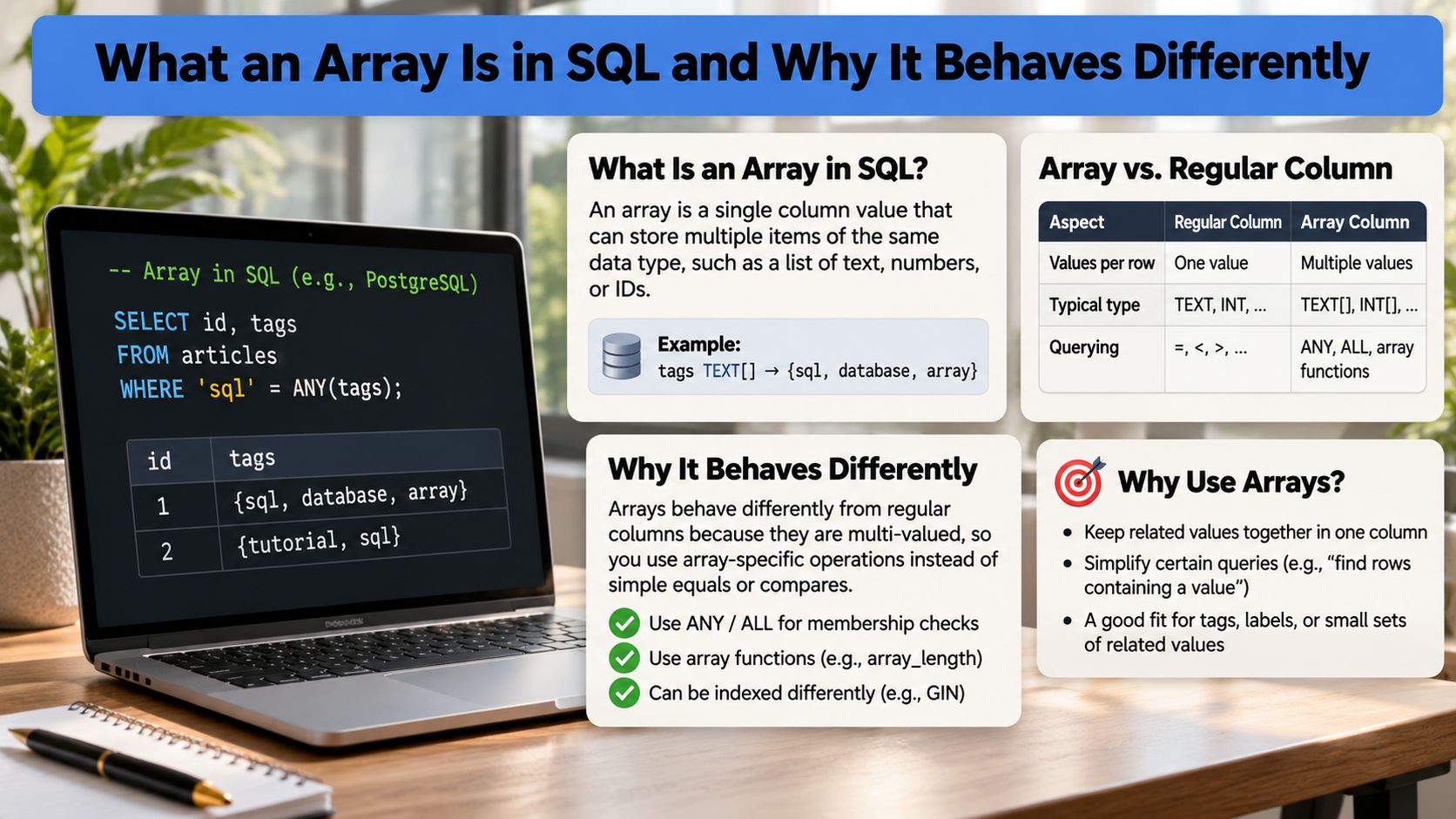
In PostgreSQL, an array is an ordered, typed collection whose elements are addressed with square-bracket subscripts, as the PostgreSQL documentation on arrays sets out. Order is part of the value, so {sql,postgres} and {postgres,sql} are different arrays. Type is enforced as well, which means a text[] column rejects an integer or a date.
Why the first element sits at position one
Arrays are one-based by default, so an array holding n elements spans indexes 1 through n. That’s ordinary for SQL and surprising for anyone arriving from JavaScript, Java or Go, where counting starts at zero. Convert indexes at the database boundary, because a mismatch there becomes an off-by-one defect that survives every unit test and appears in production on the last row of a page.
Reading a position that doesn’t exist returns NULL instead of raising an error, which is forgiving in a way that hides bugs. Multidimensional arrays add another wrinkle, since PostgreSQL treats them as one matrix rather than an array of arrays, so asking for the first sub-array doesn’t return what a nested Python list would.
Three NULL states that look alike and don’t behave alike
Test NULL behaviour early. A NULL array, an array containing NULL elements and an empty array are three distinct states, and the same predicate returns different results for each. tags IS NULL is true for the first and false for the other two. A containment test against a NULL array returns unknown, which a WHERE clause then discards.
A NOT NULL DEFAULT '{}' column removes the first state entirely, which is why so many production schemas set it. The empty array still needs a decision, because it matches no containment predicate and produces zero rows from an expansion.
The syntax is easier to watch than to read, so here’s a short walkthrough before the operator set matters.
The operator set is small. || concatenates two arrays, && tests for any shared element, @> and <@ test containment in each direction, and array_position finds the index of a given value. Those five cover nearly every real query.
Arrays earn their place with tags, feature flags and permitted region codes, values that belong to one row, get read as a set, and change when the row changes. They struggle when an element needs its own foreign key, its own uniqueness rule, its own update path, or a join at high cardinality. Those are the cases where a child table gives the database something it can enforce.
How to Create, Fill and Query an Array Column
The steps below run in order against a PostgreSQL database. Each one ships with the reason it works and the mistake that usually follows it.
-
Create the column with an empty-array default.
CREATE TABLE articles (id serial PRIMARY KEY, tags text[] NOT NULL DEFAULT '{}');The default means a row without tags stores a real value rather than NULL, so later filters never meet the unknown state. Leaving the column nullable gives you three states to handle in every query instead of two. -
Insert values in either literal form.
INSERT INTO articles (tags) VALUES ('{sql,postgres}'), (ARRAY['indexing','gin']);Both forms store the same value, and theARRAY[...]constructor is easier to build when your driver sends parameters. The slip here is pasting user input into the literal string, which is an injection risk and a quoting bug at the same time. Bind the array as a parameter. -
Filter with containment and overlap.
SELECT id FROM articles WHERE tags @> ARRAY['sql'];returns rows whose array includes sql, whileWHERE tags && ARRAY['gin','indexing'];returns rows sharing any one of those elements. Comparing with a bare string (WHERE tags = 'sql') compares the whole array against a one-element array and matches nothing.
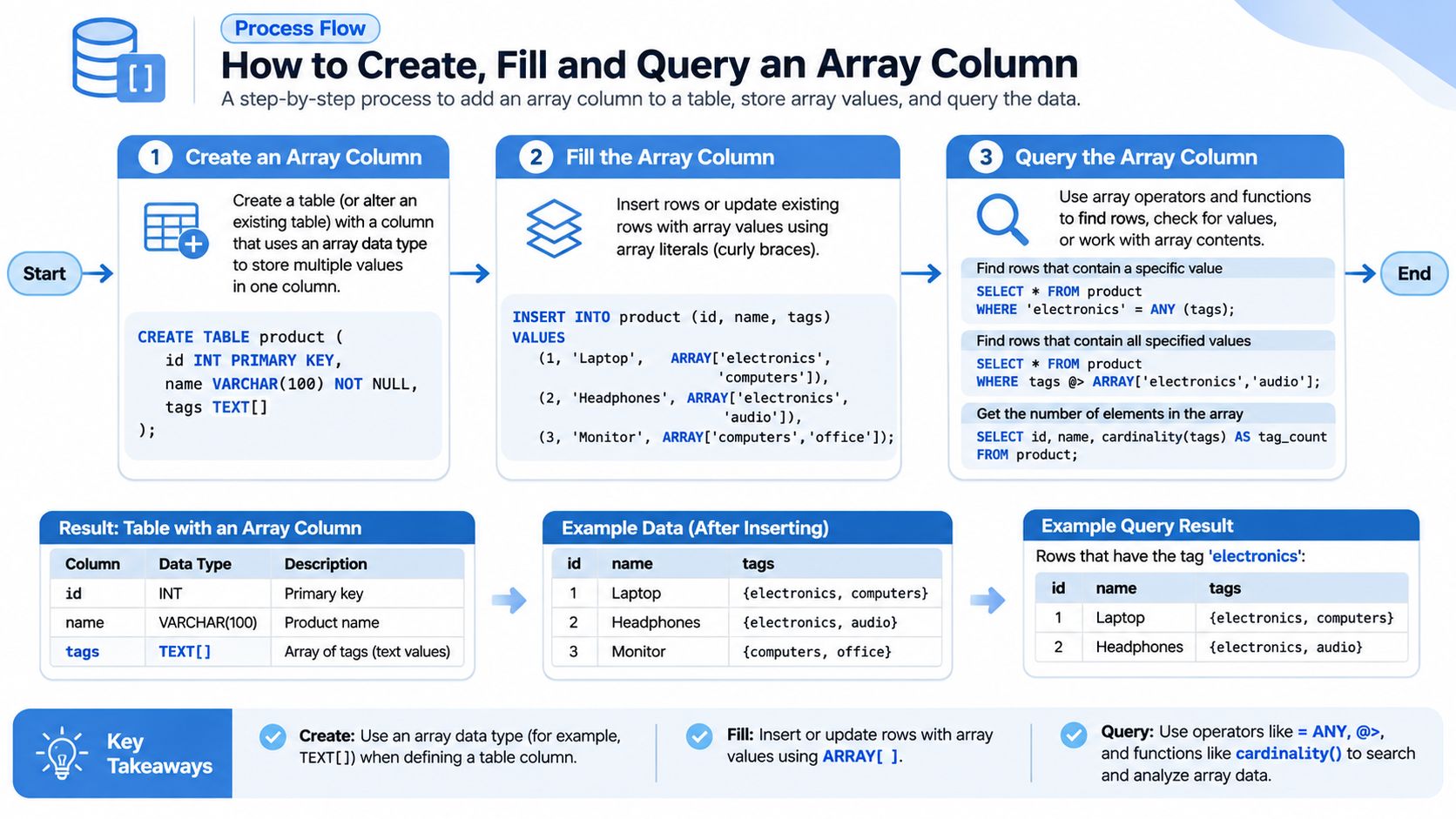
The process below condenses those first steps into one flow, which helps when you’re writing the statements from scratch.
-
Read a single position.
SELECT tags[1] FROM articles;returns the first element, because subscripts start at one. Two traps live inside that one bracket:tags[0]returns NULL without complaint, andtags[1:1]returns a one-element array rather than the value itself, which matters the moment the result feeds a comparison. -
Expand to one row per element.
SELECT id, unnest(tags) AS tag FROM articles;turns each array into rows, so a table of 100 articles carrying 4 tags each returns 400 rows. That multiplication is the point of the function and the cause of inflated counts when you join the result without aggregating first. -
Index the column.
CREATE INDEX articles_tags_idx ON articles USING GIN (tags);gives the planner an inverted structure it can use for containment and overlap. A B-tree on the same column mostly earns its keep for whole-array equality, which is rarely the query you write. -
Check the plan.
EXPLAIN (ANALYZE, BUFFERS) SELECT id FROM articles WHERE tags @> ARRAY['sql'];should mention a bitmap index scan onarticles_tags_idx. Wrapping the column in a function, or testing with'sql' = ANY(tags), gives the planner a scalar comparison it can’t match to the index, so the scan falls back to sequential. On a small table the planner may choose that scan and be right, which is why step 7 belongs on production-sized data.
Equivalent Array Syntax in MySQL, SQL Server and Oracle
When the same list has to run on a second engine, this table is the one to keep open. Treat each cell as the shape of the pattern, then confirm the exact form against the engine documentation for the version you deploy.
Two differences cause most of the migration pain. Position is the first. PostgreSQL and Oracle count from one, so the first item sits at tags[1] or tags(1). MySQL and SQL Server read JSON paths that start at $[0], so the identical first element lives at index 1 in one engine and index 0 in another, and any code that carries an index across a boundary needs a conversion.
Typing is the second. JSON_TABLE and OPENJSON need explicit column definitions, or a WITH clause, before they return typed values. Skip that step and a number arrives as a string, which makes WHERE value > 10 compare text and return the wrong rows without an error.
| Operation | PostgreSQL | MySQL (JSON) | SQL Server (JSON) | Oracle |
|---|---|---|---|---|
| Store a list | tags text[] | tags JSON | tags NVARCHAR(MAX) with ISJSON check | tags declared as VARRAY or nested table type |
| Test membership | tags @> ARRAY[‘sql’] | JSON_CONTAINS(tags, JSON_ARRAY(‘sql’)) | EXISTS over OPENJSON(tags) where value = ‘sql' | 'sql’ MEMBER OF tags |
| Expand to rows | unnest(tags) | JSON_TABLE(tags, ’$[*]’ COLUMNS …) | OPENJSON(tags) | TABLE(tags) |
| Read by position | tags[1] (one-based) | JSON_EXTRACT(tags, ’$[0]’) (zero-based) | JSON_VALUE(tags, ’$[0]’) (zero-based) | tags(1) (one-based) |
| Append an element | array_append(tags, ‘new’) | JSON_ARRAY_APPEND(tags, ’$’, ‘new’) | JSON_MODIFY(tags, ‘append $’, ‘new’) | EXTEND and assign in PL/SQL |
Appending splits the same way. array_append returns a new array value that you assign back to the column, while the JSON functions return a modified document. Oracle needs EXTEND to grow the collection and an assignment to store it, which is a different mental model from an operator that returns a value.
Oracle rewards planning here, because the collection type is part of the schema rather than a column decoration. If you’re wiring up the Oracle side of a comparison, the CREATE TABLE patterns for Oracle cover the type declaration step before the table gets built.
Some cells above are sketches of the pattern rather than complete statements, so verify version support and exact syntax before anything reaches production. The structural lesson holds regardless: the same list is a first-class value in one engine and a parsed text document in the next.
Passing a List Into a Query
Plenty of searches for array in SQL are really about sending a list from application code into a statement, not storing one. That’s a different problem with different failure modes.
-
PostgreSQL, bind one array parameter.
WHERE id = ANY($1::int[])sends a single parameter and keeps one cached plan, instead of generating 500 placeholders for 500 IDs. The plan stays stable as list length changes, which is the whole benefit. -
Short fixed lists belong in the statement.
WHERE status IN ('open','closed')is fine when the values are part of the business rule, because the statement text never changes and the plan can be reused. -
MySQL has no array parameter, so send the list as a JSON array, expand it with
JSON_TABLE, and join against the result. Treat it as a derived table rather than trying to interpolate values into anINclause. -
SQL Server takes JSON text read through
OPENJSON, or a table-valued parameter when the list is large and the types matter. The TVP route keeps type safety and avoids parsing a string on every call. -
Oracle wants a declared collection type, bound as a parameter and expanded with
TABLE(). A fixedINlist works for short enumerations, but a growing list pushes you toward the collection type.
Concatenating user values into SQL text is the failure that matters most, because it invites injection and produces a different statement for every list length. Keep these transient lists separate from stored arrays, too. A list needed for one statement should never become a column.
Indexing and Performance Costs of Array Columns
A GIN index works like the index at the back of a book. Each element in the array becomes a searchable key, and each key points at the rows that contain it, so the engine can intersect those pointer lists instead of reading every page. The PostgreSQL GIN index documentation describes exactly that mapping, with each indexed array element stored as a key linked to a posting list or posting tree of row identifiers.
The built-in array_ops operator class supports &&, @>, <@ and array equality, which is why CREATE INDEX ... USING GIN (tags) covers the predicates people write. Any query using a different formulation, including scalar equality wrapped around the column, falls outside that support and goes back to scanning.
What the index costs on writes
The same structure that speeds reads adds work in the other direction. Every insert, update and delete has to maintain the element entries, and building the index takes longer than building a B-tree over the same rows. A row carrying six tags produces six index entries, so a bulk load that looks cheap on the table can be expensive on the index.
Memory matters as well. PostgreSQL documents that GIN is generally faster to search, while GiST can be preferable for frequently updated data, and the intarray extension sharpens that trade-off for 32-bit integer arrays: larger signatures buy more precise searches and fewer heap-page visits, at the price of a bigger index. Very wide arrays make posting lists large and push query time up even with the index in place.
Benchmark the read/write mix you actually run, not a read-only query you picked because it’s the one you hope to optimise.
A measurement routine that settles the argument
Capture a representative sample of reads and writes. Run the containment queries with EXPLAIN (ANALYZE, BUFFERS) before adding the index and again after, and compare both plans, not just the faster one.
Record index size, insert latency and update latency alongside query time. One index that halves report time and doubles ingestion cost is a trade you may still want, but it’s a decision rather than an accident.
Push the test to production volume, because a small table may skip the index entirely. The planner weighs statistics and decides, and your preference doesn’t enter into it. When write cost starts to outweigh the read gain, removing or narrowing the index is a legitimate answer, and the wider playbook on database performance tuning covers the measurement side in more depth.
Troubleshooting Array Queries and Testing Portability
Say a dashboard returns 12 rows where the analyst expects 14, and the two missing rows hold an empty array and a NULL. Nothing threw an error. That is the shape of most array bugs, a query that runs, returns a plausible number, and is wrong.
| Symptom | Likely cause | Fix |
|---|---|---|
| Element looks shifted by one | Mixing one-based SQL positions with zero-based application code | Convert indexes at the database boundary |
| Rows with NULL or empty arrays vanish from a filter | NULL predicates return unknown and empty arrays match nothing | Test NULL, empty and populated arrays explicitly |
| Membership query ignores the index | Column wrapped in a function or an unsupported operator | Apply @> or && directly to the column and check EXPLAIN output |
| Join or count inflates after unnest | One row per element multiplies parent rows | Aggregate or use EXISTS before joining |
| Writes slow down after adding a GIN index | Each insert, update and delete maintains element entries | Remove or narrow the index if write cost outweighs the read gain |
| JSON array values compare as text | Extracted values are strings by default | Cast to the target type before comparing |
| Migration fails on another engine | Native array syntax has no direct equivalent | Map the column to JSON or a child table during design |
The deeper risk is semantic rather than syntactic. The PostgreSQL index types overview is careful to say that GIN suits values with multiple components and can efficiently test whether specific components are present, while operator, index class, data distribution, array width, update rate and planner choice all still decide whether a given query is fast.
That same caution applies across engines. PostgreSQL supports native arrays, while MySQL lacks a native array type and commonly uses JSON or a normalised child table instead. NULL and empty-array handling, ordering, indexing and serialisation back to the application can all shift between engines, even when every statement parses cleanly.
A portability test that catches semantics
Load the same representative dataset into each target engine, with NULL, empty and populated rows in the mix. Run containment queries, expansions, updates and the queries your application sends most often, then compare result sets row for row rather than trusting the schema.
If you capture real production traffic, replay the recorded requests against a test environment built on each candidate engine. That way the check uses the query mix your users generate rather than the hand-picked statements a developer remembers. The trade is clear: native arrays improve developer ergonomics and reduce portability, so workload-level testing earns its keep.
Decide Between an Array, JSON Column or Child Table
Here’s the rule in one sentence. Use a native array when the list belongs to one parent row, is read as a whole, rarely changes element by element, and the engine is fixed. Use a JSON column when the payload shape varies between rows and moving to MySQL or SQL Server matters more than native typing. Use a child table when elements need their own foreign keys, uniqueness constraints or independent updates, and accept the joins.
A single tag list can travel that path over time. It starts as tags text[] because the query is “show me everything tagged sql”. Later the business wants tag validation, tag history and per-tag permissions, and the array can’t enforce any of it, so the list becomes a tags table with a join table beside it.
| Criterion | Native array | JSON column | Child table |
|---|---|---|---|
| Elements need their own foreign keys | No | No | Yes |
| Elements need uniqueness constraints | Weak | Weak | Yes |
| Values are read as a set with the parent row | Yes | Yes | Usually needs a join |
| Frequent independent element updates | Poor | Poor | Good |
| Portable across MySQL and SQL Server | No | Partly | Yes |
| Payload shape varies between rows | No | Yes | No |
The next action is concrete. List every query that filters by membership, mark which ones need uniqueness or a join, run them on the target engine with NULL and empty rows included, and read the plans before you commit. A replay test under real traffic then confirms the design holds.
Arrays look like a convenience feature until a list has to survive a migration. GoReplay captures live HTTP traffic and replays it into a staging environment, so you can run containment, expansion and update queries against a candidate schema on each engine using the request mix production produces. Visit GoReplay to record a slice of real traffic, replay it against both designs, and compare plans and row counts before the column ships.