
SQL Create Table Oracle: The Complete Reference Guide
You’ve been asked to ship a new feature, the application needs a table, and the first draft looks deceptively simple: CREATE TABLE. In Oracle, that statement does far more than reserve a name for columns. It can define integrity rules, choose storage placement, establish partition boundaries, and determine whether a deployment behaves predictably when it runs again.
That’s why SQL CREATE TABLE in Oracle deserves more attention than a short syntax tutorial usually gives it. A table definition is part of your application contract. If it’s vague, difficult to migrate, or tied too tightly to one environment, the problems often appear later, after data and dependent code already exist.
Why Oracle CREATE TABLE Matters in Real Projects
A junior developer may first meet CREATE TABLE while implementing an employee directory or an orders endpoint. A DBA sees the same statement differently. It creates a schema object whose metadata, privileges, constraints, and physical attributes become part of the database’s operating model.
Oracle describes CREATE TABLE as the basic command for defining a relational table in its Oracle Database SQL Language Reference. The statement can create a table in your own schema, or target another schema when the executing account has the appropriate administrative privilege. That distinction matters in CI/CD, where the account running a migration may not be the account that owns application data.
The provisioning decision
At minimum, the command defines:
- Column structure, including names, datatypes, defaults, and nullability.
- Integrity rules, such as primary keys, foreign keys, unique constraints, and checks.
- Physical placement, including a target tablespace and storage attributes.
- Data organization, including partitioning for workloads that need separate segments.
- Initial table state, which is empty unless you use the
AS subqueryform.
Oracle also states that creating a table in your own schema requires the CREATE TABLE system privilege. Creating one in another user’s schema requires CREATE ANY TABLE, while the tablespace owner needs quota or UNLIMITED TABLESPACE for the target tablespace, as documented in the Oracle table creation requirements.
Practical rule: Treat table creation as a deployment contract, not as disposable setup code.
A missing quota can stop a migration before the first row is inserted. A missing foreign key can permit invalid relationships. An unsuitable partition key can make later maintenance harder. Conversely, a clear DDL script gives developers, DBAs, QA engineers, and migration tools the same definition to validate.
The rest of this guide builds that definition from the inside out. It starts with the statement’s anatomy, then moves through columns, constraints, storage, generated keys, errors, portability, and release checks.
Anatomy of the Oracle CREATE TABLE Statement
A migration can fail before any application code runs because one clause names the wrong owner, another assumes a local tablespace, or a constraint differs from the target environment. Read CREATE TABLE as a provisioning contract: first identify the object, then define its logical shape, then add rules and Oracle-specific deployment choices.
A useful conceptual form is:
CREATE TABLE [schema_name.]table_name
(
    column_definition [, column_definition ...]
    [, table_constraint ...]
)
[physical_properties]
[TABLESPACE tablespace_name]
[partitioning_clause]
[table_properties];
The full grammar supports more alternatives, but this outline gives a migration reviewer a reliable map.
Read the statement from left to right
CREATE TABLE starts the operation. The optional schema prefix selects the owner, so billing.invoice addresses the INVOICE table in the BILLING schema instead of the current schema. That distinction matters in deployment pipelines, where the migration account and application owner may be different users.
Within the parentheses, a column definition usually supplies a name and datatype. It can also set a default expression or attach an inline constraint. Table-level, or out-of-line, constraints follow the column definitions. Use them for named rules, relationships, and conditions involving multiple columns.
After the closing parenthesis, Oracle accepts clauses for physical characteristics, tablespace placement, partitioning, and other table properties. The Oracle 26c CREATE TABLE reference covers relational tables, object tables, JSON collection tables, and partitioned table creation. The logical core may transfer between database systems, while these later options often require Oracle-specific migration handling.
| Clause | Purpose | Example Fragment |
|---|---|---|
CREATE TABLE | Starts table definition | CREATE TABLE |
| Schema prefix | Selects the owner | app.orders |
| Column definition | Sets name and datatype | order_id NUMBER |
| Default | Supplies a value when omitted | status VARCHAR2(20) DEFAULT 'NEW' |
| Inline constraint | Attaches a rule to one column | PRIMARY KEY |
| Out-of-line constraint | Defines a named or multi-column rule | CONSTRAINT pk_orders PRIMARY KEY (order_id) |
TABLESPACE | Selects storage placement | TABLESPACE users_data |
| Storage clause | Controls physical attributes | STORAGE (INITIAL 1M) |
| Partitioning clause | Splits data into partitions | PARTITION BY RANGE (order_date) |
| Table properties | Adds broader creation options | Table-level properties |
For each clause, ask whether it defines the data contract or Oracle’s storage behavior. Names, datatypes, defaults, and constraints describe what the table accepts. Tablespaces, storage settings, partitioning, and table properties affect provisioning and operations. Keeping those categories separate helps teams identify portable SQL, isolate Oracle-specific decisions, and catch environment-dependent failures before release.
Building Your First Tables with Basic Examples
Start with the smallest useful table. A one-column lookup table makes the object lifecycle visible without introducing several unrelated decisions at once.
CREATE TABLE status_codes (
    status_code VARCHAR2(20)
);
This creates an empty table with one nullable character column. In SQL Developer or SQL*Plus, run the statement, then inspect it:
DESC status_codes;

SELECT table_name
FROM user_tables
WHERE table_name = 'STATUS_CODES';
If you’re iterating in a sandbox, remove it before trying a revised definition:
DROP TABLE status_codes PURGE;
Add a key when the value identifies each row:
CREATE TABLE status_codes (
    status_code VARCHAR2(20) CONSTRAINT pk_status_codes PRIMARY KEY
);
The inline constraint is readable because the rule belongs directly to the column. Add another column to see nullability and defaults:
CREATE TABLE employees (
    employee_id NUMBER CONSTRAINT pk_employees PRIMARY KEY,
    first_name  VARCHAR2(80) NOT NULL,
    last_name   VARCHAR2(80) NOT NULL,
    salary      NUMBER(12,2),
    hire_date   DATE DEFAULT SYSDATE
);
Here, employee_id identifies the row, names are required, salary may be unknown, and Oracle supplies the current database date when hire_date is omitted. A default isn’t the same as NOT NULL. The default supplies a value only when the column isn’t provided. It doesn’t reject an explicit NULL unless a not-null rule also exists.
Move multi-column rules outside the columns
Named, out-of-line constraints become more useful as the model grows:
CREATE TABLE departments (
    department_id NUMBER,
    department_name VARCHAR2(100) NOT NULL,
    CONSTRAINT pk_departments PRIMARY KEY (department_id),
    CONSTRAINT uq_departments_name UNIQUE (department_name)
);
You can load rows into a new table with an INSERT INTO ... SELECT operation, a pattern described in this Oracle INSERT INTO SELECT guide. For production DDL, keep creation and data loading as separate migration steps unless the deployment specifically calls for CTAS.
After creation, inspect both the table and its metadata:
DESC employees;

SELECT table_name, tablespace_name
FROM user_tables
WHERE table_name = 'EMPLOYEES';
A production script should normally use stable names, explicit datatypes, named constraints, and a deliberate order. Create parent tables before children, create the structure before loading data, and verify the resulting metadata instead of assuming the script produced what you intended.
Oracle Column Datatypes and When to Use Each
Datatype selection is a contract with both the application and Oracle. Choose the smallest type that safely represents the business value, but don’t optimize storage so aggressively that valid values are rejected or precision is lost.
Character data
Use VARCHAR2 for variable-length text such as names, email addresses, and status values:
CREATE TABLE contacts (
    contact_id NUMBER PRIMARY KEY,
    email      VARCHAR2(255),
    display_name VARCHAR2(120)
);
CHAR is fixed-length and can introduce trailing-blank behavior that surprises developers. NCHAR and NVARCHAR2 are for national character semantics. CLOB is appropriate for large text, while LONG is an obsolete choice for new designs.
Numbers and dates
NUMBER is the usual choice for identifiers, counts, and exact currency:
CREATE TABLE payments (
    payment_id NUMBER PRIMARY KEY,
    amount     NUMBER(12,2),
    attempts   NUMBER(3)
);
Precision and scale communicate intent. A value such as NUMBER(12,2) reserves space for a defined total precision with two fractional digits. BINARY_FLOAT and BINARY_DOUBLE can suit scientific or approximate numerical workloads, but they aren’t interchangeable with exact financial arithmetic.
Oracle’s DATE stores date and time information at its supported granularity. Use TIMESTAMP when fractional seconds matter, and use time-zone-aware timestamp variants when events originate across regions:
CREATE TABLE audit_events (
    event_id   NUMBER PRIMARY KEY,
    created_at TIMESTAMP(6) WITH LOCAL TIME ZONE DEFAULT SYSTIMESTAMP
);
Binary, row identifiers, and JSON
RAW stores binary values with a defined maximum size, while BLOB is intended for larger binary content. ROWID represents a row’s physical address and is generally an implementation-oriented value, not a business key. Oracle also supports JSON-oriented table definitions, including JSON collection tables, for document-shaped data.
| Datatype | Best For | Example Syntax |
|---|---|---|
VARCHAR2 | Variable-length application text | email VARCHAR2(255) |
CHAR | Fixed-width values | country_code CHAR(2) |
NUMBER | Exact numeric and currency values | amount NUMBER(12,2) |
DATE | Date and time values | hire_date DATE |
TIMESTAMP | Fractional-second timestamps | created_at TIMESTAMP(6) |
CLOB | Large character documents | body CLOB |
BLOB | Large binary content | payload BLOB |
RAW | Smaller binary values | token RAW(32) |
| JSON-aware types | JSON document storage patterns | JSON collection table syntax |
A useful decision rule is simple: identify the valid range, whether exact arithmetic matters, whether time zones matter, and whether the value is bounded text or a large object. Then choose the narrowest safe Oracle type and test conversions explicitly.
Constraints That Keep Your Data Honest
Constraints move validation into the database, where every client receives the same rules. They also give migration and QA teams something concrete to inspect in metadata rather than relying solely on application behavior.
NOT NULL rejects an omitted or null value:
CREATE TABLE employees (
    employee_id NUMBER PRIMARY KEY,
    first_name  VARCHAR2(80) NOT NULL,
    salary      NUMBER(12,2)
);
UNIQUE prevents duplicate values. Oracle can create an index to support uniqueness, so don’t add a second redundant index without a reason. A primary key identifies the row and combines uniqueness with non-nullability.
Define relationships explicitly
A foreign key connects a child value to a key in a parent table:
CREATE TABLE departments (
    department_id NUMBER CONSTRAINT pk_departments PRIMARY KEY,
    department_name VARCHAR2(100) NOT NULL
);

CREATE TABLE employees (
    employee_id NUMBER CONSTRAINT pk_employees PRIMARY KEY,
    department_id NUMBER NOT NULL,
    salary NUMBER(12,2),
    CONSTRAINT fk_employees_department
        FOREIGN KEY (department_id)
        REFERENCES departments (department_id)
);
ON DELETE CASCADE can be added when child rows should be removed with their parent, but use it only when that lifecycle is strictly correct. A mistaken cascade can remove more data than an application user expects.
A CHECK constraint expresses a row-level business condition:
CREATE TABLE employees (
    employee_id NUMBER CONSTRAINT pk_employees PRIMARY KEY,
    salary NUMBER(12,2),
    CONSTRAINT ck_employees_salary CHECK (salary > 0)
);
Name rules so operators can diagnose them
Named constraints make deployment logs and DBA queries much easier to interpret. Inspect them with:
SELECT constraint_name, constraint_type, status
FROM user_constraints
WHERE table_name = 'EMPLOYEES';
Typical violations include ORA-00001 for a unique constraint violation and ORA-02291 when a foreign-key value has no matching parent row. Those messages are much more actionable when the constraint name says FK_EMPLOYEES_DEPARTMENT instead of using an autogenerated identifier.
| Constraint | Enforces | ORA Error |
|---|---|---|
NOT NULL | A value must be supplied | ORA-01400 |
UNIQUE | No duplicate key values | ORA-00001 |
PRIMARY KEY | Unique, non-null row identifier | ORA-00001 |
FOREIGN KEY | A matching parent key exists | ORA-02291 |
CHECK | A Boolean row condition | ORA-02290 |
Tablespace, Storage, and Partitioning at DDL Time
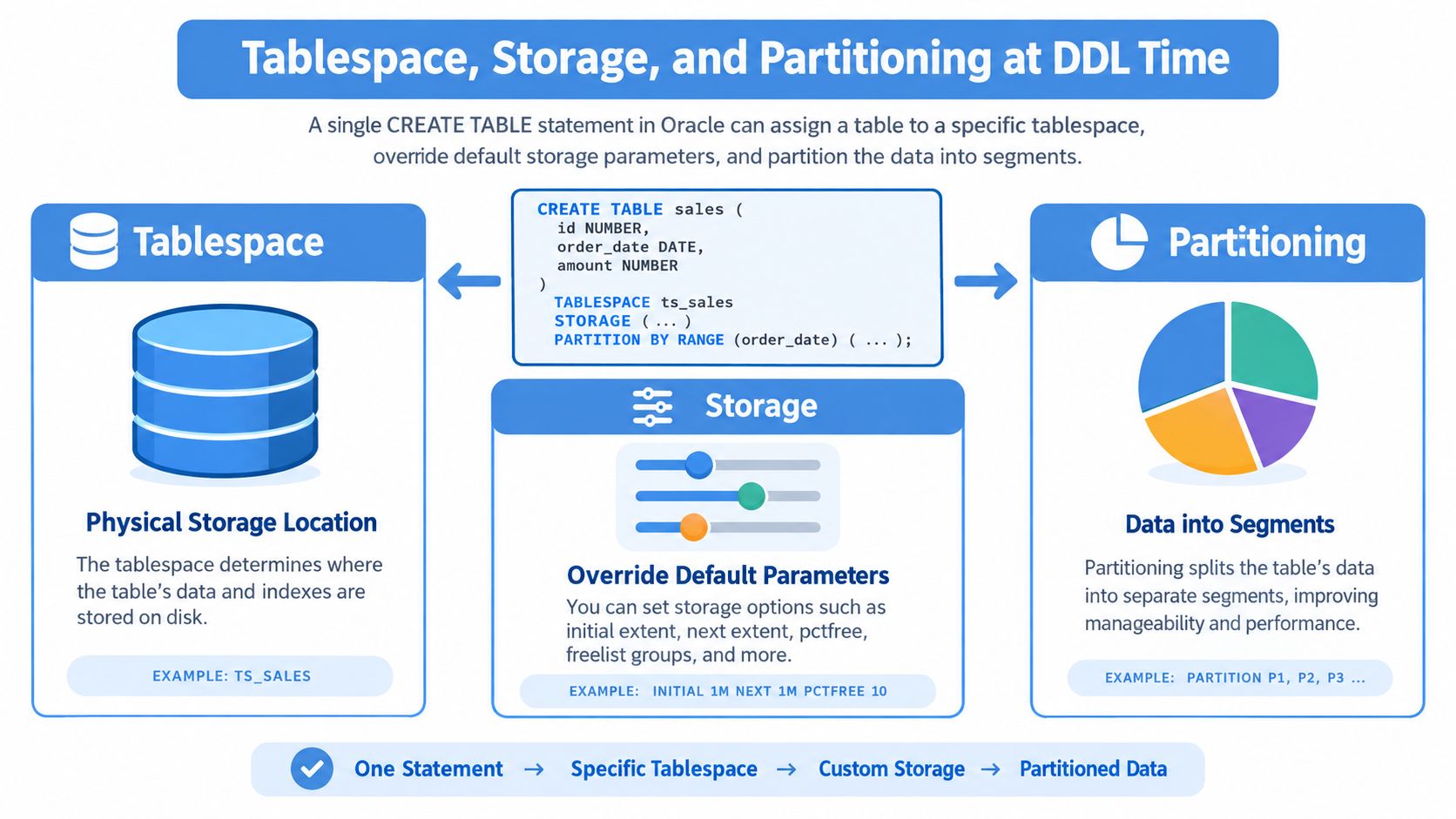
A migration can create the table correctly in development and still fail in production because the target database uses different tablespaces, quotas, or storage policies. Oracle lets one CREATE TABLE statement describe both the logical columns and their physical placement, so every infrastructure clause should have an owner and a deployment plan.
Tablespaces and storage attributes
A simple placement rule looks like this:
CREATE TABLE orders (
    order_id NUMBER PRIMARY KEY,
    order_date DATE NOT NULL,
    customer_id NUMBER NOT NULL
)
TABLESPACE users_data;
The table definition remains readable, but deployment now depends on a users_data tablespace and sufficient quota. A more physical definition can specify allocation and block behavior:
CREATE TABLE orders (
    order_id NUMBER PRIMARY KEY,
    order_date DATE NOT NULL
)
TABLESPACE users_data
STORAGE (
    INITIAL 1M
    NEXT 1M
)
PCTFREE 10
BUFFER_POOL DEFAULT;
These clauses are Oracle-specific and belong in DBA-reviewed infrastructure DDL when the environment depends on them. A developer migration that embeds them can break when tablespace names or storage policies differ between environments. Oracle also allows partitions and subpartitions to inherit or override physical attributes, so administrators can place workloads and plan lifecycle operations at creation time. Refer to the Oracle partitioning and table property reference when choosing those options.
Partition the access path, not the fashion
Range partitioning suits time-oriented orders:
CREATE TABLE orders (
    order_id NUMBER,
    order_date DATE NOT NULL,
    customer_id NUMBER,
    CONSTRAINT pk_orders PRIMARY KEY (order_id, order_date)
)
PARTITION BY RANGE (order_date) (
    PARTITION orders_old VALUES LESS THAN (DATE '2025-01-01'),
    PARTITION orders_new VALUES LESS THAN (DATE '2026-01-01')
);
List partitioning can route known categories such as regions. Hash partitioning distributes rows by a key such as customer_id. Choose the partition key with the primary key and unique constraints, because Oracle may require the partitioning column in those definitions to enforce uniqueness across partitions.
Local indexes place index segments alongside table partitions and can simplify partition maintenance. Global indexes support queries that do not follow the partition key, but partition changes require additional index handling. Base the choice on query predicates, maintenance frequency, and whether the application regularly filters by the partition column. Partitioning improves administration only when it matches real access and retention patterns.
Identity, Sequences, and Auto-Increment Strategies
Oracle gives developers several ways to generate surrogate keys, and the choice affects application code, portability, and operational ownership.
An identity column is the modern starting point for a new Oracle schema:
CREATE TABLE customers (
    customer_id NUMBER GENERATED AS IDENTITY,
    name VARCHAR2(120) NOT NULL,
    CONSTRAINT pk_customers PRIMARY KEY (customer_id)
);
The application can insert the descriptive columns without selecting a key first:
INSERT INTO customers (name)
VALUES ('Ada Lovelace');
A classic alternative uses a sequence and trigger:
CREATE TABLE customers (
    customer_id NUMBER PRIMARY KEY,
    name VARCHAR2(120) NOT NULL
);

CREATE SEQUENCE customers_seq;

CREATE OR REPLACE TRIGGER customers_bir
BEFORE INSERT ON customers
FOR EACH ROW
WHEN (new.customer_id IS NULL)
BEGIN
    :new.customer_id := customers_seq.NEXTVAL;
END;
/
This separates value generation from the table definition. It remains useful when legacy applications already expect a sequence, when several tables share a sequence, or when a trigger must populate several related audit or key columns. It also adds another object to deploy, inspect, and migrate.
Don’t confuse CTAS with key generation
CREATE TABLE AS SELECT is useful for a staging copy or a derived snapshot:
CREATE TABLE customer_snapshot AS
SELECT customer_id, name
FROM customers;
It isn’t a substitute for a carefully designed production key. CTAS derives column definitions from the query expressions and doesn’t automatically recreate primary keys, foreign keys, checks, indexes, triggers, grants, comments, or defaults. If expressions come from views, explicit CAST operations may be needed to prevent datatype drift.
| Strategy | Example Syntax | SQL Portability | Insert Pattern | Gaps on Rollback | Best Use Case |
|---|---|---|---|---|---|
| Identity column | id NUMBER GENERATED AS IDENTITY | Moderate | Omit the key | Possible | New Oracle schemas |
| Sequence and trigger | seq.NEXTVAL in a trigger | Lower | Insert with or without key, by policy | Possible | Legacy or customized generation |
| CTAS-derived table | CREATE TABLE x AS SELECT ... | Query-dependent | Key must be designed separately | Not a key strategy | Staging and snapshots |
Identity columns are usually easier for new code. None of these approaches should promise gapless numbering, because generated values can be allocated independently of transaction commit behavior.
Common Errors and How to Fix Them Fast
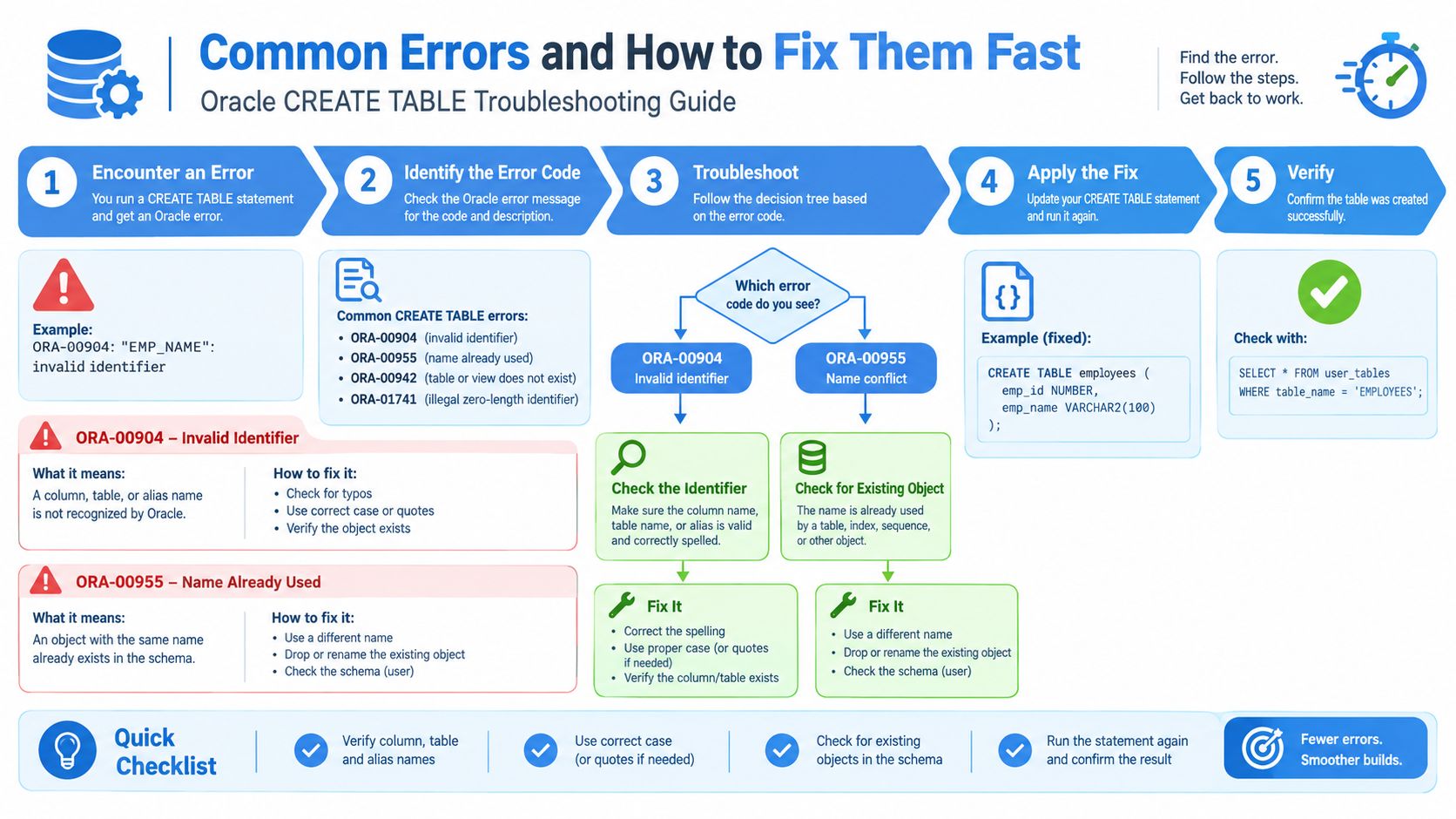
Most failed table-creation migrations aren’t caused by obscure Oracle behavior. They come from names, punctuation, ordering, or assumptions that were valid in another database.
Read the first error literally
A reserved word or invalid identifier can produce an identifier error:
CREATE TABLE orders (
    order_id NUMBER,
    order DATE
);
Oracle can raise ORA-00904: invalid identifier because ORDER has special SQL meaning. Rename it to order_date, or quote the identifier only when a legacy requirement leaves no alternative.
Re-running a migration can produce:
ORA-00955: name is already used by an existing object
The table name may already exist, or another object may occupy that name. Check USER_OBJECTS before deciding whether to preserve, alter, or remove the object. Oracle’s newer documentation includes CREATE TABLE IF NOT EXISTS in Oracle 23, providing an idempotent option for avoiding an error when the table already exists, as described in this Oracle CREATE TABLE tutorial. Verify the target release before using it in a cross-version pipeline.
Fix punctuation and dependency order
This malformed definition contains a trailing comma:
CREATE TABLE teams (
    team_id NUMBER,
);
Oracle raises ORA-00907: missing right parenthesis. Remove the comma:
CREATE TABLE teams (
    team_id NUMBER
);
A table can have only one primary key. Defining two produces ORA-02260: table can have only one primary key. If the business key is composite, place all required columns inside one constraint instead.
Foreign keys also depend on creation order and a valid parent key. Create the parent table and its primary or unique key before the child table. If Oracle reports a referenced-table or parent-key problem, inspect the parent constraint metadata rather than changing the child syntax blindly.
A defensive migration checks object existence with PL/SQL and uses exception handling where the deployment policy permits it. Don’t automatically drop production tables. Destructive cleanup belongs in an explicit, reviewed migration, while repeatable provisioning should prefer version tracking, existence checks, or Oracle 23’s conditional syntax where supported.
What Is Portable and What Is Oracle-Specific
Portability is a release-engineering concern. A table definition can look standard while depending on Oracle’s datatypes, storage model, privilege system, or partitioning grammar.
The logical core usually travels with limited redesign:
- Column names and basic relational structure.
NOT NULL,DEFAULT,PRIMARY KEY,FOREIGN KEY,CHECK, andUNIQUE.- Conceptual text, numeric, date, and binary requirements.
The physical layer usually doesn’t. TABLESPACE, PCTFREE, INITRANS, STORAGE, BUFFER_POOL, and Oracle segment behavior need a target-specific translation. Partitioning is also a migration design task, not a simple search-and-replace operation. Oracle reference partitioning, for example, doesn’t have a direct equivalent in PostgreSQL, as described in this AWS migration guide for Oracle reference-partitioned tables.
| Clause or Feature | Oracle Syntax | Portable? | Closest Cross-Engine Equivalent |
|---|---|---|---|
| Variable text | VARCHAR2(255) | Partly | VARCHAR with target limits |
| Exact numeric | NUMBER(12,2) | Partly | DECIMAL(12,2) or equivalent |
| Large text | CLOB | No | Target large-text type |
| Binary large object | BLOB | No | Target binary large-object type |
| Physical placement | TABLESPACE users_data | No | Target tablespace or filegroup policy |
| Storage tuning | PCTFREE, STORAGE | No | Target-specific storage settings |
| Constraints | PRIMARY KEY, FOREIGN KEY | Generally | Native relational constraints |
| Identity | GENERATED AS IDENTITY | Partly | Target identity or generated-column syntax |
| Range partitioning | PARTITION BY RANGE | Partly | Target partition grammar |
| JSON collection tables | Oracle-specific form | No | Target JSON table or document model |
Keep the portable model in one migration layer and isolate Oracle physical clauses in vendor-specific scripts. Teams moving toward SQL Server should also separate schema translation from operational rollout, a distinction covered in this SQL Server migration tools and practices guide.
DDL Best Practices Checklist for Developers and QA
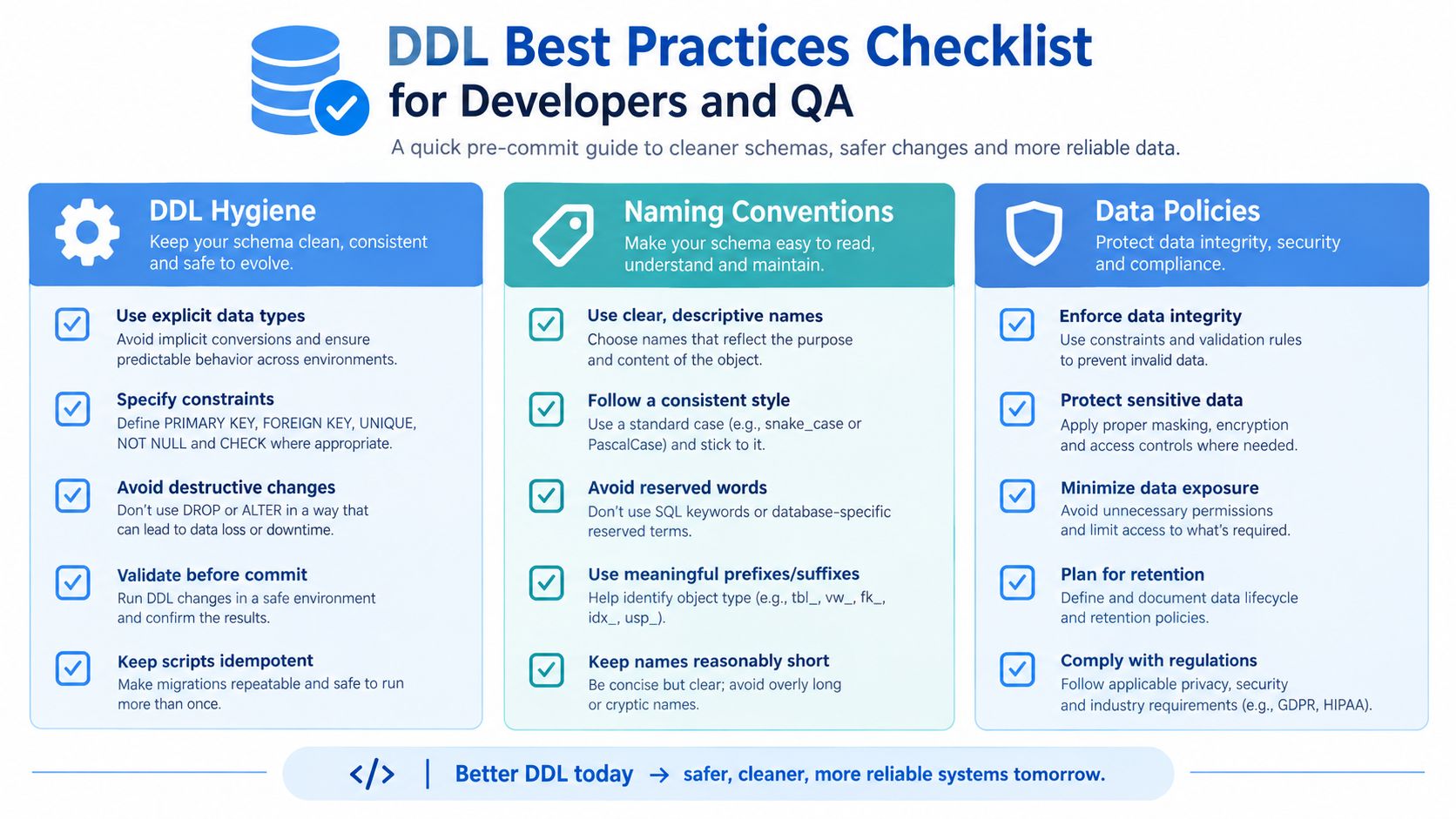
A strong CREATE TABLE review catches problems before the application depends on them. Use this as a pre-commit checklist, then verify the deployed metadata rather than treating a successful migration exit code as proof.
DDL hygiene
- Use stable names: Avoid reserved words, unexplained abbreviations, and quoted identifiers.
- Declare types explicitly: Don’t let CTAS or implicit expressions decide a production column contract.
- Choose a null policy: Decide which attributes are required and enforce that decision with
NOT NULL. - Set deliberate defaults: Use defaults for predictable creation behavior, not to conceal missing application logic.
- Name constraints: Make operational errors and metadata queries readable.
Integrity and operations
- Add a primary key: Every durable business table needs an intentional row identity.
- Protect relationships: Create parent keys before foreign keys and validate cross-schema privileges.
- Check business rules: Use
CHECKconstraints for bounded states and valid numeric conditions. - Review storage placement: Confirm the target tablespace exists and the owner has quota.
- Choose partitions deliberately: Base the key on access and lifecycle patterns, not table size alone.
- Separate portable and Oracle-specific DDL: Keep storage clauses and vendor datatypes easy to replace.
QA verification
Run the migration against a clean schema and a repeat execution path. Confirm that the script is intentionally idempotent or fails with a controlled, documented result. Use DBMS_METADATA.GET_DDL against a reference schema, compare the returned definition with the deploy artifact, and test constraint violations before application testing begins.
Assign sign-off clearly. The developer owns logical requirements, the DBA owns privilege and physical design review, and QA owns repeatability and validation evidence. That division prevents a table from being “approved” while no one has checked the part that matters most to the next environment.
GoReplay captures and replays live HTTP traffic in testing environments, helping development and QA teams exercise application behavior against schema and migration changes before production deployment. Visit GoReplay to evaluate how traffic replay can complement your Oracle DDL verification workflow.