
Unlocking Quality with API Test Automation
Let’s be honest: in today’s fast-paced development world, manual testing just can’t keep up. The demand for rapid, reliable software releases is relentless. This is where API test automation steps in, not just as a tool, but as a critical quality gate that ensures your application’s core logic is solid.
Simply put, API test automation is the practice of using software to automatically check and validate your Application Programming Interfaces (APIs).
Why API Test Automation Is Your New Superpower
Think of your application’s APIs as its central nervous system. They handle all the critical communication buzzing between different services, databases, and the user interface. If this system is slow, buggy, or unreliable, the entire application grinds to a halt.
Trying to test this complex web of connections manually is a losing battle. It’s painstakingly slow, riddled with human error, and nearly impossible to scale as your application grows. This is the exact problem that a robust API test automation strategy is built to solve.
By automating these checks, you create a safety net that runs continuously in the background. It gives your development teams the freedom to innovate and push new features, knowing that any change breaking a critical API connection will be caught almost instantly. This isn’t just about finding bugs faster; it’s about building a fundamentally more resilient and agile development process from the ground up.
The Driving Force Behind Automation
The big shift toward modern practices like DevOps and Agile has turned automation from a “nice-to-have” into an absolute necessity. These methodologies are built on the foundation of fast, continuous feedback loops.
- Speed and Efficiency: Automated tests can rip through an entire test suite in minutes. The same regression tests done manually could take days. This speed dramatically accelerates the entire release cycle.
- Early Defect Detection: Automation finds bugs much earlier in the development process. When you catch them early, they are significantly cheaper and easier to fix.
- Increased Confidence: A solid suite of automated API tests gives developers the confidence to refactor code and ship updates without the constant fear of causing a domino effect of failures.
The growth in this space is impossible to ignore. The overall automation testing market, with API test automation as a key component, was valued at USD 35.52 billion and is projected to skyrocket to around USD 169.33 billion by 2034. You can dig into the specifics of this market surge in this detailed automation testing market research.
Adopting API test automation is one of the highest-impact changes a software team can make. It directly improves product quality, developer productivity, and the speed at which you can deliver value to your users.
To really see the difference, a side-by-side comparison makes it clear.
Manual vs Automated API Testing At a Glance
This table breaks down the core differences between the two approaches, showing why automation has become the standard for modern teams.
| Attribute | Manual API Testing | API Test Automation |
|---|---|---|
| Speed | Slow, dependent on human pace. Takes hours or days. | Extremely fast. Runs in minutes. |
| Scalability | Poor. Adding more tests requires more people and time. | Excellent. Can run thousands of tests in parallel. |
| Consistency | Prone to human error, typos, and missed steps. | 100% consistent and repeatable every time. |
| Cost | High long-term cost due to manual labor. | Higher initial setup cost, but much lower long-term. |
| Feedback Loop | Delayed. Bugs are found late in the cycle. | Immediate. Finds bugs almost instantly after a code change. |
| Coverage | Limited by time and resources. Often superficial. | Comprehensive. Can test countless scenarios and edge cases. |
As you can see, while manual testing might seem simpler for a one-off check, automation provides the speed, reliability, and scale needed for continuous development.
The chart below visualizes the powerful return on investment that teams often see when they make the switch.
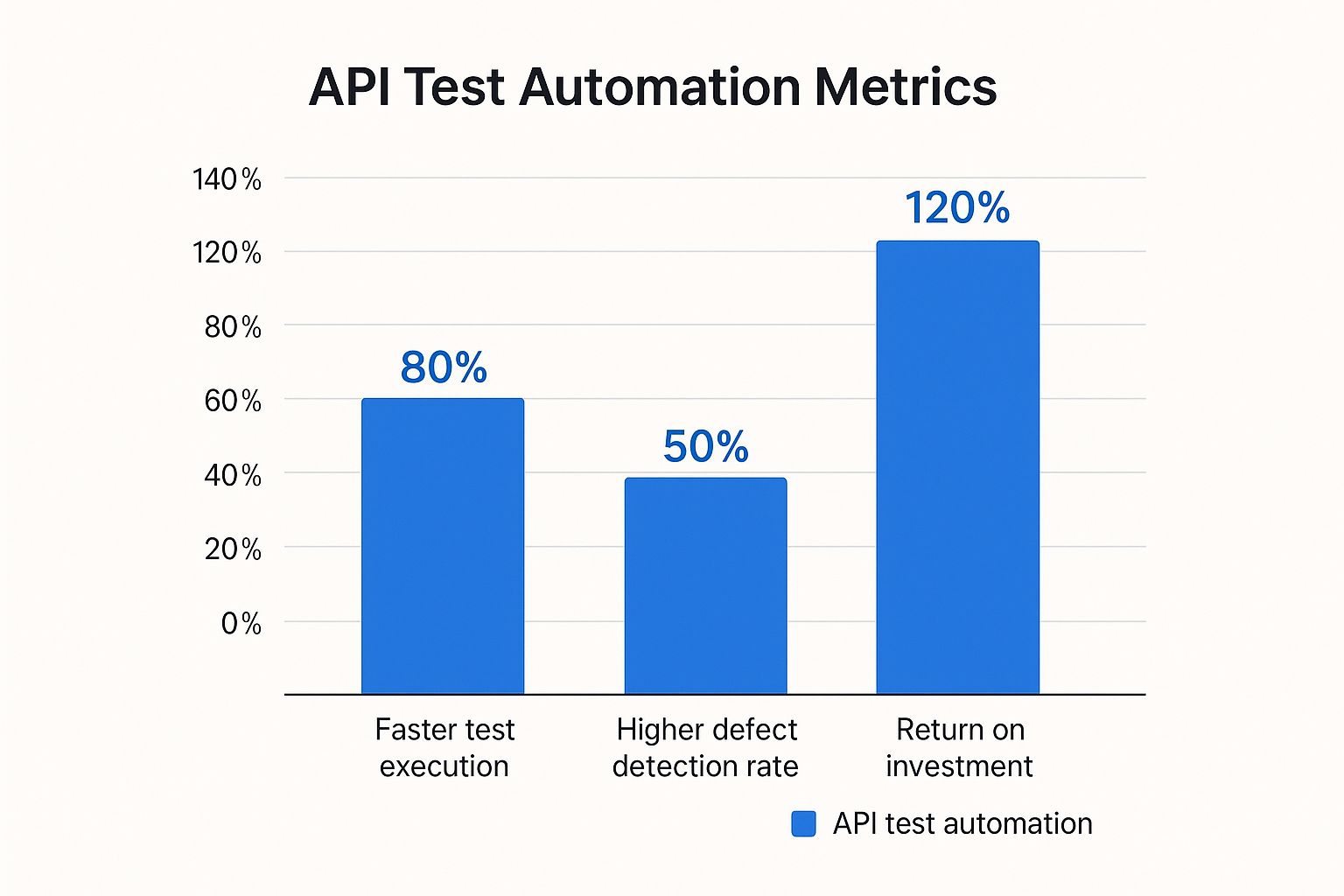
The data speaks for itself. Automation doesn’t just execute tests faster; it fundamentally improves the quality of defect detection and delivers a substantial financial return over time.
Gracing the Language of APIs

Before you can really sink your teeth into API test automation, it helps to speak the language. If you don’t have a solid handle on the fundamentals, your automated tests will just feel like a mysterious black box. But don’t worry—these concepts are much simpler than they sound.
Let’s break it down with a familiar analogy: ordering food at a restaurant.
Think of an API (Application Programming Interface) as your waiter. You, the customer, are the client. You don’t just wander into the kitchen to make your own food; you give your order to the waiter, who acts as the go-between. In the same way, a client application doesn’t poke around in a server’s database directly.
When you figure out what you want to eat, you place an order. This is your request. The waiter takes that request to the kitchen—which represents the server—where your order is processed and your meal is prepared.
Finally, the waiter brings your food back to the table. This is the response. At its core, effective API test automation is all about programmatically sending thousands of these “orders” and checking that the “meals” that come back are correct, arrive on time, and match what was on the menu.
Deconstructing the API Request
Every API request has a few key parts, just like a detailed food order. The most important piece is the endpoint, which is the specific “table” or “menu item” you’re asking for. It’s simply the URL where the API can be reached. For instance, a request to api.example.com/users/123 is specifically targeting the user with ID 123.
Your tests will verify that sending requests to the right endpoints gets you the right results. They’ll also make sure that requests to endpoints that don’t exist are handled gracefully—which brings us to the response.
Understanding the API Response
When the server sends back a response, it contains two critical things your tests need to check: the status code and the payload.
An API response is more than just data; it’s a conversation. The status code tells you the outcome of your request at a glance, while the payload provides the details.
Status codes are three-digit numbers that give you a quick summary of what happened. You’ve probably seen a 404 Not Found error when a webpage is missing—that’s an HTTP status code. In API testing, you’ll frequently encounter codes like these:
200 OK: Success! The request worked perfectly. Your meal arrived just as you ordered.201 Created: A new resource was successfully created, like a new user account.400 Bad Request: The server couldn’t understand what you asked for. You might have ordered something that isn’t on the menu.401 Unauthorized: You need to be logged in to make this request.500 Internal Server Error: Something went wrong in the kitchen.
The second part of the response is the payload—the actual data you get back. This data is usually structured in a specific format, with JSON (JavaScript Object Notation) being the most common. It’s a lightweight and human-readable format that’s also incredibly easy for machines to understand. Your automated tests will dig into this JSON to make sure the right data, like a user’s name or email, is present and accurate.
The Real-World Benefits of Automating API Tests
Putting your API test automation on solid ground isn’t just about catching bugs—it completely changes how your teams build and ship software. The most immediate win? You create an incredibly fast feedback loop that gives developers near-instant validation of their work.
Picture this: a developer pushes new code. Within minutes, a full suite of automated API tests runs against it, immediately flagging any regressions or new problems. This is the core idea behind “shift-left” testing, where we pull quality checks much earlier into the development cycle. Instead of a critical bug hiding for days or weeks until a manual QA phase, it’s found and fixed while the code is still fresh in the developer’s mind.
This immediate feedback is a game-changer for both software quality and developer productivity.
Expanding Quality and Coverage
Let’s be honest, manual testing can only go so far. Testers are limited by time and human capacity, meaning they can only ever check a small fraction of all possible scenarios. API test automation completely blows past this limitation, allowing for far broader and deeper test coverage.
Automated scripts can run tirelessly, hammering your API with countless edge cases, weird data combinations, and failure scenarios that a manual tester could never hope to cover. This thoroughness ensures you’re not just validating the “happy path.” You’re building a truly resilient application that can handle unexpected inputs gracefully, leading directly to a more stable product and happier users.
By automating checks at the API layer, you are building quality directly into the development process, not just inspecting for it at the end. This shift is critical for delivering reliable software at speed.
Driving Efficiency and Cost Savings
Yes, there’s an upfront investment to get an automation framework running. But the long-term cost savings are huge. Automation slashes the hours your team spends on repetitive, mind-numbing manual regression tests. This frees up your skilled QA engineers to focus on higher-value work like complex exploratory testing and big-picture quality strategy.
This drive for efficiency is fueling massive market growth. The app test automation market was valued at USD 31.29 billion and is projected to hit USD 81.03 billion within five years, a clear sign of the demand for faster, more dependable software delivery. You can see a full breakdown of this incredible growth in this comprehensive market forecast.
Ultimately, a strong suite of automated API tests is the engine that powers a modern CI/CD pipeline. It’s what makes continuous integration and continuous delivery truly possible, enabling faster, more predictable, and lower-risk releases. These tests also serve as a foundation for more advanced checks; for instance, you can gain even deeper insights by load testing your APIs with these techniques to see how they hold up under real-world pressure.
Building Your API Test Automation Playbook

Solid API test automation doesn’t just happen. It’s the direct result of a smart, well-structured plan. Think of it like a sports team’s playbook; without one, you’re just winging it. Your development team needs that same clear strategy to build an automation suite that actually lasts.
Otherwise, you risk creating a tangled mess of tests that nobody understands, and eventually, the whole thing gets abandoned.
The first move is to resist the urge to automate everything all at once. That’s a classic mistake. Instead, start by pinpointing your most critical API endpoints. What are the absolute core functions of your application? Things like user authentication, payment processing, or essential data lookups. These are your high-value targets.
By prioritizing these business-critical flows first, you get the biggest bang for your buck right away. You’re building a safety net where it counts the most, protecting the APIs that would cause the most damage if they failed.
Choosing Your Tools and Structuring Tests
Once you know what to test, the next step is picking the right tools for the job. The market for API testing tools is exploding—and for good reason. Projections show the global API testing market growing from USD 1.5 billion to an estimated USD 12.4 billion over the next decade. This massive shift is driven by the urgent need for software that can guarantee quality in our API-driven world.
Your choice of tools needs to match your team’s skills and the project’s real-world needs. Ask yourself a few key questions:
- Is it easy to use? Can both developers and QA engineers get up and running quickly?
- Does it integrate well? Will it plug into your existing CI/CD pipeline without a fight?
- Can it scale? Will the tool keep up as your application and testing demands grow?
With your tools in hand, it’s time to think about structure. A great practice is to separate your test logic from your test data. This means you don’t hardcode API endpoints, request bodies, or expected results directly into your test scripts. Instead, keep them in separate, easy-to-update files.
A well-structured test suite is a living asset. A poorly structured one quickly becomes technical debt. The goal is to make tests easy to read, update, and debug.
Integrating Automation into Your Workflow
The final piece of the playbook is integration. Your API test automation delivers its real value when it runs automatically and often. This means plugging it directly into your Continuous Integration/Continuous Delivery (CI/CD) pipeline.
Configure your pipeline to kick off the API test suite every single time a developer commits new code. This creates an immediate feedback loop that catches bugs just moments after they’re introduced. For a deeper look at this process, check out our guide on automating API tests and strategies for success.
By weaving automation into the very fabric of your development process, you turn it from a simple chore into a powerful engine for building better software, faster.
Testing with Real User Traffic Using GoReplay
Traditional scripted tests are invaluable, but they have one massive blind spot: they only test for scenarios you can think of. What about all the weird, unpredictable ways real people hammer your application? This is where a powerful technique called traffic shadowing steps in, offering a dose of reality that scripted API test automation just can’t deliver.
Think of it like this: what if you could secretly clone every single request hitting your live production server and safely send it over to a test version of your app? That’s precisely what traffic shadowing does. It lets you throw the full, unfiltered chaos of real-world user behavior at your new code before a single customer ever sees it.
This approach is the ultimate reality check. You’re not guessing what users will do—you’re using what they actually do. By doing this, you can catch subtle bugs, hidden performance bottlenecks, and strange edge-case failures that would almost certainly slip through a normal QA process.
How GoReplay Makes Realistic Testing Possible
GoReplay is an open-source tool designed for exactly this job. It works by listening to the live HTTP traffic in your production environment without slowing anything down. It then fires off a copy of that traffic to your staging, development, or testing setup.
Here’s a peek at the GoReplay interface, which gives you a handle on managing and analyzing all that replayed traffic.

The dashboard gives you a clear visual of how captured traffic is being replayed, offering immediate insights into performance and any potential trouble spots. This allows your team to validate changes with a level of accuracy that’s hard to beat.
Because the replayed traffic is a perfect mirror of what’s happening in production, the test results are incredibly reliable. It’s the closest you can get to deploying to production without actually deploying to production.
The real benefit of traffic shadowing is confidence. When a new feature or fix can withstand the full force of real user traffic in a test environment, you can push it live with a much higher degree of certainty.
Key Use Cases for Traffic Shadowing
This technique can seriously level-up your testing strategy, moving you way beyond simple functional checks.
- High-Fidelity Regression Testing: You just updated an API. How can you be sure you didn’t accidentally break something for a small group of users with unique request patterns? Replaying production traffic against the new version is the single best way to catch these kinds of regressions.
- Performance and Load Validation: Scripted load tests often rely on clean, repetitive requests. GoReplay uses the messy, spiky, and diverse traffic patterns from your actual users, giving you a far more accurate picture of how your API will hold up under real-world stress.
- Validating New Features: Before rolling out a new feature, you can run it in a shadow environment. This lets you see how it behaves under live traffic conditions, helping you find and squash bugs before any user ever experiences them.
Navigating Common API Automation Roadblocks
Starting your API test automation journey is always exciting, but even the sharpest teams run into a few bumps in the road. Knowing what to expect is half the battle. When you anticipate these common roadblocks, you can build a resilient automation framework that doesn’t just crumble under pressure.
One of the first hurdles you’ll likely hit is test environment management. Your automated tests need a stable, predictable place to run. But what happens when that environment relies on other services that are flaky, slow, or just plain unavailable? This dependency can cause your entire test suite to fail for reasons that have nothing to do with your code. It’s a classic case of “it’s not you, it’s me.”
Taming Flaky Tests and Dependencies
Another all-too-common headache is the dreaded flaky test. This is a test that passes one minute and fails the next—with zero code changes in between. These phantom failures slowly erode your team’s trust in the whole automation suite. Flakiness often pops up from tricky timing issues, network hiccups, or inconsistent test data.
And then there’s the constant battle with dynamic data, like authentication tokens that expire. You can’t hardcode them, so your tests have to be smart enough to grab a fresh one before they run, adding yet another layer of complexity.
To get ahead of these issues, successful teams build a few key strategies right into their framework:
- Service Virtualization: When you’re dealing with unstable external dependencies, you don’t have to wait for them to get fixed. Use tools to create “mock” or virtual services that mimic the real thing. They give you the predictable, consistent responses you need to test your API in total isolation.
- Smart Retry Logic: Instead of instantly marking a test as failed because of a temporary glitch, build in a retry mechanism. If a test stumbles, it automatically tries again once or twice. Only then, if it still fails, is it officially marked as a failure.
- Dynamic Authentication Handling: Don’t let expired tokens ruin your day. Create a reusable function or module that logs in and fetches a fresh auth token before the test suite even starts. This token gets stored as a variable and passed along to all the API calls that follow.
The goal isn’t to eliminate every single potential problem—that’s impossible. The real win is building an automation framework that’s intelligent enough to handle them. A resilient test suite anticipates instability and adapts, making sure that when you see a “red” build, it’s signaling a real problem with your application.
Common Questions About API Test Automation
When teams first dip their toes into automation, a few questions always pop up. Getting straight answers is the best way to build a solid strategy and move forward with confidence. Let’s tackle some of the most common ones I hear.
What Is the Main Difference Between API Testing and UI Testing?
Think of it like this: API testing is like having a mechanic check your car’s engine, while UI testing is like getting in the driver’s seat to make sure the steering wheel, pedals, and radio all work.
API test automation digs into the “business logic” layer of your application—the behind-the-scenes engine that processes data and talks to other services. It confirms the core functions are solid, all without ever touching the user interface.
UI testing, on the other hand, is all about the user experience. It mimics how a real person clicks buttons, fills out forms, and navigates menus to make sure everything looks and feels right. API tests are almost always faster, more stable, and way better at finding critical logic bugs early on.
Can I Start API Test Automation Without Being a Developer?
Absolutely. While knowing your way around code is always a plus, you don’t need to be a developer to get started. Many modern API test automation tools are built with the whole team in mind, offering low-code or even no-code interfaces that let you build powerful tests visually.
These days, the focus is shifting away from writing complex scripts and toward smart, accessible platforms. This empowers QA pros to jump in and contribute to automation directly, without needing a programming degree.
This shift means you can start creating genuinely useful tests right away instead of getting bogged down trying to learn a new language first.
How Do I Measure the ROI of API Test Automation?
Showing the return on investment (ROI) is key to proving the value of your work. It’s not as abstract as it sounds. You can track your impact by keeping an eye on a few key metrics:
- Faster Release Cycles: How much quicker can you get code from a developer’s machine into production? Measure that time before and after.
- Reduced Bugs in Production: Keep a running tally of the critical bugs that slip through into the live environment. You should see this number drop.
- Lower Manual Testing Costs: Every hour you don’t spend on repetitive manual regression testing is money saved. Calculate those saved hours.
When you put real numbers to these improvements, you create a powerful story that shows just how much value great API test automation brings to the table.
Ready to test your APIs with the ultimate dose of reality? GoReplay lets you capture and replay real production traffic into your staging environment, uncovering bugs that scripted tests always miss. Validate your next release with confidence by visiting the GoReplay website.