
Api Rest Testing: Practical Guide to Reliable APIs

So, what exactly is REST API testing? At its core, it’s the process of making sure your API does what it’s supposed to do. We’re talking about validating everything from basic functionality and reliability to performance under stress and, of course, security.
Think of it as the ultimate quality check before your API goes live. It ensures the API not only meets its design specs but can also handle real-world traffic and fend off potential threats. In modern software development, this isn’t just a nice-to-have; it’s an essential gatekeeper.
Why Modern API REST Testing Is a Business Imperative

In today’s interconnected world, APIs have graduated from being simple technical components to core business products. They’re the glue holding together mobile apps, partner integrations, and sprawling microservice architectures.
When an API breaks, it’s not just a technical hiccup. It’s a direct hit to your revenue, user trust, and brand reputation.
This reality elevates API REST testing from a routine QA task to a critical business strategy. A single buggy endpoint can trigger a domino effect, causing cascading failures across multiple systems. The result? Downtime, frustrated users, and a damaged bottom line.
Protecting Your Digital Assets
Effective testing is your first line of defense. It’s how you verify that data is handled correctly, business logic is sound, and sensitive information stays secure. A solid testing strategy makes sure your API can withstand weird inputs and malicious attacks, protecting your infrastructure from the inside out.
It’s also crucial to look beyond just the API. Understanding the broader IT security considerations is vital for protecting your entire digital ecosystem. This holistic view ensures security is baked in, not bolted on as an afterthought.
The numbers don’t lie. The global API testing market is on track to hit USD 8.24 billion by 2030, a surge driven by the explosive growth of APIs across every industry. This trend highlights a major shift: businesses now treat their APIs as mission-critical infrastructure that demands rigorous, nonstop validation.
A robust API testing plan is non-negotiable. It’s the difference between building a reliable service that customers trust and launching a product that constantly breaks, costing you time, money, and credibility.
This guide will take you far beyond simple endpoint checks. We’ll lay out a practical path to creating a quality gate that truly protects your applications and your users.
Building a Comprehensive API Testing Strategy
A solid API testing strategy isn’t a one-and-done activity. It’s a multi-layered approach designed to build confidence and guarantee quality from every angle. Simply checking if an endpoint returns a 200 OK status just scratches the surface.
Real confidence comes from a plan that methodically verifies functionality, withstands heavy load, repels security threats, and maintains system-wide stability. It’s about building a quality gate that catches issues long before they ever impact a user.
Let’s dig into the four essential pillars of a comprehensive strategy.
Functional and Logic Testing
This is your foundation. Functional and logic testing is where you confirm the API behaves exactly as you designed it to. Does creating a new user actually add a record to the database? When you ask for order history, does the endpoint return the right data for the right customer?
Essentially, you’re answering the most fundamental question: “Does this thing actually do what it’s supposed to do?”
This breaks down into a few key areas:
- Positive Testing: You validate that the API works correctly with expected inputs. Think sending a perfectly valid JSON payload to a
/usersendpoint and confirming the user gets created successfully. - Negative Testing: This is where you see how the API handles the unexpected. You throw it malformed data or leave out required fields to ensure it fails gracefully with clear error messages instead of just crashing.
- Business Logic Validation: You move beyond single endpoints to test complex workflows. For example, a multi-step e-commerce checkout process has a lot of business rules to enforce, and this is where you confirm they all work in concert.
Performance and Load Testing
Once you know your API works, you need to find out how well it works under pressure. Performance and load testing are all about uncovering bottlenecks and understanding your API’s capacity limits. An API that’s functional but painfully slow can be just as damaging as one that’s completely broken.
These tests simulate real-world traffic to measure key performance indicators. You might, for instance, simulate 500 concurrent users all trying to log in at once to see how response times hold up. The goal is to ensure your API remains fast and responsive, even when things get busy.
Security Testing
Security can never be an afterthought; it has to be baked in from the start. Security testing is your chance to proactively find and fix vulnerabilities that could expose sensitive data or compromise your entire system.
A huge part of this is understanding how your endpoints are protected. If you’re new to the topic, a good developer’s guide to REST API authentication methods is an excellent place to start.
A common mistake is assuming that internal APIs don’t need the same level of security testing as public-facing ones. In a microservices architecture, a single compromised internal service can provide an entry point into your entire network.
You’ll want to focus on a few key areas:
- Authentication & Authorization: Verify that only authenticated and properly authorized users can access specific endpoints and data. Can User A see User B’s private information? They shouldn’t.
- Input Validation: Test for common attack vectors like SQL injection or Cross-Site Scripting (XSS) by intentionally sending malicious payloads.
- Rate Limiting: Make sure your endpoints are protected against denial-of-service (DoS) attacks by enforcing reasonable usage limits.
Contract Testing
In modern architectures—especially those built on microservices—services constantly talk to each other. Contract testing ensures these interconnected dependencies don’t shatter when one service gets an update.
It’s all about verifying that an API (the “provider”) continues to meet the expectations of its “consumer” (another service or a frontend app). This simple practice prevents a minor change in one microservice from causing a cascade of failures across your system, keeping everything stable as your application evolves.
To help you keep these different methodologies straight, here’s a quick summary of what each one focuses on.
Key API Testing Types and Their Focus Areas
| Testing Type | Primary Objective | Example Tools |
|---|---|---|
| Functional | Verify that the API behaves according to its business requirements and specifications. | Postman, Insomnia, Jest, Pytest |
| Performance | Measure responsiveness, stability, and scalability under various load conditions. | JMeter, Gatling, K6 |
| Security | Identify and mitigate vulnerabilities like injection flaws and broken authentication. | OWASP ZAP, Burp Suite, Postman |
| Contract | Ensure that services (provider and consumer) can communicate with each other. | Pact, Spring Cloud Contract |
By incorporating all four of these testing types into your strategy, you create a robust framework that covers your API from every angle, ensuring it’s not just functional, but also fast, secure, and reliable.
Choosing the Right Tools for API Testing

The right toolkit is a massive force multiplier for your testing efforts. It’s what turns tedious, manual checks into a fast, repeatable process that actually scales. An effective API REST testing strategy isn’t about finding a single “best” tool, but about layering different tools to cover everything from quick debugging to full-scale automation.
Most of the time, starting with the basics is the smartest move. For quick, one-off checks, nothing beats the raw simplicity of a command-line tool like curl. It’s lightweight, it’s everywhere, and it’s perfect for just verifying if an endpoint is even alive or what its basic response looks like.
Getting Started with Curl
Let’s say you’ve just deployed a new /users/{id} endpoint and need to confirm it’s working. Instead of firing up a whole application, you can pop open your terminal and get an answer in seconds.
This kind of immediate feedback is priceless for developers in the middle of a build. A quick curl command instantly tells you if you’re getting a 200 OK, a 404 Not Found, or a dreaded 500 Internal Server Error, letting you pinpoint issues right away.
Graduating to UI-Based Tools
While curl is fantastic for simple pings, it gets clunky fast when you’re juggling complex authentication, headers, and request bodies. This is where UI-based tools like Postman or Insomnia come into their own, giving you a structured and visual interface for more serious testing.
These platforms are essential for a few key reasons:
- Complex Request Building: They make it easy to construct requests with different HTTP methods, tack on custom headers, and manage things like Bearer tokens for JWTs.
- Environment Management: You can set up variables for different environments (local, staging, production) so you can run the same tests against different servers without changing URLs or credentials by hand.
- Test Collections: You can organize tests into collections, which basically become executable documentation for your API. A collection for a “User Management” service could include requests for creating, updating, and deleting users.
A well-organized Postman collection does more than just test your API; it becomes a shared source of truth for your entire team. Developers, QA engineers, and even frontend devs can use it to understand and interact with the API consistently.
The Leap to Automated Test Suites
Ultimately, the real goal for any serious testing strategy is automation. Manual testing with curl or Postman is great for exploring and debugging, but it just doesn’t scale. For a comprehensive look at your options, check out this ultimate guide to API testing tools in 2024.
Automated test suites, written in code using frameworks like Pytest (for Python) or Jest (for JavaScript), are what allow you to build a truly reliable CI/CD pipeline. These tests run automatically every time new code is committed, creating a safety net that catches regressions before they ever see the light of day.
For instance, a simple automated test for a “get user” endpoint might look something like this in a JavaScript project using Jest and an HTTP client like Axios:
test(‘GET /users/:id should return a single user’, async () => {
const userId = 123;
const response = await apiClient.get(/users/${userId});
// Check for a successful status code expect(response.status).toBe(200);
// Verify the response body contains the correct user ID expect(response.data.id).toBe(userId);
// Ensure sensitive data like passwords are not returned expect(response.data.password).toBeUndefined(); }); This little script doesn’t just validate functionality; it also checks for adherence to security best practices, like making sure sensitive fields aren’t being leaked. By building out a suite of these tests, you create a robust, automated quality gate—something that’s fundamental to modern API development.
Simulating Reality with Production Traffic Replay
Synthetic tests are great, but let’s be honest—they live in a clean, predictable world that we engineers create. They rarely account for the sheer chaos of a live production environment. Real users are unpredictable, and their request patterns can be messy.
This is where traffic replay completely changes the game. It’s a powerful technique where you capture real user traffic from your production environment and replay it against a staging or test system. You stop guessing and start validating against actual, real-world behavior.
Why Replay Trumps Synthetic Testing
Imagine you’re testing a new payment endpoint. Your synthetic test might fire off a few dozen perfectly structured requests. But real traffic? That includes everything from malformed headers and bizarre payloads to users double-clicking the “submit” button out of frustration.
Traffic replay captures all of this beautiful chaos. It uncovers the sneaky edge cases and performance bottlenecks that your synthetic tests would blissfully ignore. You’re not just testing with some data; you’re testing with the same volume, variety, and unpredictability your actual users generate.
By replaying production traffic, you’re not just guessing how your API will perform under load—you’re proving it. This turns regression and performance testing from a theoretical exercise into a realistic dress rehearsal for deployment.
Implementing Traffic Replay with GoReplay
Tools like GoReplay make this technique surprisingly accessible. The process breaks down into a few key stages, each one critical for getting it right. For a much deeper look, check out this guide on simplifying REST API testing with GoReplay.
Here’s what the typical workflow looks like:
- Capture Traffic: A lightweight agent listens to network traffic on your production server. The beauty of this is that it captures HTTP requests without getting in the way or slowing things down.
- Sanitize Data: This is a non-negotiable step. Before you replay anything, you must sanitize the captured data. This means scrubbing or masking personally identifiable information (PII) like passwords, API keys, and user details to keep everything secure and compliant.
- Replay and Analyze: The clean, sanitized traffic is then replayed against your staging environment. Now you can compare the responses from your old and new application versions to spot regressions, performance hits, or any other unexpected weirdness.
This method is incredibly effective for de-risking major releases. Instead of deploying and hoping for the best, you can validate that a new version of your service handles real-world requests exactly like the old one.
With the move to Agile, DevOps, and microservices, this kind of testing is more important than ever. In complex, distributed systems, you can’t leave reliability to chance. It’s no surprise that the API testing market in the Asia-Pacific region, for instance, is projected to grow at a 20.5% CAGR as more organizations realize how critical this is. You can dig into more API testing market trends on globenewswire.com.
Ultimately, traffic replay gives you the highest level of confidence you can get before pushing to production. It’s an essential tool for any team that’s serious about API reliability.
Weaving API Testing into Your CI/CD Pipeline
Automated tests are great, but they’re most powerful when you don’t even have to think about running them. The real magic happens when you integrate your API REST testing suite directly into your CI/CD pipeline. This turns testing from an occasional spot-check into a constant, vigilant quality gate.
By doing this, you’re embedding quality right into the development lifecycle. Instead of someone remembering to run tests before a release, they kick off automatically with every single code commit. This creates an incredibly tight and reliable feedback loop for your developers.
Creating an Automated Quality Gate
The whole point is to fail fast and early. A developer pushes new code, the CI/CD pipeline spins up, builds the application, and immediately throws your entire suite of API tests at it. If even one test fails, the pipeline grinds to a halt. The build is marked as broken, and the team gets notified right away.
This simple backstop prevents regressions from ever slipping into the main codebase. It’s a safety net that ensures buggy code doesn’t make it to staging, let alone production. Getting this set up is surprisingly straightforward with tools like GitHub Actions, GitLab CI, or Jenkins. You just add a job to your config file that runs your test command (like npm test or pytest) right after the build finishes.
When API tests become a mandatory step in your pipeline, you shift the culture. Quality stops being just a “QA problem” and becomes a shared responsibility. A broken build is no longer a ticket—it’s an immediate, all-hands-on-deck issue for the development team to fix.
Fine-Tuning Your Pipeline for Speed and Confidence
Okay, here’s a common snag: a pipeline that takes forever to run. If you have thousands of tests in your regression suite, running all of them on every single commit can really slow things down. To find a good balance between speed and thoroughness, many teams use a tiered approach:
- For Pull Requests: Run a quick “smoke test” suite. This is a small, curated set of critical tests that cover your most important API endpoints and user flows. The goal is to get a fast “go/no-go” signal in under a minute.
- For Merges to Main: This is when you unleash the full regression suite. You run every functional, integration, and contract test you have to be absolutely sure the new code didn’t break something unexpected.
This strategy gives developers the rapid feedback they need while maintaining a high level of confidence before code gets deployed. The industry is leaning heavily into this kind of automation. In fact, the API security testing tools market is expected to explode from USD 1.2 billion to USD 26.8 billion by 2034. Why? Because enterprises are automating security checks within their pipelines to fend off a growing number of cyber threats. You can dig into the growth of API security testing tools on market.us.
The flowchart below shows an advanced technique called traffic replay, which is a fantastic way to bring realistic validation into your CI/CD pipeline.
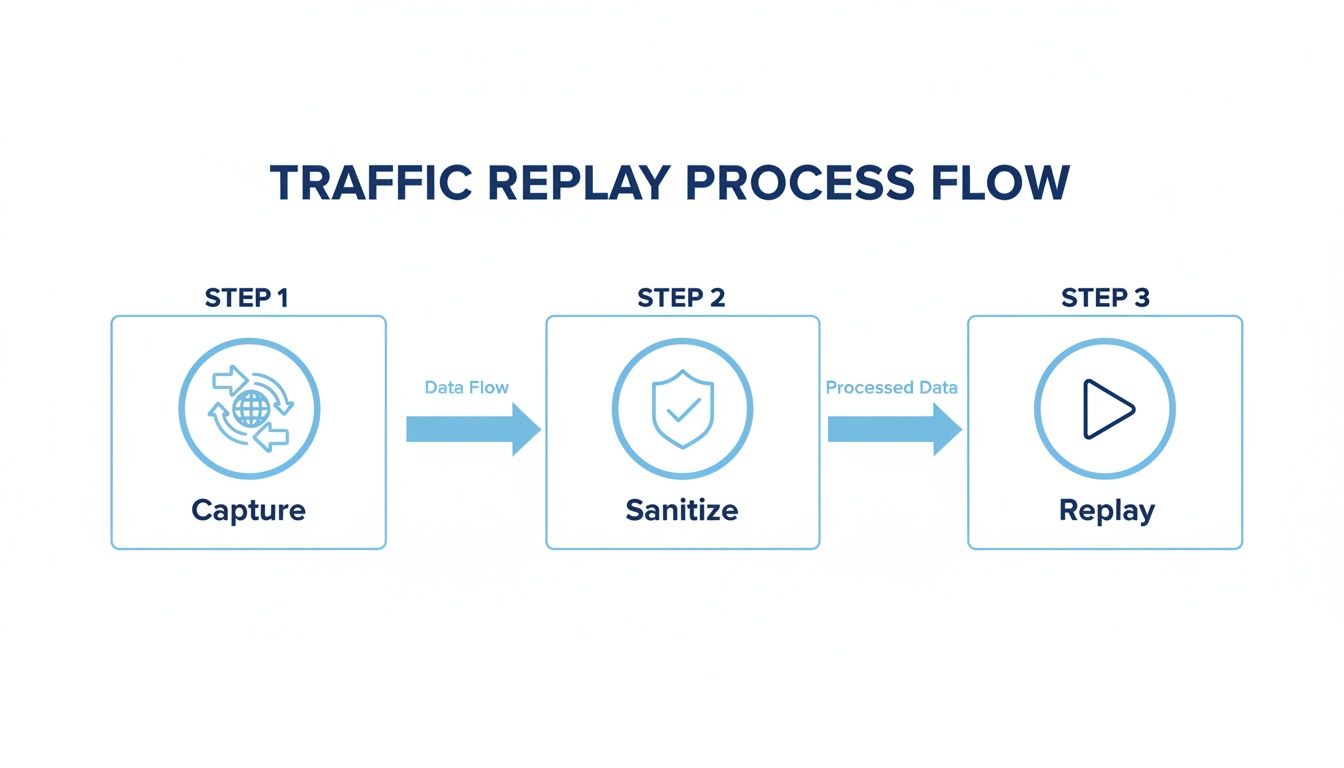
This workflow is all about safely capturing real production traffic, scrubbing it of any sensitive data, and then replaying it in a test environment. It’s a powerful way to validate changes against actual real-world scenarios, all within your automated pipeline.
Common Questions About REST API Testing
As you get your hands dirty building and testing APIs, a few questions tend to pop up again and again. Getting these sorted out early on saves a ton of headaches, clarifies who owns what, and helps build a solid testing culture across the team.
Let’s dive into some of the most common questions I hear.
What’s the Difference Between API Testing and UI Testing?
This is easily one of the most frequent points of confusion. While both are critical for a quality product, they operate on completely different layers of your application.
UI testing is all about the user’s experience. It simulates someone clicking buttons, typing into forms, and navigating your app’s screens. The goal is to make sure the front-end looks right and feels seamless.
On the other hand, API testing skips the UI entirely. It goes straight to the business logic layer, sending requests directly to your API endpoints. This is where you verify that the core functionality—data processing, business rules, security—is working exactly as it should.
I like to think of it this way: UI testing is like checking the car’s dashboard, steering wheel, and radio. API testing is lifting the hood to make sure the engine, transmission, and brakes are all running perfectly. API tests are almost always faster, more stable, and can be run way earlier in the development cycle, long before a single UI screen is even built.
How Should I Manage Test Data?
This one is huge. Solid test data management is the foundation of any reliable testing strategy. If your data is inconsistent, you’re setting yourself up for flaky tests that no one trusts, and you’ll waste hours chasing down false positives.
The whole point is to create a predictable, repeatable environment so you can pinpoint failures with confidence.
Here are a few practices that have become non-negotiable for my teams:
- Use a Dedicated Test Database: Seriously, never run tests against your production database. Ever. You need a dedicated, isolated database that you can wipe and reset to a known good state before every single test run.
- Generate Synthetic Data: For tests that need unique or dynamic data, use data generation libraries or simple scripts. This lets you create realistic-looking (but totally fake) user profiles, orders, or whatever else you need on the fly.
- Anonymize and Mask Everything: If you absolutely must use a snapshot of production data, it’s critical to scrub it clean of all sensitive information. This means anonymizing or masking names, emails, passwords, and any other personally identifiable information (PII).
What Are the Most Important Metrics to Track?
You can’t fix what you can’t see. Tracking the right metrics gives you a clear, objective picture of your API’s health and how well your testing efforts are paying off. While you could drown in data, a few key metrics deliver the most bang for your buck.
For API performance, these are the big three:
- Response Time (Latency): How long does it actually take for your API to process a request and send back a response?
- Error Rate: What percentage of requests are failing with
5xxserver errors or other issues? - Throughput: How many requests can the API chew through per second or minute?
From a functional quality perspective, keep a close eye on your test pass/fail rates and code coverage. These tell you how stable the codebase is and how much of it is actually being validated by your test suite.
Ready to transform your API testing with real-world traffic? With GoReplay, you can capture and replay live user interactions to uncover critical issues before they impact your customers. Start testing with real traffic today!