
What Is User Access Control: Guide for GoReplay Devs
User access control is the practice of defining and enforcing who can access which systems and data under which conditions, monitored through authentication, authorization, and continuous auditing rather than one-time permission grants. Mature enterprise systems treat it as an auditable process, with Oracle documentation describing access reporting for the last 24 hours and audit history retained for 120 days.
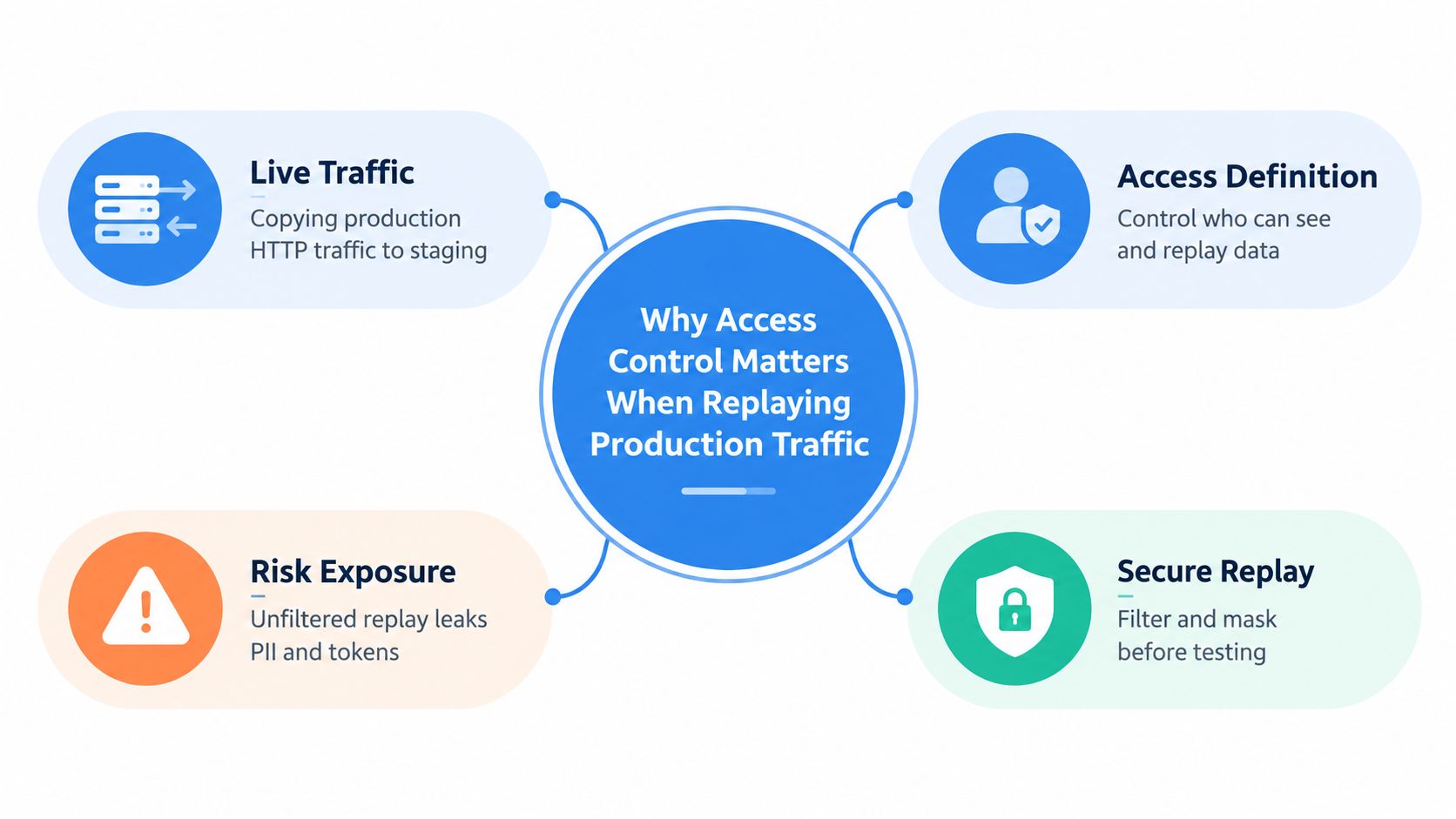
A production replay job often starts innocently. An engineer captures live HTTP traffic, routes it toward staging, and watches the application handle realistic requests. The request stream may also contain session cookies, bearer tokens, personal data, internal headers, and transaction details. The test environment can become a second data boundary before anyone has decided who may inspect, modify, or replay that material.
That’s why access control for replay infrastructure has to cover more than developer logins. It must govern capture permissions, stored traffic files, replay destinations, service credentials, masking rules, and the audit trail that connects each action to a person or workload.
Why Access Control Matters When Replaying Production Traffic
Copying production traffic into a test environment creates a governance problem before it creates a performance result. A capture operator may be allowed to observe traffic but not export it. A replay runner may need to read sanitized requests and send them to a designated test service, but it shouldn’t be able to retrieve raw captures or alter authorization policies.
In practical terms, user access control is the authorization layer around the entire replay path. Authentication establishes which human or service is making a request. Authorization determines whether that identity may capture, read, transform, or replay traffic. Accounting records what happened, including successful and failed attempts, permission changes, and lifecycle events. Oracle’s access-control documentation describes reporting for authentication and authorization activity, failed authorizations by user and resource, locked accounts, password changes, and account events such as creation, deactivation, reactivation, and deletion. Oracle access-control reporting documentation shows why these activities belong in an operational control loop.
The replay path needs separate decisions
Treat capture, storage, transformation, and replay as separate permissions. A developer who can run a load test doesn’t automatically need access to production captures. A storage administrator may manage retention without being allowed to trigger a replay against a shared test service. A security reviewer may inspect audit records without accessing request bodies.
This separation matters for shadow testing, load simulation, and captured-file replay. Teams using production traffic for realistic load testing should define the permitted source, destination, data class, and execution identity before the first capture begins.
Why one-time grants fail
A permission granted for an initial test can outlive the test itself. Roles change, contractors leave, credentials remain in automation, and a copied session can continue working after its original purpose has ended. Access decisions must therefore be reviewable over time, not treated as a static setting in an identity provider.
A safer workflow asks four questions for every replay event:
- Who: Which human or service identity initiated the action?
- What: Which capture, endpoint, and operation were involved?
- Under which conditions: Was the request sanitized, approved, and sent only to an authorized environment?
- What evidence remains: Can the team reconstruct the event from tamper-resistant logs?
Without those answers, a successful performance test can still leave an uncontrolled credential and data exposure behind.
Core Access Control Models Explained
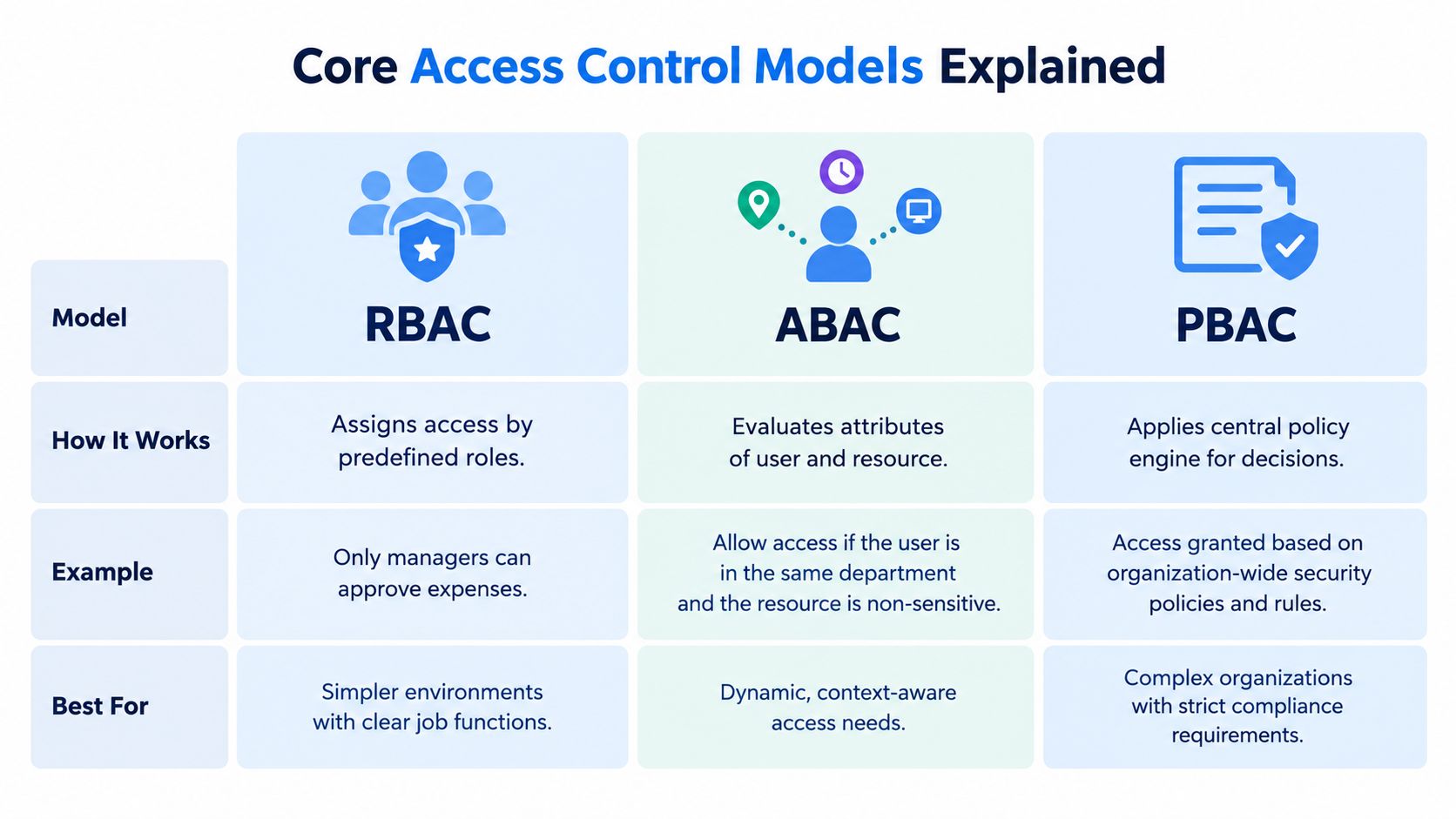
The right model depends on how predictable your permissions are and how much context a request needs. Role-based access control, or RBAC, assigns permissions to named roles such as capture operator, replay runner, storage owner, or auditor. It’s straightforward to explain and works well when job responsibilities map cleanly to actions.
RBAC becomes awkward when one role covers too many environments or data classes. A “replay engineer” role that can read every capture and target every test cluster is easy to administer, but it creates a broad blast radius. Static roles can become coarse and over-permissive in cloud systems, particularly when the same person needs different access for different applications or sessions.
Attribute-based access control, or ABAC, evaluates attributes of the user, protected object, and environment at request time. NIST characterizes ABAC as useful for scalable, flexible, and auditable decisions in its attribute-based access-control guidance. A rule might require that the user belongs to the payments team, the capture is marked sanitized, the destination is a nonproduction environment, and the session uses an approved device context.
Choose the model by operational shape
Policy-based access control, or PBAC, centralizes enforcement in explicit policies, often through a policy engine that evaluates requests consistently across services. This approach can reduce duplicated authorization logic, but it introduces a dependency on policy quality, policy distribution, and clear ownership. A central rule that nobody can interpret or safely test becomes a new operational failure point.
| Model | Practical fit | Main trade-off |
|---|---|---|
| RBAC | Stable duties with clear permission boundaries | Easy to operate, but roles can grow too broad |
| ABAC | Contextual decisions involving users, data, devices, or sessions | More precise, but attributes must be accurate and available |
| PBAC | Consistent enforcement across multiple services | Centralizes decisions, but policy management becomes critical |
Most replay platforms benefit from a combination rather than a pure model. RBAC can define who operates the pipeline, ABAC can restrict access based on environment and data classification, and policy enforcement can keep capture and replay decisions consistent across cloud services.
Access Control Principles That Actually Prevent Incidents
Models describe how authorization decisions are represented. Principles determine how much damage follows when an operator makes a mistake or a credential is compromised. Replay infrastructure needs these controls because mirrored production traffic can expose credentials, personal data, and internal paths across capture files, storage, and test services.
Least privilege gives each replay identity only the permissions required for its assigned operation. A runner may read sanitized capture files, write results to a designated test bucket, and invoke one approved test service. It should not administer the identity provider, browse unrelated storage, or reach production databases. Restricting the replay path also limits what a stolen runner credential can do.
Need to know limits the data available to each role. An engineer investigating load behavior may need request timing, method, path, and response status, while request bodies may contain information unrelated to the test. Masking or removing those fields reduces exposure if an artifact, log, or debugging session is accessed accidentally.
Practical rule: Grant access to the smallest useful operation, data set, and environment.
Separate risky duties
Separation of duties prevents one identity from controlling the entire replay path without oversight. Do not give the same person or service account unrestricted authority to capture production traffic, approve its reuse, remove masking, and send it to a shared environment. Team size changes the exact assignment, but sensitive actions should still require independent review or distinct credentials.
NIST’s access-control catalog covers 25 distinct access-control requirements, including least privilege, separation of duties, account management, and external-system access, as defined in the NIST SP 800-53 Rev. 5 Access Control family. That scope includes provisioning, deprovisioning, emergency access, role membership, and review. Access control therefore requires an operating process, not just an allow-or-deny rule.
Make auditing useful
Logs must support investigation. Record the identity, operation, source, destination, capture or replay object, decision outcome, and relevant policy version. Keep successful and failed authorization events so reviewers can distinguish expected activity from repeated denied attempts. Log access to raw artifacts and masking changes as carefully as replay execution.
Reviewers also need enough history to find stale permissions and unusual access patterns. Oracle documents governance workflows with review windows of 1, 30, 90, or 120 days, alongside audit history retained for 120 days in the referenced access-reporting context. Oracle access-control review documentation shows how access records can serve as reviewable evidence rather than passive logs.
Implementing Access Control with GoReplay
A secure replay setup begins by assigning distinct identities to distinct jobs. Use one identity for capture, another for transformation or masking, another for replay execution, and a restricted identity for audit review where the platform and surrounding infrastructure support that separation. The names don’t matter as much as the boundaries.
The capture identity should have the narrowest practical path out of the source environment. The replay runner should read only approved artifacts and reach only approved test destinations. Storage owners should manage encryption, retention, and access policy without gaining automatic permission to execute traffic against applications.
Build permissions around the workflow
Define permissions for actions rather than broad infrastructure ownership:
- Capture: Observe the approved source interface and write to a controlled staging location.
- Transform: Read the captured artifact, apply masking or token replacement, and write a sanitized output.
- Replay: Read sanitized output and send requests to an explicitly allowed test endpoint.
- Review: Inspect metadata and audit events without exposing raw request content.
- Administration: Change policy, identity bindings, and retention settings through a separately controlled path.
Avoid using a shared administrator credential in scripts. Shared credentials make attribution weak, complicate revocation, and allow a compromised test job to reach unrelated services. Short-lived credentials and workload identity are preferable where your infrastructure supports them, because they reduce the amount of reusable secret material in the pipeline.
Mask before the file becomes portable
Captured traffic files are data assets, not disposable logs. Mask authorization headers, cookies, personal fields, payment-related values, and internal identifiers before the artifact moves into a broader test environment. Preserve the structure needed for replay, but replace values that could authenticate a request or identify a real person.
A mask applied only at display time isn’t enough. If the raw value remains in the capture file, temporary storage, backup, debug output, or replay metadata, the exposure still exists. Test the masking process with deliberately chosen sensitive fields and fail the pipeline when a prohibited field survives.
Preserve the audit trail
For every run, record the capture origin, sanitized artifact, replay destination, initiating identity, service identity, approval context, and timestamped outcomes. Store those records separately from the traffic payload when possible, and restrict deletion or alteration to a tightly governed administrative path.
A replay result without a trustworthy audit trail is a performance observation, not a defensible change record.
Secure the storage layer with encryption, access logging, retention rules, and environment separation. Treat temporary files and failed jobs as part of the threat model. Cleanup routines should remove intermediate artifacts, but deletion must not erase the evidence required to investigate an access event.
Common Access Control Pitfalls in Traffic Replay
Replay tools don’t make production data safe by default. The risk comes from the pipeline surrounding the tool, especially when teams treat HTTP captures as harmless test fixtures.
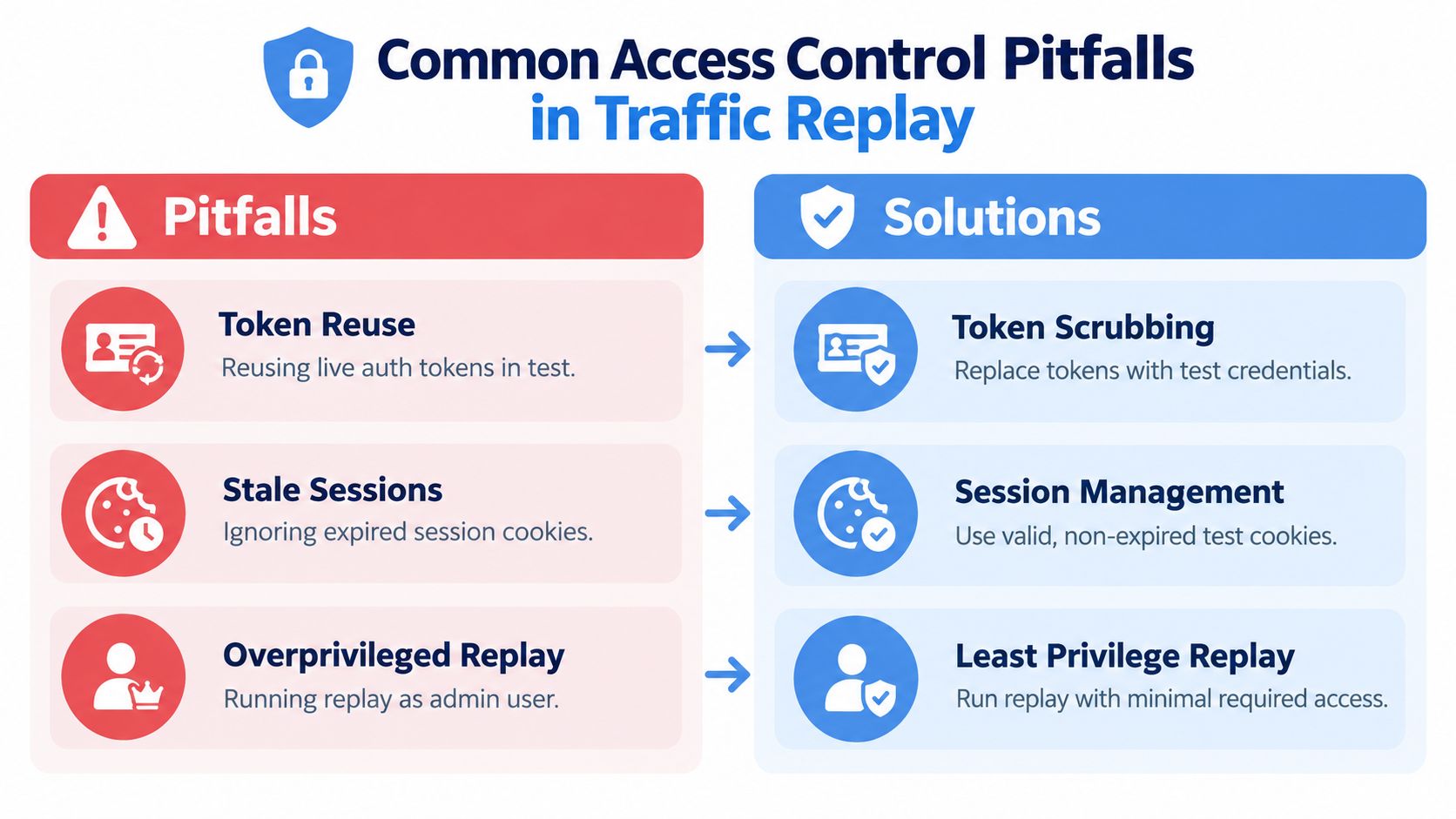
The most dangerous shortcut is reusing live authentication material. A bearer token or session cookie can turn a request replay into an authenticated action against the wrong destination. Even when the destination is nonproduction, the credential may expose internal systems, reveal identity data, or remain available to anyone who can read the artifact.
Look for failure patterns
- Token reuse: Replace live tokens with test credentials or inert values before storage and replay.
- Stale sessions: Treat cookies as sensitive even when they appear old. Expiration isn’t a substitute for scrubbing.
- Overprivileged accounts: Don’t run replay as an administrator when a narrowly scoped service identity can perform the test.
- Shared credentials: Give each operator or workload attributable access so revocation and investigation remain possible.
- Missing audit events: Record denied attempts as well as successful capture, transformation, and replay operations.
Development and QA teams often share credentials to remove friction. That choice trades a small setup convenience for poor attribution and privilege persistence. It also makes it difficult to establish whether a request came from an approved test, an accidental rerun, or an unrelated automation job.
Open-source software can be inspected and adapted, but it can’t decide whether your capture contains secrets, whether a destination is authorized, or whether a user should be allowed to trigger the run. Those are architecture and governance decisions. The safe assumption is that every captured request deserves the same handling discipline as the underlying production data.
Compliance Alignment for Replay Environments
Compliance evidence starts with a defined boundary around replay infrastructure. Record which production sources may be captured, which identities can start a run, how sensitive fields are masked, which test destinations are approved, and who reviews the resulting records. GoReplay can mirror more data than the test requires, so the capture path needs the same governance as the application data it carries.
Review permissions against current responsibilities. Remove access when a project ends, a role changes, or a service no longer needs a capture path. Keep emergency access separate from normal operation, require a reason for each use, and write that event to the audit record.
Turn controls into evidence
A policy document alone rarely proves that a control operated. Keep evidence showing:
- Access decisions are explicit: Role or policy definitions identify permitted actions and environments.
- Data minimization is enforced: Sanitized artifacts contain only fields required for the test.
- Replay activity is attributable: Human and workload identities appear in event records.
- Reviews are repeatable: Access owners can approve, remove, or adjust permissions on a defined cadence.
- Storage is controlled: Raw and transformed artifacts have separate access rules and retention behavior.
The replay record should connect the request, operator or service identity, source, destination, approval, and outcome. Preserve denied attempts alongside successful capture, transformation, and replay events. This gives investigators a usable trail when a run reaches an unexpected environment or a credential is used outside its intended scope.
Data masking needs its own control record. Teams evaluating masking production data for testing should document which fields were replaced, where transformation ran, how detection of prohibited fields stopped the pipeline, and who could access any restricted source artifact. Retain the transformation result and failure log under separate permissions, so a test operator cannot recover the original production values.
What Is Changing in Access Control Right Now
The definition of user access control is expanding beyond the human who typed a password. A legitimate user can operate from an unmanaged device, carry a stolen token, or inherit a compromised session. A system that checks identity only at login may miss the condition that makes the request dangerous.
Recent IAM coverage identifies zero trust, passwordless authentication, and AI-driven threat detection among the trends shaping 2025 and 2026, as discussed in IAM trends for 2025. The practical direction is clear: systems increasingly evaluate device posture, session behavior, authentication strength, and shared risk signals alongside role membership.
Replay infrastructure faces the same shift
A replay runner should not be trusted merely because it authenticated successfully earlier. The authorization decision may need to consider whether the artifact is sanitized, whether the destination is approved, whether the credential is intended for this environment, and whether the session is behaving like an authorized test.
Phishing-resistant authentication and passwordless methods can reduce reliance on reusable secrets for human operators, but they don’t solve workload authorization by themselves. Service identities still need scoped permissions, protected tokens, clear ownership, and event records. AI-assisted detection may surface unusual replay behavior, but detection is a supplement to preventive controls, not permission to skip them.
The critical question is no longer only “Who logged in?” It’s “Should this identity, device, token, and session perform this action now?”
For developers and DevOps teams, that means reviewing control planes as carefully as application endpoints. A stolen session, a copied token, or a compromised runner can bypass an otherwise sensible RBAC design if the system never reevaluates context.
How to Apply Access Control to Safer GoReplay Testing
Treat the replay pipeline as a controlled subsystem with its own identities, data boundaries, and evidence. Start by mapping the complete path from capture source to final destination. For each transition, identify the actor, the artifact, the permitted operation, and the condition that should cause an immediate denial.
The practical priorities are tightly connected:
- Scope credentials tightly. Give capture, masking, storage, replay, and review operations separate permissions where feasible. A replay runner should never inherit production administration because both tasks run in the same deployment platform.
- Mask before distribution. Sanitize headers, cookies, request bodies, and identifiers before captured traffic reaches shared storage or test environments. Keep raw material behind a smaller, separately reviewed boundary.
- Log the control plane. Record who or what captured, transformed, approved, stored, and replayed each artifact. Include denied attempts, destination decisions, and the identity used by automation.
- Review access as operations change. Recheck permissions after ownership changes, test completion, environment migration, and credential rotation. Remove temporary grants instead of assuming they’ll become irrelevant.
This approach also applies outside engineering. Teams building structured user management for nonprofits can use the same mental model: define roles, restrict sensitive records, separate administration from review, and preserve evidence of access decisions.
GoReplay’s value comes from realistic HTTP traffic, which is also why governance matters. The closer a replay resembles production, the more carefully the team must control the credentials, payloads, destinations, and sessions involved. Safe shadow testing and load validation don’t require eliminating realism. They require making realism deliberate, bounded, and auditable.
GoReplay lets teams capture and replay live HTTP traffic for realistic testing, while access control determines whether that capability stays contained. Visit GoReplay to evaluate how its replay workflows, traffic handling, and data-masking capabilities can fit into a governed testing pipeline.