
What Is Testing Plan Practical Guide to Building Realistic Tests

A testing plan pulls scope, objectives, resources, schedule, and success metrics into one clear project blueprint. It makes sure every feature is put through its paces before going live, cutting down on last-minute surprises.
Testing Plan Blueprint

Here’s a breakdown of the main pieces that every testing plan should cover:
- Scope defines which features or functions are in test—and which aren’t.
- Objectives set clear targets, like pass/fail rates or coverage percentages.
- Resources list the people, tools, and environments you’ll need.
- Schedule maps out your timeline: unit tests, integration checks, UAT windows.
- Metrics track progress through requirements coverage, defect density, SLA KPIs, and more.
Testing Plan Overview
Below is a quick-reference table summarizing these core elements and what they entail.
| Aspect | Description |
|---|---|
| Scope | In-scope and out-of-scope features |
| Objectives | Measurable outcomes such as pass/fail rates |
| Resources | Test environments, tools, and assigned personnel |
| Schedule | Phased timelines for unit, integration, and UAT |
| Metrics | Requirement coverage, defect density, and SLA KPIs |
Think of this table as your testing plan’s north star—it keeps everyone aligned on what gets tested, by whom, and by when.
Planning early highlights hidden dependencies and surfaces resource conflicts before they derail development. It also brings stakeholders onto the same page and minimizes frantic fixes at the eleventh hour.
- Clarify test coverage so no scenario slips through the cracks.
- Balance manual checks with automated scripts for efficiency.
- Define transparent entry and exit criteria to know exactly when you’re ready to ship.
- Document those criteria so everyone measures readiness the same way.
- Account for risks like environment shifts or staffing gaps.
- Prioritize phases up front to avoid bottlenecks later.
The global software testing market was USD 55.8 billion in 2024 and is projected to reach USD 112.5 billion by 2034, underscoring ongoing investment in structured testing strategies. Discover more about software testing market growth.
Metrics such as test case counts, pass/fail rates, and defect density give you real-time visibility into your project’s health.
In the next sections, we’ll unpack each planning element with practical templates and examples. You’ll also see how to weave in production-traffic replay using tools like GoReplay for realistic load and regression testing.
With this foundation in place, your team can dive deeper into entry criteria, risk planning, and advanced replay techniques in the chapters to come.
Understanding Testing Plan Key Concepts

Think of a testing plan as your expedition map. You chart out waypoints, pack what you need and scout for hazards before you even lace up your boots.
Back in the early days, software testing borrowed heavily from aerospace reliability engineering. Then Agile and DevOps shook things up—fast feedback loops meant our map had to stay flexible, yet still point us toward clear checkpoints.
For instance, by 2022 application testing made up roughly 55% of the global testing market, with BFSI consuming over 25% and imposing strict acceptance and compliance rules. Companies in regulated fields often allocate 20–40% of project budgets to QA, detailing environments, data-masking needs, entry/exit criteria like “no critical defects and ≤5 high-priority defects,” and precise staffing levels. (The UK market alone was ~£1.1 billion in 2023.) Read the full report on software testing market segmentation
- Waypoints (Entry & Exit Criteria): Tell the team when to start and stop testing.
- Supplies (Test Data & Environments): Cover everything from specific OS/browser versions to anonymized data sets.
- Hazards (Risks & Contingencies): Highlight resource gaps, tool failures or any unexpected snags.
- Traceability Matrices: Connect every requirement back to a test case so nothing slips through the cracks.
Entry And Exit Criteria
Entry criteria are the gates you pass before testing begins—think “code branch merged” or “test environment configured.” Exit criteria set the finish line, often capping the number of allowable defects or mandating full coverage of critical flows.
Clear entry and exit gates help teams measure progress and reduce ambiguity during release cycles.
Core Components Of A Plan
A rock-solid testing plan should align with your project goals. At a minimum, document:
- Scope: Which features are in play—and which aren’t.
- Objectives: Targets such as coverage percentages or performance baselines.
- Test Types: From unit and integration tests to security and user-acceptance checks.
- Environments: Hardware, operating systems, browsers and data requirements.
- Schedules: Milestones for smoke tests, regression runs and final sign-off.
- Metrics: Pass rates, defect density and coverage stats.
- Risks: Potential blockers that could derail your testing effort.
Integrating Realistic Replay
To see how your system behaves under real user load, production-traffic replay is a game-changer. Tools like GoReplay capture live HTTP requests and replay them against staging builds, giving you a mirror of genuine user behavior—without touching your production servers.
- Uncover performance bottlenecks that synthetic scripts miss
- Validate new code against real workloads
- Mix manual and automated tests for a deeper look
With this expedition-style plan, teams combine structure and agility to keep quality consistently high.
Now let’s explore practical templates and examples to bring these concepts to life.
Exploring Core Components Of Testing Plan
A testing plan is like a detailed roadmap. It brings together features, resources, schedules, and metrics so everyone knows what’s happening and when.
In the following sections, we’ll unpack each core component—scope, objectives, test types, environments, schedules, entry and exit criteria, risks, and metrics—so your team can turn high-level goals into practical, verifiable steps.
- You’ll learn how to map features to tests without missing a beat
- We’ll cover ways to set clear targets, from coverage percentages to response times
- You’ll see how realistic traffic replay with GoReplay fits into your plan
Let’s take a closer look at how these pieces fit together.
Below is a quick snapshot of the essentials:
Core Components Comparison
A side-by-side look at what each component does and a real-world example.
| Component | Purpose | Example |
|---|---|---|
| Scope | Define what’s in and out of testing | Link the shopping cart to checkout flows |
| Objectives | Set measurable targets | Hit 90% code coverage |
| Test Types | Choose the right methods | Unit tests, integration tests, UAT |
| Environments | Specify hardware, OS, browsers, data sets | macOS + Windows + mobile with anonymized data |
| Schedules | Organize phases and timings | Timeboxed unit → integration → system tests |
| Metrics | Track progress and quality | Defect density, pass/fail rates |
With this foundation in place, you’re ready to dive into the details.
Mapping Scope And Objectives
Start by listing every function you need to test. For an e-commerce site, that means item browsing, cart updates, payment flows—and more.
Next, tie each feature to specific test cases. Maybe you’ll automate the “add to cart” path but leave complex payment edge cases for manual review.
The goal? Make sure nothing slips through the cracks. When everyone sees exactly what’s covered, it’s easier to spot overlaps or gaps.
Planning Environments And Schedules
Think of environments as your test lab. You’ll need the right hardware, OS versions, browsers, and sample data to mirror real life.
A typical web app might require:
- Windows and macOS browsers
- Android and iOS devices
- A scrubbed dataset that mimics production
Now, break your work into phases—unit, integration, system, acceptance. Give each phase a clear window and stick to it. That way, when something unexpected pops up, you’ve built in breathing room.
Defining Entry And Exit Criteria
Entry Criteria: When can we kick off testing?
Entry gates usually include a stable build and configured environment. If either’s missing, hold off until they’re in place.
Exit gates spell out success. For example:
- No critical defects remain
- Achieve a pass rate above 95%
Assessing Risks And Tracking Metrics
List potential pitfalls—staff availability, tricky third-party integrations, data privacy concerns. Rank them by impact and probability so you know where to focus.
Risk-based test prioritization can cut defects by up to 40% before release.
Metrics keep you honest. Monitor:
- Test coverage
- Defect density
- Pass/fail trends
Integrating Production-Traffic Replay
Capturing live HTTP requests and replaying them in staging uncovers issues scripted tests often miss. With GoReplay, you can:
- Mirror real user scenarios for load and regression checks
- Generate weekly reports showing 85% requirement coverage and 0.5 defects per KLOC
- Make informed go/no-go calls based on actual usage patterns
When you weave production-traffic replay into your plan, you move from theory to reality. You’ll catch weird edge cases and performance hiccups that synthetic tests simply can’t replicate.
A cohesive testing plan isn’t just documentation—it’s your single source of truth. It aligns QA and development, slashes handoff delays, and helps teams react quickly when requirements shift.
In the next section, we’ll explore how to embed production-traffic replay deeper into your tests for maximum confidence. Stay tuned. Test smart.
Integrating Production Traffic Replay For Testing
Bringing production traffic replay into your testing plan lets you inject real user behavior instead of relying solely on scripted scenarios. This means you’ll catch those elusive issues that only show up under genuine load.
With GoReplay you tap into live HTTP requests, scrub any sensitive fields, and channel that traffic into your staging or canary environments. It’s a straightforward way to layer authentic load on top of your existing testing plan.
- Capture Live Traffic securely from production without taking systems offline
- Mask Sensitive Data automatically before it reaches your test clusters
- Route Anonymized Requests to staging, pre-production, or canary environments
- Control Replay Parameters, including speed, concurrency, and session affinity
This method surfaces performance bottlenecks and edge-case errors under real-world conditions—all without putting production at risk.
The screenshot below shows the GoReplay logo, representing the open-source replay tool’s branding.
This logo underscores GoReplay’s role in bridging production insights with test environments.
Setup Steps
Follow these precise steps to integrate traffic replay smoothly:
- Install GoReplay on a proxy node near your production servers
- Configure capture filters to include the HTTP methods and paths your app uses
- Define replay targets, such as staging or pre-prod clusters
- Tune replay parameters—set rate limits, max connections, and session affinity
- Enable TLS optimization flags and connection pooling to mirror real sessions
These settings tie directly into core test plan components:
| Component | Purpose |
|---|---|
| Scope | Choose which traffic segments to include |
| Schedule | Plan replay windows to avoid peak production hours |
| Metrics | Monitor response times, error rates, and resource usage |
Process Flow Visualization
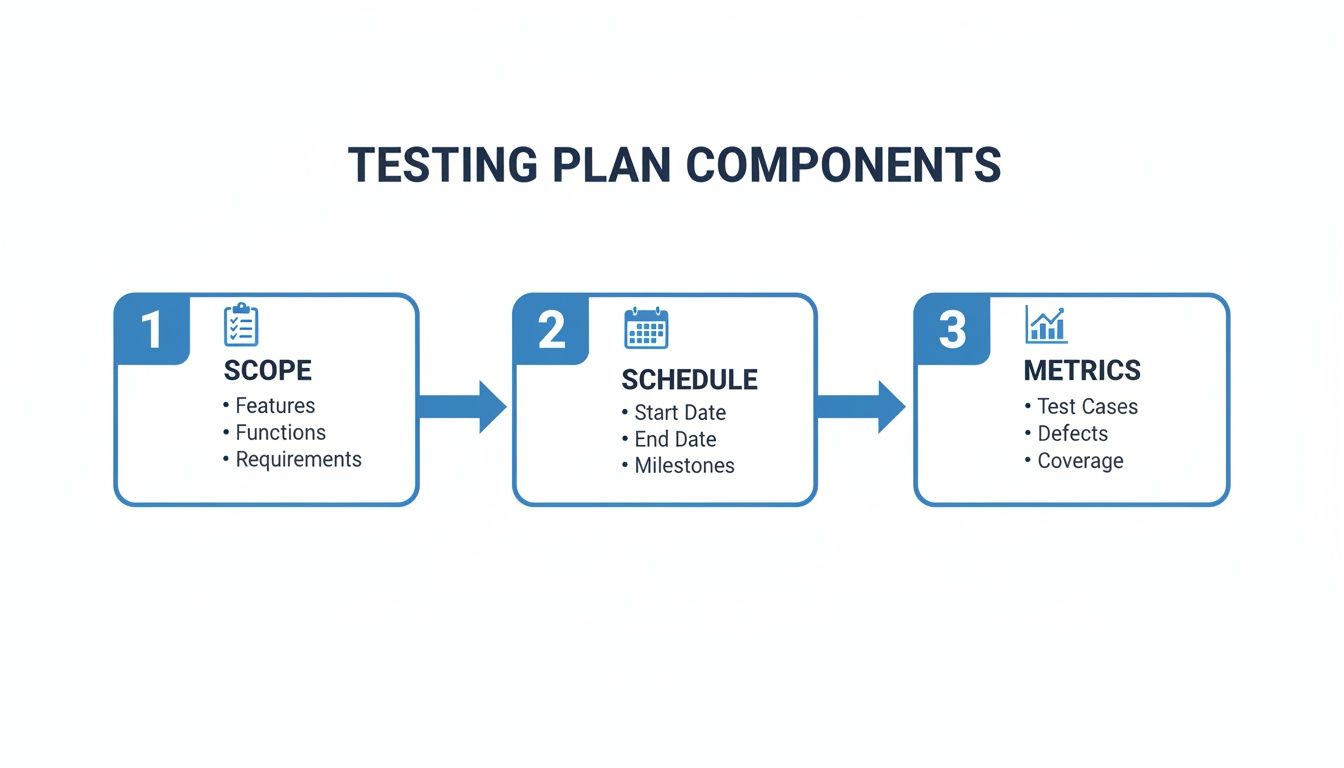
A clear flow makes it obvious how production replay slots into your test plan: define Scope, set a replay Schedule, then gather Metrics.
Next, ramp up the replay volume gradually—start at 10% of normal traffic and increase in 25% increments. Keep a close watch on CPU, memory, and network stats so you catch anomalies early.
For stateful services, add an isolation step: reset or sandbox your database before each run. This prevents one test from contaminating the next and keeps your data pristine.
“Real user traffic replay uncovers subtle regressions that synthetic tests often overlook,” says a QA lead at a major ecommerce firm.
Result Interpretation
After a replay completes, stack the results against your baseline. Look for spikes in error rates or latency that breach your thresholds. Drill into logs to trace unexpected status codes and follow requests through your stack.
For a deeper dive, check out our guide on replaying production traffic for realistic load testing for step-by-step configurations and real-world case studies.
Turning production traffic replay into a core part of your testing plan makes it a living, breathing system. You merge scheduled runs and well-defined metrics with real user interactions—uncovering hidden flaws and proving your application can handle true-to-life load.
Testing Plan Examples And Customizable Template
Testing plans turn big-picture goals into clear, actionable steps so teams don’t get blindsided at release time. In a fast-moving Agile mobile project, you might lean on a slim plan that targets key user journeys and keeps documentation light. By contrast, a BFSI (Banking, Financial Services, Insurance) rollout demands a broader approach—think compliance gates, detailed audit trails, and extra security checks.
- Agile Mobile: rapid sprints, focused on core flows
- Regulated BFSI: strict exit criteria, full traceability, security reviews
Industry Specific Testing Plan Examples
Agile Mobile Builds
Here, the scope zeroes in on essential user flows like login, search, and checkout. Objectives often include hitting 95% load success even when network conditions dip. Before you start, make sure smoke tests pass and the CI/CD tag is stable.
- Environments: Android/iOS devices, simulators, API stubs
- Test Types: unit, integration, UI automation
- Exit Criteria: zero blocker defects, ≥90% automated test pass rate
BFSI Payment Portals
Security, transaction accuracy, and disaster recovery are front and center. Your objectives tie directly to standards like PCI DSS or GDPR. Entry criteria typically demand completed security reviews and anonymized production data.
In regulated domains, a clear audit trail and traceability matrix can reduce compliance review time by 30%.
Customizable Test Plan Template
A simple fill-in-the-blank table helps you capture every section without over-scoping or missing edge cases.
| Section | Purpose | Template Prompt |
|---|---|---|
| Overview | Summarize goals | “Project name, release version, brief scope” |
| Objectives | Define measurable targets | “List 3 key goals (coverage, performance, security)” |
| Components | List features, environments, and tools | “Map feature to test type and required resources” |
| Schedule | Outline phases | “Unit → integration → system → UAT with dates” |
| Risks | Identify potential blockers | “State 5 risks and mitigation plans” |
| Metrics | Determine success criteria | “Set thresholds (test pass rate, defect density)” |
Using Your Template
Start by filling in each prompt with your project’s specifics. When you list environments, include staging URLs, device models, and data-masking rules. For your metrics, aim for 90–100% requirement coverage in critical flows and keep an eye on defect density.
Integrate production-traffic replay from GoReplay to feed real user scenarios into your regression suites. You might also want to dive deeper into crafting solid test cases—check out our comprehensive guide on how to write test cases for more details.
Building the plan this way ensures clarity, adaptability, and consistent quality checks across every release.
Tips For Effective Test Plan Management
- Review the plan with cross-functional teams before execution to catch misunderstandings
- Schedule regular checkpoints to update risks and adjust for new requirements
- Automate regression tests where feasible and free up manual testers for exploration
- Timebox phases to prevent scope creep and keep priorities in focus
- Keep the plan fluid so it can evolve with sprint goals or changing compliance standards
Documenting assumptions early prevents confusion later and keeps stakeholders aligned.
Give your completed template a final once-over to make sure nothing slipped through the cracks.
Get started.
Applying Testing Plan Best Practices
A testing plan isn’t just a checklist—it’s your roadmap to consistent quality. By weaving scope, objectives, and metrics into one clear blueprint, everyone on the team knows exactly what success looks like.
To keep that roadmap accurate, you’ll revisit it regularly. After each sprint, gather your notes, tweak automation targets, and refine test cases so they stay aligned with your goals.
- Define Entry and Exit Gates: Make progress visible
- Track Key Metrics: Use defect density and coverage rates to spot trends
- Simulate Real Loads: Replay production traffic with tools like GoReplay
Iterative Plan Refinement
Think of your test plan as a living document. It grows and changes as your product does.
After every cycle, schedule a quick retrospective. Jot down any blind spots, then loop back in:
- Expand coverage for newly discovered areas
- Increase automation where manual steps slow you down
- Archive outdated test cases that no longer reflect requirements
Continuous testing can cut release defects by 30%.
Continuous Stakeholder Communication
Testing shouldn’t happen in a silo. Keep everyone—from developers to product owners—on the same page with crisp updates.
A weekly dashboard or a short summary table can work wonders:
- Highlight pass rates, defect trends, and replay metrics
- Flag urgent risks and open tickets
- Invite feedback on scope changes or new requirements
By touching base regularly, you build trust, catch misunderstandings early, and uncover hidden blockers before they derail your schedule.
Risk Management Techniques
No plan is foolproof, so identify your potential hazards up front—whether that’s an unstable test environment or a sudden resource shortage.
Assess each risk by its impact and likelihood, then:
- Monitor risk indicators alongside test results
- Adjust mitigation plans when thresholds are exceeded
- Reassign team members or spin up backup environments as needed
Keeping an eye on risk metrics helps you head off problems before they become full-blown defects.
Whether you’re running a two-week sprint or rolling out an enterprise release, these practices scale easily:
- Scope defined and reviewed
- Objectives set with clear metrics
- Stakeholders updated on a regular cadence
- Risks ranked, mitigated, and monitored
- Replay Integration validated in each cycle
- Plan Reviews scheduled monthly
- Pass Rates measured continuously
Ready to tighten up your testing workflow? Start weaving these best practices into your next test plan, and watch your team hit its quality goals with confidence.
Frequently Asked Questions
When teams sit down to create a testing plan, a few questions always bubble up. This FAQ tackles those head-scratching moments.
We cover everything from plan effectiveness to defining gates, choosing replay tools, and scaling templates for lean teams.
- A solid plan spells out clear scope, specific objectives, and measurable metrics.
- Well-defined entry and exit criteria act as your “go” and “no-go” signals.
- Tools like GoReplay, traffic generators, and automation frameworks inject real-world load.
- Compact templates help small teams customize plans in minutes without extra overhead.
Aligning everyone around one document means you’ll know exactly when to kick off tests, pause for fixes, and wrap up.
You might track 95% test coverage or cap defect density to decide if a build is ready to ship.
Setting Entry And Exit Criteria
Entry criteria are your preflight checklist:
- A stable build deployed to the test environment
- All dependent services up and running
- A passing smoke test suite
Exit criteria signal when you can call it a day:
-
Zero critical or blocker bugs
-
Response times under 200ms
-
All high-priority test cases passed
-
GoReplay captures real HTTP traffic and replays it in staging for accurate load tests.
-
Traffic generators like Locust or JMeter spin up virtual users but don’t mirror true session patterns.
-
Automation frameworks such as Selenium and Cypress validate functional flows, not production-scale traffic.
Scaling Templates For Small Teams
Lean teams often need just the essentials. A one-page plan can cover:
- Scope
- Test environments
- Schedules and milestones
Clone the template, tweak those sections, then run with it. Regularly review and refine after each release to keep pace with changing needs.
“Replay-driven testing surfaces issues scripted tests often miss,” says a QA lead at a fintech company.
Ready to feed real user traffic into your staging environment? Check out the GoReplay homepage for more details.