
What Is Test Planning in Software Testing Explained

Think of a test plan as the architect’s blueprint for a skyscraper. You wouldn’t just start laying bricks and hope for the best, right? Before anyone even breaks ground, that blueprint lays out every single detail—from the materials and goals to the safety standards. Without it, you’re not building a skyscraper; you’re building a disaster.
Your Blueprint for Software Quality

So, what is test planning in software testing? It’s the very same idea. It’s the critical document that turns testing from a chaotic, reactive bug hunt into a disciplined and predictable process. This plan defines the objectives, scope, resources, and what success actually looks like, making sure everyone is on the same page.
The Foundation of Predictable Quality
A solid test plan is your single source of truth. It answers all the big questions up front, killing ambiguity before it can waste time and money. For instance, it clearly states which features are being tested (in-scope) and, just as importantly, which ones are being intentionally ignored (out-of-scope).
This clarity ensures that your valuable resources—your people, tools, and time—are pointed in the right direction. Developers, QA engineers, project managers, and stakeholders all know their roles and what the end goal is.
This isn’t a new concept. Structured planning became essential as software grew more complex, eventually being formalized in standards like IEEE 829. While modern approaches have evolved with agile and DevOps (now used by about 70% of organizations), the fundamental need to define what, how, and when to test has never been more critical. In fact, over 82% of enterprises now invest in structured test planning to keep risk under control. You can dig deeper into the trends shaping the software testing market to see why.
Key Pillars of a Test Plan
A truly comprehensive test plan is built on several core pillars. Each one tackles a specific piece of the puzzle, ensuring nothing gets missed. Getting a handle on these is your first step toward building a plan that actually works.
To make it simple, here’s a quick breakdown of the essential elements. Think of this as the “cheat sheet” for what every good test plan needs to cover.
Key Elements of a Test Plan at a Glance
| Element | Purpose |
|---|---|
| Scope & Objectives | Defines what will be tested and the specific quality goals to achieve. |
| Test Strategy | Outlines the testing types (e.g., functional, performance) and methods. |
| Resources | Details the team members, tools, and environments needed for testing. |
| Schedule | Sets a clear timeline with milestones for all testing activities. |
| Deliverables | Lists all documents to be produced (e.g., test cases, bug reports). |
| Entry & Exit Criteria | Specifies the conditions that must be met to start and stop testing. |
Nailing these six areas ensures your plan isn’t just a document that sits on a shelf—it’s an active guide that leads your team to a high-quality release.
Why We Plan: Defining the Strategic Goals of Test Planning
Let’s be honest: great teams know that test planning is way more than just a box-ticking exercise or a bug hunt. It’s a strategic game plan with clear business objectives that have nothing to do with finding every last typo. At its core, test planning is all about managing risk, using resources wisely, and getting everyone on the same page about what “done” really means.
Without a plan, testing quickly becomes a chaotic, expensive mess. A solid plan, however, turns that chaos into a predictable process that directly boosts the bottom line. It answers the simple but critical question: “What are we actually trying to accomplish here?”
Mitigating Critical Business Risks
One of the biggest wins from test planning is proactive risk mitigation. Think of it as a pre-mortem for your software release. The planning phase forces you to sit down and imagine all the ways things could go spectacularly wrong before they have a chance to.
For instance, what’s the risk of your new payment gateway crashing during the Black Friday rush? The financial hit and reputational damage would be massive. A good test plan anticipates this disaster and carves out specific resources for performance and load testing, ensuring the gateway can handle the heat.
By flagging high-risk areas—like security holes, data integrity problems, or performance bottlenecks—the test plan ensures your most critical features get the most intense scrutiny. This is all about prioritizing your effort to prevent the kind of failures that kill revenue and user trust.
Ensuring Smart Resource Management
Another key goal is efficient resource management. We’re talking about your team’s time, your testing tools, and the hardware you run it all on. A test plan is essentially a budget and a schedule for these valuable assets.
It spells out who’s doing what, which tools are needed for which tests (think automated regression vs. manual exploratory testing), and when test environments need to be ready. This simple act of planning sidesteps common headaches like team members spinning their wheels on low-priority tasks, expensive tools gathering dust, or developers and testers stuck waiting on each other. Proper planning makes sure every dollar and hour you invest in testing actually counts.
Defining a Clear Scope of Work
We’ve all seen projects derailed by scope creep—that endless trickle of “just one more thing” that leads to blown deadlines and budgets. Test planning is your best defense. It establishes firm boundaries for the testing effort from day one.
The plan explicitly states what’s in-scope (features we are testing) and what’s out-of-scope (features we are intentionally ignoring this cycle). This clarity prevents wasted time on non-critical features or functionality that isn’t even part of the current release. For example, the plan might declare that the new checkout flow will be tested exhaustively, but the legacy user profile page is out-of-scope until Q3.
This keeps the team laser-focused on what matters now. It also gives you a formal document to point to when last-minute requests threaten to throw the entire schedule off track.
Aligning Stakeholders on Quality
Finally, test planning is absolutely crucial for getting all your stakeholders aligned. Different people have wildly different ideas about what “quality” even means. A project manager might see it as hitting a deadline, a developer as zero bugs, and a business owner as a killer user experience.
The test plan forces everyone to agree on a single, measurable definition of quality for the project. It establishes clear entry and exit criteria—the specific conditions that must be met to start and, more importantly, to stop testing. An exit criterion might be something like, “zero outstanding critical bugs and a 95% pass rate for all regression tests.”
This alignment means no nasty surprises when you’re trying to ship. With software getting more complex by the day, this shared understanding is more critical than ever. The global software testing market was valued at around USD 51.8 billion in 2023, and services like planning and development made up over 56% of that. You can learn more about the software testing market to see just why expert planning is such a big deal.
Anatomy of an Effective Test Plan Document
A great test plan is so much more than a document. It’s the blueprint that turns your high-level strategy into a set of concrete, actionable tasks for your team. While the exact format can change from team to team, every solid test plan has a few non-negotiable parts that bring clarity and direction to the chaos.
Think of it like building a piece of furniture. You wouldn’t just start screwing pieces together without the instruction manual. That manual lists all the parts, tools, and steps you need. Your test plan does the same thing for your testing cycle, making sure nothing important gets missed.
Defining Scope and Objectives
This is where it all starts, and it’s arguably the most critical section of the whole document. It sets the stage for everything else by answering two fundamental questions: What are we actually testing, and why are we testing it?
The scope is all about drawing clear lines in the sand. You list every feature, user story, or module that is in-scope (things we will test) and, just as crucially, what’s out-of-scope (things we will intentionally ignore). Getting this right from the start is your best defense against scope creep and keeps the team laser-focused on what matters most.
The objectives are your measurable goals—the specific outcomes you’re aiming for. An objective isn’t vague; it’s something you can prove you’ve accomplished. For example, “Achieve 95% code coverage for the new payment module” or “Verify the app can handle 500 concurrent users without a dip in performance.”
Crafting the Test Strategy
Okay, you’ve nailed down the “what” and “why.” Now, the test strategy explains the “how.” This is where you detail the overall approach your team will use to hit those objectives. It’s where you make the big calls on what kind of testing is needed for the release.
A good strategy will map out:
- Testing Types: What’s in the mix? You might decide on a combination of functional, regression, performance, security, and usability testing.
- Automation Approach: What gets automated, and what stays manual? Repetitive regression checks are perfect candidates for automation, while a brand-new, complex feature might need some hands-on exploratory testing first.
- Tools and Technologies: What’s in your toolkit? List the software you’ll be using for test management, automation, and performance monitoring.
Planning Resources and Schedules
No plan is worth its salt without sorting out the logistics. The resource plan identifies everyone involved, clarifying their roles and responsibilities. It answers the simple question, “Who is doing what?” This creates clear ownership and makes sure everyone is accountable.
The schedule lays out a detailed timeline for all testing activities, complete with key milestones and deadlines. It has to sync up with the broader project plan to avoid becoming a bottleneck. A realistic schedule always accounts for things like:
- Time for writing and reviewing test cases
- Setting up the test environment
- The actual test execution cycles
- The inevitable bug-fixing and re-testing loop
A classic mistake is underestimating how long it takes to get the environment ready. A well-thought-out schedule allocates specific time for configuring hardware, software, and networks. Your test results are only as good as the environment they run in.
Establishing the Test Environment
The test environment is the stage where the entire performance happens. This section needs to specify the exact hardware, software, and network configurations required for testing. If your test environment doesn’t mirror production, you risk missing bugs that will pop up for real users or, just as bad, wasting time on “bugs” that only exist in your flawed setup.
If you want to dive deeper into this crucial step, check out our guide on test environment best practices.
Setting Entry and Exit Criteria
This part might be the most powerful tool you have for managing expectations and defining what “done” actually looks like. These are the black-and-white rules of the road for your testing cycle.
- Entry Criteria: These are the conditions that must be met before the testing phase can even begin. For instance, “The latest build has been deployed to the QA environment, and all smoke tests are passing.”
- Exit Criteria: These are the signals that testing is complete and successful. A common example is, “All critical and high-priority bugs are closed and verified, and 100% of planned test cases have been executed.”
These criteria eliminate all the guesswork. They stop you from shipping too early or getting stuck in an endless testing loop, providing a clear, data-driven answer to the question, “Are we ready?”
Identifying Test Deliverables
Finally, your test plan should list all the artifacts—the tangible outputs—that your team will produce. These documents are the official record of your efforts and findings.
Common deliverables include:
- The test plan document itself
- Test cases and test suites
- Any automation scripts that were written
- Defect reports and system logs
- A final test summary report
That test summary report is especially important. It gives stakeholders a clean, high-level overview of the entire testing effort, highlighting key metrics, assessing the overall quality, and making a final recommendation on whether to release.
Navigating the Test Planning Process Step by Step
Knowing the key parts of a test plan is one thing. Actually putting them together into a solid process is something else entirely. Test planning isn’t a one-and-done meeting; it’s a series of careful steps that turn vague ideas into a real, workable strategy. Think of it like mapping out a cross-country road trip—each stop you plan builds on the last, making sure you don’t end up lost in the middle of nowhere.
This structured approach ensures testing isn’t just tacked on at the end but is woven into the development fabric from day one. By following a clear workflow, teams can cover all their bases, from figuring out what to test to defining exactly when you can call the job “done.” This is how you shift from a reactive bug hunt to proactive quality assurance.
This chart breaks down the typical steps a QA engineer follows to build a solid test plan.
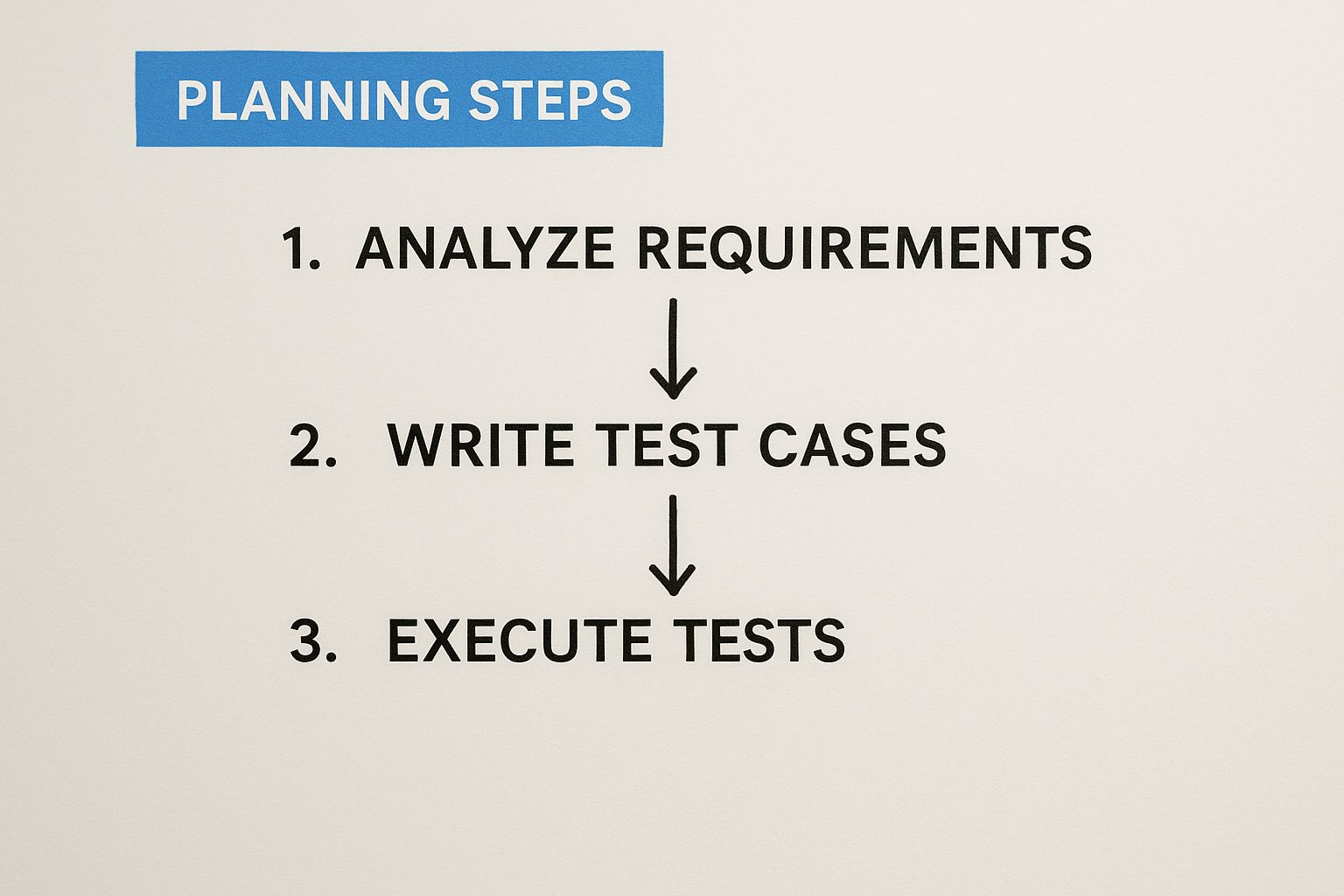
You can see how each phase flows right into the next, creating a repeatable and logical path for any project.
Step 1: Analyze Product Requirements
Every great plan starts with a deep dive into the product itself. Before you can figure out how to test something, you have to get your head around what it is, who it’s for, and what it’s supposed to do. This means getting in a room (virtual or otherwise) with product managers, developers, and business analysts to pick apart user stories, specs, and design docs.
The real goal here is to pinpoint the testable requirements and iron out any fuzzy details. You should be asking questions like:
- What are the absolute must-have features for this release?
- Are there any known trouble spots or high-risk areas from past releases?
- From a user’s point of view, what does a successful outcome look like?
Step 2: Define Test Strategy and Objectives
Once you’ve got a handle on the “what,” it’s time to define the “how.” The test strategy is your high-level game plan. Here, you’ll decide on the right blend of testing types—functional, performance, security, usability—to hit your quality targets.
This is also where you lock down clear, measurable test objectives. A vague goal like “test the new checkout page” is useless. Instead, aim for something concrete: “Verify the checkout process can handle 100 transactions per minute with an average response time under two seconds.” That kind of clarity gets everyone on the same page.
A well-defined strategy is your compass. It ensures every test case you write and every hour you spend is pushing toward a specific, agreed-upon goal. Without it, you’re just testing in the dark.
Step 3: Estimate Effort and Resources
With a clear strategy in hand, you can start to realistically map out the work ahead. This step is all about estimating the time, people, and tools you’ll need to get the job done. This isn’t just about pulling numbers out of thin air; it’s about breaking the work into smaller chunks—test case design, environment setup, execution, reporting—and estimating each one.
You’ll also pin down your resource needs. Who’s actually going to run these tests? What specific hardware and software do you need for the test environment? Will you need specialized tools, like GoReplay for replaying production traffic, or a dedicated performance testing suite?
Step 4: Create the Schedule and Timeline
Now it’s time to get everything on a calendar. The test schedule has to sync up with the broader project timeline, with clear milestones and deadlines. This isn’t just a list of dates; it’s a coordinated plan that considers dependencies, like waiting for a stable build from the dev team before you can even start.
A smart schedule always includes some buffer for the unexpected hiccups that are bound to happen in software development. Good scheduling prevents testing from getting squeezed into the last few days of a sprint—a classic recipe for rushed, sloppy work. To get a better feel for how this all fits together, it helps to understand testing in the software life cycle and how it integrates with development.
Step 5: Define Deliverables and Secure Approval
The final step is to make it all official. Here, you clearly list all the test deliverables—the actual, tangible things you’ll produce. This includes the test plan document itself, test cases, any automation scripts, bug reports, and a final test summary report.
Once the plan is documented, it needs to be reviewed and signed off on by all the key stakeholders: project managers, dev leads, and product owners. This approval process makes sure everyone is aligned on the scope, goals, schedule, and resources. It turns the test plan from just a QA document into a shared team commitment to quality.
Test Planning Phase and Core Activity
To tie it all together, this table shows how each planning phase connects to a core activity and its main output. It’s a simple way to visualize the flow from start to finish.
| Planning Phase | Core Activity | Key Output |
|---|---|---|
| 1. Product Analysis | Review requirements, user stories, and specifications. | List of testable requirements. |
| 2. Strategy & Objectives | Select testing types and define measurable goals. | A documented test strategy. |
| 3. Effort & Resource Estimation | Calculate time, personnel, and tool requirements. | Detailed effort and resource plan. |
| 4. Scheduling & Timelines | Align testing milestones with the project schedule. | A comprehensive test schedule. |
| 5. Deliverables & Approval | Document outputs and get stakeholder sign-off. | The final, approved test plan. |
Following this structure helps ensure that nothing critical is missed and that the entire team understands the road ahead.
Common Test Planning Mistakes to Avoid
Even the sharpest teams can get tripped up by a few common test planning mistakes. A solid plan is your best defense against chaos, but it’s only as good as the thinking behind it. If you can learn to spot these classic traps ahead of time, you’re already halfway to a smoother, more predictable release cycle.
These aren’t just minor technical errors; they’re fundamental oversights in strategy and communication. They’re the kind of slip-ups that lead to blown deadlines, burnt-out teams, and buggy software that drives users away.
Forgetting to Collaborate with Stakeholders
This is probably the biggest and most common mistake: creating a test plan in a silo. When a QA team writes a plan without talking to developers, product managers, or business analysts, they’re basically just guessing what matters. This almost always creates a massive disconnect between what gets tested and what the business actually needs.
Imagine the QA team spending a week testing a minor UI element, only to find out the critical new payment integration was the real priority. To avoid this, kick things off with a meeting that includes everyone. Get aligned on the scope, agree on what “done” really means, and make sure the plan reflects everyone’s priorities. This turns the test plan from a QA checklist into a shared commitment.
Setting Vague or Unrealistic Objectives
A plan with fuzzy goals is a roadmap to nowhere. An objective like “test the new user profile page” is totally useless. What are you actually testing? Functionality? Performance? Security? Without a clear target, your team has no idea when they can stop.
You need to define specific, measurable goals. A much better objective is: “Verify all user profile form fields save correctly and achieve a 95% pass rate on all functional test cases.” Now the team has a clear finish line.
The same goes for timelines. A schedule that doesn’t account for dev delays, environment issues, or bug-fixing cycles isn’t a plan—it’s wishful thinking. Always build in a buffer for the things you know will go wrong.
Ignoring Risk and Prioritization
Look, not all features are created equal. If you don’t identify and prioritize high-risk areas, your team could waste days on low-impact bugs while a show-stopping flaw in the login flow goes completely unnoticed. Risk assessment isn’t optional; it’s the core of smart test planning.
The goal isn’t to test everything with the same intensity. It’s to apply the most rigor to the parts of the system that could cause the most damage if they break.
Get the team together and figure out which parts of the application are most complex, business-critical, or have a history of being buggy. Focus your efforts there first. This one shift in mindset can dramatically improve the quality of your release without adding a single hour of work.
Treating the Plan as a Static Document
In software development, change is the only constant. Requirements shift, priorities get shuffled, and unexpected problems crop up. A test plan that can’t adapt becomes irrelevant the second the project changes. A classic mistake is to write a plan, get it signed off, and then shove it in a drawer.
Your test plan has to be a living document. Here’s how you keep it that way:
- Review Regularly: Make it a habit to look at the plan at the start of every new sprint or development cycle.
- Update with Changes: As soon as the project scope changes, the test plan needs to change with it. No delays.
- Incorporate Learnings: Use what you learn from bug reports and team retrospectives to make your strategy better for the next round.
When you treat your plan like a dynamic guide instead of a stone tablet, you ensure your testing efforts always stay aligned with where the project is actually going.
Frequently Asked Questions About Test Planning
Even with the best process laid out, theory only gets you so far. When the rubber meets the road, real-world questions always pop up. The world of software testing is full of nuances, and getting the small details right can completely change how effective your testing is.
Let’s clear up some of the most common questions we hear from teams.
What Is the Difference Between a Test Plan and a Test Strategy?
This is easily the most common point of confusion, and for good reason—people often use the terms interchangeably. But they are fundamentally different.
Think of it like planning a road trip.
Your test strategy is your high-level travel philosophy. It answers the big questions, like “Are we budget-conscious campers or do we only stay in luxury hotels?” It’s a static, long-term document for the whole organization that sets the ground rules for quality. It rarely changes and contains principles like, “All new features must undergo security penetration testing.”
Your test plan, on the other hand, is the detailed itinerary for one specific trip. It’s the tactical, project-specific document answering: “Where are we driving on Tuesday, what’s our gas budget, and where are we staying that night?” It takes the rules from the strategy and applies them to a single feature or release.
In short: The strategy is the big-picture “why” and general “how” for the whole company. The plan is the detailed “what, when, and who” for a single project.
How Does Test Planning Work in an Agile Environment?
If you’re coming from a traditional waterfall background, test planning in Agile will feel very different. Forget creating a massive, all-encompassing plan at the start of a project and then sticking to it for months. Agile is all about adapting on the fly.
Instead of one big planning event, Agile test planning is a continuous activity that happens in short bursts. It usually breaks down like this:
- Release-Level Planning: Before a major release kicks off, the team might sketch out a lightweight, high-level test plan. This just sets the overall goals and scope, leaving the finer details for later.
- Sprint-Level Planning: This is where the real work happens. At the beginning of each sprint (typically 1-4 weeks), the team looks at the user stories for that cycle and creates a focused “mini” test plan just for that work.
- Continuous Adaptation: The plan isn’t set in stone; it’s a living document. As the sprint progresses and new information comes to light, the team can pivot the testing approach instantly.
The key takeaway? In Agile, test planning shifts from a single, static event to a dynamic, continuous process. It’s all about collaboration and responding to change, not following a rigid script.
What Tools Are Commonly Used for Creating Test Plans?
The right tool for the job really depends on your team’s size, project complexity, and budget. The options range from simple documents to powerful, all-in-one test management platforms.
For smaller teams or straightforward projects, you don’t need to overcomplicate things.
- Document Editors: Tools you already use, like Google Docs, Confluence, or even Microsoft Word, work perfectly well for creating and sharing test plans. They’re simple, collaborative, and get the job done.
- Spreadsheets: For organizing test cases and tracking results, Google Sheets or Microsoft Excel are surprisingly effective. They give you structure without the overhead of a dedicated tool.
But as your project scales, you’ll quickly outgrow these basic options. That’s when dedicated test management tools become a lifesaver.
- Jira with Plugins: Jira is the king of project management, and with plugins like Zephyr, Xray, or qTest, it transforms into a serious test management solution. This keeps your test cases, user stories, and bugs all linked together.
- Dedicated Tools: Platforms like TestRail are built from the ground up just for test management. They offer advanced features for organizing test suites, tracking progress in real-time, and generating the kind of detailed reports that give you deep insights into quality.
The goal isn’t to find the most feature-packed tool—it’s to find the one that fits your team’s workflow and makes planning easier, not harder.
At GoReplay, we know that the best test plan is only as good as the data you test with. By capturing and replaying real production traffic, our tool ensures your test environment behaves just like the real world. This gives you the confidence that your application is truly ready for anything your users throw at it. Discover how GoReplay can bridge the gap between planning and reality.