
What Is Jenkins Software Used for: A Practical Guide
Jenkins is an open-source automation server that builds, tests and deploys software through CI/CD pipelines, with main uses including continuous integration, automated testing, release packaging, deployment and scheduled automation.
You’ve pushed a change, the application works on your laptop, and someone asks whether it’s ready to release. Answering means rebuilding it, running tests, preparing a deployable package and checking the target environment. Jenkins can coordinate that work, but your team still decides which checks count as evidence that the change is safe.
What Jenkins Is Used For at a Glance
Automation means turning a repeatable procedure into an executable workflow. Instead of asking a developer to run commands and pass the results to an operations engineer, Jenkins starts the configured tasks, records their outcomes and decides which task can run next.
Teams use it for recurring delivery work, not just occasional releases. Between June 2021 and June 2023, total monthly Jenkins jobs rose 45% to 73,746,418, while monthly Pipeline jobs rose 79% to 48,625,398, according to the Continuous Delivery Foundation’s Jenkins growth announcement.
Core uses of Jenkins and what each one automates
| Use | What Jenkins Does | Typical Pipeline Stage |
|---|---|---|
| Continuous integration | Builds and tests every configured commit or pull request | Checkout, compile, unit test |
| Continuous delivery | Packages approved builds and promotes them through environments | Package, staging deploy, approval gate |
| Automated testing | Runs unit, integration and regression suites on each change | Test stage with published reports |
| Deployment | Releases to staging or production with scripted steps | Deploy stage with rollback step |
| Scheduled automation | Runs nightly jobs, reports and maintenance scripts | Timed trigger and script step |
| Distributed builds | Spreads jobs across agents with different operating systems or tools | Parallel stages on agents |
| Release coordination | Sends notifications and waits for manual approvals | Input step with chat or email notice |
The distinction between continuous delivery and continuous deployment often confuses newcomers. Delivery keeps a validated release ready for production, with a person potentially approving the final move. Deployment removes that routine manual release decision when the configured checks pass.
Jenkins doesn’t replace the tools in those stages. Maven might compile a Java application, a test framework checks its behavior, and a deployment script updates the environment. Jenkins supplies the order, triggers, status tracking and control around those tools.
Think of Jenkins as an execution and control plane, not as the compiler, test strategy or production environment itself.
Say your team maintains a web application and a nightly reporting service. The application might run validation whenever a pull request changes, while the reporting service runs on a schedule. Both are Jenkins workloads, even though only one immediately leads toward a software release.
That’s the practical answer to what is Jenkins software used for: making your team’s delivery procedures executable, repeatable and visible. The value comes from replacing undocumented handoffs with explicit steps, not from installing Jenkins alone.
How Jenkins Is Structured Around Controller, Agents and Executors
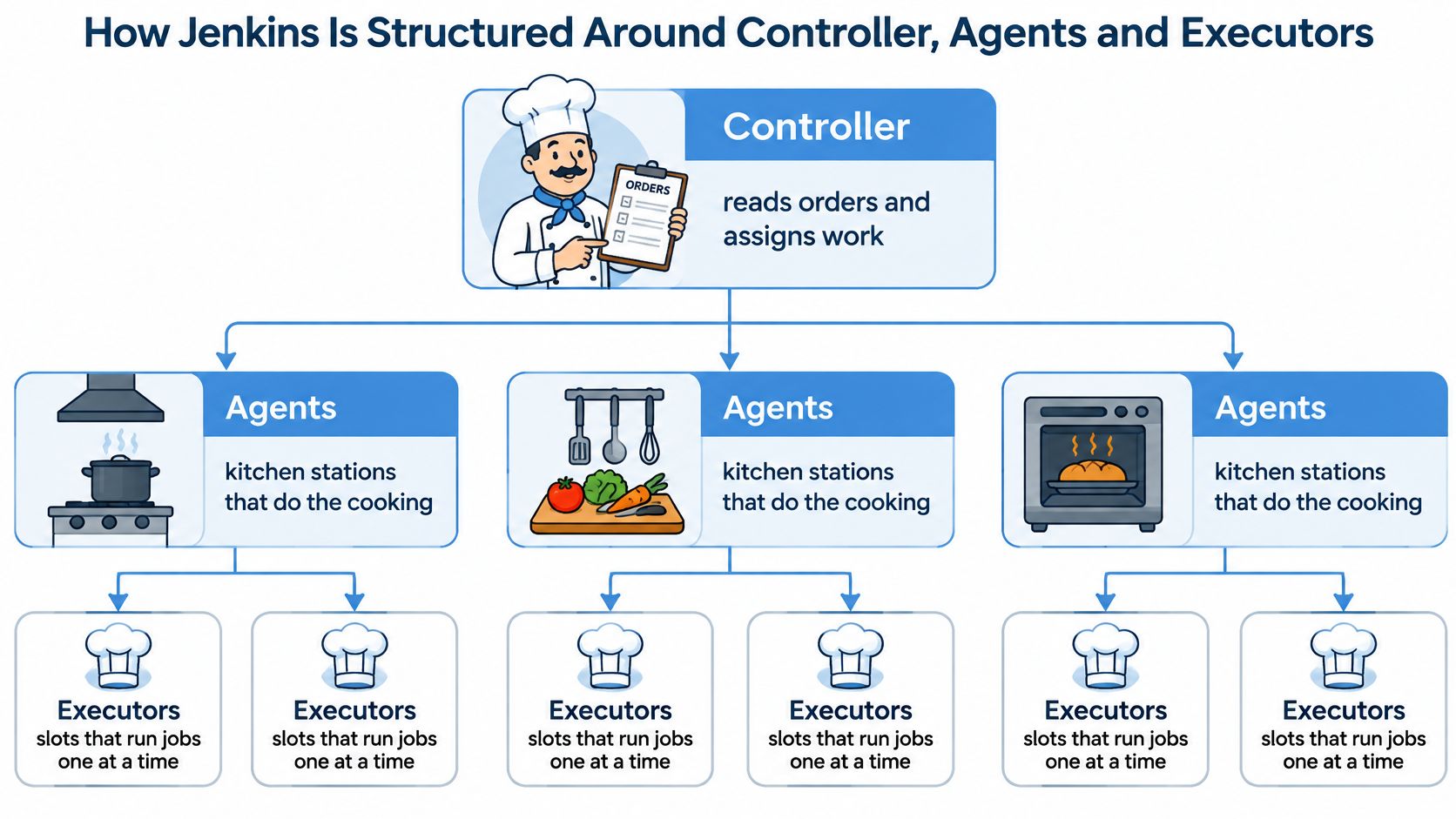
A restaurant’s head chef reads orders, assigns dishes to kitchen stations and tracks what’s ready. The stations do the cooking with their own equipment. Jenkins separates coordination from execution in much the same way.
The controller handles scheduling, configuration, the dashboard and coordination of results. Agents provide the machines, tools and workspaces where build and test commands execute. An executor is an available execution slot on an agent, not another machine.
The diagram shows how those responsibilities fit together.
Follow a build through the kitchen
Suppose your application needs Linux-based backend tests and Windows-specific desktop tests. The controller receives the build request and schedules each workload on an agent with the appropriate environment. Each agent needs its own working directory and access to the tools required by its assigned tasks.
Agents can be physical or virtual machines, hosted locally or in the cloud. They don’t all need identical operating systems or software. That’s useful when a release must work across different runtimes, browser configurations or database environments.
The Jenkins agent documentation recommends setting the controller’s executor count to zero, keeping execution on agents so the controller can concentrate on coordination.
Adding execution slots isn’t automatically the same as adding useful capacity. If several builds compete for the same memory, disk or database, they can slow each other down. Size agents around their workloads rather than increasing concurrency until the queue disappears.
Practical rule: Keep build workloads off the controller, and treat agent capacity as a resource budget rather than an unlimited setting.
Make environments explicit
An ephemeral Docker-based agent gives a job a temporary environment with declared tools and dependencies. That reduces reliance on a long-lived machine whose configuration someone changed manually and forgot to document. Persistent caches and external services still need deliberate management.
For a traffic-replay workflow, separate agents can run the application build, replay workload and report analysis. Isolation helps prevent the test generator from competing directly with the application it’s measuring.
Before troubleshooting a queued job, check its requested agent label. Does a matching agent exist, is it connected, and does it have an available executor? A pipeline requesting an unavailable environment can remain queued even when other agents are idle.
How Pipeline-as-Code Turns Delivery Into Repeatable Stages
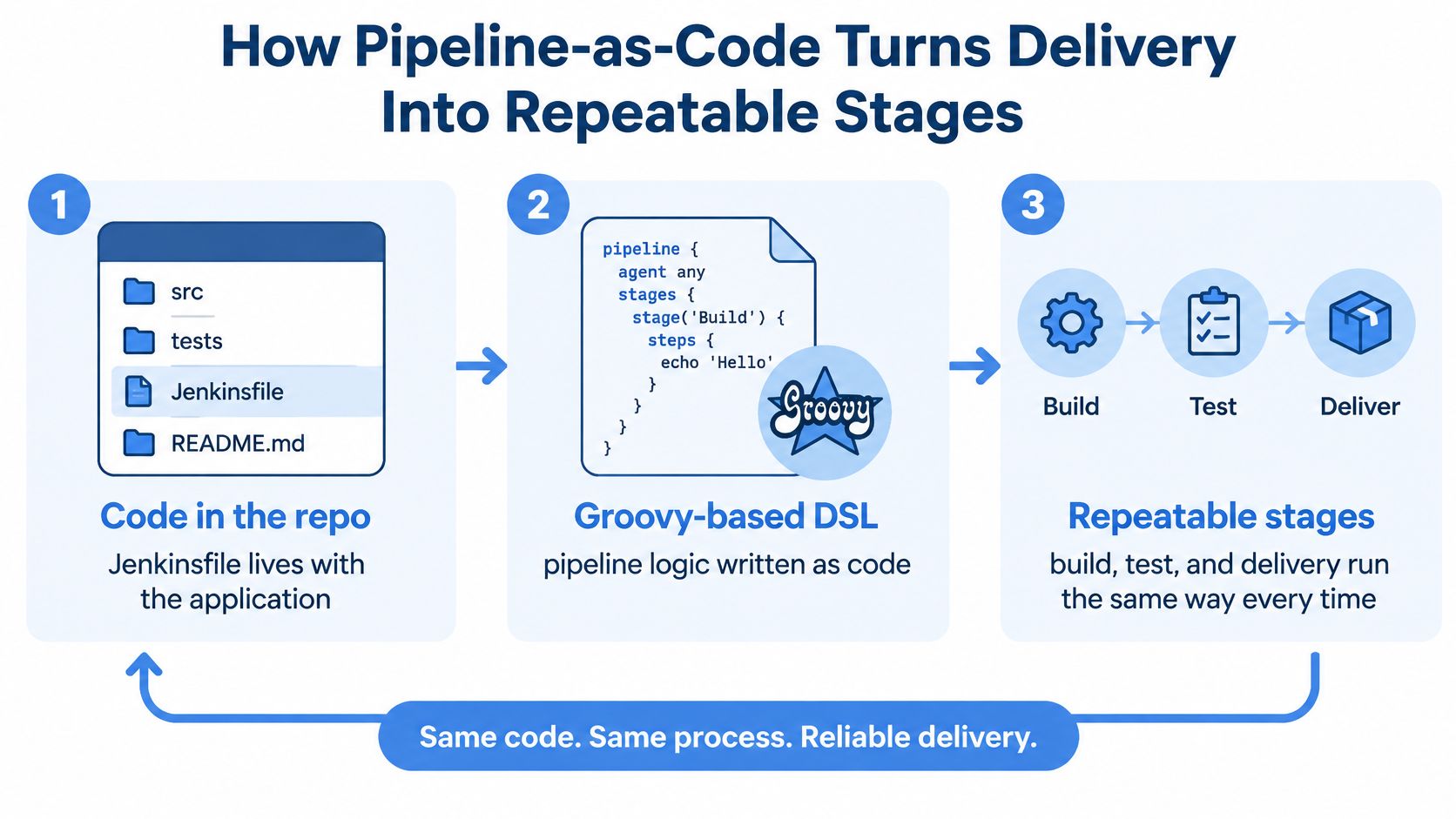
A Jenkinsfile is a text file that describes the delivery workflow and lives alongside the application code. Jenkins uses a Groovy-based domain-specific language to express those instructions, as explained in the Jenkins Pipeline getting-started guide.
Storing the workflow in version control makes changes reviewable. A pull request can show that someone removed a security check or changed a deployment destination, rather than hiding that change in a server’s settings.
This diagram connects the repository file to the stages Jenkins executes.
Put checks before promotion
A typical workflow follows this sequence:
- Source checkout retrieves the exact revision being evaluated, so results belong to identifiable code.
- Compilation checks that the source can become a runnable application.
- Unit and integration tests check local behavior and component interactions before release packaging.
- Packaging creates the deployable artifact from the validated candidate.
- Security checks examine the relevant source, dependencies or package before publication.
- Artifact publication stores the candidate where downstream environments can retrieve it.
- Deployment promotes that artifact, with an approval gate where your release policy requires one.
Stage order should reflect dependencies. Source scanning may run earlier, while container scanning needs an image to inspect. A failed checkout-service test should stop promotion rather than allow deployment to continue with a warning nobody reads.
Read a small Jenkinsfile
This declarative skeleton assumes the repository contains executable scripts for each operation. The deployment script must enforce your environment’s approval policy, or you must add an explicit approval stage.
pipeline {
    agent any
    stages {
        stage('Checkout') {
            steps { checkout scm }
        }
        stage('Compile') {
            steps { sh './ci/build' }
        }
        stage('Test') {
            steps { sh './ci/test' }
        }
        stage('Package') {
            steps { sh './ci/package' }
        }
        stage('Security checks') {
            steps { sh './ci/security-check' }
        }
        stage('Publish') {
            steps { sh './ci/publish' }
        }
        stage('Deploy') {
            steps { sh './ci/deploy' }
        }
    }
}
Pipelines can pause and resume for approvals. Place a waiting gate outside an agent allocation when you don’t want an idle approval to occupy build capacity.
A traffic-replay check belongs after the candidate is running in staging and before production promotion. Its result should identify the candidate artifact and test evidence, not merely report that a replay command executed.
For broader delivery measurement, Fundl explains how to find software delivery metrics on GitHub. Keep those process measurements separate from the pass criteria for an individual release.
Adoption, Market Position and Integrations
Jenkins adoption often starts with builds, then expands into testing and release coordination. The historical Jenkins community survey of nearly 250 respondents in 2015 reported the practices below, showing that build automation was more common than automatic production release.
Share of 2015 survey respondents by Jenkins practice
| Practice | Respondents Reporting It | What It Means |
|---|---|---|
| Builds | 97% | Entry point for most teams |
| Continuous integration | 59% | Automated build and test on each change |
| Deployment | 58% | Scripted release to target environments |
| Continuous delivery with manual production deployment | 30% | Release approved by a person |
| Continuous deployment with automated production releases | 11% | Passing changes ship automatically under the configured release policy |
These are historical survey results, not current adoption estimates or mutually exclusive categories. A team could use Jenkins for builds, integration and deployment, so the rows shouldn’t be added together.
For a newer position, 28% of organizations used Jenkins for CI/CD in 2025, ranking it second behind GitHub Actions, according to the State of Developer Ecosystem report summarized in JetBrains’ CI/CD tools comparison. That establishes continued organizational use, not a reason to choose Jenkins regardless of your requirements.
The more useful selection question is what Jenkins must connect. A team with established deployment scripts and specialized build machines faces a different decision from a small service team starting with hosted source control and no existing automation.
Jenkins connects tools rather than replacing them
Jenkins can coordinate a delivery workflow through plugins, command-line tools and service APIs. Common integration categories include:
- Source control hosting: Git-based repositories provide revisions, branch information and change events.
- Build tools: Maven, Gradle and npm execute language-specific build procedures.
- Container tools: Docker builds images, while Kubernetes can supply execution environments or deployment targets.
- Testing and reporting: Test frameworks generate results that Jenkins can publish for developers.
- Artifact repositories: Package stores and container registries retain outputs for later promotion.
- Cloud platforms: Deployment commands and APIs provision or update the target services.
- Team communication: Email or chat integrations notify the people responsible for failed checks or pending approvals.
A commit might trigger a build, a passing validation run might publish a container image, and a failed test might notify the team channel. Each transition needs explicit configuration. Installing a connector doesn’t establish the correct permissions, failure handling or release policy.
For the repository side of that setup, this guide to connecting Git with Jenkins provides a focused starting point. Confirm that the event triggers the intended branch and revision before connecting it to privileged deployment steps.
A useful integration delivers the right information to the next stage. A connector that merely exists in the plugin catalog isn’t enough.
Evaluate the whole integration path
Write down the required connections before choosing the server. Include the source host, build runtime, artifact store, deployment destination, identity provider and reporting destination. Mark which connections use maintained plugins and which rely on scripts your team must own.
Then test a failure, not just a successful run. If the artifact repository is unavailable, does publication fail clearly? If a deployment command loses its connection, can the operator determine whether the release completed?
Those details determine whether automation reduces handoffs or creates a new troubleshooting burden. A missing integration can be implemented, but its maintenance belongs in the decision alongside the initial setup effort.
A Worked Example of Replaying Production Traffic in Jenkins
Suppose your team is rewriting a checkout service. Unit tests pass, but you need to know how the candidate handles the request patterns customers really send, including unusual combinations of cart updates, discounts and checkout retries.
The pipeline should make the candidate, replay environment and resulting evidence visible to the developers reviewing the release.
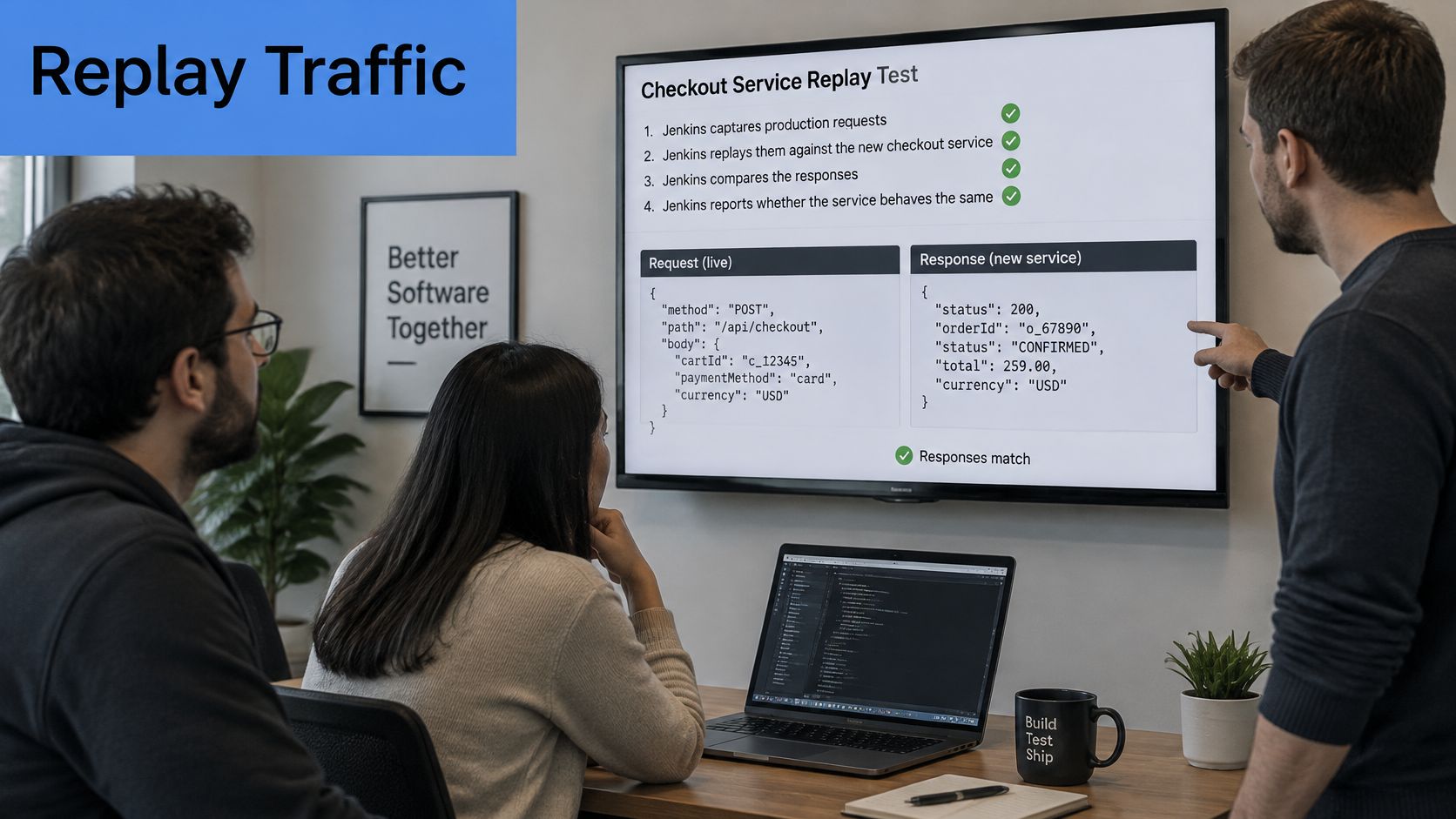
Turn replay into a release gate
- Build and stage the candidate. Deploy it into an isolated environment with suitable test data. Disable real payments, customer emails and other external side effects before sending requests.
- Prepare representative traffic. Capture plaintext HTTP at an authorized point after TLS termination, or read an approved saved capture. Remove sensitive headers, cookies and body fields before retaining or replaying it.
- Run the replay stage. Send recorded requests to the candidate’s staging address while production continues serving users. Keep the replay destination explicit so a configuration error can’t target the live checkout service.
- Collect comparison evidence. Configure response tracking and supporting instrumentation to record status codes, relevant payload fields and latency. Account for expected differences such as generated identifiers and timestamps.
- Evaluate predefined criteria. Fail on unexpected server errors or unacceptable response differences. Apply the team’s agreed latency margin rather than inventing an acceptance threshold after seeing the result.
- Archive the report and permitted test inputs. Record the candidate version, environment configuration and comparison outcome. Restrict capture access and apply a retention policy because sanitized traffic can still contain sensitive business information.
Session handling needs special attention. If an ASPX application ties requests to environment-specific session cookies, middleware may need to map session identifiers between live and test. Without that mapping, replay failures may reflect invalid test sessions rather than a checkout regression.
This demonstration provides additional context for traffic replay.
Interpret the evidence narrowly
A successful replay shows that the candidate met your comparison criteria for the traffic and environment tested. It doesn’t establish capacity at a different concurrency level, validate absent workflows or prove that downstream systems will behave identically.
For planning representative workloads, the guide to how traffic replay improves load-testing accuracy helps connect recorded requests to deliberate load-test design. Matching request shapes and reproducing realistic load are related tasks, but they aren’t interchangeable.
The open-source replay tool can supply capture, filtering and replay operations. Treat session recognition, response analysis and environment preparation as explicit requirements to verify in the edition and configuration you choose, not as automatic consequences of adding a Jenkins stage.
Deciding Whether Jenkins Fits Your Stack
Jenkins’ running cost includes maintaining the automation system itself. The Jenkins plugin security guidance warns that some vulnerable plugins have no available fix other than removal, making plugin inventory, patch ownership and upgrade testing operational requirements.
That doesn’t make Jenkins insecure by itself. Its effective risk depends on controller privileges, plugin dependencies, pipeline code and exposure to untrusted changes. Someone who can edit a privileged pipeline may be able to do much more than change a build command.
A green pipeline has a defined scope
Green means the configured success conditions were satisfied. It doesn’t automatically establish that production sessions, capacity, rollback or operational monitoring work. Those need deliberately designed checks and evidence.
The Pipeline Build Step documentation also cautions against passing plaintext secrets through pipeline parameters, where they may persist in pipeline state or appear without masking. Use credential references and restrict which jobs can access them.
Before approval: Ask which production risks the run actually tested, and which risks the release owner is still accepting.
When Jenkins fits and when a different approach fits better
| Situation | Jenkins Fit | Better Choice or Addition |
|---|---|---|
| Many custom build steps and legacy integrations | Strong fit | Keep Jenkins and document each plugin’s owner |
| Small team that wants minimal administration | Weaker fit | Managed CI service with hosted runners |
| Strict audit needs with a large plugin list | Fit only with governance | Narrower automation tool or a smaller plugin set |
| Need to validate behavior under real traffic | Fit as orchestrator | Add a replay or load-test stage behind a gate |
| Container-heavy builds with varied toolchains | Strong fit | Ephemeral Docker agents for each job |
Before expanding an installation, name who can modify pipelines, who maintains plugins and who can authorize production access. Keep untrusted pull-request execution separate from privileged release operations. Test upgrades and recovery procedures rather than discovering their limits during an incident.
Start with a service whose behavior and deployment path your team understands. Add a replay or load-test stage behind a manual gate, define its acceptance criteria and confirm plugin ownership before applying the pattern more widely.
GoReplay captures live HTTP traffic and replays it against testing environments, giving Jenkins a way to execute checks based on real request patterns. Visit GoReplay to plan a staging replay workflow, beginning with sanitized traffic, isolated dependencies and an explicit release gate.