
What Is Ephemeral Storage and How It Actually Works
You finish a traffic-capture run, check the process status, and discover that the request file has disappeared. Or a Kubernetes Pod restarts after node pressure, taking a carefully warmed cache with it. Nothing is necessarily wrong with the application logic. The storage was doing exactly what it was designed to do.
Ephemeral storage is temporary storage whose existence is tied to a compute unit, such as a container, Pod, virtual machine, or instance. When that unit ends, the data can disappear with it. Kubernetes groups writable container layers, emptyDir volumes, container logs, and certain system files under its ephemeral-storage model, with the kubelet measuring that usage for local storage isolation, as described in this Kubernetes ephemeral-storage overview.
That makes ephemeral storage useful for caches, scratch files, intermediate results, and traffic captures that are consumed quickly. It also makes it a poor home for user uploads, databases, compliance records, or any file you expect to survive a restart. The important skill isn’t memorizing product names. It’s recognizing which part of your workload can be recreated and which part must outlive the machine running it.
The Moment Ephemeral Storage Bites You
A Pod has spent hours building a warm cache. The node runs short on local disk, Kubernetes evicts the Pod, and the replacement starts with an empty directory. The application comes back healthy, but its first requests are slower while it rebuilds state that someone assumed was still there.
A similar failure appears in traffic testing. A capture process records production requests to a local file, the instance stops, and the recording vanishes before the replay job reads it. The capture command may have exited successfully, yet the test now runs against an incomplete or nonexistent input. That can distort the result because the failure occurs in the data path rather than in the application under test.
The plain definition is simple:
Ephemeral storage exists for the lifetime of its compute context, not for the lifetime of the data.
The compute context might be a container process, a Kubernetes Pod, a VM, or a cloud instance. The physical backing can also vary. It may be a node-local SSD, an instance-store volume, a writable container layer, a node disk used by emptyDir, or RAM through a tmpfs mount.
This isn’t one disk product. It’s a durability category. Two directories can look identical to an application while having completely different survival behavior. A local scratch path may be fast and convenient, but it can disappear when the Pod is recreated. A mounted persistent volume may look like an ordinary directory, while its data remains available after the original Pod is gone.
That distinction affects architecture, deployment settings, monitoring, and testing. You need to know what storage your platform is exposing, what event ends its lifecycle, and whether losing the contents changes the user-visible result. Once those answers are clear, choosing between temporary and durable storage becomes a workload decision rather than a naming puzzle.
How Ephemeral Storage Actually Works
Developers usually encounter ephemeral storage through a small set of concrete forms. The name changes by platform, but the underlying question stays the same: what owns the data, and what event removes that owner?
Cloud instance storage
A cloud instance store is local SSD or NVMe capacity attached to the host running a virtual machine. It can deliver fast local I/O because the workload doesn’t need to reach a remote storage service for every operation. Its contents are tied to the instance lifecycle, so terminating the instance removes the data.
A temporary build workspace is a good fit. A database data directory isn’t. If the instance is replaced, the workspace can be recreated from source and dependencies. The database needs a separate durable system.
Local ephemeral volumes
Some cloud platforms expose local blocks as temporary volumes associated with a compute instance. These are distinct from persistent network-backed disks, even when both appear as block devices inside the guest operating system. Their performance and availability characteristics follow the local hardware and the instance that exposes it.
Treat them as acceleration space, not as the authoritative copy of important data. A cache, unpacked archive, or generated index can use them. A source-of-truth record should live elsewhere.
Kubernetes emptyDir
Kubernetes creates an emptyDir volume when a Pod is scheduled. It starts empty, can be mounted by all containers in that Pod, and is permanently deleted when the Pod is removed, according to the Kubernetes documentation for ephemeral volumes. The volume can use node disk or SSD, while medium: Memory places it on a RAM-backed filesystem.
This makes emptyDir useful for sharing temporary files between containers, buffering a pipeline, or storing files that can be regenerated. The Pod owns the directory, not the application data itself. A replacement Pod receives a new empty volume.
tmpfs
A tmpfs filesystem stores contents in memory instead of on a disk. It can be useful for short-lived files that need low access latency, but it competes with the memory available to the workload and disappears when the relevant host or compute context ends.
The backing medium changes, but the lifecycle rule doesn’t. Local SSD, node disk, and RAM can all provide ephemeral storage.
| Type | Backing media | Lifecycle bound to | Example |
|---|---|---|---|
| Instance store | Local SSD or NVMe | Cloud instance | Temporary build workspace |
| Local ephemeral volume | Host-local block storage | VM or instance | Generated index or cache |
emptyDir | Node disk, SSD, or RAM | Kubernetes Pod | Shared scratch directory |
tmpfs | System memory | Host or container environment | Short-lived sensitive temporary file |
Kubernetes brings several of these sources under one resource-accounting concept. The kubelet measures writable layers, logs, and emptyDir usage through periodic scanning or filesystem project quotas, helping it enforce local storage isolation. For a more conceptual analogy, NeoTeo’s explanation of ephemeral P2P describes something that exists only while its surrounding context remains active. The storage version follows the same lifecycle-bound idea.
Ephemeral vs Persistent Storage
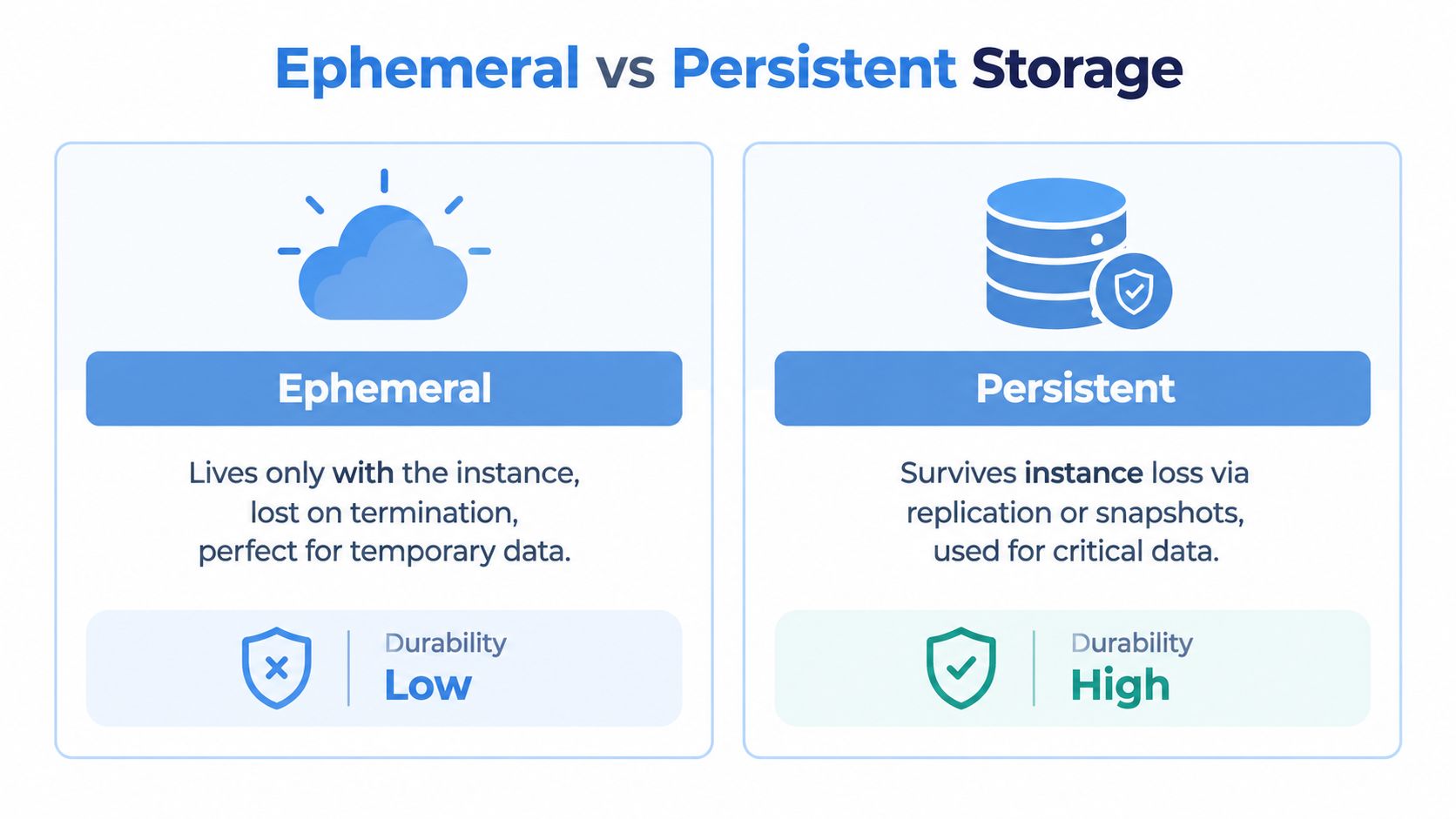
Ephemeral and persistent storage solve different problems. Persistent storage protects data beyond the life of a particular compute unit, often through replication, snapshots, or a managed storage service. Ephemeral storage prioritizes locality and disposability, accepting that a restart, deletion, or host failure can remove the contents.
Durability changes the design
A persistent volume can follow a workload after a Pod moves to another node, depending on the storage system and access mode. A managed database or object store can provide an even stronger separation between application compute and stored data. Ephemeral data stays close to the machine that produced it, so losing that machine removes the local copy.
That doesn’t make ephemeral storage unreliable in every sense. It makes its failure behavior predictable. A cache miss is acceptable if the application can rebuild the cache. A missing payment record isn’t acceptable because reconstruction may be impossible.
Speed comes with a trade-off
Local instance storage and tmpfs often avoid network hops and remote durability work, so they can offer lower latency for scratch operations. Persistent disks trade some locality for availability, recovery features, snapshots, and replication. The right choice depends on whether the workload values fast temporary access or continued access to the same data after compute changes.
Cost also follows the architecture. Ephemeral capacity may be included with an instance or counted against node resources, while persistent services commonly charge for provisioned capacity and storage performance features. The exact billing model varies by provider, so check the service documentation before treating one option as automatically cheaper.
Use the restart test
Ask one question before assigning a directory:
If this directory vanished during a restart, would the user experience or business result be wrong?
If the answer is yes, use a persistent volume, managed database, or object storage. If the contents can be regenerated, replayed from another source, or discarded without harm, ephemeral storage is usually a sensible fit.
Persistent storage isn’t automatically better. Paying for durability where the data has no lasting value can add operational work without protecting anything important. Ephemeral storage isn’t automatically risky either. It becomes risky when a team mistakes convenient local state for an authoritative record.
Where Ephemeral Storage Makes Sense in Practice
A cache is the easiest example. An application downloads reference data, builds an index, and keeps the result on local storage. If a Pod disappears, the replacement downloads the source again and rebuilds the index. The restart may cost time, but it doesn’t destroy the only copy.
Build and test systems use the same pattern. A compiler can unpack dependencies into a scratch directory, a test runner can write temporary reports, and an image-building process can create intermediate layers. Those files matter while the job runs, but they don’t need to cross the job’s lifecycle if the inputs remain available.
Video and machine-learning pipelines often create intermediate buffers or preprocessing shards. The output may be sent to durable object storage after a stage completes. In that design, ephemeral space absorbs local work while the pipeline treats the durable destination as the handoff point.
Traffic capture needs more care. A capture process can write short-lived files for immediate replay, but recordings intended for later analysis should leave the node before the capture context ends. The local directory can be a fast landing zone, while durable storage holds the completed segments.
| Workload | Ephemeral? | Why |
|---|---|---|
| Regenerable cache | Yes | The source data can rebuild the cache |
| Image-build scratch files | Yes | The build can recreate intermediates |
| Transcoding buffer | Usually | The source and final output live elsewhere |
| ML preprocessing workspace | Usually | Failed stages can rerun from durable inputs |
| Immediate traffic replay buffer | Yes, with limits | The data is consumed during the active run |
| Long-term traffic recording | No | The recording must survive the capture process |
| User-uploaded documents | No | Users expect the files to remain available |
| Compliance or audit records | No | Retention must outlive compute lifecycles |
| Database state | No | Recovery cannot depend on one node’s local disk |
The classification becomes easier when you ask three questions: Can the data be derived? Can loss be tolerated? Is recovery cheap and tested? A workload that passes all three can usually use ephemeral storage safely. A workload that fails any of them needs a durable boundary.
Failure Modes and What to Monitor
Ephemeral data can disappear through ordinary platform behavior. A Pod eviction can terminate a process while it still has buffered writes. A spot interruption or instance stop can remove local instance-store contents. A node failure can take every node-local cache and scratch file with it.

Kubernetes also reacts to disk pressure. The kubelet accounts for writable layers, logs, and emptyDir usage, then may evict containers or Pods when local capacity becomes constrained. A process that only writes application temp files can still be affected by logs or another container consuming the same node resources.
Start with the signals closest to the failure:
- Pod conditions: Check eviction-related status and container termination details instead of treating every restart as an application crash.
- Kubelet logs: Look for disk-pressure decisions, local-storage accounting, and eviction messages.
- Node pressure: Alert on node filesystem capacity and inode availability, including metrics such as
node_filesystem_freeandcontainer_fs_inodes_free. - Workload usage: Track container filesystem consumption, log growth,
emptyDiruse, and write-heavy paths. - Cloud telemetry: For instance-store workloads, inspect provider metrics such as
InstanceStoreBytesReadalongside instance lifecycle events.
tmpfs introduces a different pressure path. Because its contents occupy memory, an unbounded temporary write can compete with the application for RAM. Set an explicit size or resource policy where the platform supports it, and test the behavior when the directory fills.
The operational mindset matters more than a particular dashboard. Ephemeral loss is a routine condition in systems that reschedule, autoscale, evict, or replace compute. Design recovery first, then monitor closely enough to identify the event before users mistake partial output for valid output.
The following video provides another visual perspective on the infrastructure behind temporary local storage:
Ephemeral Storage and Traffic Capture With GoReplay
Traffic capture exposes the storage decision because the recording itself is the test input. A capture process commonly writes request and response streams to working files on the same node where it runs. If that path is an emptyDir, writable container layer, local disk, or instance-store volume, the recording is ephemeral by default.
The failure is easy to miss. A Pod restarts halfway through a session and loses buffered data. A replay job then reads a partial file, so the test traffic no longer represents the captured session. If the replay depends on session tokens, cookies, or sticky routing state, losing a local capture index can break the relationship between requests and produce misleading results.

The design should separate capture speed from recording durability. Use local ephemeral space for in-flight buffers when low-latency writes matter, but mount a writable PersistentVolume for recordings that must survive a restart. GoReplay’s traffic-capturing documentation is the appropriate place to verify the capture mode and output behavior you select.
Build a durable handoff
Segmented output can reduce the amount of data exposed to one interrupted write. Each completed segment becomes an independent unit that can be flushed and transferred, rather than leaving one large session file vulnerable until the entire capture ends. The pipeline should also distinguish between a file that is still being written and a file that is ready for replay.
A readiness gate can hold replay traffic until the capture path is mounted, writable, and connected to its durable destination. It should also reject incomplete segments rather than assuming that file existence means capture completion. For longer-lived workflows, store completed recordings in durable object storage, such as the S3 capture-storage capability available in GoReplay PRO, and keep local space for the active write path.
Design rule: ephemeral storage is fine for the capture process. Persistent storage is non-negotiable for a recording that must survive the process.
Test the failure deliberately. Restart the Pod while requests are being captured, remove the node-local path, and interrupt the instance. Then verify that the replay system either resumes from a complete durable segment or fails visibly. A pipeline that replays partial traffic is more dangerous than one that stops and reports a missing recording.
A Practical Checklist for Using Ephemeral Storage Well
Use ephemeral storage when the workload’s local files are temporary by design. Make the decision explicit in the deployment and in the recovery test, rather than relying on the default directory provided by a container image.
- Classify the data: Mark caches, scratch buffers, build intermediates, and disposable preprocessing files as regenerable. Mark uploads, database state, retained reports, and audit records as durable.
- Set Pod resources: Add ephemeral-storage requests and limits to Pods that write local files. This gives scheduling and eviction decisions a declared view of the workload’s needs.
- Choose the medium intentionally: Use
emptyDiron node storage for disk-backed scratch work. Usemedium: Memoryonly when RAM-backed behavior is required and memory pressure is controlled. - Separate stages: Keep active buffers local when useful, then move completed artifacts to a PersistentVolume or object store before the compute context can disappear.
- Test interruption: Restart the Pod, drain the node, and exercise the cloud instance lifecycle. Confirm that the application rebuilds disposable data and preserves durable output.
- Watch the right signals: Connect alerts to Pod conditions, kubelet eviction logs, node filesystem capacity, inode availability, and container filesystem usage.
- Make probes restart-aware: Liveness and readiness checks shouldn’t turn a recoverable temporary directory loss into a repeated restart loop. A replacement Pod must be able to initialize cleanly.
A useful decision aid is blunt: if losing the directory doesn’t affect the user experience, ephemeral storage is probably correct. If losing it changes the business result, escalate the data to block storage, a managed database, or object storage.
Traffic capture follows the same rule. Ephemeral capture works when replay happens before the Pod exits or when completed recordings stream to durable storage. For production readiness considerations around capture and replay workflows, use the GoReplay production readiness checklist.
GoReplay captures and replays live HTTP traffic so teams can test changes with realistic request patterns, while durable output keeps those recordings available when ephemeral compute disappears. Visit GoReplay to evaluate a capture and replay workflow that separates fast local buffering from recordings you need to preserve.