
Explore Different Types of Performance Tests for Better Results
In today’s world, slow software isn’t just a minor annoyance—it’s a genuine business liability. Think of the different types of performance tests as a specialized diagnostic toolkit. Each tool is built to find and fix specific problems long before your customers even know they exist. This isn’t just about being proactive; it’s your insurance policy against lost sales and a tarnished reputation.
Why Performance Testing Is Your Digital Insurance Policy
Picture your e-commerce site on Black Friday. If you haven’t tested it properly, it’s like a wildly popular restaurant trying to serve a dinner rush with just one waiter. It’s a recipe for disaster. Performance testing is the non-negotiable process of seeing exactly how your software holds up under specific workloads by measuring its speed, stability, and scalability.
This isn’t about hunting for functional bugs, like a button that doesn’t work. It’s about understanding how your system behaves when it’s under pressure. This kind of proactive quality check has become a cornerstone of modern software development, helping teams prevent costly meltdowns and deliver a smooth, reliable user experience.
The Business Case for Performance Testing
The consequences of poor performance are stark and immediate. Slow-loading pages lead directly to higher bounce rates, tanking conversion rates, and frustrated users who probably won’t be back. In a crowded market, a few seconds of delay can be the difference between making a sale and losing a customer for good.
This is exactly why the global performance testing market is booming. Its value is projected to skyrocket from USD 6.5 billion in 2023 to USD 13.2 billion by 2032. This explosive growth is fueled by ever-more-complex software and the massive premium that businesses now place on delivering a truly superior user experience. You can explore more about these market trends and their drivers.
Performance testing answers the tough business questions: Can our app actually handle a big product launch? What happens if our marketing campaign goes viral? At what exact point will our infrastructure buckle?
Introducing the Core Testing Methods
To get those answers, engineers rely on several distinct types of performance tests. It’s best to think of them as a team of specialists, where each one has a very specific job:
- Load Testing checks if the system can handle the expected, day-to-day traffic.
- Stress Testing intentionally pushes the system beyond its limits to find the breaking point.
- Scalability Testing figures out if the system can grow to handle future demand.
- Endurance Testing looks for problems that only crop up over extended periods of time.
Each method gives you unique insights, and together they help you build an application that’s resilient, fast, and reliable.
Verifying Stability with Load Testing
How can you be sure your application won’t buckle on a typical busy day? This is the fundamental question that load testing answers. It’s one of the most critical types of performance tests because it simulates expected, real-world user traffic to confirm your system behaves exactly as it should under normal pressure.
Think of it like this: an engineer wouldn’t open a new bridge to the public without testing it first. They’d drive a specific number of trucks across it—representing the daily traffic it’s built to handle. The point isn’t to break the bridge; it’s to verify that it can support the expected load without any strain. That’s precisely what load testing does for your software.
This isn’t about pushing your system to its absolute breaking point. It’s about building confidence. By simulating both normal and peak expected traffic, you can validate that your application will deliver a smooth, reliable experience for your users every single day.
What Load Testing Measures
Running a load test is far more than just throwing traffic at your app and seeing what sticks. It’s a targeted investigation. You’re closely monitoring key performance indicators (KPIs) to get a clear, data-driven picture of how your system is coping with the pressure. This data is what helps you find bottlenecks before your users do.
Here are the core metrics you’ll want to watch:
- Response Time: How long does it take for a user’s request to get a response? Slow response times are often the first canary in the coal mine.
- Throughput: How many transactions can your system process per second? This tells you about your application’s overall capacity.
- Error Rate: What percentage of requests are failing under load? If this number starts climbing, your system is getting overwhelmed.
- Resource Utilization: How are your servers holding up? Keeping an eye on CPU, memory, and network usage helps you pinpoint exactly where a bottleneck is forming.
Getting a handle on these numbers is essential for boosting application performance with load testing, giving you the hard evidence needed to make smart, effective improvements.
A load test gives you a baseline for “normal.” It proves your application can handle its day-to-day operations flawlessly, which is the foundation upon which all other performance optimizations are built.
When to Use Load Testing
Load testing isn’t a one-and-done activity; it’s a crucial step at several points in the development lifecycle. It’s absolutely vital right before any event where you expect a significant—but predictable—jump in traffic.
For instance, you should always run a solid load test before launching a major new feature, kicking off a big marketing campaign, or heading into a known busy period like a holiday shopping season. By confirming your app can handle these expected peaks, you prevent embarrassing, avoidable failures that can cost you both customers and credibility.
Finding Your Breaking Point with Stress Testing
While load testing tells you if your application can handle the crowd you expect, stress testing asks a much scarier question: what happens when an absolute mob shows up? This is one of the most intense types of performance tests out there. The whole point is to push your system way past its design limits to find out where it finally snaps.
Think of it like a structural engineer testing a bridge. They don’t just want to know if it can hold the legal weight limit. They want to know exactly how much weight it takes before the first cracks appear and what happens when it finally gives way. Does it buckle, or does it collapse catastrophically? Stress testing is that for your software.
The goal isn’t just to watch things burn. It’s about seeing how your system behaves under that immense pressure. Does it slow down gracefully? Do users get helpful error messages? And, most importantly, how fast does it get back on its feet once the chaos subsides?
Why Stress Testing Is Non-Negotiable
For many businesses, stress testing isn’t just a good practice—it’s a survival tactic. In sectors like e-commerce, finance, or online gaming, a few minutes of downtime during a peak event can mean huge financial losses and a damaged reputation that’s hard to fix.
This is why stress testing is a core discipline in performance engineering, right alongside load and scalability testing. It’s designed specifically to take systems beyond their normal operational capacity to find resource bottlenecks and test recovery procedures.
The core purpose of stress testing is to find the point of failure before your users do. It reveals your system’s true limits, ensuring it can survive the most chaotic scenarios you can throw at it.
What Stress Testing Uncovers
A well-designed stress test is like a diagnostic tool for your system’s resilience. By deliberately putting your application in a high-pressure situation, you get clear answers to some tough but necessary questions.
Here’s what you typically learn from a stress test:
- The System’s Breaking Point: You’ll find the exact number of users or transactions that bring your system to its knees.
- Failure Behavior: Does the system crash hard and disappear, or does it degrade elegantly, maybe slowing down but staying partly functional?
- Recovery Capabilities: This is the big one. How long does it take for your system to return to normal after the overwhelming traffic is gone?
- Security Vulnerabilities: Sometimes, extreme system stress can expose security holes that are invisible during normal operation.
Once you understand these failure modes, you can build a much more resilient application. For a closer look at how to put this into practice, check out our guide on stress testing in software testing to ensure your application’s resilience. It’s how you build systems that don’t just perform well but also fail predictably and recover with grace.
Planning for Growth with Volume and Scalability Tests
A successful app is a magnet for users and data. But as your user base explodes and your database swells, can your software actually keep up? This is where a couple of forward-looking performance tests become your best friends for future-proofing your system.
We’re talking about scalability testing and volume testing. These aren’t about fixing today’s problems; they’re about making sure your success doesn’t become your biggest problem tomorrow. They help you build a system that grows with your business, not one that holds it back.
Preparing for More Users with Scalability Testing
Picture this: a small startup builds a fantastic local app that suddenly gets a shout-out on national news. Scalability testing is how you figure out if that app’s infrastructure can handle a massive flood of new users from all over the country without falling over. The real goal here is to see how well the system “scales up” when you throw more resources at it, like extra servers or more CPU power.
This test methodically cranks up the user load while you keep a close eye on key metrics. It’s all about answering the tough questions every growing business faces:
- If we double our users, will doubling our servers keep response times snappy?
- At what point does adding more hardware stop giving us a good return on performance?
- Can our current architecture actually support our business goals for the next 2 years?
By simulating this kind of growth, you can make smart, data-driven decisions about your infrastructure and architecture. It’s how you get ready for the big leagues.
Handling More Data with Volume Testing
Now, think about a different problem. Imagine a huge digital library. Its main challenge might not be the number of librarians working at once (users), but the sheer size of its catalog. What happens when you add millions of new books (data records)? Does searching for a title suddenly slow to a painful crawl?
That’s where volume testing steps in. Unlike other tests that are obsessed with user traffic, volume testing is all about the data. It bombards your application with enormous amounts of data to see how it copes. This is absolutely critical for data-heavy applications, like analytics platforms, large e-commerce sites, or massive databases.
The core difference is simple yet vital. Scalability testing measures how your system handles more traffic, while volume testing measures how it handles more data. Both are essential for long-term health.
The performance testing software market is full of tools designed for this. You’ll see Volume Testing offered right alongside Load and Stress Testing to evaluate how massive datasets impact an application’s speed and reliability. If you want to dive deeper, you can read the full research on the performance testing market to see how they all fit together.
The diagram below shows a related concept, spike testing, which often goes hand-in-hand with scalability planning. It’s a great visual for understanding system resilience.
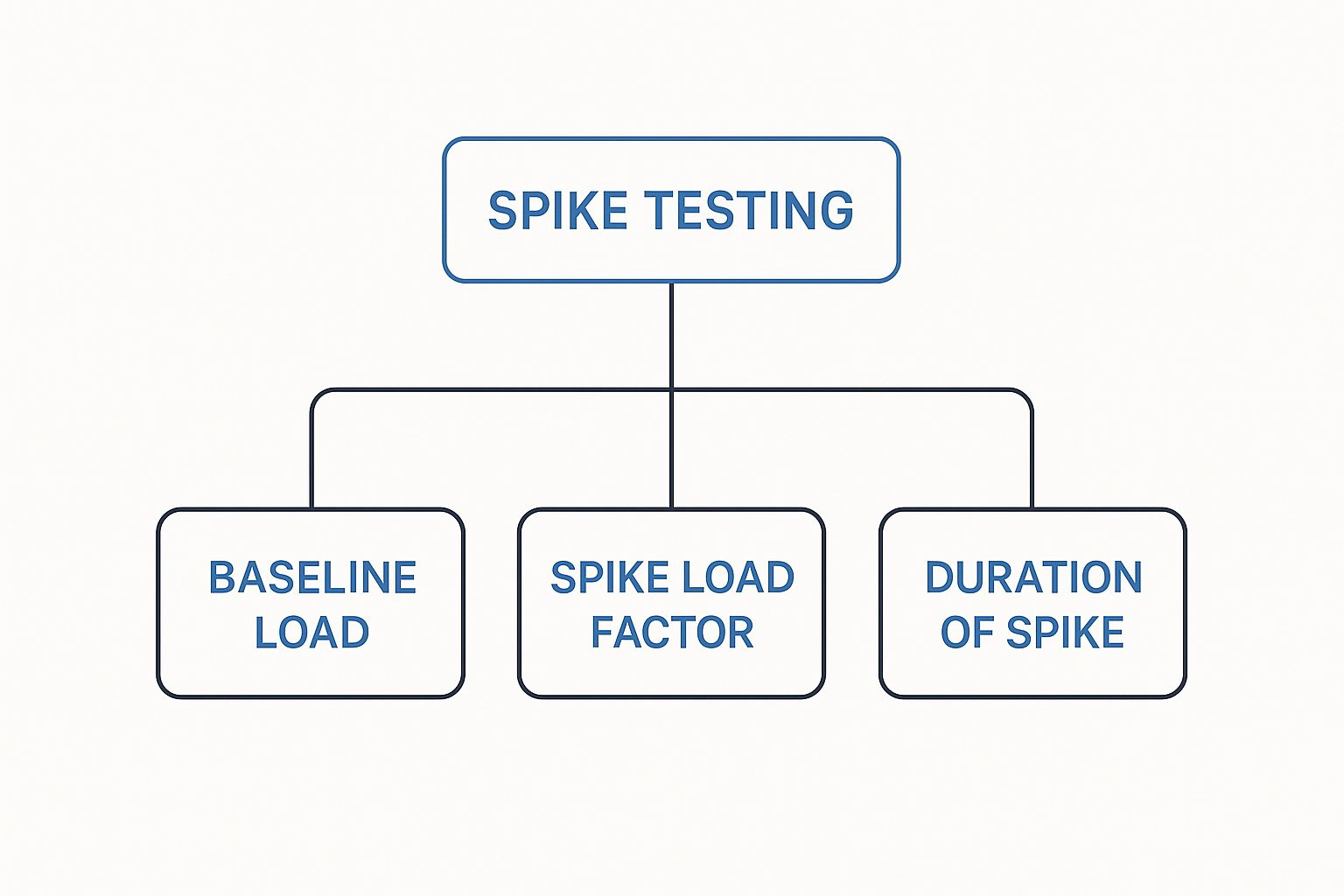
This image breaks down how a sudden traffic spike is defined by its intensity and duration compared to your normal traffic. Understanding this is key to building a system that doesn’t just scale, but can also survive unexpected surges.
Key Performance Tests at a Glance
To help you keep these concepts straight, here’s a quick cheat sheet that breaks down the main goal and a common use case for each of the major performance tests we’ve discussed so far.
| Test Type | Primary Goal | Example Use Case |
|---|---|---|
| Load Test | Validate performance under expected user loads. | Simulating traffic for a Black Friday sale. |
| Stress Test | Find the system’s breaking point. | Pushing a new API until it fails to determine its absolute limit. |
| Spike Test | Measure recovery from sudden, massive traffic bursts. | Testing how a news site handles a viral story. |
| Endurance Test | Check for memory leaks or degradation over time. | Running a test for 48 hours to ensure system stability. |
| Scalability Test | Determine how well the system handles more users. | Simulating 2x user growth to plan for server upgrades. |
| Volume Test | See how the system performs with a huge database. | Importing millions of records into a CRM. |
This table serves as a handy reference, but remember that the real magic happens when you combine these tests to get a complete picture of your application’s health and readiness for the future.
Testing Resilience Over Time with Endurance and Spike Tests
 Not all performance problems show up right away. Some are slow, creeping failures that only rear their ugly heads after hours of continuous use. Others strike like lightning, overwhelming your system in an instant.
This is exactly why a solid performance testing strategy has to account for both time and sudden chaos.
Two key tests that tackle these challenges are endurance testing and spike testing. They might seem like polar opposites, but both are crucial for building an application that can handle long-term use and unexpected shocks.
Endurance Testing for Long-Term Stability
Endurance testing, often called soak testing, is the marathon of performance testing, not a sprint. Its entire purpose is to find problems that only emerge after a system has been chugging along under a steady load for a long time—think 8, 12, or even 48 hours.
Imagine a car built only for quick trips to the store. It runs perfectly for 20 minutes, but what happens when you try to drive it across the country? The engine might overheat, or a tiny oil leak could become a big problem. That’s what endurance testing looks for in your software.
It’s fantastic at uncovering sneaky issues like:
- Memory Leaks: This is the classic soak testing find. A tiny bit of unreleased memory on each transaction is invisible over a few minutes. But after hours, it can eat up all available resources and crash the entire system.
- Performance Degradation: Does your app’s response time get a little bit slower over the course of a day? Endurance testing tracks this over the long haul to make sure performance stays solid.
- Database Connection Failures: If a system isn’t correctly closing and managing database connections, it can eventually run out of available connections, grinding everything to a halt.
Endurance testing confirms your application is just as reliable in its eighth hour of operation as it is in its first. It’s all about building confidence in your system’s long-term stability and resource management.
Spike Testing for Sudden Surges
On the flip side, spike testing simulates a sudden, massive, and unexpected flood of users. Picture a breaking news story, a viral TikTok linking to your site, or a Black Friday flash sale announcement. This test isn’t about lasting for hours; it’s about surviving the next five minutes.
Spike testing is there to answer two critical questions:
- Can the system handle a dramatic, instantaneous jump in traffic without falling over?
- How quickly does it recover and return to normal after the chaos subsides?
To run this test, you establish a normal baseline load and then, out of nowhere, you crank it up by a massive factor—sometimes 5x or 10x the normal traffic—for just a short burst. The most important thing to watch is the recovery. A truly resilient system won’t just survive the spike; it will stabilize quickly on its own without needing a developer to jump in and fix things.
By preparing for both the marathon (endurance) and the sudden shock (spike), you build an application that’s truly ready for whatever the real world throws at it.
When you start digging into the different types of performance tests, you’ll naturally run into some practical questions. Which test should I run? When should I run it? What tools do I even use for this stuff? These are common hurdles for any team.
Think of this section as your no-nonsense field guide. We’ll cut through the confusion, clarify the real differences between similar-sounding tests, and point you toward the tools that make it all happen.
Load Testing vs. Stress Testing: What Is the Difference?
It’s incredibly easy to mix up load testing and stress testing. They sound similar, but their goals are worlds apart. The real distinction is all about intent.
Load testing is about validation. You’re confirming that your system can handle the expected, day-to-day traffic without breaking a sweat. It’s like a final dress rehearsal—you want to make sure everything runs perfectly for a typical audience. You aren’t trying to break things; you’re just verifying that you’re ready for opening night.
Stress testing, on the other hand, is an investigation. You’re intentionally pushing your system past its limits to find the absolute breaking point. The goal here is to see not only how it fails under extreme pressure but, more importantly, how (or if) it recovers.
In short: load testing checks if you can handle a normal day. Stress testing finds out what happens on your worst day.
When Is the Best Time to Start Performance Testing?
The old way of waiting until the end of a project to run performance tests is a recipe for disaster. It leads to expensive delays and last-minute scrambles. The modern, and frankly, only sane approach is to “shift left”—start testing as early as you possibly can.
Instead of a final hurdle, think of it as a continuous quality check.
- Early Stages: Start small. Test individual components or APIs to catch bottlenecks before they’re buried deep in the codebase, where they become a nightmare to fix.
- During Development: As new features come together, run bigger load and endurance tests in your staging environments. This ensures new code isn’t dragging down the overall performance of the entire application.
Catching problems early is dramatically cheaper and faster. You’ll launch with a solid product instead of frantically patching critical bugs days before going live.
Which Tools Are Best for Automating Performance Tests?
Let’s be real: you can’t manually simulate thousands of users. Automation isn’t just nice to have; it’s essential. Luckily, the market is full of powerful tools built for different needs, skills, and budgets.
Here’s a quick look at the main categories:
- Open-Source Tools: Tools like Apache JMeter and Gatling are hugely popular for a reason. They give you incredible flexibility and are backed by massive communities, letting you script just about any scenario you can dream up. They’re a perfect fit for technical teams who want total control.
- Commercial Platforms: Platforms like LoadRunner, NeoLoad, and BlazeMeter offer a more polished experience. They typically come with slick dashboards, advanced analytics, and cloud infrastructure ready to generate huge, globally distributed loads. These are great for getting deep insights without a ton of custom setup.
The right tool really comes down to your team’s expertise, what your project demands, and your budget. Choosing well is what empowers you to run all these different performance tests efficiently and get results you can actually trust.
Ready to stop guessing and start knowing how your application performs under real-world pressure? GoReplay helps you capture and replay real production traffic in your testing environment. Eliminate performance risks by testing with actual user behavior before you deploy. Discover a more reliable way to ensure stability and resilience. Learn more at https://goreplay.org.