
Working with Tomcat Embed Core: A Practical Setup Guide
You add Tomcat Embed Core to pom.xml, the build turns green, and everyone assumes the app is now “on Tomcat.” That assumption is where a lot of embedded deployments go sideways.
What usually breaks isn’t the first boot. It’s everything around it. Spring Boot may override the version you thought you declared. A dependency bump can move you from javax.servlet to jakarta.servlet land faster than your codebase is ready for. Security review asks which Tomcat version is in production, and the answer in the build file doesn’t always match the artifact inside the runnable JAR.
That gap matters more than the basic setup. Adding the dependency is easy. Knowing what runs, how it’s configured, and what changes when you cross major Tomcat lines is the part most setup posts gloss over.
Why Embed Tomcat in a Java App
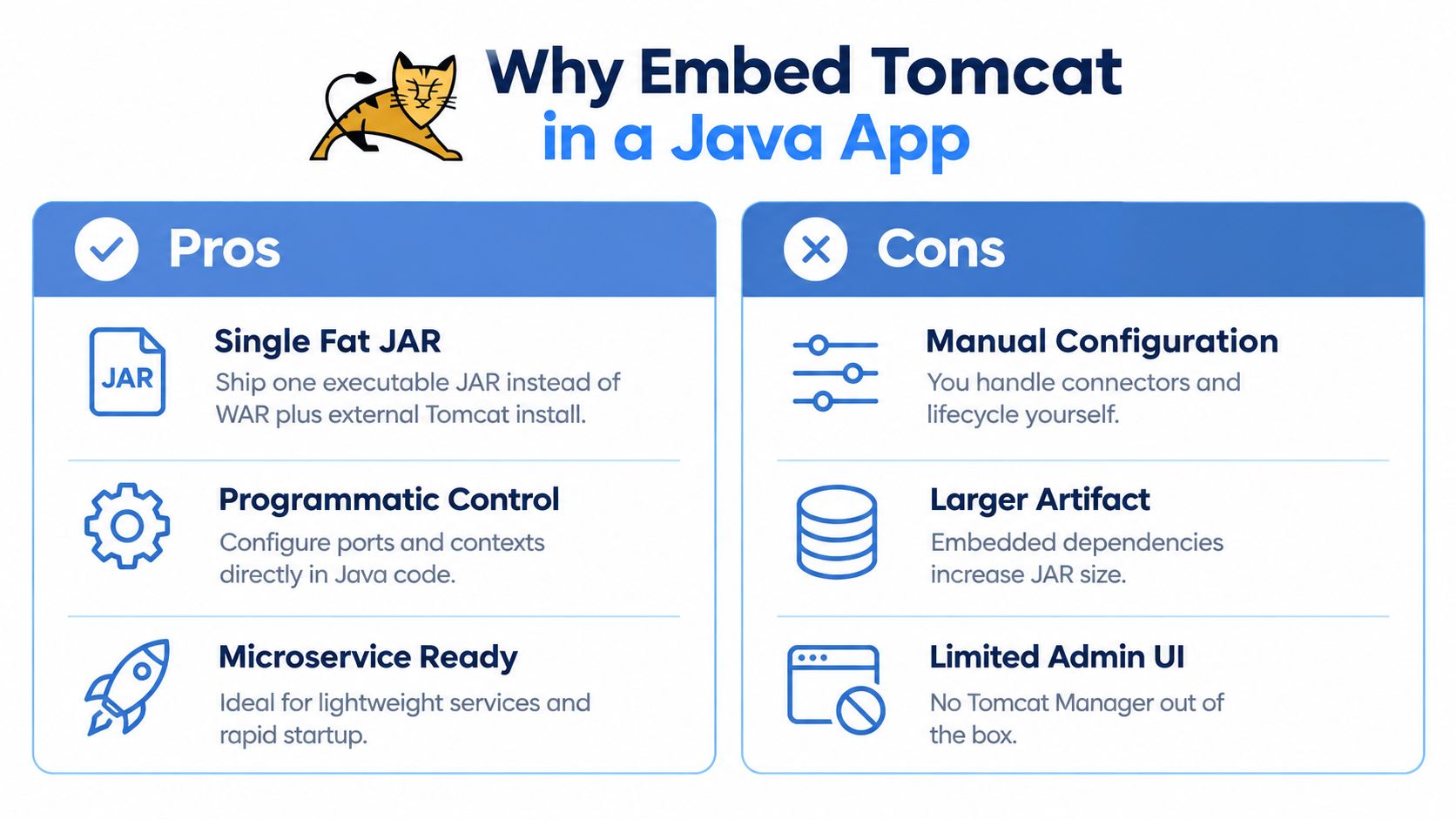
A lot of teams reach for embedded Tomcat when they stop thinking in terms of “deploy a WAR to a shared server” and start thinking in terms of “ship one executable application artifact.” That deployment shape fits how many Java services are built today. You package the app, start it the same way locally and in CI, and keep the servlet container version close to the application code instead of managing it separately on the host.
Tomcat Embed Core isn’t a toy library bolted on late. The project history tracked by Open Hub shows first development activity in March 2006, and by March 11, 2026 the project record had 28,111 commits from 198 contributors, with an estimated 487,866 lines of code and about 130 years of effort under the COCOMO model, which tells you you’re dealing with a mature server component rather than a niche add-on (Open Hub project history referenced from the Maven repository entry).
Where embedding works well
Embedded Tomcat tends to be the right shape when you want the application to own its runtime:
- Spring Boot services that already expect an executable JAR.
- Internal APIs where each service carries its own web stack.
- Integration test fixtures that need a real servlet container without external setup.
- Command-line or batch tools that expose a small HTTP endpoint for health or callbacks.
Where a standalone Tomcat still makes sense
There are still environments where external Tomcat is the better operational model:
- Shared hosting patterns where multiple applications live on one managed server.
- Ops-owned servlet platforms with centralized policy, rotation, and deployment controls.
- Legacy estates built around WAR promotion and host-level Tomcat administration.
Practical rule: Embed Tomcat when the application team owns packaging and runtime behavior. Use standalone Tomcat when the platform team owns the server lifecycle and wants applications to stay decoupled from it.
The friction point isn’t “can Tomcat run inside my app?” It can. The question is whether your team wants application code, dependency management, and runtime verification to own that responsibility.
Adding Tomcat Embed Core as a Dependency
The artifact you care about is org.apache.tomcat.embed:tomcat-embed-core. That’s the core package used when you want embedded Tomcat behavior inside your application process instead of running a separate server installation.
Maven Central shows a long release trail across multiple major lines, including 10.1.24 dated May 9, 2024, visible 9.x and 10.x families, and continued maintenance activity later in the index across versions such as 8.5.94 through 8.5.99, which is a good reminder that Tomcat maintains several compatibility tracks instead of forcing one upgrade path on everyone (Maven Central artifact listing).
Minimal dependency examples
For plain Maven, a direct dependency looks like this:
<dependency>
  <groupId>org.apache.tomcat.embed</groupId>
  <artifactId>tomcat-embed-core</artifactId>
  <version>10.1.24</version>
</dependency>
If you’re in Spring Boot and want to force a specific Tomcat version instead of inheriting the framework BOM, pinning the dependency may not be enough by itself. Boot’s dependency management can still win unless you override it deliberately.
A Gradle Kotlin DSL equivalent:
dependencies {
    implementation("org.apache.tomcat.embed:tomcat-embed-core:10.1.24")
}
What else comes along
In practice, tomcat-embed-core is only part of the embedded story. Depending on your stack, you’ll often see related embed modules or extras in the resolved tree.
| Artifact | Purpose | Required For |
|---|---|---|
tomcat-embed-core | Core embedded Tomcat runtime and servlet container classes | Any embedded Tomcat setup |
tomcat-embed-el | Expression language support | Framework features that rely on EL |
tomcat-embed-websocket | WebSocket support | Apps that expose WebSocket endpoints |
tomcat-embed-jasper | JSP compilation support | Only when you actually serve JSPs |
tomcat-embed-logging-juli | Tomcat JULI logging integration | Logging setups that need Tomcat’s JULI pieces |
If you’re unsure what your build resolves, inspect the dependency graph instead of guessing. The Maven dependency tree command guide is useful for tracing where Tomcat modules enter the build and whether another starter is overriding what you declared.
The version split that trips people
The major line matters more than most quickstart guides admit.
- Tomcat 9.x lines align with the older
javax.servletworld. - Tomcat 10.x and newer move into
jakarta.servletnamespaces.
That isn’t cosmetic. If your imports, filters, or libraries still expect javax.*, adding a modern Tomcat Embed Core version can turn into a compile or runtime migration problem, not a simple patch upgrade.
The dependency declaration is the easy part. The hard part is making sure the rest of your code, starters, and transitive libraries speak the same servlet namespace.
Programmatic Server Setup With the Tomcat API
If you want to understand what Spring Boot hides, build one embedded Tomcat service in plain Java. That exercise clears up the lifecycle quickly: create a Tomcat, give it a base directory, set a port, create a context, register a servlet, and keep the server thread alive.
A visual pass through the code helps before you wire it yourself:
A minimal plain Java setup
This is the smallest useful shape for an embedded server with a /health endpoint:
import jakarta.servlet.http.HttpServlet;
import jakarta.servlet.http.HttpServletRequest;
import jakarta.servlet.http.HttpServletResponse;
import org.apache.catalina.Context;
import org.apache.catalina.startup.Tomcat;

import java.io.File;

public class EmbeddedTomcatApp {
    public static void main(String[] args) throws Exception {
        Tomcat tomcat = new Tomcat();
        tomcat.setBaseDir(createTempDir());
        tomcat.setPort(8080);

        tomcat.getConnector();

        Context context = tomcat.addContext("", new File(".").getAbsolutePath());

        Tomcat.addServlet(context, "healthServlet", new HttpServlet() {
            @Override
            protected void doGet(HttpServletRequest req, HttpServletResponse resp) {
                resp.setStatus(200);
                resp.setContentType("text/plain");
                try {
                    resp.getWriter().write("ok");
                } catch (Exception e) {
                    throw new RuntimeException(e);
                }
            }
        });

        context.addServletMappingDecoded("/health", "healthServlet");

        tomcat.start();
        tomcat.getServer().await();
    }

    private static String createTempDir() {
        File baseDir = new File(System.getProperty("java.io.tmpdir"), "embedded-tomcat");
        baseDir.mkdirs();
        return baseDir.getAbsolutePath();
    }
}
A few lines matter more than they look:
tomcat.getConnector()forces connector creation. Skip it and you can end up debugging why your port config wasn’t applied the way you expected.addContext("", ...)gives you a root context. If you switch to a nested context path, mapping behavior changes and 404s get confusing fast.Tomcat.addServlet(...)is the cleanest path when you want one simple servlet without a full webapp layout.
addWebapp versus addContext
Use addContext when you’re building routes and servlets in code. Use addWebapp when you already have web resources and want Tomcat to treat a directory more like a traditional web application.
That distinction matters because a lot of examples online use addWebapp by habit. For small embedded services, it adds moving parts you probably don’t need.
If your app doesn’t have static web resources, JSPs, or a webapp directory structure, start with
addContext. It’s less magic and easier to debug.
What Spring Boot does instead
In a Spring Boot setup, you usually won’t create Tomcat directly. The common path is spring-boot-starter-web, where Tomcat is the default servlet container, so the minimal setup is to include the web starter and let Boot provision the embedded container for you (embedded Tomcat packaging and Spring Boot default container overview).
That changes the code you write. Your main method typically looks like this instead:
import org.springframework.boot.SpringApplication;
import org.springframework.boot.autoconfigure.SpringBootApplication;

@SpringBootApplication
public class BootApp {
    public static void main(String[] args) {
        SpringApplication.run(BootApp.class, args);
    }
}
And the equivalent server behavior moves into configuration and beans instead of direct Tomcat API calls.
If you want a walkthrough format while comparing your own setup, this video is a decent companion to the low-level API view above.
The main trade-off is control versus convenience. Plain Tomcat API gives you explicit lifecycle and container wiring. Spring Boot gives you speed, but the container becomes one more managed dependency that can be upgraded around you.
Configuring Connectors, SSL, and Sessions
Once the server starts, the connector determines how requests enter the process. That’s where teams usually set a port and stop. In production, you usually need more than that: protocol handler choices, SSL, and session cookie behavior all need to line up.
A coherent configuration block
In Spring Boot, the cleanest hook is usually a TomcatServletWebServerFactory customizer. In plain embedded Tomcat, you’d do similar work directly on the connector and context.
import org.apache.catalina.Context;
import org.apache.catalina.startup.Tomcat;
import org.apache.catalina.connector.Connector;
import org.apache.coyote.http11.Http11Nio2Protocol;

public class TomcatConfigExample {

    public static Tomcat build() throws Exception {
        Tomcat tomcat = new Tomcat();
        tomcat.setBaseDir("build/tomcat");
        tomcat.setPort(8443);

        Connector connector = new Connector(Http11Nio2Protocol.class.getName());
        connector.setPort(8443);
        connector.setScheme("https");
        connector.setSecure(true);
        connector.setProperty("SSLEnabled", "true");
        connector.setProperty("keystoreFile", "classpath:server-keystore.p12");
        connector.setProperty("keystorePass", "changeit");
        connector.setProperty("keystoreType", "PKCS12");
        connector.setProperty("sslProtocol", "TLS");
        connector.setProperty("acceptCount", "100");

        Http11Nio2Protocol protocol = (Http11Nio2Protocol) connector.getProtocolHandler();
        protocol.setSSLEnabled(true);

        tomcat.setConnector(connector);
        tomcat.getService().addConnector(connector);

        Context context = tomcat.addContext("", ".");
        context.setSessionTimeout(30);

        var cookieProcessor = context.getServletContext().getSessionCookieConfig();
        cookieProcessor.setName("APPSESSION");
        cookieProcessor.setHttpOnly(true);
        cookieProcessor.setSecure(true);

        return tomcat;
    }
}
The exact keystore loading approach depends on how you package and expose the file. The main point is ordering. Configure the connector before start, then apply context and session settings on the webapp side.
What to tune first
A few settings deserve attention early:
- Protocol handler choice:
Http11Nio2Protocolis a reasonable default when you want modern non-blocking connector behavior in embedded mode. acceptCount: This affects how many incoming connections can queue when worker threads are busy.- Session timeout: Set it explicitly. Leaving it to inherited defaults makes behavior harder to reason about across environments.
- Cookie flags:
httpOnlyandsecureshould be intentional, not accidental.
The gotcha commonly hit is the secure cookie flag.
Operational warning:
setSecure(true)on the session cookie doesn’t magically make plain HTTP safe. If the connector isn’t actually running with HTTPS semantics, that flag won’t give you the behavior you think you’re enforcing.
Session behavior in practice
If you’re replaying traffic through load balancers or running sticky-session setups, session naming and tracking become part of the contract. Keep the cookie name explicit so diagnostics stay readable, and verify the behavior with real request flows rather than assuming the framework did what you meant.
When you’re testing session behavior under load or replay, this guide to HTTP sessions and their behavior in traffic flows is a helpful companion because it focuses on what happens at the request level, not just in application config.
One more practical note. APR/native sounds attractive in old Tomcat tuning discussions, but for embedded JAR deployments it’s usually extra packaging complexity for little payoff. It’s better to get the Java connector, TLS setup, and application behavior right first.
Version Verification and the Jakarta Transition
The most common embedded Tomcat mistake is trusting the declared dependency more than the running artifact. In managed builds, especially Spring Boot, those two can diverge.
Recent guidance on embedded Tomcat security calls this out directly: the framework BOM can override the version you declare, which means the build file may show one version while the packaged application uses another. The same guidance also points out why this matters operationally. Embedded Tomcat inherits the same CVE exposure concerns as standalone Tomcat, so runtime verification matters for patching and SBOM review (embedded Tomcat version override and security guidance).
Check resolution first
For Maven:
mvn dependency:tree | grep tomcat-embed-core
For Gradle:
./gradlew dependencies --configuration runtimeClasspath | grep tomcat-embed-core
Those commands tell you what the build resolved. They don’t prove what the final executable starts with, especially if packaging or layering changes later in the pipeline.
Verify the running artifact
A better habit is to inspect the packaged JAR itself. Open the artifact and look at the embedded libraries under BOOT-INF/lib/ in Spring Boot packaging, or inspect META-INF/MANIFEST.MF for version metadata where applicable.
The permanent low-cost sanity check is to log Tomcat’s own version at startup:
import org.apache.catalina.util.ServerInfo;

public class StartupVersionLog {
    public static void main(String[] args) {
        System.out.println("Embedded Tomcat version: " + ServerInfo.getServerNumber());
    }
}
That line won’t solve dependency drift, but it will stop debates about what booted.
The version you typed is a request. The version inside the runnable artifact is the fact.
The javax to jakarta break
A separate but equally predictable failure is the namespace transition.
Coverage of embedded Tomcat usage still shows mixed examples across older javax.servlet snippets and newer Tomcat artifact lines, which reflects a real migration gap. Newer Tomcat 10.x and 11.x usage lives in the jakarta.* namespace, and moving an existing embedded app isn’t a drop-in upgrade because application code, libraries, and extension points often need changes (Jakarta transition discussion around embedded Tomcat examples).
When imports suddenly stop compiling after a version change, don’t start by blaming your IDE. Check which servlet namespace your application and your container line are targeting.
Performance Tuning and Container Choices
Most “Tomcat versus Jetty versus Undertow” arguments collapse under real testing because the application stack dominates more than people want to admit. Serialization, frameworks, filters, and client behavior often outweigh the raw differences between embedded servlet containers.
One published Spring Boot comparison is useful precisely because the gaps are modest, not dramatic. In that test, Tomcat handled 1,542 requests/sec with 6.483 ms average request time and 168 MB JVM memory used, while Jetty handled 1,627 requests/sec with 6.148 ms average request time and 155 MB, and Undertow handled 1,650 requests/sec with 6.059 ms average request time and 164 MB. The benchmark notes these startup and request measurements were taken with default configurations and Actuator-exposed metrics, which is exactly why you shouldn’t overgeneralize from them (embedded servlet container comparison benchmark).
Read the benchmark the right way
That data doesn’t say “Tomcat is slow.” It says container choice can matter, but not always enough to outrank your application code.
| Container | Req/sec (2KB JSON) | Memory/Connection | Best Fit |
|---|---|---|---|
| Tomcat | 1,542 req/sec in the published benchmark | Moderate in the benchmark setup | Default choice for many Spring Boot services |
| Jetty | 1,627 req/sec in the published benchmark | Slightly leaner in the benchmark setup | Teams that already standardize on Jetty |
| Undertow | 1,650 req/sec in the published benchmark | Similar to Tomcat in the benchmark setup | Workloads where Undertow-specific behavior fits the stack |
The “Memory/Connection” and “Best Fit” columns are directional here because those outcomes depend heavily on your own stack and traffic mix. The benchmark itself is useful as a reminder that the differences are real but not magical.
Tuning that usually matters
When tuning embedded Tomcat, focus on a short list first:
- Threading limits:
maxThreadsand queue behavior affect how the service degrades under concurrency. - Connection backlog:
acceptCountcontrols what happens when the app can’t accept work immediately. - Startup and memory checks: Measure them with your actual framework, not a toy endpoint.
- Protocol and TLS choices: These can change behavior more than tiny buffer tweaks.
If you’re running Spring Boot with Tomcat because it’s the default and it fits your operational model, that’s usually a sound baseline. Switch containers because your tests show a real advantage for your workload, not because a benchmark chart on its own looked decisive.
Troubleshooting and a Final Checklist
Most embedded Tomcat incidents aren’t exotic. They come from a short list of repeat offenders: namespace mismatches, bad context mapping, hidden JSP dependencies, and assumptions about which port or scheme the app bound.
The failures that show up first
ClassNotFoundExceptionfor servlet types: This usually means your code or a library expectsjavax.servletwhile your container line has moved tojakarta.servlet, or the reverse.- Port already in use during local restarts: Embedded mode doesn’t change the underlying socket rules. Verify shutdown behavior and make sure the previous process is gone.
- 404 on a route that looks correct: Check the context path and servlet mapping together. A missing leading slash or an unexpected context root is enough to hide a perfectly valid servlet.
- Memory surprises after adding web features: If JSP support sneaks in through
tomcat-embed-jasper, you’ve pulled in more than a plain JSON API needs.
A few fixes that save time
If an embedded webapp behaves oddly because default web XML handling kicks in where you didn’t expect it, control it explicitly.
context.setAddDefaultWebXmlToWebapp(false);
That won’t solve every mapping issue, but it removes one layer of inherited behavior while you’re debugging.
Keep the first embedded service boring. One port, one context, one servlet or controller path, explicit startup logs, and no JSP support unless you need it.
Final ship checklist
- Confirm the namespace line matches the Tomcat major version you’re using.
javax.*andjakarta.*are not interchangeable. - Verify the runtime version from the packaged artifact or startup log, not just the dependency declaration.
- Check connector settings for port, scheme, and whether SSL is enabled.
- Validate keystore loading in the same packaging format you’ll ship.
- Set session behavior intentionally, including timeout and cookie flags.
- Hit the running app directly with a quick
curlagainst the expected context before tagging the release. - Review the dependency tree if Tomcat behavior changed after an unrelated framework upgrade.
If you treat Tomcat Embed Core as “just another dependency,” you’ll miss the operational edge cases. If you treat it like part of your runtime platform, it becomes predictable.
If you’re validating an embedded Tomcat upgrade, config change, or Jakarta migration, production-like traffic is what exposes the mistakes synthetic smoke tests miss. GoReplay lets you capture and replay real HTTP traffic into test environments so you can verify connector behavior, session handling, and runtime changes before they reach users.