
Build a Winning Testing Automation Strategy

A real testing automation strategy is so much more than a technical document. Think of it as a business plan for quality. It’s the blueprint that dictates what you automate, which tools you use, and how you weave testing into your development lifecycle to ship better software, faster. Flying blind with ad-hoc scripting, on the other hand, almost always leads to wasted effort and results you can’t trust.
Why a Real Strategy Crushes Ad-Hoc Automation
Getting past random acts of automation is the first real step in turning your QA from a cost center into a genuine competitive edge. Without a deliberate strategy, teams often get stuck writing brittle, high-maintenance scripts that don’t deliver much value. This ad-hoc approach racks up technical debt, kills confidence in your test results, and completely misses the mark on your bigger business goals.
A true strategy gives you a clear roadmap. It forces you to get serious about what matters most—like your critical user journeys and the features that actually drive revenue. This ensures your automation efforts deliver the highest possible return.
From Slow Cycles to Confident Releases
Picture a classic scenario: a SaaS company is bogged down by a two-week manual regression cycle for every single release. The process is painfully slow, wide open to human error, and a total drain on developer morale. By finally putting a formal automation strategy in place, they can pinpoint the most repetitive, high-risk tests and build out a solid, automated regression suite.
This kind of shift doesn’t just speed things up; it fundamentally changes the development culture. Instead of dreading deployments, the team gains the confidence to push out new features bi-weekly or even daily. Why? Because the strategy provides a reliable safety net that catches bugs early and frees up engineers to focus on innovation, not mind-numbing manual checks.
The industry data backs this up. By 2025, around 46% of software teams reported that automation had replaced 50% or more of their manual testing efforts. You can read more about the latest test automation statistics to see just how quickly teams are evolving.
The point of a testing automation strategy isn’t just to run tests on their own. It’s to build a predictable, scalable, and efficient process that directly fuels a faster time-to-market and a higher quality product. It flips testing from a bottleneck into an accelerator.
Laying the Groundwork for Automation Success

Before a single line of code is written, the fate of your test automation strategy is already being decided. So many teams make the classic mistake of jumping straight into choosing a tool or writing scripts. This almost always leads to automating the wrong things—sinking valuable time and resources into tests that deliver very little real-world value.
The first, non-negotiable step is to do a thorough audit of your application. You’re looking for the tests that will give you the most bang for your buck. Think about tasks that are painfully repetitive, heavily data-driven, or absolutely critical to keeping the lights on. These are your foundational quick wins.
Pinpoint High-Impact Automation Candidates
Let’s be real: not all tests are created equal. The goal here is to find the ones that offer the highest return on your automation investment. It’s about working smarter, not harder.
Start by zeroing in on test cases that fit these descriptions:
- Regression Tests: These are the perfect starting point. They have to be run over and over again to make sure new changes haven’t quietly broken something important.
- Data-Driven Tests: Any test that needs a bunch of different data sets to check outcomes—like form validations or complex calculations—is a prime candidate for automation.
- Cross-Browser and Cross-Device Tests: Manually checking your app on a dozen different browsers and devices is a soul-crushing, error-prone task. Automate it.
This initial deep dive saves you from the common pitfall of trying to automate everything at once, which just stretches your team too thin. Instead, you end up with a prioritized backlog that’s directly tied to business risk and impact.
Of course, a solid strategy needs a reliable place to run. If your foundation is shaky, everything else will be too. You can get some great insights on this by exploring test environment best practices in our detailed guide.
Define Clear and Measurable Goals
Once you know what you’re going to automate, you have to define what “done” looks like. Vague goals like “improve quality” are useless because you can’t measure them. Your objectives have to be specific, measurable, and connected to business outcomes that actually matter to stakeholders.
Your goals are the North Star of your testing automation strategy. They justify the investment and keep the team focused on delivering tangible results, not just writing scripts.
For instance, aim for goals like these:
- Cut down the manual regression testing cycle from 40 hours to just 4 hours.
- Slash post-release critical defects by 30% within the next six months.
- Boost test coverage of our critical payment APIs from 50% to 95%.
Metrics like these give you clear targets and make it dead simple to show everyone the value your automation efforts are delivering.
Finally, remember that success always comes down to the people. Building the right team isn’t just about hiring skilled automation engineers. It’s about creating a culture where quality is everyone’s job—from dev to QA and back. This “whole team” approach is what makes a strategy stick for the long haul.
Choosing the Right Tools and Frameworks
Picking the right tools for your testing automation strategy is a decision that will ripple through your entire development lifecycle. This isn’t just about grabbing popular software; it’s about finding a long-term partner for your team. The wrong choice leads to a suite of brittle, high-maintenance tests that nobody trusts. Get it right, and you’ll accelerate releases and ship with confidence.
Your decision should really hinge on a few core pillars. First, think about language compatibility. Your test automation code is still code, after all. It’s always best to stick with tools that align with your team’s existing skills, whether that’s Python, JavaScript, or Java. This simple choice flattens the learning curve and makes future maintenance so much easier.
Aligning Tools With Your Tech Stack
Next up is CI/CD integration. Let’s be honest, your automated tests are most valuable when they’re a seamless part of your deployment pipeline, giving you feedback fast. Make sure whatever tool you pick plays nicely with your existing systems like Jenkins, GitHub Actions, or CircleCI. Without that solid connection, your tests become a siloed chore instead of a core part of development.
Community support is another factor that’s easy to overlook but incredibly important. Open-source giants like Selenium are backed by massive global communities. That means you’ll find tons of documentation, tutorials, and forums to help you solve problems. Don’t underestimate how valuable that is when you hit an inevitable roadblock at 2 AM.
This decision tree shows how things like project size, budget, and the complexity of your stack can point you toward the right tool.
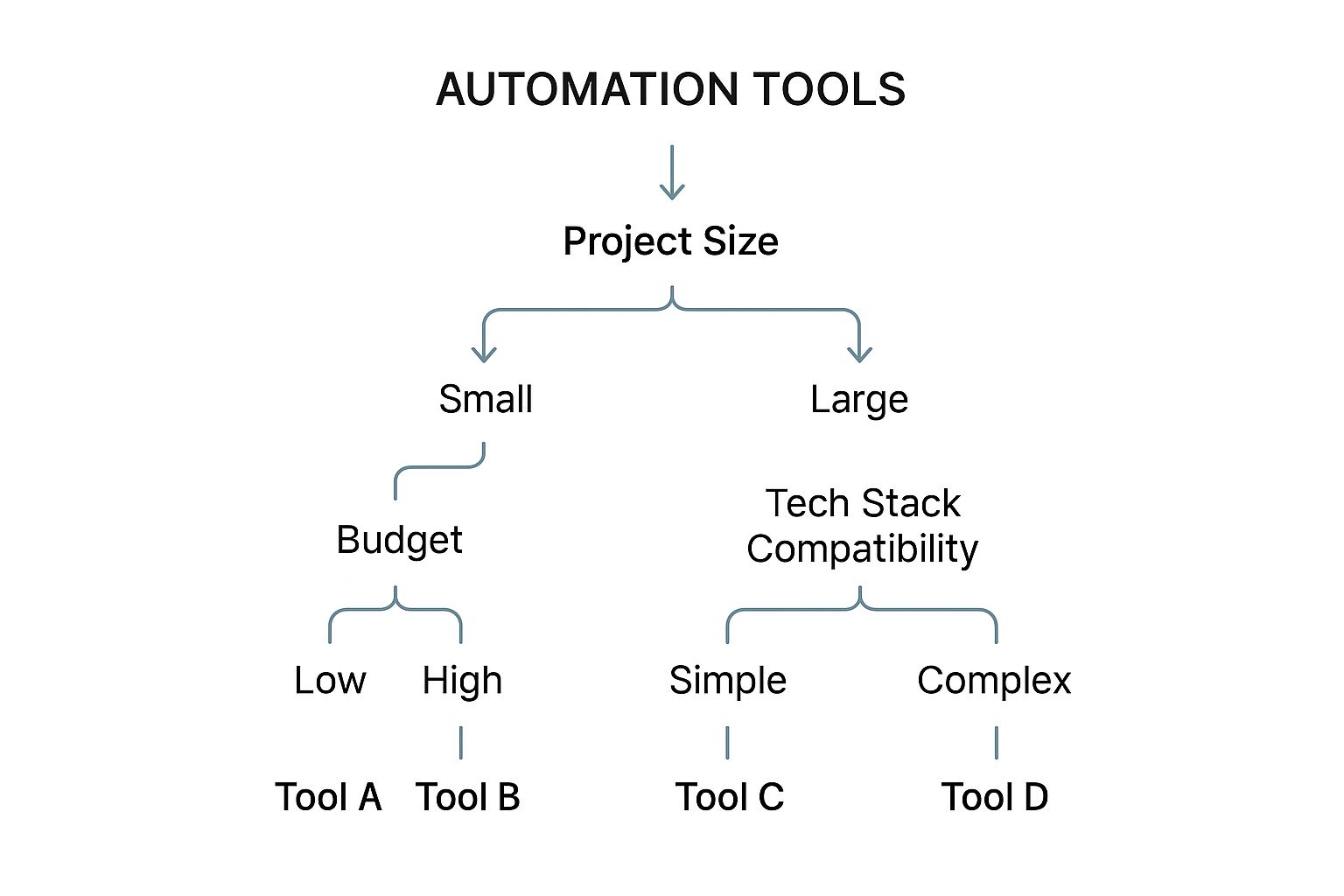
As you can see, there’s no silver bullet. The best tool is always going to depend on the specifics of your project.
Finally, you have to calculate the true total cost of ownership. This goes way beyond the sticker price (many of the best tools are free). It includes the time spent on setup, training, script maintenance, and infrastructure. A “free” tool that needs constant hand-holding can quickly become more expensive than a paid one with great support. For a deeper dive, checking out a guide on the best test automation tools for every team can give you some more context.
A tool is only as good as its fit within your team’s workflow and technical environment. Prioritize tools that empower your team and integrate seamlessly, rather than those that simply have the longest feature list.
Comparing Tool Categories
To help you make a practical choice, it’s useful to break down the different tool categories by what they’re designed to do. This ensures you’re applying the right solution to the right problem—a fundamental part of any successful automation strategy.
Below is a simple framework to help you compare different types of tools based on their strengths and where they fit into your testing plan.
Automation Tool Selection Framework
| Tool Category | Primary Use Case | Key Strengths | Integration Capability | Skill Requirement |
|---|---|---|---|---|
| Web UI | Browser-based end-to-end tests | Simulates real user interactions accurately, validates visual elements | High (CI/CD, Reporting) | Moderate to High |
| Mobile | Native & hybrid app testing | Supports iOS and Android platforms, handles device-specific actions | High (Device Farms, CI/CD) | Moderate to High |
| API | Backend service validation | Fast, stable, and independent of the UI | Excellent (CI/CD, Mocking) | Low to Moderate |
| Traffic Replay | Load, performance & shadow testing | Uses real production traffic, uncovers unknown unknowns | Excellent (Middleware, CI/CD) | Moderate |
For instance, tools like Postman or direct scripting are fantastic for API testing because they’re fast and stable. For the front end, something like Cypress or Selenium has long dominated web UI testing thanks to its cross-browser support.
The goal isn’t to find one tool to rule them all. It’s about building a complementary toolset that covers your application from the backend APIs all the way to the front-end user experience, creating a robust safety net for your entire system.
Getting Your Automated Tests Off the Ground and Ready to Scale
Alright, you’ve got a solid plan and you’ve picked your tools. Now for the fun part: turning that strategy into reality. This is where the rubber meets the road, moving from a document on a shared drive to something that’s actually part of your daily development rhythm. The first big hurdle is writing test scripts that are clean, easy to maintain, and won’t break at the first sign of trouble.
Think of your test suite like any other piece of production code—it deserves the same level of care. That means using version control like Git for every test script is an absolute must. No exceptions. This gives you a complete history of changes, makes it a thousand times easier for the team to collaborate, and lets you quickly roll back if a new test starts causing chaos.
Weaving Automation into Your CI/CD Pipeline
The real magic happens when you bake your automated tests directly into your CI/CD pipeline. When tests fire off automatically with every single code commit, you create a tight, continuous feedback loop. This is what changes testing from a slow, painful gate at the end of a cycle into a living, breathing part of how you build software.
I saw this firsthand with a team that hooked their entire regression suite into their Jenkins pipeline. Before, they were lucky to get feedback in a few days. After the integration? Developers got a pass or fail result within minutes of pushing their code. They could jump on bugs while the logic was still fresh in their minds, instead of weeks later.
A great automation practice isn’t just a folder full of scripts. It’s about embedding those checks into the very heartbeat of your development process. The goal is to make a test failure feel as immediate and obvious as a compiler error.
This tight integration is where you’ll see the biggest wins. Don’t just take my word for it—research shows that teams embedding automation into CI/CD slash their release cycles by 86% and see 71% fewer defects escape into production. Better yet, 58% of these teams see a return on their investment in under six months. You can dig into the numbers yourself in the latest software testing quality report.
Building a Practice That Can Grow With You
Your application is going to grow, and your test suite needs to keep up. A scalable strategy plans for this from day one. It’s all about building tests that are modular and reusable, steering clear of hard-coded data, and using design patterns that don’t make you want to pull your hair out during maintenance.
To scale without the pain, zoom in on these areas:
- Run Tests in Parallel: Get your pipeline configured to run multiple tests at the same time across different environments. This dramatically slashes your total execution time, keeping the CI/CD process snappy even as you pile on hundreds of new tests.
- Master Your Environments: Use tools like Docker to spin up consistent, disposable test environments on demand. This kills the classic “but it worked on my machine” problem and ensures your tests run the same way, every single time.
- Treat Test Code Like Real Code: Make peer reviews for new test scripts mandatory. This simple practice helps catch problems early, gets more eyes on the automation code, and keeps the quality bar high across the entire suite.
By sticking to these principles, you’re not just building a set of tests for today. You’re creating an automation practice that’s ready to handle whatever complex features you throw at it tomorrow. Your test suite will evolve from a simple safety net into a genuine strategic asset that helps you ship code faster and with way more confidence.
Measuring Success and Improving Your Strategy

A great testing automation strategy is never a “set it and forget it” project. Think of it as a living system, one that needs regular check-ups and fine-tuning to keep delivering real value. Without clear metrics, you’re essentially flying blind, unable to prove the strategy’s worth or pinpoint exactly where it needs help.
The best mindset you can adopt is to treat your automation suite like its own product. It needs continuous measurement, feedback, and iteration. If you don’t, your once-valuable tests can quickly devolve into a noisy, high-maintenance burden that the team eventually just starts to ignore.
Key Metrics to Track Automation Health
To figure out if your efforts are actually paying off, you have to track the right data. Vague feelings about “better quality” won’t cut it when you need to justify resources or make tough strategic calls. Instead, focus on a handful of key performance indicators (KPIs) that tell a clear story about efficiency, reliability, and business impact.
Here are the essentials that should be on your dashboard:
- Test Pass Rate: This is your most basic health check. A consistently high pass rate—ideally 95% or more—suggests a stable application and a reliable test suite.
- Flaky Test Percentage: These are the worst—tests that randomly pass and fail without any code changes. A high flaky test rate erodes trust in your entire automation setup. Aim to keep this demon below 2%.
- Mean Time to Recovery (MTTR): When a real test failure happens, how fast can the team find the root cause and fix the bug? A low MTTR is a sign that your tests provide clear, actionable feedback, not just noise.
- Automation ROI: This is the metric that connects your technical work directly to business value. It’s a simple calculation: the hours you saved from manual testing versus the time you invested in creating and maintaining the automated tests.
Your metrics are the feedback loop for your strategy. They tell you what’s working, what’s breaking, and where you need to focus your optimization efforts next. An ignored metric is a missed opportunity for improvement.
To give you a clearer picture, here’s a breakdown of the most critical KPIs, what they mean, and what a good target looks like in the real world.
Key Test Automation Strategy KPIs
| Metric | Description | Good Target Benchmark |
|---|---|---|
| Test Pass Rate | The percentage of executed tests that pass. A high rate indicates stable software and reliable tests. | > 95% |
| Flaky Test Percentage | The percentage of tests that produce inconsistent results (pass/fail) without any changes to the code. | < 2% |
| Mean Time to Recovery (MTTR) | The average time it takes to diagnose and fix a bug after a test failure. | < 1 hour for critical failures |
| Automation Coverage | The percentage of test cases or code covered by automated tests. This should focus on critical paths first. | 70-80% for critical features |
| Test Execution Time | The total time it takes to run the entire automation suite. Shorter times mean faster feedback. | < 15 minutes for CI builds |
| Automation ROI | The financial return from automation, calculated by comparing manual testing costs to automation investment. | Positive ROI within 12-18 months |
Tracking these numbers gives you a powerful, data-driven way to communicate the health and impact of your automation efforts to the rest of the organization.
The Cycle of Continuous Refinement
With solid data in hand, you can shift from just running tests to actively improving your testing automation strategy. This isn’t some massive annual project; it’s a continuous, iterative process. The whole point is to keep the test suite lean, effective, and perfectly aligned with your evolving application.
Schedule regular review sessions—monthly or quarterly works well—to dig into your metrics and prune your test suite. Hunt for tests that are consistently flaky, provide low value, or cover edge cases that just aren’t relevant anymore.
Seriously, deleting a test that causes more noise than value is a huge win for team productivity. This constant refinement ensures your strategy doesn’t go stale. It adapts to new features, gets rid of obsolete checks, and ultimately delivers a much higher return on investment by focusing your automation resources where they truly matter most.
What’s Next? AI and Machine Learning in Automation
Keeping an eye on the future is the only way to build a testing automation strategy that lasts. The conversation has moved beyond theory—artificial intelligence and machine learning are no longer just buzzwords. They’re practical tools actively reshaping the QA landscape.
These technologies are finally starting to solve some of the oldest, most frustrating problems in automation, like brittle tests and the sky-high cost of script maintenance.
Instead of just running scripts someone else wrote, AI is now helping to create them. We’re seeing AI-powered tools that can scan an application, figure out the user flows on their own, and generate meaningful test cases automatically. This is a game-changer, slashing initial setup time and letting teams expand their test coverage far faster than they ever could manually.
The Dawn of Self-Healing Tests
One of the most powerful applications of AI we’re seeing right now is the rise of self-healing tests.
For years, QA teams have been plagued by brittleness. A developer makes a tiny UI change—renaming an element ID or moving a button—and suddenly, a whole suite of tests breaks. An engineer has to drop everything they’re doing to go fix it. It’s a massive drain on resources and, frankly, a huge source of frustration.
AI-driven frameworks are designed to combat this. When a test fails because it can’t find an element, the AI doesn’t just crash. It intelligently scans the page for other clues—text labels, its position relative to other elements, or even visual cues—to locate the intended target and finish the test. Better yet, if it succeeds, it automatically updates the script with the new locator, effectively healing itself for all future runs.
Making QA Smarter, Not Just Faster
This intelligent adaptation goes way beyond just finding buttons. AI is weaving its way into the entire quality assurance process.
Here are a few key areas where it’s making a real difference:
- Smarter Visual Regression: AI tools can now tell the difference between a real bug and a minor, acceptable visual shift. This cuts down the noise from false positives dramatically.
- Predictive Analytics: By analyzing past test runs and recent code changes, machine learning models can predict which parts of your application are most likely to have new bugs. This lets your team focus its efforts where they’ll have the most impact.
The industry is already jumping on board. Recent data shows that 72% of QA professionals are already using AI for test generation and optimization. And 82% believe AI will be critically important in the next few years. You can see the full test automation statistics for 2025 to get a sense of how fast things are moving.
By bringing AI and ML into the fold, your testing strategy stops being just a reactive bug-finding process. It becomes a proactive, intelligent quality assurance engine that anticipates issues before they happen and adapts to change on the fly.
Got Questions About Your Automation Strategy? We’ve Got Answers
Even the best-laid plans run into questions once you start putting them into practice. When it comes to test automation, a few common hurdles pop up time and time again.
Let’s tackle these head-on. Getting clear on these points early will keep your strategy on track and make sure everyone from engineering to the C-suite is on the same page.
What Percentage of Tests Should We Automate?
This is easily the most common question, and teams often get fixated on finding the “perfect” number. The truth is, there’s no magic number, and chasing 100% automation is a classic rookie mistake that burns through time and resources.
A smart automation strategy is all about impact, not just volume. Focus on what delivers the most value first. Think critical user journeys, comprehensive regression suites, and complex data-driven tests.
For most teams, a realistic and healthy target is to automate 70-80% of the regression suite. This frees up your brilliant QA folks to do what they do best: exploratory testing, usability checks, and poking at new features where human intuition is king.
The goal isn’t to automate everything. It’s to automate the right things—the repetitive, high-risk tests that give your team the most leverage and confidence.
How Do We Get Management Buy-In?
To get leadership on board, you have to speak their language: business outcomes. Ditch the deep technical jargon. Instead, frame your proposal around ROI, risk reduction, and speed.
Show them the money. Calculate the projected savings by comparing your current manual testing hours against the efficiency gains you’ll get from automation.
Then, talk about risk. Emphasize how a solid automation strategy directly lowers the risk of costly production bugs that crater revenue and tarnish your brand’s reputation.
Present a clear, phased plan with measurable milestones. Something like, “Our goal is to cut regression time by 50% in six months.” This transforms the conversation from a technical expense into a savvy business investment.
Who Should Write the Automated Tests?
The best answer? It’s a team sport. Quality is a shared responsibility, and the most successful teams live by that mantra.
In a modern workflow, developers are typically writing unit and integration tests as part of their day-to-day. This is your first line of defense, catching bugs right at the source.
Meanwhile, your dedicated QA automation engineers can take the lead on building and maintaining the more complex end-to-end and system-level tests.
But there’s one non-negotiable rule here: all test code must be treated like production code. That means version control, peer reviews, and high standards for quality. Your test suite is a valuable asset; treat it like one.
At GoReplay, we believe testing should mirror the real world. Our open-source tool lets you capture and replay actual production traffic, ensuring your application is ready for whatever comes its way. See how you can build a more resilient testing strategy and visit us at GoReplay.org.