
A Complete Guide to Test Reports in Software Testing

A test report in software testing is a formal document that pulls together all your testing activities and their results into one place. Think of it as a comprehensive health check for your software, translating a mess of technical data into a clean snapshot of quality that developers, managers, and stakeholders can actually understand.
Understanding Why Test Reports Matter

Imagine a doctor running a series of complex medical tests but never giving you a summary of the results. The raw data—blood pressure readings, lab values, and scan images—would be pretty meaningless on its own. A test report does the same job in software development: it diagnoses the health of an application, explains what the findings mean, and guides the next steps toward a healthier product.
Without a structured report, your test results are just a scattered collection of passes, fails, and cryptic error logs. It’s nearly impossible to make good decisions from that chaos. Project managers can’t gauge release readiness, developers struggle to prioritize which bugs to fix first, and business stakeholders are left in the dark about the quality of their investment.
Core Functions of a Test Report
A solid test report does a few critical jobs that are essential for keeping a project on track. This table breaks down what those jobs are and why they matter so much.
| Core Function | Description | Project Impact |
|---|---|---|
| Provide a Snapshot of Quality | Summarizes test outcomes, bug severity, and overall application stability in a clear, digestible format. | Gives stakeholders a quick, high-level understanding of whether the software is ready for release or needs more work. |
| Enable Informed Decisions | Presents concrete data (pass/fail rates, defect density) that teams need to make go/no-go release choices. | Replaces guesswork and gut feelings with data-driven confidence, reducing the risk of releasing a buggy product. |
| Highlight Critical Risks | Pinpoints high-severity defects, performance bottlenecks, and areas of the application that are unstable. | Allows teams to proactively address the biggest problems before they impact end-users and cause real damage. |
| Drive Process Improvement | Documents the entire testing cycle, creating a historical record that can be analyzed to spot trends and weaknesses. | Helps teams learn from past cycles, refine testing strategies, and improve the overall efficiency of the development process. |
| Bridge Communication Gaps | Translates technical findings into a common language that both engineering and business teams can understand. | Ensures everyone is on the same page, aligning expectations and fostering better collaboration across the organization. |
Ultimately, these functions transform a simple document into a powerful tool for collaboration and quality control.
Bridging Communication Gaps
At their heart, test reports are communication tools. They create a common language that closes the gap between different teams, from the deeply technical developer to the results-focused product manager. A well-crafted report ensures everyone understands the current state of the software.
This shared understanding is critical for:
- Making Smart Decisions: Providing the clear data needed for go/no-go release decisions.
- Spotting Risks Early: Highlighting critical defects and potential problem areas before they ever reach a user.
- Getting Better Over Time: Tracking quality trends to see if testing strategies are actually working and improving.
A great test report doesn’t just present data; it tells a story. It answers the crucial questions: “Is this thing ready to ship?” and “What do we need to do to get it there?” This narrative transforms raw metrics into actionable intelligence.
The Foundation of Quality Assurance
At the end of the day, test reports in software testing are the backbone of any mature quality assurance process. They serve as the official record of a testing cycle, verifying that the product actually meets its requirements and holds up to quality standards. This isn’t just administrative busywork; it’s a strategic asset that builds confidence and drives real improvement.
By documenting what was found, reports help teams learn from past mistakes and fine-tune their testing strategies for future projects. They create a feedback loop that makes the entire software development lifecycle more efficient and predictable, ensuring each release is more stable than the last.
The Anatomy of a High-Impact Test Report

A truly great test report does more than just list numbers—it tells a story with data. It needs to guide everyone from an exec in a hurry to an engineer digging into a bug, giving each person exactly what they need without burying them in noise.
Think of it like a pyramid. The top is a sharp, to-the-point summary, and the layers of detail expand as you go down. This structure keeps the report comprehensive but also incredibly scannable, respecting everyone’s time while offering the depth needed for a real investigation.
Starting with the Executive Summary
This is, without a doubt, the most important part of the entire document. The executive summary is your 60-second pitch that gives stakeholders the bottom line. It’s not just a table of contents; it’s a tight narrative answering the big questions: What did we test? What broke? And are we good to go?
This section absolutely must include:
- Overall Status: A crystal-clear “go” or “no-go” call, or a conditional pass with the exact next steps required.
- Key Risks: A quick rundown of any show-stopping defects or critical performance bottlenecks you found.
- Major Highlights: A summary of big wins, like all critical user paths passing without a single issue.
For busy managers and non-technical folks, this might be the only part they read. Make it direct, actionable, and impossible to misinterpret.
Detailing the Test Environment
Context is everything in testing. A bug that crashes one browser might be completely invisible on another. That’s why every solid test report in software testing must meticulously document the environment.
This section is the blueprint of your testing conditions, making sure any bugs you find can actually be reproduced. It should always list specifics like:
- Operating Systems: Windows 11, macOS Sonoma, Ubuntu 22.04, etc.
- Browsers: Chrome version 125, Firefox version 126, etc.
- Devices: iPhone 15 (iOS 17.5), Samsung Galaxy S24 (Android 14), etc.
- Application Version: The specific build or version number of the software under test.
Without this, developers are just guessing, and that wastes everyone’s time trying to track down a ghost.
Presenting Test Execution and Defect Breakdowns
Now we get to the heart of the report, where raw data gets turned into real insight. This part moves beyond a simple pass/fail tally to give a meaningful breakdown of what happened during execution. A clean dashboard or a well-organized table works wonders here.
A great report doesn’t just list failures; it categorizes them. It helps teams see if defects are clustered in a specific feature, browser, or user flow, turning a list of bugs into a strategic map for fixing them.
Key metrics here are the obvious ones—Pass, Fail, Skipped, and Blocked. But for defects, you need to go deeper. Categorizing bugs by severity (Critical, High, Medium, Low) and priority is essential for helping developers know where to start.
In today’s fast-paced cycles, this clarity is non-negotiable. The 2023 Software Testing and Quality Report from TestRail found that 62% of companies now run over 100 automated tests every day. Better reporting from these test runs has led to a 50% drop in production defects because teams can spot issues earlier. You can read the full TestRail quality report for more data.
Visuals are also a huge help in this section. Trend charts showing pass/fail rates over the last few builds or pie charts breaking down defect distribution by feature can make complex data easy to grasp in a second. This turns your report from a static document into a tool for spotting patterns and making smarter decisions.
Choosing Metrics That Actually Drive Decisions
A well-structured test report is a great start, but it’s the data inside that turns it from a simple log into a powerful decision-making tool. The metrics you choose are the lifeblood of your report, and let’s be honest, not all data points are created equal. Some metrics look impressive on a chart but offer very little real insight, while others cut right to the heart of your product’s quality.
The trick is to move beyond “vanity metrics” and zero in on actionable Key Performance Indicators (KPIs). A high test execution rate, for example, might feel like a win for efficiency. But what if you’re just running thousands of easy, low-impact tests? Likewise, a low defect count could mean you have a high-quality product, or it could mean your test coverage is so poor that it isn’t finding the bugs in the first place.
Differentiating Vanity and Actionable Metrics
To create test reports in software testing that actually drive improvement, you have to get good at telling the difference between data that feels good and data that does good.
- Vanity Metrics: These are numbers that are easy to measure and often look good but don’t really connect to business outcomes or product quality. Think “Total Tests Executed per Day.” A big number seems productive, but it doesn’t tell you if those tests were meaningful or if they covered critical user journeys.
- Actionable Metrics: These are KPIs that give you clear, specific insights you can act on. They help you pinpoint weaknesses, prioritize work, and actually measure the impact of your efforts. A metric like Defect Escape Rate (bugs found in production) directly ties your testing effectiveness to the real user experience.
A huge part of crafting effective test reports is knowing how to approach measuring code quality with practical metrics that get beneath the surface. This focus ensures you’re tracking indicators that genuinely reflect the health of your codebase.
Core KPIs for Your Test Reports
To build a dashboard that tells a meaningful story, you need a balanced set of KPIs covering different aspects of quality. Here are a few essential metrics to get you started.
The table below breaks down some of the most crucial testing metrics, explaining what they measure and the kind of insights they can give your QA and development teams.
Key Test Report Metrics and Their Meaning
| Metric | What It Measures | Actionable Insight |
|---|---|---|
| Test Pass Rate | The percentage of executed test cases that passed within a specific cycle. | A consistently low pass rate in a particular module can signal instability, suggesting that area needs more developer attention or refactoring. |
| Defect Density | The number of confirmed defects found in a component or system, divided by its size (e.g., lines of code). | High defect density in a new feature compared to the application average may point to rushed development or complex code that needs more rigorous testing. |
| Requirements Coverage | The percentage of specified business requirements that have at least one associated test case. | Gaps in requirements coverage highlight features that aren’t being validated, which is a direct risk to the business if released untested. |
| Mean Time to Detect (MTTD) | The average time it takes for the QA team to identify a defect after it’s introduced by a code change. | A long MTTD suggests a slow feedback loop. This insight can drive improvements in your CI/CD pipeline, like running more targeted tests earlier. |
By tracking these types of metrics, your reports start answering the most important question: “So what?”
If you want to go deeper on this, we’ve put together a detailed guide covering more essential metrics for software testing.
The goal isn’t just to present numbers; it’s to provide context. A report should explain why a metric is important, what the current trend means for the project, and what actions the team should consider next. This analytical layer is what transforms raw data into real intelligence.
Generating Realistic Reports with Live Traffic Simulation
Even the most meticulous test reports have a common blind spot: the chasm between clean test data and the messy, unpredictable nature of real-world users. It’s a classic story every QA team has lived through. Everything looks perfect in the sterile staging environment, only for the application to buckle under the chaotic demands of live traffic.
This disconnect happens because even the most detailed reports are often built on a foundation of synthetic data, which doesn’t truly reflect reality.
The core of the problem is scripted testing. While essential for checking specific functions, scripts rarely capture the simultaneous, illogical, and downright strange things thousands of real users do. Your test scripts walk a straight line, but your users click everywhere at once, abandon carts mid-process, and hammer your API in ways you never dreamed of. This is precisely why production fires still happen after a “perfect” testing cycle.
Closing the Gap with Traffic Mirroring
To generate test reports in software testing that actually mean something, you have to test against real production behavior. This is where modern tools like GoReplay come in, using a powerful technique called traffic mirroring or shadowing. Instead of guessing what users might do, you capture the actual HTTP traffic from your live application.
This captured traffic isn’t a simulation; it’s a recording. It contains the exact requests, headers, and user flows your application is already dealing with. GoReplay lets you “replay” this traffic against your staging or test environment, transforming your tests from a rough approximation into a direct reflection of a real day for your app.
This approach gives you reports that are grounded in truth, finally answering critical questions like:
- Can our new build actually handle the traffic spike from last week’s marketing campaign?
- Does that one API endpoint grind to a halt under the weight of thousands of concurrent, real-world queries?
- Are there sneaky memory leaks that only surface after hours of sustained, varied user activity?
The ultimate goal of any test report is to build confidence in a release. Testing with replayed production traffic gives you the highest level of confidence possible because you’re validating new code against the known stress of your actual user base.
Building Reports Based on Reality
When you base your tests on real traffic, the reports you produce become infinitely more valuable. You’re no longer reporting on how your app performed against a script; you’re reporting on its resilience against your actual customers. The metrics in these reports shift from theoretical to tangible.
This flow chart shows how these core metrics build a complete picture of software quality.
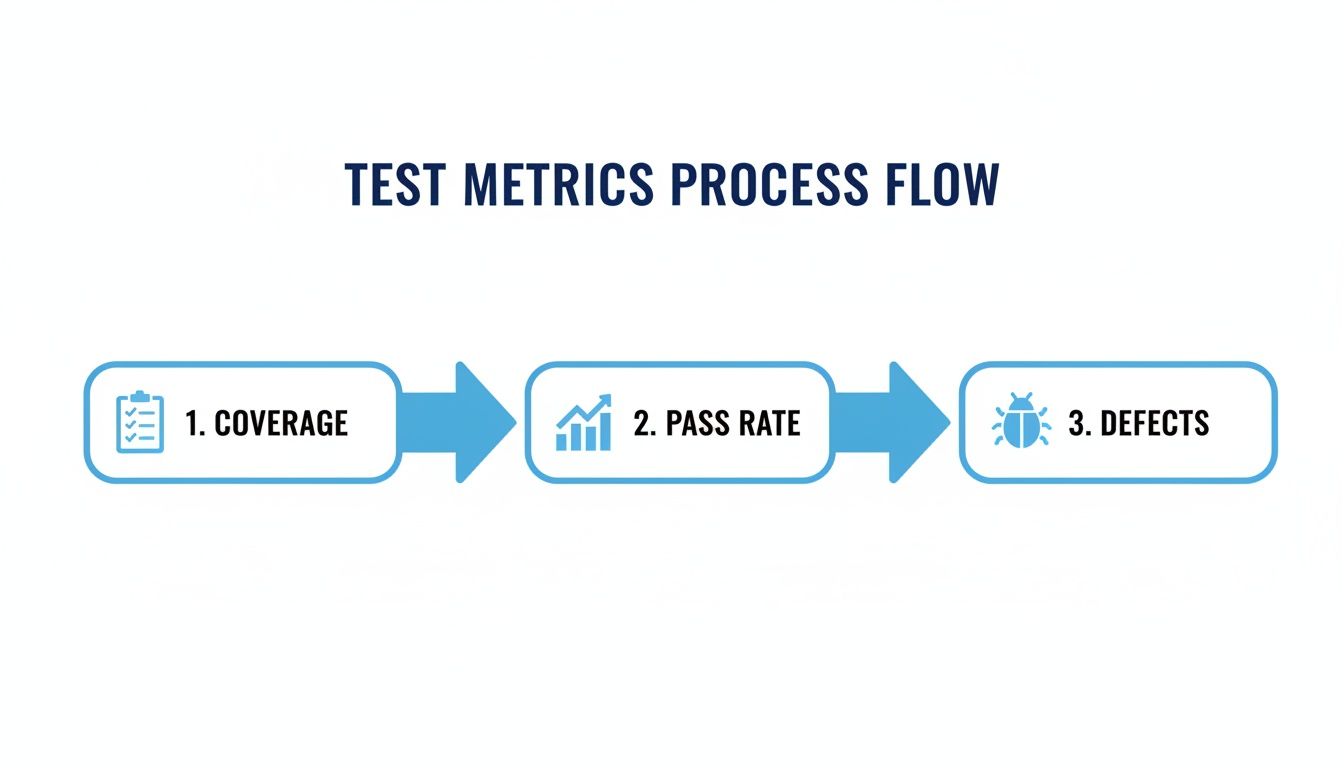
It visualizes how testers move from checking initial coverage to analyzing pass rates and, finally, digging into the defects that matter, creating a true quality narrative.
Imagine a performance report that isn’t based on an arbitrary “200 virtual users” but on the actual traffic patterns from your last Black Friday sale. Now you can directly compare your current build’s performance against a previous one under identical, real-world load conditions. The insights are immediate and undeniable.
If your checkout API’s response times jump by 30% under the replayed traffic, you have a concrete, high-priority problem to solve before you dare deploy. You can learn more about how to replay production traffic for realistic load testing to see how this works in practice.
Practical Advantages for Your Reports
Bringing live traffic simulation into your testing strategy makes your reports better in a few key ways.
- Uncover Unexpected Edge Cases: Real users are masters of chaos, creating complex scenarios that are nearly impossible to script. Replaying their traffic automatically puts these edge cases to the test, revealing bugs that would have sailed right through into production. Your defect reports will suddenly feature issues your manual and scripted tests never could have found.
- Validate Performance Benchmarks: You can build a library of “golden traffic” recordings from peak events, like a product launch or holiday rush. Replaying these specific patterns against new builds provides consistent, repeatable, and truly realistic performance benchmarks. Your reports can then definitively state whether the new version is faster or slower under a known, high-stakes load.
- Enhance Confidence for Stakeholders: There’s nothing more powerful than presenting a test report backed by real traffic data. Instead of saying, “We think it will hold up,” you can declare, “We hit the new build with last Tuesday’s peak traffic, and it performed 15% better with 99.9% fewer errors.” This is the kind of data-driven confidence that business leaders need to make smart release decisions.
By grounding your testing in reality, you transform your test reports from a simple project document into a true predictor of production stability.
Practical Templates and Real-World Examples
Theory is great, but seeing concepts in action is where the real learning happens. Let’s bridge that gap with tangible examples and templates you can adapt for your own projects, because the fastest way to master test reports in software testing is to see how they work in the wild.
The golden rule is to tailor every report to its audience. A project manager doesn’t need a stack trace, and a developer needs more than just a “failed” status. To drive this point home, we’ll look at two common scenarios.
First up, a high-level summary designed for leadership. Then, we’ll dive into a detailed defect report built specifically for engineering teams. Think of these as blueprints for creating clear, purposeful reports, no matter the situation.
Template for a Manager-Focused Test Summary
A Test Summary Report needs to get straight to the point. Its job is to deliver the bottom line in minutes, focusing on trends, business risks, and the overall health of the release. It’s less about individual bugs and more about answering the big question: “Are we ready to ship?”
Here are the must-haves for a manager-focused report:
- Executive Summary: A single paragraph with a clear go/no-go recommendation.
- Test Scope: A quick overview of what was tested (e.g., “New User Onboarding and Checkout Flow”).
- Key Findings: Bullet points highlighting major wins and critical risks.
- Defect Trend Analysis: A simple chart showing new vs. resolved bugs over the sprint.
- Business Impact: An assessment of how outstanding critical issues might affect users and revenue.
A strong summary report translates technical findings into business context. Instead of just stating “5 critical defects remain,” it explains, “5 critical defects are blocking the payment gateway, risking a potential loss in revenue.” This framing drives faster, more informed decisions.
Example of a Developer-Centric Defect Report
While managers need the 30,000-foot view, developers need precision. A detailed defect report gives them everything required to reproduce, diagnose, and squash a bug with zero wasted time. Ambiguity is the enemy here; clarity and context are everything.
This type of report must include:
- Unique Defect ID: For easy tracking in tools like Jira.
- Clear Title: A concise summary of the problem (e.g., “Error 500 on Checkout with Expired Credit Card”).
- Environment Details: OS, browser, device, and application build version.
- Steps to Reproduce: A numbered list detailing the exact actions that trigger the bug.
- Expected vs. Actual Results: A clear statement of what should have happened versus what did.
- Attachments: Screenshots, video recordings, and relevant log files are non-negotiable.
The importance of clear regression testing reports can’t be overstated. Regression testing challenges plague 47% of organizations, making these detailed reports essential for verifying that new code doesn’t break old features. The data shows that 77% of automation is focused on functional and regression testing, which helps 33% of teams improve developer collaboration through better bug reports. You can dig into more insights from the 2023 State of Testing report to understand the latest trends.
Visualizing Performance with GoReplay Dashboards
When it comes to performance testing, a picture is worth a thousand log files. Visual dashboards are king. The screenshot below shows a dashboard generated from a load test using GoReplay, a tool that replays real production traffic to expose performance issues.
This dashboard instantly visualizes key metrics like response times, error rates, and request counts under a realistic load. It allows teams to spot bottlenecks and performance degradation that synthetic, predictable tests would completely miss.
Best Practices for Creating Reports People Actually Read
An unread report is a wasted effort. After all the hard work of testing and data collection, the final step—communication—is what determines whether your findings drive action or just disappear into a digital folder.
Creating test reports in software testing that people actually read isn’t about flashy designs. It’s about clarity, relevance, and respecting your reader’s time.
Tailor the Content to the Audience
The fastest way to get your report ignored is to send the same one to everyone. A single, one-size-fits-all report rarely works because your stakeholders all have different needs. An effective report meets them where they are.
- For Executives and Product Managers: They need the big picture, fast. Give them a concise executive summary with a clear go/no-go recommendation. Highlight trend analysis charts and critical risks translated into direct business impact. Get straight to the “so what?”
- For Developers and QA Engineers: This is where you provide the “how.” This audience needs the granular details—comprehensive defect reports with environment specifics, logs, screenshots, and exact steps to reproduce the bug. The goal is to eliminate any guesswork so they can fix issues efficiently.
- For the Entire Team: A central dashboard can be the single source of truth. Displaying real-time pass/fail rates and open defect counts keeps everyone aligned on the project’s quality status and promotes transparency.
Focus on Analysis Over Data Dumping
Simply listing numbers is a data dump, not a report. Your job is to interpret those numbers and give them meaning. A report that just says “57 failed tests” is useless.
A report that explains, “57 tests failed, and 80% are clustered in the new payment module, blocking all checkout flows,” is an analysis. It tells a story and points to a problem.
The most valuable reports answer the question, ‘What should we do next?’ They move beyond observation to recommendation, transforming raw data into a clear action plan for the team. This analytical layer is what makes a report indispensable.
Instead of just stating metrics, provide context. Explain what the trends mean. If defect density is rising, recommend a code review for the problematic module. This proactive guidance turns your report from a passive document into an active tool for improvement.
Establish Consistency and Automation
Finally, consistency is key to readability. When you establish a standard format for your reports, people know exactly where to look for the information they need. A familiar structure makes it easier for stakeholders to scan for key data and compare results over time.
Once you have a solid template, automate its generation.
Automating test reports in software testing saves a ton of time, reduces human error, and ensures your reports are delivered on schedule. This frees up your team to focus on the high-value work—analyzing results and solving problems—instead of manually compiling spreadsheets.
To make sure your reports reflect true quality, it’s always a good idea to integrate software testing best practices into your workflow. By following these principles, your reports will become essential tools that command attention and drive real action.
Got the basics down but still have a few lingering questions? You’re not alone. When teams start getting serious about test reporting, the same handful of practical questions always pop up.
Let’s clear them up so you can get your reporting strategy right.
How Often Should I Generate Test Reports?
There’s no magic number here—the right frequency depends entirely on your development speed.
If you’re in a fast-moving Agile or DevOps shop, the answer is simple: generate automated reports with every single build. This gives your developers immediate feedback, letting them squash bugs almost as soon as they appear.
For teams on a more structured weekly or bi-weekly sprint, a single, comprehensive summary report at the end of each cycle usually works best. The goal isn’t to create noise; it’s to deliver timely insights that your team can actually use without feeling overwhelmed.
What’s the Real Difference Between a Summary and a Detailed Report?
It all comes down to the audience. Think of it like this: are you briefing the generals or the soldiers in the trenches?
A test summary report is for the generals—your leadership and non-technical stakeholders. It’s the high-level briefing that cuts straight to the point: overall quality, major risks, and a clear go/no-go recommendation. It helps them make strategic decisions.
A detailed test report, on the other hand, is for the technical crew—devs, QA, and DevOps engineers. This is the case file. It’s packed with granular data on every test case, exact steps to reproduce defects, system logs, and all the environment details needed to hunt down and fix bugs.
The core difference is purpose. A summary report tells you if you have a problem. A detailed report shows you exactly where it is and how to fix it.
How Can I Make My Reports Less… Boring?
Let’s be honest, most test reports are a fantastic cure for insomnia. To make yours something people actually want to read, stop just presenting data and start telling a story.
Kick things off with an executive summary that highlights the most critical findings and their business impact. This is your hook—it grabs the attention of busy stakeholders right away.
Next, lean on visuals. A pie chart breaking down defect severity or a line graph showing pass/fail trends over the last few sprints is infinitely more powerful than a wall of numbers. Most importantly, always add your own analysis. Don’t just show the “what”; explain the “why” and recommend clear, actionable next steps.
Ready to create test reports based on real-world conditions? GoReplay helps you capture and replay live production traffic, ensuring your reports reflect actual user behavior, not just synthetic scripts. Discover how to build unshakeable confidence in every release.