
Test Automation Mobile: A Practical Engineering Guide

A release branch is waiting, two app stores have their submission windows open, and a Friday hotfix has just regressed login on Android 11. The team has checked the main path manually, but nobody is certain whether the payment flow still works after the authentication change. A tester is moving between phones, an emulator is running an older OS version, and the bug report from yesterday is still being reproduced.
That situation is why test automation mobile work matters. Good automation doesn’t promise that every device, screen, and system condition will be tested exhaustively. It gives the team a fast, repeatable signal on the flows that can damage revenue or trust, then extends that signal with API, integration, performance, accessibility, and production-like validation. The practical challenge is choosing the right frameworks, designing tests that don’t become flaky, selecting devices based on evidence, and connecting mobile checks to the backend behavior users generate.
Why Mobile Automation Matters Right Now
Manual testing remains valuable, especially for exploration and usability, but it struggles under release pressure. A tester can verify a payment flow carefully, yet repeating the same flow across operating system versions, device sizes, permissions, network conditions, and fresh account states quickly consumes the release window. When a fix lands late, the team must choose between repeating the smoke suite and accepting uncertainty.
The operational gap is clear in the 2024 mobile test automation survey. Most organizations reported needing three to five days to run manual tests, while automated tests could complete in hours. More than half of respondents said automation reduced time to market by at least 25%, even though a majority had automated less than 24% of their tests and 47% still ran at least 100 manual test cases per application release.
Those figures describe a familiar contradiction. Teams know automation shortens feedback loops, but they often automate the wrong layer, leave tests dependent on unstable data, or build a large UI suite that becomes too expensive to maintain.
Start with the risk, not the device list
A useful first question isn’t “Which framework should we install?” It’s “Which user journeys must work after every meaningful change?”
For a payments app, that list might include:
- Authentication: Sign in, refresh a session, recover access, and handle an expired token.
- Money movement: Select a funding source, submit a payment, and display the correct result.
- Failure recovery: Recover from a declined request, timeout, offline state, or interrupted transaction.
- Account continuity: Preserve state when the app moves to the background or the operating system interrupts it.
Automate those journeys early, then validate their supporting business logic and APIs at lower, faster layers. This approach delivers useful signal without pretending that a few UI scripts represent the entire product.
Practical rule: A mobile suite is healthy when it helps a developer decide whether to merge or stop, not when it contains the largest possible number of scripts.
The market reflects the growing role of this discipline. A 2026 mobile app testing market summary values the global market at $8.4 billion in 2025 and projects $31.2 billion by 2034, with a projected 16.8% CAGR. The same summary says automated testing represented 61.1% of the market in 2025. Those figures don’t prove that every team needs a larger UI suite. They do show that automation has become a central part of mobile quality engineering.
What Mobile Test Automation Actually Covers
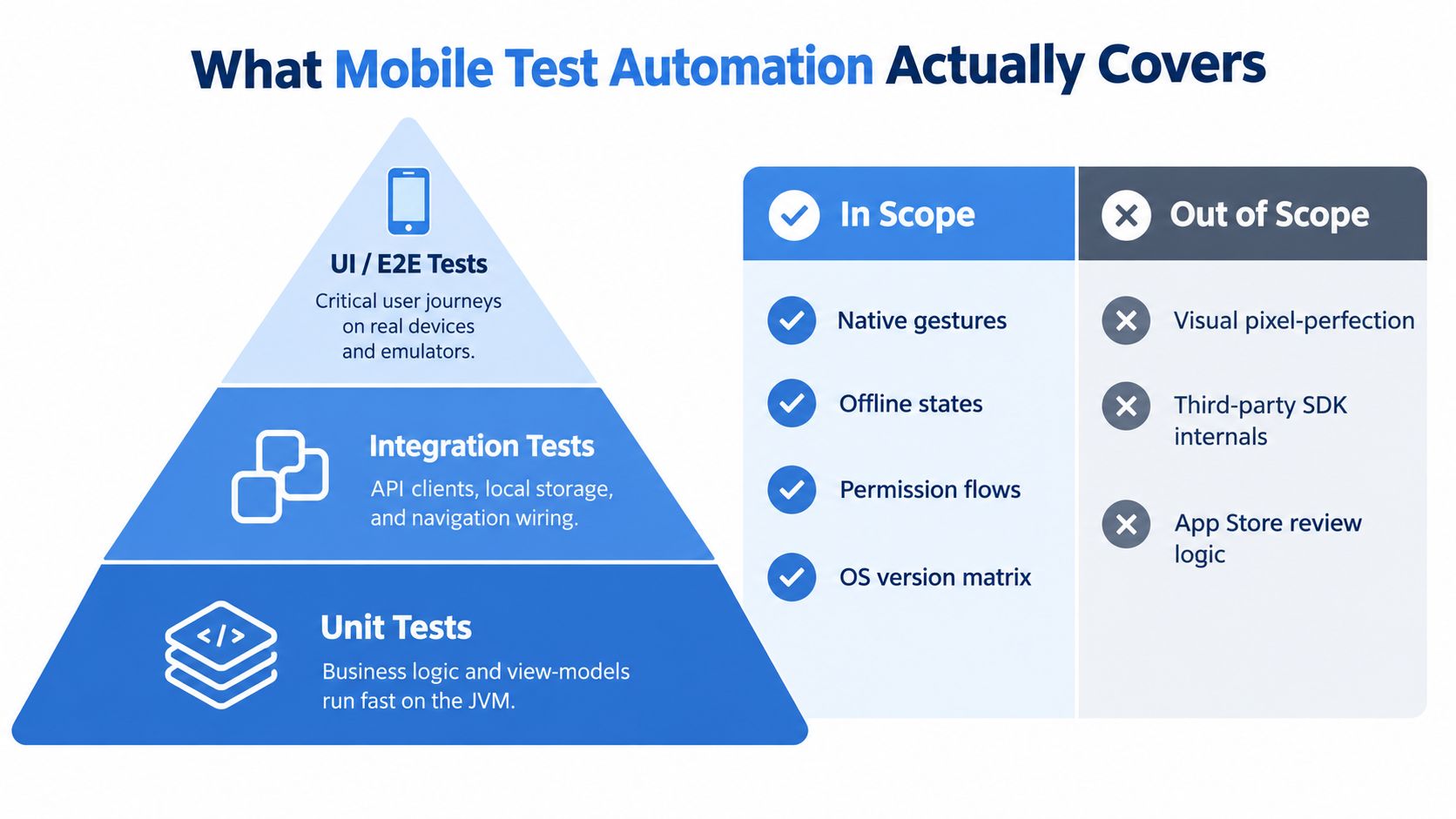
Mobile test automation is a collection of checks, not a single test type. The most reliable approach follows a mobile-adapted testing pyramid: many fast checks at the bottom, fewer integration checks in the middle, and a small set of high-value end-to-end journeys at the top.
The lower layers catch most logic defects
Unit tests should cover calculations, validation rules, state reducers, view-model behavior, and other business logic without launching a device. Android teams can run many of these on the JVM, while iOS teams can use their native unit-test tooling. These tests should answer questions such as, “Does a declined payment produce the right state?” rather than, “Can a user tap the decline button?”
Integration and contract tests verify the boundaries between components. They can exercise API clients, authentication handling, local storage, navigation wiring, serialization, and persistence. A contract check might catch a changed response field before a UI test fails with an unhelpful “element not found” error.
UI and end-to-end tests belong at the top. They should represent complete, business-critical paths such as logging in, completing a checkout, or recovering after a network interruption. UI tests are slower and more sensitive to rendering, timing, device state, and system dialogs, so each one needs a clear reason to exist.
| Layer | Best target | Typical signal |
|---|---|---|
| Unit | Business rules and view-models | A calculation or state transition is wrong |
| Integration | API clients, storage, and navigation wiring | Components disagree at a boundary |
| UI or E2E | Critical journeys on real app builds | A user can’t complete an important task |
Automation doesn’t replace every quality activity
UI automation isn’t API testing. API tests can validate payloads, authorization, idempotency, and error handling without depending on a rendered screen. It isn’t performance testing either. A UI journey may prove that one user can complete a flow, while performance tests examine concurrency, latency, resource pressure, and service capacity.
Accessibility testing needs its own assertions. A flow can pass while a screen has missing labels, poor focus order, insufficient contrast, or controls that a screen reader can’t identify. Visual regression testing has a different purpose again. It checks appearance and layout, but pixel comparison alone won’t prove that a payment was authorized correctly.
Backend realism strengthens every layer. Traffic captured from staging or production can provide representative payload shapes, sequencing, headers, errors, and state transitions for API and integration tests. That evidence helps teams choose which UI journeys deserve deep coverage. It complements UI automation, rather than turning backend replay into a substitute for tapping through the app.
Exhaustive UI coverage is an attractive trap. Each added script brings setup, selectors, test data, device execution, failure triage, and future maintenance. The result you want isn’t “every screen has a test.” It’s confidence that important behavior is checked at the cheapest layer that can detect the relevant defect.
Frameworks and Platforms Worth Knowing
Framework selection should follow app architecture and test scope. Native frameworks usually provide better synchronization and platform access inside their own ecosystem. Cross-platform tools trade some of that depth for broader reach and shared test authoring.
Native frameworks
Espresso is a strong Android choice for in-app UI behavior. It fits teams already working in Kotlin or Java and benefits from close Android integration. Its usual boundary is platform scope. It won’t give an iOS team a shared suite, and system-level journeys may require a different tool.
XCUITest serves the equivalent role on iOS. Swift or Objective-C teams can use it for native flows with strong Xcode integration. It works well for app-internal checks, but it ties execution and development to Apple’s tooling and platform.
Cross-platform frameworks
Appium is the broadest default for native and hybrid Android and iOS journeys. It supports several programming languages and can interact with system UI, permissions, notifications, and cross-application behavior. The cost is operational complexity. Test execution can be slower than native tooling, and selectors, driver configuration, and timing need careful management.
Detox fits React Native teams that want synchronization with the application’s state and a framework designed around that architecture. Its scope is narrower than Appium, and configuration can become demanding when teams need different platform behaviors or system-level interactions.
Maestro uses YAML-driven flows and is useful for straightforward cross-platform journeys where quick authoring matters. It can be approachable for QA specialists and developers who don’t want a large test harness. Logic-heavy flows and complex debugging may eventually push a team toward code-based tooling.
Flutter teams can start with integration_test, which stays close to the Flutter ecosystem and works well for basic in-process checks. Patrol is another option when Flutter tests need broader access to native platform behavior. Neither removes the need to decide which system-level cases require separate coverage.
| Framework | Platforms | Language | Strengths | Common failure modes |
|---|---|---|---|---|
| Espresso | Android | Kotlin or Java | Fast in-app synchronization and native access | Platform-specific scope, setup tied to Android expertise |
| XCUITest | iOS | Swift or Objective-C | Strong Xcode integration and native iOS coverage | macOS dependency, platform-specific test code |
| Appium | Android and iOS | Multiple languages | Broad reach and system-level interaction | Driver configuration, slower execution, timing sensitivity |
| Detox | React Native on Android and iOS | JavaScript or TypeScript | App-aware synchronization for React Native | React Native-specific setup and platform differences |
| Maestro | Android and iOS | YAML | Lightweight flows and simple CI integration | Complex branching and debugging can become difficult |
| integration_test | Flutter platforms | Dart | Close integration with Flutter tooling | Limited reach beyond Flutter’s runtime |
| Patrol | Flutter platforms | Dart | Flutter testing with additional native interaction | Smaller, architecture-specific scope |
Run multiple frameworks only when their scopes differ significantly. For example, an Android team might use Espresso for fast app-internal checks and Appium for a small number of permission or notification journeys. Adding a second framework because it is popular creates another execution environment and another maintenance queue.
Designing Tests That Do Not Break Tomorrow
Flaky tests rarely fail at random. They usually expose a design decision that made timing, state, or element identity ambiguous. Mobile applications amplify those problems because they depend on event loops, device resources, sensors, network conditions, animations, and operating system transitions.
Replace guesses with observable conditions
A fixed sleep says, “The app will be ready after this duration.” That assumption becomes false when the emulator is busy, the device is under resource pressure, the network is slow, or an animation changes. Research on mobile test flakiness describes how variable runtime resources can trigger garbage collection, GUI lag, and Android ANR errors, which can make the same test pass or fail without a code change. The research on flaky mobile tests supports synchronizing with UI-idle conditions and explicit waits rather than relying on fixed delays.
Wait for a concrete condition:
- Screen readiness: A stable element is visible and enabled.
- Network completion: A loading indicator disappears and the expected state appears.
- Transition completion: The destination screen is present, not merely assumed after a tap.
- System state: A permission dialog, keyboard, or notification has reached the expected state.
Use accessibility identifiers or dedicated test IDs as the primary locator strategy. Text selectors can break when copy changes, and XPath often binds tests to a rendered hierarchy that developers are free to refactor. Platform-rendered classes are equally fragile when native and hybrid components differ.
Make every test start from known state
A stable fixture should establish the app’s launch state, identity, feature flags, and data assumptions before the first meaningful action. Depending on the test, that might mean a clean install, reset app data, a seeded account, a backend sandbox, or recorded responses that reproduce a defined server condition.
Keep data isolated. Per-test users or controlled backend records prevent one test from changing the account state another test expects. If a test needs to verify a failed payment, create that failure intentionally through a test endpoint or fixture instead of waiting for an external service to fail.
The Appium guidance on mobile automation practices also emphasizes accessibility IDs, explicit waits, and removing fixed sleeps. These aren’t cosmetic improvements. They move variability into a small number of reusable helpers, leaving the test itself focused on the user outcome.
Failure diagnosis: A retry can reveal transient infrastructure noise, but it can’t repair a selector that targets the wrong element or a test that leaks state.
Treat screen objects, page objects, and driver wrappers as production code. Review them, lint them, and refactor them when failure patterns rise. Quarantine a test only with an owner and a deadline. Otherwise, retries hide real regressions and the suite teaches developers to ignore failures.
For a broader quality process, use this guide to automated testing best practices as a reference point, then adapt its practices to the stateful and device-dependent nature of mobile applications.
Device Coverage, Real Devices, and Cloud Labs
A larger device matrix doesn’t automatically create better coverage. It creates more execution combinations, more screenshots to inspect, and more places for a test to fail for infrastructure reasons. Device selection should follow user distribution, crash data, revenue-critical behavior, and hardware-specific risk.
Use emulators and simulators for rapid developer feedback and broad checks of navigation, layout, and API integration. They are easier to reset and usually cheaper to run repeatedly. They won’t reproduce every camera, biometric, battery, radio, notification, or manufacturer behavior.
Real devices belong in tests where physical hardware changes the result:
- Camera and media: Focus, permissions, orientation, and capture behavior.
- Biometrics: Face or fingerprint enrollment, cancellation, and fallback paths.
- Push and interruption: Notifications, calls, backgrounding, and lock-screen transitions.
- Network and battery: Radio changes, constrained connectivity, and resource pressure.
- OEM behavior: Vendor-specific permissions, keyboards, background limits, and rendering.
Cloud labs such as BrowserStack App Automate, Sauce Labs, AWS Device Farm, and Firebase Test Lab provide access to device combinations a team may not want to purchase or maintain. They work particularly well for parallel regression and long-tail compatibility checks, but they add queue time, network dependencies, and another source of logs that must be correlated with the application failure.
| Test goal | Real device | Emulator or simulator | Cloud lab |
|---|---|---|---|
| Validate camera or biometric behavior | Preferred | Usually insufficient | Useful when the required hardware is available |
| Check layout and navigation | Useful for selected devices | Fast default | Good for broad OS and model coverage |
| Exercise API integration | Useful for release confidence | Efficient during development | Suitable for parallel regression |
| Reproduce OEM-specific behavior | Required | Not representative | Strong option when the model is supported |
| Run a broad compatibility sweep | Expensive to operate | Limited device realism | Practical for the long tail |
The economic question matters. A recent State of Testing report from Sauce Labs found that more than half of surveyed engineering and software executives cited cost-effective automation scaling as a top challenge. About a third identified the cost and burden of in-house device testing, while nearly half reported insufficient coverage for catching issues early in the development lifecycle.
Start with the devices that represent real users and the flows that carry the greatest risk. Add breadth when crash reports, support tickets, analytics, or release history justify it. Coverage should be a measured allocation of effort, not a badge earned by listing more models.
CI/CD Pipelines and Traffic Replay
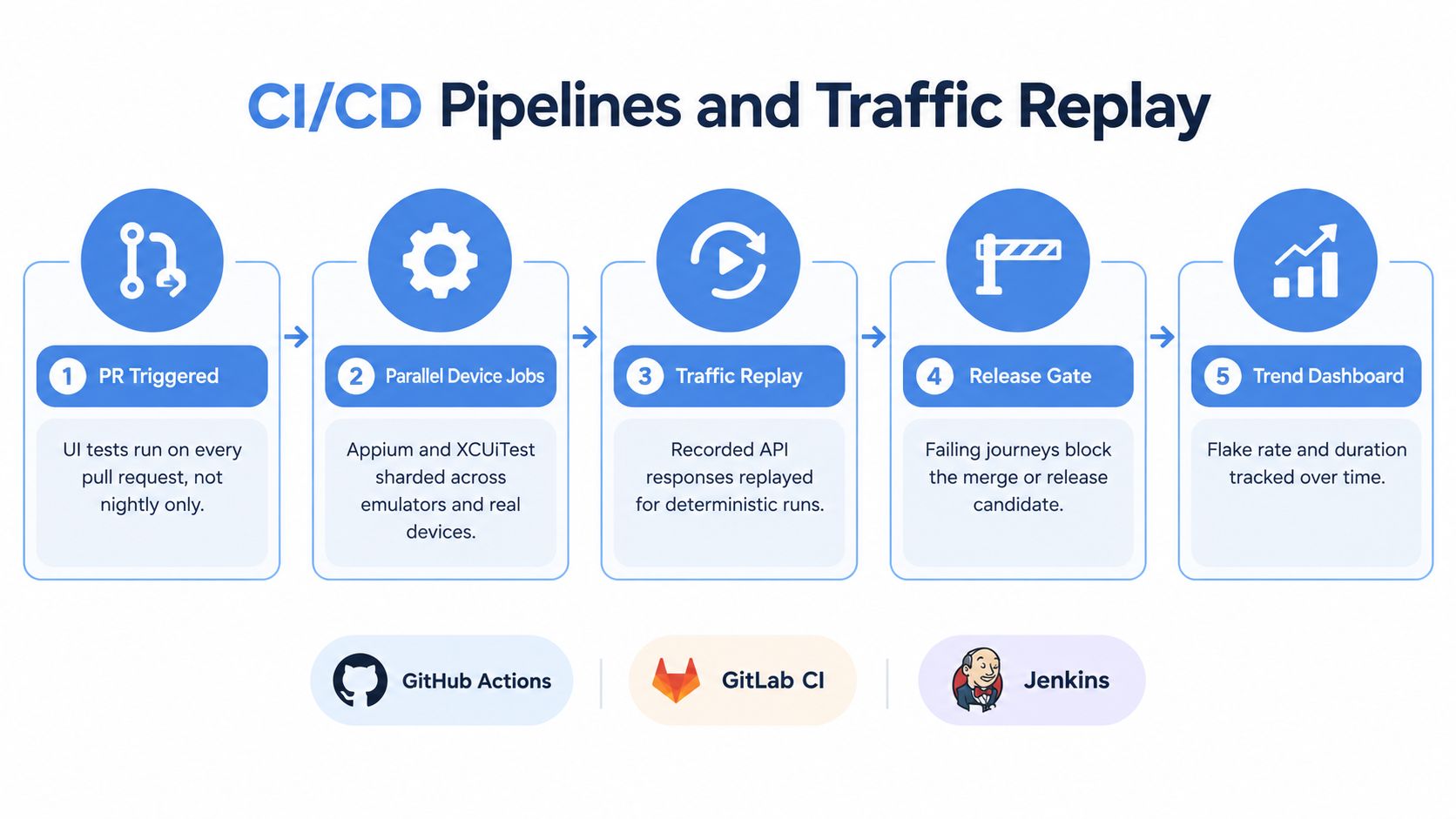
Mobile UI automation becomes useful when developers receive its signal during normal delivery. Run a small critical suite on pull requests, execute broader device coverage in parallel on release candidates, and keep longer compatibility jobs separate from the fastest merge feedback.
GitHub Actions, GitLab CI, and Jenkins can coordinate builds, signing, emulators, simulators, real-device jobs, and result collection. Shard tests by journey or device so one slow group doesn’t hold every other check. Cache dependencies and derived build artifacts, but keep the environment definition explicit. A fast pipeline that can’t be reproduced locally is only fast at hiding uncertainty.
Pair the UI signal with backend evidence
A mobile test can confirm that a user tapped “Pay” and saw a success screen. It may not reveal that the backend mishandled a response variant, failed under a realistic request sequence, or degraded only for a particular account state. Synthetic API tests cover intentional scenarios, but production-adjacent traffic exposes behavior the test author didn’t think to model.
Traffic replay tools capture HTTP traffic from a mobile app and replay those requests against a staging or test environment. Teams can use the replay to examine realistic payloads, ordering, headers, error paths, and session behavior without asking a UI script to represent every possible backend interaction. Data masking and environment controls are essential before replaying sensitive traffic.
A practical pipeline can look like this:
- Pull request: Build the app and run the critical UI journeys.
- Parallel device jobs: Execute selected Android and iOS combinations.
- Staging deployment: Publish the candidate backend and app dependencies.
- Traffic replay: Send representative captured requests to the target environment.
- Release decision: Combine UI results, service errors, replay anomalies, and test health trends.
Traffic replay for more accurate load testing describes the reason this layer matters. Replay doesn’t replace functional assertions. It gives the API tier realistic work while the UI suite proves that the most important user journeys still connect correctly.
A useful replay setup separates identity and data concerns from test logic. Mask personal information, route requests to safe accounts, and define what responses may be compared exactly versus semantically. Record the request context needed to understand a failure, including the journey and session, so a backend anomaly can be traced back to the mobile behavior that produced it.
The combined signal is more honest than a green UI dashboard alone. A passing mobile test with failing service health should stop the release investigation, not reassure the team that the product is safe.
Metrics That Prove Your Suite Is Healthy
A test suite can have a high pass rate and still be unhealthy. If developers rerun failed jobs until they turn green, the dashboard measures persistence rather than quality. Health metrics should show whether the suite is trustworthy, fast enough to use, and connected to escaped defects.
Track the trend across the last 50 runs, rather than treating a single pass rate as the verdict. The number comes from the planned observation window, not from a universal quality threshold. Watch for a rising failure cluster on one device, a sudden duration increase, or a group of tests that passes only after retries.
Four useful metric families
- Pass trend: Compare recent runs with the previous window and separate product failures from infrastructure failures.
- Flake detection and repair: Measure how long the team takes to identify a flaky test and how long it remains unresolved.
- Execution duration: Break runtime down by unit, integration, UI, device, and setup work.
- Defect escape rate: Connect production defects to the journey, device, OS version, and test layer that missed them.
A coverage map adds the missing context. It should show which critical journeys ran against which device and OS combinations during the current sprint, along with the conditions covered. “Login passed” is less informative than “login passed on the dominant Android and iOS targets with a fresh account and an expired-session scenario.”
| Metric | Healthy signal | Investigate when |
|---|---|---|
| Pass trend | Failures are classified and trends remain understandable | Reruns hide recurring failures |
| Flake detection time | Engineers can identify whether a failure is product or test related | The same test fails without code changes |
| Flake repair time | Quarantined tests have owners and deadlines | Quarantine becomes a permanent junk drawer |
| Suite duration | Critical checks fit the delivery feedback loop | Developers skip or defer the suite |
| Device coverage | High-risk journeys map to evidence-based targets | The matrix grows without usage or defect data |
| Defect escape rate | Escaped bugs lead to a new check at the right layer | The same defect class returns |
Emit these measurements as time-series data from CI. Link mobile failures to service health, crash reports, and deployment events. That correlation helps distinguish a rendering regression from an API incident and prevents the QA team from “fixing” a test for a problem outside the app.
Putting It All Together Without Burning Out
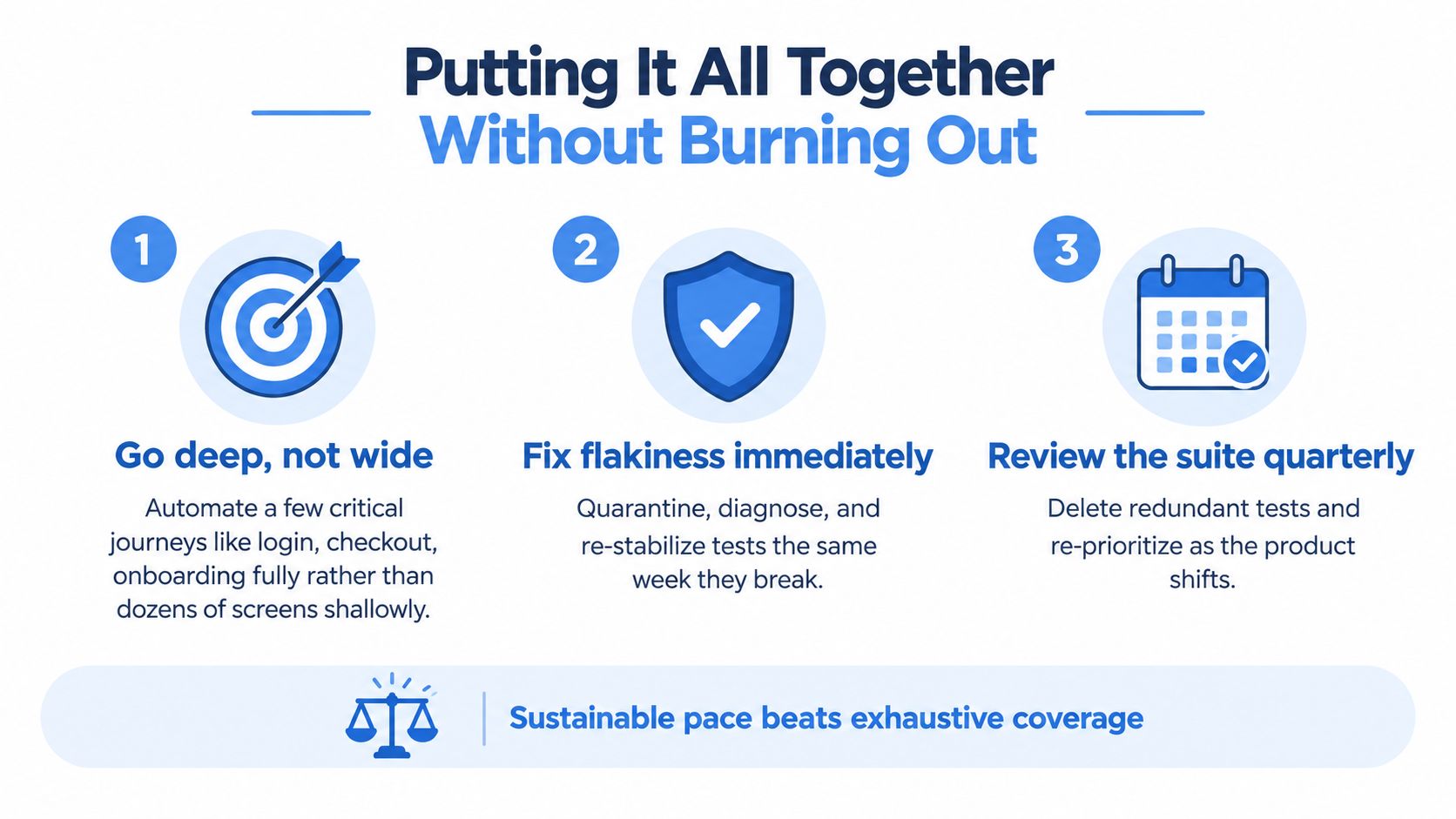
Sustainable mobile automation follows three operating principles.
First, go deep on critical journeys. A complete login, checkout, or onboarding path tests more meaningful behavior than a collection of isolated taps across dozens of screens. Verify the business result, not just the presence of a button.
Second, make ownership local. The team that changes authentication should own its authentication fixtures and critical journeys. QA engineers can provide strategy and tooling, but a separate silo shouldn’t be expected to understand every feature’s state model after the code has changed.
Third, treat the suite as a product. Give it a backlog. Remove redundant tests, update device priorities, repair unstable fixtures, and review whether each check still protects a current business risk.
Choose depth before scale
The Turkish Testing Board’s 2024-2025 mobile testing survey reported 28.2% of respondents citing a lack of real-world scenarios as a mobile testing challenge. The same survey reported 29.6% citing CI or automation challenges and 38% citing device fragmentation. Those findings point to a problem broader than framework selection. Teams need realistic conditions and deliberate prioritization, not only more scripts.
Common traps include:
- Chasing framework releases: A new feature won’t compensate for weak fixtures, unstable selectors, or unclear ownership.
- Expanding the matrix without evidence: More devices add cost unless usage, crashes, or business risk justify them.
- Testing only the happy path: Interruptions, network changes, expired sessions, and backend response variants deserve explicit coverage.
- Ignoring replayable production behavior: A UI suite may pass while a service fails on request sequences synthetic tests never generated.
Use the pyramid to keep most verification cheap. Use a small, deep set of UI journeys for user confidence. Use selected real devices and cloud labs for representative conditions. Then connect those checks to controlled traffic replay so the backend receives realistic work before release.
Sustainable coverage: The goal isn’t to automate everything. It’s to automate the right evidence at the right layer and keep that evidence trustworthy.
GoReplay captures and replays live HTTP traffic against testing environments, giving mobile teams a way to complement focused UI journeys with production-like backend behavior. Visit GoReplay to explore how traffic replay can fit into your CI/CD validation strategy.