
Test Automation in Python: A Practical Guide for QA Success
When you hear “test automation in Python,” what comes to mind? It’s really about writing simple scripts to handle the heavy lifting of software testing. Instead of a human manually clicking through an application over and over, you write code that does it automatically—executing tests, checking if the app behaves as expected, and flagging what’s broken.
It’s a strategic move to replace repetitive manual work with efficient, reliable, and scalable code. This lets your team find bugs much earlier in the process and ship new features with a lot more confidence.
Why Python Is a Go-To for Test Automation
When an engineering team picks a language for testing, the decision usually boils down to one question: what gives us the best mix of speed, power, and clarity? More and more, the answer is Python. Its popularity isn’t an accident; it’s a direct result of a design philosophy that puts readability first.
Think about what it takes to build a test script. In many languages, you’re wrestling with boilerplate code and rigid syntax rules right from the start, which just slows you down. Python, on the other hand, almost feels like writing in plain English. This clean, intuitive syntax means engineers can write, understand, and maintain test scripts much faster. The result? Teams spend less time trying to figure out convoluted code and more time actually improving test coverage.
Simplicity Accelerates Development
The biggest advantage of test automation in Python is its incredibly gentle learning curve. A new engineer, even one who isn’t a programming guru, can get up to speed and start contributing almost immediately. This makes testing more accessible, opening the door for developers, QA engineers, and even analysts to take part in quality assurance.
That simplicity has a direct impact on the bottom line. When your test scripts are easy to write and read, the feedback loop between coding a feature and knowing it works gets dramatically shorter.
The real win with Python’s clean syntax isn’t just about writing tests faster. It’s about building a sustainable, collaborative testing culture where anyone on the team can read a test and immediately understand the business rule it’s supposed to validate.
A Powerful and Versatile Ecosystem
Syntax aside, Python’s real strength comes from its massive ecosystem of libraries and frameworks. It’s like having a universal toolkit where there’s a specialized tool for just about any job you can think of. This treasure trove of open-source tools makes Python incredibly adaptable.
- Web UI Testing: Need to automate a browser? Libraries like Selenium and Playwright give you powerful tools to simulate a user clicking, typing, and navigating through a complex web app.
- API Testing: If you need to hit an API endpoint and check the response, frameworks like Requests and pytest make it dead simple to send HTTP requests and validate what comes back.
- Data Analysis: Drowning in test results? With libraries like Pandas and NumPy, you can easily slice, dice, and analyze huge datasets to spot performance trends and weird patterns.
This versatility is a huge reason why Python is everywhere. You can see its dominance in industry trackers like the TIOBE Index, which consistently ranks it as a top language, and its popularity is backed by over 1.19 million job listings requiring Python skills. If you dig into Python’s development trends and innovations, you’ll see why it’s not slowing down.
Ultimately, Python gives teams the flexibility to build a complete testing strategy—from small unit tests to complex end-to-end scenarios—all within one cohesive ecosystem.
Choosing the Right Python Testing Framework
Picking a testing framework is one of the most important decisions you’ll make when you start with test automation in Python. This isn’t just about grabbing a tool off the shelf; it’s about adopting a philosophy that will guide your entire testing strategy for years to come.
Think of it like choosing a vehicle for a road trip. A sleek sports car is perfect for smooth, open highways, but you’d want a rugged 4x4 for unpredictable mountain terrain. Each framework offers a completely different ride, and the right one depends entirely on your project, your team’s skills, and your company’s culture.
A framework that’s perfect for a small, fast-moving API project might completely bog down a large team building a complex web application. Let’s break down the major players to help you find the right fit.
Unittest The Built-In Standard
If you’ve worked with Python, you’ve already met unittest. It’s the dependable sedan of the testing world—it comes built into the Python standard library, so there’s absolutely nothing extra to install. This makes it a go-to for developers who just need to write solid unit tests without adding another dependency to the requirements.txt file.
Its design is heavily inspired by the classic xUnit style you’d find in languages like Java (JUnit), so it feels immediately familiar to a lot of developers. While it’s perfectly capable, its syntax can feel a bit clunky and verbose compared to more modern options. You often end up writing more boilerplate code just to get a simple test running.
Still, for projects that need stability and have straightforward, isolated tests, unittest is a rock-solid choice.
Pytest The Flexible Powerhouse
If unittest is the sedan, then pytest is the high-performance SUV that can handle any road. It has rightfully become the default choice for a huge part of the Python community, thanks to its clean syntax and incredible flexibility.
Pytest gets rid of all the ceremony. You can write powerful tests with less code, making them far more readable. Its most loved feature is the fixture system, which is an elegant and powerful way to manage the setup and teardown of your tests. No more messy setUp() and tearDown() methods.
This screenshot from the official pytest docs shows just how clean it is—tests are just simple functions.
That simplicity is at the core of its design. With a massive ecosystem of plugins, pytest can be extended to do just about anything, from API testing to full-blown UI automation. It’s a framework that truly grows with you.
Robot Framework The Collaborative Communicator
Robot Framework plays a completely different game. It’s a keyword-driven framework designed for acceptance testing and robotic process automation (RPA). Its biggest win? A human-readable syntax that lets non-technical people—like business analysts or product managers—read and even help write the test cases.
Robot Framework is built on the idea that test cases should be clear, collaborative assets. By using plain-language keywords, it bridges the communication gap between technical and non-technical team members, ensuring everyone is aligned on what the application is supposed to do.
This makes it perfect when test clarity and stakeholder buy-in are critical. While it can be extended with Python, its keyword-driven style can sometimes feel a bit indirect for pure developers who just want to write code.
Behave The BDD Champion
For teams all-in on Behavior-Driven Development (BDD), Behave is the answer. BDD is all about defining an application’s behavior using natural language, which then drives the development process. Behave uses the Gherkin syntax (Given-When-Then) to turn user stories directly into automated tests.
This approach forces development to stay tightly aligned with business requirements. Each “Given,” “When,” or “Then” step in a story maps directly to a Python function, creating a living, breathing document that proves the system works as specified. It’s the ultimate tool for teams who want to bake testing into their requirements process from day one.
Python Testing Framework Comparison
Choosing between these frameworks requires a careful look at your team’s needs. To make it a bit easier, here’s a quick side-by-side comparison.
| Framework | Best For | Learning Curve | Key Feature | Ecosystem/Plugins |
|---|---|---|---|---|
| Unittest | Basic unit tests, projects avoiding external dependencies | Low | Included in Python’s standard library | Limited, relies on built-in capabilities |
| Pytest | All-purpose testing, from simple unit tests to complex APIs | Low | Fixtures, concise syntax, rich plugins | Massive and actively maintained |
| Robot Framework | Acceptance testing, involving non-technical stakeholders (BDD) | Medium | Keyword-driven, human-readable syntax | Strong, with many libraries for web, API, and RPA |
| Behave | Teams strictly following Behavior-Driven Development (BDD) | Medium | Gherkin syntax (Given-When-Then) | Focused on BDD, integrates well with other tools |
Ultimately, the best framework is the one that gets out of your way and helps your team build a robust, maintainable test suite. For a broader look at tools beyond just Python, check out our guide on the best test automation tools for every team size and need.
Building a Complete Testing Pyramid in Python
A truly effective test automation strategy in Python isn’t about finding one magic tool; it’s about building a layered defense. This is where the Testing Pyramid comes into play—a classic model that organizes tests into distinct layers, each with its own purpose, scope, and speed. A well-balanced pyramid helps you catch different kinds of bugs at the most efficient stage possible.
Think of it like building a house. You wouldn’t start with the delicate roof tiles. You’d pour a massive, solid concrete foundation first. In the world of testing, that foundation is built with Unit Tests.
The Foundation: Unit Tests
Unit tests are the absolute bedrock of your testing pyramid. They are small, incredibly fast, and hyper-focused, designed to verify just one tiny piece of your code in complete isolation. We’re talking about testing a single function that adds two numbers or a class method that formats a string.
Because they have zero dependencies—no databases, no networks, no external services—they execute in milliseconds. A healthy project will have hundreds, if not thousands, of them. They provide developers with immediate feedback, confirming that the code they just wrote does exactly what they think it does. A solid suite of unit tests is your single best defense against regressions.
The diagram below shows how different Python frameworks fit into these layers.
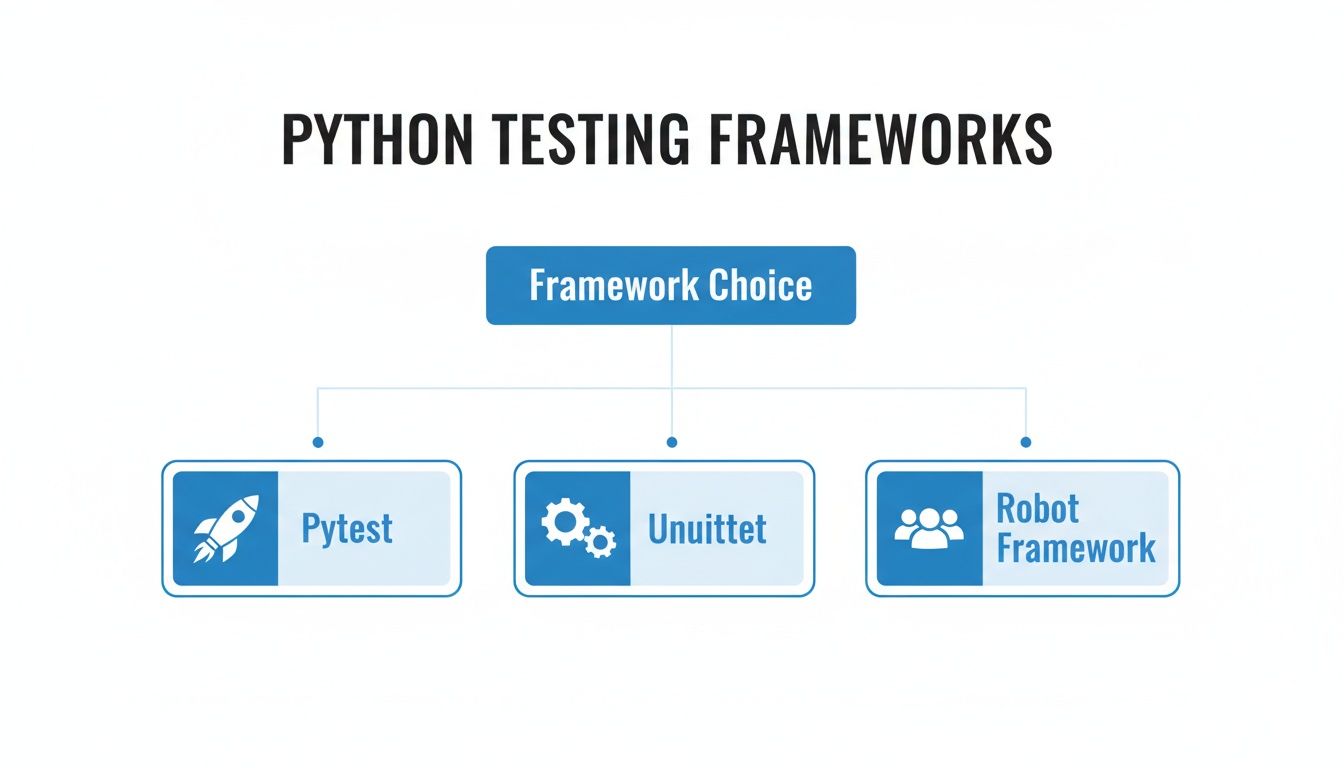
As you can see, frameworks like Pytest, Unittest, and Robot Framework offer distinct choices for building out your testing strategy, each with its own strengths for different types of tests.
The Middle Layer: Integration Tests
As we move up the pyramid, we hit Integration Tests. While unit tests check components in isolation, integration tests are all about making sure those components play nicely together. This is where you answer the real-world questions: “Does my API service layer actually pull the right data from the database?” or “Can the login module talk to the user management API without failing?”
These tests are a bit slower and more complex than unit tests because they often spin up real services, hit a test database, or make network calls. But they are absolutely critical for finding bugs that hide in the seams of your application—those tricky spots where different modules meet.
Integration tests are your first line of defense against system-level bugs. They catch the subtle mismatches in assumptions between different modules that unit tests, by their very nature, are designed to ignore.
The Peak: End-to-End Tests
Right at the top of the pyramid, we have End-to-End (E2E) Tests. These are the heavyweights, simulating a complete user journey from start to finish. A typical E2E test might look something like this:
- Fire up a web browser.
- Navigate to the login page and sign in with a test user.
- Search for a product and add it to the shopping cart.
- Go to the checkout page and complete the purchase.
- Verify that the order confirmation screen appears as expected.
These tests are priceless because they validate the entire application workflow just as a real user would experience it. The downside? They are by far the slowest, most brittle, and most expensive to maintain. A tiny UI change can easily break an entire E2E test suite. For this reason, you should have far fewer E2E tests than any other type.
Beyond the Pyramid: Performance and Load Testing
While not always considered part of the traditional pyramid, performance and load testing are crucial layers for ensuring your app is not just functional, but also resilient under pressure. These tests are designed to find your application’s breaking points by hammering it with simulated user traffic.
- Load Testing: Checks how the system behaves under a specific, expected amount of traffic.
- Stress Testing: Pushes the system beyond its normal limits to see how and when it finally breaks.
By building a balanced pyramid with Python frameworks, you get a comprehensive strategy. You can use a tool like pytest for your unit and integration tests, then bring in tools like Selenium or Playwright for the E2E layer. This ensures your application is stable, reliable, and ready for whatever your users throw at it.
Designing a Scalable Python Test Architecture
Writing your first few test scripts is one thing. Architecting a full-blown test suite that can actually grow with your application—without collapsing under its own weight—is a whole different ball game.
Without a solid plan, your test suite quickly becomes a maintenance nightmare. A single UI change breaks dozens of tests, and suddenly you’re spending more time fixing automation than writing it. A scalable architecture, on the other hand, turns your tests into a durable, long-term asset.
The guiding principle here is separation of concerns. Your test logic (the what) should be completely separate from your page interactions (the how) and your test data (the with what). Get this right, and when your application changes, you’ll only need to update small, isolated parts of your framework instead of rewriting entire scripts.
Implementing the Page Object Model
The Page Object Model (POM) is a foundational pattern for building a maintainable UI test suite. Instead of cluttering your test scripts with selectors like id="login-button", you create a dedicated class for each page or major component of your app. These classes become the single source of truth for all locators and methods needed to interact with that part of the UI.
Think of each page object as a remote control for a specific screen. Your test script just pushes the buttons (calls the methods) without needing to know anything about the complex circuitry (locators and browser commands) inside.
If a developer changes the login button’s ID, you update it in one place: the
LoginPageobject. Instantly, every test that uses it is fixed. This simple insulation is the key to creating a robust suite that doesn’t shatter every time the front end gets a facelift.
Organizing Your Project Structure
A clean, logical directory structure is your best friend for managing a growing automation project. It’s not just about neatness; it’s about making it dead simple for anyone on the team to find what they need, whether it’s a specific test case, a page object, or a shared helper function.
A common and effective structure looks something like this:
- /tests: This is home base for all your actual test scripts. You’ll usually want to organize these into subdirectories by feature, like
/tests/loginor/tests/checkout. - /pages: Here’s where you’ll store all your Page Object Model classes. Each file typically corresponds to a single page, like
login_page.pyorhome_page.py. - /data: Keep your test data—like user credentials or product info—in this folder. Storing it in formats like CSV, JSON, or YAML keeps it cleanly separated from your test logic.
- /utils: A handy spot for shared helper functions. Think custom logging setups, database connectors, or API clients that multiple tests might need.
- config.py: A central file for global settings like base URLs, browser types, and timeouts. This keeps configuration out of your code.
This kind of separation makes your project predictable and a breeze to navigate.
Leveraging Fixtures and Data-Driven Testing
Modern frameworks like pytest are packed with tools for managing test setup and data. Pytest fixtures are a game-changer, letting you define reusable setup and cleanup actions. Need to initialize a web driver or connect to a database before a test? A fixture can handle that for you, keeping your test code clean and focused.
Data-driven testing takes this a step further by decoupling the test logic from the data it consumes. Instead of hardcoding a username and password into a test, you can “parameterize” the test to run multiple times, pulling different inputs from a data file. This is how you cover dozens of scenarios—valid logins, invalid passwords, empty fields—with a single, elegant test function.
The industry is constantly pushing forward, with 72.3% of teams now exploring or adopting AI-driven test workflows. This trend is part of a broader market projected to grow from $25 billion to nearly $92 billion by 2030, all driven by the relentless need for smarter quality validation. To see where things are headed, you can read the full research on the future of automated testing. By building on the architectural patterns we’ve covered, your Python test suite will be ready for whatever comes next.
Integrating Python Tests into Your CI/CD Pipeline
Test automation really begins to pay off when it stops being a manual chore and becomes an invisible, automatic guardian of your codebase. This is exactly what happens when you weave your Python test suite into a Continuous Integration/Continuous Deployment (CI/CD) pipeline. It transforms testing from something you do into something that just happens—every single time.
The idea is simple but powerful: whenever a developer pushes new code, the pipeline automatically kicks off a series of quality checks. This creates an immediate feedback loop, turning your test suite into a quality gate that stops bad code from ever reaching production. It’s all about the philosophy of failing fast—catching bugs moments after they’re introduced, not days or weeks later.
The Anatomy of an Automated Test Pipeline
A typical CI/CD pipeline for test automation in Python follows a pretty standard sequence. While you might be using GitHub Actions, Jenkins, or GitLab CI, the core workflow is almost always the same.
- Trigger on Commit: It all starts the moment a developer commits code. That single event is the trigger that kicks off the entire pipeline.
- Set Up a Clean Environment: The pipeline spins up a fresh, consistent environment for the tests. This is usually done with Docker containers to guarantee every test run happens in an identical setting, stamping out those frustrating “it works on my machine” problems for good.
- Install Dependencies: Next, it installs all the necessary Python packages and project dependencies from your
requirements.txtor a similar file. - Execute the Test Suite: This is the main event. The pipeline runs your test commands (like
pytest) and unleashes the full suite against the new code. - Report the Results: Finally, you get the verdict. A successful run means the code can move to the next stage, like deployment. A failure immediately stops the process and alerts the team.
This automated flow ensures every single change gets validated against your quality standards, giving you a constant safety net.
Smart Pipeline Strategies for Efficiency
Here’s the thing: running every single test on every single commit can get slow. Really slow. A much smarter approach is to structure your pipeline in stages, moving from the fastest checks to the most time-consuming ones.
A well-designed pipeline prioritizes rapid feedback. By running quick unit tests first, developers get immediate validation on core logic. More time-consuming tests are reserved for later stages, creating a balance between speed and thoroughness.
Think about a multi-stage strategy like this:
- Stage 1 (On Every Commit): Run all your unit tests. These are lightning-fast and give you an instant check on the core logic, often finishing in less than a minute.
- Stage 2 (On Pull Requests): Run your integration tests. This makes sure the new changes play nicely with other components before they get merged into the main branch.
- Stage 3 (Nightly or Pre-Deployment): Run the full end-to-end (E2E) test suite. Since these are the slowest and most resource-heavy, running them less often strikes the perfect balance between thoroughness and speed.
By plugging your Python tests into a CI/CD pipeline, you’re not just running scripts anymore. You’re building a dynamic, automated system that continuously enforces quality and helps your team move faster.
Validating Your Code with Production Traffic
Scripted tests, no matter how well you write them, are still just a best guess. You’re trying to predict how users will behave. But what if you could stop guessing and test your code against the chaotic, unpredictable reality of actual user interactions?
That’s the whole idea behind replaying production traffic. It’s a powerful strategy that adds a layer of confidence you just can’t get from traditional tests.
The process involves capturing live requests from your production environment and then replaying them against a staging or dev version of your app. It’s like having thousands of real users beta-test your changes all at once, flushing out strange edge cases and performance bottlenecks that your scripted scenarios would never dream of.
Introducing GoReplay for Realistic Testing
One of the best open-source tools for the job is GoReplay. It acts like a network recorder, silently capturing HTTP traffic from your live server and saving it. Later, you can “replay” that captured traffic against any environment you want. It’s the ultimate real-world workout for your application before it ever goes live.
This approach gives you two massive wins:
- Uncover Obscure Bugs: Real user traffic is messy. It’s full of unexpected headers, weird API call sequences, and strange payloads you’d never think to write a test for. Replaying it is one of the best ways to find those hidden, hard-to-reproduce bugs.
- Hyper-Realistic Load Testing: Instead of inventing load profiles from scratch, you can use actual traffic patterns to see how your system holds up under real-world stress. This is absolutely critical for understanding performance before you ship. To dive deeper, check out this guide to replay production traffic for realistic load testing.
Integrating Traffic Replay into Your Python Workflow
While GoReplay isn’t a Python-native tool, slotting it into your workflow is pretty straightforward. You just configure it to listen to your production server and then point the replayed traffic to your staging environment where your Python application is running.
This process doesn’t replace your existing pytest or unittest suites. Instead, it runs alongside them, acting as a final, dynamic validation step that closes the gap between simulation and reality.
By simulating real user interactions, you shift from verifying predictable paths to validating system resilience against unpredictable, real-world conditions. This is the ultimate confidence booster before a deployment.
This need for higher-fidelity testing is a huge reason why the global test automation market is projected to hit $63.05 billion by 2032. Companies are hunting for methods that deliver more reliable software, faster. In fact, studies show that 70% of organizations adopting advanced automation see a positive ROI in the first year alone.
Replaying production traffic is a massive step toward building a truly robust quality assurance process.
Common Questions About Python Test Automation
As you start exploring test automation in Python, you’ll naturally run into a few common questions. Getting these sorted out early is a big step toward building a testing strategy that actually works and lasts. Let’s dig into some of the most frequent hurdles teams face.
How Much Python Do I Need to Know to Get Started?
This is probably the biggest question people have, and the good news is, you need less than you think. You don’t need to be a Python guru to write your first test.
If you have a handle on the basics—things like variables, loops, conditions, and functions—you’re more than ready to jump in with a framework like pytest. The more advanced corners of the language can wait. Your first goal should be to understand the core concepts of testing, and you can pick up the fancier Python tricks as your tests get more complex.
Pytest vs Unittest: Which One Should I Use?
There’s no single “best” framework here; it’s all about what’s best for your team and your project.
-
Unittest comes built into Python, which is a huge plus if you want to avoid adding external dependencies. It’s rock-solid and uses a classic, class-based structure that will feel familiar to many developers.
-
Pytest is generally seen as more modern and flexible. It lets you write tests as simple functions, has an incredibly powerful fixture system for managing test state, and boasts a massive ecosystem of plugins. This often means you can write clearer tests, faster.
For most new projects, pytest is the go-to starting point because it’s so easy to learn and scales beautifully. That said, unittest is still a perfectly capable tool, especially if you’re working on an older codebase that already uses it.
The real question isn’t about which framework is superior. It’s about which one helps your team write clean, effective tests with the least amount of friction.
How Do I Actually Measure the ROI of Test Automation?
Figuring out the Return on Investment (ROI) for test automation can feel a bit like trying to nail jelly to a wall, but it’s essential for getting buy-in from your team and stakeholders. You might not be able to put a precise dollar value on it, but you can track key metrics that clearly show its value over time.
Try to quantify improvements in these four areas:
- Reduced Manual Testing Time: Start by calculating the hours your QA team gets back by no longer having to manually run the same regression tests before every single release.
- Faster Bug Detection: Track how many critical bugs are caught by your automated suite in the CI/CD pipeline. Compare that to how many slip through to production. Finding bugs early is exponentially cheaper to fix.
- Increased Release Frequency: How much faster can your team ship new features once you have a reliable test suite backing you up? Measure it.
- Improved Test Coverage: Report on the percentage of your code covered by automated tests. This is a clear, tangible way to show how you’re systematically reducing risk.
Over time, these data points will paint a clear picture. They’ll show that test automation in Python isn’t just another expense—it’s a critical investment that speeds up development and makes your product better.
Ready to validate your application with real-world user traffic? GoReplay provides the tools to capture and replay production requests, bridging the gap between scripted tests and actual user behavior. Discover a new level of confidence in your deployments at https://goreplay.org.