
Software Testing Scenarios Explained with Examples
You release a feature on Friday. Unit tests are green. A few integration checks passed in staging. By Monday morning, support is flooded because real users are hitting a path nobody modeled: a saved cart from an older app version, a coupon that expired at midnight, and a payment retry after a timeout. Nothing was “wrong” with the individual checks. The team didn’t test the story users lived through.
That’s where software testing scenarios earn their keep. They connect product behavior to real user journeys, system dependencies, timing, data state, and failure conditions. Without them, testing turns into a pile of isolated checks that look reassuring but leave dangerous gaps.
Why Software Testing Scenarios Make or Break Releases
A release rarely fails because a team forgot every test. It fails because the team tested fragments while users experienced flows.
Years ago, software testing itself had to evolve to recognize that difference. One historical timeline notes a shift from informal debugging to structured testing in the late 1950s and 1960s, including Charles L. Baker distinguishing testing from debugging in 1957, Gerald M. Weinberg forming a dedicated testing team in 1958, formal reference to software testing in a NATO report in 1968, Winston Royce presenting the waterfall model in 1970, and IEEE 829 introducing a common framework for test documentation in 1983 in the history of software testing timeline. That progression matters because modern releases depend on planned coverage, not just smart people “trying stuff.”
A scenario is where the release story becomes testable
A checkout button can work in isolation and still fail in a realistic purchase flow. An API can return the right status code and still break a mobile session because token refresh, retry behavior, and backend state weren’t tested together.
Teams often confuse activity with coverage. They’ll say:
- We tested the form: But did anyone test editing an existing record with partially missing data?
- We tested login: But did anyone test a returning user with an expired session moving from one service to another?
- We tested the service under load: But did the traffic pattern resemble actual user behavior?
One industry summary says 60% of software defects escape into production and 80% of customer complaints are linked to those defects in these software testing industry statistics. That doesn’t mean teams aren’t testing. It means many teams still miss the scenarios that matter most to customers.
Practical rule: If a user can describe a path in one sentence, your team should be able to point to the scenario that covers it.
Why this matters during release pressure
Release pressure makes the problem worse. When schedules tighten, people drop “extra” checks first. Scenario thinking helps you cut intelligently instead of randomly. You keep the paths with the highest customer impact, the most fragile dependencies, and the most realistic production behavior.
That’s also why strong scenario design fits naturally with disciplined delivery habits such as release management best practices. Releases break when planning, risk, and validation drift apart.
If you remember one thing, remember this: software testing scenarios are the bridge between a passing test suite and a working product.
Understanding Software Testing Scenarios and How They Work
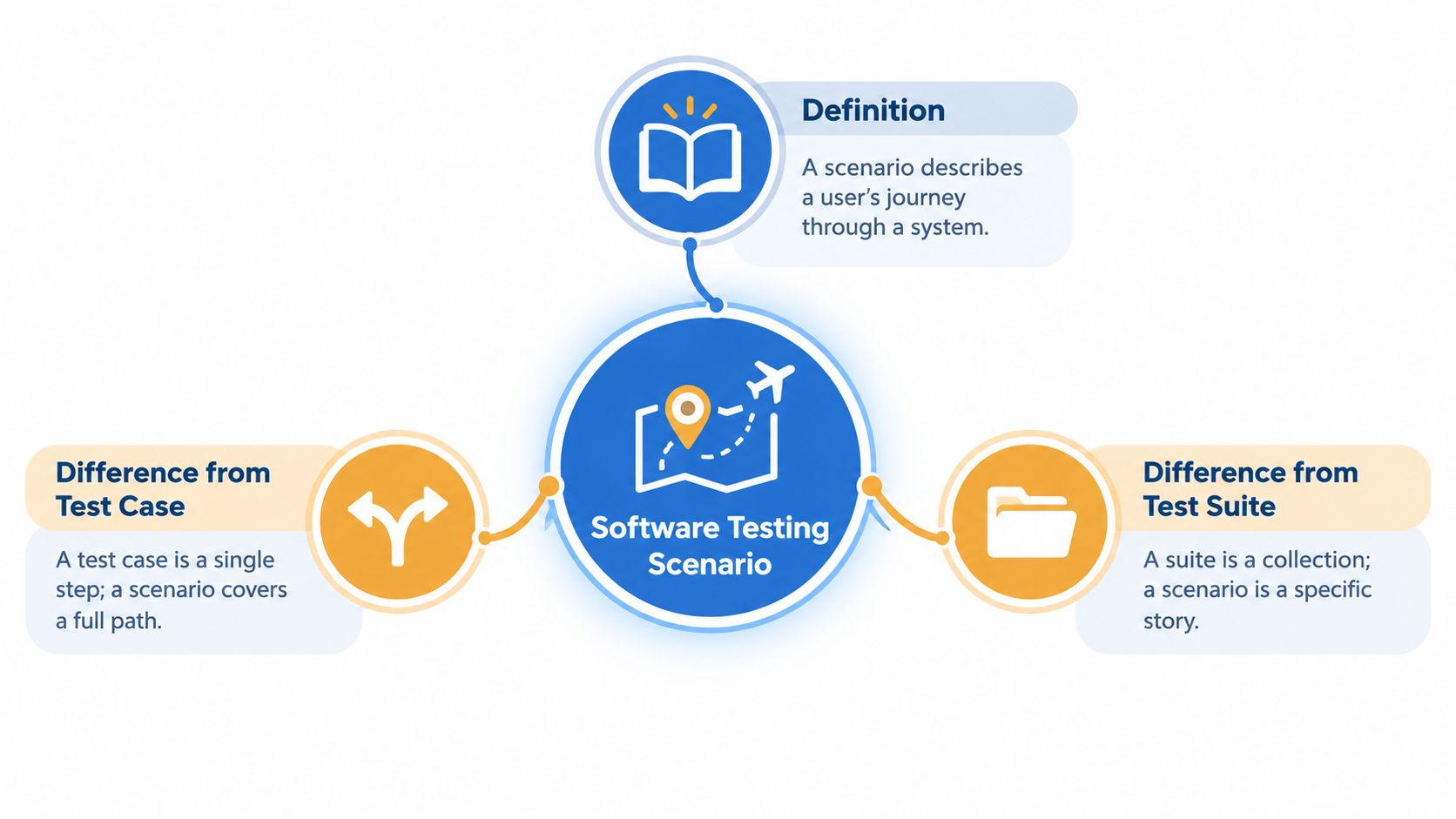
A software testing scenario is a high-level story about how someone or something uses the system. It’s broader than a single check, but narrower than a whole test program.
Think of it like travel planning.
A scenario is the itinerary: “Fly from New York to Berlin, collect luggage, take the train, and check into the hotel.”
A test case is one checkpoint: “Confirm the boarding pass scans successfully.”
A test suite is the folder holding many itineraries and checkpoints for the whole trip.
What belongs in a scenario
A useful scenario usually includes these parts:
-
Goal
What the user or system is trying to accomplish. -
Preconditions
What must already be true. The user exists. Inventory is available. The service is reachable. -
Main flow
The normal path through the system. -
Variations or branches
A timeout, an invalid input, a retry, a role change, a stale session. -
Expected outcome
What success looks like, including visible behavior and system effects.
That structure sounds simple because it is. Confusion starts when teams skip the preconditions or write expected results too vaguely.
The difference between scenario, test case, and suite
Here’s the simplest way to separate them:
| Term | What it represents | Example |
|---|---|---|
| Scenario | A user or system journey | Customer completes checkout with saved payment method |
| Test case | A specific validation step | Verify tax is recalculated after shipping address changes |
| Test suite | A collection of tests | Regression suite for checkout and payments |
A scenario should answer, “What story are we testing?”
A test case should answer, “What exact thing are we checking?”
A suite should answer, “What set of checks runs together?”
Why teams lose traceability
When developers and testers are moving fast, people often write detailed cases without a clear parent scenario. Then a bug appears and everyone asks the same question: “Did we ever test this path?”
A scenario is traceable when a requirement, a user journey, and a test result all point to the same story.
That’s why scenario IDs, clear names, and links to requirements matter. Not because documentation is fashionable, but because memory fails under pressure.
A weak scenario says, “Test payment flow.”
A stronger one says, “Returning customer updates shipping address during checkout and retries payment after gateway timeout.”
The second one gives a team something they can execute, automate, discuss, and replay.
Key Categories of Software Testing Scenarios You Should Know
Many teams don’t suffer from too few tests. They suffer from unbalanced scenario coverage. They have a lot of one kind and not enough of another.
The easiest way to fix that is to classify scenarios by purpose.
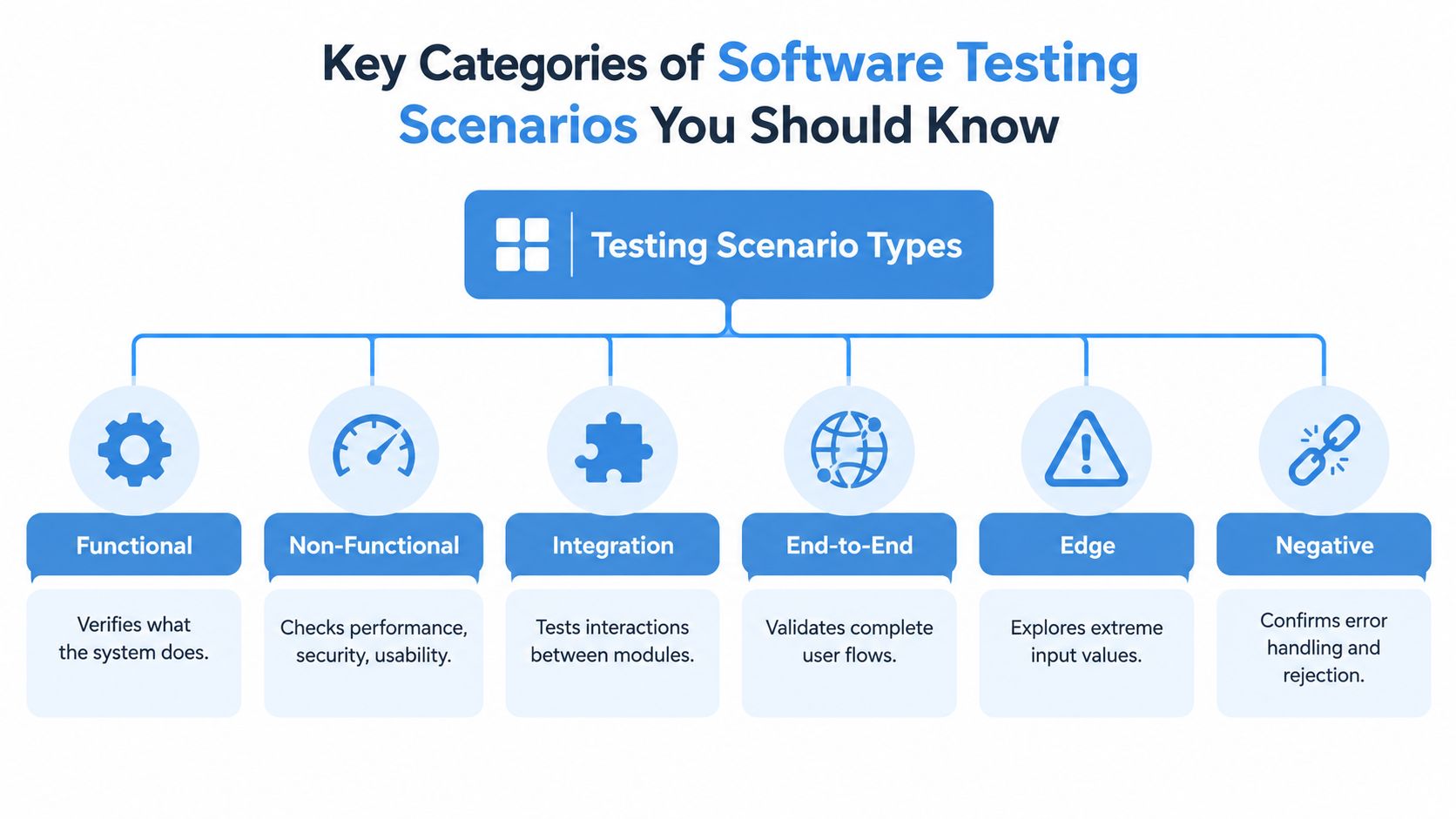
The six categories that matter most
Functional scenarios check what the system does. Can a customer add an item to cart? Can an admin disable a user? These are usually the first scenarios teams write.
Non-functional scenarios check how the system behaves. Does it stay responsive? Is it usable? Does it handle security controls properly? These often get delayed until late, which is exactly why they surprise teams.
Integration scenarios focus on handoffs between modules or services. A billing service, identity provider, queue, and notification worker can each pass isolated tests and still fail when connected.
End-to-end scenarios validate a complete business flow from entry point to final result. These are expensive to maintain, so they should represent only your most important user journeys.
Later in the section, this video gives a quick visual explanation of how teams think about testing scope in practice.
Edge scenarios push boundaries. Maximum field lengths, unusual date values, empty states, interrupted sessions, and old-version payloads belong here.
Negative scenarios confirm the system rejects or handles bad behavior correctly. Wrong credentials, malformed input, duplicate submissions, and unauthorized access all fit this category.
Choosing the Right Scenario Category for Your Goal
| Scenario Category | Primary Purpose | Best Used When |
|---|---|---|
| Functional | Verify expected business behavior | A feature is new or business rules changed |
| Non-functional | Validate behavior quality | Performance, security, or usability risks are high |
| Integration | Check service-to-service interactions | Multiple systems exchange state or data |
| End-to-end | Confirm the full user journey works | A critical revenue or operations flow must not break |
| Edge | Expose fragile boundary behavior | Inputs, versions, or timing vary widely |
| Negative | Confirm safe failure handling | Invalid actions could cause confusion or data issues |
How to avoid category blind spots
Teams often overinvest in functional checks because they’re easier to write and easier to demo. But the release risk may live elsewhere.
For example:
- A checkout feature might need end-to-end and negative scenarios more urgently than another happy-path click test.
- A video or accessibility-heavy product may need stronger non-functional coverage. Teams working through user-facing accessibility checks sometimes use resources such as Premier Broadband Testparty compliance to think more concretely about experience validation, especially when scenario quality depends on what real users can complete.
- A microservices change usually deserves integration scenarios before broad UI regression.
The category should follow the risk. Don’t write a beautiful functional scenario when the real danger sits in latency, retries, or cross-service state.
Good portfolios spread coverage across unit, integration, system, and acceptance layers. Great portfolios do that while staying tied to actual user behavior.
Practical Software Testing Scenario Examples and Templates
Teams usually understand scenarios once they see them written in a reusable form. A template removes a lot of hesitation because people stop wondering, “Am I writing this the right way?”
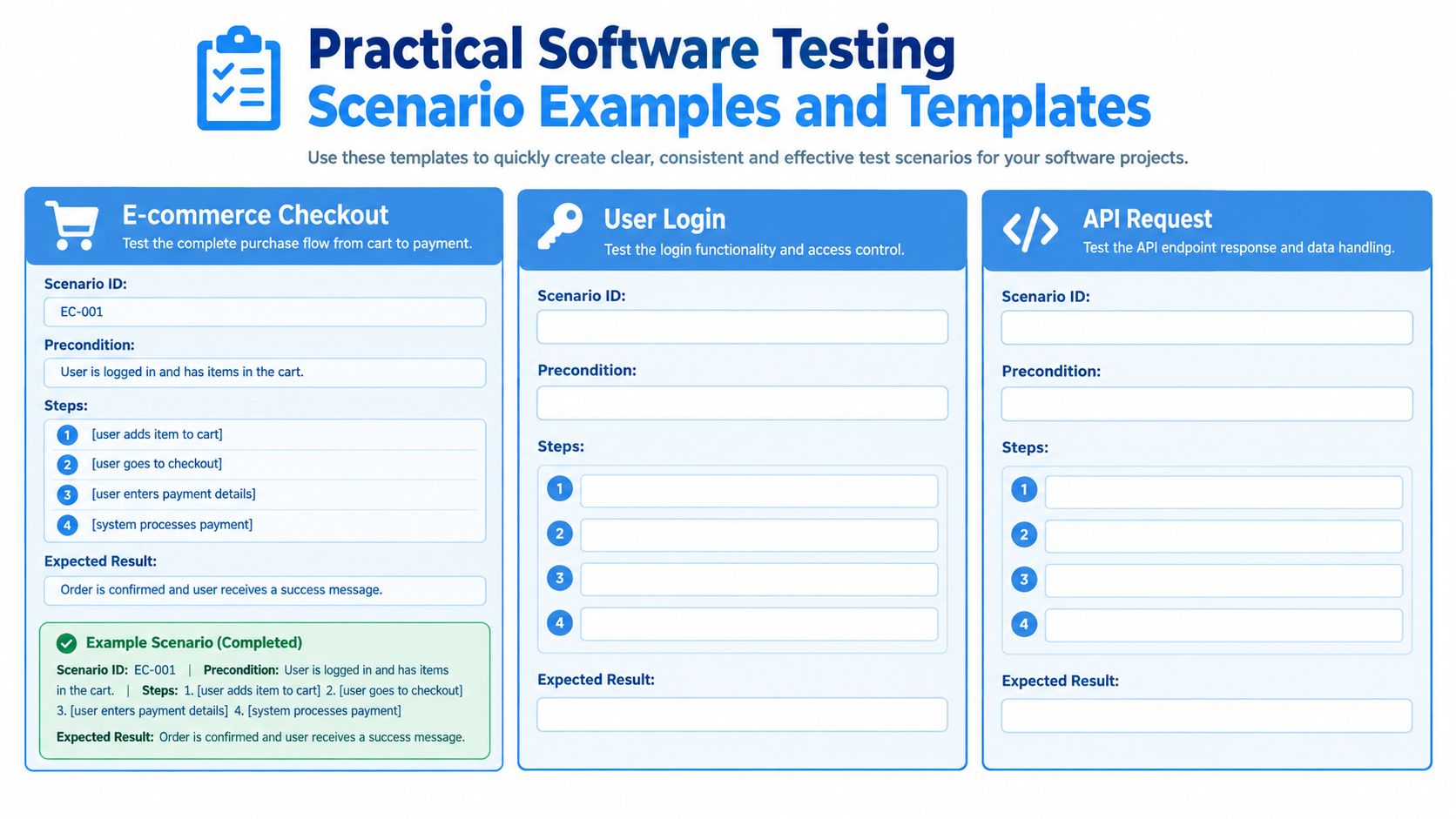
A simple template that works
Use this structure for most software testing scenarios:
-
Scenario ID
A short unique label. -
Scenario name
A plain-English description of the journey. -
Preconditions
Required data, roles, environment state, or dependencies. -
Steps
The actions taken by the user or system. -
Test data
Inputs, account state, payload values, or file conditions. -
Expected result
Visible output plus any important backend effect.
If your team interviews or hires testers often, it helps to compare how candidates think through scenarios, not just whether they know terminology. A practical set of interview questions for software testers can help surface that difference.
Example one with e-commerce checkout
Scenario ID: CHK-01
Scenario name: Returning customer completes checkout with saved card
Preconditions: User account exists, cart contains in-stock item, saved card is valid
Steps:
- User signs in
- User opens cart
- User confirms shipping address
- User selects saved card
- User submits order
Test data: Returning user account, valid cart item, standard shipping
Expected result: Order is created, payment is authorized, inventory updates, confirmation appears
That’s the baseline version. Now adapt it.
If your team has seen retries fail, add a branch where payment submission times out and the user tries again. If taxes change by region, vary the address. If mobile app versions differ, reuse the same scenario with older payload behavior.
Example two with API authentication
Scenario ID: API-AUTH-03
Scenario name: Client refreshes expired access token and retries request
Preconditions: Client has refresh capability, access token is expired, refresh token is valid
Steps:
- Client sends protected request
- API rejects expired token
- Client requests new access token
- Client retries original request
Test data: Expired access token, valid refresh token
Expected result: New token is issued and original request succeeds without duplicate side effects
Example three with data migration
Scenario ID: MIG-07
Scenario name: Legacy customer record imports with partial optional fields missing
Preconditions: Migration tool is available, mapping rules are defined
Steps:
- Import record from legacy source
- Apply field mapping
- Validate required fields
- Save record
Test data: Record missing non-required preference values
Expected result: Import succeeds, required fields persist correctly, optional missing fields don’t block processing
For more side-by-side examples of how cases break down beneath a broader scenario, this guide to test cases example in software testing is useful.
What makes a template reusable
Reusable scenarios have three qualities:
- Stable language keeps the business story intact even if the UI changes.
- Variable test data lets you rerun the same journey under different conditions.
- Clear expected results prevent debates after execution.
A template should save thinking time, not erase thinking. The best teams reuse the frame and customize the risk.
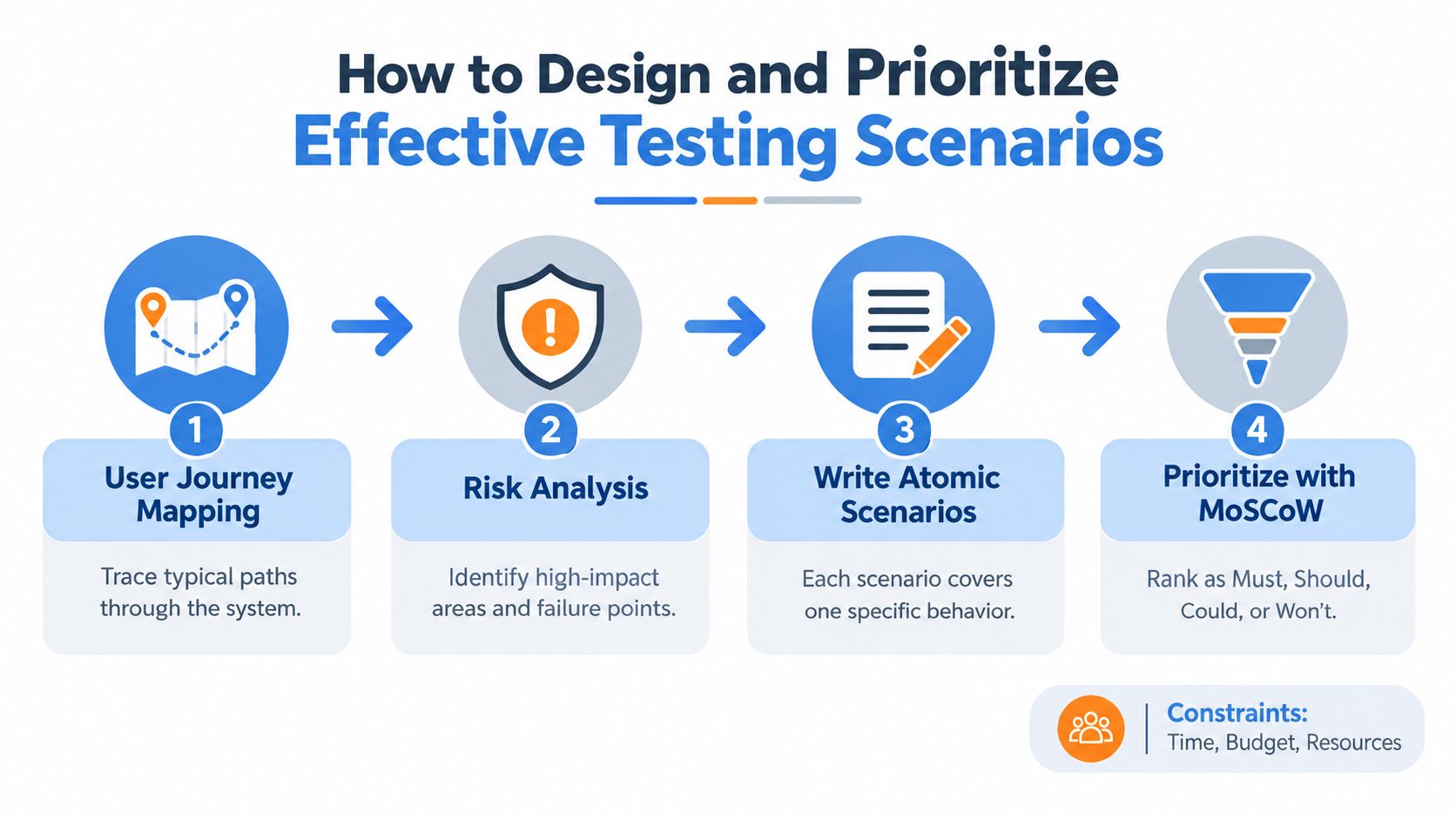
How to Design and Prioritize Effective Testing Scenarios
Teams don’t struggle with writing a scenario title. They struggle with choosing which scenarios deserve attention first when time, environments, and people are limited.
That pressure is common. A 2025 global survey found 87% of development teams reported inconsistent or unstable environments as a prominent obstacle, 85% cited insufficient time for testing, and another study found 63% of organizations ship code without completing all necessary testing, while poor communication between developers and QA was the biggest hurdle for 33% in this report on AI and software testing obstacles.
Start with journeys, not screens
A weak prioritization meeting sounds like this: “What pages changed?”
A stronger one sounds like this: “Which user journeys can now fail?”
Map the journey first:
-
Entry point
How the user or system begins. -
State changes
What data, permissions, or inventory changes along the way. -
Dependencies
Which APIs, queues, third-party services, or background jobs are involved. -
Failure consequences
Who notices if it breaks, and how painful the result is.
This pulls the team away from UI fragments and back toward actual risk.
A practical prioritization filter
When I coach teams, I use four questions.
- Impact: If this breaks, does revenue stop, data corrupt, or support volume spike?
- Frequency: Does this path happen often in real use?
- Fragility: Does it depend on timing, integration, tokens, retries, or shared state?
- Recoverability: Can a user self-correct, or are they stuck?
Scenarios scoring high on impact and fragility move to the front. Low-impact cosmetic checks can wait.
Test the paths users can’t recover from before you test the paths they can easily retry.
Use MoSCoW without turning it into theater
MoSCoW works well for scenario triage if you keep it honest:
| Priority | Meaning in practice |
|---|---|
| Must | Release should not proceed without this scenario |
| Should | Important, but workaround or limited exposure exists |
| Could | Valuable if time allows |
| Won’t | Explicitly deferred and documented |
The mistake is labeling everything “Must.” That isn’t prioritization. That’s anxiety.
Validate priority with replayed traffic
Here’s where scenario planning gets stronger. Instead of arguing endlessly about which user paths matter most, compare your scenario list against production traffic patterns.
Replay-based testing works best when the captured workload preserves real request path distribution, data variation, and timing. It also often needs transformation because naïve replay breaks on volatile fields, credentials, correlation IDs, or non-idempotent side effects. One independent result cited in this guide to replaying production traffic for realistic load testing reports 286 successful replays out of 291 attempts after templating, a 98.3% success rate, versus below 80% for naive replay.
That finding matters because it changes prioritization from opinion to evidence. If replay shows that a supposedly minor path is common and stateful, it probably deserves a Must or Should ranking.
Mapping Scenarios to Tools and Measuring Success with Real Traffic
A scenario becomes useful only when the team can execute it with the right tool and decide whether it passed for the right reason.
Match the tool to the job
Scripted browser tests are good for visible user flows. API test tools are good for contract and response validation. Load generators are useful when you need controlled concurrency and threshold checks.
Replay tools fit a different job. They let teams capture live HTTP traffic and send that same workload to a baseline and a candidate build under matching conditions. In practice, a tool such as GoReplay can be used to mirror production traffic into an isolated environment so teams can compare behavior under realistic request sequences instead of relying only on handcrafted scripts.
That matters because scripted tests often smooth out the rough edges that real systems see every day: mixed endpoints, odd payload combinations, irregular timing, and session behavior.
What to compare during replay
When replaying traffic, don’t just ask whether the service stayed up. Compare specific outputs:
- Response codes to catch regressions in accepted or rejected requests
- Latency behavior across the same workload
- Response body differences where content matters
- Side effects such as duplicate writes, missing updates, or broken state transitions
A clean comparison requires sanitized or reusable identifiers, tokens, and credentials. Without that, teams confuse replay noise with application defects.
Use realistic performance thresholds
For performance validation, realistic load tests should model human-like think times, diversified journeys, and representative ramp profiles, not instant saturation with uniform traffic. One practical benchmark set suggests p95 latency below 300 ms, p99 below 800 ms, and error rate below 0.1% at target concurrency, with 2x to 3x headroom tests used to expose saturation before release in this load testing guide.
Those thresholds aren’t universal law. They are useful guardrails. The key lesson is to measure tail latency, error behavior, and saturation under realistic traffic, not just average response time on synthetic requests.
A simple execution map
| Scenario type | Useful tool pattern | Pass signal |
|---|---|---|
| Functional UI flow | Browser automation or manual execution | Expected user-visible outcome occurs |
| Integration path | API and service-level checks | Correct cross-service data and state transitions |
| End-to-end journey | Combined UI and backend verification | Business flow completes without hidden side effects |
| Performance scenario | Load generation plus replayed traffic | Thresholds hold under realistic pressure |
The strongest test strategy usually combines both worlds. Scripts prove intended behavior. Replay proves behavior under the conditions your users create.
Common Pitfalls in Software Testing Scenarios and How to Avoid Them
The most common scenario problem isn’t that teams forget to test. It’s that they write scenarios that are too vague to fail clearly.
A scenario that ends with “system works correctly” isn’t a real testing artifact. It’s a wish. Expected results need visible outcomes and meaningful side effects.
Four mistakes that quietly weaken coverage
-
Vague expected results
Write what should happen on screen, in the response, and in the underlying state. -
Unstable or unrealistic data
If test data doesn’t resemble production conditions, the scenario may pass while the flow fails. -
Ignoring non-functional behavior
A scenario that proves correctness under no pressure may still miss timeouts, queueing, and retry problems. -
Over-reliance on synthetic scripts
Handwritten flows are tidy. Users are not. Add replayed traffic when realism matters.
A quick audit before release
Use this checklist:
- Can a developer, tester, and product owner all read the scenario name and picture the same journey?
- Does the scenario include preconditions that reflect the actual state required?
- Are expected results specific enough to settle a pass or fail call?
- Does the overall set include functional, integration, end-to-end, edge, and negative coverage where needed?
- Has the team validated high-risk paths with realistic traffic, not only synthetic paths?
Strong software testing scenarios don’t try to cover everything equally. They make risk visible and force the team to test what would hurt most if it broke.
If your current suite feels busy but not reassuring, that’s usually the signal. You don’t need more checks first. You need better stories, better priorities, and more realistic execution.
GoReplay captures and replays real HTTP traffic so your team can validate software testing scenarios against production-like behavior instead of depending only on synthetic scripts. If you want to compare builds, pressure-test critical flows, and catch regressions under realistic workloads, visit GoReplay.