
Level Up Your Testing Game
Delivering high-quality software requires robust testing. This listicle presents seven software testing best practices to elevate your testing process and preempt potential issues. Learn how to integrate key practices like Test-Driven Development (TDD), Behavior-Driven Development (BDD), and the Test Automation Pyramid Strategy to build more reliable applications. Implementing these software testing best practices empowers teams to catch bugs early, streamline development, and improve overall software quality. Master these essential techniques and release software with confidence.
1. Test Driven Development (TDD)
Test Driven Development (TDD) is a cornerstone of modern software testing best practices and a powerful approach to software development. It flips the traditional development script by requiring tests to be written before the code they are designed to test. Developers begin by creating a failing test case that defines a specific piece of desired functionality. They then write the minimal amount of code necessary to make that test pass. Finally, they refactor the code to improve its design and maintainability, ensuring the tests continue to pass. This cyclical process, known as Red-Green-Refactor, ensures that code is thoroughly tested from the very beginning, building quality in from inception.

TDD’s Red-Green-Refactor cycle provides immediate feedback on code changes, fostering a tight feedback loop. This iterative process allows developers to catch errors early, reducing debugging time and leading to more robust and reliable software. The focus on small, incremental changes helps to isolate issues, simplifying the debugging process and promoting a cleaner, more modular code design.
Examples of Successful TDD Implementation:
- Kent Beck’s work at Chrysler: Kent Beck, widely considered the father of TDD, famously utilized this approach while working on the Chrysler Comprehensive Compensation system, a notoriously complex project. This early implementation showcased the effectiveness of TDD in managing complexity and ensuring high quality.
- GitHub: GitHub uses TDD for core functionality development, ensuring the reliability and stability of its platform.
- Shopify: Shopify’s engineering teams leverage TDD to build and maintain their robust and reliable commerce systems. This highlights the applicability of TDD in high-stakes, mission-critical applications.
Tips for Implementing TDD:
- Start small: Begin with simple test cases to get comfortable with the process.
- Choose the right tools: Utilize appropriate testing frameworks for your programming language, such as JUnit for Java, pytest for Python, or Jest for JavaScript.
- Focus on single functionality: Each test case should focus on verifying a single, well-defined piece of functionality.
- Test frequently: Run tests frequently during the development process to catch errors early.
- Discipline is key: Practice the discipline of writing tests first, even when tempted to jump straight into coding.
Pros and Cons of TDD:
Pros:
- High test coverage
- Reduced debugging time
- Cleaner, modular code design
- Serves as living documentation
- Early detection of regression issues
Cons:
- Initial learning curve can slow down development
- Requires more upfront time investment
- Can be challenging for UI and integration testing
- Requires team buy-in for effectiveness
Why TDD Deserves Its Place in Software Testing Best Practices:
TDD’s proactive approach to quality assurance sets it apart as a best practice. By shifting the focus to testing from the outset, TDD helps developers build better software, faster. The benefits extend beyond just finding bugs; TDD promotes better code design, reduces development costs over the long term, and fosters greater confidence in the software’s reliability. This makes TDD a crucial tool for software developers, QA engineers, DevOps professionals, and any organization striving to deliver high-quality software.
Key Figures in TDD:
- Kent Beck: Created and popularized TDD.
- Martin Fowler: Advocated and wrote extensively about TDD.
- Robert C. Martin (Uncle Bob): A strong proponent of TDD and clean code principles.
2. Continuous Integration/Continuous Testing
Continuous Integration/Continuous Testing (CI/CT) is a cornerstone of modern software testing best practices. It involves automatically building and testing code changes every time they are committed to a shared repository. This practice hinges on integrating testing deeply into the Continuous Integration pipeline. By doing so, development teams can identify and address problems early in the development lifecycle, long before they snowball into larger, more complex issues. This proactive approach helps ensure the codebase remains consistently in a deployable state, minimizing integration headaches that often arise when multiple developers contribute to the same project.
CI/CT is characterized by several key features: automated test execution triggered by each code commit, seamless integration with build systems, the ability to run tests in parallel for faster feedback, comprehensive reporting and notification systems to keep the team informed, and even automated provisioning of test environments. This automation streamlines the entire testing process, freeing up developers to focus on writing code rather than managing complex testing procedures.
The benefits of implementing CI/CT are substantial. Early bug detection translates directly into reduced development costs and faster time to market. The consistent and repeatable nature of the testing process improves software quality and reliability. Faster feedback loops empower developers to address issues promptly, leading to increased productivity. By minimizing integration problems, CI/CT facilitates smoother collaboration within development teams.
However, adopting CI/CT isn’t without its challenges. It requires a significant initial investment in infrastructure setup and can be resource-intensive, especially for large and complex projects. “Flaky” tests—tests that produce inconsistent results—can erode trust in the system and require careful management. Maintaining comprehensive test suites also adds to the overall development overhead.
Despite these challenges, the advantages of CI/CT far outweigh the drawbacks, making it a crucial component of effective software development. Industry giants like Google, Netflix, and Facebook exemplify the successful implementation of CI/CT. Google reportedly runs over 150 million tests daily through its CI systems, while Netflix’s continuous testing infrastructure executes thousands of tests for every single code change. Facebook’s ‘Buck’ CI system processes and tests thousands of commits daily, highlighting the scalability and power of this approach.
Tips for implementing CI/CT effectively:
- Start small: Begin with fast-running unit tests in your CI pipeline and gradually incorporate other test types.
- Real-time feedback: Set up notifications for failed tests to ensure immediate action.
- Comprehensive testing: Include different test types (unit, integration, UI) with appropriate frequency based on risk and impact.
- Zero tolerance: Maintain a zero-tolerance policy for broken builds. Address failing tests immediately to prevent regressions.
- Parallelization: Implement test parallelization to significantly reduce feedback time.
- Containerization: Consider using containerization technologies like Docker to create consistent and reproducible test environments.
CI/CT’s power lies in its ability to catch errors early, improve software quality, and streamline the development process. By embracing this practice, organizations can build better software, faster, and more efficiently. Key figures like Martin Fowler (continuous integration concepts) and Jez Humble (continuous delivery methodology) have championed these practices. Platforms like Jenkins, CircleCI, Travis CI, and GitHub Actions have further popularized and streamlined CI/CT adoption, making it increasingly accessible to development teams of all sizes. This practice deserves its place on the list of software testing best practices because it is a fundamental shift towards a more proactive and efficient approach to software development, leading to higher quality products and faster delivery cycles.
3. Test Automation Pyramid Strategy
One of the most crucial software testing best practices is the Test Automation Pyramid Strategy. This framework guides teams in effectively balancing different types of automated tests to achieve optimal software quality. The core principle is to build a hierarchical structure of tests, with a broad base of fast, isolated unit tests, a smaller middle layer of integration tests, and a pinpoint top layer of end-to-end (E2E) UI tests. This approach allows for rapid feedback, reduces maintenance overhead, and ensures comprehensive test coverage across all application layers.
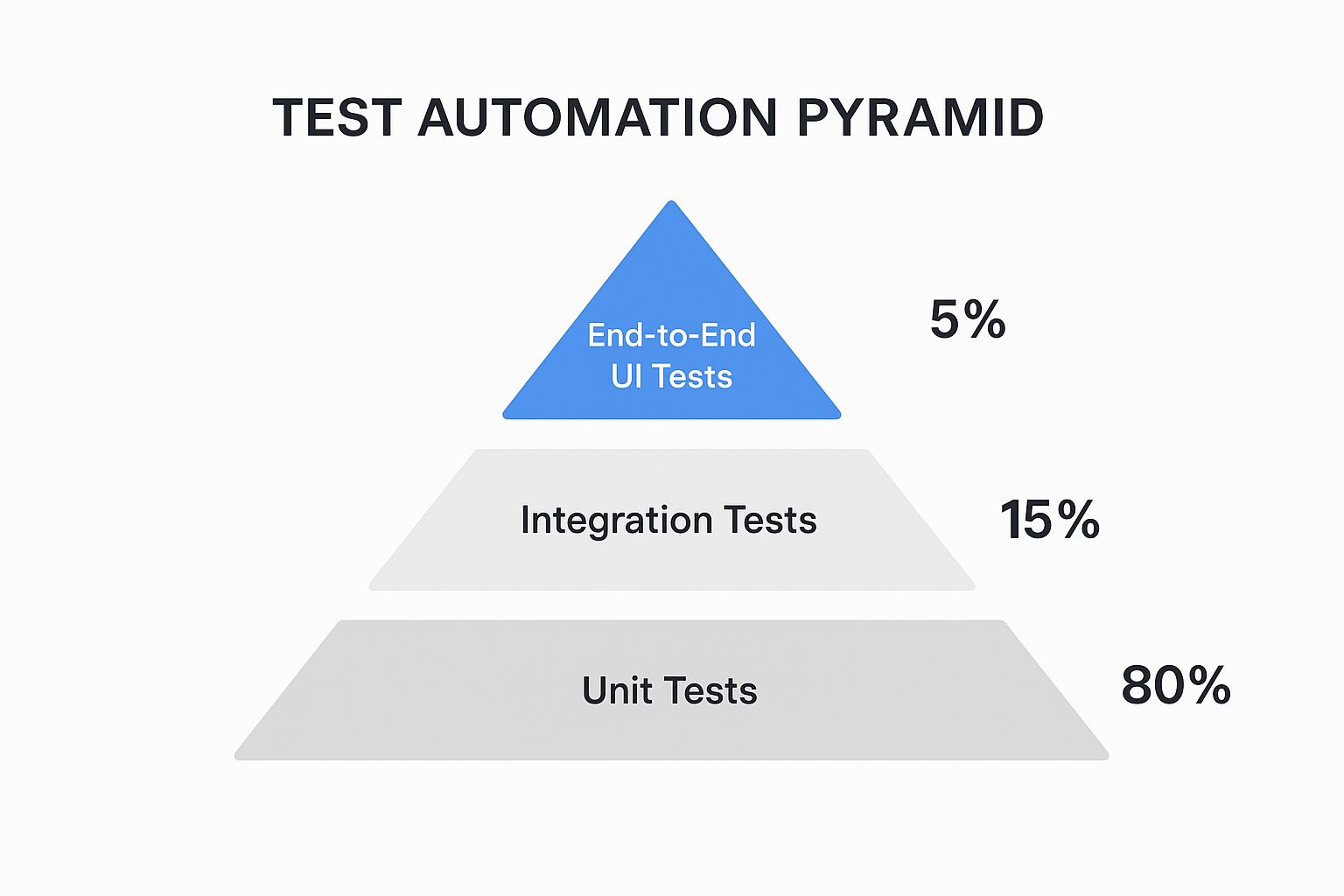
The infographic visually represents the hierarchical relationship between the different test types in the Test Automation Pyramid. The foundation is built upon numerous unit tests, followed by a smaller layer of integration tests, and finally, a select few E2E tests. This visualization emphasizes the importance of a strong unit testing foundation for efficient and effective software testing.
The Test Automation Pyramid prioritizes high-speed, low-level tests (unit tests) that target individual components in isolation. As you move up the pyramid, tests become more complex and integrated, eventually encompassing the entire application in E2E UI tests. This strategic distribution of test types focuses on catching errors early in the development cycle, minimizing the cost and effort of fixing them later.
This layered approach is crucial for several reasons. First, it provides faster overall test execution. Unit tests run in milliseconds, providing rapid feedback to developers. Integration tests, while slower, still execute much faster than E2E tests. This speed allows for quicker identification and resolution of bugs. Second, it improves test isolation and reliability. Unit tests, by focusing on individual components, make it easier to pinpoint the source of errors. Third, it reduces maintenance costs. Changes in the application are less likely to break numerous unit tests compared to complex E2E tests.
Pros of Using the Test Automation Pyramid:
- Faster overall test execution
- Better test isolation and reliability
- Reduced maintenance costs
- Balanced coverage across application layers
- Earlier problem detection
Cons of Using the Test Automation Pyramid:
- Requires skilled developers for effective unit testing
- May miss UI-specific issues with fewer E2E tests
- Can be challenging to implement in legacy systems
- Requires coordinated testing strategy across teams
Examples of Successful Implementations:
Industry giants like Google, Spotify, and Microsoft leverage the Test Automation Pyramid in their development processes. Google’s testing approach heavily emphasizes unit tests, forming the solid base of their pyramid. Spotify utilizes the pyramid to efficiently test their microservices architecture. Microsoft’s Visual Studio Team Services also incorporates the pyramid model.
Actionable Tips for Implementing the Test Automation Pyramid:
- Aim for an approximate 80/15/5 ratio between unit, integration, and UI tests.
- Make unit tests the cornerstone of your testing strategy.
- Use mocks and stubs to isolate units of code during testing.
- Focus integration tests on critical interaction paths between components.
- Limit UI tests to critical user journeys and workflows.
- Consider adding contract tests for microservice architectures.
When and Why to Use This Approach:
The Test Automation Pyramid is invaluable for any software development project, especially those following Agile or DevOps methodologies. It’s particularly beneficial for projects with complex architectures, frequent releases, and a strong emphasis on automated testing. By prioritizing faster, more isolated tests at the base of the pyramid, teams can achieve a higher return on investment for their testing efforts. Learn more about Test Automation Pyramid Strategy
The Test Automation Pyramid strategy deserves its place in the list of software testing best practices because it offers a structured and scalable approach to automated testing. This structured method, popularized by figures like Mike Cohn and Martin Fowler and championed by organizations like Google and Thoughtworks, has become a mainstay for modern software development, guaranteeing improved software quality and faster delivery cycles. Its emphasis on a balanced approach, combined with the focus on early detection of bugs through extensive unit testing, contributes significantly to the efficiency and effectiveness of the overall software development lifecycle.
4. Shift-Left Testing: A Cornerstone of Software Testing Best Practices
Shift-Left Testing is a crucial element of software testing best practices, fundamentally changing how and when testing is performed. It involves moving testing activities earlier in the Software Development Life Cycle (SDLC), integrating them seamlessly from the initial requirements gathering and design phases. Instead of treating testing as a gatekeeper at the end of the development process, Shift-Left makes quality a shared responsibility, woven into the fabric of development from the very beginning. This proactive approach stands in contrast to traditional “test-last” methodologies, focusing on preventing defects rather than merely detecting them after they’ve been coded.
How Shift-Left Testing Works:
Shift-Left testing operates on the principle of early and continuous testing. It encourages involving testers alongside developers right from the requirements phase. This collaboration ensures testability is considered a critical design factor, not an afterthought. As the development progresses, various testing activities like static analysis, code reviews, and unit testing are integrated into each stage. This continuous feedback loop helps identify and address potential issues early on, significantly reducing the cost and effort required for later-stage bug fixes.
Features of Shift-Left Testing:
- Early test planning and design: Test strategies are formulated and test cases are designed in parallel with requirements gathering and design activities.
- Developer involvement in testing: Developers actively participate in testing activities, fostering a sense of shared responsibility for quality.
- Integration of testing throughout the SDLC: Testing is not an isolated phase but an integral part of every stage of development.
- Preventive rather than detective approach: The focus is on preventing defects through early detection and mitigation, rather than finding and fixing them after they’ve been coded.
- Collaborative quality ownership: Quality becomes a shared responsibility across the entire development team, fostering a culture of quality.
Benefits of Implementing Shift-Left Testing:
- Reduces the cost of fixing defects: Finding and fixing bugs early in the SDLC is significantly cheaper than addressing them in later stages or after release.
- Shortens feedback loops: Continuous testing provides rapid feedback, allowing for quick identification and resolution of issues.
- Improves design through testability considerations: Incorporating testability into the design phase leads to more robust and maintainable code.
- Reduces project risks: Early identification of potential problems mitigates risks and prevents costly delays.
- Increases overall product quality: By building quality into the product from the start, Shift-Left testing results in a higher quality end product.
Pros and Cons:
While Shift-Left testing offers numerous advantages, it also presents some challenges:
Pros:
- Significantly reduced defect costs
- Faster feedback loops
- Improved software design
- Reduced project risks
- Enhanced product quality
Cons:
- Requires a cultural shift within the organization
- May necessitate additional skills training for team members
- Can initially slow down development velocity as teams adapt to the new process
- Demands strong collaboration between developers and testers
Successful Implementations of Shift-Left Testing:
Several organizations have successfully adopted Shift-Left testing and reaped significant benefits:
- Microsoft: Their transition to Shift-Left dramatically reduced post-release defects by over 50%.
- IBM: The integration of Shift-Left principles into their Rational Unified Process has been a key factor in improving software quality.
- Cisco: Cisco’s engineering teams utilize Shift-Left practices to enhance the reliability of their network software.
Actionable Tips for Implementing Shift-Left Testing:
- Include QA representatives in requirements discussions and planning meetings.
- Create testability requirements alongside functional requirements.
- Implement code reviews with a testing perspective.
- Utilize static analysis tools during development.
- Invest in building testing skills among developers.
- Create automated tests during or before code implementation.
Why Shift-Left Testing Deserves its Place in Software Testing Best Practices:
Shift-Left testing’s emphasis on early and continuous testing represents a paradigm shift in software development. By proactively addressing quality throughout the SDLC, it mitigates risks, reduces costs, and ultimately delivers higher quality software. Its ability to prevent defects rather than just detect them makes it an indispensable practice for any organization striving to deliver superior software products. In the fast-paced world of software development, where time-to-market and quality are paramount, Shift-Left testing provides a competitive edge by enabling teams to deliver robust and reliable software efficiently. This makes it a truly essential component of any comprehensive software testing strategy and a cornerstone of software testing best practices. Popularized by figures like Larry Smith (who coined the term in 2001) and embraced by organizations like Atlassian and within movements like DevOps and ISTQB, Shift-Left’s widespread adoption speaks volumes about its effectiveness and importance.
5. Behavior-Driven Development (BDD)
Behavior-Driven Development (BDD) is a powerful approach to software testing best practices that emphasizes collaboration and shared understanding between technical and non-technical stakeholders. It’s an evolution of Test-Driven Development (TDD) that focuses on defining the desired behavior of an application using a common, human-readable language. This shared language, often expressed in a “Given-When-Then” format known as Gherkin, ensures everyone involved, from developers and QA engineers to business analysts and product owners, is on the same page regarding the expected functionality. This shared understanding minimizes misunderstandings and promotes testable requirements from the outset. BDD transforms these human-readable specifications into executable tests, creating a “living documentation” that evolves alongside the software.

BDD’s strength lies in its focus on the “why” behind the code. Instead of solely concentrating on technical implementation details, BDD encourages teams to consider the business value and user perspective. This business-focused approach ensures that the software being developed truly meets the needs of its users. Key features of BDD include human-readable test scenarios, executable specifications that serve as both tests and documentation, and a collaborative workflow that bridges the communication gap between technical and business teams. This collaborative environment fosters a shared understanding of project goals and minimizes the risk of miscommunication and costly rework.
Several organizations have successfully implemented BDD. The Guardian uses Cucumber for content management system testing, ensuring their platform delivers content effectively. Stack Overflow leverages SpecFlow for their .NET applications, enhancing the reliability and maintainability of their platform. The BBC’s digital teams utilize BDD for cross-platform feature development, ensuring consistent functionality across various devices and platforms. These examples highlight BDD’s adaptability and effectiveness in diverse software development environments.
Pros of BDD:
- Improved Communication: Facilitates a common understanding of requirements across the entire team.
- Living Documentation: Executable specifications serve as up-to-date documentation.
- Business-Focused Testing: Aligns testing efforts with business goals and user needs.
- Reduced Misunderstandings: Minimizes discrepancies between expected and actual behavior.
- Promotes Testable Requirements: Encourages clear and testable requirements from the start.
Cons of BDD:
- Overhead for Simple Features: Can be overkill for small or straightforward projects.
- Requires Discipline: Maintaining scenarios requires consistent effort and attention.
- Learning Curve for Gherkin: Writing effective Gherkin scenarios requires practice.
- Scenario Duplication: Without careful management, scenarios can become redundant.
Tips for Effective BDD Implementation:
- Focus on Business Value: Describe scenarios in terms of business outcomes.
- Keep Scenarios Simple: Focus each scenario on a single, specific behavior.
- Use Domain-Specific Language: Employ terminology that all stakeholders understand.
- Involve Product Owners: Actively engage product owners in scenario creation.
- Reusable Step Definitions: Create a library of reusable steps to streamline test creation.
- Integrate with CI/CD: Run BDD tests regularly as part of your CI/CD pipeline.
BDD is a valuable addition to any software development process aiming to improve communication, align development with business needs, and deliver high-quality software that meets user expectations. By focusing on behavior and using a shared language, BDD empowers teams to build the right software the right way, making it a crucial best practice in software testing. It’s particularly beneficial for complex projects with diverse stakeholder groups where clear communication and shared understanding are paramount.
6. Risk-Based Testing: A Software Testing Best Practice
Risk-based testing is a crucial software testing best practice that prioritizes testing efforts based on the likelihood of failure and the potential impact of those failures on the business. Instead of striving for exhaustive testing of every single feature, which is often impractical due to time and budget constraints, risk-based testing focuses resources on the areas that matter most. This approach ensures that critical functionalities are thoroughly vetted while accepting a calculated level of risk for less critical components. By optimizing test coverage in this way, teams can deliver high-quality software efficiently, making it a cornerstone of any robust software development lifecycle.
How it Works:
Risk-based testing involves a systematic process:
- Identify Risks: Pinpoint potential failures within the application. These could be functional (e.g., incorrect calculations), performance-related (e.g., slow loading times), security vulnerabilities, or usability issues.
- Analyze Risks: Assess the likelihood (probability) of each risk occurring and the potential impact (severity) on the business if it does. A high-impact risk might be a security breach leading to data loss, while a low-impact risk could be a minor UI inconsistency.
- Prioritize Risks: Combine likelihood and impact to determine the overall risk level. This is often visualized using a risk assessment matrix. High-probability, high-impact risks receive the highest testing priority.
- Allocate Resources: Assign testing resources (time, personnel, tools) proportionally to the risk level. High-risk areas receive the most thorough testing, while low-risk areas might receive less rigorous or even exploratory testing.
- Monitor and Reassess: Risk levels can change throughout the project lifecycle. Regularly review and update the risk assessment to ensure testing efforts remain aligned with the evolving project landscape.
Features of Risk-Based Testing:
- Prioritization of test cases by risk level: Focuses testing on the most critical areas.
- Business impact assessment: Aligns testing with business objectives.
- Failure probability analysis: Considers the likelihood of defects.
- Resource allocation optimization: Maximizes the use of testing resources.
- Strategic test coverage: Provides targeted and efficient test coverage.
Pros:
- Maximizes the effectiveness of limited testing resources.
- Focuses effort on business-critical functionality.
- Provides better ROI for testing investment.
- Reduces time-to-market while managing quality risks.
- Adapts to project constraints realistically.
Cons:
- Requires good risk assessment skills.
- May miss defects in areas deemed ‘lower risk’.
- Needs regular risk reassessment as the project evolves.
- Can be subjective without proper risk metrics.
Successful Implementations:
- JPMorgan Chase: Employs risk-based testing for their complex financial systems, prioritizing transactions and functionalities based on their financial impact and regulatory compliance requirements.
- NASA: Utilizes risk-based testing for mission-critical software components, where failure could have catastrophic consequences.
- Philips Healthcare: Applies risk-based testing in medical device software development, focusing on areas directly impacting patient safety and regulatory adherence.
Actionable Tips:
- Create a risk assessment matrix (impact vs. probability).
- Involve business stakeholders in risk evaluation to ensure alignment with business goals.
- Document risk-based decisions for transparency and traceability.
- Review and update risk assessments after major changes or milestones.
- Use metrics from past defects and incidents to inform future risk models.
- Combine risk-based testing with other testing methods (e.g., functional, performance, security) for comprehensive coverage.
When and Why to Use Risk-Based Testing:
Risk-based testing is particularly valuable when:
- Time and budget are limited.
- The system has complex functionalities with varying levels of criticality.
- There’s a need to prioritize quality risks.
- Early feedback on critical functionalities is essential.
By focusing on the most crucial aspects of the software, risk-based testing ensures that resources are utilized effectively and that the delivered product meets the most important business requirements. It’s a vital component of a mature software testing strategy and contributes significantly to delivering high-quality software within practical constraints. This method is popularized by figures like James Bach, a pioneer in software testing, and is a core component of the ISTQB (International Software Testing Qualifications Board) certified tester syllabus, solidified by authors like Rex Black, further demonstrating its importance in the field.
7. Exploratory Testing: Unearthing Hidden Defects in Your Software
Exploratory Testing is a crucial software testing best practice that deserves its place on this list due to its unique ability to uncover defects often missed by more structured approaches. Unlike scripted testing where testers follow pre-defined steps, exploratory testing is a dynamic, hands-on approach where testers simultaneously learn about the application, design tests, and execute them. Think of it as a detective investigating a crime scene – they don’t have a script, but they use their experience, intuition, and observation skills to find clues. This method emphasizes the tester’s creativity, intuition, and critical thinking to discover defects that might otherwise remain hidden, making it a powerful tool in any software development lifecycle.
How Exploratory Testing Works:
At its core, exploratory testing combines learning, test design, and test execution into a single activity. Testers aren’t bound by rigid scripts; instead, they explore the software freely, following their instincts and adapting their tests based on what they discover. This unscripted, free-form approach is particularly effective for finding unexpected issues and edge cases that might not be covered by pre-defined test cases. This approach is managed through session-based testing, where testing activities are carried out within specific timeframes, allowing for focused exploration.
Features of Exploratory Testing:
- Simultaneous learning and testing: Testers gain knowledge about the application while actively testing it.
- Unscripted, free-form testing approach: No predefined scripts, allowing for greater flexibility and adaptability.
- Session-based test management: Organizes testing into time-boxed sessions for focused exploration.
- Emphasis on tester skill and intuition: Leverages the tester’s experience and critical thinking abilities.
- Adaptability to emerging information: Testers can quickly adjust their testing strategy based on new discoveries.
Pros:
- Finds defects missed by scripted testing.
- Adapts quickly to changing software.
- Requires less upfront preparation compared to scripted testing.
- Leverages human intuition and creativity.
- Provides rapid feedback on new features.
Cons:
- Results depend on tester skill and domain knowledge.
- Less repeatable than scripted tests.
- Can be challenging to track test coverage.
- Difficult to estimate the time required.
- May be seen as less rigorous by some stakeholders.
Examples of Successful Implementation:
Several leading tech companies incorporate exploratory testing as a core part of their software testing best practices. Microsoft, for example, includes dedicated exploratory testing time in their Windows testing process. Similarly, Slack’s QA process incorporates regular exploratory testing sessions to ensure a high-quality user experience. Salesforce leverages session-based exploratory testing, particularly for complex workflows, maximizing the effectiveness of this approach.
Actionable Tips for Exploratory Testing:
- Use time-boxed sessions (typically 60-90 minutes): This helps maintain focus and provides a structured timeframe for exploration.
- Create charters to guide exploration focus: Define the scope and objectives of each testing session.
- Take detailed notes during testing sessions: Document findings, observations, and any defects encountered.
- Use heuristics and mnemonics like ‘I SLICED UP FUN’ to guide testing: These provide prompts for different testing areas (e.g., Interoperability, Security, Load, Interface, Compatibility, Ease of use, Data, Update, Performance, Functionality, Usability, Navigation).
- Pair experienced and novice testers together: This fosters knowledge sharing and skill development.
- Combine with scripted testing for comprehensive coverage: Use exploratory testing to supplement and enhance your scripted tests.
- Use tools like screen recorders to document findings: Provide visual evidence of defects and issues discovered.
When and Why to Use Exploratory Testing:
Exploratory testing is particularly valuable in situations where:
- Requirements are incomplete or constantly changing.
- You need rapid feedback on new features.
- You want to supplement your existing scripted tests.
- You’re looking for defects that might be missed by traditional testing methods.
Learn more about Exploratory Testing for insights into how it can be applied to performance testing. By understanding the nuances of exploratory testing and implementing these best practices, software developers, QA engineers, enterprise IT teams, DevOps professionals, and tech-savvy business leaders can significantly improve the quality and reliability of their software products. Pioneered by figures like James Bach, Cem Kaner (who coined the term), Elisabeth Hendrickson (developer of session-based test management), and Michael Bolton (who further refined the approach), exploratory testing has become an essential tool for uncovering hidden defects and delivering high-quality software.
7 Best Practices Comparison Matrix
| Practice | Implementation Complexity 🔄 | Resource Requirements ⚡ | Expected Outcomes 📊 | Ideal Use Cases 💡 | Key Advantages ⭐ |
|---|---|---|---|---|---|
| Test Driven Development (TDD) | Medium (learning curve initially) | Moderate (time invested upfront) | High test coverage, cleaner code | New feature development, bug prevention | Catch regressions early, modular code |
| Continuous Integration/Continuous Testing | High (infrastructure setup) | High (automation & maintenance) | Early bug detection, consistent testing | Projects with multiple contributors | Fast feedback, reduced integration issues |
| Test Automation Pyramid Strategy | Medium (requires skilled testing strategy) | Moderate (focus on unit tests) | Balanced test coverage, fast execution | Large codebases, microservices | Cost-effective, reliable test distribution |
| Shift-Left Testing | Medium-High (culture & collaboration) | Moderate (skills training needed) | Reduced defect cost, improved design quality | Organizations aiming for quality early | Shortens feedback, improves design quality |
| Behavior-Driven Development (BDD) | Medium (scenario writing discipline) | Moderate (collaboration effort) | Improved communication, aligned requirements | Cross-functional teams, business-critical features | Living documentation, clear behavior specs |
| Risk-Based Testing | Medium (risk assessment skills required) | Low to Moderate (focused testing) | Optimized test effort, business risk focus | Projects with limited resources/time | Maximizes ROI on testing, risk prioritization |
| Exploratory Testing | Low-Medium (tester skill dependent) | Low (preparation light) | Finds unexpected defects, quick feedback | Complex or rapidly changing features | Leverages tester creativity, finds hidden bugs |
Taking Your Testing to the Next Level
Implementing the software testing best practices discussed—from Test-Driven Development (TDD) and Behavior-Driven Development (BDD) to the Test Automation Pyramid and Shift-Left Testing—is crucial for building robust and reliable applications. By embracing a comprehensive approach that includes continuous integration, continuous testing, and risk-based testing, you not only improve software quality but also accelerate development cycles and minimize costly production errors. Mastering these software testing best practices empowers teams to deliver exceptional user experiences, build customer trust, and ultimately achieve greater business success. These practices work in concert to create a feedback loop that constantly improves the quality and reliability of your software.
A key takeaway is the importance of integrating these practices into every stage of the development lifecycle. Early testing, frequent testing, and targeted testing, guided by a clear understanding of risk, are fundamental to preventing defects and ensuring a smooth development process. By prioritizing quality through comprehensive software testing best practices, you invest in the long-term success of your projects and the satisfaction of your users.
Want to take your testing even further and ensure your application performs flawlessly under real-world conditions? Explore GoReplay (https://goreplay.org), a powerful tool that allows you to capture and replay real production traffic, providing a realistic testing environment to refine your software testing best practices. Leverage the power of real-world data to achieve unprecedented levels of testing accuracy and confidence.